
[Thread Ufficiale] Asus EeePc
-
oggi sono di buon umore quindi mi faccio il multy boot con windows7... ho fatto un ghost preventivo però

-
ecco come crearsi una penna usb con su vista e/o windows 7:
Unlock For UsHow to Make/Create a Bootable USB Flash Disk Windows Vista Installer

Mr Dave Glover of Blogs.MSDN.com wrote a guide on how to create a USB Thumb Drive Vista Installer. The article is interesting because recently a friend of mine wishes to install Windows Vista onto a laptop in which DVD drive is not working anymore (it's already dead).
BTW, this is really useful for all DVD less laptops. So, I wrote a Complete Step-by-Step Beginner's Style Guide on how to do it easily, Not Just For the Geeks But For All.
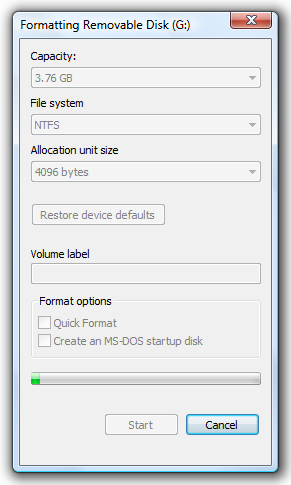
1. Format the USB Stick as NTFS: Open Windows Explorer and Right-Click the Drive > Choose the Format Option
2. In the File System Combo box, Choose NTFS and Click the Start Button to begin.
3. Afterwards, Open the Command Prompt as Administrator: In Start Search type, cmd > Press CTRL + Shift + Enter
or you will get... "Access is denied" Message after launching diskpart command.
4. Setting the USB Partition Active (Diskpart.exe)
a. In the Command prompt, type: Diskpart and press Enter
b. Please wait for a while and type: list volume and press Enter
- The command will let you see all the drives and partitions
c. Find which volume for your Removable USB Drive, in my case 6, Therefore Type: select volume 6 and press Enter again
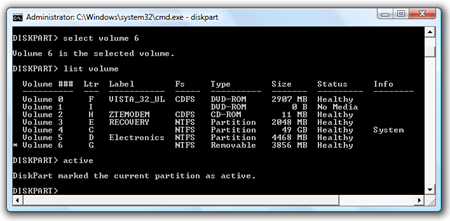
d. type: active and press enter
DiskPart marked the current partition as active. To learn more about the commands, press ? and Enter Key.
Now you already finished setting the volume active so, type the command Exit and press Enter Again
5. Create a Boot Sector (bootsect.exe)
What is Bootsect? In the Command Prompt, enter the following command to learn about the tool: bootsect /?
SYNTAX:
bootsect {/help|/nt60|/nt52} {SYS|ALL|:} [/force]
Boot sector restoration tool
Bootsect.exe updates the master boot code for hard disk partitions in order to switch between BOOTMGR and NTLDR. You can use this tool to restore the boot sector on your computer.
Run "bootsect /help" for detailed usage instructions.
It is located at your Windows Vista installer directory called boot
1. Let's go back to the guide...First, Find where's your DVD Drive is located (Windows Vista Installer) and go to the boot directory, which in my case Drive F:
Next, type: bootsect(space)/nt60(space)Flash Drive Letter
C:WindowsSystem32>f:
F:>cd boot
F:BOOT>bootsect /nt60 g:
Target volumes will be updated with BOOTMGR compatible bootcode.
G: (\?Volume{e5e56f28-84e3-11dd-bd4b-00188bdb682d})
Successfully updated NTFS filesystem bootcode.
Bootcode was successfully updated on all targeted volumes.
F:BOOT>
6. You have now successfully created a Boot Sector for the Vista Installer... Finally, Open Windows Explorer > Go to the the Windows Vista Installer DVD Drive and Copy these Files and folders onto the USB Stick:
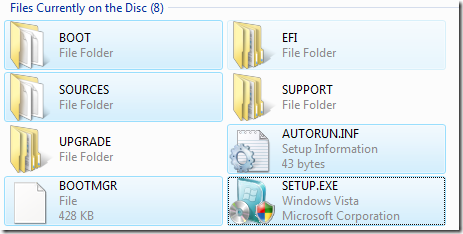
1. Boot Directory
2. Sources Directory
3. Files in the root directory (drive)
That's it!
Now you have a USB Stick Bootable Vista Installer... which BTW Rocks! (As Mr David says... Anyway, Me too!!!)
It's very useful in troubleshooting and fixing Windows Vista problems e.g. Unbootable, infected by a virus, very slow and many more.
Enjoy Learning Windows Vista!!!
-
impressione sull'installazione di windows7: voto 10!
da chiavetta usb 2.0 da 4gb da quando si fa il boot a quando si fa il primo avvio passano meno di 30 minuti su questo piccolo! credo che sia proprio migliorato almeno questo aspetto rispetto solo ad xp che sul pargolo si installa in 40 minuti abbondanti!

-
beh è pur sempre una beta e potrebbe mancare ancora qualcosa...comunque direi che abbiamo buone speranze che sia effettivamente un gran bel sistema

-
allora raga windows 7 lo definirei un xp-killer! non sto scherzando. sul piccolo eeepc va come lui se non meglio.
driver xp quasi tutti accettati! sono riuscito a fargli digerire pure i tasti rapidi fn+tasto che prima non prendeva, wlan configurata, BT pure, lan pure, driver audio hd messi in automatico, vga pure!
eeetcl pienamente supportato, avira pure! cavolo questo appena esce me lo metto al posto di xp sicuro!
-
apix_1024 ha scritto:
allora raga windows 7 lo definirei un xp-killer! non sto scherzando. sul piccolo eeepc va come lui se non meglio.driver xp quasi tutti accettati! sono riuscito a fargli digerire pure i tasti rapidi fn+tasto che prima non prendeva, wlan configurata, BT pure, lan pure, driver audio hd messi in automatico, vga pure!
eeetcl pienamente supportato, avira pure! cavolo questo appena esce me lo metto al posto di xp sicuro!
Vuoi dire che Windows 7 supporta i driver di XP oppure ho capito male ?
Perchè se così fosse lo provo anche io visto che Vista non lo posso mettere perchè i driver della vga non ci sono

-
swattolo ha scritto:
Vuoi dire che Windows 7 supporta i driver di XP oppure ho capito male ?Perchè se così fosse lo provo anche io visto che Vista non lo posso mettere perchè i driver della vga non ci sono
a be i driver dell'eeepc 1000h sono disponibili solo per xp e quelli che windows 7 non ha messo lui di default li ho messi io facendo installare i driver xp:clapclap::clapclap:
ora sto provando opera 9.6!
-
il piccolo atom ha detto basta a ben 2040 mhz... ghghggh le rammine nuove 800cl5 si fanno sentire
 le vecchie 533cl4 le dò al fratellino:)
 -
apix_1024 ha scritto:
il piccolo atom ha detto basta a ben 2040 mhz... ghghggh le rammine nuove 800cl5 si fanno sentire le vecchie 533cl4 le dò al fratellino:)test test :clapclap:
ps: quand'è che lo butti sotto azoto ?

-
ecco un giro veloce di test a codecreatures:
990mhz

1610mhz

1750mhz

1890mhz

2040mhz

c'è un netto miglioramento! :clapclap::clapclap::clapclap:
-
-
penguin86 ha scritto:
semplicemente incredibile. è peggio di rigor questo... ha piazzato di ogni dentro quel povero 701! mamma mia quanta roba ci ha fatto stare!!!!:AAAAH::AAAAH:
-
penguin86 ha scritto:
:king:
-
Le085 ha scritto:
:king:Bello, eh?
-
penguin86 ha scritto:
Bello, eh?Accipicchia che roba O_O :AAAAH:
-
mi serve 1 anima pia che ne sappia di dual boot
mi sono registrato con la microzoz e mi sono scaricato la beta 7000 di windows 7 con relativo cd key ora il problema è: come levo la mia beta 6956 dal disco secondario e metto questa? windows 7 infatti ha fatto tutto lui il dual boot ergo se vado di format sulla partizione secondaria poi rido visto che dopo non mi vedrà manco più xp sulla primaria...come devo fare? grazie ragassss
-
:boh: non puoi installare sopra senza formattare?
-
Le085 ha scritto:
:boh: non puoi installare sopra senza formattare?dici che funzioni?:cheazz:
-
Ragazzuoli mi sono convertito anch'io all'EeePC! :clapclap:
Eccolo al confronto con Orma:

Inutile dire che pesa un terzo di Orma... :AAAAH: Come dimensioni è la metà.
Visto che qualche mese fa si parlava di consumi dell'eeepc... secondo voi è possibile tenerlo acceso con circa 300mAh?
Son curioso di sapere se quest'estate riuscirò ad utilizzarlo in campeggio col pannello solare... magari anche con la luce del display spenta (sempre che si possa fare), tanto se c'è il sole forte...
Il mio è il modello 900, quindi con lo schermo 8,9" (che speriamo non consumi molto più del 7"...).
-
penguin86 ha scritto:
Ragazzuoli mi sono convertito anch'io all'EeePC! :clapclap:Eccolo al confronto con Orma:
Inutile dire che pesa un terzo di Orma... :AAAAH: Come dimensioni è la metà.
Visto che qualche mese fa si parlava di consumi dell'eeepc... secondo voi è possibile tenerlo acceso con circa 300mAh?
Son curioso di sapere se quest'estate riuscirò ad utilizzarlo in campeggio col pannello solare... magari anche con la luce del display spenta (sempre che si possa fare), tanto se c'è il sole forte...
Il mio è il modello 900, quindi con lo schermo 8,9" (che speriamo non consumi molto più del 7"...).
grandissimooooooooooooooo! ti dico subito che il mio schermo da 10" con luminosità al minimo mangia da solo 6watt... vedi te... con luminosità al max mangia cirac 8 o 9watt sempre solo lo schermo...
 :muro:
Ciao! Sembra che tu sia interessato a questa conversazione, ma non hai ancora un account.
Stanco di dover scorrere gli stessi post a ogni visita? Quando registri un account, tornerai sempre esattamente dove eri rimasto e potrai scegliere di essere avvisato delle nuove risposte (tramite email o notifica push). Potrai anche salvare segnalibri e votare i post per mostrare il tuo apprezzamento agli altri membri della comunità.
Con il tuo contributo, questo post potrebbe essere ancora migliore 💗
Registrati Accedi