
[Thread Ufficiale] ASRock Chipset INTEL Z77
-
Dopo l'iniziale sconforto dovuto al bundle della mia nuova Z77 Extreme4, che è praticamente nullo (appena 2 cavi SATA, tra l'altro molto corti, e poche, pochissime altre cose strettamente indispensabili), devo ammettere che le prime impressioni su questa scheda sono buone: il BIOS è chiaro, ben organizzato e molto completo, e il software AXTU è davvero utile.
Anche il layout della scheda è decisamente comodo, molto migliore della mia precedente scheda Gigabyte: sono ottimi l'orientamento dei connettori SATA e la disposizione dei pin per il pannello anteriore.
Il mio esemplare nasce con il bios v.1.30, ho notato che sono uscite molte nuove release: conviene aggiornare all'ultima oppure ce ne sono alcune da evitare?
-
certo che si, aggiorna. Il bios avrà nuova vita e aspetto.
-
Lista Bios aggiornata in prima pagina.

-

-
ASRock presenta la nuova scheda madre Z77 Extreme11
Link e foto attivi in prima pagina

TAIPEI, Taiwan, October 17, 2012 – For those who haven't taken a leap to Intel's Z77 and Ivy Bridge combo yet, either you're cultivating self discipline or you're planning to prey upon something big. Well, now is the big moment, because ASRock is releasing its beastlike Z77 Extreme11! This tiptop motherboard has 8 SAS2/SATA3 connectors supported by an LSI
 SAS2308 PCIe 3.0 x8 controller. For extreme graphics, 3-Way SLI/4-Way CrossFireX is supported via a PLX PEX 8747 bridge. The LAN solution is also tempting. Two Intel
 LAN chips to support dual LAN and teaming, while there's also a 2T2R Dual Band WiFi & Bluetooth 4.0 module and a bundled Wi-SB Box. Specially designed for computer enthusiasts, Z77 Extreme11 possesses unbeatable hardware and extreme powers waiting to be unleashed.
8 SAS2/SATA3 Ports from LSI SAS2308 PCIe 3.0 x8 Controller
Having insufficient storage space and mediocre file transferring speed is an unforgivable crime for a topnotch motherboard. Therefore, besides the two native SATA3 and four native SATA2 ports, Z77 Extreme11 has eight additional SAS2/SATA3 ports powered by an LSI
SAS2308 PCIe 3.0 x8 controller. The abundant SAS2/SATA3 ports support RAID 0, RAID 1, RAID 1E, RAID 10 and MegaRAID utility. Moreover, users may get up to 3.8Gb/s transfer speed through 8 SSDs in RAID 0 mode.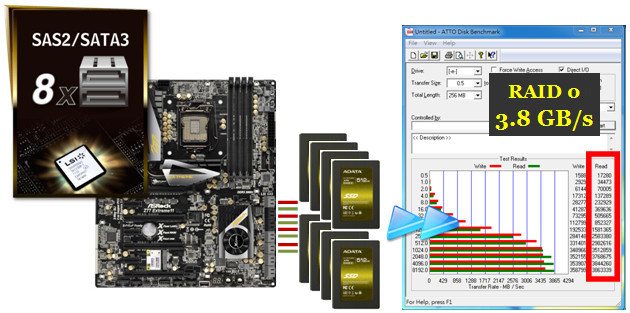
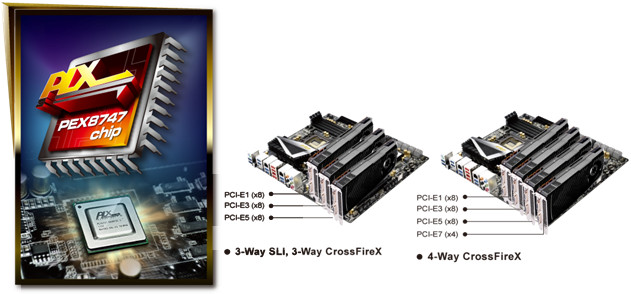
3-Way SLI and 4-Way CrossFireX via PLX PEX 8747 Bridge
We all agree that eye appealing graphics is fundamental for a good PC. But merely being good is never enough, and the onboard graphics might not meet your high expectations. That's why Z77 Extreme11 has a PLX PEX8747 bridge embedded for building 3-Way SLI/CrossFireX in x8/x8/x8 mode or 4-Way CrossFireX in x8/x8/x8/x4 mode.
Intel
Dual LAN/2T2R Dual-Band WiFi & BT v4.0 Module/Wi-SB BoxIn case you're concerned whether the LAN solutions are acceptable, then get a load of this. The onboard Intel
Dual LAN chips support teaming function, while there is also a 2T2R Dual-Band WiFi & Bluetooth v4.0 Module which supports WiFi a/b/g/n, dual band 2.4/5 GHz and of course, Bluetooth 4.0. The WiFi module comes with ASRock's exclusive Wi-SB BOX for you to connect the WiFi antenna and two USB 3.0 ports.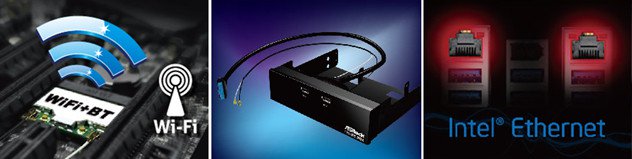
Deluxe Hardware and Components
As usual, ASRock Z77 Extreme11 is equipped with top tier gears. Including 2oz copper PCB that effectively controls the PCB's temperature when overclocking; 8 + 4 power phase design and Digi Power bring smoother voltage to the CPU Vcore; Premium Gold Caps to extend the motherboard's lifespan; Dual-Stack MOSFET which provides lower Rds(on) and efficient currents for the CPU. As for your need to literally connect a dozen peripherals on USB 3.0 ports, ASRock Z77 Extreme11 is ready to comply with your demand with a total of twelve speedy USB 3.0 ports. Eight USB 3.0 ports on the rear I/O and two front USB 3.0 headers that supports four USB 3.0 ports.

Software For the Win
The Windows
8 launch date is just around the corner. ASRock Z77 Extreme11 is ready for Windows 8 with "Fast Boot", an easy setting in ASRock's UEFI which allows users to logon to Windows 8 within 1.5 seconds! It boots up so fast that it will make your head spin and it's almost impossible to enter into the UEFI again. Good news is there's also "Restart To UEFI". By enabling this function under OS, the computer will automatically enter the UEFI on its next restart. There's also other useful software such as Lucid Virtu MVP for improving visual performances.
ASRock Z77 Extreme11 has everything an enthusiast could wish for on a motherboard and even more. From the selection of high-end hardware to the artistic designs and the powerful software bundled. If you are in search of a Z77 chipset motherboard that is full of wins and reliable in quality, Z77 Extreme11 won't let you down.
-
bel mostricciattolo
-
Ho caricato le immagini della nuova Z77 Extreme 6/TB4
-
-
Inseriti in prima pagina svariati aggiornamenti bios di rilievo

-
stanno lavorando come i matti
 un ottimo punto a favore di asrock
 -
Inseriti nuovi bios
-
2.60: (23-01-2013) 1. Update RAID ROM. 2. Support Intel UEFI RAID configuration in BIOS setup.
Link download: Z77 Extreme6(2.60)
-
2.80: (29-01-2013) 1. Patch GSKILL F3-2133C11Q-32GZL memory. 2. Support Intel UEFI RAID configuration in BIOS setup.
Link download: Z77 Extreme4(2.80)
-
1.40: (29-01-2013) 1. Patch GSKILL F3-2133C11Q-32GZL memory. 2. Support Intel UEFI RAID configuration in BIOS setup.
Link download: Z77 Extreme3(1.40)
-
1.50: (25-12-2012) 1. Support UEFI PXE boot. 2. Improve monitor compatibility.
Link download: Z77 Extreme4-M(1.50)
-
1.70: (08-01-2013) 1. Support UEFI PXE boot. 2. Improve monitor compatibility.
Link download: Z77 Pro4-M(1.70)
-
1.70: (17-12-2012) Add "Multi-Core Acceleration" for k series CPU.
Link download: Z77E-ITX(1.70)
-
2.10: (31-01-2013) 1. Patch GSKILL F3-2133C11Q-32GZL memory module. 2. Support Intel UEFI RAID configuration in BIOS setup.
Link download: Fatal1ty Z77 Performance(2.10)
-
1.30: (31-01-2013) 1. Patch GSKILL F3-2133C11Q-32GZL memory module. 2. Support Intel UEFI RAID configuration in BIOS setup.
After updating this BIOS or later, please also update Realtek audio driver v6788.
Link download: Z77 Extreme11(1.30)
-
2.60: (23-01-2013) 1. Update RAID ROM. 2. Support Intel UEFI RAID configuration in BIOS setup.
-
-
1.90 (08-02-2013) 1. Improve memory compatibility. 2. Support Intel UEFI RAID configuration in BIOS setup.
Link download: Fatal1ty Z77 Professional-M(1.90)
-
2.00: (08-02-2013) 1. Improve memory compatibility. 2. Support Intel UEFI RAID configuration in BIOS setup.
Link download: Z77 OC Formula(2.00)
-
1.90: (08-02-2013) 1. Improve memory compatibility. 2. Support Intel UEFI RAID configuration in BIOS setup.
Link download: Z77 Extreme6/TB4(1.90)
-
1.70: (08-02-2013) 1. Improve memory compatibility. 2. Support Intel UEFI RAID configuration in BIOS setup.
Link download: Z77 Pro4(1.70)
-
1.80: (08-02-2013) 1. Improve memory compatibility. 2. Support Intel UEFI RAID configuration in BIOS setup.
Link download: Z77 Pro4-M(1.80)
-
1.80: (08-02-2013) 1. Improve memory compatibility. 2. Support Intel UEFI RAID configuration in BIOS setup.
Link download: Z77E-ITX(1.80)
Rilasciati 6 nuovi bios
-
1.90 (08-02-2013) 1. Improve memory compatibility. 2. Support Intel UEFI RAID configuration in BIOS setup.
-
aggiorno la mia piccolina z77 pro4-m
-
tom1 ha scritto:
aggiorno la mia piccolina z77 pro4-m
-
1.90: (19-03-2013) Add TPM auto detected function.
Link download: Z77 Pro4-M(1.90)
Aggiorna ancora Tom
-
1.90: (19-03-2013) Add TPM auto detected function.
-
-
1.40: (24-04-2013) 1. Improve PCIEx1 card compatibility. 2. Patch Samsung F3-2133C9Q-16GAB memory module. 3. Patch Kingston KHX24C11X3K4/16X memory module. 4. Update ME version.
Link download: Z77 Extreme11(1.40)
-
2.70: (24-04-2013) 1. Improve PCIEx1 card compatibility. 2. Patch Samsung F3-2133C9Q-16GAB memory module. 3. Patch Kingston KHX24C11X3K4/16X memory module. 4. Update ME version.
Link download: Z77 Extreme6(2.70)
-
1.40: (24-04-2013) 1. Improve PCIEx1 card compatibility. 2. Patch Samsung F3-2133C9Q-16GAB memory module. 3. Patch Kingston KHX24C11X3K4/16X memory module. 4. Update ME version.
-
-
1.80: (17-07-2013) Change Internet Flash server.
Link download: Z77 Pro4(1.80)
-
1.80: (17-07-2013) Change Internet Flash server.
-
Esiste la possibilità di alimentare la M/B ASRock extreme6/TB4 in assenza di cpu e ram?
Esistono delle spie/led che indicano che la scheda è correttamente alimentata?
-
stessa risposta dell'altro thread
-
VISTAS ha scritto:
Esiste la possibilità di alimentare la M/B ASRock extreme6/TB4 in assenza di cpu e ram?Esistono delle spie/led che indicano che la scheda è correttamente alimentata?
Senza cpu o ram la mobo non parte perchè il bios non completa il ciclo di inizializzazione e va in blocco.
-
Ma perchè se attacco una ventolina del case direttamente all'alimentatore questa non parte? E' normale?
Inoltre volevo sapere se ci sono sulla mobo dei punti in cui con un tester è possibile rilevare delle tensioni ed anche sull'alimentatore.
Ciao! Sembra che tu sia interessato a questa conversazione, ma non hai ancora un account.
Stanco di dover scorrere gli stessi post a ogni visita? Quando registri un account, tornerai sempre esattamente dove eri rimasto e potrai scegliere di essere avvisato delle nuove risposte (tramite email o notifica push). Potrai anche salvare segnalibri e votare i post per mostrare il tuo apprezzamento agli altri membri della comunità.
Con il tuo contributo, questo post potrebbe essere ancora migliore 💗
Registrati Accedi