
[Thread Ufficiale] Asus EeePc
-
Le085 ha scritto:
come da tabellone su wiki nessun eeepc monta la 2 celle (la montano solo alcuni acer one di cacca) e tutti i 1000 e i 901 montano la 6 celle da 6600mah...teoricamente a 2 celle neanche dovrebbe esistere quindi dovresti stare tranquillo....ma si sà tranquillo non ha fattto una bella fine...cmq mannaggia a te proprio quello senza ssd dovevi andare a prendere?
bah...cmq ho visto su xtreview che patrios sta facendo degli ssd proprio per eeepc...da 32 e 64gb...ora non so i prezzi e se sono mini pci-e o sata però mi sembrava interessante come cosa...
inoltre proprio stamattina stavo dando un'occhiata su come è la situazione con le altre distro linux tipo ubuntu ecc ecc e non è che sia tutto rose e fiori....xandros sarà pure una cacca però vorrei evitare + di tante rogne...boh aspettiamo un po' la 8.10 magari con il pacchetto netbook remix...ma nn credo che mi prenderà voglia di metterci le mani...:(
guarda lo sta per comprare mio fratello per l'università
 ti farò sapere!
per ora grazie
-
Le085 ha scritto:
come da tabellone su wiki nessun eeepc monta la 2 celle (la montano solo alcuni acer one di cacca) e tutti i 1000 e i 901 montano la 6 celle da 6600mah...teoricamente a 2 celle neanche dovrebbe esistere quindi dovresti stare tranquillo....ma si sà tranquillo non ha fattto una bella fine...cmq mannaggia a te proprio quello senza ssd dovevi andare a prendere?
bah...cmq ho visto su xtreview che patrios sta facendo degli ssd proprio per eeepc...da 32 e 64gb...ora non so i prezzi e se sono mini pci-e o sata però mi sembrava interessante come cosa...
inoltre proprio stamattina stavo dando un'occhiata su come è la situazione con le altre distro linux tipo ubuntu ecc ecc e non è che sia tutto rose e fiori....xandros sarà pure una cacca però vorrei evitare + di tante rogne...boh aspettiamo un po' la 8.10 magari con il pacchetto netbook remix...ma nn credo che mi prenderà voglia di metterci le mani...:(
Leo sono su mini pci-e .
Ho postato l'articolo qui su XH

-
eccaallà mi hanno appena chiamato da chl per dirmi che domani nn lo consegneranno visto che hanno avuto problemi con il fornitore... consegna slittata al 6/11... ora mio fratello appena torna mi sà che sarà felicissimo di questa notiziona


-
ho il bimbo..... siiiiiiiiiiiiiiiiiiiiiiiiiiiiiiiiiiiiiiiiiiiiiiiiiii! ora ghost e poi windows serio altro che sta pataccata!!!!

-
eccomi qui. domanda: come faccio a fare il ghost del windows che c'è già su senza un lettore cd esterno?? ho già una penna usb bootable ma nn zo che cosa metterci su per fare il ghost... idee... ho provato a copiare l'hiren's boot cd direttamente su usb ma nn ha sortito l'effetto voluto... lol
-
unm c'era un softwarino che non ricordo come si chiama...l'avevo postato un po' di tempo fa
appena mi viene in mente te lo dico...prova a spulciare il forum altrimenti
ah anzi mi pare si chiami clonezilla
yep!
il mio disco rigido non è ancora da buttare
-
Le085 ha scritto:
unm c'era un softwarino che non ricordo come si chiama...l'avevo postato un po' di tempo faappena mi viene in mente te lo dico...prova a spulciare il forum altrimenti
ah anzi mi pare si chiami clonezilla
yep!
il mio disco rigido non è ancora da buttare
ma funziona sotto win o sotto dos? sotto dos preferirei...
-
metodo per il ghost da chiavetta:
Eee PC 1000H Recovery from USB Flash Drive
Published October 15, 2008 Guides
Tags: Eee PC 1000H, Ghost, Recovery
This guide will show you how to restore the Eee PC 1000H (with Windows XP Home SP3) to factory default without the use of an external DVD-Drive. There is also no need to build a BartPE (Bart Preinstalled Environment) from an Original Windows XP CD.
All you need is:
- a USB Flash Drive with at least 4GB of storage
- the original ASUS 1000H XP Support DVD
-
WinRAR
-
PeToUSB
I’ve tested this guide with a 32-bit version of Windows XP. A 64-bit version of Windows Vista can not be used!
You will find nearly everything you need on the 1000H XP Support DVD. The most important files are:
-
WINPE.ISO (in the root directory of the DVD)
-
EEEPCAH.GHO (in the “Recovery” folder of the DVD)
WINPE.ISO contains a lightweight version of Windows XP, called WinPE (Windows Preinstallation Environment) and can be booted for example from an USB Flash Drive. It also contains the file GHOST32.EXE, which actually is version 11.0 of the well known backup software Symantec Ghost.
EEEPCAH.GHO contains the image of the complete hard disk after factory install and can be restored using Symantec Ghost.
WinRAR will extract the content from WINPE.ISO to the hard disk. WinZip or 7-zip may also be used (not tested).
PeToUSB will format the USB Flash Drive, make it bootable and then copy the extracted files from WINPE.ISO to the drive.
1. Extract all files from WINPE.ISO
Create a new folder with the name WINPE in the root directory of a drive. In my example i will use drive
 .
.Open WinRAR and select the file WINPE.ISO from the Support DVD.

Click “Extract To” and choose D:WINPE as destination path. Click “OK” and all files from WINPE.ISO will be extracted.
2. Choose Symantec Ghost as start application
This step is very important to start Ghost automatically after booting into the Windows Preinstallation Environment from the USB Flash Drive.
Doubleclick to open the file WINPESHL.INI located in D:WINPEI386SYSTEM32 and change …
[launchApp]
AppPath=x:EPCRecover.exe
… to …
[launchApp]
AppPath=x:GHOST32.EXE
… and save the changes (Command: File > Save). Do not save the file under a new name or in another folder!
3. Format USB Flash Drive and copy files
Connect a USB Flash Drive with at least 4GB of storage to your PC and start PeToUSB. It should show up under Destination Drive. Check USB Removable, Enable Disk Format and Enable File Copy. Finally browse to the Source Path of the WinPE files, in this example located at D:WINPE.
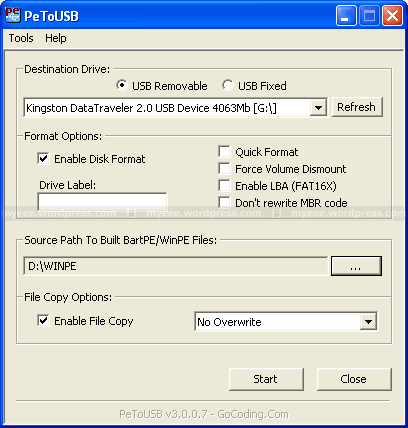
Click “Start” and answer the following two questions “Continue?” with “Yes”. Please keep in mind, that all existing volumes and data will be lost! Depending on the write speed of your USB Flash drive it may take a while to copy all WinPE files. If everything goes well, the message “Operation Completed Successfully!” should appear. Click “OK” and close PeToUSB.
4. Copy image file
Copy the image file EEEPCAH.GHO from the “Recovery” folder on the 1000H XP Support DVD into the root directory of the USB Flash Drive. This may also take a while because the file size is 2.53GB.
5. Recovery process
Connect the USB Flash Drive to your Eee PC and turn on the Eee. Press “ESC” at the boot screen and you will be able to select the USB Flash Drive as your boot device from the boot menu.
After booting from USB Flash Drive, WinPE (Windows Preinstallation Environment) should start and finally Symantec Ghost.
Click “OK” and then “Local > Disk > From Image”. From the pulldown menu on the top choose your USB Flash Drive. It should be drive X:, because Windows assigned this drive letter during boot up. From here you can choose the image file EEEPCAH.GHO.
Now you have to select the destination drive. Of course this should be the Eee PCs hard drive. For my 1000H it’s drive 1 and the size is 76319MB. Please make sure to select the correct drive!
The next window will show you the destination drive details. Here you can change the partition layout or just click “OK” to keep the default settings. There will be one last question “Proceed with disk restore?”. If you click “Yes”, the process will be started.
Important: The destination drive will be permanently overwritten. All existing volumes and data will be lost!
After the restore process is finished, you have to reboot the Eee PC.
Notes:
This guide should only be used for the ASUS Eee PC 1000H with Windows XP and cannot be extended to other models because of the different storage solutions ( one or two SSDs, one HDD). The name(s) of the image file(s) in the “Recovery” folder on the Support DVD are also different.
Disclaimer:
I can not be held responsible for data loss or any damage to your hardware!
fonte: Eee PC 1000H Recovery from USB Flash Drive myeeeguides.wordpress.com
- a USB Flash Drive with at least 4GB of storage
-
ghost avviato da chiavetta verso hdd esterno usb... meglio di così! in settimana metto un windows decente e tolgo tutte le mille pataccate asus:asd:
-
apix_1024 ha scritto:
ghost avviato da chiavetta verso hdd esterno usb... meglio di così! in settimana metto un windows decente e tolgo tutte le mille pataccate asus:asd:
E posta qualche bei test, così li inserisco nell'altro forum con annesso link
-
swattolo ha scritto:
E posta qualche bei test, così li inserisco nell'altro forum con annesso link
appena riesco a fare la chiavetta usb con su win ed installarlo faccio anche dei test
-
apix_1024 ha scritto:
appena riesco a fare la chiavetta usb con su win ed installarlo faccio anche dei test
Bella, ti aNo
 :2funny:
Seeeeeeee ti piacerebbe


:n2mu:
-
-
rimetto il windows default perchè mi dà una paga in avvio bestiale..
 :muro:
 -
che ha che non va quello originale scusa?
considera che è già bello ottimizzato...se lo vuoi cambiare devi trovarne uno già nlitato per eeepc o te lo devi fare te (ma non credo sia banale)
lo stesso vale anche per xandros, volevo cambiarlo ma sicuramente troverei + problemi con qualsiasi altra distro linux che vantaggi in termini di velocità...devo ammettere che come gestione della memoria e delle risorse fa un po' cagare ma bene o male ci funziona tutto decentemente....in modalità desktop è anche facilmente fruibile (un simil xp)
per quanto riguarda la paga in avvio soprattutto il fatto sta che quello di tuo fratello non ha l'ssd ma l'hard disk normale...e i tempi si dialtano inevitabilmente
-
Le085 ha scritto:
arda la paga in avvio soprattutto il fatto sta che quello di tuo fratello non ha l'ssd ma l'hard disk normale...e i tempi si dialtano inevitabilmente
no ho provato i due eeepc 1000h, mio fratello con il win default ed io con il mio sp3 moddato e devo dire che in avvio quello di default mi dava circa 20 secondi di paga.... incredibile:AAAAH:
ora ho rimessoo il default e bona
-
intendevo che su un ssd a differenza sarebbe stata di massimo 6o7 secondi visto che in una 30na scarsi si avvia
cmq non ho capito...dove li hai presi 2 eeepc?
lo hai preso anche te?
-
Le085 ha scritto:
intendevo che su un ssd a differenza sarebbe stata di massimo 6o7 secondi visto che in una 30na scarsi si avvia
cmq non ho capito...dove li hai presi 2 eeepc?
lo hai preso anche te?
si mio fratello aveva fatto il preordine su chl e glielo hanno consegnato settimana scorsa al mercoledì
io mercoledì stesso l'ho ordinato e sabato mattina è arrivato pure il mio. e grazie agli sconti che chl ha messo in questo periodo l'ho pagato 80gneuri meno di mio fratello.... ora abbiamo due eeepc1000h bianchi in casa che andranno a sostituire il mulo. domani o in settimana infatti lo smantello:asd: -
primo giro di test: super pi
power saving 1254mhz

high performance 1596mhz

super high performance 1710mhz

nei prox giorni ne farò altri
-
altro giro di test:
power saving 1254mhz:

high performance 1596mhz:

super high performance 1710mhz:

si prosegue
Ciao! Sembra che tu sia interessato a questa conversazione, ma non hai ancora un account.
Stanco di dover scorrere gli stessi post a ogni visita? Quando registri un account, tornerai sempre esattamente dove eri rimasto e potrai scegliere di essere avvisato delle nuove risposte (tramite email o notifica push). Potrai anche salvare segnalibri e votare i post per mostrare il tuo apprezzamento agli altri membri della comunità.
Con il tuo contributo, questo post potrebbe essere ancora migliore 💗
Registrati Accedi