
GIGABYTE Mid-High End Performance Model - Z87X-OC Guide
-
GIGABYTE launched very rich product line for Intel latest Haswell.
Haswell chipset has the most high end Z87, mainstream H87 and B85 and entry H81.
Of course, more high-end chipset has more features and expandability. MB price is also higher.
GIGABYTE in high-end Z87 has OC series and G1 series. Both series has its? own position.
G1, as name said, is for Gaming market. I will share more about this after.
OC series has 2 models. Z87X-OC Force is for extreme and Z87X-OC is for mid-high.
This review is Z87X-OC, focusing on OC or looking for high performance.
First look, you can see the box is black and orange.
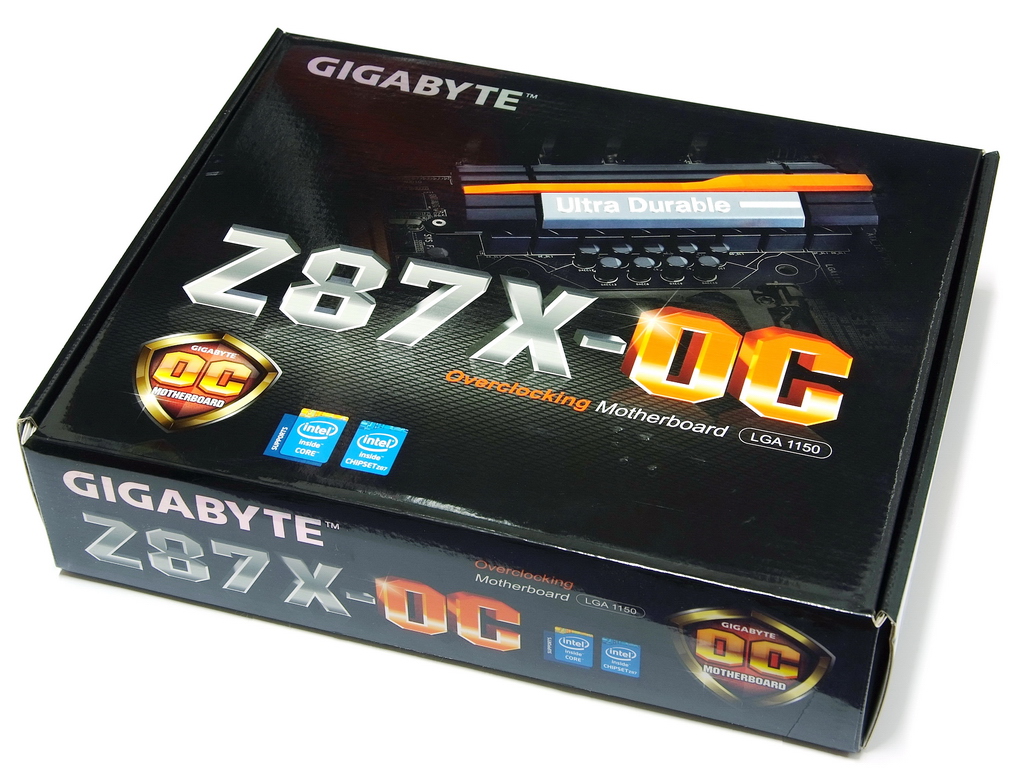
OC series is black and orange tone. G1 is black and green.
I believe most users used to black and red for high end MB. Currently, too many MB use this color.
GIGABYTE use different visual design to enhance their recognizable. Color is personal like.

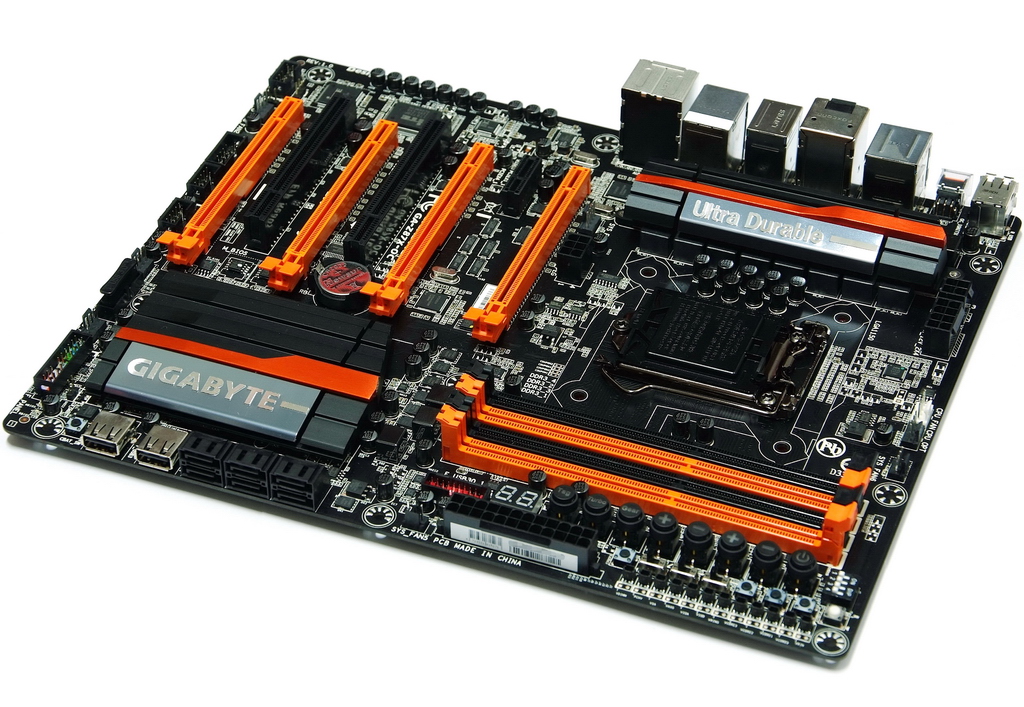
Z87X-OC is standard ATX spec. The size 30.5cm x 24.4cm
OC is mainly for Overclocking market. There are many exclusive designs for hardware and software. I will explain the details later.
Z87X-OC price is only half of Z87X-OC Force. It looks like a good choice for overclockers.

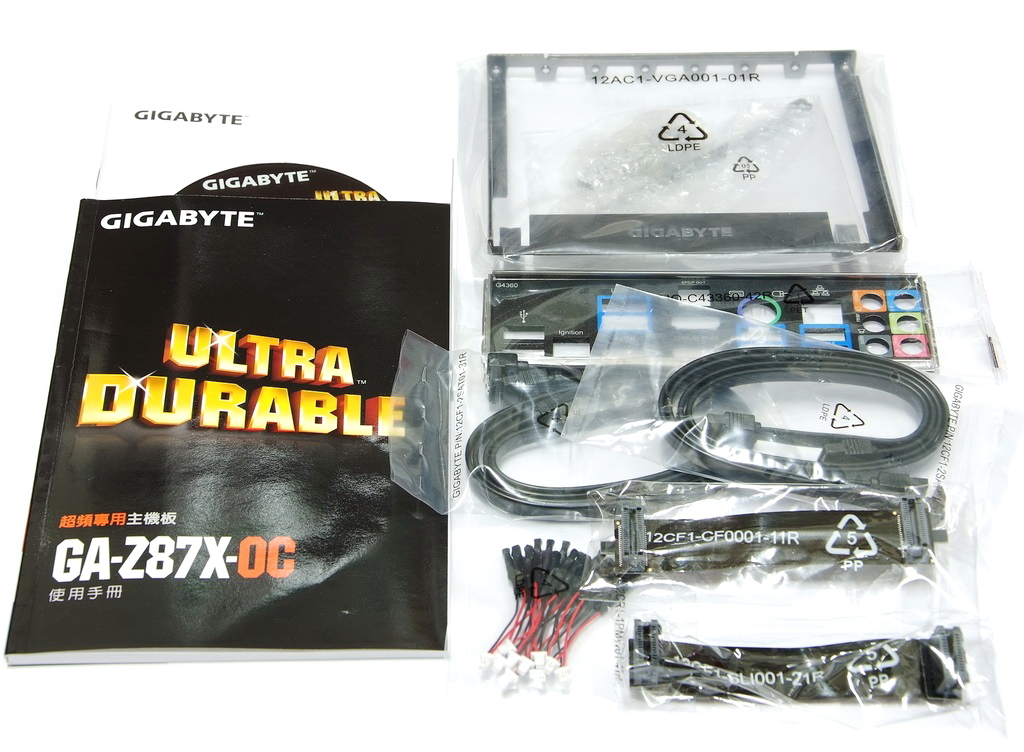
Accessories
Product manual, software guide, driver CD, SATA cable and IO panel.
CrossFireX / 2-Way SLI bridge, wires for the voltage check points, OC Brace.
Lower-Left Corner
1 X PCI-E X16, support X16 bandwidth
1 X PCI-E X16, support X8 bandwidth
2 X PCI-E X16, support X4 bandwidth
It supports max 4-Way AMD CrossFireX / 2-Way nVIDIA SLI
2-Way AMD CrossFireX/nVIDIA SLI bandwidth is X8 + X8.
3-Way AMD CrossFireX bandwidth is X8 + X4 + X4.
4-Way AMD CrossFireX bandwidth is X8 + X4 + X4 + X4.
1 X PCI-E X1
2 X PCI
LAN is Intel GbE LAN chip.
Realtek ALC892 audio chip supports 7.1 channels and High Definition Audio.
Design in Taipei

Lower-Right Corner
6 X Black SATA, provided by Z87 and supports SATA3.
It also supports RAID 0, RAID 1, RAID 5 and RAID 10.
2 X Silver OC Connent / ON/OFF Charge2
Z87 chipset has new design large heatsink. Black round button is CHAT_SW for switching battery.

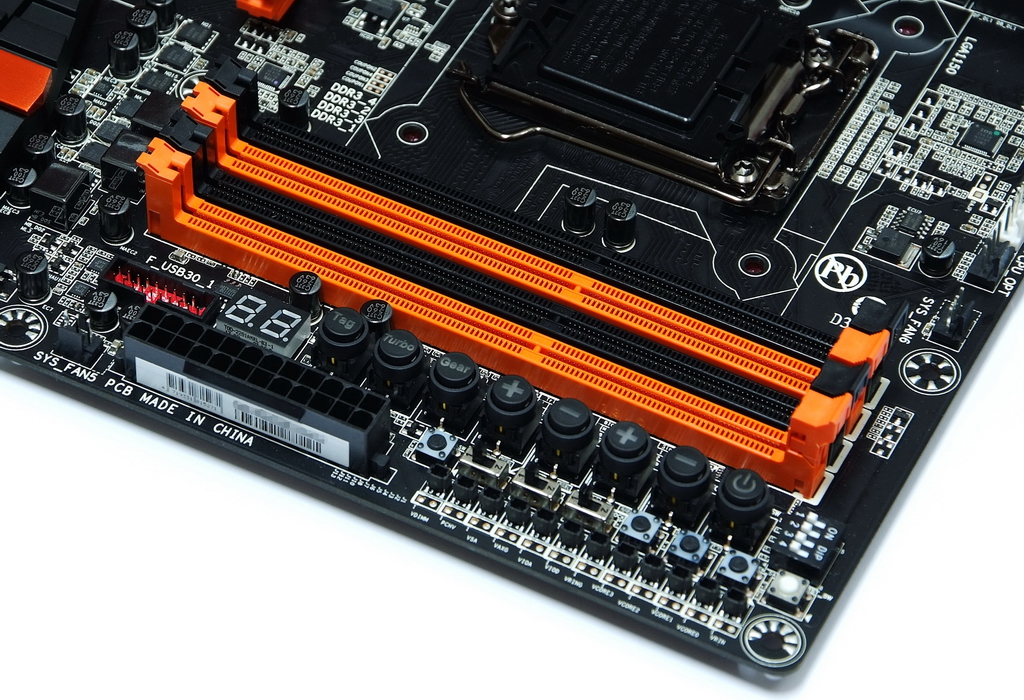
Upper-Right Corner
4 X DIMM DDR3 support DDR3 1066~1600 / 1866~2800(OC)
DDR3 max capacity is 32GB. It supports Extreme Memory Profile. Right is 24-PIN power in.
Upper-Left Corner
Z87X-OC uses the new thermal module. CPU metal cover is plating for better look.
Behind top heatsink is 8 + 4Pin power in for high power consumption extreme OC.

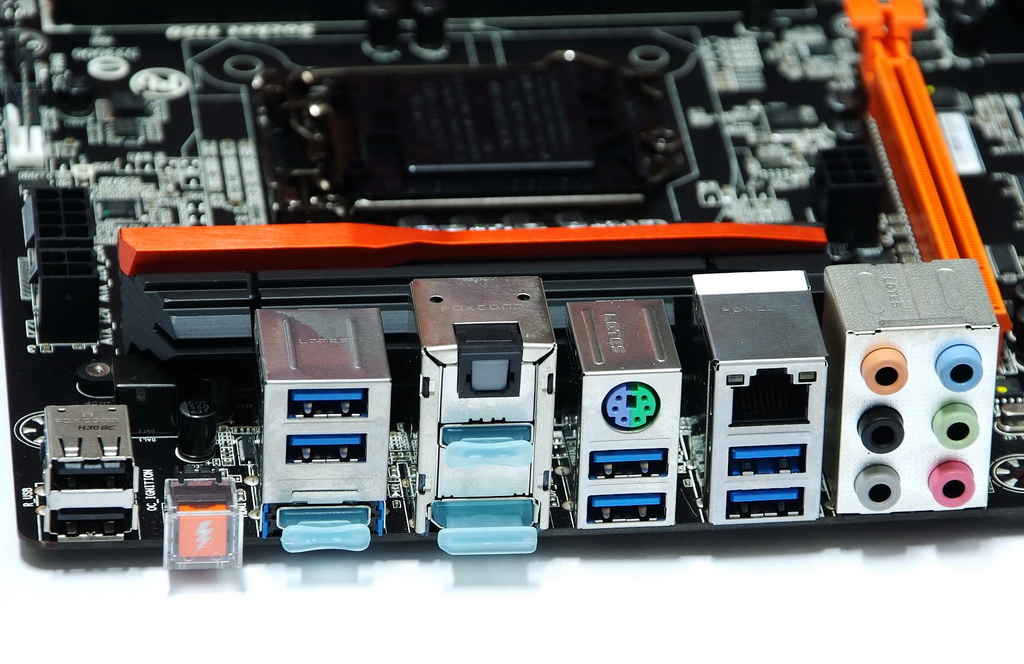
IO
2 X Black USB 2.0
1 X OC Ignition button
2 X HDMI
1 X DisplayPort
1 X S/PDIF optical output
1 X PS2 KB/Mouse
6 X Blue USB 3.0/2.0
1 X RJ-45 LAN
6 X audio jacks
OC Touch area has more new features comparing to Z77X-UP7.
There are 8 buttons. 2 set + and - for adjusting CPU or BCLK.
Gear is for BCLK gap switching. The other 2 are OC Turbo and Tag.
Right side OC PCIe Switch can switch on/off PCIe VGA power.
Middle 3 black round buttons and 3 switches enhance OC convenience.
There are 12 points in bottom for measuring voltages.

-
GIGABYTE launched very rich product line for Intel latest Haswell.
Haswell chipset has the most high end Z87, mainstream H87 and B85 and entry H81.
Of course, more high-end chipset has more features and expandability. MB price is also higher.
GIGABYTE in high-end Z87 has OC series and G1 series. Both series has its? own position.
G1, as name said, is for Gaming market. I will share more about this after.
OC series has 2 models. Z87X-OC Force is for extreme and Z87X-OC is for mid-high.
This review is Z87X-OC, focusing on OC or looking for high performance.
First look, you can see the box is black and orange.
OC series is black and orange tone. G1 is black and green.
I believe most users used to black and red for high end MB. Currently, too many MB use this color.
GIGABYTE use different visual design to enhance their recognizable. Color is personal like.
Z87X-OC is standard ATX spec. The size 30.5cm x 24.4cm
OC is mainly for Overclocking market. There are many exclusive designs for hardware and software. I will explain the details later.
Z87X-OC price is only half of Z87X-OC Force. It looks like a good choice for overclockers.
Accessories
Product manual, software guide, driver CD, SATA cable and IO panel.
CrossFireX / 2-Way SLI bridge, wires for the voltage check points, OC Brace.
Lower-Left Corner
1 X PCI-E X16, support X16 bandwidth
1 X PCI-E X16, support X8 bandwidth
2 X PCI-E X16, support X4 bandwidth
It supports max 4-Way AMD CrossFireX / 2-Way nVIDIA SLI
2-Way AMD CrossFireX/nVIDIA SLI bandwidth is X8 + X8.
3-Way AMD CrossFireX bandwidth is X8 + X4 + X4.
4-Way AMD CrossFireX bandwidth is X8 + X4 + X4 + X4.
1 X PCI-E X1
2 X PCI
LAN is Intel GbE LAN chip.
Realtek ALC892 audio chip supports 7.1 channels and High Definition Audio.
Design in Taipei
Lower-Right Corner
6 X Black SATA, provided by Z87 and supports SATA3.
It also supports RAID 0, RAID 1, RAID 5 and RAID 10.
2 X Silver OC Connent / ON/OFF Charge2
Z87 chipset has new design large heatsink. Black round button is CHAT_SW for switching battery.
Upper-Right Corner
4 X DIMM DDR3 support DDR3 1066~1600 / 1866~2800(OC)
DDR3 max capacity is 32GB. It supports Extreme Memory Profile. Right is 24-PIN power in.
Upper-Left Corner
Z87X-OC uses the new thermal module. CPU metal cover is plating for better look.
Behind top heatsink is 8 + 4Pin power in for high power consumption extreme OC.
IO
2 X Black USB 2.0
1 X OC Ignition button
2 X HDMI
1 X DisplayPort
1 X S/PDIF optical output
1 X PS2 KB/Mouse
6 X Blue USB 3.0/2.0
1 X RJ-45 LAN
6 X audio jacks
OC Touch area has more new features comparing to Z77X-UP7.
There are 8 buttons. 2 set + and - for adjusting CPU or BCLK.
Gear is for BCLK gap switching. The other 2 are OC Turbo and Tag.
Right side OC PCIe Switch can switch on/off PCIe VGA power.
Middle 3 black round buttons and 3 switches enhance OC convenience.
There are 12 points in bottom for measuring voltages.
-
New UEFI DualBIOS, call dashboard mode.
Resolution is 1920 X 1080. Top column is voltage, fan speed and temperature.
Left side is CPU and DRAM related information. Right side is system status, showing other voltage and fan status.
In picture, it?s X02 version BIOS. You almost can see all hardware status and parameters in this page.
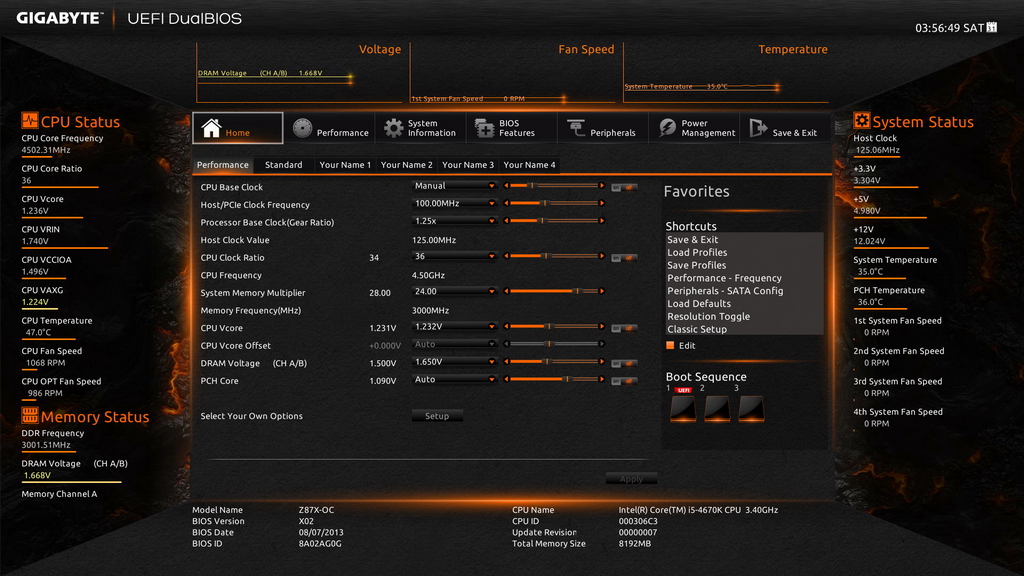
There are 7 languages for selecting. Right side is calendar.

CPU Voltage Page
You can set 9 CPU related voltage parameters. It offers more options for enthusiasts.
When I use air cooling, I only set CPU Vcore to 1.232V.
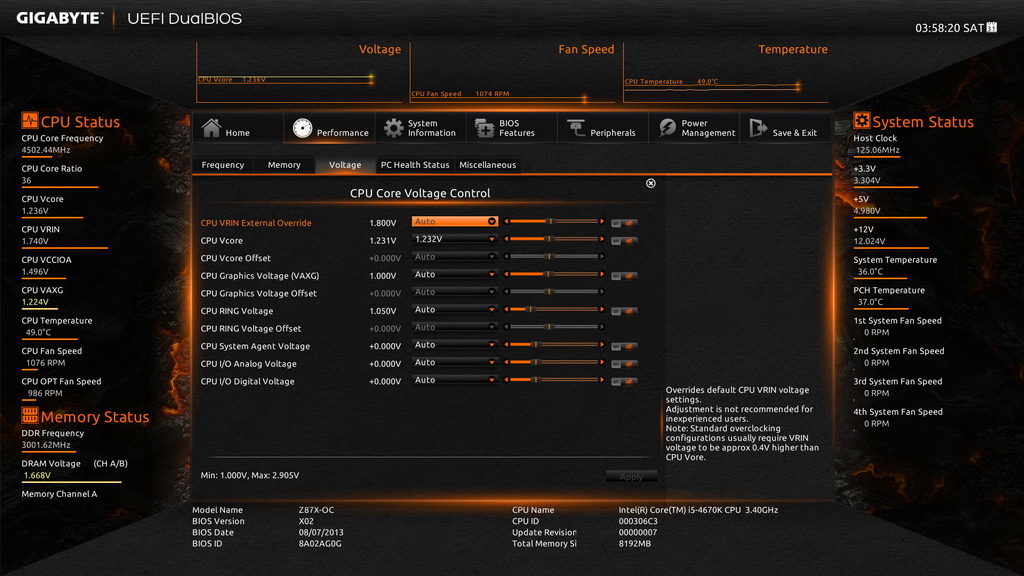
DRAM details
CPU frequency set at 125MHz and enable DDR3 XMP mode. Multiplier set at 24.00.
You can reach DDR3 3000. BTW, the DRAM voltage is 1.65V.
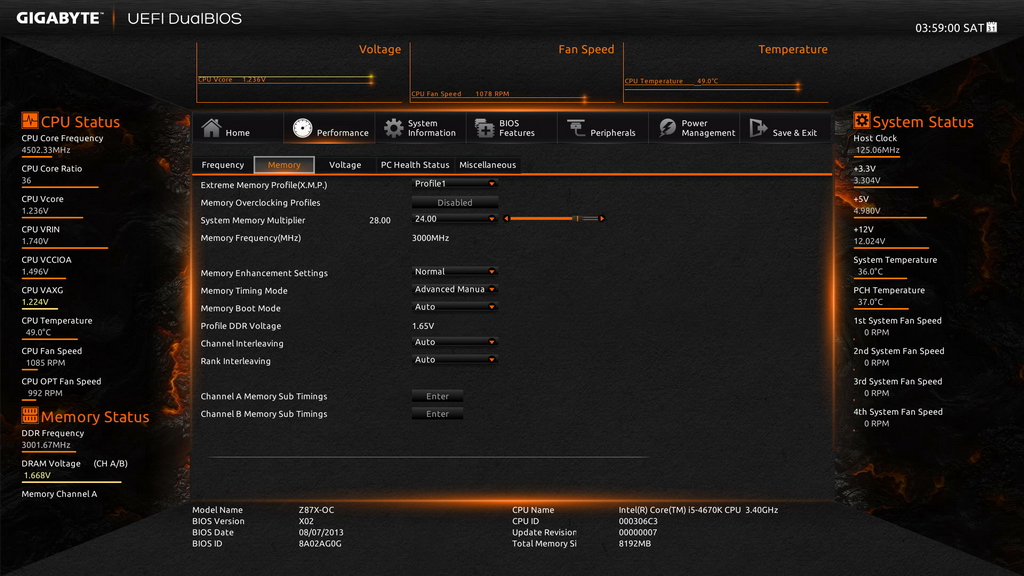
If you don?t get used to the new interface, you can switch back to the previous one.

Besides higher resolution, new UEFI DualBIOS also improves the convenience.
You can set up CPU frequency and voltage at first page, even DRAM clock and voltage.
For most OC setup, you can finish at one page to save time.
However, it still takes time to get used to the new interface for new users.
The above reference setting is i5-4670K OC 4.5GHz bundling withCORSAIR DDR 2800 OC 3000.
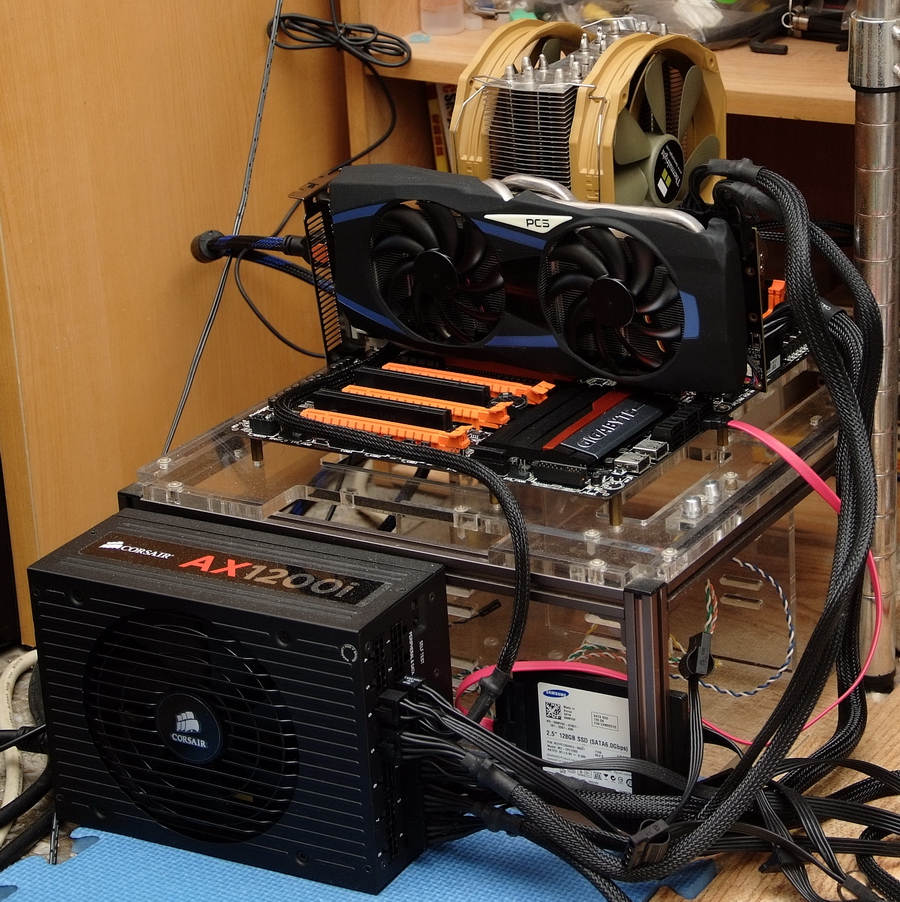
System Configuration
CPU: Intel Core i5-4670K
MB: GIGABYTE Z87X-OC
DRAM: CORSAIR Dominator Platinum CMD16GX3M4A2800C11
VGA: Intel HD Graphics 4600 / PowerColor AX7970 3GBD5-2DHV3
HDD: Samsung 830 Series 128GB SSD
POWER: CORSAIR AX1200i
Cooler: Thermalright Archon SB-E X2
OS: Windows8 64bit
Intel Core i5-4670K OC Performance
CPU 100 X 45 => 4501.35MHz 1.232V
DDR3 3001.2 CL11 14-14-36 1T 1.668V
Hyper PI 32M X4 => 7m 22.374s
CPUMARK 99 => 782

Nuclearus Multi Core => 29232
Fritz Chess Benchmark => 30.58/14680
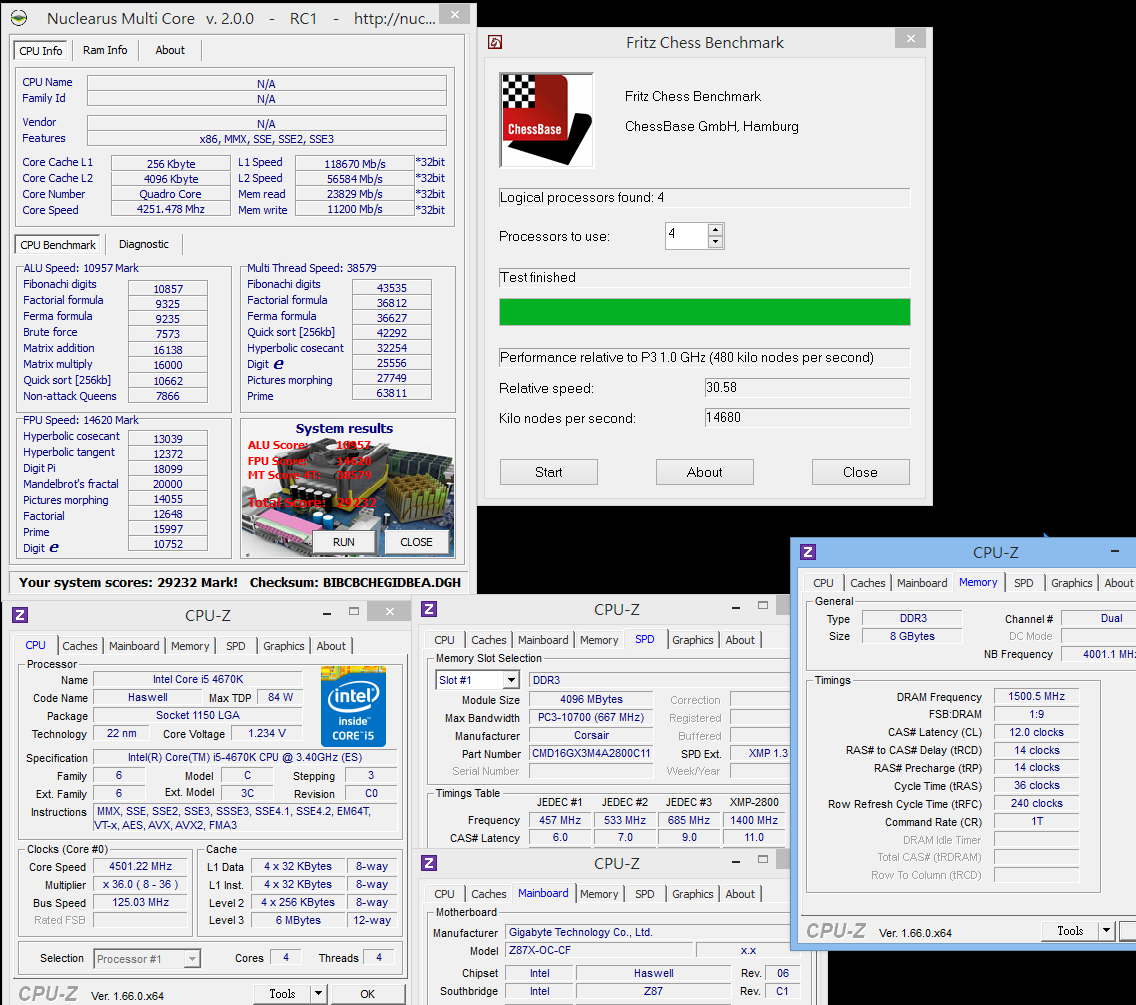
CrystalMark 2004R3 => 421951

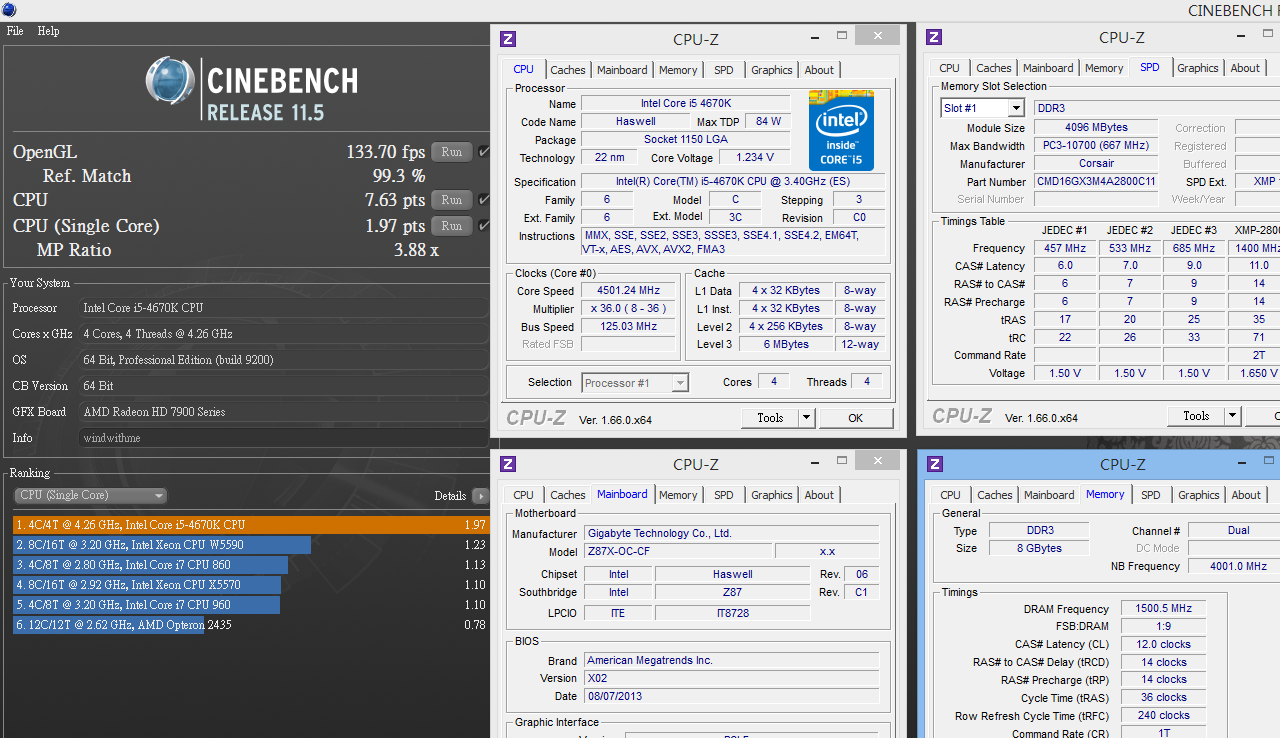
CINEBENCH R11.5
CPU => 7.63 pts
CPU(Single Core) => 1.97 pts
-
FRYRENDER
Running Time => 5m 19s
x264 FHD Benchmark => 25.2

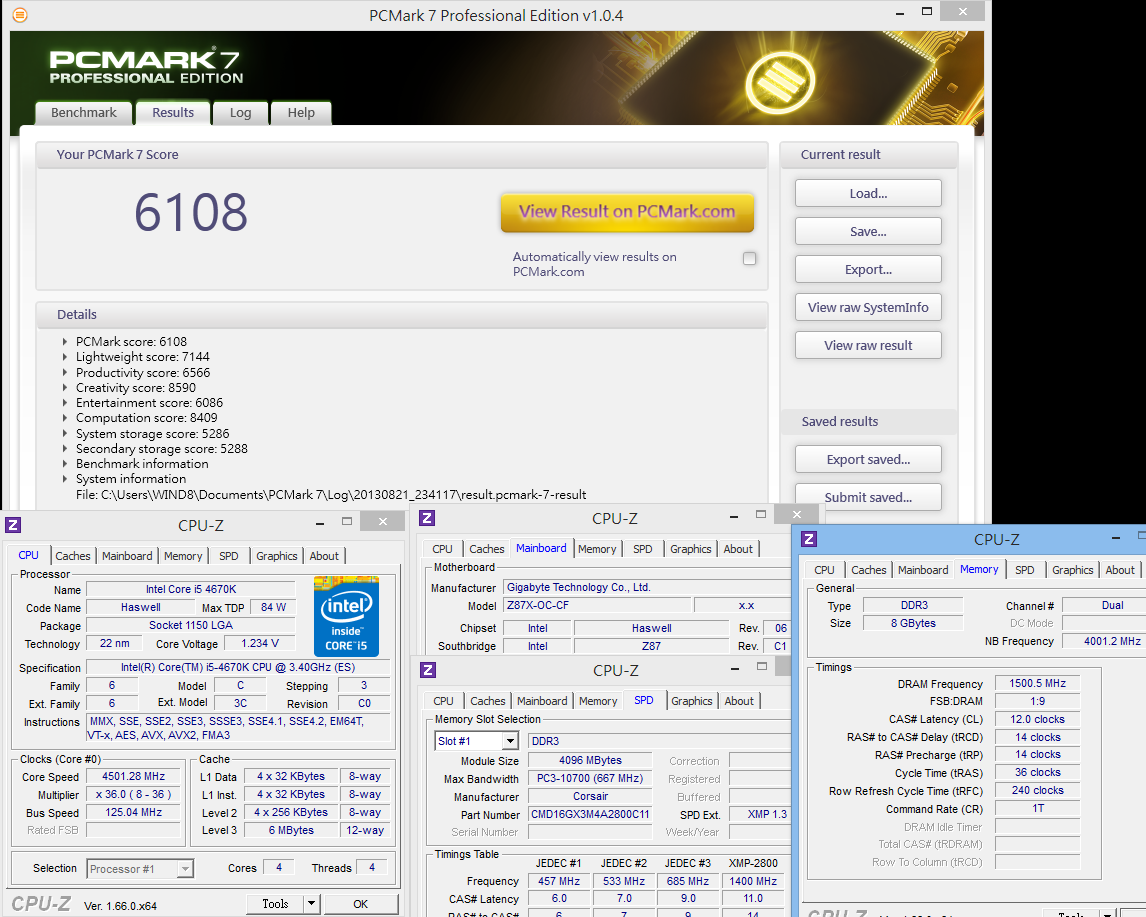
PCMARK7 - 6108
Windows8 Experience Index - CPU 8.2
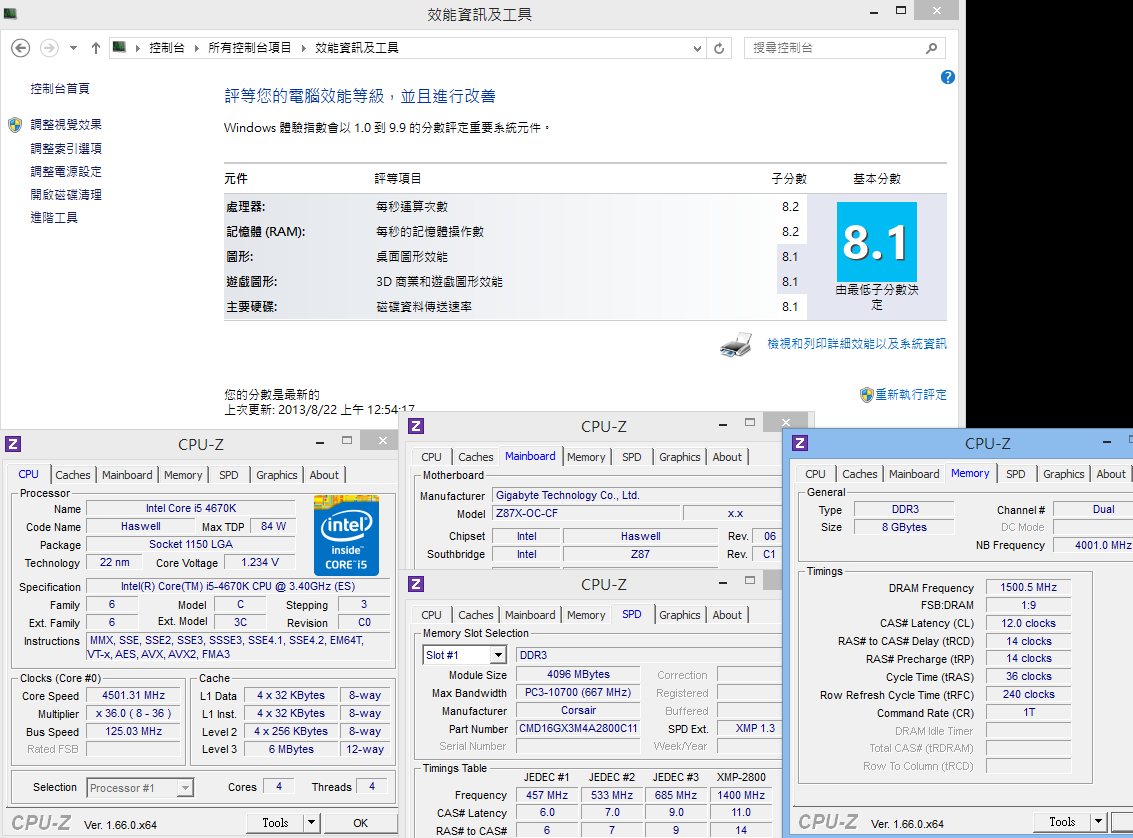
When OC i5-4670K to 4.5GHz, same as previous i7-4770K test, the single thread performance is almost the same.
As multitasking, due to the 4C4T and 4C8T difference, 4770K performance is 19-29% higher.
i5-4670K performance is more than enough for general users. The air cooling OC ability is almost same as i7.
As less thread and less cache, sometimes you can pull 100MHz more for OC range.
If you need multitasking graphic files converting, i7-4770K should be better. Of course, you need more budget for it.
DRAM Bandwidth Test
DDR3 3001.2 CL11 14-14-36 1T 1.668V
ADIA64 Memory Read - 30898 MB/s
Sandra Memory Bandwidth - 28691 MB/s
MaXXMEM Memory-Copy - 30715 MB/s
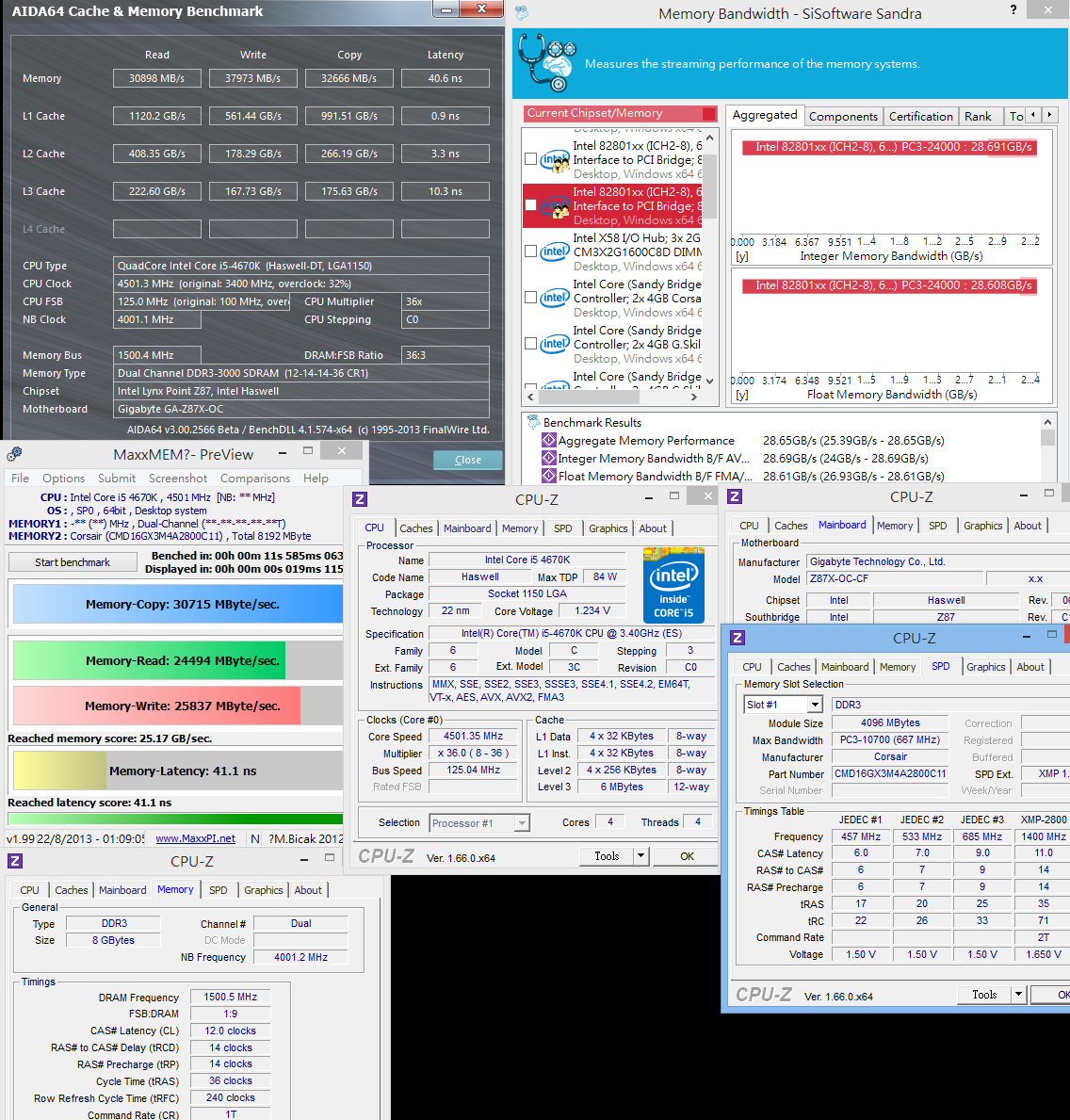
Intel Haswell DRAM is really improved. This is always the advantage for new platform.
If same DDR3 2800 clock, bandwidth is 13-27% higher than Ivy Bridge.
DDR3 extreme clock also can reach 2800~3000 from former 2666~2800.
Haswell structure improves Memory Controller design.
As good quality DDR3, Z87X-OC can reach 3000 easily.
Z87X-OC bandwidth is lower others Z87 about 5%. It may be caused by default latency settings.
3D Performance Test
PowerColor AX7970 3GBD5-2DHV3
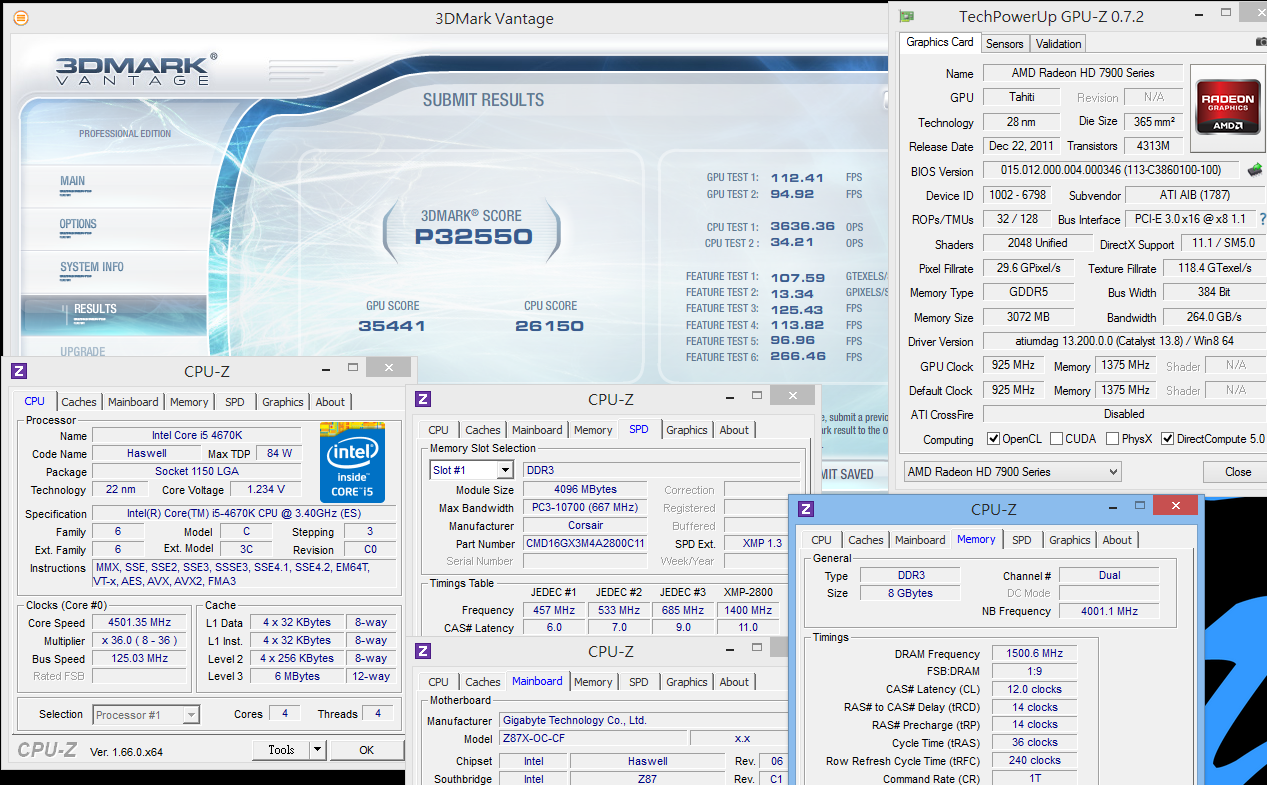
3DMark Vantage => P32550
Unigine Heaven Benchmark 4.0
2560 X 1440 => 35.1 FPS

FINAL FANTASY XIV 1920 X 1200 => 11570
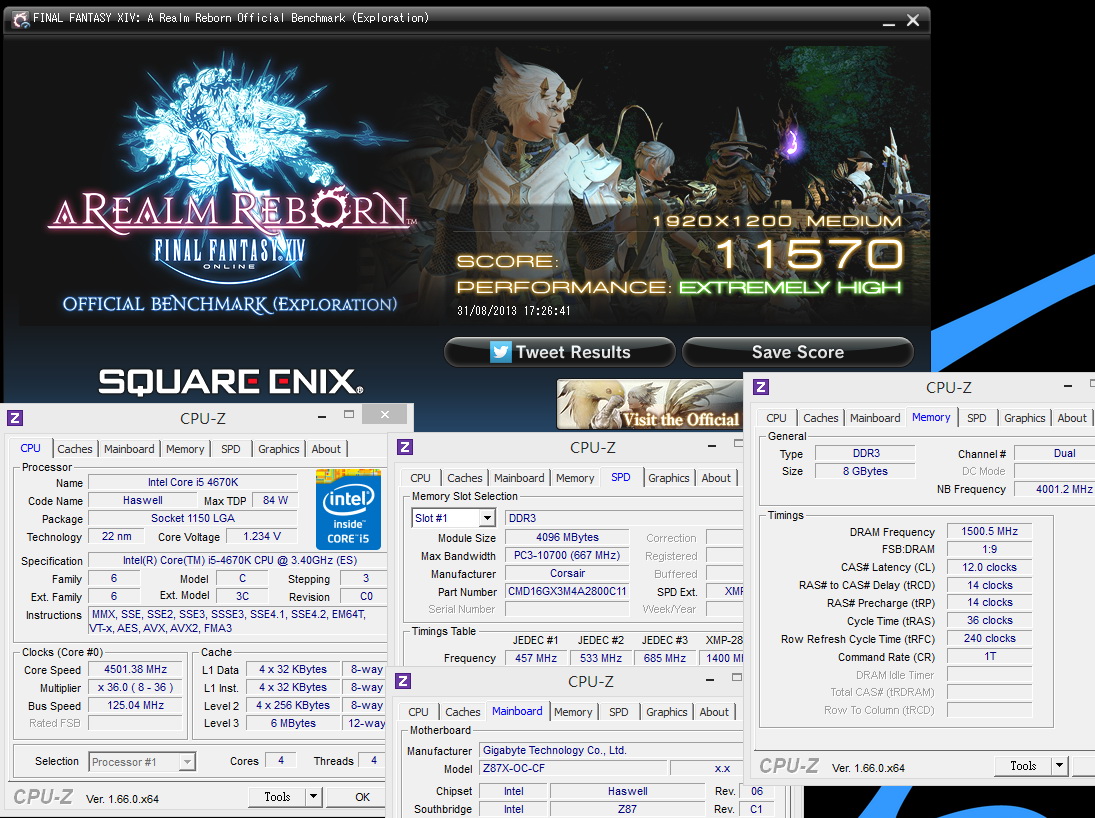
As CPU performance change, 7970 3D performance is also connected.
4670K OC to 4.5GHz bundles with AMD most high-end 7970 single core GPU, you can have very good 3D scores.
I use 2560 X 1440 high resolution to test Unigine Heaven Benchmark 4.0.
I still remember the same 7970 card, ver3.0 with 1920 X 1080 can reach 100 FPS.
It?s possible that 4.0 need more 3D performance. Also, higher resolution does drain 7970 performance.
Power Consumption Test
Enter to OS Desktop - 58W

Running ADIA64 to full speed 4670K - 138W

Running ADIA64 to full speed both 4670K and 7970 - 315W
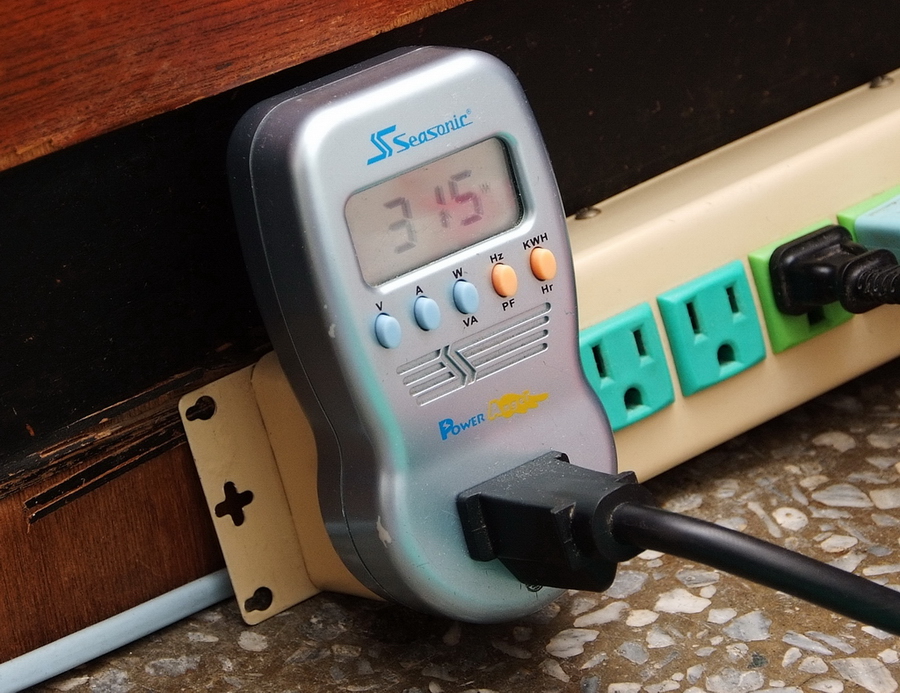
When i5-4670K run at 4.5GHz, same as i7-4770K, 4670K standby is 7W lower and full speed is 35W less.
315W doesn’t mean CPU and GPU are both full speed. Running FurMark to full speed 7970 already takes 250W.
If adding CPU, HDD, SSD, DVD, I suggest you using 500W more Power supply.
Haswell is 22nm design. The power consumption is similar to Ivy Bridge.
-
Temperature (Room temperature is 29?C)
Enter to OS Desktop - 40~56

Running ADIA64 to full speed 4670K - 68~80

4670K OC to 4.5GHz is lower than 4770K a little.
I use pretty high end cooler, Thermalright Archon SB-E X2. The performance is very impressive.
However, if you want to OC to 4.6~4.7GHz and running benchmark software stablily, you need more effort for voltage and temperature control.
Expecting further Haswell CPU yield rate improved, we can see air cooling 4.6~4.8GHz level.
The main difference between Haswell and former2 structures is CPU frequency can pull higher.
In other words, you can OC by pulling CPU frequency. 4th generation CPU adds back this feature again.
The test below is pulling CPU frequency from 100MHz to 166MHz for CINEBENCH R11.5 test.
Of course, this setting can pass Hyper PI 32M to prove 166MHz stability is ok.

GIGABYTE Z87X-OC Conclusion
Pros
1. As high end Z87 OC MB, the price is close to mainstream high end board.
2. Phase in FHD UEFI BIOS. It also provides previous UEFI BIOS interface.
3. Exclusive OC-Touch design is more advanced. It provides more features and tuning settings.
4. OC Ignition can provide power to fan or other hardware under system shut down.
5.OC PEG provides power for individual PCIe slot. OC Brace can fix several PCIe cards when you use outsidechassis.
6. Black Nippon Chemi-Con caps life time is 10000 hours under 105?C working temperature.
Cons
1. DDR3 3000 bandwidth is too low. Hopefully, it can improve by BIOS tuning.
2. For 3-Way AMD CrossFireX, I hope it will provide X8 + X8 + X8 bandwidth.
3. It can use better audio chip than Realtek ALC898.
Performance ?????????? 86/100
Components ?????????? 85/100
Specification ?????????? 82/100
Appearance ?????????? 80/100
C/P Value ?????????? 82/100
Intel new structure does improve DDR3 bandwidth and OC limitation. Built-in HD4600 GPU also raises the 3D performance.
I have shared this in previous i7-4770K performance test.
This review, I used lower price Intel Core i5-4760K. CUP/DDR3 OC range is similar to 4770K.
If you consider to buy Core i5 CPU and you have more budget, also you want to do some quick OC, 4670K is a good pick for you.
Z87X-OC implements many OC features in both software and hardware. Even though it?s still some spec difference with Z87X-OC Force, Z87X-OC C/P value is better.
It has most OC features and components.
It?s a good option for less budget overclokers.
However, for most users, I think G1 series is more attractive.
Besides G1.SNIPER5, I hope GIGABYTE can provide a mainstream ATX G1 model as Z87X-OC.

The paper is also published on my Blog WIND3C, 3C fans are welcome to visit and give advice or comments:)
-
Thank you for the review!
Nice board, we hope to test it soon under LN2!
-
love this MB
Ciao! Sembra che tu sia interessato a questa conversazione, ma non hai ancora un account.
Stanco di dover scorrere gli stessi post a ogni visita? Quando registri un account, tornerai sempre esattamente dove eri rimasto e potrai scegliere di essere avvisato delle nuove risposte (tramite email o notifica push). Potrai anche salvare segnalibri e votare i post per mostrare il tuo apprezzamento agli altri membri della comunità.
Con il tuo contributo, questo post potrebbe essere ancora migliore 💗
Registrati Accedi