
[ENG]Test of BIOSTAR Hi-Fi Z77X with improved built-in audio unit effect
-
In recent years, overclocking and material are the major positioning route in the middle and high-level MB market.
With the Desktop market changing, the terms like electric competition or Gaming appear on the technical data of a lot of hardware.
For the MB field with mature specifications, it has put the focus on the audio effect and network.
In this way, it intends to improve the traditional design model before, providing better audio effect for users in gaming environment.
Most customers are under the impression that BIOSTAR take the affordable price and the overclocking as the major market positioning.
TZ77XE4 released before performs well in the aspects of C/P ratio and overclocking capabilities.
And Hi-Fi Z77X released lately, as implied in the product name, mainly strengthens the audio effect.
The product package this time takes the sound-related pattern, which is also quite special.

Hi-Fi Z77X Appearance
Currently, most MB brands use the shining black PCB, while BIOSTAR uses the matte PCB material which increases the sense of texture.
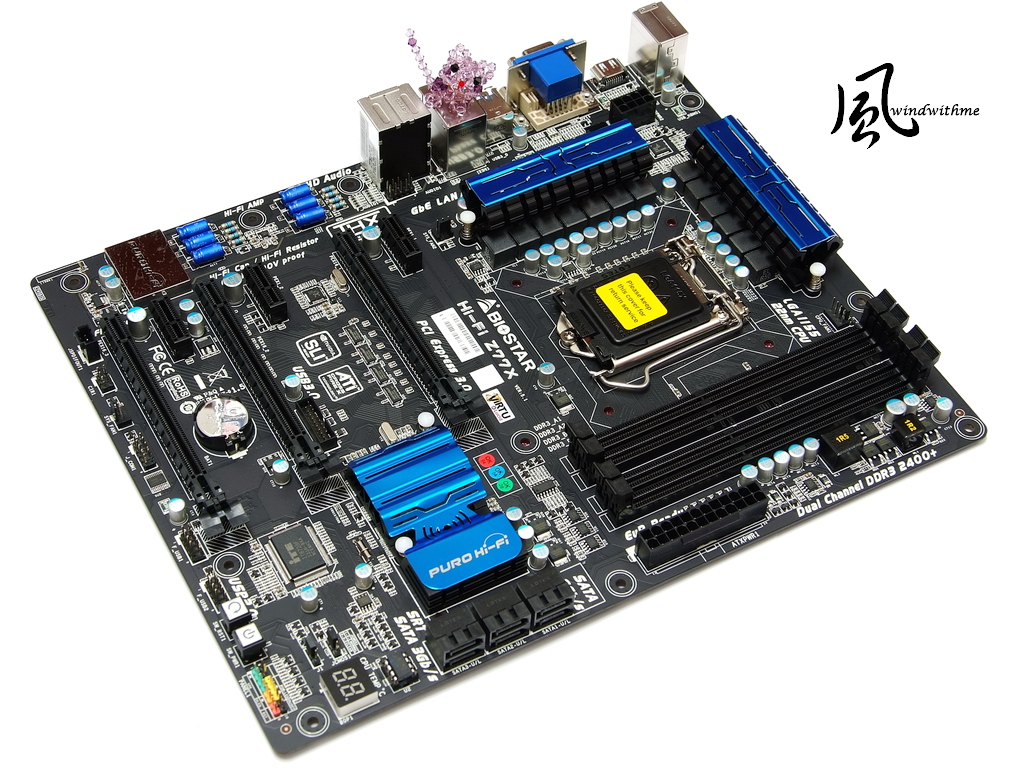
As for colors of Hi-Fi Z77X, PCB, DRAM and PCI slots are all black, and then matched with blue radiator.
Hi-Fi Z77X looks different from the black and orange appearance of TZ77XE4. Personally, I like its external package design and new colors better.
Accessories enclosed:
Product manual, IO board, SLI / CorssFire X bridge, SATA wires, Calibration Microphone and driver disk

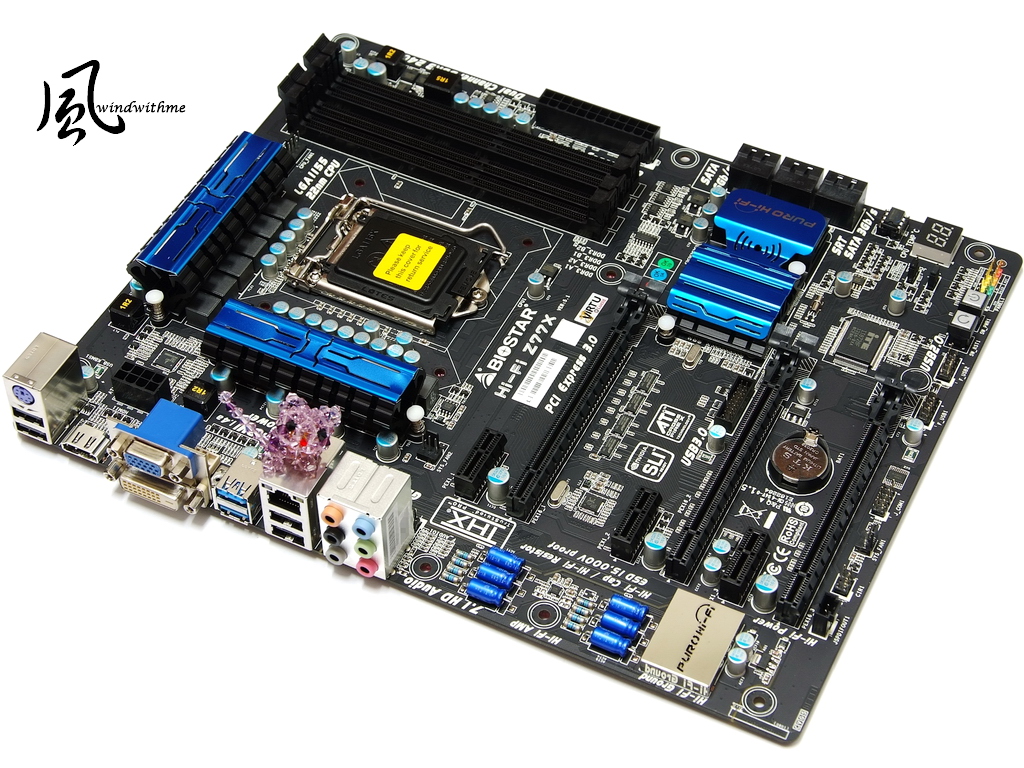
The lower-left section of motherboard
2 X PCI-E X16 3.0, supporting AMD CrossFireX/nVIDIA SLI technology at most, with a bandwidth of X8 + X8
1 X PCI-E X16 2.0, with a bandwidth of X4
3 X PCI-E X1
Network chip adopts Realtek RTL8111E
Audio chip Realtek ALC898 supports 8-channel Blu-ray Audio and THX TruStudio Pro technology at most

The lower-right of motherboard
2 X black SATA, provided by chipset Z77, with SATA3 specification
4 X black SATA, provided by chipset Z77, with SATA2 specification
They can work together to build RAID 0, RAID 1, RAID 5 and RAID 10, and the highest performance depends on the SATA device installed.
Power / Reset buttons and debug LED, and the black section on upper side is the front USB 3.0 slot

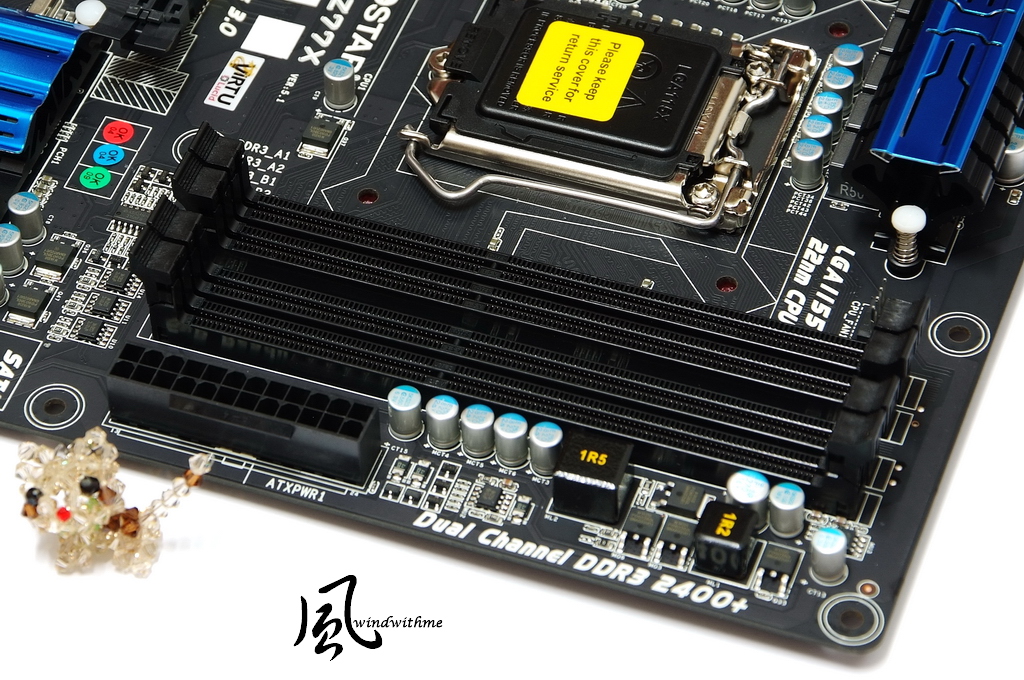
The upper -right of motherboard
4 X DIMM DDR3, supporting 1066/1333/1600/1866(OC)/2133(OC)/2400(OC)/2600(OC)
The maximum capacity supported by DDR3 is 32GB, supporting Extreme Memory Profile technology.
The lower side is the 24-PIN power input.
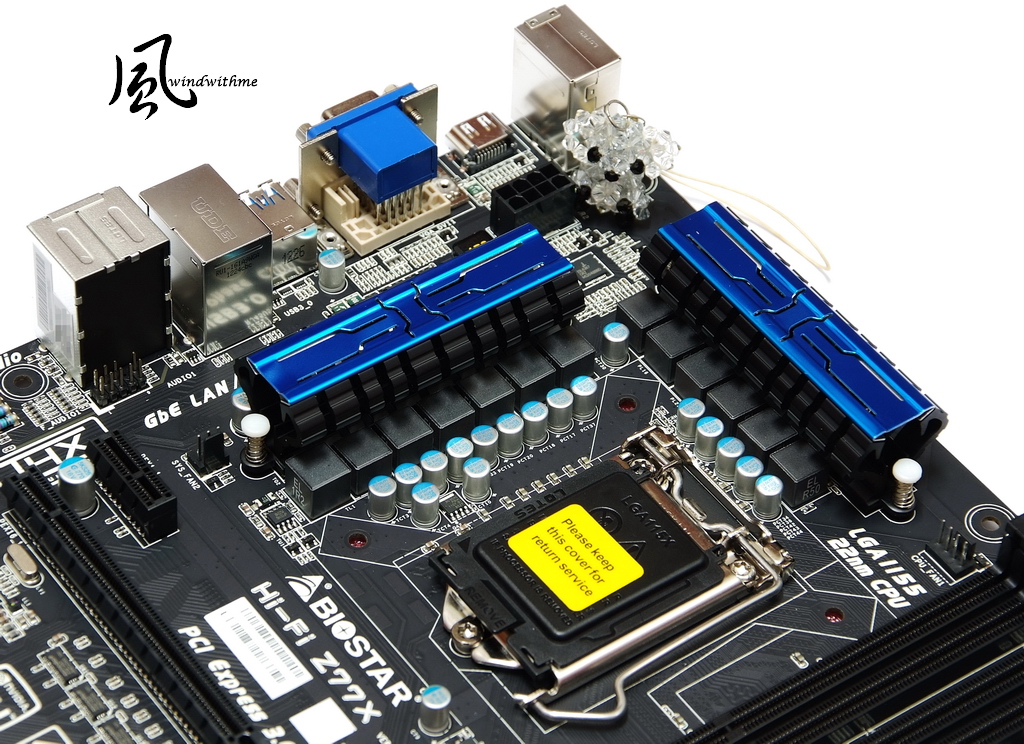
The upper-left of motherboard
The power supplies on both sides of CPU are equipped with the enhanced passive radiator, with a power input on the upper side of 8PIN.
IO
1 X PS/2 Keyboard
1 X D-Sub / DVI-D / HDMI DisplayPort
4 X USB 2.0(black)
2 X USB 3.0(blue)
1 X RJ-45 Network hole
6 X Audio hole

The power supply design has 13 phases in total, including 10 CPU VCORE phases + 1 VCC phase + 2 IGD phases

-
In recent years, overclocking and material are the major positioning route in the middle and high-level MB market.
With the Desktop market changing, the terms like electric competition or Gaming appear on the technical data of a lot of hardware.
For the MB field with mature specifications, it has put the focus on the audio effect and network.
In this way, it intends to improve the traditional design model before, providing better audio effect for users in gaming environment.
Most customers are under the impression that BIOSTAR take the affordable price and the overclocking as the major market positioning.
TZ77XE4 released before performs well in the aspects of C/P ratio and overclocking capabilities.
And Hi-Fi Z77X released lately, as implied in the product name, mainly strengthens the audio effect.
The product package this time takes the sound-related pattern, which is also quite special.
Hi-Fi Z77X Appearance
Currently, most MB brands use the shining black PCB, while BIOSTAR uses the matte PCB material which increases the sense of texture.
As for colors of Hi-Fi Z77X, PCB, DRAM and PCI slots are all black, and then matched with blue radiator.
Hi-Fi Z77X looks different from the black and orange appearance of TZ77XE4. Personally, I like its external package design and new colors better.
Accessories enclosed:
Product manual, IO board, SLI / CorssFire X bridge, SATA wires, Calibration Microphone and driver disk
The lower-left section of motherboard
2 X PCI-E X16 3.0, supporting AMD CrossFireX/nVIDIA SLI technology at most, with a bandwidth of X8 + X8
1 X PCI-E X16 2.0, with a bandwidth of X4
3 X PCI-E X1
Network chip adopts Realtek RTL8111E
Audio chip Realtek ALC898 supports 8-channel Blu-ray Audio and THX TruStudio Pro technology at most
The lower-right of motherboard
2 X black SATA, provided by chipset Z77, with SATA3 specification
4 X black SATA, provided by chipset Z77, with SATA2 specification
They can work together to build RAID 0, RAID 1, RAID 5 and RAID 10, and the highest performance depends on the SATA device installed.
Power / Reset buttons and debug LED, and the black section on upper side is the front USB 3.0 slot
The upper -right of motherboard
4 X DIMM DDR3, supporting 1066/1333/1600/1866(OC)/2133(OC)/2400(OC)/2600(OC)
The maximum capacity supported by DDR3 is 32GB, supporting Extreme Memory Profile technology.
The lower side is the 24-PIN power input.
The upper-left of motherboard
The power supplies on both sides of CPU are equipped with the enhanced passive radiator, with a power input on the upper side of 8PIN.
IO
1 X PS/2 Keyboard
1 X D-Sub / DVI-D / HDMI DisplayPort
4 X USB 2.0(black)
2 X USB 3.0(blue)
1 X RJ-45 Network hole
6 X Audio hole
The power supply design has 13 phases in total, including 10 CPU VCORE phases + 1 VCC phase + 2 IGD phases
-
The radiation fin for Z77?s chipset is of long-shape design.
In addition to the unique appearance, it is also labeled with PURO Hi-Fi.

O.N.E calibration page of BIOSTAR UEFI interface
The frequency multiplication of the CPU Ratio is 45, i.e. 3770K will be operated by 4500MHz

Graphics Core Ratio Limit is the frequency of the built-in GPU
The algorithm of 23 is 23 X 50 => 1150MHz. In the figure below, it adopts the default frequency of built-in HD 4000 for 3770K.
DDR3 frequency is set as 24, namely DDR3 2400.

For DRAM frequency and parameter settings, generally, smaller value leads to higher performance.
Set it as DDR3 2400 CL11 12-11-28 2T, and adjust other detailed options to optimal setting values.
The user can increase the frequency and adjust the parameters based on the DDR3 property, so as to increase DDR3 bandwidth.

Voltage page
Four CPU VCore Modes are included, i.e. SPEC Volgate/Auto/Offset Mode/Fixed Mode
CPU VCore Offset -0.200~+0.370V
CPU VCore Fixed 1.000~1.790V
In terms of the purpose of overclocking, the major change here is the CPU voltage.
In the sample figure, the CPU Vcore is fixed as 1.280V. Making slight adjustment based on the radiation ability and CPU property are two major foundations for overclocking CPU.

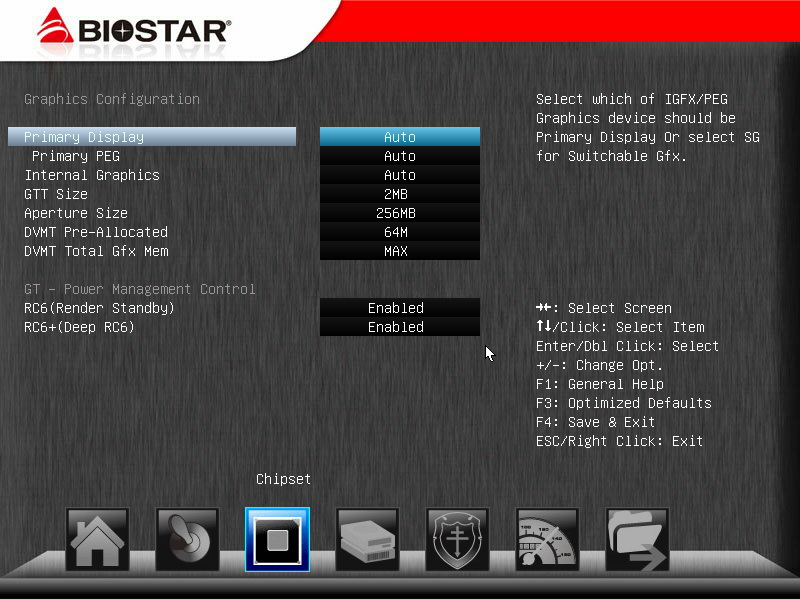
This page can adjust the shared capacity needed by the HD 4000 built in 3770K.
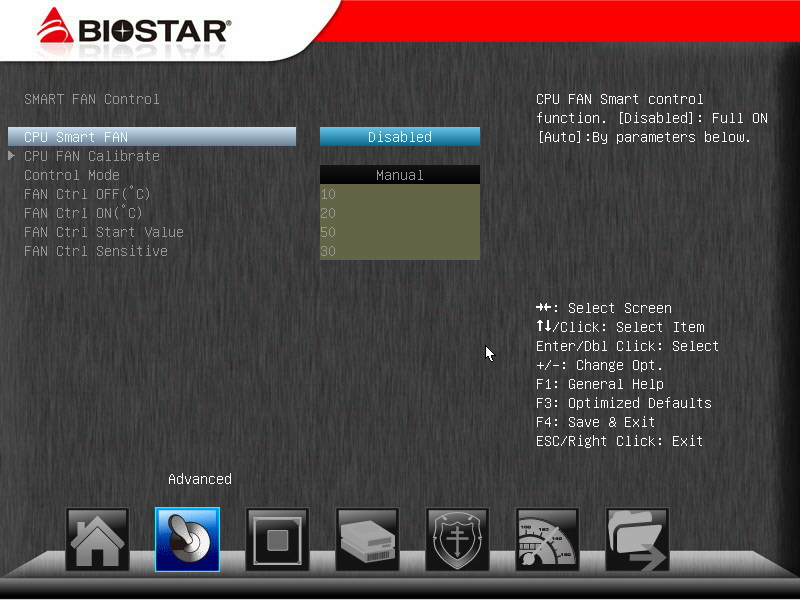
CPU Smart FAN can control the rotating speed based on the CPU condition.
PC Health Status
The CPU temperature detected here is higher, while the wind temperature felt from the radiator or the detected temperature by OS temperature detection software will be lower.

This time the common and affordable CPU radiator is used, and the 3770K overclocking to 4.5GHz is set stably.
Install 4DIMM DDR3 2133 and overclock it to 2400 2T. The capacity of DRAM is 4G X4, namely 16GB in total.
Hi-Fi Z77X is equipped with better radiator and 2DIMM DDR3, which can also achieve the overclocking performance of 4.8GHz / 2600.
I only intend to test the overclocking in different ways, providing more information to the users who need.
Test platform
CPU: Intel Core i7-3770K
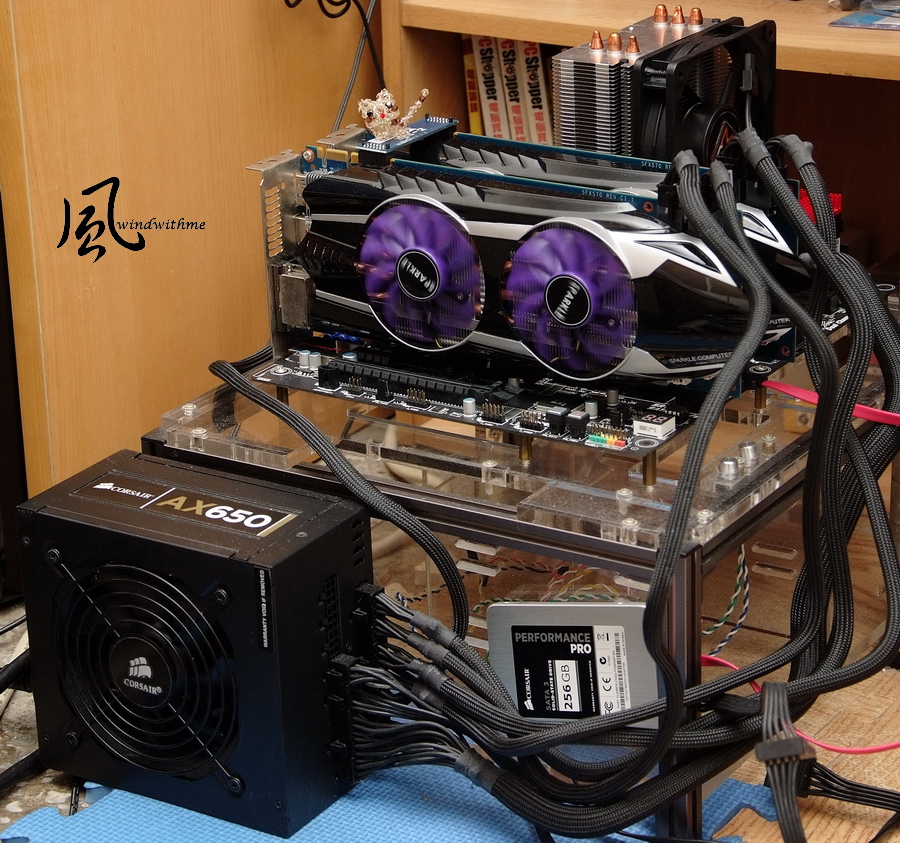
MB: BIOSTAR Hi-Fi Z77X
DRAM: CORSAIR DOMINATOR-GT CMT16GX3M4X2133C9
VGA: SPARKLE GTX570 SLI
SSD: CORSAIR Performance Pro Series 256GB
POWER: CORSAIR AX650W
Cooler: XIGMATEK HDT-S1283
OS: Windows7 Ultimate 64bit
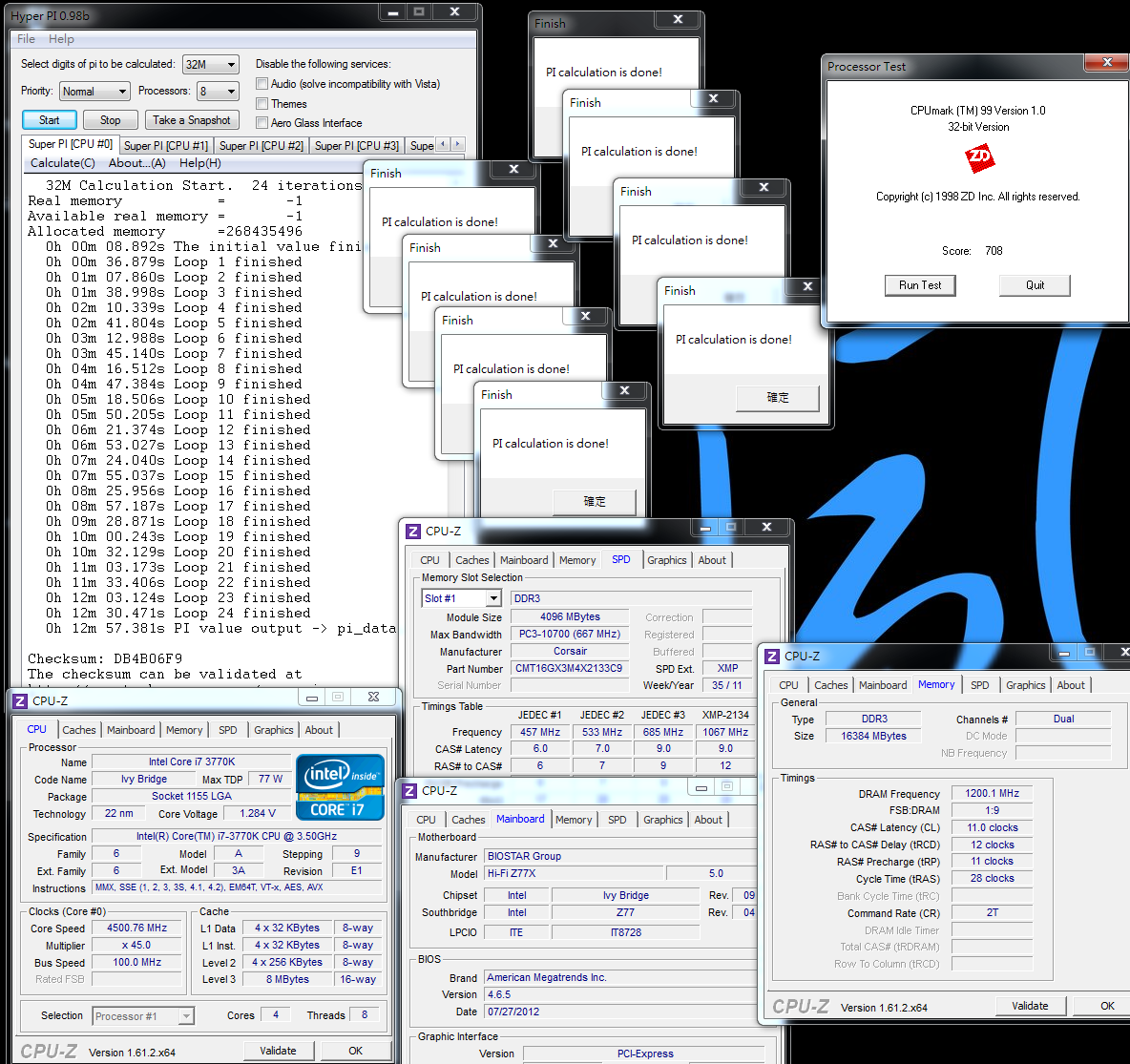
Intel Core i7-3770K overclocking performance
CPU 100 X 45 => 4500MHz 1.280V
DDR3 2400 CL11 12-11-28 2T 1.608V
Hyper PI 32M X8 => 12m 57.381s
CPUMARK 99 => 708
-
Nuclearus Multi Core => 31526
Fritz Chess Benchmark => 35.08 /16837
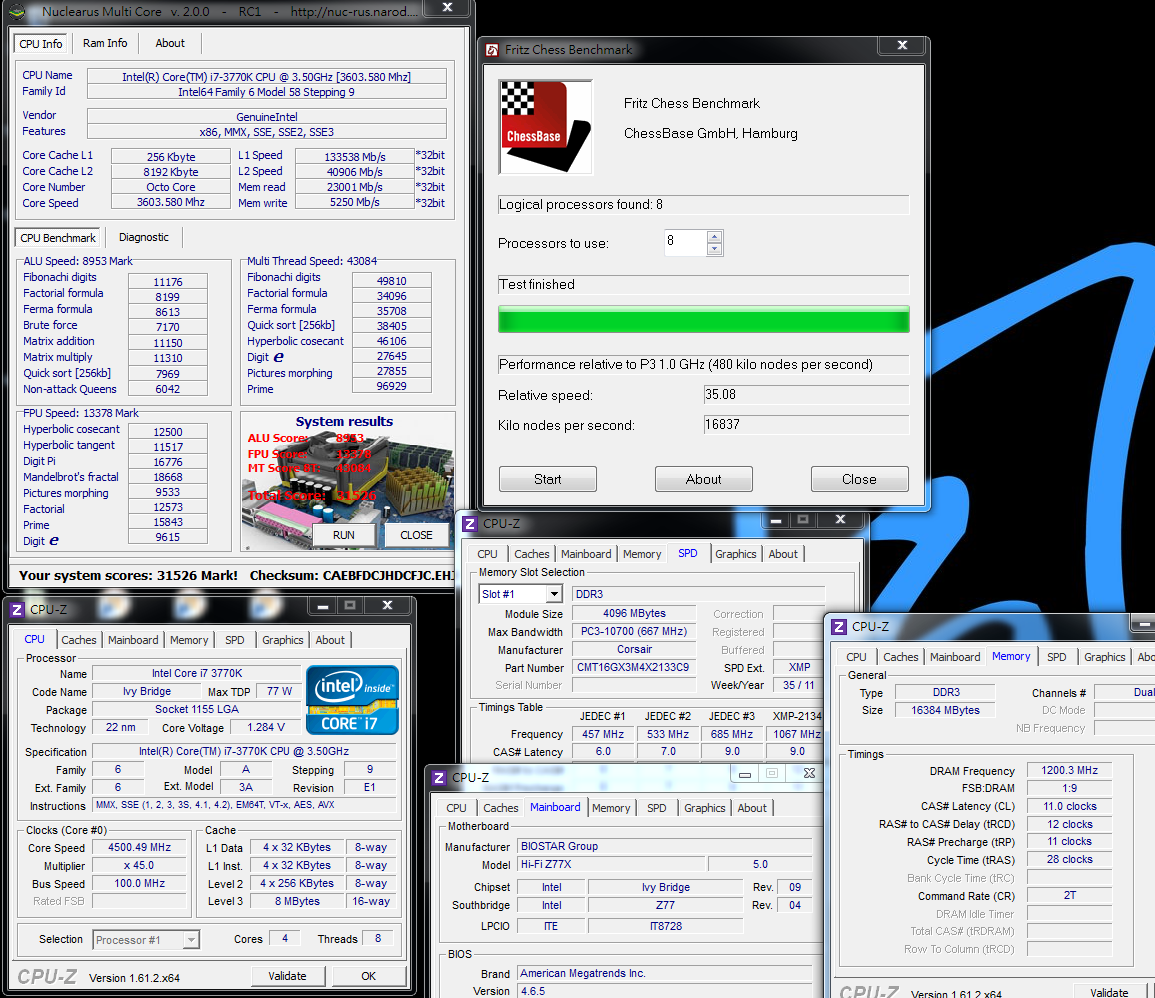
CrystalMark 2004R3 => 378507

CINEBENCH R11.5
CPU => 9.14 pts
CPU(Single Core) => 1.92 pts
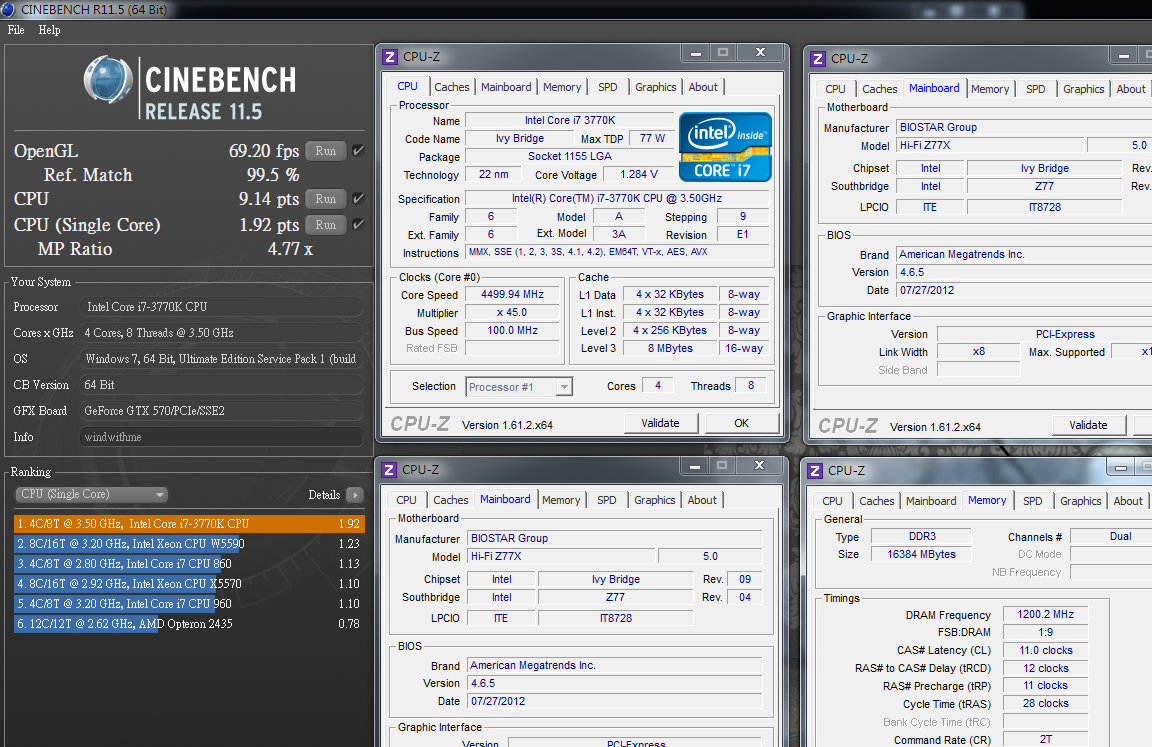
FRYRENDER
Running Time => 4m 10s
x264 FHD Benchmark => 26.6
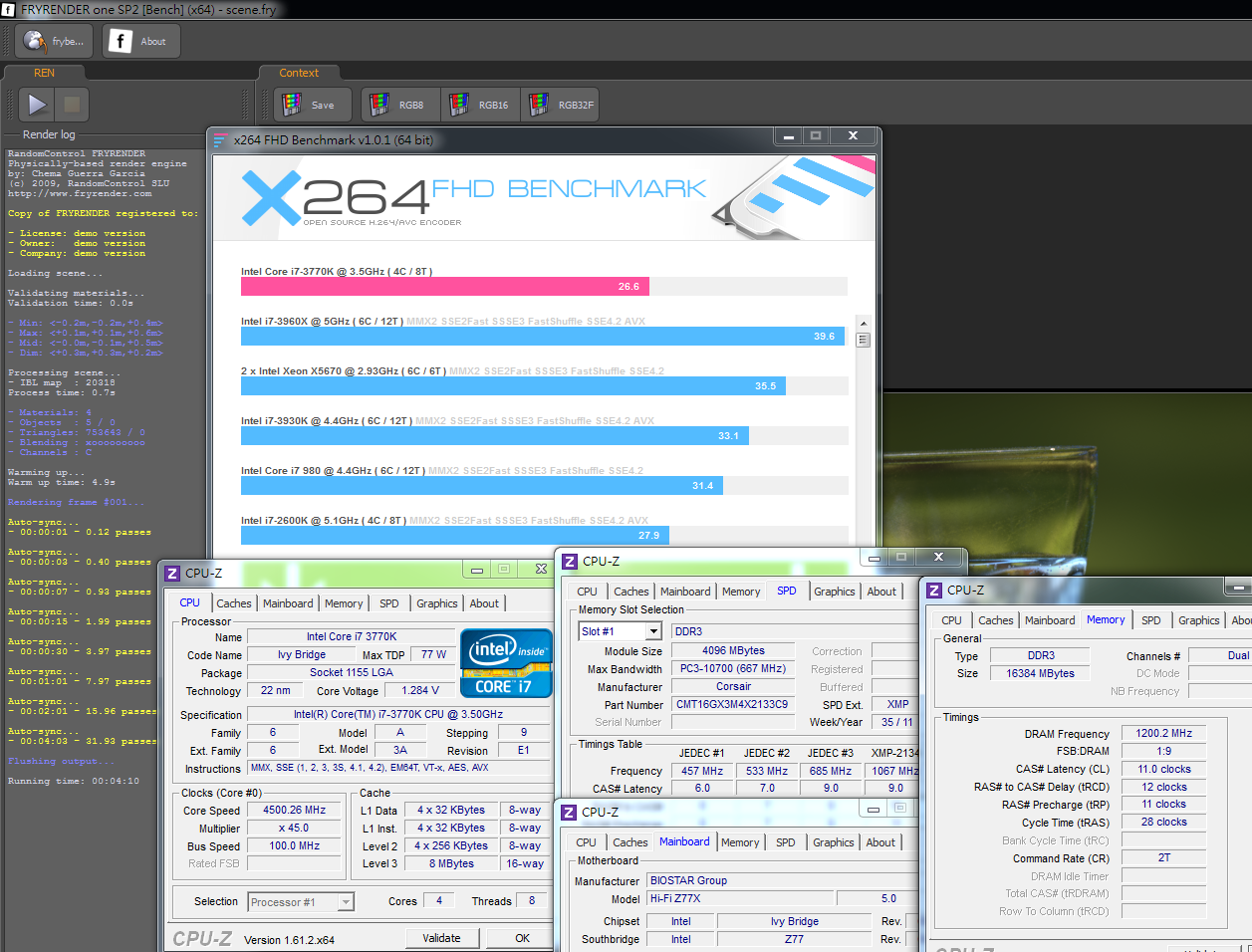
PCMark Vantage => 26885
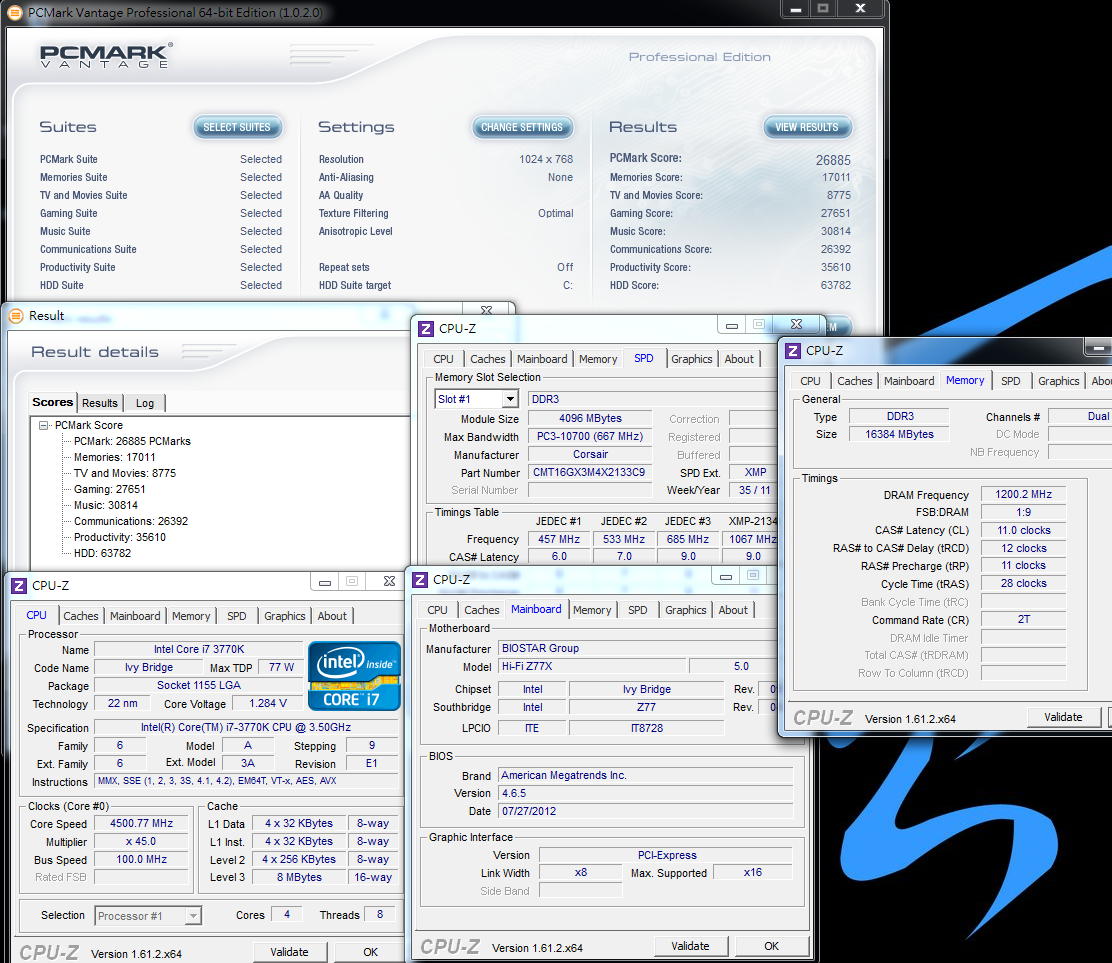
The frequency of 4.8GHz is about 6.7% higher than that of 4.5GHz.
Compared with 4.8GHz, the Fritz Chess Benchmark of 4.5GHz is 7.8% higher in the test, and CINEBENCH R11.5 7.2% higher.
Moreover, the x264 FHD Benchmark is 7.1% higher and FRYRENDER is 6.3% faster.
It seems that the increased CPU frequency will improve the performance accordingly.
However, most of my previous tests use the advanced radiator with overclocking to 4.8GHz.
This time I use the affordable CPU radiator with overclocking to 4.5GHz to test the performance, getting different results in the voltage, power consumption and working performance.
It is hoped to provide reference for the users of medium-level radiator. After all, overclocking to 4.8GHz requires more conditions.
DRAM bandwidth test
DDR3 2400 CL11 12-11-28 2T
ADIA64 Memory Read - 19333 MB/s
Sandra Memory Bandwidth - 19292 MB/s
MaXXMEM Memory-Copy - 22702 MB/s

When installing 4DIMM in the DRAM, the overclocking capability of the same DDR3 will be lowered by one or two levels, which is common for many Z77.
Thus, I set it as DDR2400 2T, which is a stable parameter.
Those who want to achieve the overclocking frequency of DDR3 2400~2600 1T,
it is suggested using 2DIMM which also provides a favorable environment to achieve the purpose in addition to the powerful DDR3.
Moreover, the DRAM bandwidth of Hi-Fi Z77X is two-level lower than that of TZ77XE4, which needs to be enhanced by the newer BIOS in the future.
3D performance test - SPARKLE GTX570 SLI
3DMark Vantage => P45768

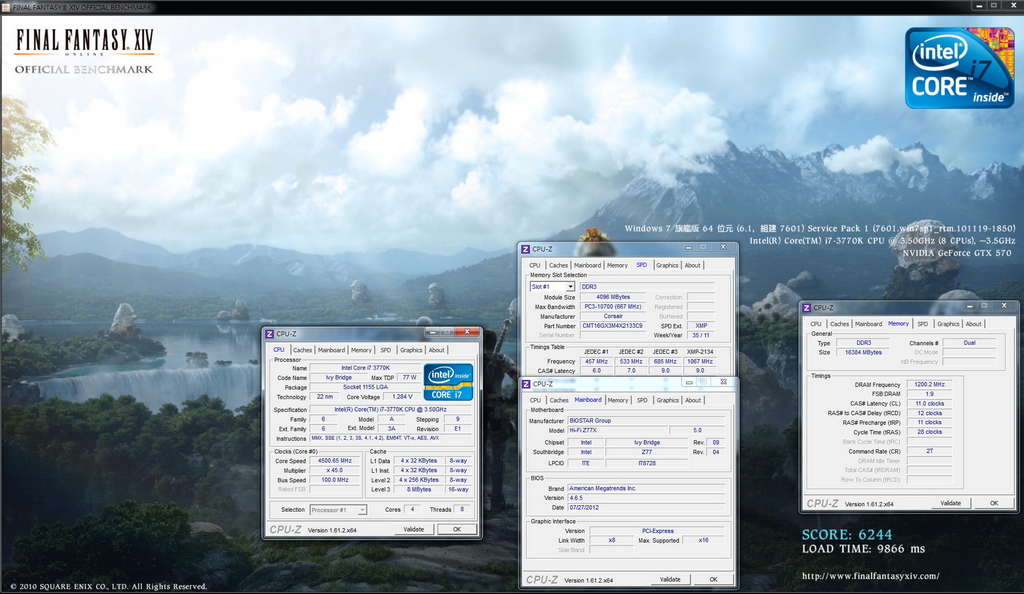
FINAL FANTASY XIV
1920 X 1080 => 6244
Unigine Heaven Benchmark 3.0
1920 X 1080 => 101.4 FPS

The bandwidth required by SLI mode is X8 + X8, but the performance might be poorer.
However, sold at this lower price, Hi-Fi Z77X still supports AMD CrossFireX/nVIDIA SLI technology, thus it is a product with rather good specification.
BIOSTAR advertises Hi-Fi Caps and Hi-Fi resistors, and the material adopts the non-polarized capacitor and film resistor.
Equipped with the audio-amplification chipset on the front earphone, it provides the users with better audio quality.

-
Hi-Fi Z77X uses relatively high-level ALC898 of Realtek, which has the good performance in both computability and stability.
Its audio effect is quite acceptable. At present the MB manufacturers use various audio chipsets of Realtek.
Hi-Fi Z77X uses Realtek, so it is difficult to be distinguished from other MB brands.
The design on the upper side of the audio chipset is the metal shield printed with BIOSTAR Logo shining red when power-on.

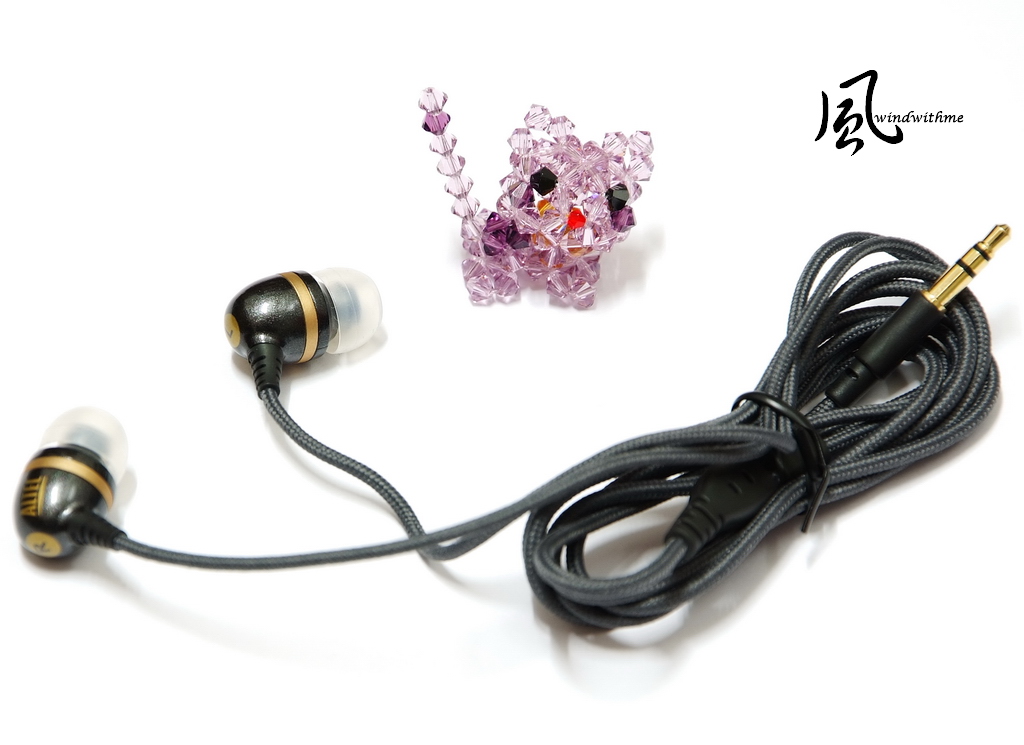
Altec Lansing BackBeat Plus UHP206 is sold at a price closed to the medium-level earphone in the common consumption market.
I compare the actual audio effect of Hi-Fi Z77X and TZ77XE4 when the Realtek ALC898 audio chipset is used.

Altec Lansing is a U.S. brand with long history. I believe most PC users can speak out some of its well-known loudspeakers which produce quite high-level performance.
BackBeat Plus UHP206 is of in-ear type, belonging to the monitoring function, and can present the audio effect of real sound source.
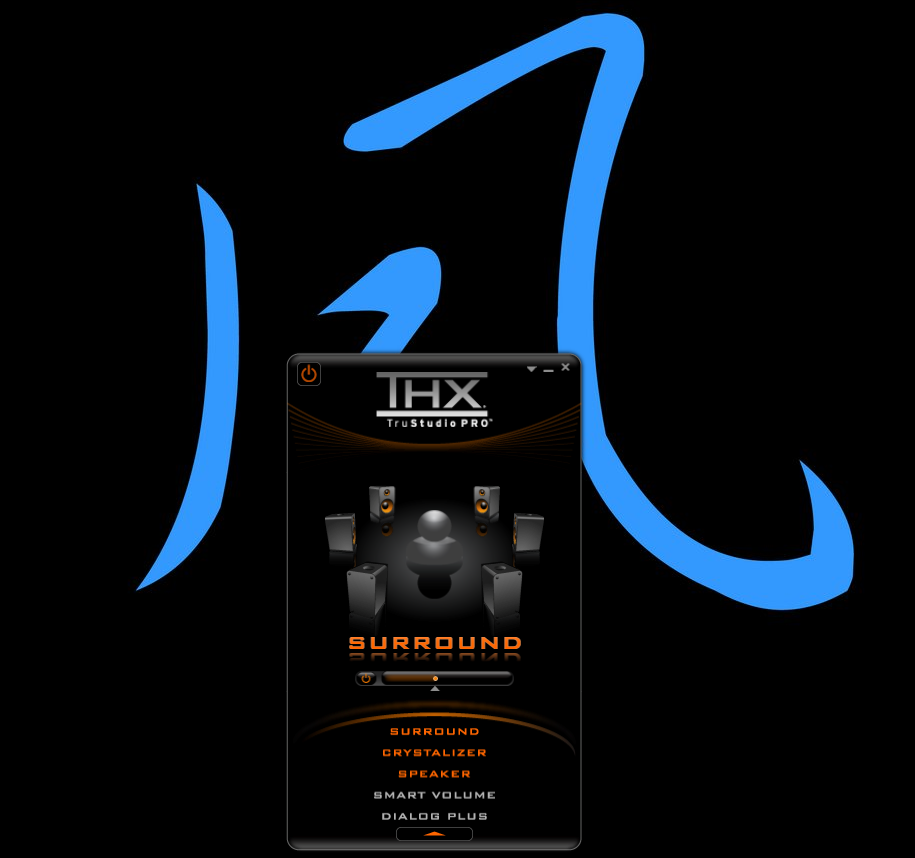
It supports Creative THX technology. Let?s first take a look at the THX software interface.
The first three options are enabled by default. If the user enables the options of SMART VOLUME and DIALOG PLUS, it will optimize the sound field, but decrease the finer points of intermediate frequency.
It is suggested opening these two options when gaming or watching videos.
When comparing the audio quality of these two MB brands, it will disable all THX options to achieve the original audio effect.
The left side is the Multi-Channels Calibration interface, used for the multi-channel calibration of PC loudspeaker.
The right side is SmartEAR Headphone Utility?used for adjustment under the earphone environment.

Below is the test for audio quality, which belongs to personal opinion.
It makes the comparison of the built-in audio effect between the Hi-Fi Z77X and TZ77XE4.
When the earphone volume is 50%, the sound is loud enough.
Thus, it?s no need to worry the insufficient power will cause small volume.
High frequency ? there is no sharp tune, and it is much finer .
Intermediate frequency ? the definition and the finer points are improved. If the intermediate frequency can be fuller, it will be better.
Low frequency ? bass is quite shocking, free from the problems of TZ77XE4 in which the sound is not thick or muddy enough.
As for the built-in level, Hi-Fi Z77X improves the audio effect more or less.
Moreover, with the THX software, it will be more suitable for watching video or gaming, bringing about a better performance in the effect of audio field.
Compared with the last generation under the same brand, TZ77XE4 makes the most improvements in the performance in the intermediate frequency.
It will get quite good built-in audio effect for listening to the music.
Of course, Hi-Fi Z77X improves the audio effect of built-in audio chipset, making the consumer enjoy better audio quality with the same price.
However, its audio effect is not so good as the lower or medium-level audio card on the market.
After all, the built-in audio effect doesn?t need to spend extra money like the additional audio card, so it is hard to compare this part fairly.
Temperature performance (Ambient temperature is 28 Celsius)
System standby - 38~46

Running LinX, CPU at full speed - 82~87

XIGMATEK HDT-S1283 is a radiator that has gain higher C/P ratio on the market, while its price falls around the medium level.
Although the temperature is slightly higher when overclocking to 4.5GHz, its radiation capacity is quite satisfactory if considering its reasonable price..
If you think the temperature of 80 Celsius is too high, it is helpful to enhance the internal cooling or reduce the overclocking to 4.4GHz when installing it into the case.
Power consumption test
System standby - 125W

Running LinX, CPU at full speed - 222W
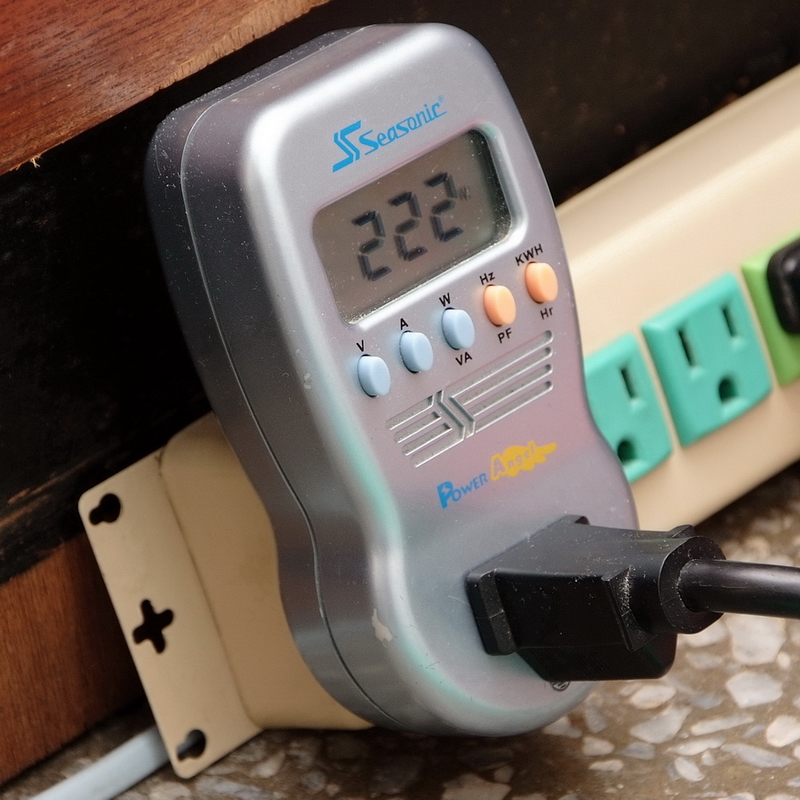
3770K OC 4.5GHz, C1E disabled, and the system standby under GTX 570 SLI mode, it is only 125W.
When CPU is at full speed, it will increase about 97W. The power consumption under Ivy Bridge platform is obviously lower than the last generation of Sandy Bridge.
BIOSTAR Hi-Fi Z77X
Pros
1. The price is a little higher than the basic-level Z77, with its specification and material similar to the middle-level Z77.
2. Japanese solid capacitor, built-in Power/Reset buttons and simple debug LED.
3. It adopts UEFI interface with fast startup speed, rich options and large range of voltage, as well as excellent overclocking ability.
4. Provide special Calibration Microphone to adjust the sound field based on the surroundings.
5. With special design of audio effect of the built-in Hi-Fi, the MB power supply has 13 phases in total.
Cons
1. BIOSTAR has no distribution channel in Taiwan currently.
2. It is suggested using the advanced audio chips, such as Creative CA0132 or VIA Envy24MT.
3. DDR3 bandwidth has some improvement room.

Performance ratio ?????????? 80/100
Material ratio ?????????? 85/100
Specification ratio ?????????? 82/100
Appearance ratio ?????????? 82/100
C/P ratio ?????????? 83/100
BIOSTAR Hi-Fi Z77X is sold at US$150(NT$4,382), which is almost the same price of TZ77XE4 when released on the market.
Currently, the price of TZ77XE4 has dropped to US$120 or so, but it has two more SATAs and one DisplayPort. Thus, the C/P ratio will be increased.
Both Hi-Fi Z77X and Hi-Fi H77S are two models of Intel platform introduced with Hi-Fi material.
Hi-Fi A85X and Hi-Fi A85W with the AMD FM2 that are released by BIOSTAR lately, also have the same audio effect design.
In recent years, some MB brands have improved the audio effect or the network on the advanced product line, which seems to pave road for the gaming market.
Moreover, the BIOSTAR with affordable price and high performance has also stepped in the design of audio effect.
It is a piece of good news for the users who calls for better built-in audio effect with limited budget. And Hi-Fi design does make substantial improvements on the audio effect.
I hope BIOSTAR will adopt Hi-Fi material in more MB products in the future, so that the consumers will have more MB options with higher C/P ratio:)
This article is also post in my blog - WIND3C, All comments are welcome.
-
not bad chip audio
Ciao! Sembra che tu sia interessato a questa conversazione, ma non hai ancora un account.
Stanco di dover scorrere gli stessi post a ogni visita? Quando registri un account, tornerai sempre esattamente dove eri rimasto e potrai scegliere di essere avvisato delle nuove risposte (tramite email o notifica push). Potrai anche salvare segnalibri e votare i post per mostrare il tuo apprezzamento agli altri membri della comunità.
Con il tuo contributo, questo post potrebbe essere ancora migliore 💗
Registrati Accedi