
[ENG] Intel Latest Ivy Bridge Platform - GIGABYTE Z77X-UD3H WiFi OC Guide
-
Since Intel launched Sandy Bridge in Jan 2011, it’s been a year.
In April 2012, Intel released LGA115 socket, code name is Ivy Bridge.
CPU manufacturing from 32nm 2nd Core I improves to 22nm 3nd Core I and some new technology.
The most high end chipset is Z77 instead of Z68.
Simultaneously, mid-end chipset is H77 to replace H67. Also B75 is for SMB. The price is higher than H61.
Z77 position is same as Z68. It integrates all new features.
It owns GPU output and CPU/GUP overclock options. It’s for high performance.
Z77 is also native support USB3.0 plus native SATA3 which is same as Z68.
Z77 complements the new generation I/O spec. However, it would be better to support more SATA3 Ports.
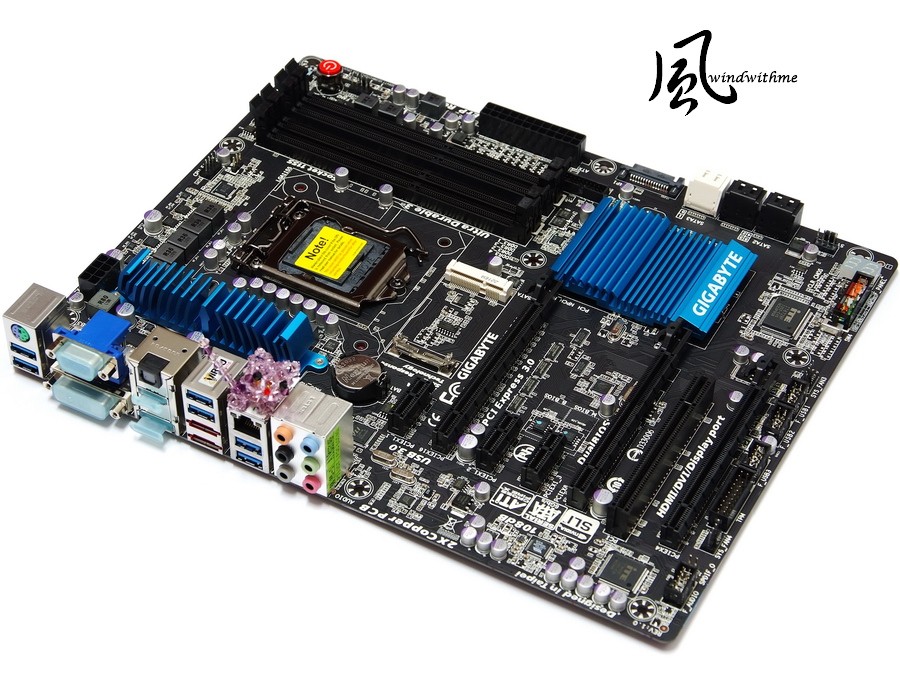
This guide is test with Z77 mid-end range product - GIGABYTE Z77X-UD3H WiFi.
GIGABYTE started this design from X79. White background looks better.

Accessories
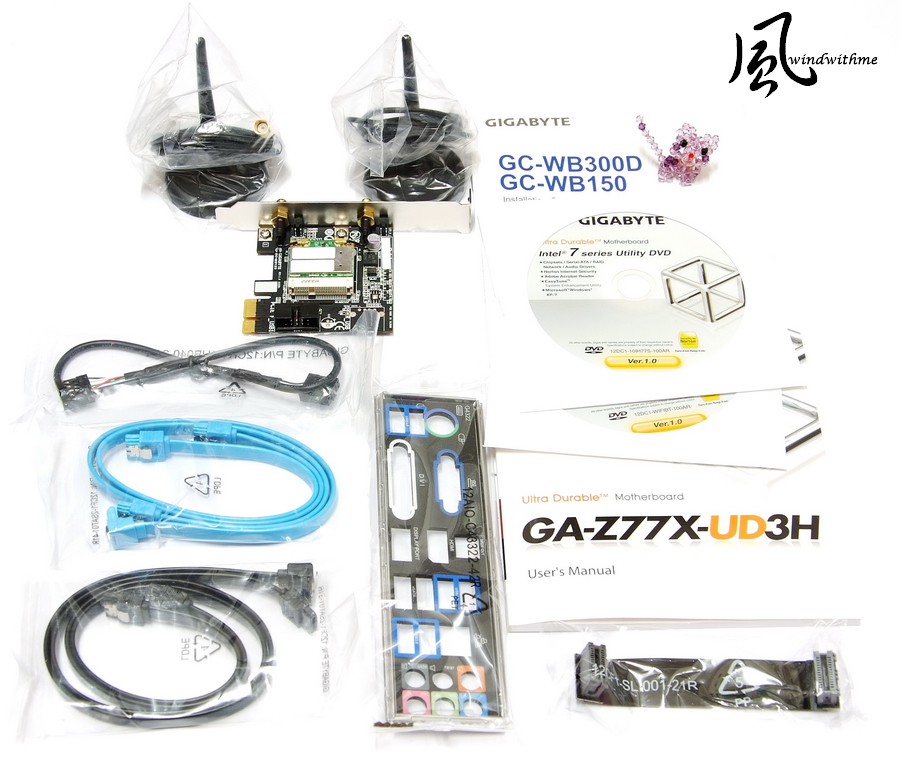
The WiFi means this model bundles BT4.0 and WiFi PCI-E card.
Lower-Right is two different USB devices. WiFi make PC location be more flexible.
As more mobile devices be more popular, now your PC can link with smart phone or tablet through BT and WiFi.

GIGABYTE Z77X-UD3H position is replacing Z68X-UD3H.
Z77 UD3H plus WiFi is only 10USD more than Z68.
However, it bundles exclusive PCI-E BT4.0/WiFi card to have better C/P.

Main color is black and heat sink is blue. The harmonize colors are good.
Intel Smart Response and Lucid Virtu GPU are still key functions of Z77.

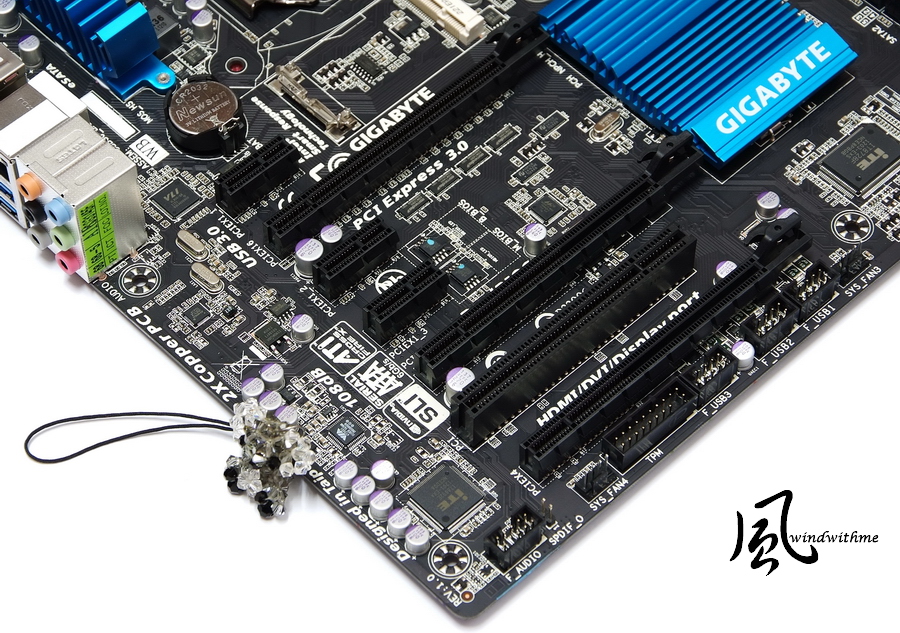
Lower-Left Corner
3 X PCI-E X16 support 2-Way AMD CrossFireX/nVIDIA SLI technology
When using Ivy Bridge CPU, the bandwidth is Gen3 X16 + X8 + X4
3 X PCI-E X1
1 X PCI
LAN chip is Atheros GbE LAN
Audio chip is VIA VT2021 supporting 7.1 channel and High Definition Audio technology
Design in Taipei
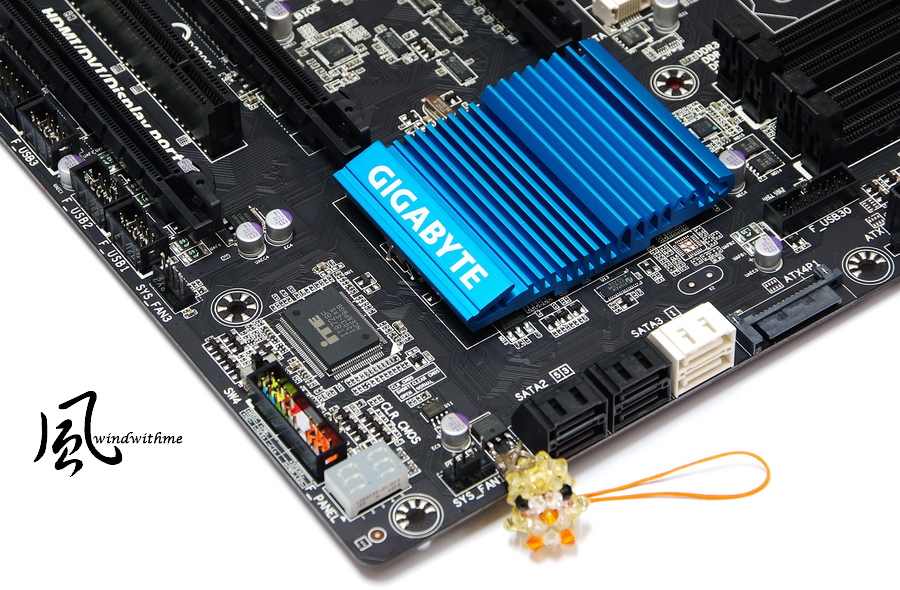
Lower-Right Corner
2 x White SATA, by Z77, support SATA3
4 x Black SATA, by Z77, support SATA2
It supports hybrid RAID 0, RAID 1, RAID 5 and RAID 10. The max performance is decided by installed SATA devices.
2 x 64 Mbit flash, Dual BIOS double protection, Debug LED
Upper-Right Corner
4 x DIMM DDR3 support 1333/1600/1866/2133/2666(OC). The max DDR3 capacity is 32GB.
It supports Extreme Memory Profile. Next is 24-PIN power connector and front USB 3.0.
Red Power button, black Reset and blue Clear CMOS buttons.
The part below are 7 onboard voltage read points for accurate real-time voltage reading.

IO
1 X PS2 Keyboard/Mouse
1 X D-Sub / DVI-D / HDMI / DisplayPort
1 X S/PDIF Optical Output
6 X USB 3.0/2.0(Blue)
2 X eSATA 6Gb/s(Red)
1 X RJ-45 LAN
6 X Audio Jacks

-
Since Intel launched Sandy Bridge in Jan 2011, it’s been a year.
In April 2012, Intel released LGA115 socket, code name is Ivy Bridge.
CPU manufacturing from 32nm 2nd Core I improves to 22nm 3nd Core I and some new technology.
The most high end chipset is Z77 instead of Z68.
Simultaneously, mid-end chipset is H77 to replace H67. Also B75 is for SMB. The price is higher than H61.
Z77 position is same as Z68. It integrates all new features.
It owns GPU output and CPU/GUP overclock options. It’s for high performance.
Z77 is also native support USB3.0 plus native SATA3 which is same as Z68.
Z77 complements the new generation I/O spec. However, it would be better to support more SATA3 Ports.
This guide is test with Z77 mid-end range product - GIGABYTE Z77X-UD3H WiFi.
GIGABYTE started this design from X79. White background looks better.
Accessories
The WiFi means this model bundles BT4.0 and WiFi PCI-E card.
Lower-Right is two different USB devices. WiFi make PC location be more flexible.
As more mobile devices be more popular, now your PC can link with smart phone or tablet through BT and WiFi.
GIGABYTE Z77X-UD3H position is replacing Z68X-UD3H.
Z77 UD3H plus WiFi is only 10USD more than Z68.
However, it bundles exclusive PCI-E BT4.0/WiFi card to have better C/P.
Main color is black and heat sink is blue. The harmonize colors are good.
Intel Smart Response and Lucid Virtu GPU are still key functions of Z77.
Lower-Left Corner
3 X PCI-E X16 support 2-Way AMD CrossFireX/nVIDIA SLI technology
When using Ivy Bridge CPU, the bandwidth is Gen3 X16 + X8 + X4
3 X PCI-E X1
1 X PCI
LAN chip is Atheros GbE LAN
Audio chip is VIA VT2021 supporting 7.1 channel and High Definition Audio technology
Design in Taipei
Lower-Right Corner
2 x White SATA, by Z77, support SATA3
4 x Black SATA, by Z77, support SATA2
It supports hybrid RAID 0, RAID 1, RAID 5 and RAID 10. The max performance is decided by installed SATA devices.
2 x 64 Mbit flash, Dual BIOS double protection, Debug LED
Upper-Right Corner
4 x DIMM DDR3 support 1333/1600/1866/2133/2666(OC). The max DDR3 capacity is 32GB.
It supports Extreme Memory Profile. Next is 24-PIN power connector and front USB 3.0.
Red Power button, black Reset and blue Clear CMOS buttons.
The part below are 7 onboard voltage read points for accurate real-time voltage reading.
IO
1 X PS2 Keyboard/Mouse
1 X D-Sub / DVI-D / HDMI / DisplayPort
1 X S/PDIF Optical Output
6 X USB 3.0/2.0(Blue)
2 X eSATA 6Gb/s(Red)
1 X RJ-45 LAN
6 X Audio Jacks
-
mSATA SSD slot supports small capacity SSD.
It can work with Intel Smart Response to enhance system performance. However, RAID 5 will be disabled.
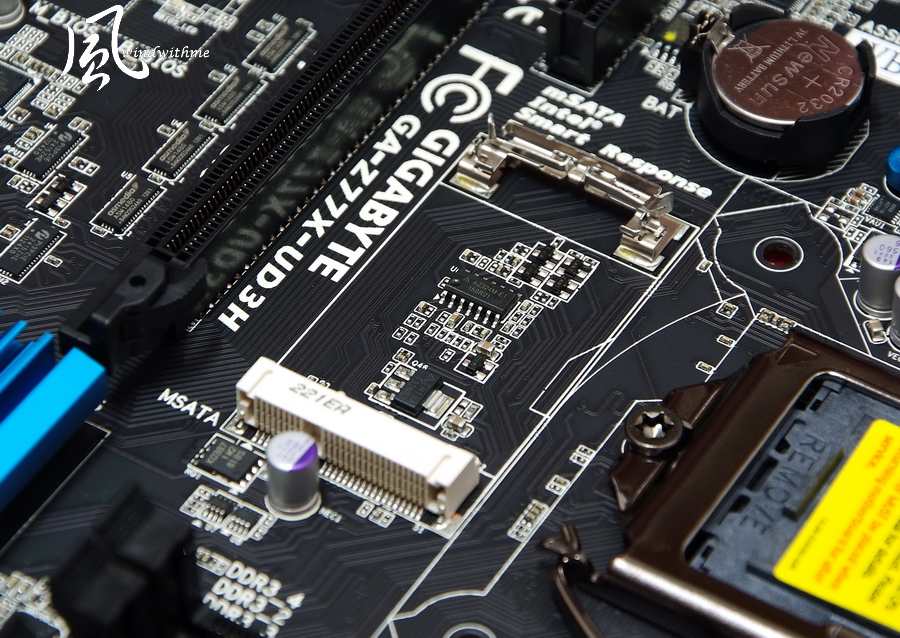
Heat-sink cutting and color are good texture.

System Configuration
CPU: Intel Core i7-3770K
MB: GIGABYTE Z77X-UD3H WiFi
DRAM: CORSAIR DOMINATOR-GT CMT16GX3M4X2133C9
VGA: Intel HD Graphics 4000
HD: Intel 520 Series 120GB
POWER: CORSAIR AX650W
Cooler: CORSAIR Hydro Series H60
OS: Windows7 Ultimate 64bit

First of all, I test in CPU default mode.
Default Setting
CPU 100 X 35 => 3500MHz (Enable Turbo Boost and C1E)
DDR3 2134.2 CL9 11-10-27 2T (Enable XMP mode)
Hyper PI 32M X8 => 14m 10.826s
CPUMARK 99 => 615

Nuclearus Multi Core => 28541
Fritz Chess Benchmark => 30.77/14770
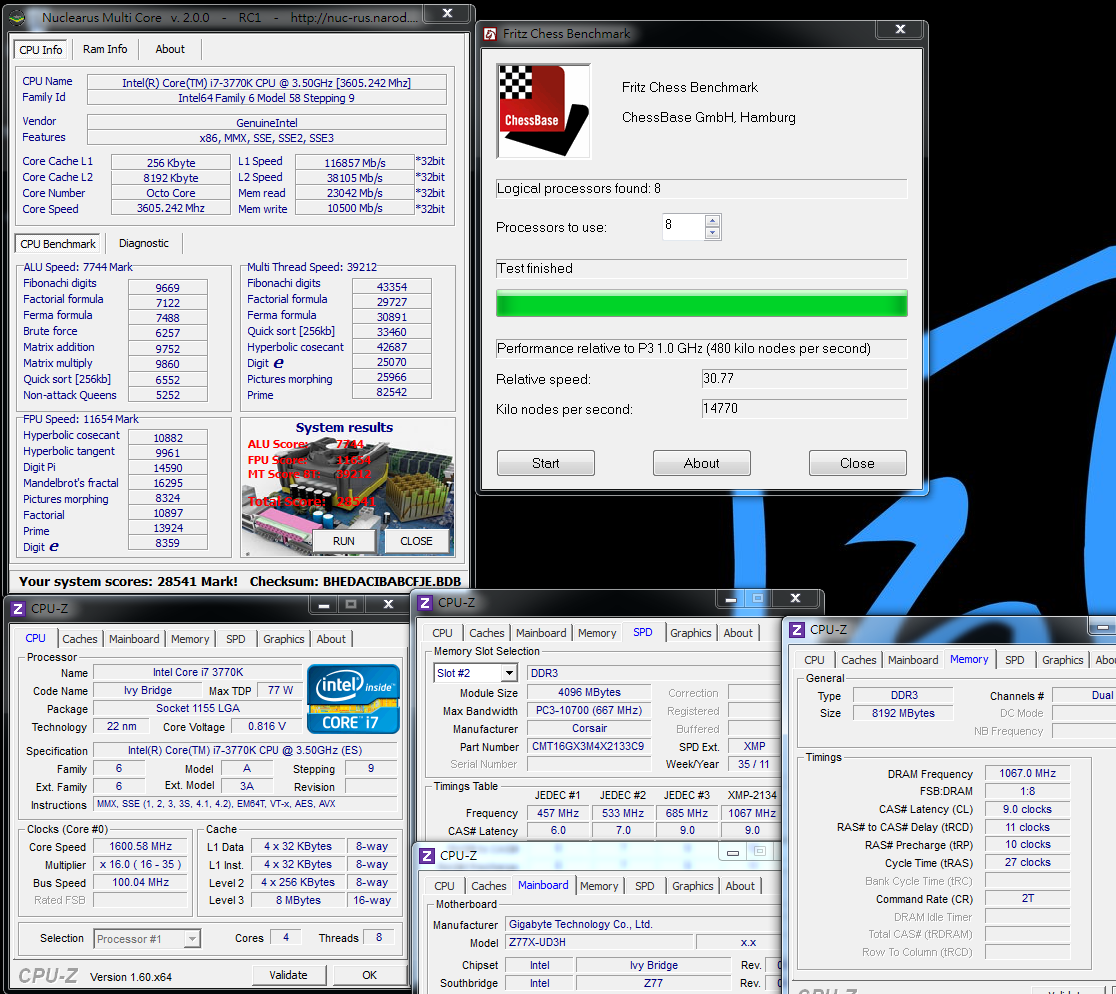
CrystalMark 2004R3 => 318966

CINEBENCH R11.5
CPU => 7.86 pts
CPU(Single Core) => 1.67 pts
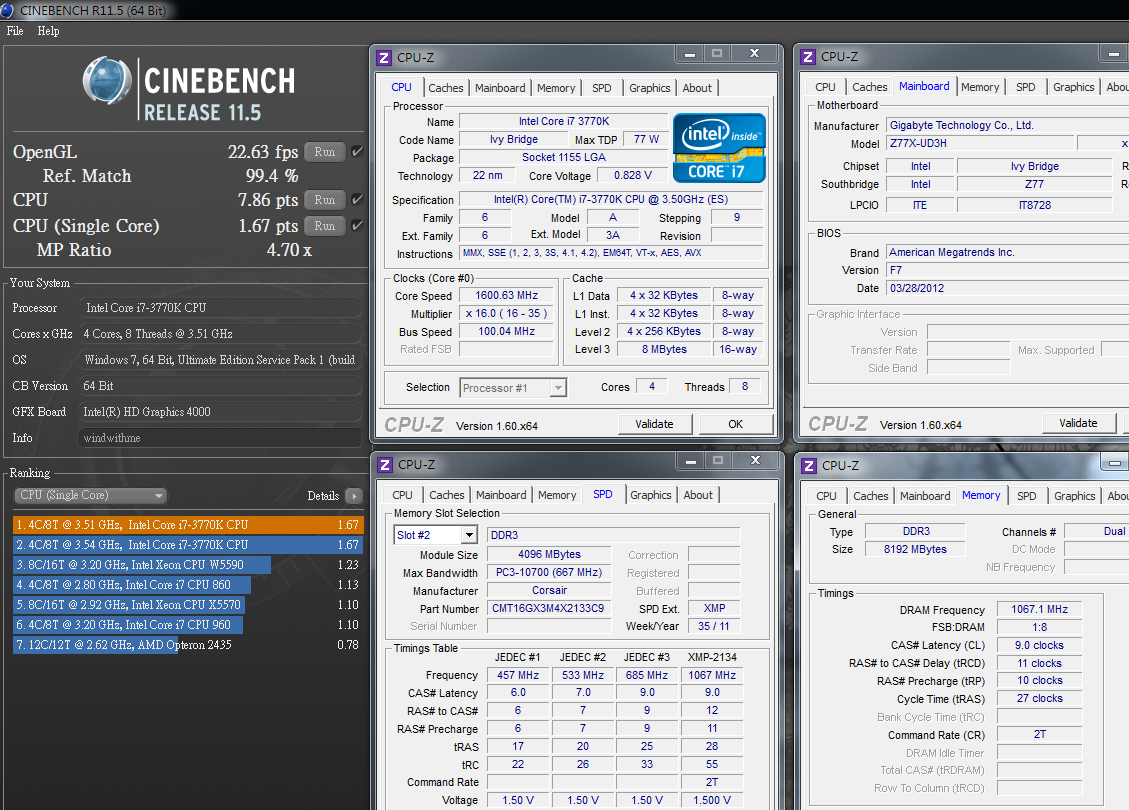
FRYRENDER
Running Time => 4m 42s
x264 FHD Benchmark => 23.1

PCMark Vantage => 23265

If we compare3nd Core i7-3770K and previous 2nd Core i7-2700K, 3770K single thread performance is 3~6% higher and 4C8T is 10~14% higher.
The main difference is 22nm and 32nm. The frequency are both 3.5GHz and 3.9GHz by Turbo Boost.
As my personal using experience, these 3 generations Core i CPU, each generation has 10~15% performance improved.
DRAM Bandwidth Test
DDR3 2134.2 CL9 11-10-27 2T
ADIA64 Memory Read - 21358 MB/s
Sandra Memory Bandwidth - 27475 MB/s
MaXXMEM Memory-Copy - 23497 MB/s

All new platforms DDR3 performance can divide into bandwidth and max frequency.
For bandwidth, Ivy Bridge DDR3 is similar to Sandy Bridge.
However, the max frequency is improved a lot which I will show you the detail later.
-
Temperature (Room Temp. is around 30?C)
Enter to OS Desktop - 28~34

CPU Full Speed by running LinX - 60~67

As high room temperature, I use CORSAIR Hydro H60 with 12cm high speed fan.
The temperature is not same as past experience. As CPU yield rate improving, it may relate to 3D transistors.
Power Consumption
Enter to OS Desktop - 34W
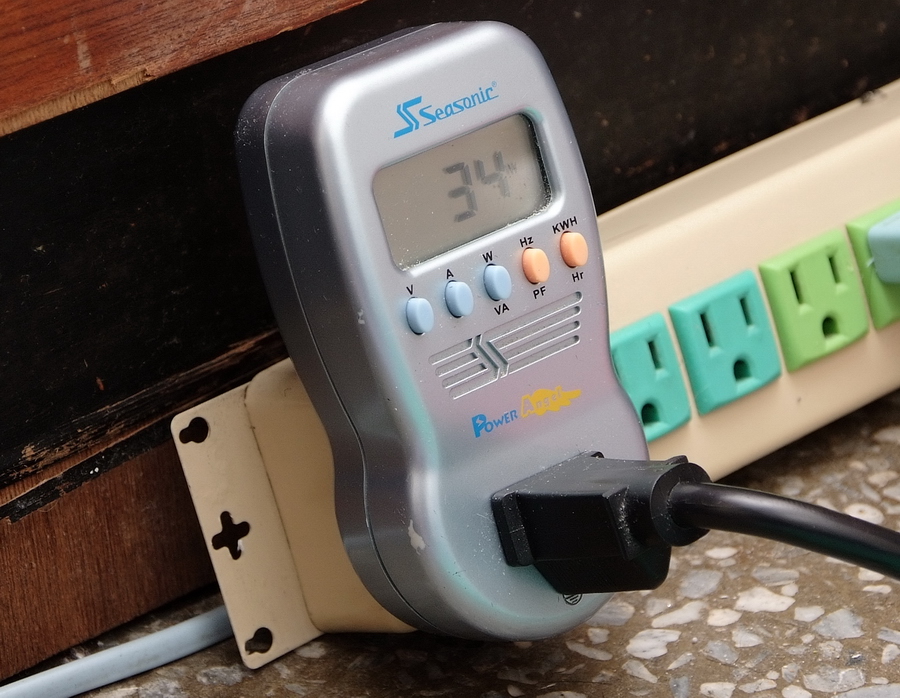
CPU Full Speed by running LinX - 106W

3770K enters to OS desktop is 11W lower than 2700K, about 25% lower.
Full speed is 3W more than 2700K, about 3% up.
3770K power consumption is lower as entering to OS desktop. For full speed, the power consumption is similar to SNB.
OC Test
Let’s check UEFI related interface first.
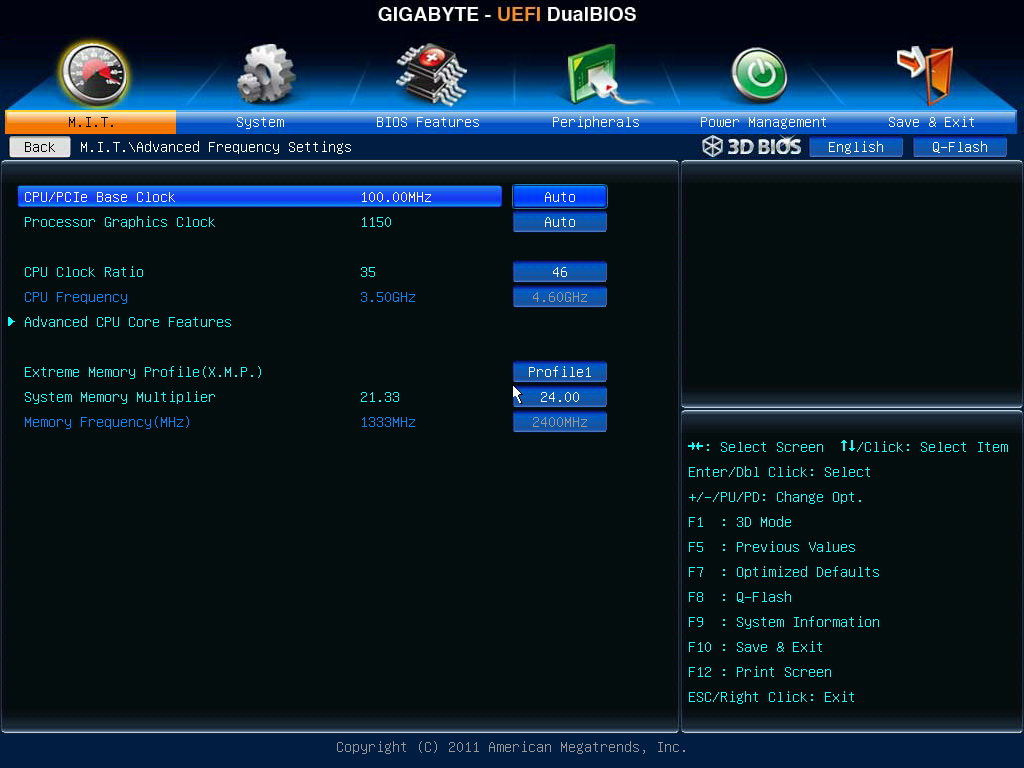
CPU Clock Ratio set to 46, 4600MHz.
Enable X.M.P. to set DDR3 to 2133 automatically.
System Memory Multiplier set to 24, DDR3-2400 by DDR3 quality.
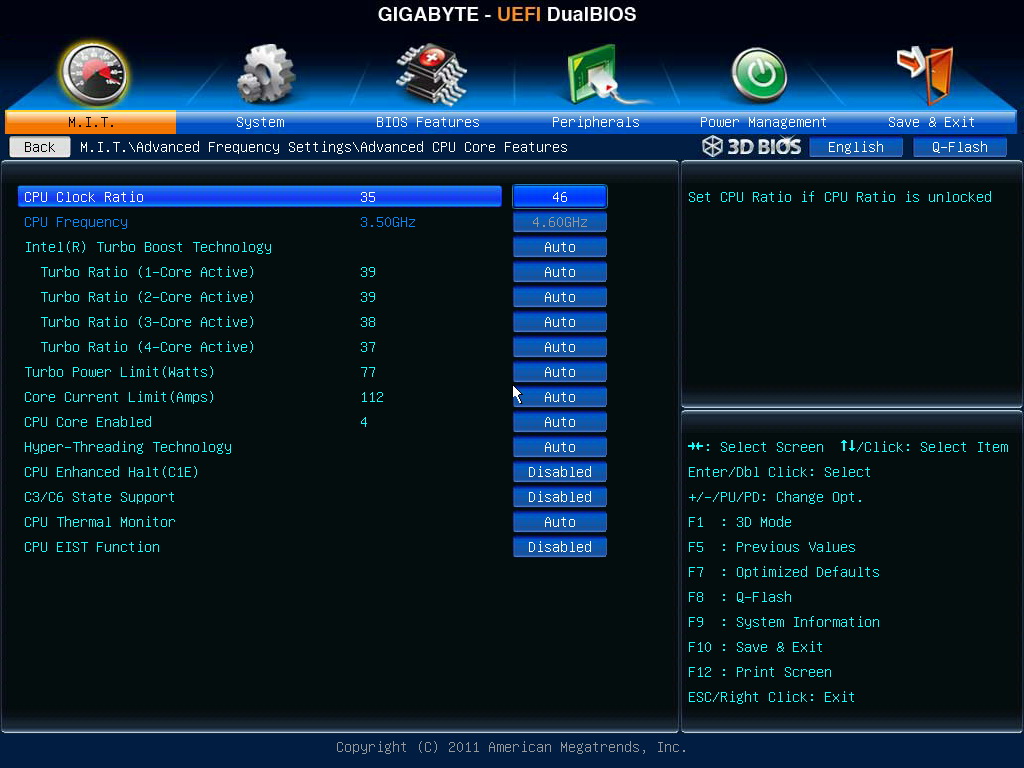
Advanced CPU Options
You can define individual CPU Core ratio or decide how many Core to enable.
C1E is power saving technology which is contrary to Intel Turbo Boost. Intel Turbo Boost will rise CPU frequency by different loading.
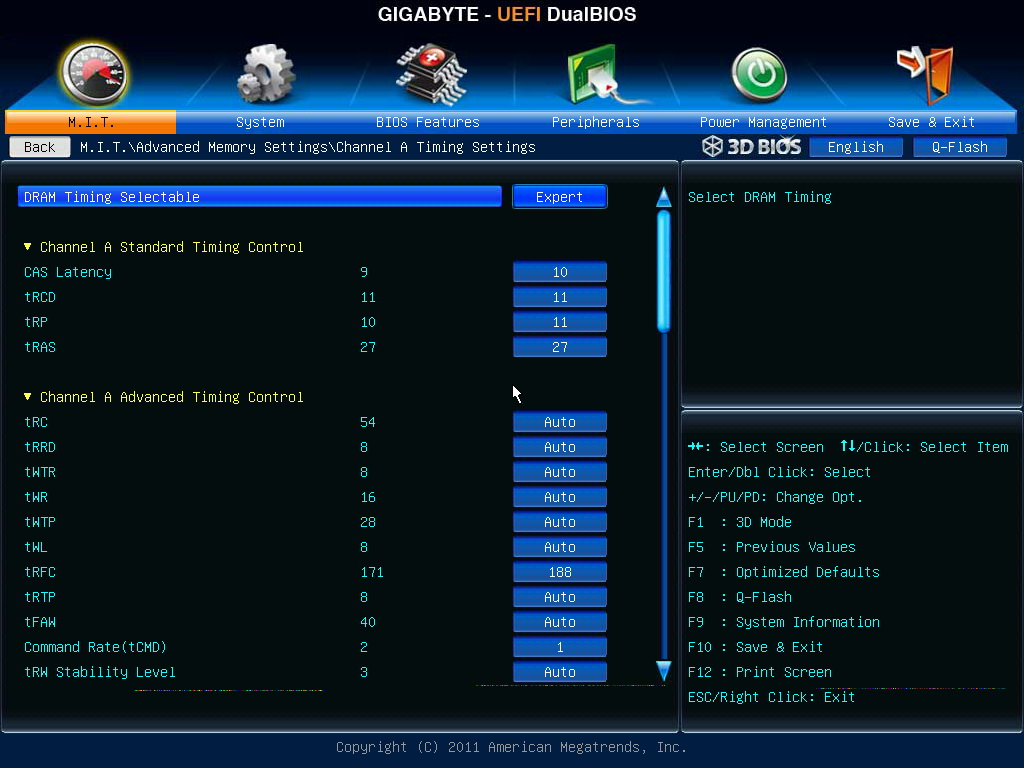
DDR3 2400 parameters are CL10 11-11-27 1T.
Major three OC voltage range.
CPU Vcore 0.800~1.900V
DRAM Voltage 1.100~2.100V
CPU Vtt 0.800~1.700V
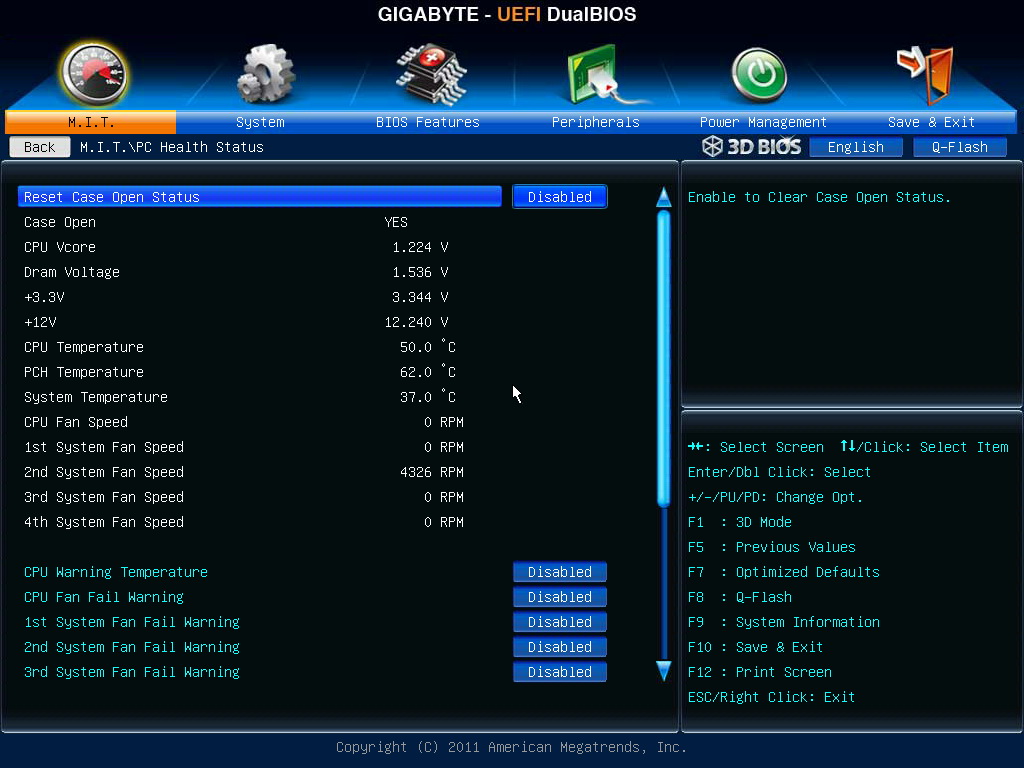
3770K voltage is very low as OC to 4.6GHz. The CPU Vcore is 1.235V.

PC Health Status
GIGABYTE UEFI interface provides 6 languages.

Normally, I spend 3 to 5 days to fine tune all voltage and OC set up.
Ivy Bridge new platform takes me almost 2 weeks to find the balance between CPU and DDR3.
Every CPU and DDR3 quality will impact the OC result. The cooling devices and room temperature will make difference as well.
The value above is based on my personal equipments. 3770K OC CPU 4.6GHz / DDR3 2133 OC 2400.
-
CPU 100.3 X 46 => 4601.24MHz(Disable Turbo Boost and C1E)
DDR3 2401.2 CL10 11-11-27 1T(Enable XMP mode)
Hyper PI 32M X8 => 12m 25.166s
CPUMARK 99 => 725
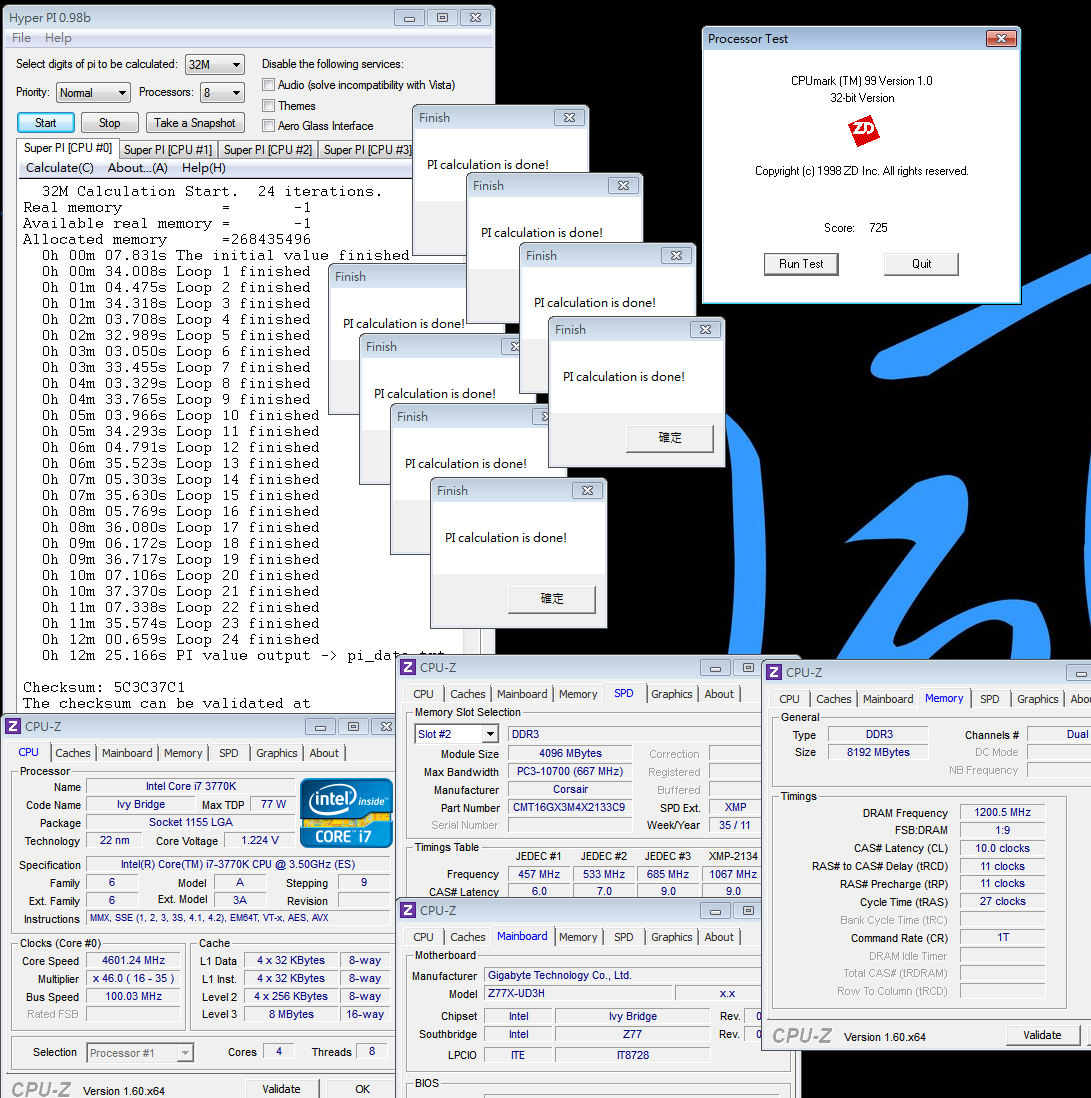
Nuclearus Multi Core => 32856
Fritz Chess Benchmark => 36.22/17384

CrystalMark 2004R3 => 365211

CINEBENCH R11.5
CPU => 9.35 pts
CPU(Single Core) => 1.96 pts

FRYRENDER
Running Time => 4m 01s
x264 FHD Benchmark => 27.3
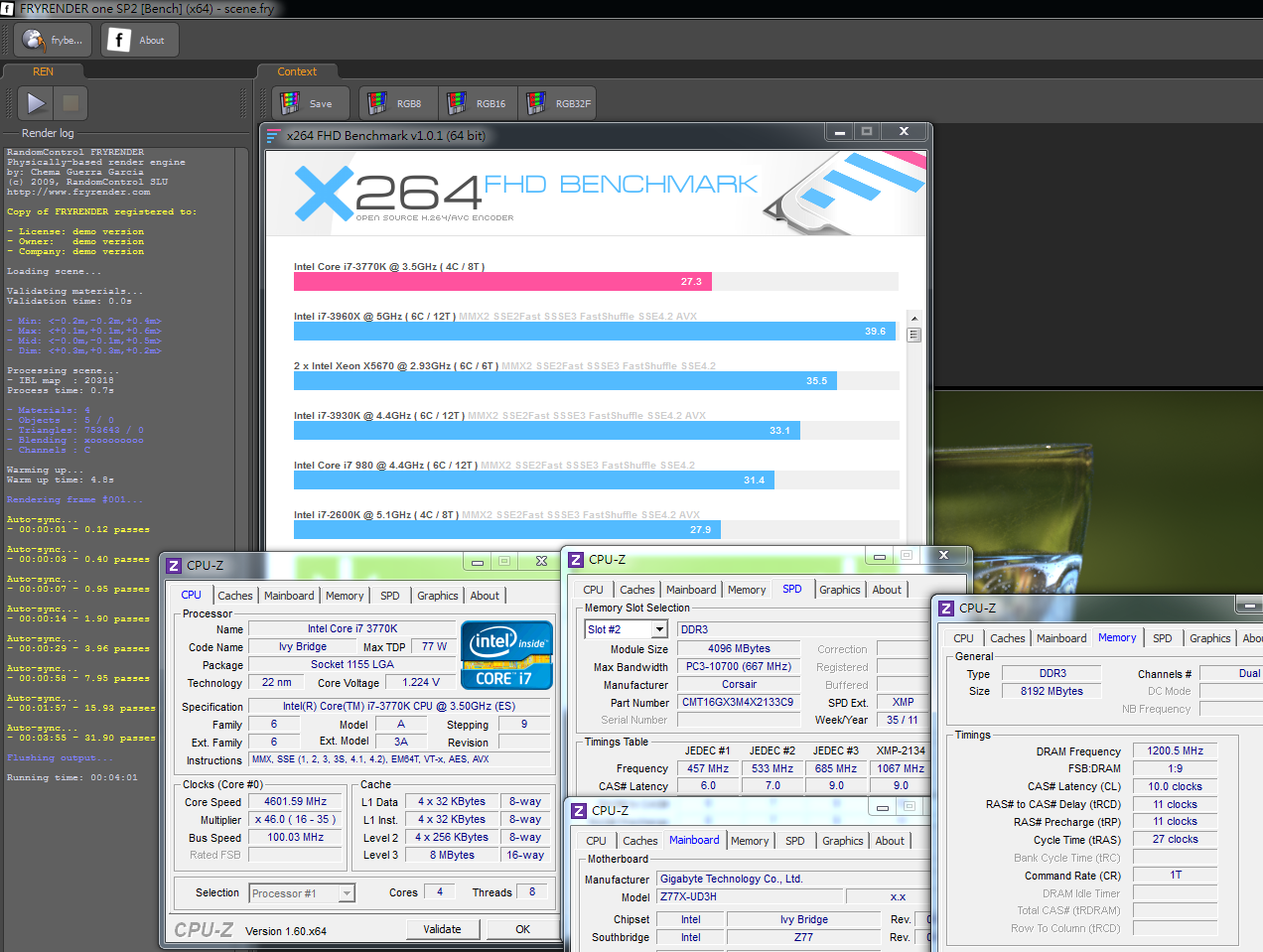
PCMark Vantage => 24906

After OC, 3770K single thread performance increases 17~18% and 4C8T full speed performance increases 17~19%.
If we compare 3770K to 2700K, 4.6GHz 3770K performance is close to 4.8GHz 2700K.
This is Ivy Bridge new structure strength.
DRAM Bandwidth Test
DDR3 2401.2 CL10 11-11-27 1T
ADIA64 Memory Read - 23337 MB/s
Sandra Memory Bandwidth - 27784 MB/s
MaXXMEM Memory-Copy - 27482 MB/s

As default CPU clock, LGA 1155 Sandy Bridge can achieve DDR3-2133
LGA 2011 Sandy Bridge-E can reach DDR3-2400.
You can see the different max DDR3 frequency in same Sandy Bridge memroy controller.
This time, LGA 1155 Ivy Bridge can achieve DDR3 2400~2666 up.
Ivy Bridge memory controller makes the best standard of high frequency high performance.
Temperature (Room Temp. is around 30?C)
Enter to OS Desktop - 34~40

CPU Full Speed by running LinX - 77~83
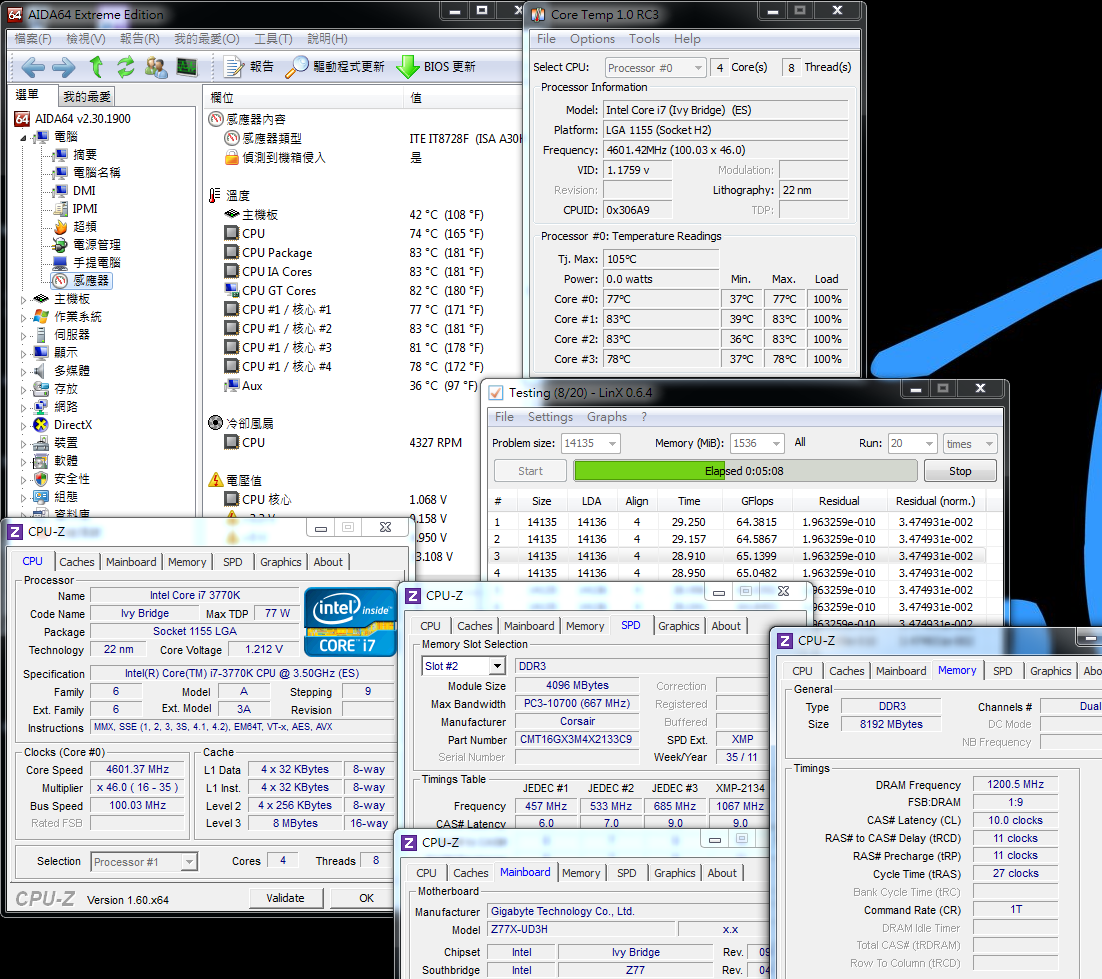
3770k temperature increases 6~12 when entering to OS desktop and 10~23 as full speed.
If comparing to default and OC 4.6GHz, the increased temperature is in acceptable range.
As 22nm manufacturing, the temperature is higher than SNB.
It may cause by Intel first using 3D transistors technology. This new technology makes 22nm temperature is not lower.
The temperature performance is a fly in the ointment.
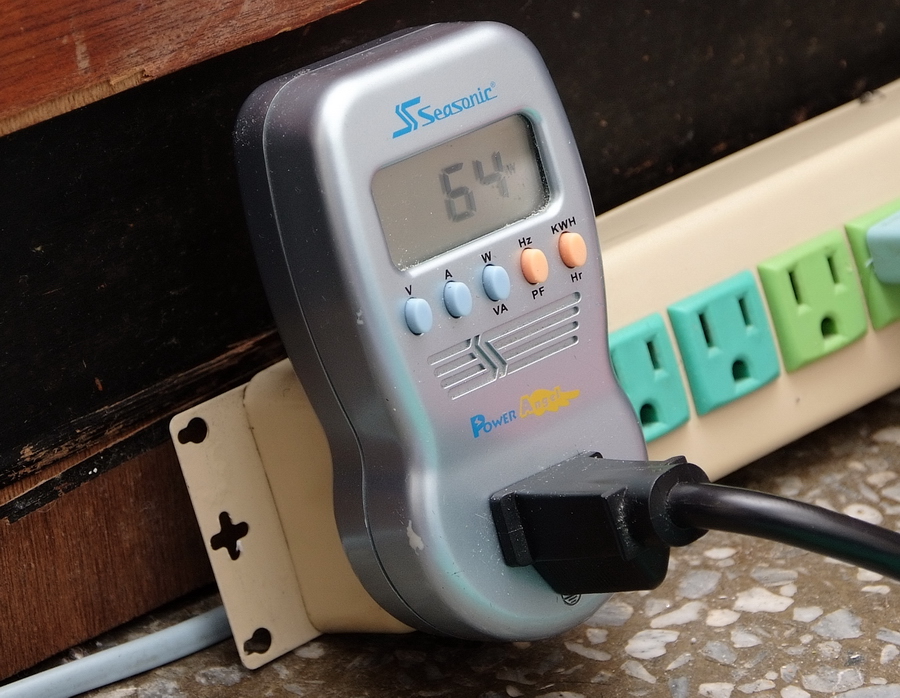
Power Consumption
Enter to OS Desktop - 64W
-
CPU Full Speed by running LinX - 145W
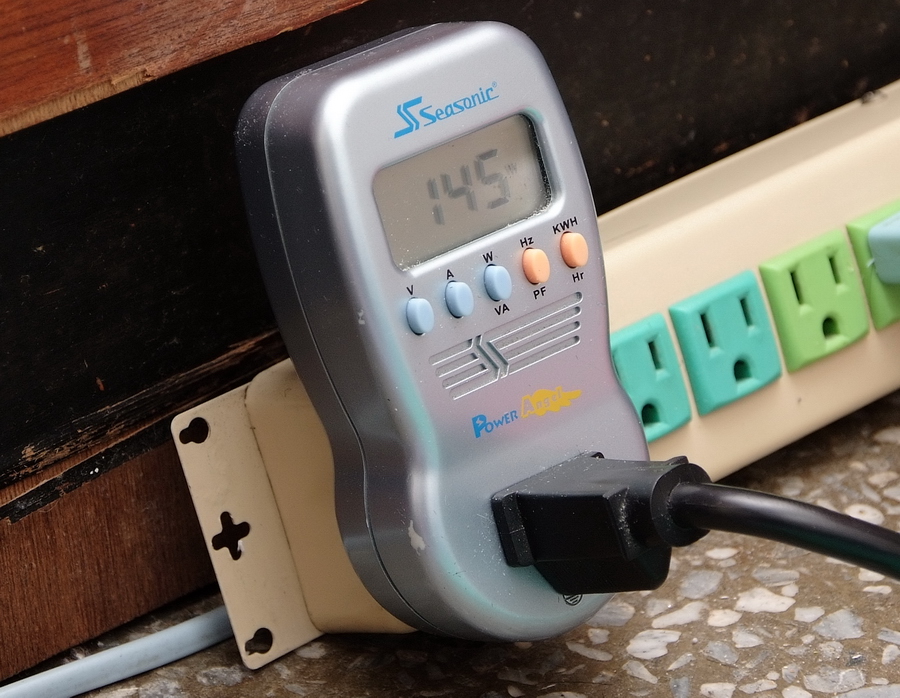
3770K has great advantage in power consumption. It should be 22nm manufacturing credit.
Entering to OS desktop is 15W lower than past high end platform. Full speed is 25~30W lower. This is one of Ivy Bridge advantages.
Intel HD Graphics 4000 Performance Test
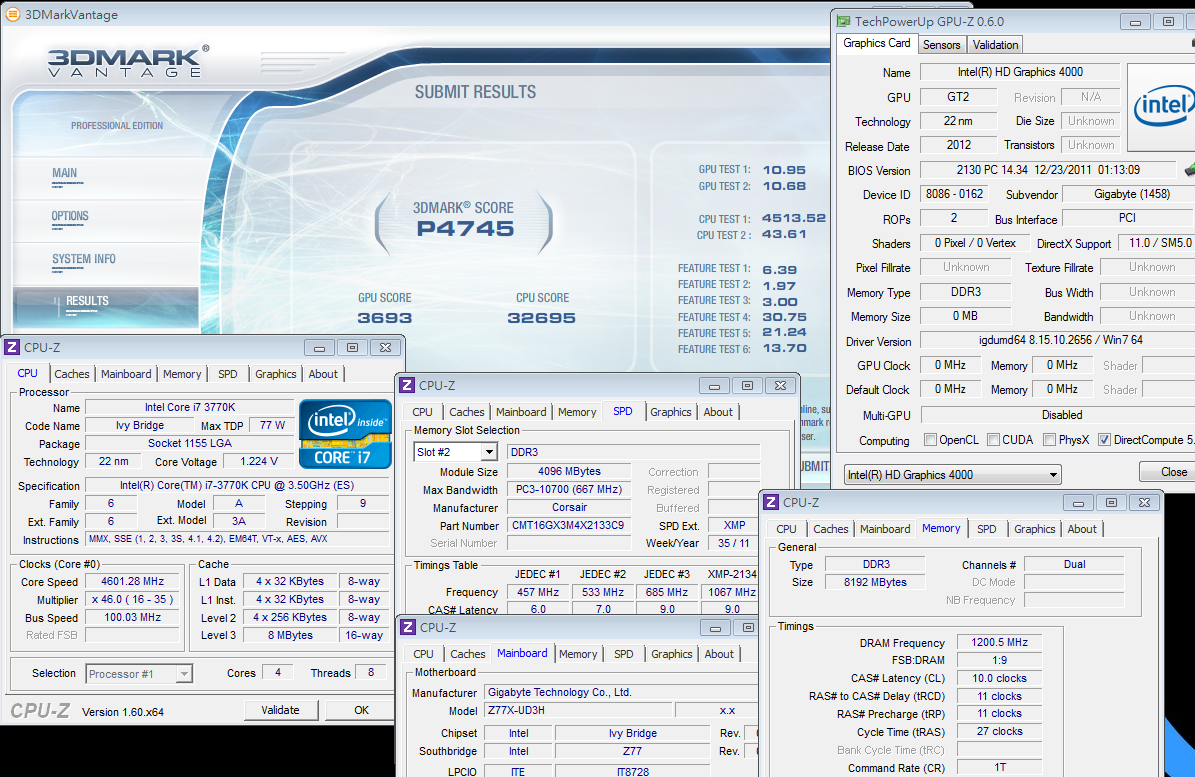
GPU default in BIOS is 23, 1150MHz
3DMark Vantage => P4745
StreetFighter IV Benchmark
1280 X 720 => 98.93 FPS

FINAL FANTASY XIV
1280 X 720 => 1698

Intel GPU - HD 3000 and HD 4000 comparison. CPU and GPU are both in default frequency.
3770K 3DMark Vantage is 4100 and 2770K is 2500?.
StreetFighter IV Benchmark high resolution 1920 X 1080, 3770K is 50fps and 2700K is 31fps.
New generation HD Graphics 4000 3D performance is about 60% higher than HD Graphics 3000.
GIGABYTE Z77X-UD3H WiFi
Pros
1. Z77 white design and boot screen are better than the past.
2. UEFI BIOS provides two BIOS interfaces.
3. Exclusive BT4.0 /Atheros WiFi card can provide wide connectivity to all mobile devices.
4. Built-in debug LED, 3 buttons and unique mSATA SSD slot.
5. Back IO panel provides USB 3.0 and build in personal preferred Atheros LAN and VIA audio chip.
Cons
1. DDR3 2600 compatibility need to be improved.
2. UEFI GUI interface make booting speed is lower than traditional BIOS few seconds. Future Windows8 will fine tune UEFI.

Performance ?????????? 82/100
Components ?????????? 88/100
Specification ?????????? 86/100
Appearance ?????????? 82/100
C/P Value ?????????? 88/100
Let’s look back to Core i7-3770K CPU again.
Performance, temperature and power consumption performance are improved mostly, but the temperature is not as good as expectation.
22nm really lower the power consumption, and CPU performance is about 200MHz higher than SNB.
IGP HD 4000 3D performance is 60% improved. It makes integrated GPU can support mid to low 3D software.
This is the first time for CPU using 3D transistors technology. The temperature after OC is higher than 2700K.
Let’s move to Z77 chipset. It has several advantages comparing to Z68. All MB brands launched rich Z77 product lines.
Native USB 3.0, Intel Smart Connect / Quick Sync 2.0, Lucid Universal MVP and so on.
The most concern point is price. Z77 price is close to Z68. Even some Z77 boards price is lower than Z68.
Now, you can see the benefits of Z77 chipset.
GIGABYTE Z77X-UD3H WiFi is mid-range of Z77 market, but the spec and components are complete.
They implement many designs from X79 and Z68 to Z77X-UD3H. Especially, the BT4.0/WiFi card are distinguishing exclusive feature
The price is a little higher than Z68X-UD3H, but the spec is much better. It makes Z77X-UD3H be a good choice in mid-end market.

This review is also in my blog WIND3C, Any comments are welcome.
-
great review
Ciao! Sembra che tu sia interessato a questa conversazione, ma non hai ancora un account.
Stanco di dover scorrere gli stessi post a ogni visita? Quando registri un account, tornerai sempre esattamente dove eri rimasto e potrai scegliere di essere avvisato delle nuove risposte (tramite email o notifica push). Potrai anche salvare segnalibri e votare i post per mostrare il tuo apprezzamento agli altri membri della comunità.
Con il tuo contributo, questo post potrebbe essere ancora migliore 💗
Registrati Accedi