
[ENG] Intel LGA 2011 latest CPU - Core i7-3820 OC Guide Sharing
-
Intel launched new Extreme LGA 2011 platform end of 2011 to replace 3-year long LGA 1366.
Recently, Intel uses two different sockets to define the product position. New Extreme uses X79 chipset.
X79 is the product at the top of pyramid. CPU is Core i7 series only. It has 4C8T and 6C12T.
The mid-high level is LGA 1155. It has full product line, from entry to Core i7.
CPU has 1C2T~4C8T. It means the top LGA 1155 is the entry of LGA 2011.
Intel dual product lines are different positions and pricing strategies. I do suggest you to study carefully before buying.
This time, the CPU I got is LGA 2011 Intel Core i7-3820.
It’s entry CPU for X79 platform. The structure is 4C8T which is different with two 6C12T 3930K and 3960X.
Even though it’s entry Core i7 of LGA 2011, the price is similar with LGA 1155 Core i7...

i7-3820 clock is 3.6GHz. It supports Turbo Boost 2.0 and up to 3.80GHz.
It’s physical 4 Cores with Hyper-Threading to support 8 threads, called 4C8T.
It’s 32nm manufacturing, TDP 130W, and 10MB L3 Cache. The picture is the back side.

MB is using GIGABYTE X79-UD5, the mid end X79 board.
GIGABYTE X79 UD5 and G1.Assassin2 both bundle BT4.0/Wi-Fi combo PCI-E card.
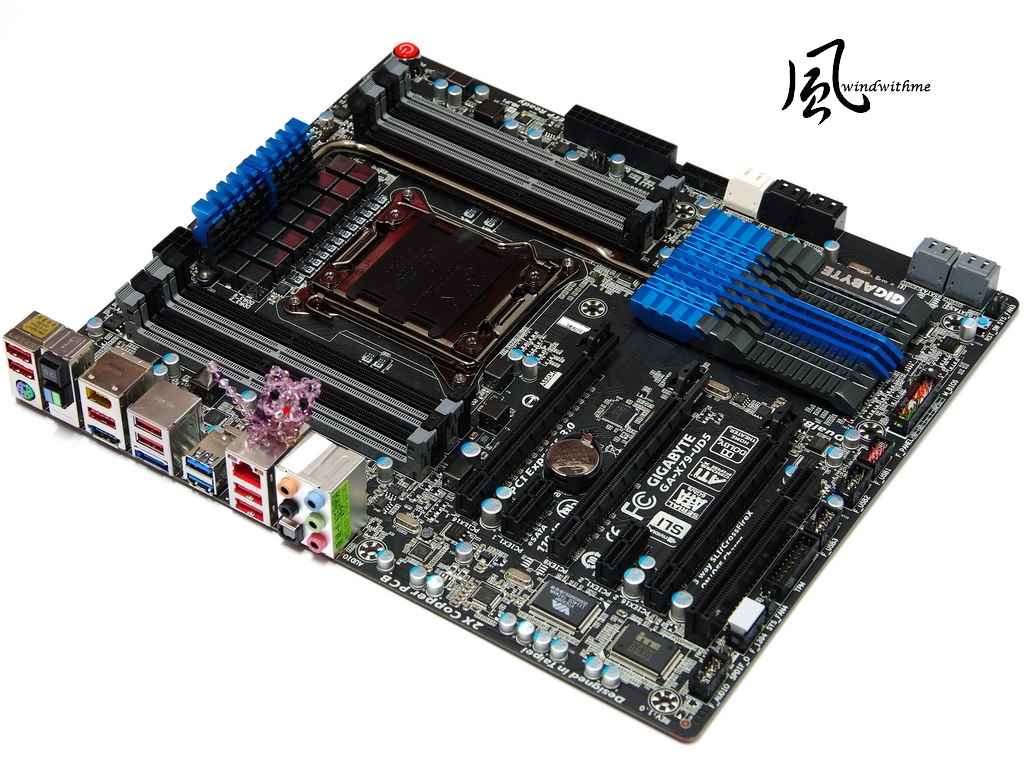
It’s E-ATX form factor, 30.5cm x 26.4cm.
It looks bigger but still can install into regular ATX case, like Sharkoon T28.

Lower-Left Corner
3 X PCI-E X16 support 3-Way AMD CrossFireX/nVIDIA SLI.
The bandwidth is X16 + X16 or X8 + X8 + X8.
2 X PCI-E X1
1 X PCI
LAN Chip is Intel GbE LAN
Audio chip is Realtek ALC898, support 7.1 channel and High Definition Audio technology.
Design in Taipei
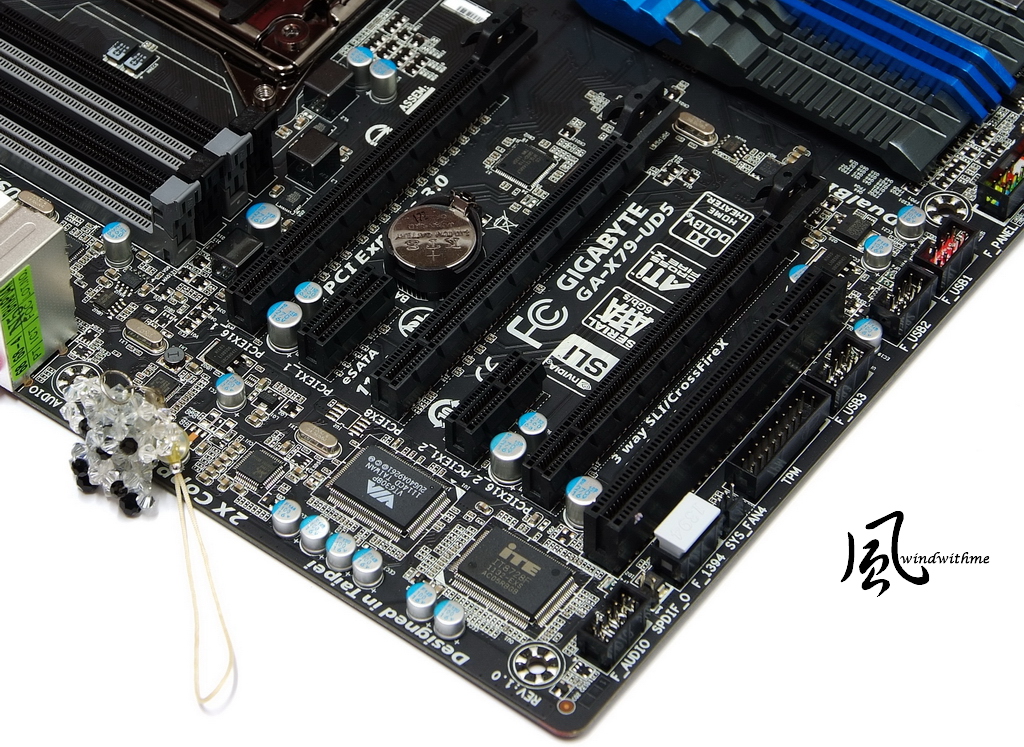
Lower-Right Corner
2 White SATA support SATA3, provided by X79.
4 lack SATA support SATA2, provide by X79.
Above SATA can support hybrid RAID 0, RAID 1, RAID 5 and RAID 10. The performance is based on installed SATA devices.
4 Gray SATA support SATA3, provided by Marvell 88SE9172. They support RAID 0 and RAID 1.
2 X 64 Mbit flash for Dual BIOS, 1 front USB 3.0 and 3 USB 2.0 ports.

Upper Side
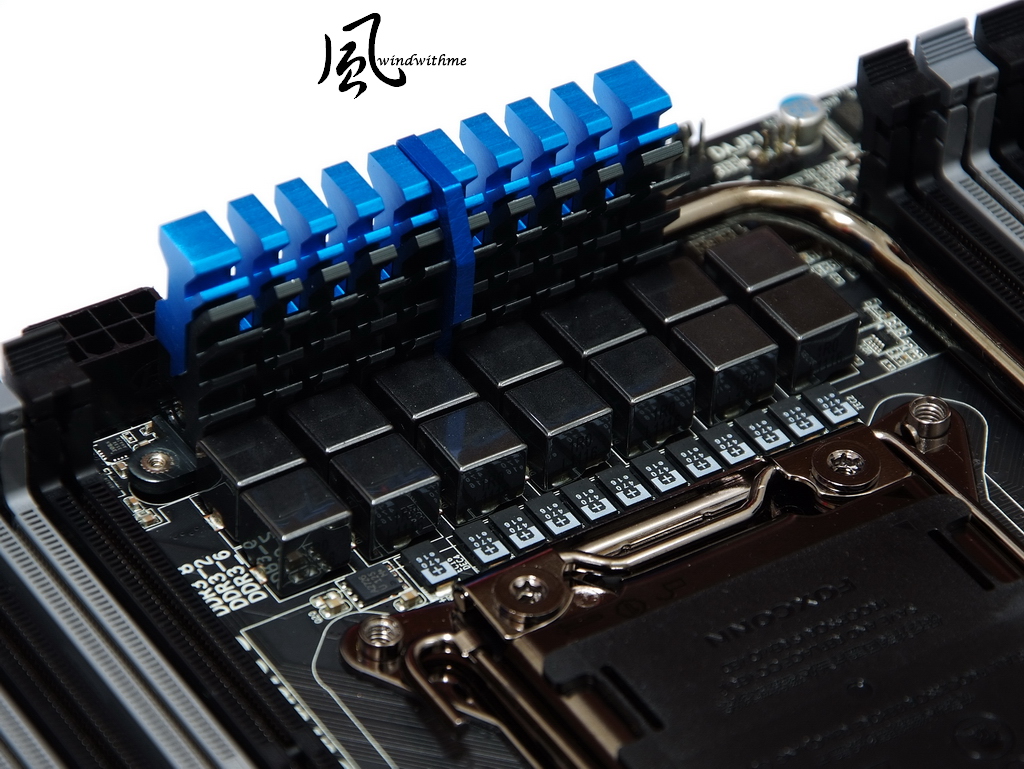
X79-UD5 uses 14-phase digital PWM for CPU. CPU metal cover is plating process.
8xDIMM DDR3 support 1066/1333/1600/1866/2133. The max DDR3 capacity is 64GB.
DRAM supports quad channel and Extreme Memory Profile technology.

IO
1 X PS2 KB/Mouse
1 X O.C. button
1 X BIOS switch
1 X Clear CMOS button
7 X USB 2.0(Red/Black)
1 X eSATA/USB 3.0 Combo(Blue)
1 X eSATA3 Combo(Blue)
2 X USB 3.0(Blue)
1 X RJ-45 LAN
1 X S/PDIF Optical Output
5 X Audio Jacks

X79 Chipset use big heat-sink. The good harmonious color makes board more elegant.

MOSFET heat-sink, you can see the special cutting make surface bigger.
The heat-pipe design can balance the heat between chipset and PWM.
-
Intel launched new Extreme LGA 2011 platform end of 2011 to replace 3-year long LGA 1366.
Recently, Intel uses two different sockets to define the product position. New Extreme uses X79 chipset.
X79 is the product at the top of pyramid. CPU is Core i7 series only. It has 4C8T and 6C12T.
The mid-high level is LGA 1155. It has full product line, from entry to Core i7.
CPU has 1C2T~4C8T. It means the top LGA 1155 is the entry of LGA 2011.
Intel dual product lines are different positions and pricing strategies. I do suggest you to study carefully before buying.
This time, the CPU I got is LGA 2011 Intel Core i7-3820.
It’s entry CPU for X79 platform. The structure is 4C8T which is different with two 6C12T 3930K and 3960X.
Even though it’s entry Core i7 of LGA 2011, the price is similar with LGA 1155 Core i7...
i7-3820 clock is 3.6GHz. It supports Turbo Boost 2.0 and up to 3.80GHz.
It’s physical 4 Cores with Hyper-Threading to support 8 threads, called 4C8T.
It’s 32nm manufacturing, TDP 130W, and 10MB L3 Cache. The picture is the back side.
MB is using GIGABYTE X79-UD5, the mid end X79 board.
GIGABYTE X79 UD5 and G1.Assassin2 both bundle BT4.0/Wi-Fi combo PCI-E card.
It’s E-ATX form factor, 30.5cm x 26.4cm.
It looks bigger but still can install into regular ATX case, like Sharkoon T28.
Lower-Left Corner
3 X PCI-E X16 support 3-Way AMD CrossFireX/nVIDIA SLI.
The bandwidth is X16 + X16 or X8 + X8 + X8.
2 X PCI-E X1
1 X PCI
LAN Chip is Intel GbE LAN
Audio chip is Realtek ALC898, support 7.1 channel and High Definition Audio technology.
Design in Taipei
Lower-Right Corner
2 White SATA support SATA3, provided by X79.
4 lack SATA support SATA2, provide by X79.
Above SATA can support hybrid RAID 0, RAID 1, RAID 5 and RAID 10. The performance is based on installed SATA devices.
4 Gray SATA support SATA3, provided by Marvell 88SE9172. They support RAID 0 and RAID 1.
2 X 64 Mbit flash for Dual BIOS, 1 front USB 3.0 and 3 USB 2.0 ports.
Upper Side
X79-UD5 uses 14-phase digital PWM for CPU. CPU metal cover is plating process.
8xDIMM DDR3 support 1066/1333/1600/1866/2133. The max DDR3 capacity is 64GB.
DRAM supports quad channel and Extreme Memory Profile technology.
IO
1 X PS2 KB/Mouse
1 X O.C. button
1 X BIOS switch
1 X Clear CMOS button
7 X USB 2.0(Red/Black)
1 X eSATA/USB 3.0 Combo(Blue)
1 X eSATA3 Combo(Blue)
2 X USB 3.0(Blue)
1 X RJ-45 LAN
1 X S/PDIF Optical Output
5 X Audio Jacks
X79 Chipset use big heat-sink. The good harmonious color makes board more elegant.
MOSFET heat-sink, you can see the special cutting make surface bigger.
The heat-pipe design can balance the heat between chipset and PWM.
-
GIGABYTE starts to use UEFI interface since X79.
The main setup page has 2 interfaces. This part is different with the others.
First, we look at the 3D BIOS. The GUI design is based on product outlook.

M.I.T. Tuning Page. You can see the real time hardware status.
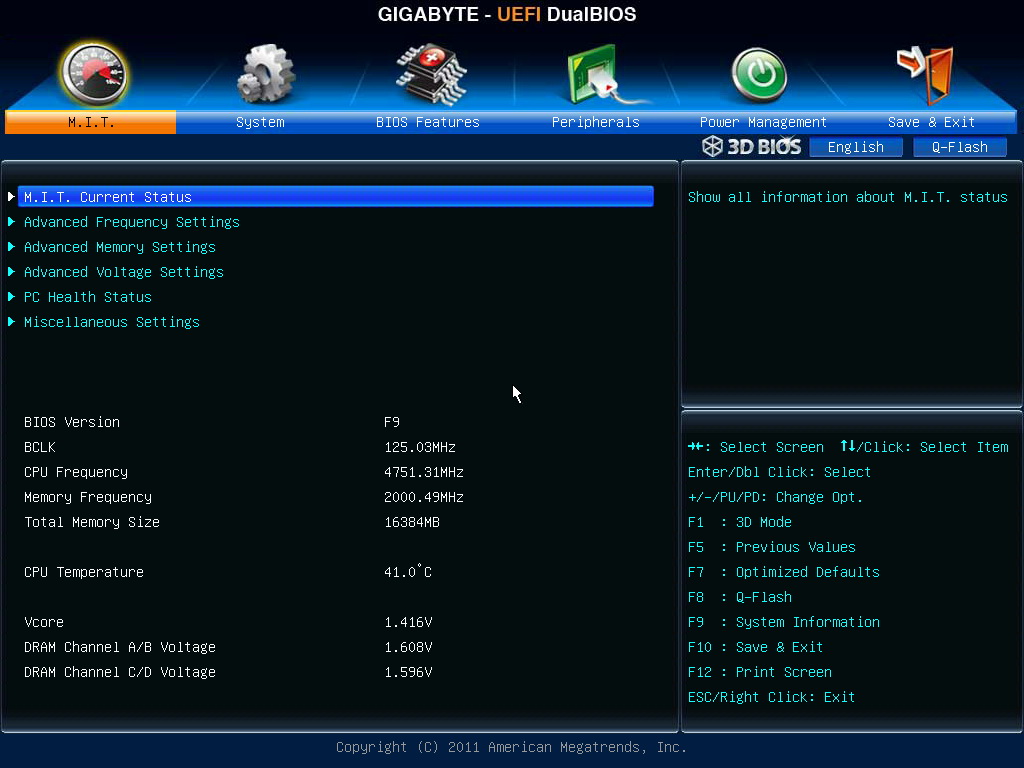
LGA 2011 CPU frequency is much higher than LGA 1155.
Depending on CPU quality, like the picture, I adjust CPU from 100MHz to 125MHz.

Memory Setup Page, you can enable XMP here.
As rising CPU clock, DDR3 will be sync with it. I set memory as 1600.
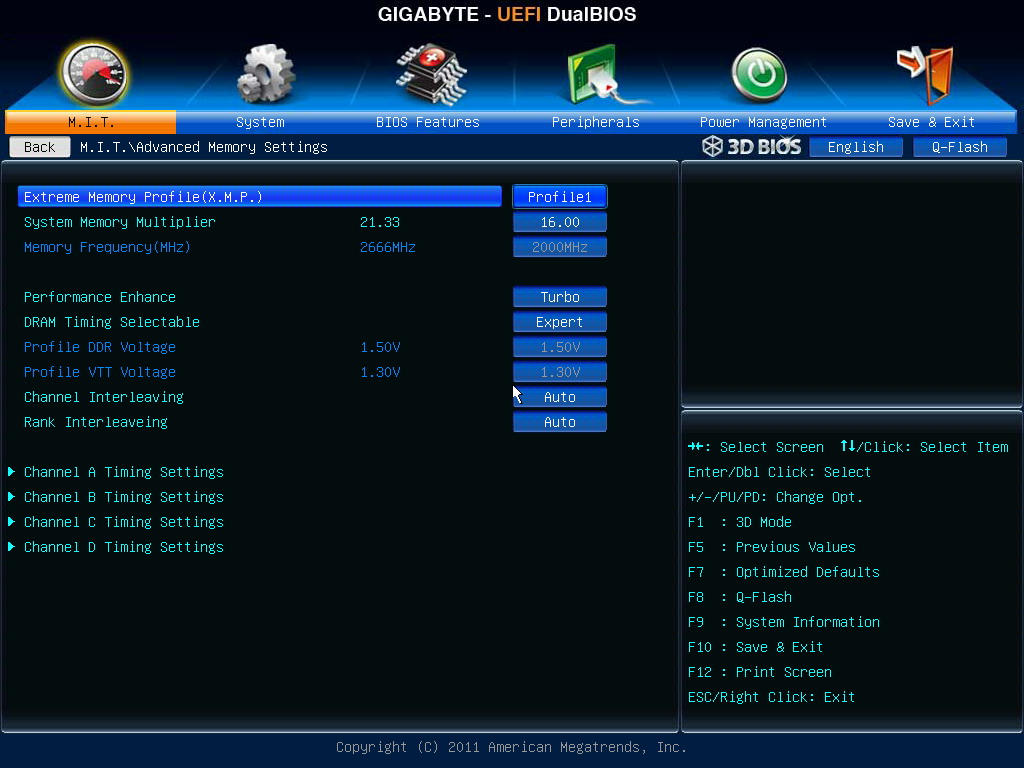
Advanced DDR3 parameters - CL9 10-10-27 1T

Voltage Page
According to CPU quality and cooler, I add 0.460V.
CPU Vtt is 1.1000V. If you would like to OC CPU and memory more, you need to add this voltage.

DDR3 Voltage is 1.600V.

PC Health Status

The setup above is OC Core i7-3820 to 4.75G and DDR3 to 2000.
If you would like to OC higher, you have to rise the CPU Vtt. The range is 1.100 ~ 1.200V.
If you only use multiplier to OC i7-3820, you can achieve 4.3GHz only by ratio X43.
It doesn’t support unlock features as 3930K or 3960X.
System Configuration
CPU: Intel Core i7-3820
MB: GIGABYTE X79-UD5
DRAM: CORSAIR DOMINATOR-GT CMT16GX3M4X2133C9
VGA: msi N560GTX-Ti Twin Frozr II
HD: Intel 520 Series 120GB
POWER: CORSAIR AX650W
Cooler: CORSAIR Hydro Series H100
OS: Windows7 Ultimate 64bit

Cooler is CORSAIR H100 Liquid Cooling System
Hydro Series has H60, H80 and H100.
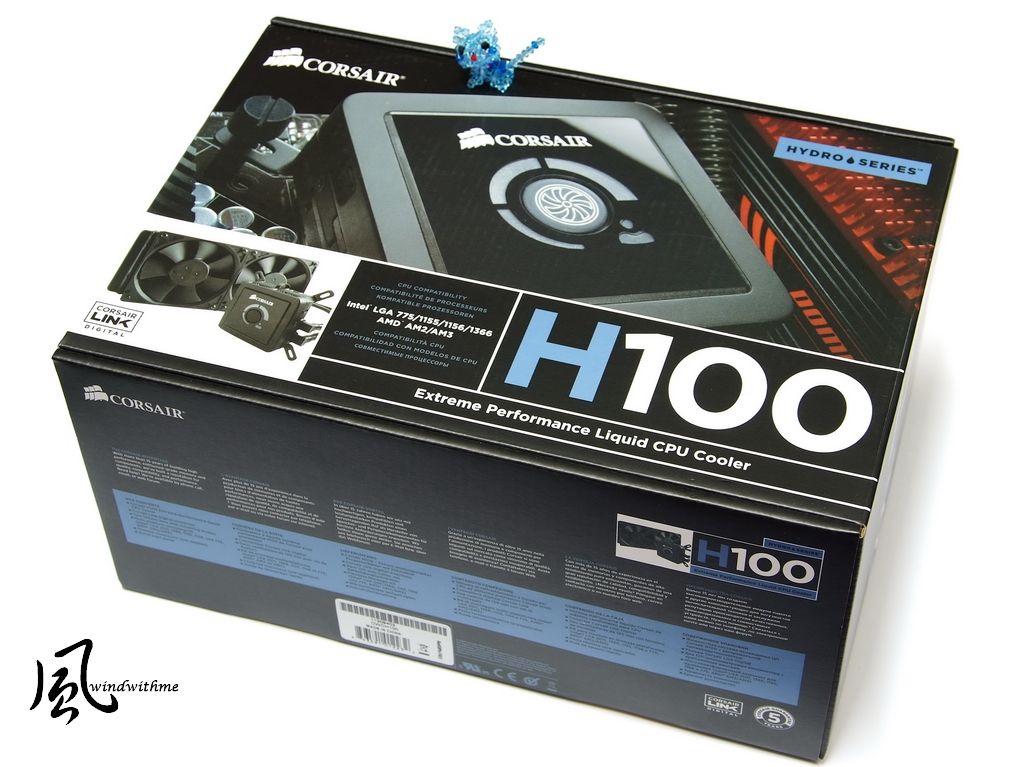
Below is H100 packing. It’s 5-year warranty. The packing is bigger than H80.
It lists all compatible CPU socket. It also supports latest LGA 2011 CPU.
-
Left side is all black radiator. The size is 120mm x 120mm x 25mm.
The shell is metal quality. It’s thinner and longer than H80. Both side can install two 12cm fan.
The fan speed is 1300/2000/2500 RPM. Fan airflow is 46~92 CFM and the acoustic is 22~39dBA.
H100 requires case having longer top to install. The performance is better than H80, but you have to pick up the right case.

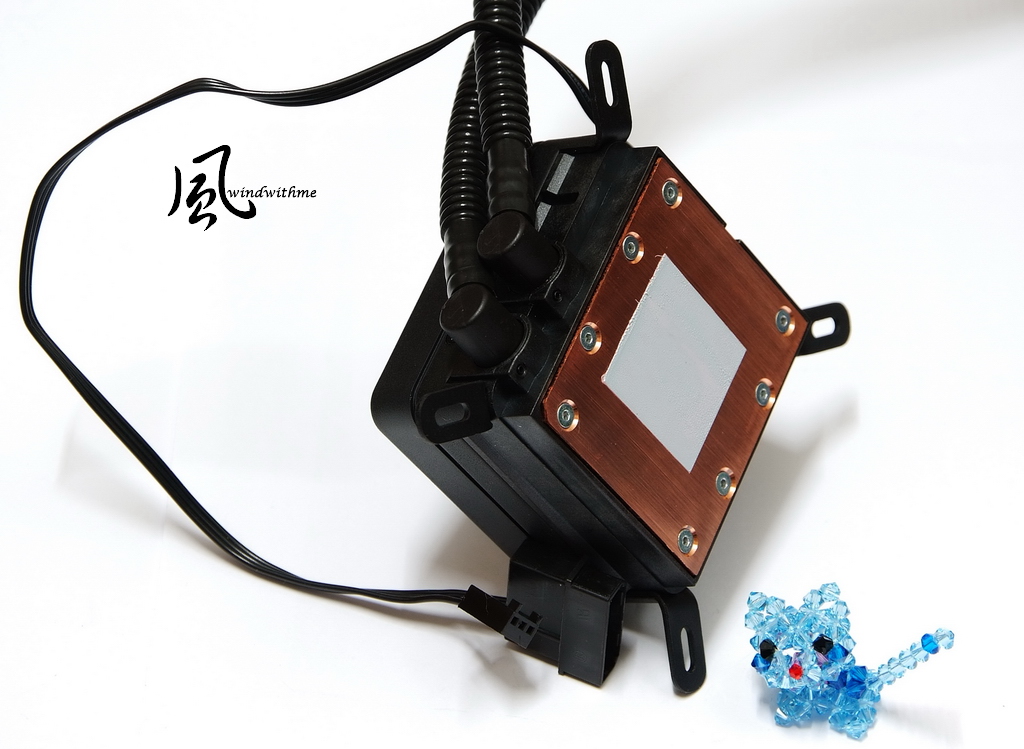
H100 uses new generation improved head and new clips which is more solid and lasting.
The bottom is still using big cooper thermal plate. Next is four 4-pin headers for 12cm fan.
Another big 4-pin and small 4-pin are for MB or PSU to read the liquid cooler motor speed.
OC Test
CPU 125 X 38 => 4750.05MHz, full speed, 1.460V
Enable C1E and disable Turbo Boost.
DDR3 2000 CL9 10-10-27 1T, XMP mode, 1.600V
Hyper PI 32M X 12 => 12m 02.921s
CPUMARK 99 => 728

Nuclearus Multi Core => 31526
Fritz Chess Benchmark => 36.69/17613
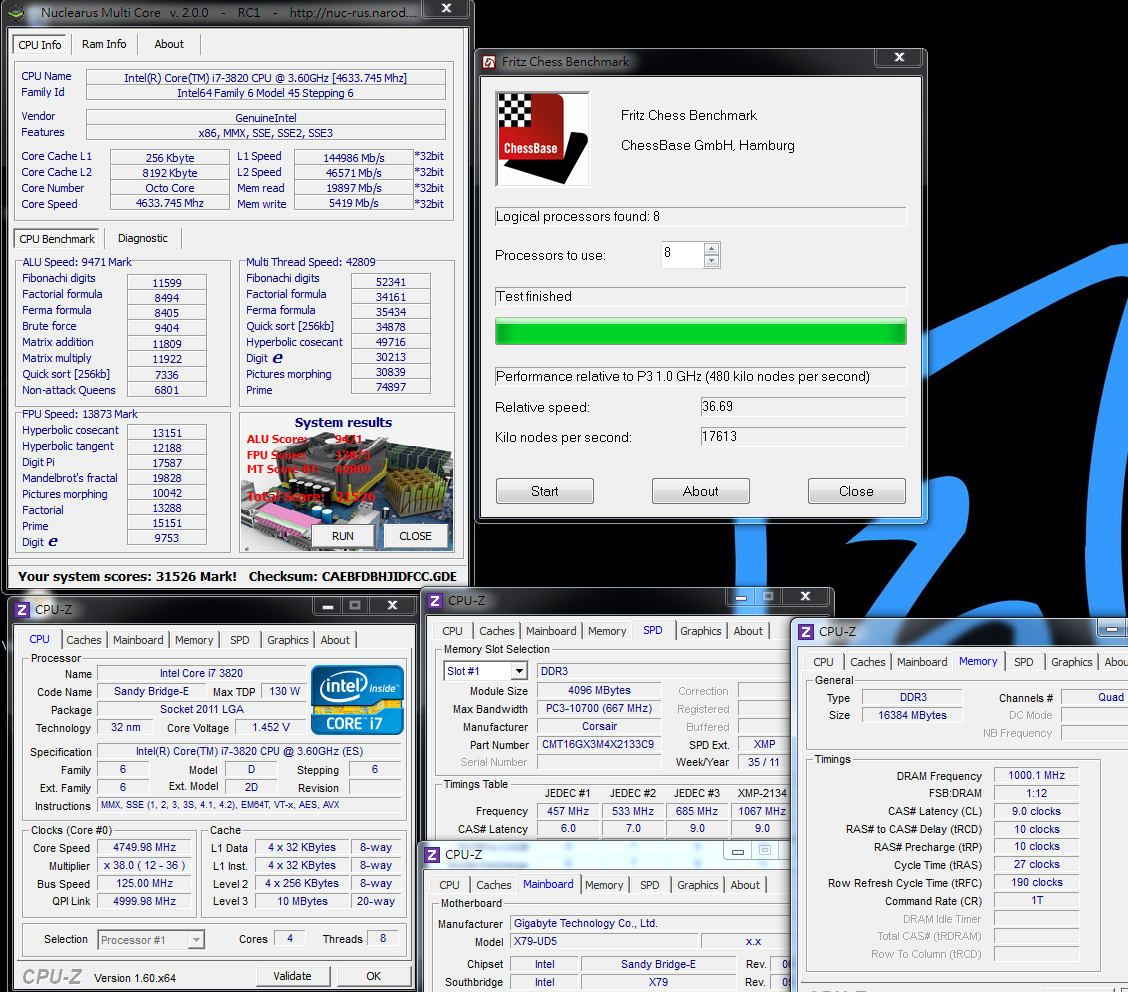
CrystalMark 2004R3 => 426555

CINEBENCH R11.5
CPU => 9.22 pts
CPU(Single Core) => 1.91 pts

FRYRENDER
Running Time => 4m 15s

PCMark Vantage => 27285

x264 FHD Benchmark => 25.8
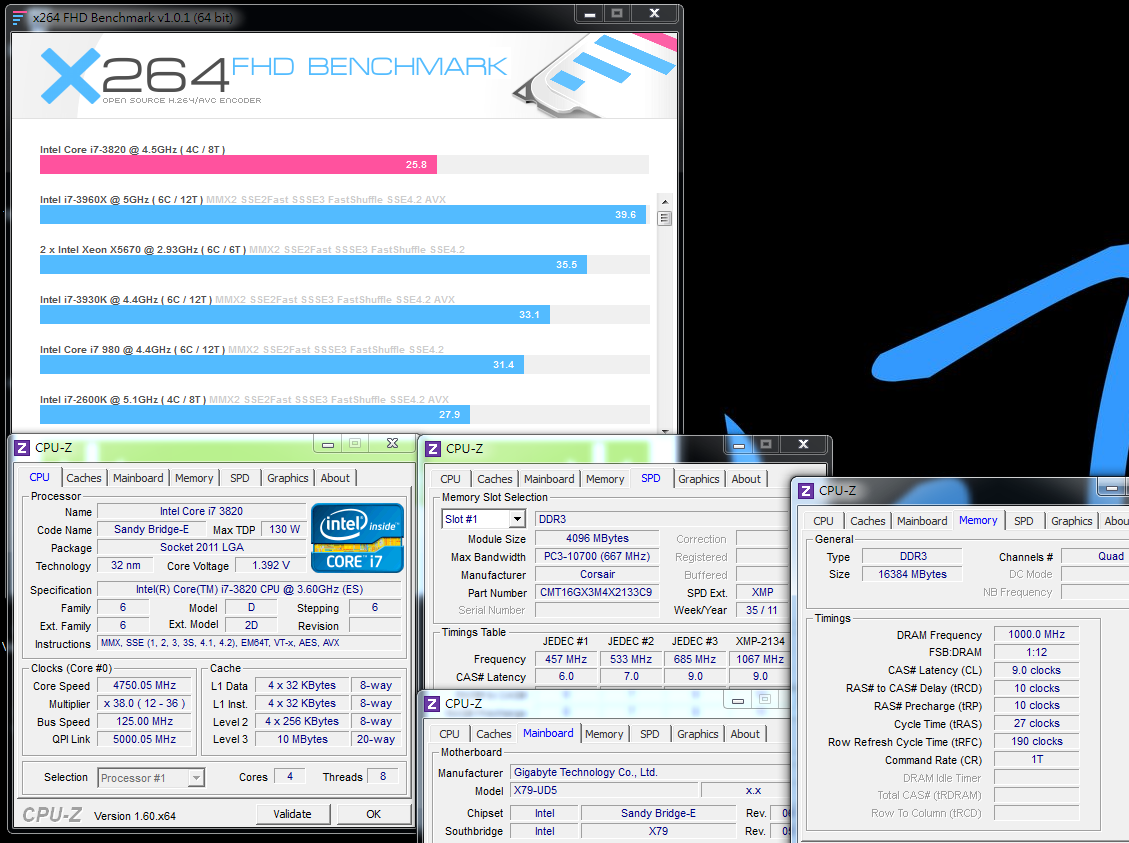
i7-3820 structure is 4C8T. The performance is same as LGA 1155 2700K as same frequency.
As i7-3820 L3 Cache is 10MB, higher than 2700K, it has advantage in some benchmark software.
Even though it’s 2 cores less than 3930K and 3960X, basic performance is good enough for most software.
DRAM Bandwidth Test
DDR3 2000 CL9 10-10-27 1T, XMP mode, 1.600V
ADIA64 Memory Read - 21496 MB/s
Sandra Memory Bandwidth - 46724 MB/s
MaXXMEM Memory-Copy - 17667 MB/s

My former review also mentioned X79 2133 1T and 2400 2T bandwidth are similar.
If higher DDR3 2T clock needs more voltage or CL, you can consider to set lower clock in 1T.
Three software above, there is only Sandra Memory Bandwidth has real quad channel bandwidth.
CrystalMark Memory test also achieve LGA 2011 quad channel bandwidth.
-
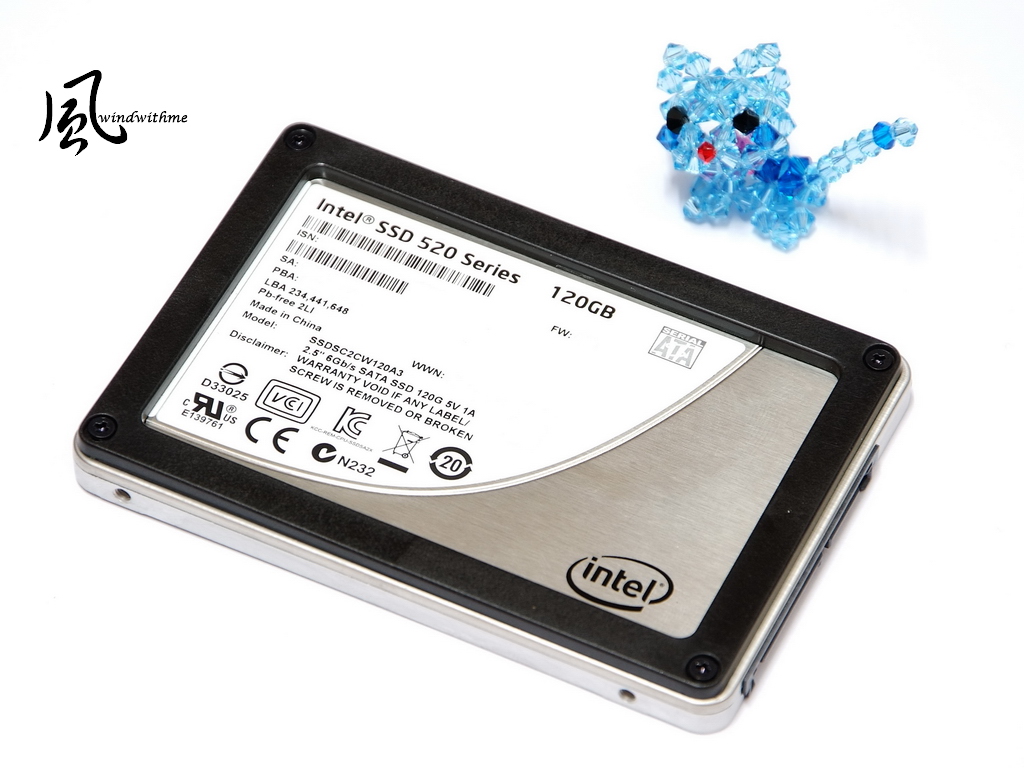
For Intel X79 SATA3 transfer rate, I use Intel latest 520 SERIES 120GB.
First, you can see the 520 packing is same as 320, which uses Intel new generation Logo.

SSD shell is Intel often use design. The benefit is you can take off the black frame to be 7mm slim SSD.
The controller is SanForce SF-2281 and flash is Intel MLC 25nm NAND FLASH.
Official spec write is 550 and sequential read is 500 MB/s. Random 4KB write is 80000 IOPS.
5-year warranty is Intel 520 SERIES biggest strength. Users have more confidence to use this product.
ATTO DISK Benchmark over 256k can reach 547.8 Mb/s read and 506.4 MB/s write.
AS SSD Benchmark - 550

ATTO DISK Benchmark is fastest and reach this SSD official specs.
AS SSD Benchmark Seq Write is lower and CrystalDiskMark also has same issue.
CrystalDiskMark
Seq Read - 484.0 MB/s Write - 159.3 MB/s
Read - 503.2 MB/s Write - 489.1 MB/s
Read - 505.5 MB/s Write - 492.3 MB/s

CrystalDiskMark default is random test. The upper right shows the write speed is lower than spec.
As SandForce controller structure, some algorithm may cause this issue.
Left side pic, CrystalDiskMark changes to sequential mode, the write speed is close to official specs.
HD Tune Pro 5.00 in File Benchmark, all benchmark reach 500 MB/s or higher.
Power Consumption
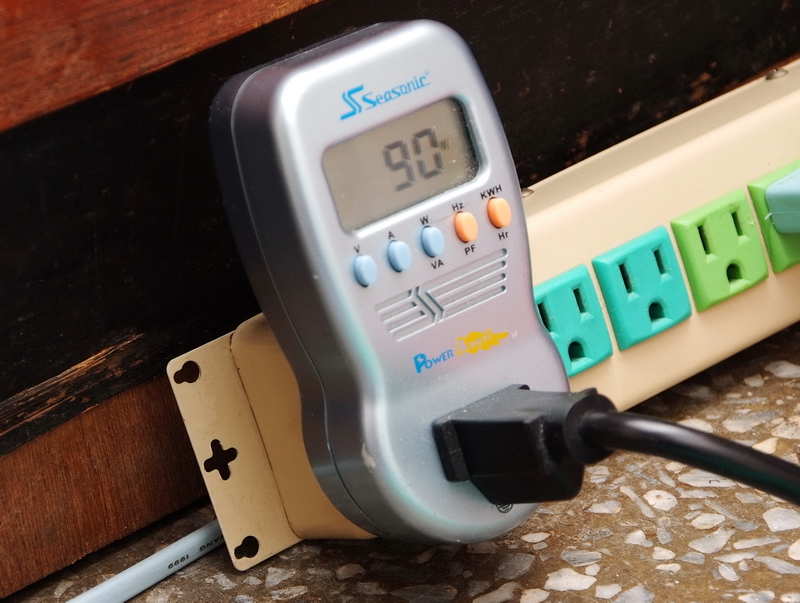
Enter to OS Desktop and enable C1E power saving technology - 90W
Enter to OS Desktop and disable C1E power saving technology - 137W

Running LinX to make CPU full speed - 275W
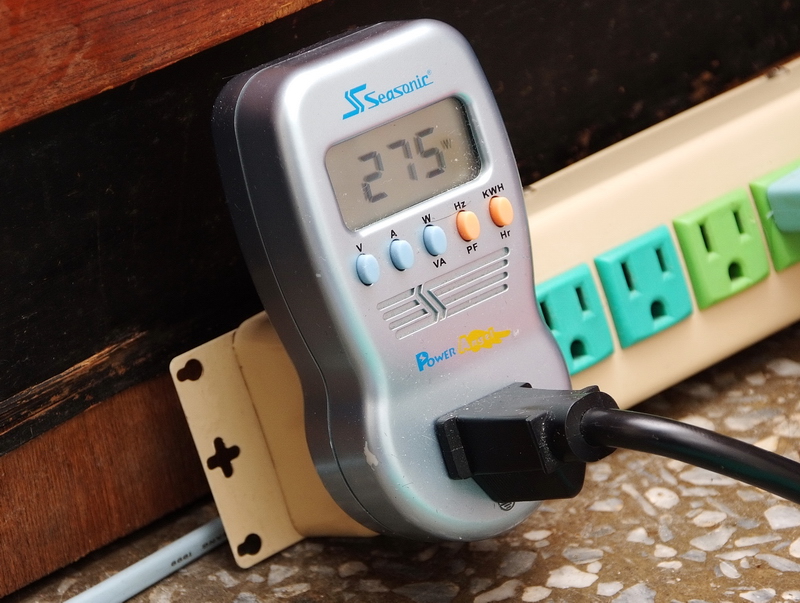
Comparing to i7-3930K, i7-3820 power consumption is similar under enable C1E and enter to OS desktop condition. If disabling C1E, the number is lower.
Running LinX to make CPU full speed, 4C8T i7-3820 is 70W lower than i7-3930K.
However, i7-3820 power consumption is higher than i7-2700K. It may causes by CPU structure design.
Temperature(Room Temp is 21?C)
Enter to OS Desktop - 19~26

Running LinX to make CPU full speed - 54~63

Cooler is CORSAIR Hydro Series H100 liquid cooling system and install 12cm higher rpm fan.
As OC to 4.75G, i7-3820 temperature performance is very good.
3D Test
msi N560GTX-Ti Twin Frozr II
3DMark Vantage CPU SCORE => 79023

-
FINAL FANTASY XIV
1920 X 1080 => 4701

StreetFighter IV Benchmark
1920 X 1080 => 305.01 FPS

Sandy Bridge-E 3D performance is almost the best in current Desktop system.
Three 3D software above, it all gets almost highest scores with same VGA card.
I used to mention CPU execute thread performance will impact 3D performance. Cores don’t impact much.
That’s why you can see i7-3820 in 3D performance is almost same level as 3930K or 3960X.
If you more focus on 3D performance, 2~4Cores are enough for you. The key factor is CPU single core execute thread.
Same as room temperature, 21, i7-3820 OC 4.75GHz OC setup and use meter to test MOSFET temperature.
Enter to OS desktop and enable C1E is 44.1. Disable C1E is 44.2. CPU burning test is 70.0.
As my personal experience with X79 boards, X79-UD5 temperature is lower with 3 times repeat test.
Windwithme every X79 board reviews all have temperature numbers.
GIGABYTE X79-UD5
Pros
1. X79-UD5 packing is all white design makes look elegant.
2. UEFI BIOS technology with two BIOS interfaces.
3. Special BT4.0/Wi – Fi card. In the mobilization century, it’s very convenient.
4. DDR3 is 8 DIMM and 10 SATA to make high expandability.
6. Exclusive front panel with USB 3.0 and quick OC features.
Cons
1. CPU voltage vibrates big between standby and full speed.
2. DDR3 2400 compatibility need to improve.

Performance ?????????? 82/100
Components ?????????? 86/100
Specification ?????????? 92/100
Appearance ?????????? 83/100
C/P Value ?????????? 88/100
GIGABYTE X79-UD5 is middle end in X79 market, but the spec is higher.
BT 4.0/ Wi–Fi card, 8 DIMM DDR3 and 10 SATA ports are very useful for user applications.
However, the OC tuning needs to improve.
This is my 6th X79 OC review. From entry to high end X79 all take me long time to fine tune and share.
I hope it’s useful for users to choose right LGA 2011 platform.
As i7-3820 launched, besides 2600K or 2700K high end LGA 1155 platform, users have one more choice.
Because entry X79 with i7-3820 price is overlapping some high end LGA 1155.
If you would like to have more upgradability and higher hardware specs, LGA2011 seems the better choice.
However, it seems too early to make the conclusion. Intel Ivy Bridge is on the way now. It may pull one back.
In the future, Intel Core i7 4C8T platform will have X79 with i7-3820 and Z77 with i7-3770K.
How to choose will be all decided by your budget and demands.
Windwithme will share more i7-3770K performance for your reference.

This review is also in my blog WIND3C, Any comments are welcome.
-
im sorry for the prevuos post, i througt u had finished
aniway well done. again!

-
nice score wind
-
Good [email protected] eliminate il post in mezzo?
-
@keroro
si tranquillo
p.s
sorry again wind
-
ormai questa cpu in pochi la possiedono
Ciao! Sembra che tu sia interessato a questa conversazione, ma non hai ancora un account.
Stanco di dover scorrere gli stessi post a ogni visita? Quando registri un account, tornerai sempre esattamente dove eri rimasto e potrai scegliere di essere avvisato delle nuove risposte (tramite email o notifica push). Potrai anche salvare segnalibri e votare i post per mostrare il tuo apprezzamento agli altri membri della comunità.
Con il tuo contributo, questo post potrebbe essere ancora migliore 💗
Registrati Accedi