
A High-end X79 Equipped with SAS and 4Way SLI - An OC Test of the ECS X79R-AX
-
Three Intel CPUs with the Sandy Bridge-E architecture have appeared on the market at different prices
At the end of last year, two CPUs, the i7-3930K 6C12T Core and the 3960X, were released at the same time with the X79 chipset
More recently, the Core i7-3820 was launched as the third CPU, mainly due to differences in the architecture and price of the 4C8T
This appeared to give the entry-level LGA 2011 series a chance to compete with the high-end LGA 1155 series in the marketplace
Based on the cost of these two high-performance platforms, they fall within purchasing range of high-end PC consumers
The X79 chipset can be used with the LGA 2011 platform, and the environment is crowded with many brands of motherboards
In terms of options and prices, this has indirectly given greater flexibility to the X79, a development that is more beneficial to consumers
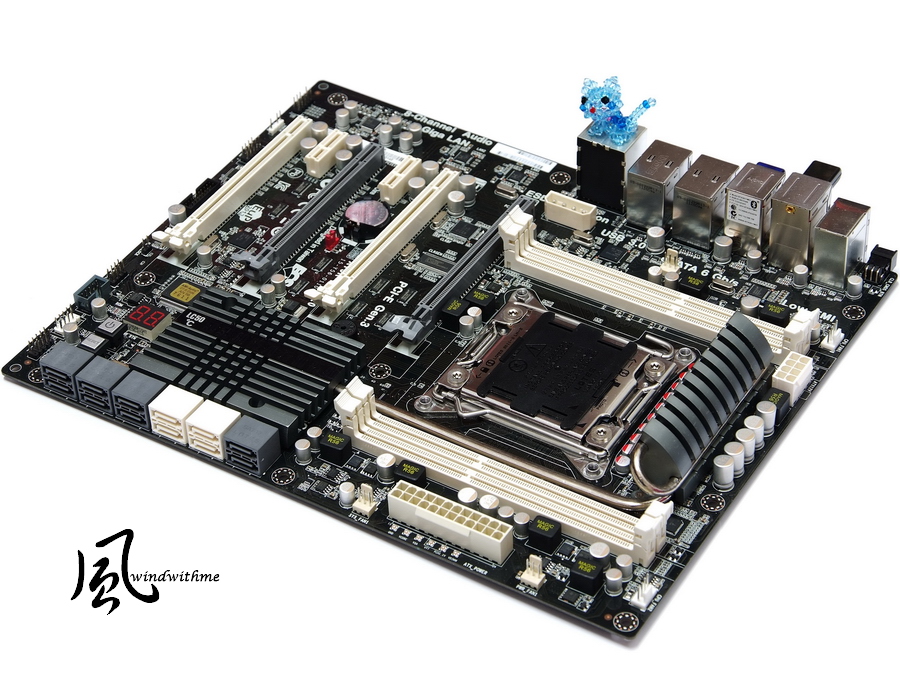
Now, we will share our findings on the X79-based X79R-AX that was released by ECS, a product positioned as part of the Black Series

ECS has launched two models in the X79 space, the X79R-AX and the X79R-AX Deluxe
There should be some netizens who together with me will feel the X79R-AX Deluxe is the more high-end version, yet in fact, the X79R-AX is the higher level version
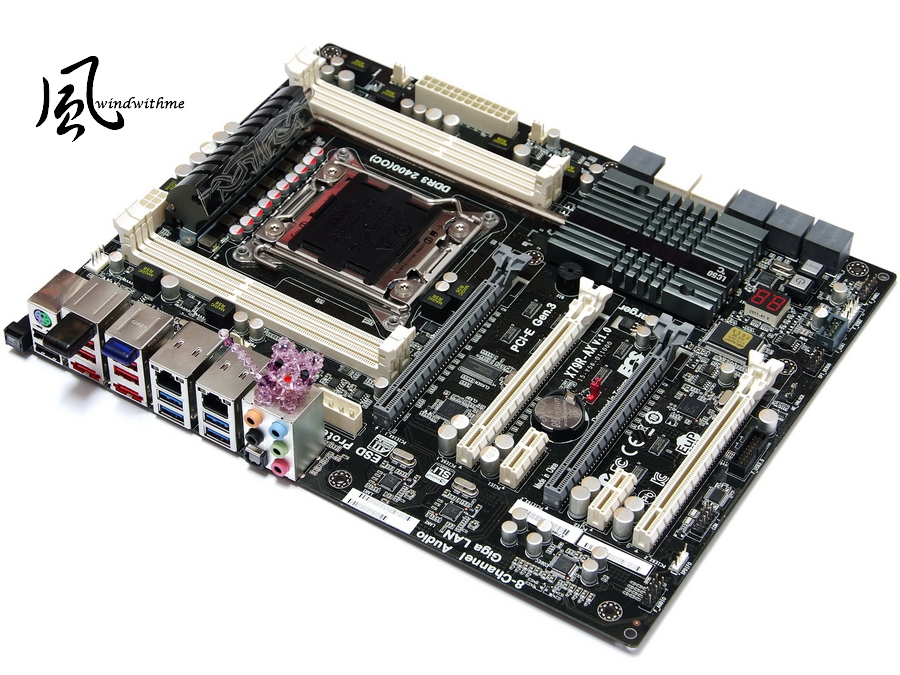
A glance shows that the X79R-AX uses black as the main color with white and gray as style accents

The dimensions meet the 305mm x 244mm ATX form factor, allowing the choice of a wide range of cases
The X79 is part of the Intel Extreme platform, and the price is a few levels higher than the mid-range to high-end Z68 chipset, but the specifications are almost all higher level
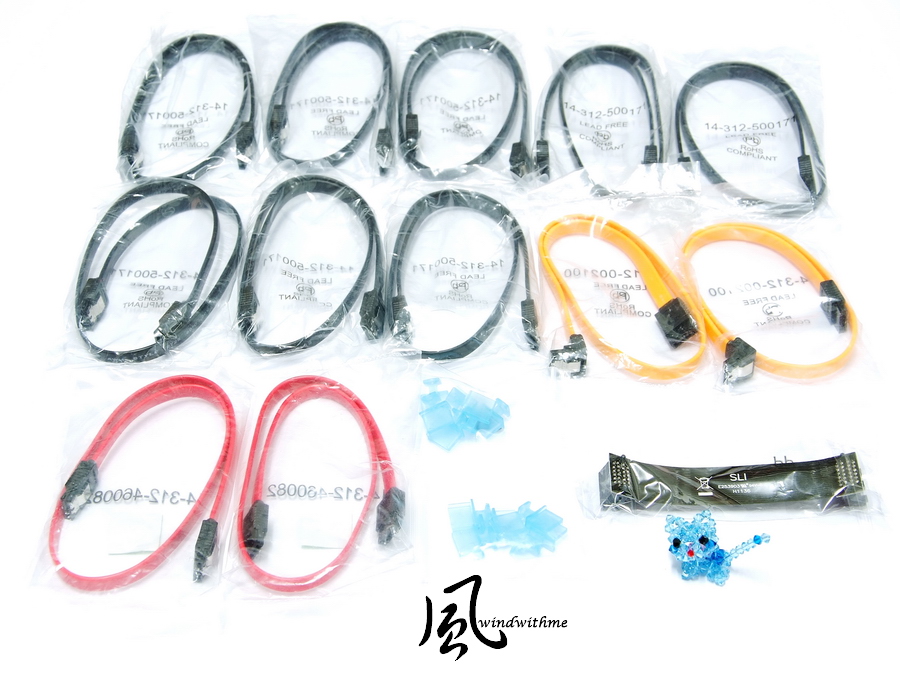
Included Accessories
English user manual, a quick start installation manual, an IO shield, an optical disk with driver software, a USB 3.0 front panel and a mobile connect wireless

An SATA cable that connects to external eSATA devices, a protective plastic cover for the IO interface, SLI bridge
Lower Left of Motherboard
4 X PCI-E X16, supporting up to 4-Way AMD CrossFireX/nVIDIA SLI technology
Bandwidths of X16 + X8 + X16 + X8
2 X PCI-E X1
Dual LAN chip, the Realtek RTL8111E
The audio chip is the Realtek ALC892, with 8 channels supporting HD Audio technology

Bottom Right of Motherboard
The X79R-AX allows the addition of quite a few SATA expansion ports, from right to left as follows
Two gray SATA ports supported by the X79 chipset with SATA3 specifications
Four white SATA ports supported by the X79 chipset with SATA2 specifications
The above can be paired to set up RAID 0, RAID 1, RAID 5 and RAID 10, depending on the highest performance SATA device that has been installed
Four gray SATA ports enabled by the ASM1601 chip with the SATA3 SAS specification, supporting RAID 0, RAID 1, RAID 10
Two gray SATA ports enabled by the ASM1601 chip with SATA3 specifications, supporting AHCI
(Simultaneously pressed) the Power/Reset/clr CMOS button and troubleshooting LED lights, to the far left in the front is the black USB 3.0 expansion port

Top Right of Motherboard
24PIN power input, and below, six crossed round terminals allowing users to directly measure the voltage of the hardware with a multimeter
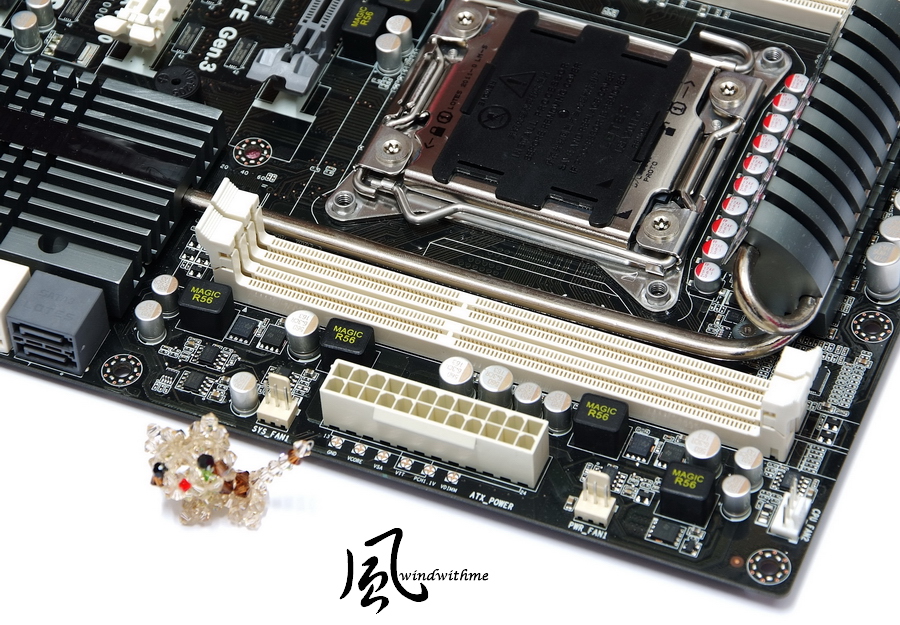
Top of Motherboard
The CPU uses 14 MOS drivers for the power supply combined with a very tactile thermal module that helps the MOSFET dissipate heat
To the right and left are four DDR3 DIMMs supporting 1600/1866/2133/2400/2500 of memory with maximum capacity of 64GB
DDR3 exceeding 2400 meets the OC specification, supporting the latest four-channel technology
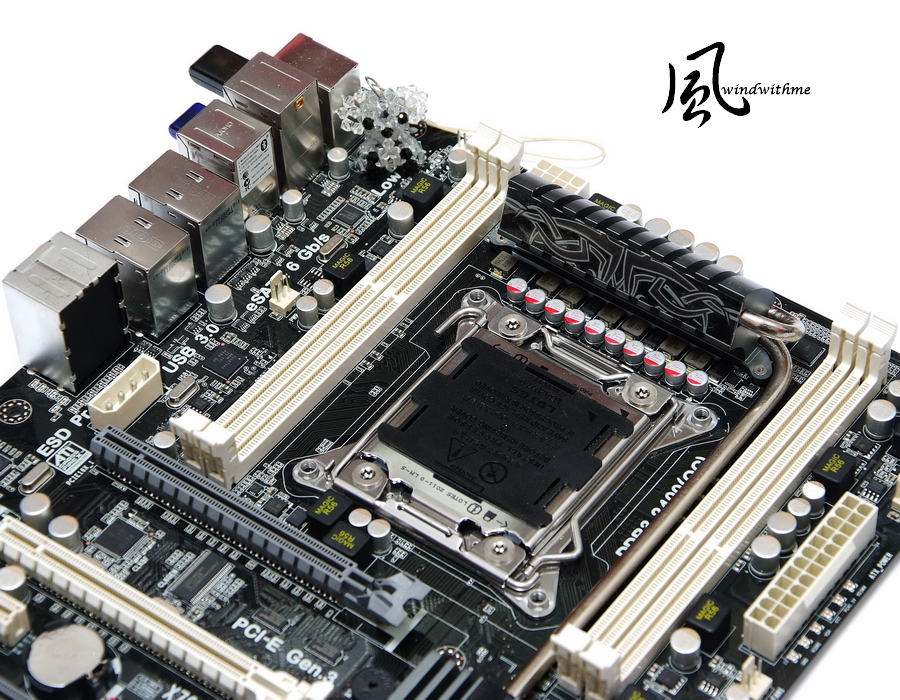
IO
One Clear CMOS button
One PS/2 keyboard/mouse port
Six USB 2.0 ports (Red/Black)
Two eSATA3/USB 2.0 ports (red)
One Wireless LAN dongle
One Bluetooth dongle
Four USB 3.0 ports (blue)
Two RJ-45 Ethernet ports
Six audio jacks

-
Three Intel CPUs with the Sandy Bridge-E architecture have appeared on the market at different prices
At the end of last year, two CPUs, the i7-3930K 6C12T Core and the 3960X, were released at the same time with the X79 chipset
More recently, the Core i7-3820 was launched as the third CPU, mainly due to differences in the architecture and price of the 4C8T
This appeared to give the entry-level LGA 2011 series a chance to compete with the high-end LGA 1155 series in the marketplace
Based on the cost of these two high-performance platforms, they fall within purchasing range of high-end PC consumers
The X79 chipset can be used with the LGA 2011 platform, and the environment is crowded with many brands of motherboards
In terms of options and prices, this has indirectly given greater flexibility to the X79, a development that is more beneficial to consumers
Now, we will share our findings on the X79-based X79R-AX that was released by ECS, a product positioned as part of the Black Series
ECS has launched two models in the X79 space, the X79R-AX and the X79R-AX Deluxe
There should be some netizens who together with me will feel the X79R-AX Deluxe is the more high-end version, yet in fact, the X79R-AX is the higher level version
A glance shows that the X79R-AX uses black as the main color with white and gray as style accents
The dimensions meet the 305mm x 244mm ATX form factor, allowing the choice of a wide range of cases
The X79 is part of the Intel Extreme platform, and the price is a few levels higher than the mid-range to high-end Z68 chipset, but the specifications are almost all higher level
Included Accessories
English user manual, a quick start installation manual, an IO shield, an optical disk with driver software, a USB 3.0 front panel and a mobile connect wireless
An SATA cable that connects to external eSATA devices, a protective plastic cover for the IO interface, SLI bridge
Lower Left of Motherboard
4 X PCI-E X16, supporting up to 4-Way AMD CrossFireX/nVIDIA SLI technology
Bandwidths of X16 + X8 + X16 + X8
2 X PCI-E X1
Dual LAN chip, the Realtek RTL8111E
The audio chip is the Realtek ALC892, with 8 channels supporting HD Audio technology
Bottom Right of Motherboard
The X79R-AX allows the addition of quite a few SATA expansion ports, from right to left as follows
Two gray SATA ports supported by the X79 chipset with SATA3 specifications
Four white SATA ports supported by the X79 chipset with SATA2 specifications
The above can be paired to set up RAID 0, RAID 1, RAID 5 and RAID 10, depending on the highest performance SATA device that has been installed
Four gray SATA ports enabled by the ASM1601 chip with the SATA3 SAS specification, supporting RAID 0, RAID 1, RAID 10
Two gray SATA ports enabled by the ASM1601 chip with SATA3 specifications, supporting AHCI
(Simultaneously pressed) the Power/Reset/clr CMOS button and troubleshooting LED lights, to the far left in the front is the black USB 3.0 expansion port
Top Right of Motherboard
24PIN power input, and below, six crossed round terminals allowing users to directly measure the voltage of the hardware with a multimeter
Top of Motherboard
The CPU uses 14 MOS drivers for the power supply combined with a very tactile thermal module that helps the MOSFET dissipate heat
To the right and left are four DDR3 DIMMs supporting 1600/1866/2133/2400/2500 of memory with maximum capacity of 64GB
DDR3 exceeding 2400 meets the OC specification, supporting the latest four-channel technology
IO
One Clear CMOS button
One PS/2 keyboard/mouse port
Six USB 2.0 ports (Red/Black)
Two eSATA3/USB 2.0 ports (red)
One Wireless LAN dongle
One Bluetooth dongle
Four USB 3.0 ports (blue)
Two RJ-45 Ethernet ports
Six audio jacks
-
Qooltech IV cooling device, which displays an orange pattern when the temperature rises to a certain range

Back of motherboard has MOS driver components
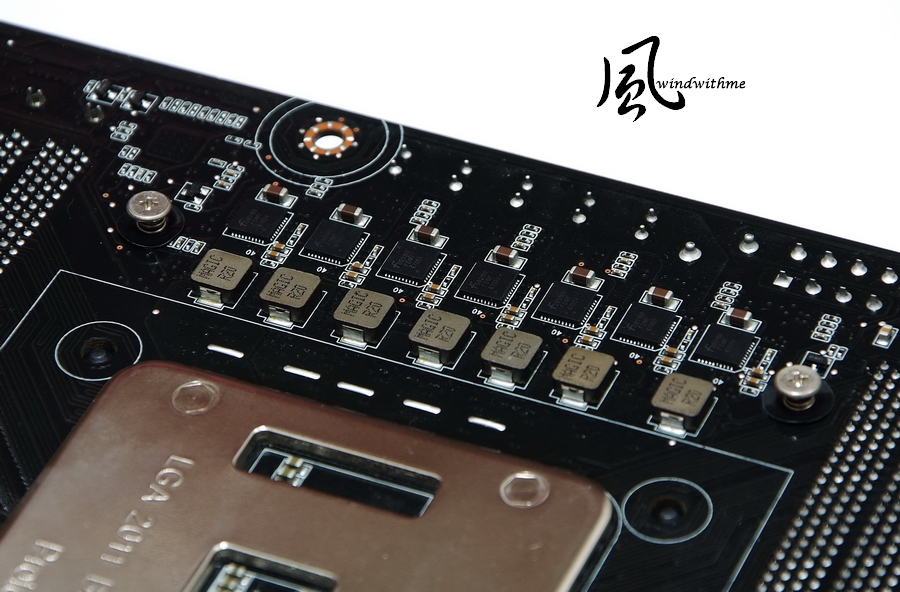
X79 heat sink, which will also display a special color when the temperature reaches a certain level
The MOSFETs and chipsets all use Qooltech IV cooling modules, which together with the heatpipe design can effectively balance the temperature on both sides

Photo of UEFI, providing choice of 10 different languages
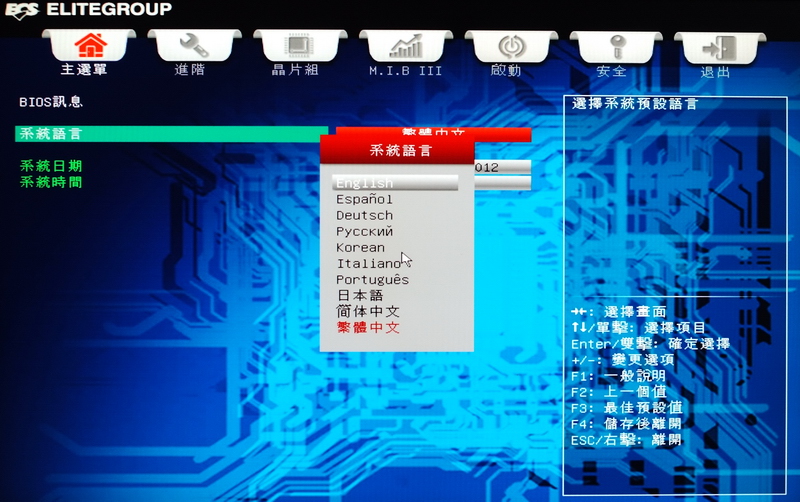
M.I.B X-
Can set clock parameters or voltage settings for CPU and DRAM
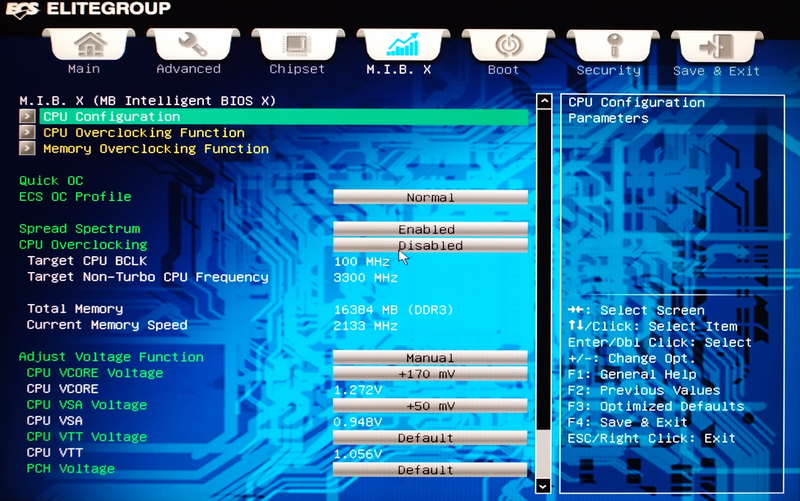
Voltage Levels
CPU VCORE Voltage -300 to +700 mV
CPU VSA Voltage -300 to +600 mV
CPU VTT Voltage -200 to +500 mV
PCH Voltage -200 to +300 mV
DRAM Voltage -300 to +500 mV

Page with information on CPU and related technology
If you want to fix the CPU clock to avoid being beat by energy-saving technology, you should select the following two options
Turn off Power Technology and Enhanced Halt (C1E)

Page on advanced CPU options
This can be used to independently set the multiplier for each CPU Core, and here all the CPU multipliers are set to 46

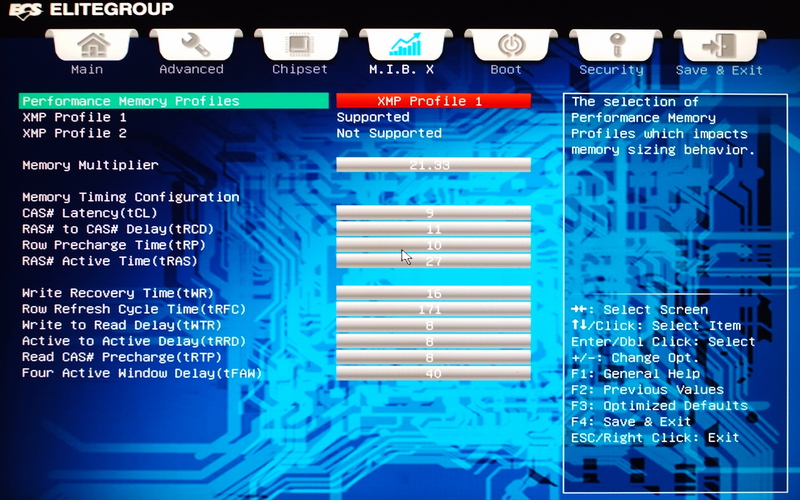
Page on DDR3 settings
Turn on XMP technology, allowing the DDR3 clock to increase to 2133
Detailed parameters are Cl9 11-10-27 2T
PC Health Status

-
With the Smart Fan page, the user can adjust the mode of the fan speed to the reach the desired balance between cooling and quiet
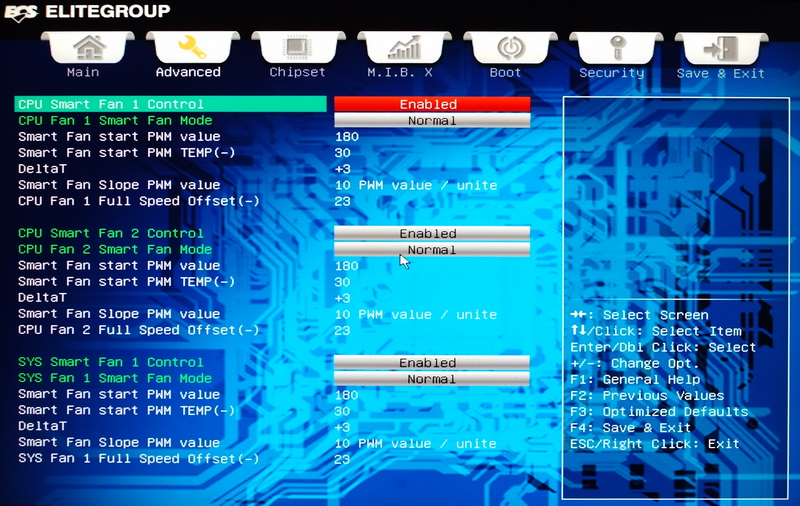
The above is for the ECS X79 UEFI interface with all of the options turned on
If you want to overclock the CPU FSB and DDR3, it is recommended that you set the CPU VSA Voltage to between 1.000 and 1.200V
It is easier to set the CPU overclocking multiplier: all you need to do is find a voltage that allows the CPU cooling system to operate stably
Basically there are only three voltages that need to be set, these overclocking factors are the same as with other X79s
The above photo shows the CPU/DDR3 set for 4.6GHz/2133, and is provided as reference to users with the same platform
Test platform
CPU: Intel Core i7-3960X
Motherboard: ECS X79R-AX
DRAM: CORSAIR DOMINATOR-GT CMT16GX3M4X2133C9
VGA: msi N560GTX-Ti Twin Frozr II
Storage: CORSAIR Performance Pro Series 128GB
POWER: Thermaltake, Toughpower Grand 1200W
Cooler: Intel RTS 2011LC
OS: Windows 7 Ultimate, 64bit

Overclocking
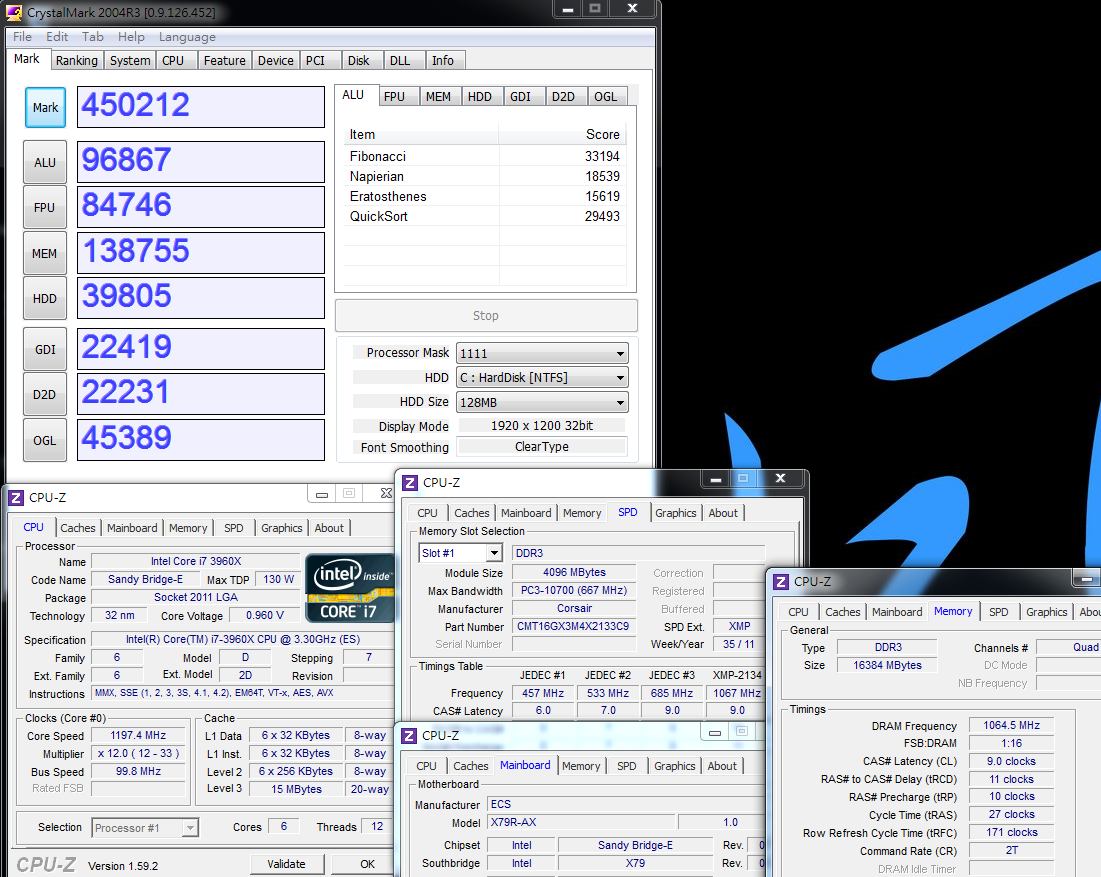
CPU 99.8 X 46 => 4590.8MHz full speed 1.356V
Enabled C1E and turned off Turbo Boost
DDR3 2128.4 Cl9 11-10-27 2T XMP mode 1.524V
Hyper PI 32M X 12 => 12m 25.822s
CPUMARK 99 => 702

x264, FHD Benchmark => 36.1
Fritz Chess Benchmark => 50.88/24424

CrystalMark 2004R3 => 450212
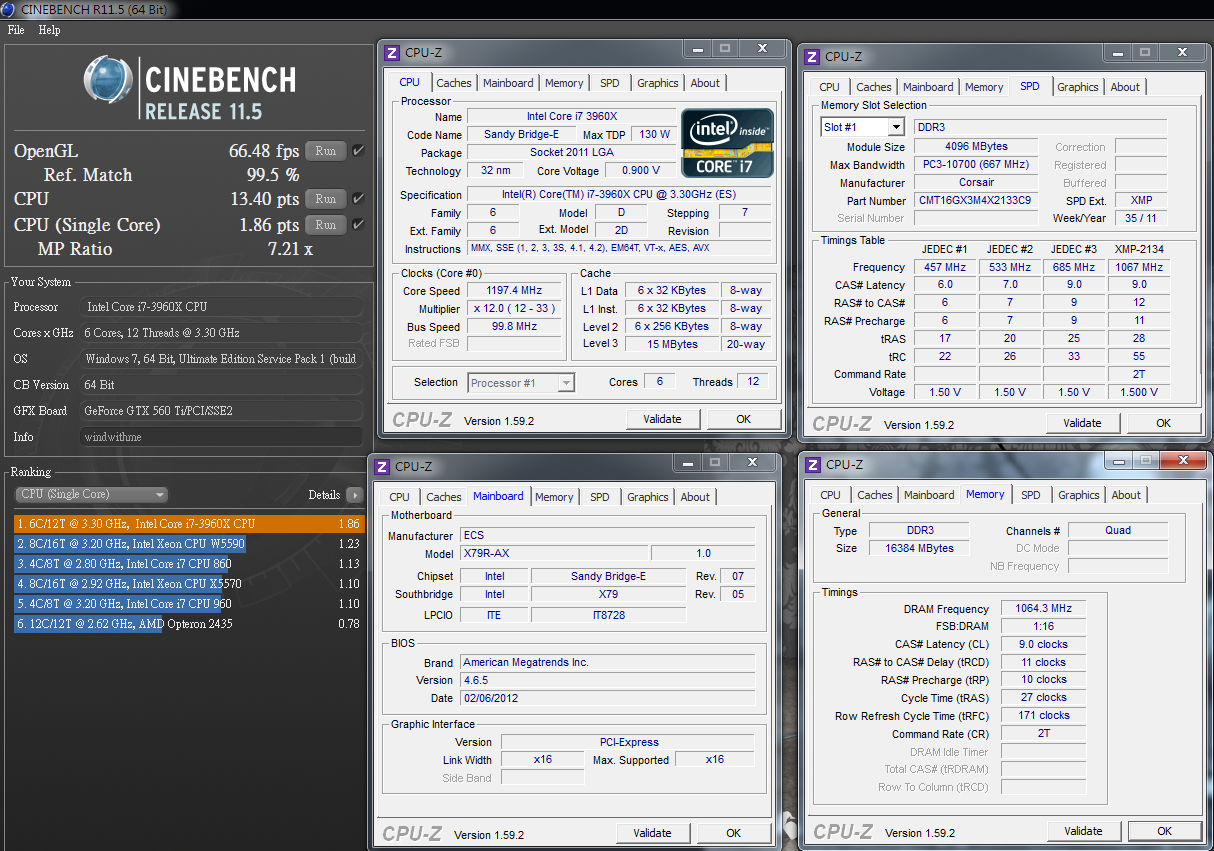
CINEBENCH R11.5
CPU => 13.40 pts
CPU (Single Core) => 1.86 pts The
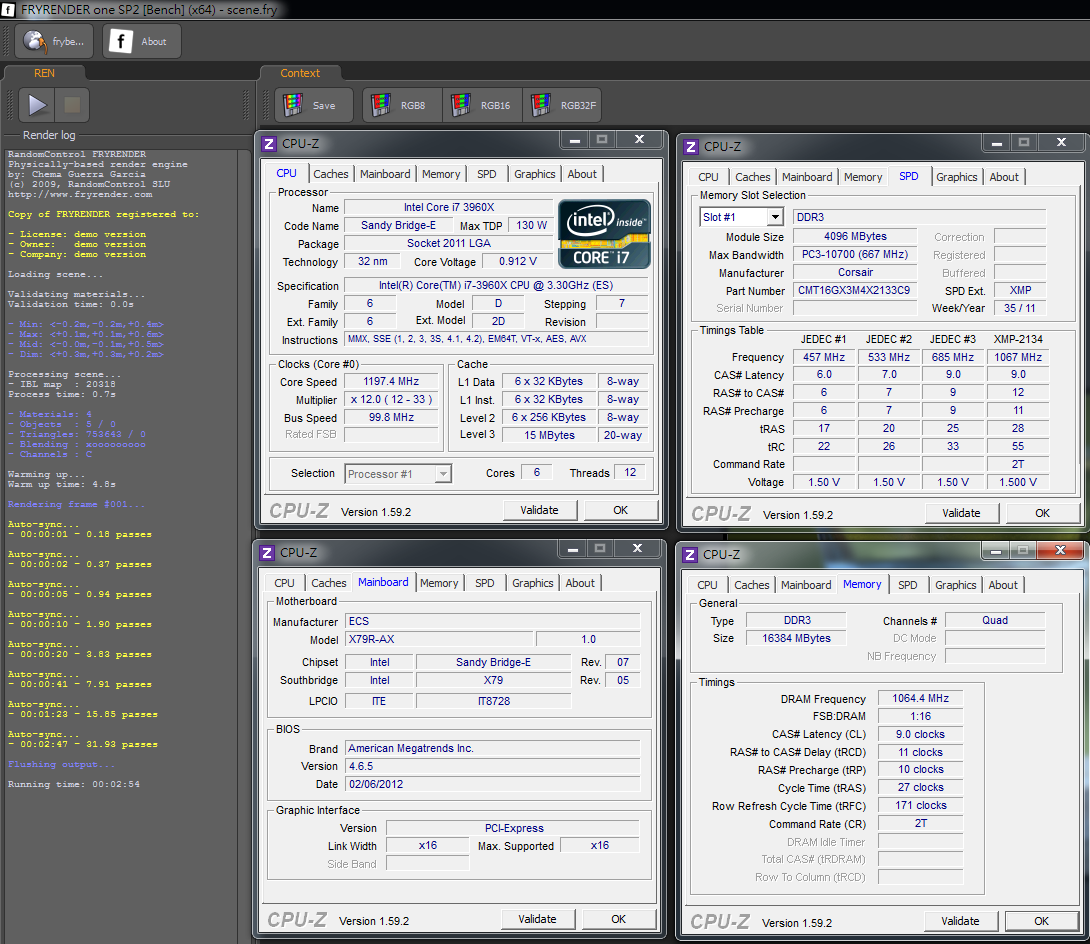
FRYRENDER
Running Time => 2m 54s
PCMark Vantage => 24951
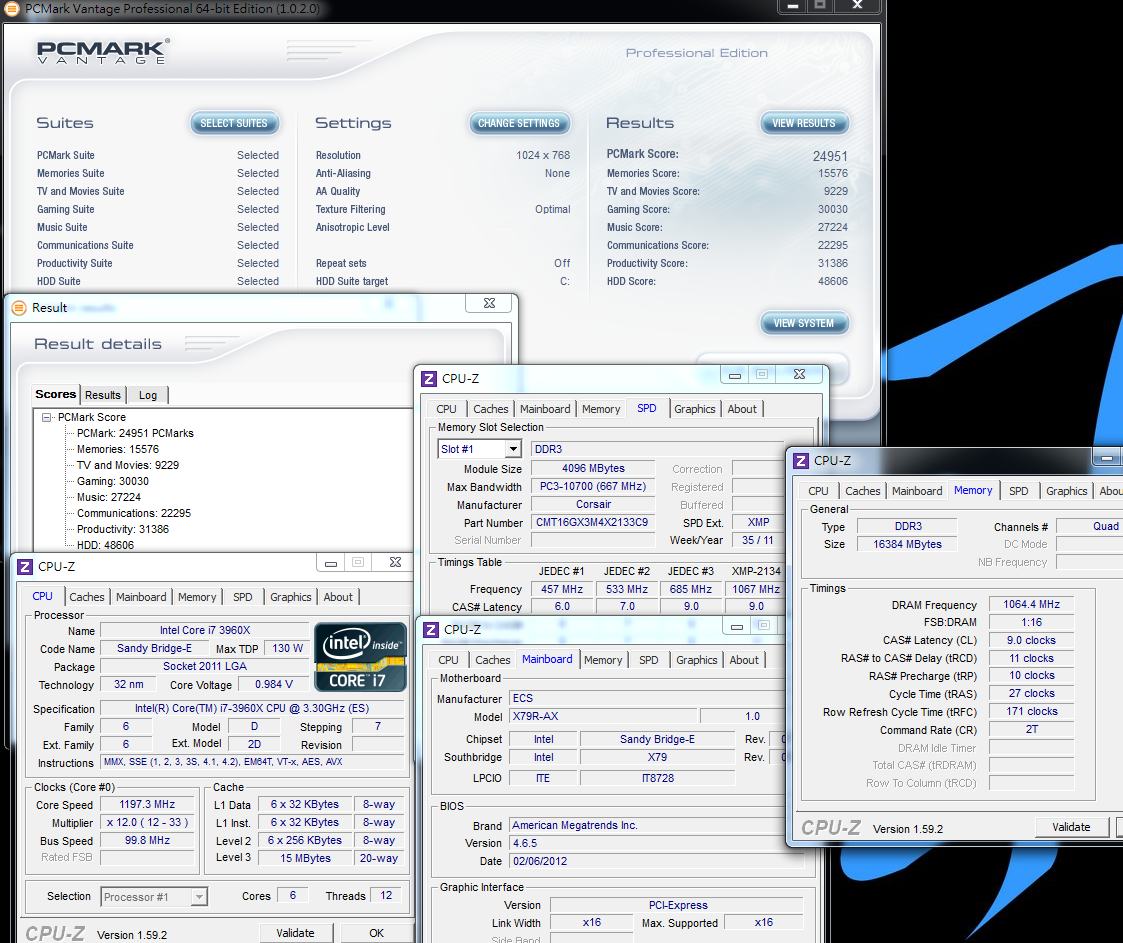
The cooling device is the Intel RTS 2011LC, and we switched to a single 12cm high-speed fan that performed well while overclocking at 4.6GHz
At full speed, the CPU voltage falls to 1.356V, and it passed several software tests and other burn-in software
For single-threaded performance we used the old CPUMARK software or CINEBENCH R11.5, both of which provided data of considerable accuracy
The above-mentioned benchmarks support 6C12T multithreading, and the 3960X currently provides nearly the highest performance data on desktop platforms
For overclocking similar CPUs, we recommend the use of appropriate voltage and clock adjustments in accordance with the class of cooling device and the CPU on hand
DRAM Test
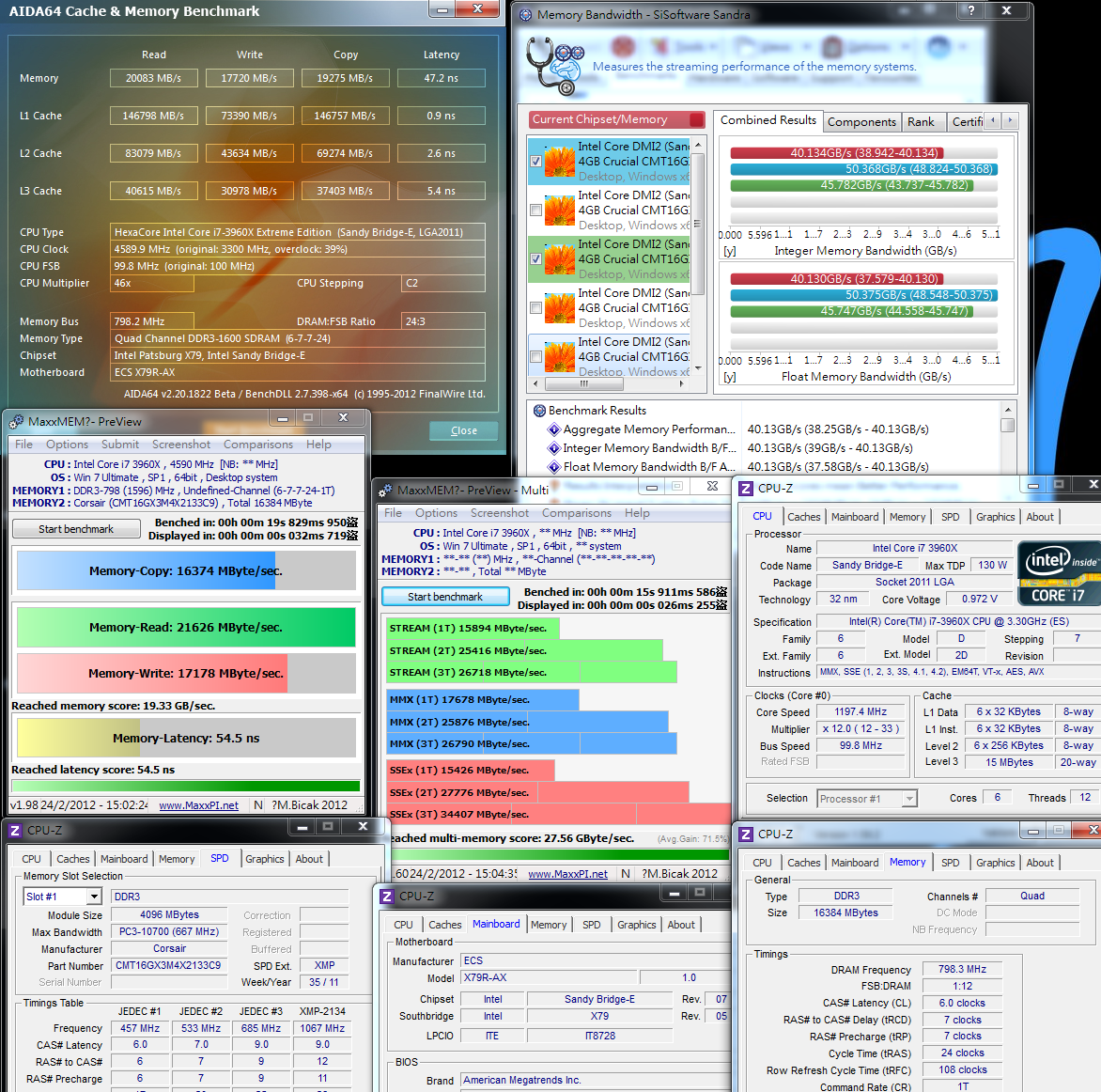
DDR3 1596.6 CL6 7-7-24 1T
ADIA64 Memory Read - 20083 MB / s
Sandra Memory Bandwidth - 40 134 MB / s
MaXXMEM Memory-Copy - 16374 MB / s
MaXXMEM Reached multi-memory score - 27.56 GByte / sec
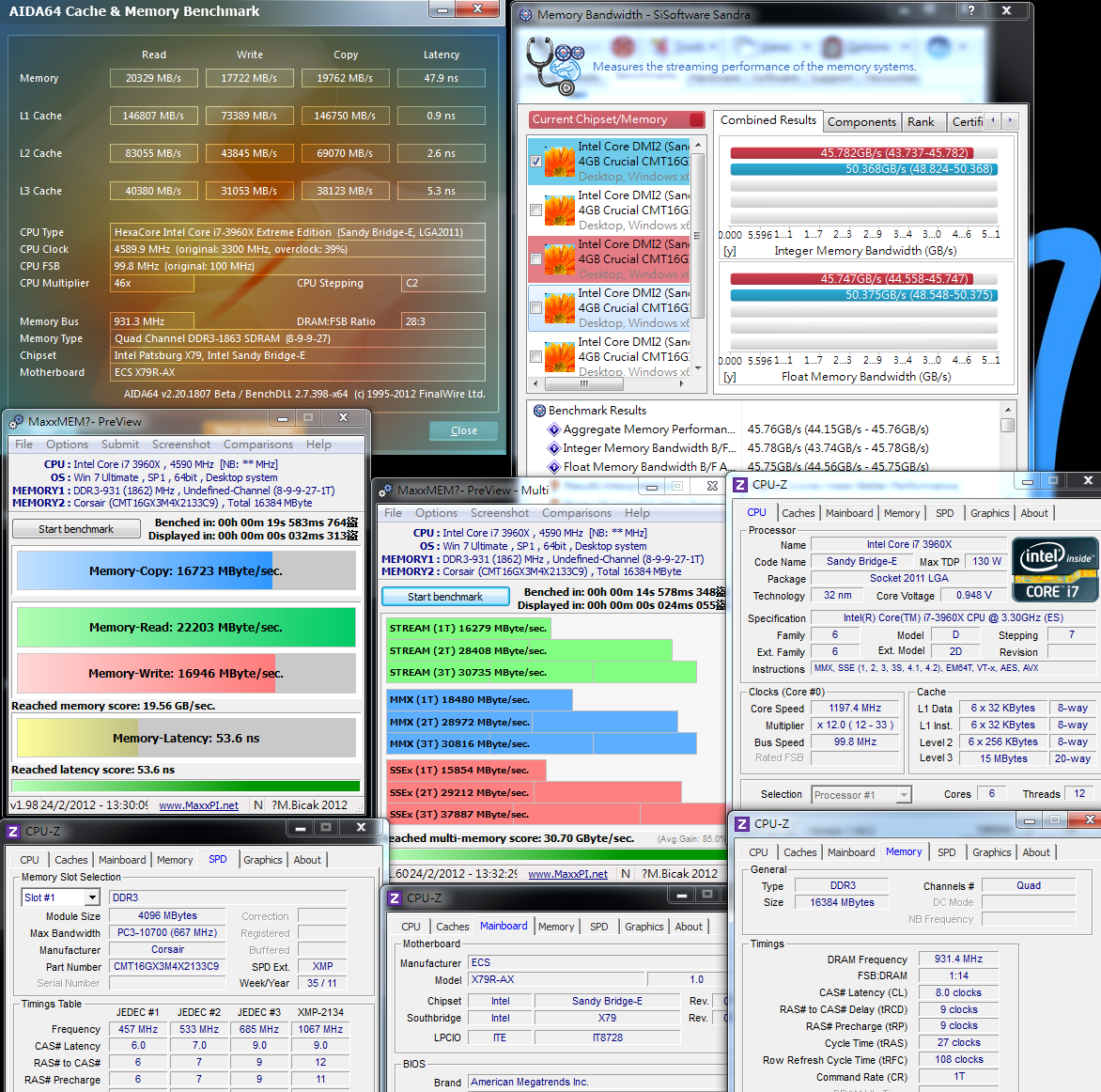
DDR3 1862.8 CL8 9-9-27 1T
ADIA64 Memory Read - 20329 MB / s
Sandra Memory Bandwidth - 45 782 MB / s
MaXXMEM Memory-Copy - 16723 MB / s
MaXXMEM Reached multi-memory score - 30.70 GByte / sec
-
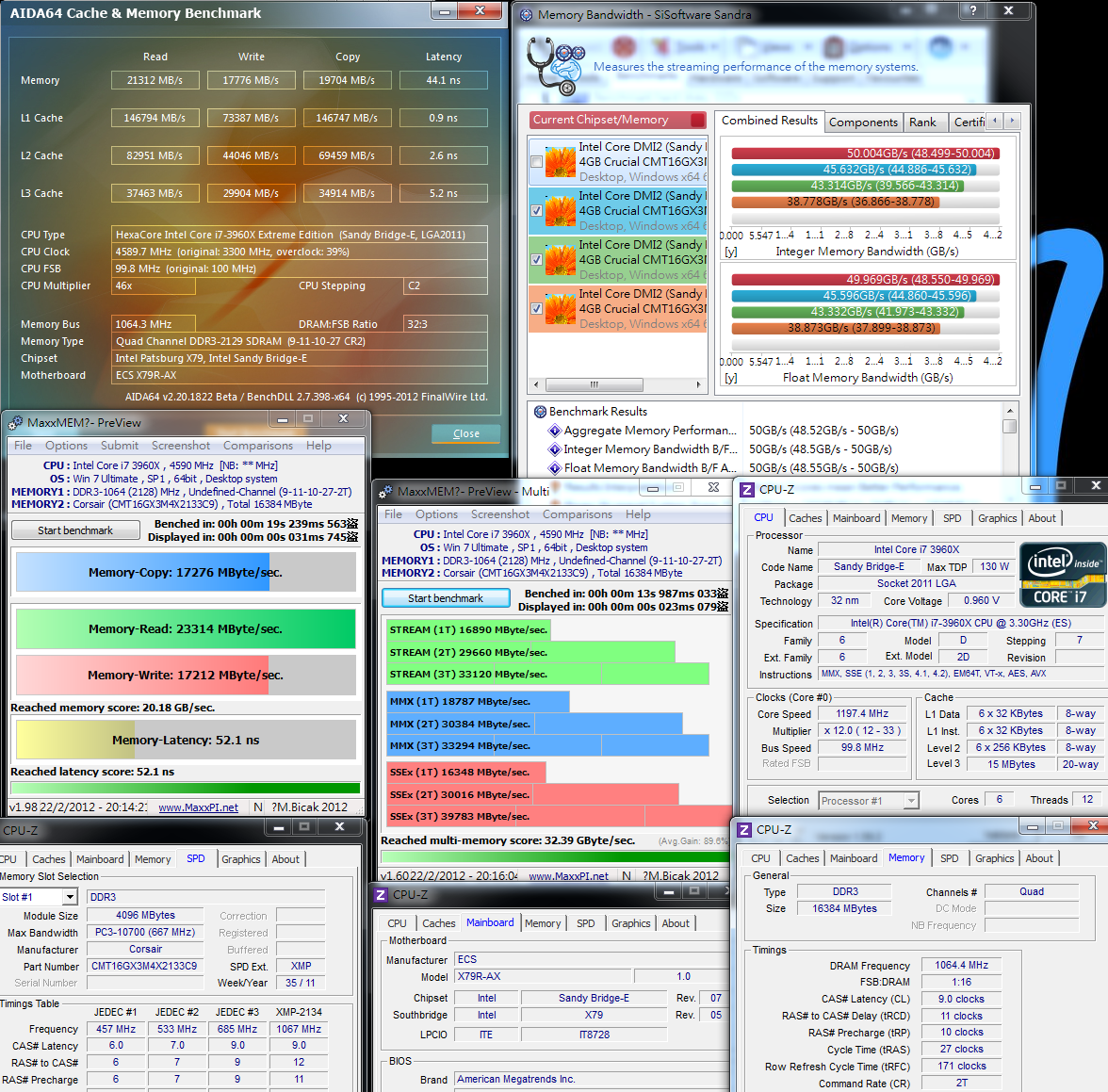
DDR3 2128.4 Cl9 11-10-27 2T the XMP mode
ADIA64 Memory Read - 21312 MB / s
Sandra Memory Bandwidth - 50 004 MB / s
MaXXMEM Memory-Copy - 17276 MB / s
MaXXMEM Reached multi-memory score - 32.39 GByte / sec
Performance comparison of bandwidth with dual-channel LGA 1155 and four-channel LGA 2011
I found that Sandra Memory Bandwidth achieved two times the level of dual-channel bandwidth when compared with CrystalMark
MaXXMEM reached multi-memory score is also about 50% higher compared with dual-channel
Other software at DDR3 bandwidth and dual channel were similar or lower: in the future we may need software that can support four-channel technology
Test of Three Clocks with Different Parameters to Compare Bandwidth Differences
If Sandra Memory Bandwidth is used as a benchmark, DDR3 efficiency will increase 14% from 1600 to 1866
If DDR3 is boosted from 1866 1T to 2133 2T, performance increases by 9.2%: the above was done with DDR3 bandwidth under various clock changes
Power Consumption Test
The OS Desktop did not use any software and C1E power-saving technology was turned on - 80W

OS Desktop did not use any software and the C1E power saving technology was turned off - 174W
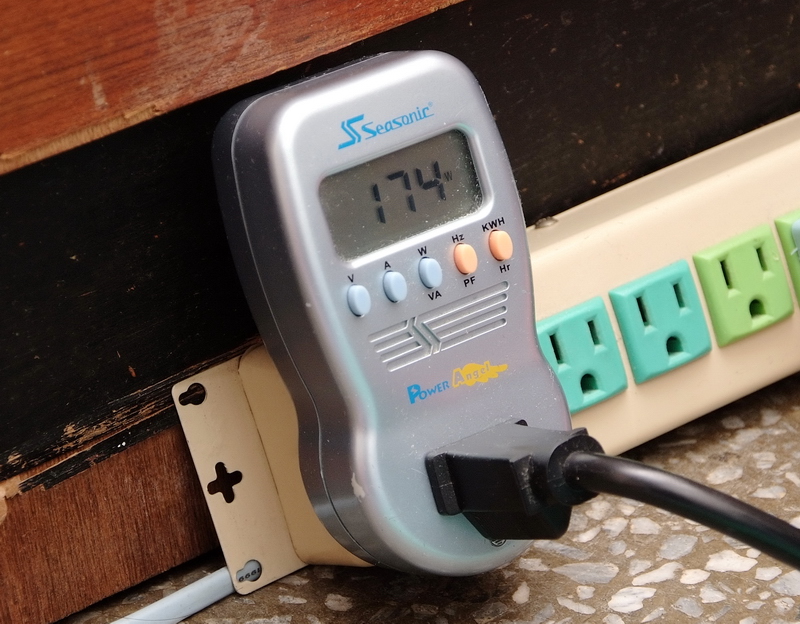
With LinX running, we allowed the CPU to reach full speed - 322W

There was little difference in power consumption performance compared with several other X79s I’ve tried before
What’s worth mentioning is that the X79R-AX’s overclocking performance was a bit lower with the C1E standby status enabled
If you use overclocking for a long time, I would recommend that you enable the C1E function for better performance in terms of temperature and power consumption
Temperature performance (room temperature about 21 degrees)
System Standby - 24 to 31

Running LinX with CPU at full speed - 61 to 71

For cooling, we used the Intel RTS 2011LC modular cooling system
This allowed the 3960X OC 4.6GHz desktop to achieve a quite low temperature in a standby environment
In addition, at full speed, the maximum temperature reached only about 71 degrees, so overclocking settings and temperature conditions were more suitable for long-term use
3D test
msi N560GTX-Ti Twin Frozr II
3DMark Vantage CPU SCORE => 89 479

FINAL FANTASY XIV
1920 X 1080 = 4705

StreetFighter IV Benchmark
1920 X-1080 special effects set to maximum => 158.79 FPS

For the 3D performance of a single GTX560 Ti, the LGA 1155 or LGA 2011 currently still achieve the highest standards of a desktop
For the same VGA combined with a different level CPU, the 3D performance will be different: the performance of the Sandy Bridge-E architecture is quite good
In addition, the X79R-AX can support technology up to the same four VGA CrossFireX or SLI boards
For users who need a higher level of 3D performance, based on their needs, they can install the number of VGA boards necessary to obtain higher performance
Also with room temperature at about 21 degrees and the 3960X OC overclocking at 4.6GHz, we used temperature measurement tools to check the temperature of the MOSFET
In standby with C1E enabled, the temperature was about 36.1 degrees, and with C1E disabled, it went up to about 53.9 degrees, and the highest CPU burn-in temperature is approximately 79.2 degrees
Compared with several X79s that I’ve used, the temperature performance of the X79R-AX in standby was relatively higher
At full speed, the temperature was a little lower than the other two X79s, and the average performance of these two models was above average
If you encounter a MOSFET temperature above 80 degrees, I would recommend overclocking to strengthen the heat dissipation in the area of the MOSFET
In this article, windwithme has shared temperature measurements in each X79 as reference
ECS X79R-AX
Strengths
1. The overseas price is about US$310, equivalent to about NT$9175, a better value than a mid-range X79
2. Equipped with the SAS specification’s SATA design, up to 12 internal SATA devices may be installed
3. A rarely seen transmission design for wireless LAN and Bluetooth dongle communications
4. Qooltech IV cooling modules use a serial configuration of MOSFET chipsets for better heat dissipation
5. The high-end X79 has a 4-Way AMD CrossFireX/nVIDIA SLI configuration
6. Use of 14 MOS drivers for power supply, PCI-E, Gen3, CPU/DDR3 installed 15? gold contacts
Weaknesses
1. DDR3 is only available in 4DIMM packaging
2. When overclocking the CPU, the UEFI interface needs to be enhanced for stability
3. Market visibility and after sales service channels have room for improvement
Performance ? ? ? ? ? ? ? ? ? ? 85/100
Materials ? ? ? ? ? ? ? ? ? ? 90/100
Specifications ? ? ? ? ? ? ? ? ? ? 91/100
Appearance ? ? ? ? ? ? ? ? ? ? 79/100
Cost ? ? ? ? ? ? ? ? ? ? 83/100
The visibility of ECS in the Taiwan market is not so good, but ECS brand motherboards are continuing to improve
The X79R-A is better in terms of components and specifications than some other similarly priced X79s, and it even approaches some high-end X79 specifications
In recent years in its high-end product lines, ECS has made visible progress and innovation, which is worthy of recognition
With an 8DIMM design, the X79R-A can reach specifications of a very comprehensive standard
Performance after overclocking was also good with DDR3 bandwidth from 1600 to 2133 above average
The price of the X79R-AX was similar to or slightly higher than other motherboard makers’ entry-level X79s
However, the overall specifications of the components were close to high-end standards in the X79 market, with a good cost to performance ratio among high-end X79 platforms
ECS will be fairly competitive with a future 8DIMM version and in addition to improved hardware, better market channels

This article is also post in my blog WIND3C, Any comments are welcome.
-
perfect analysis wind
Ciao! Sembra che tu sia interessato a questa conversazione, ma non hai ancora un account.
Stanco di dover scorrere gli stessi post a ogni visita? Quando registri un account, tornerai sempre esattamente dove eri rimasto e potrai scegliere di essere avvisato delle nuove risposte (tramite email o notifica push). Potrai anche salvare segnalibri e votare i post per mostrare il tuo apprezzamento agli altri membri della comunità.
Con il tuo contributo, questo post potrebbe essere ancora migliore 💗
Registrati Accedi