
[ENG]The new force of Intel Sandy Bridge - FOXCONN Rattler P67 Review
-

From 2007, FOXCONN has begun to introduce middle and high end MB products,
hoping to establish its own-brand products and create the complete MB product line ranging from high to low end.
During the period, FOXCONN has unveiled P35/P45/P55/X58 MB products, etc.
However, as the choice is limited and some factors related with low visibility market, it makes us feel a period of silence since the beginning of P55 products.
Early June, we have seen FOXCONN P67, Z68 and X79 in Computex,
showing that from the impression of previous Quantum Force, each MB has a unique naming.
This time, Intel P67 chipset is called Rattler, targeting the main route of racing judged from packing design.
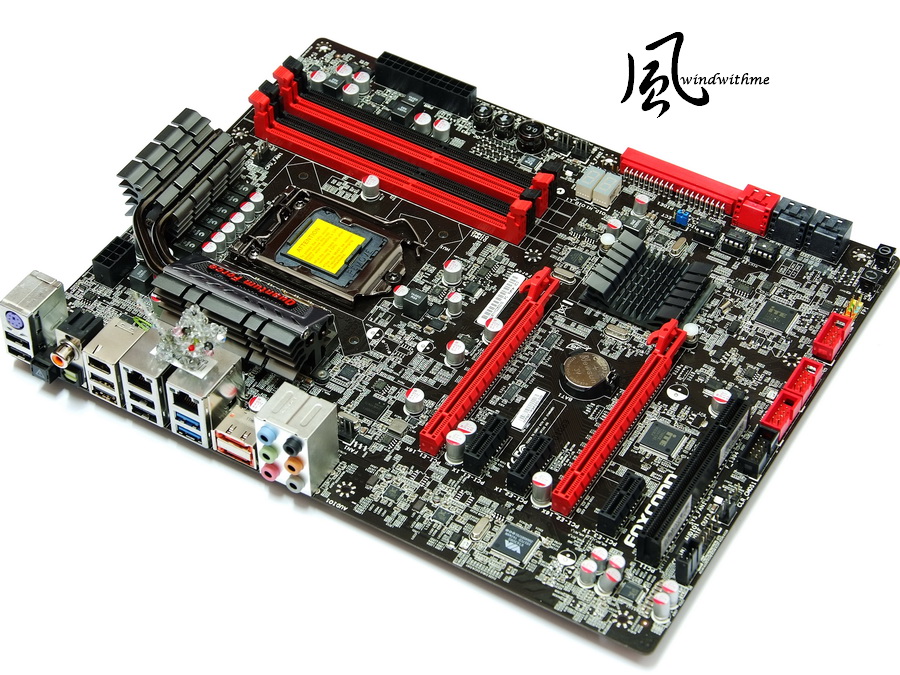
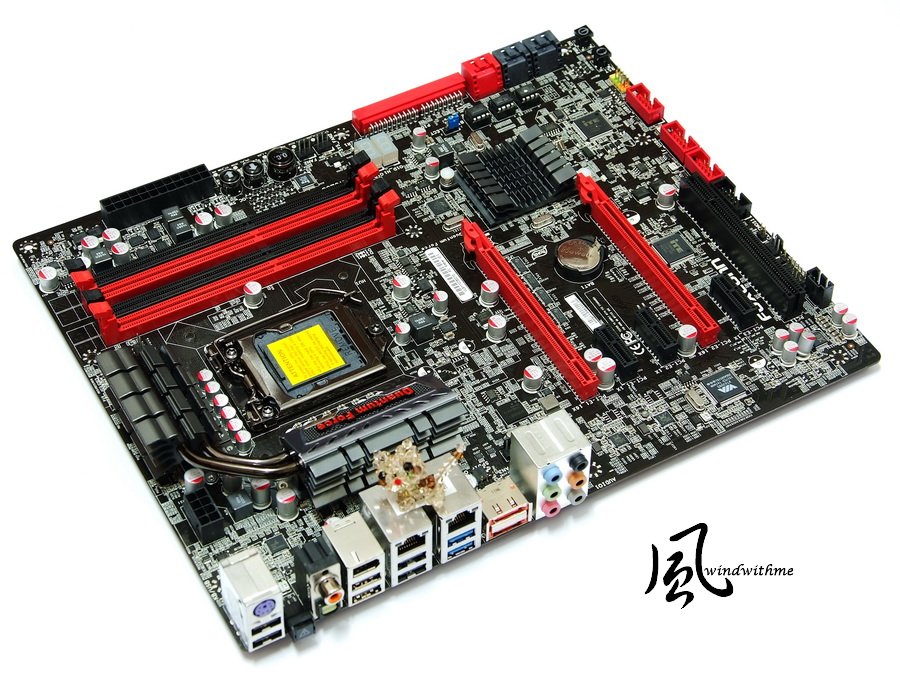
FOXCONN Rattler Appearance
Quantum Force has been used to creating visual sensation by matching the color with black and red
Nowadays, in MB market, several other brand high-end products also used such color scheme.

Rattler is supposed to target middle-end P67 with decent specs and materials.
Accessories
Brochure, installation guide, driver as well as I/O panel

SATA cable with parallel and vertical type, IDE cable, 4PIN-SATA power cable and USB expansion port

The left bottom of the MB
2 X PCI-E 2.0 X16 slots, supporting 2Way CrossFireX(X8+X8)
3 X PCI-E X1 slots
1 X PCI slot.
In addition, there are two Realtek RTL8111E LAN chips and Realtek ALC892 audio chip.

The right bottom of the MB
There are two red SATAIII ports provided by P67 chip, four black SATAII ports also provided by P67 chip as well.
An IDE port offered by Marvel 88SE6121 chip and supporting RAID 0, RAID 1, RAID 5 and RAID 10. In addition
the MB features dual-BIOS, POWER/RESET button, debugging LED, etc.

The right top of the MB
There are four DIMM DDR3 slots supporting 1066/1333/1600(oc)/1866(oc)/2133(oc) with capacity of up to 32GB.
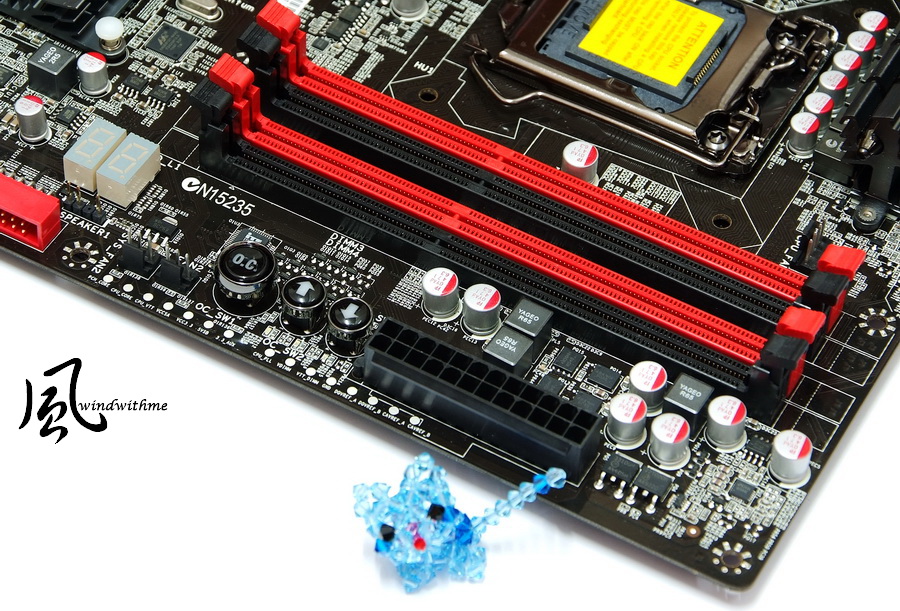
The left top of the MB
As its LGA 1155 socket pitch is the same as that of LGA 1156, so their coolers are also compatible.
CPU power supply uses 14 phase Hybrid PWM which can parallel connection at the same time.

As for I/O, there is a PS2, six USB 2.0(black), two USB 3.0(blue), one IEEE 1394a, two Gigabit LAN, two eSATA, one S/PDIF coaxial/optic fiber connectors, etc.

-
From 2007, FOXCONN has begun to introduce middle and high end MB products,
hoping to establish its own-brand products and create the complete MB product line ranging from high to low end.
During the period, FOXCONN has unveiled P35/P45/P55/X58 MB products, etc.
However, as the choice is limited and some factors related with low visibility market, it makes us feel a period of silence since the beginning of P55 products.
Early June, we have seen FOXCONN P67, Z68 and X79 in Computex,
showing that from the impression of previous Quantum Force, each MB has a unique naming.
This time, Intel P67 chipset is called Rattler, targeting the main route of racing judged from packing design.
FOXCONN Rattler Appearance
Quantum Force has been used to creating visual sensation by matching the color with black and red
Nowadays, in MB market, several other brand high-end products also used such color scheme.
Rattler is supposed to target middle-end P67 with decent specs and materials.
Accessories
Brochure, installation guide, driver as well as I/O panel
SATA cable with parallel and vertical type, IDE cable, 4PIN-SATA power cable and USB expansion port
The left bottom of the MB
2 X PCI-E 2.0 X16 slots, supporting 2Way CrossFireX(X8+X8)
3 X PCI-E X1 slots
1 X PCI slot.
In addition, there are two Realtek RTL8111E LAN chips and Realtek ALC892 audio chip.
The right bottom of the MB
There are two red SATAIII ports provided by P67 chip, four black SATAII ports also provided by P67 chip as well.
An IDE port offered by Marvel 88SE6121 chip and supporting RAID 0, RAID 1, RAID 5 and RAID 10. In addition
the MB features dual-BIOS, POWER/RESET button, debugging LED, etc.
The right top of the MB
There are four DIMM DDR3 slots supporting 1066/1333/1600(oc)/1866(oc)/2133(oc) with capacity of up to 32GB.
The left top of the MB
As its LGA 1155 socket pitch is the same as that of LGA 1156, so their coolers are also compatible.
CPU power supply uses 14 phase Hybrid PWM which can parallel connection at the same time.
As for I/O, there is a PS2, six USB 2.0(black), two USB 3.0(blue), one IEEE 1394a, two Gigabit LAN, two eSATA, one S/PDIF coaxial/optic fiber connectors, etc.
-
The new Quantum Force cooler module features iron-grey dual heatpipe design. Personally,
the color sense of black and red color matching in Inferno Katana of P55 is better.
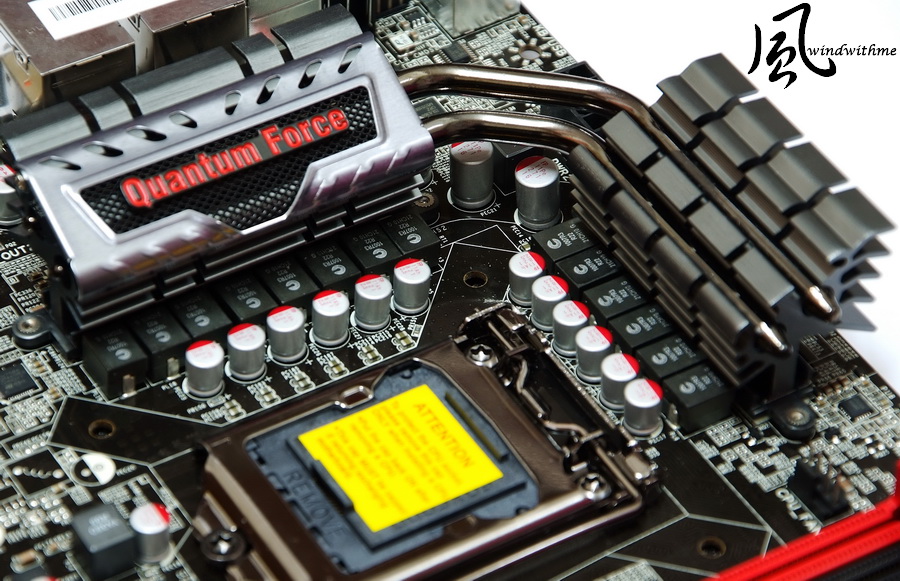
The area of P67 chip heatsink is not big; aluminum printing lines are quite dedicated, which will be great help in increasing thermal area.

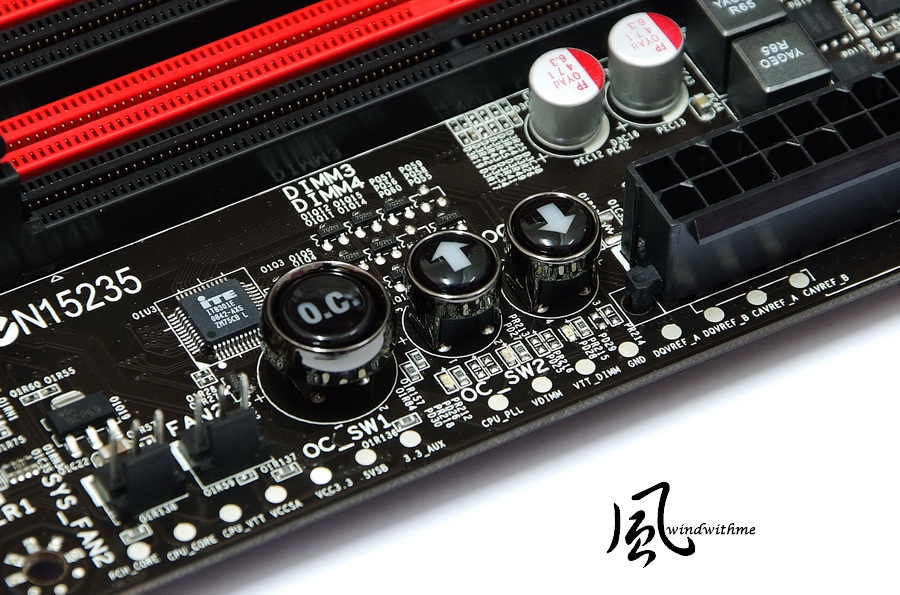
OC Switch Button
Press "O.C." button, and then use the up and down arrow to adjust CPU clock and each interval is 1MHz.
The OC range is not big due to the limit of Sandy Bridge CPU clock is between 105 ~ 108MHz.
In addition, the dots in the below are PCB Voltage Sensors and the users can measure the voltage value directly.
Share BIOS setting style of Windwithme
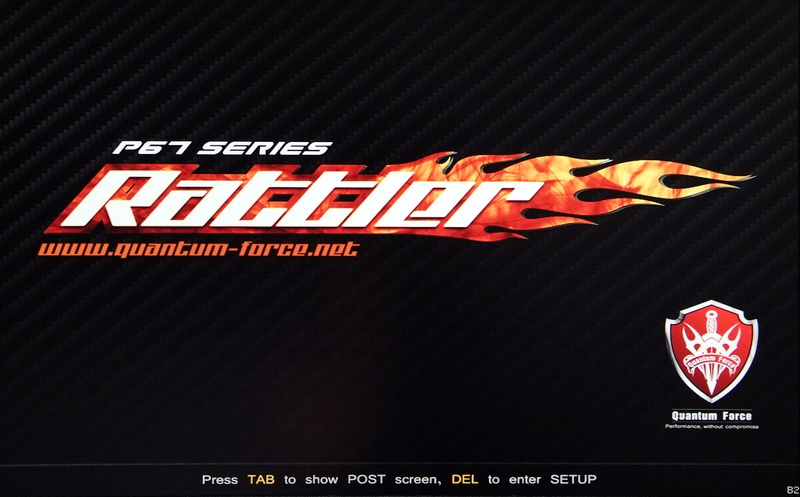
The startup screen design is quite simple and clear, and the style is in accordance with the racing pictures of packing.
The black stripe is the commonly-seen carol design which often appears in motorcycle products.
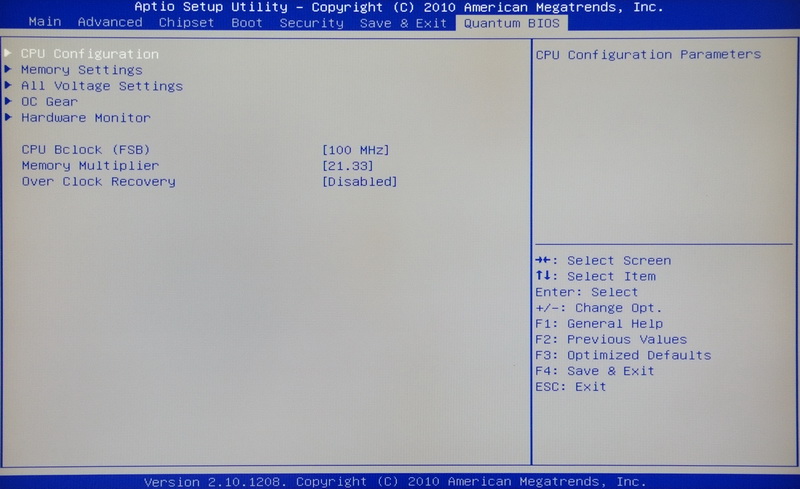
Quantum BIOS is the main adjustment page.
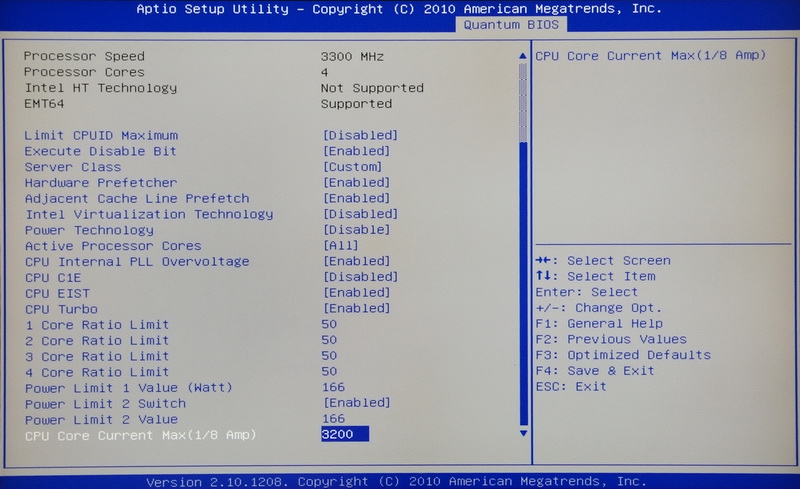
CPU Information page
Internal PLL Voltage Override is the new platform option which can strengthen the stability of CPU OC to 5GHz.

Turbo Boost 2.0 technology has the ever refined CPU multiplier acceleration mode.
2500K default setting is 38,37,36,35 in Turbo Mode and the picture shown is the setting of OC to X50 multiplier.
DDR3 setting option is designed for users to choose quicker parameter under stable usage.
The below setting is DDR3 2133 CL8 10-8-26 1T.

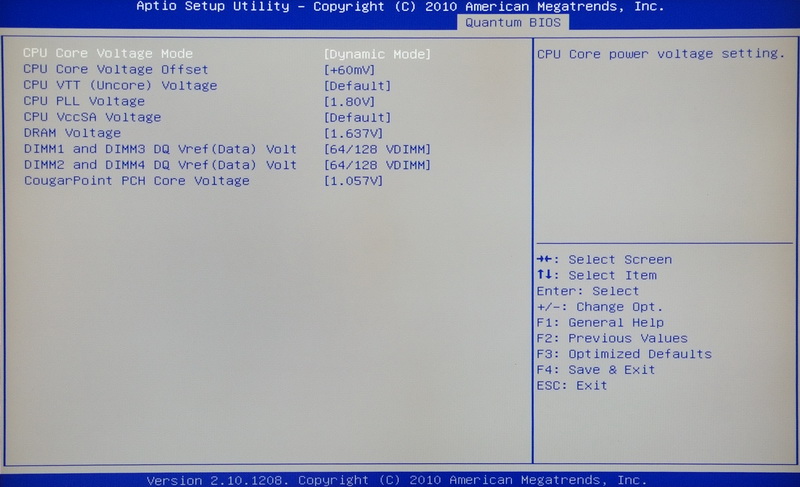
Voltage Page
There are three modes of CPU Core Voltage.
Standard Mode => CPU Core Voltage Offset (1/1000 Volt)
Dynamic Mode => +10~+1260mV
Fixed Mode => 1.10~2.00V
CPU VTT (Encore) Voltage 1.005~2.011V
CPU PCH Voltage 1.80~2.43V
DRAM Voltage 1.005~2.501V
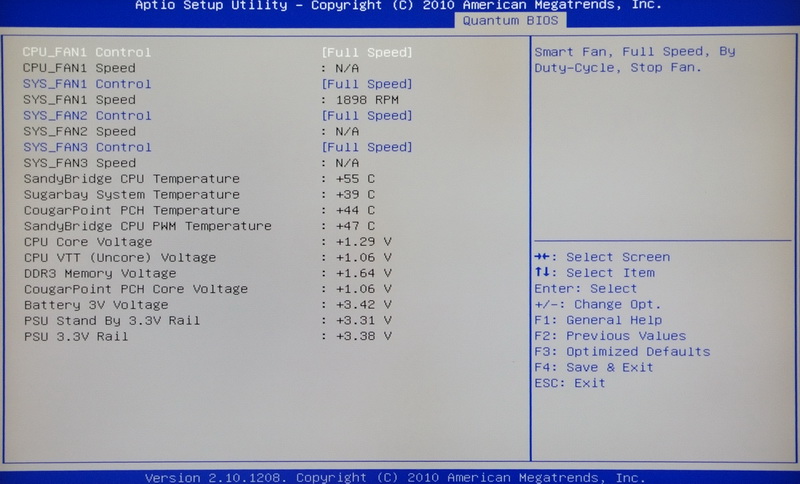
Hardware Monitor
Sandy Bridge in terms of CPU OC is much easier than the ever platform. As it mainly uses for CPU multiplier,
we choose 2500K/2600K for the availability of adjusting CPU model of multiplier.
In addition, we adjust CPU voltage according to different OC potential and it’s suggested to enable Internal PLL Voltage Override if over 5GHz.
Moreover, DDR3 OC is simpler than ever. It’s not necessary to increase CPU clock to OC DDR3.
Basic OC can reach to 2133. Surely, it also requires good physique DDR3 so that can stable run for DDR3 1866 or 2133.
Above is the setting suggestion when use 2500K with Rattler OC 5GHz/DDR2133 for reference.
-
Test system configuration
CPU: Intel Core i5-2500K
MB: FOXCONN Quantum Force Rattler
DRAM: CORSAIR DOMINATOR-GT CMT4GX3M2B2133C9
VGA: POINT OF VIEW GTX590
HD: Intel 510 Series 120GB
POWER: be quiet! Straight Power E7 Golden 550W
Cooler: Mega Shadow Deluxe Edition
OS: Windows7 Ultimate 64 bits

The background picture is quite special in Foxconn software installation screen which making us have a feeling of floating in the space.
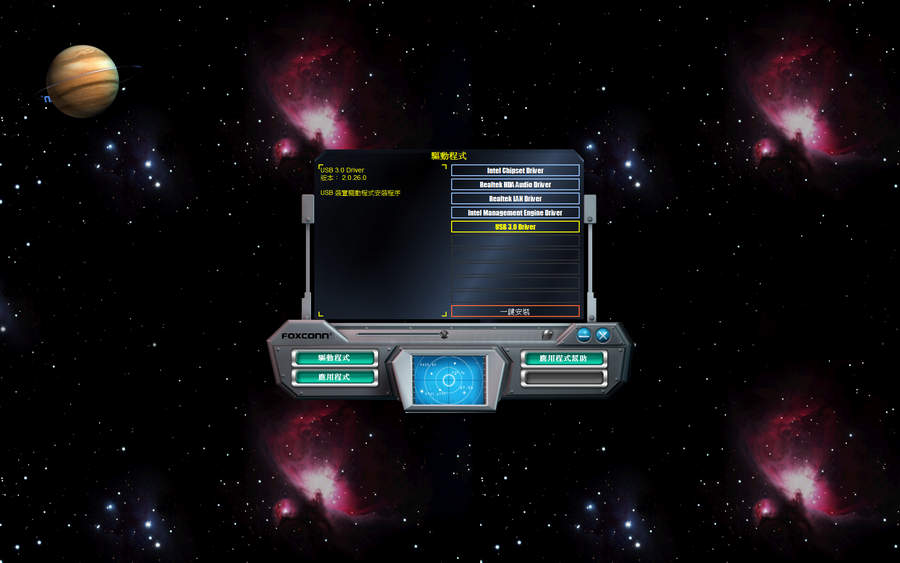
There is abundant software. FOX LOGO is the software which can change the startup screen.

AEGIS PANEL is the main adjustment software which integrates multi-function.
The right window is the choice area of four main functions.
While the left window is the overclocking page so the users can set the CPU multiplier or hardware voltage directly.

Moreover, it features hardware monitoring function and the overclocking archived page.

Overclocking performance
CPU 100 X 50 => 5002MHz 1.43V
(Disable)Turbo Boost?C1E?Internal PLL Voltage Override
DDR3 2134.2 CL8 10-8-26 1T 1.637V
Hyper PI 32M X4 => 7m 20.139s
CPUMARK 99 => 770
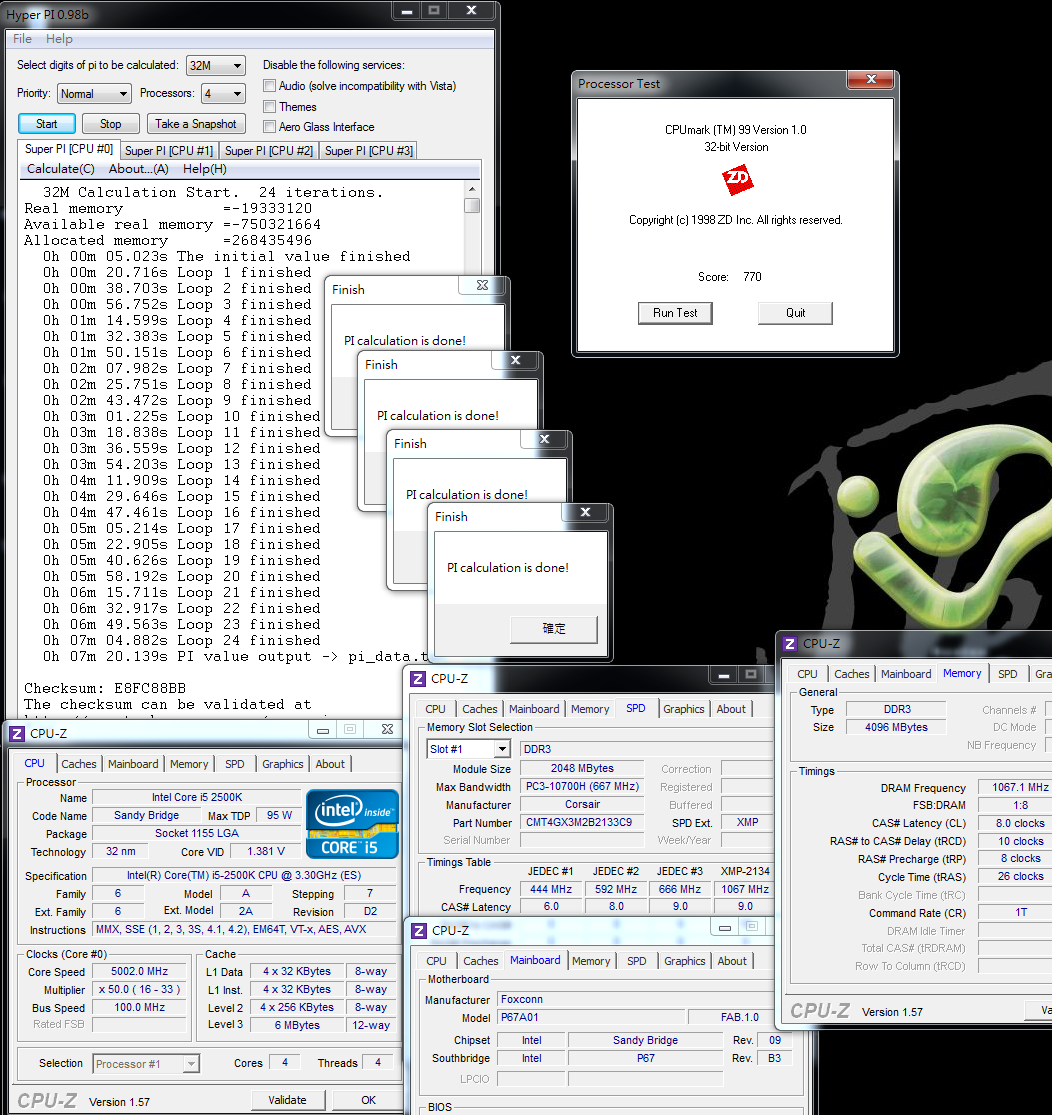
Nuclearus Multi Core => 27235
Fritz Chess Benchmark => 31.20/14976

CrystalMark 2004R3 => 415981

CINEBENCH R11.5
CPU => 7.89 pts
CPU(Single Core) => 2.02 pts

PCMark Vantage => 24675

-
Windows Experience Index - CPU 7.7
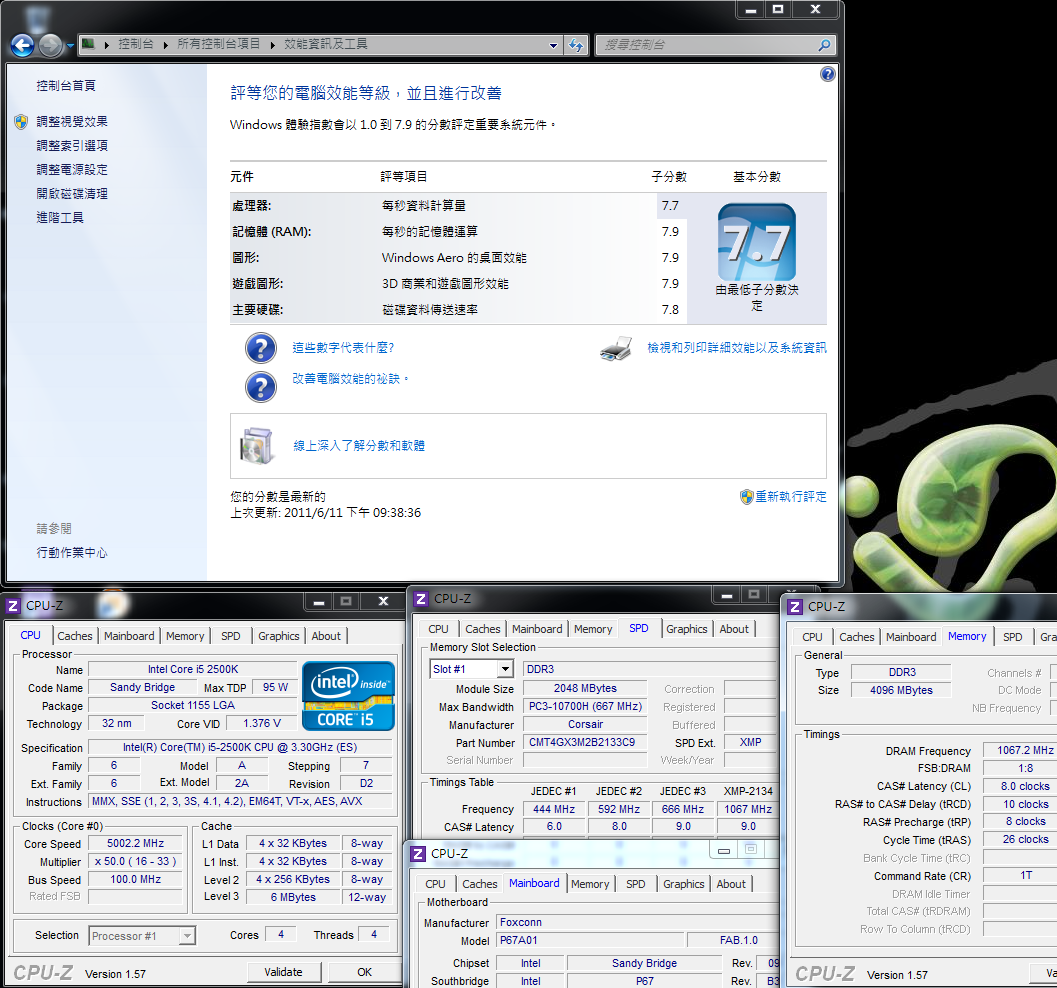
CPU-Z 1.57 can’t catch the voltage of Rattler properly no matter its added 60~150mV in BIOS and all display with 1.37~1.38V.
At this moment, we should use AEGIS PANEL in OS to get the current CPU voltage.
When 2500K is overclocked to 5GHz, it can get a high score in the above test software.
It can shorten the operation time when run with the software which consumes more CPU resource.
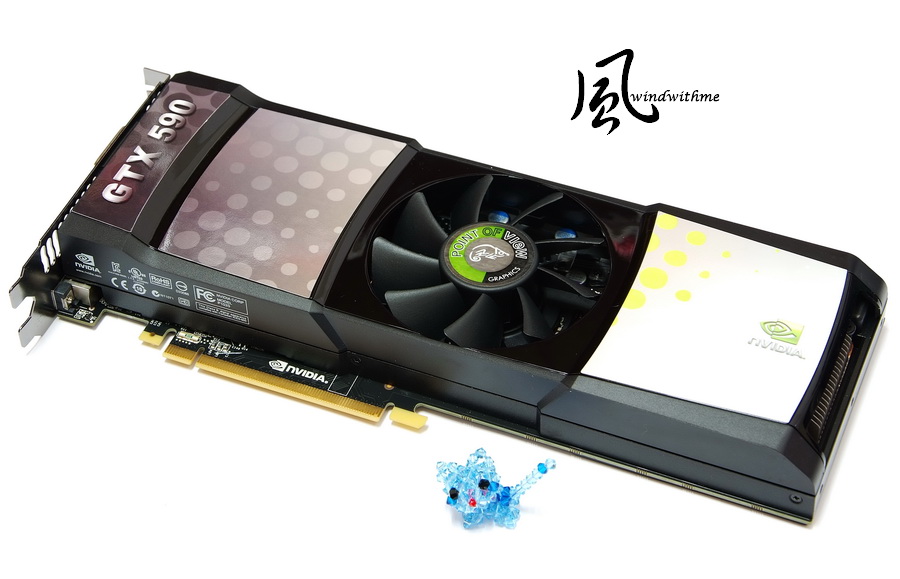
3D bench use NVIDIA GeForce GTX 590 with the brand of “POINT OF VIEW” which is the common brand in Europe.
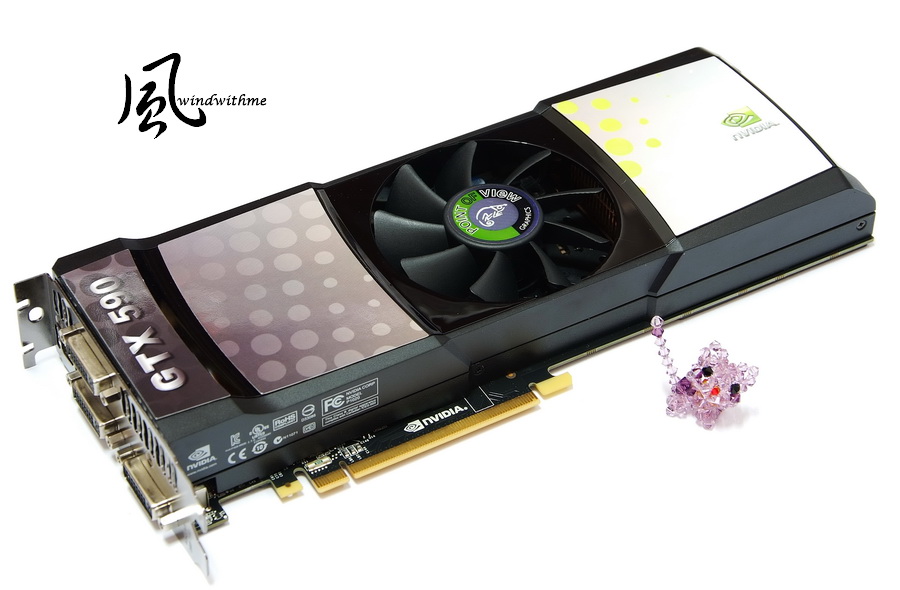
GTX 590 is based on dual GPUs and GPU/Memory clock is 608/3414MHz.
Total memory capacity is 3072MB(2X1536mb). I/O connector provides three DVI ports and a mini Display Port.
3DMark Vantage => P42645

LOST PLANET 2
DX11 1920 X 1080 TEST B - 77.7 fps

FINAL FANTASY XIV
1920 X 1080 => 7200

GTX 590 gets a quite amazing scoring in 3DMark Vantage bench which also due to the good support on VGA.
In addition, two Game test software also account for the improvement towards GPU SLI but not that much as that of 3DMark Vantage.
Previous testing when Sandy Bridge run with GTX560 Ti is quite power saving.
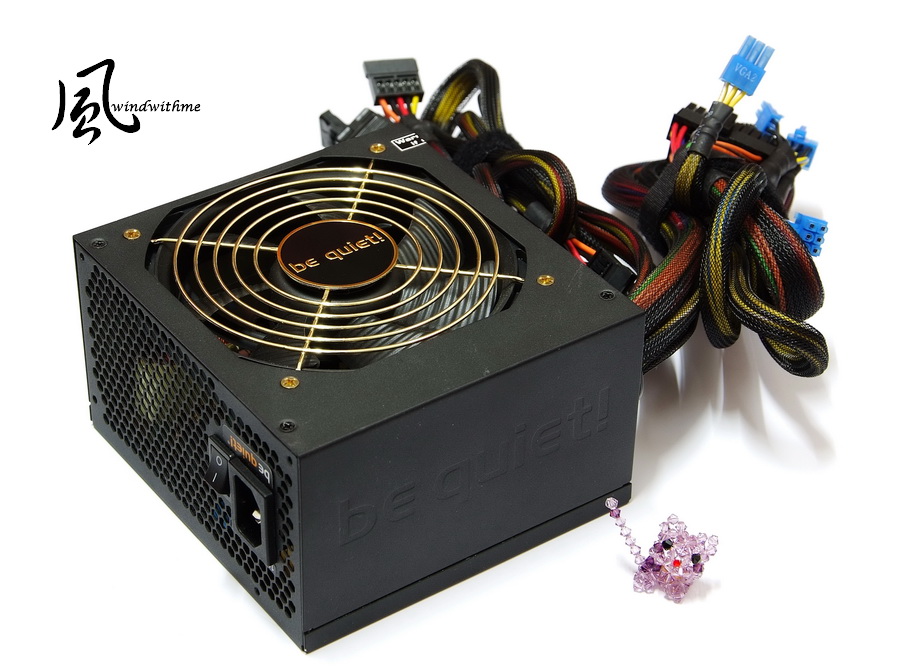
This time we use be quiet! Straight Power E7 Golden 550W to see whether it can secure enough power supply.
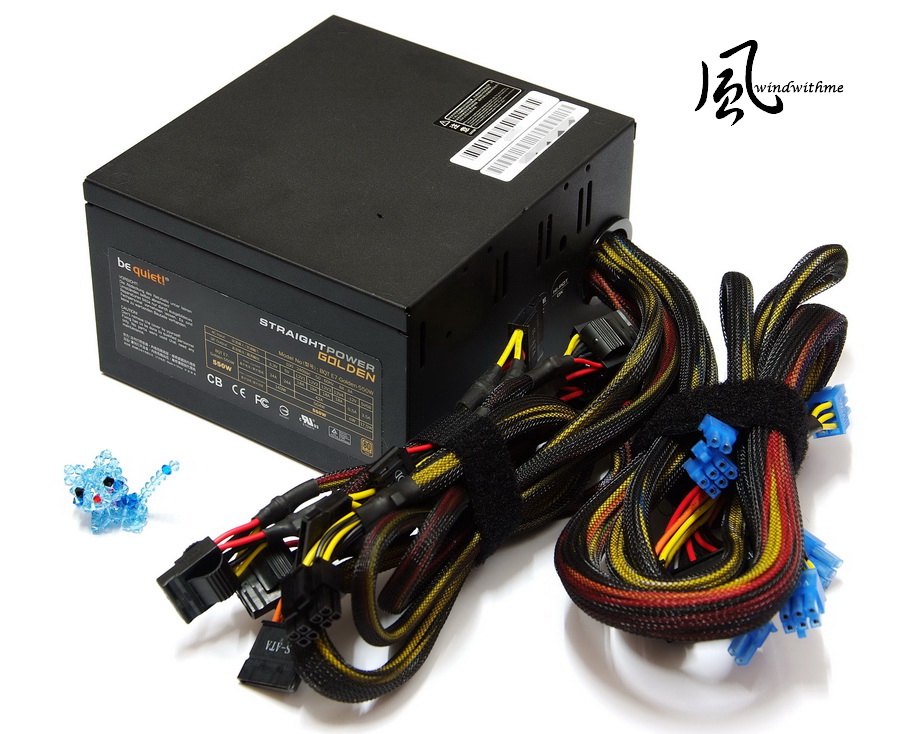
The power supply features coated painting and non-modular design and it is 80 Plus gold certified.
The pricing is cheaper than that of many gold certified PSUs.
Power Consumption Test
In Idle condition, the power consumption is 136W.

In OOCT test, the power consumption is 526W.

The power consumption of GTX 590 is not high in idle condition, much better than that of LGA 1156 platform.
In OCCT test, Power Angel shows around 520 ~ 530W when CPU and VGA at full speed simultaneously. .
Power consumption lower down to 250 ~ 400W when play game or CPU with full speed.
According to the information of 80 Plus website, it is about 89.14% when use 115V full loading to change full speed from 526W to 467W.
Under the top platform, it’s enough to match be quiet! E7 Golden 550W for power supply.
-
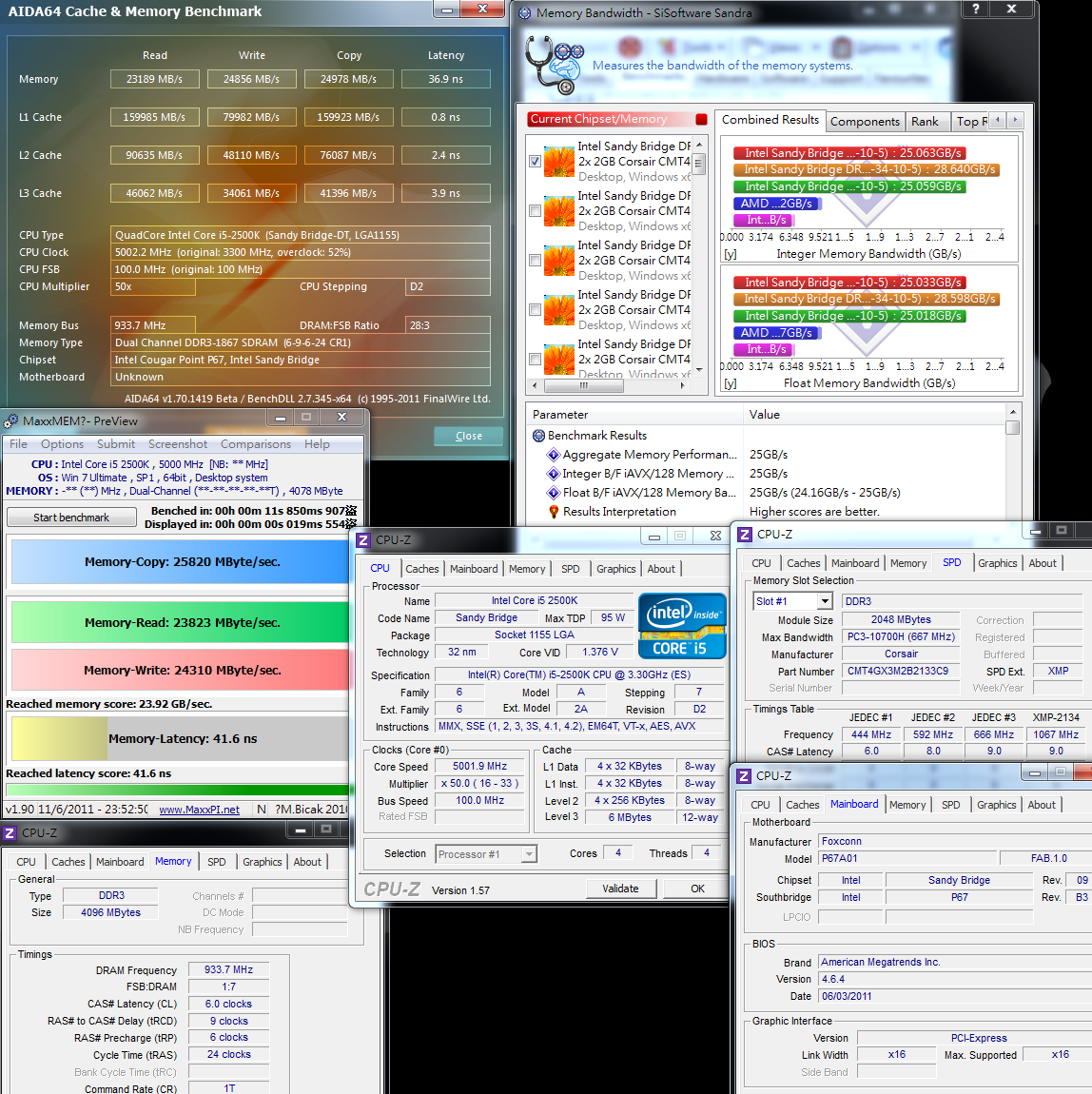
In DDR3 test, we used CORSAIR DOMINATOR-GT CMT4GX3M2B2133C9 memory.
DDR3 1867.4 CL6 9-6-24 1T
ADIA64 Memory Read - 23189 MB/s
Sandra Memory Bandwidth - 25063 MB/s
Maximum Memory-Copy - 25820 MB/s
DDR3 2134.4 CL9 11-9-27 1T
ADIA64 Memory Read - 24898 MB/s
Sandra Memory Bandwidth - 28178 MB/s
Maximum Memory-Copy - 28139MB/s

DDR3 2134.2 CL8 10-8-26 1T
ADIA64 Memory Read - 25291 MB/s
Sandra Memory Bandwidth - 28640 MB/s
Maximum Memory-Copy - 28308MB/s

One of the performance reinforcement of Sandy Bridge is the bandwidth of DDR3.
P67 features dual-channel bandwidth which can catch up tri-channel of X58.
In addition, it’s not necessary to install first bank first when we install DRAM like LGA 1156/LGA1366.
User can when choose any bank to install first with P67.
As for DDR3, we can see the obvious difference between 1866MHz and 2133MHz.
In the test, CORSAIR DDR3 2133 CL9 can be adjusted to CL8 or lower.
If the frequency is set at 2133, the performance gap between CL8 and CL9 is not big which can be shown in the above three different DDR3 bandwidth comparison chart.
If user want to purchase DRAM, suggest considering clock frequency as priority then lower parameter as second.
In SATA3 transfer rate test, we used Intel 510 Series 120GB SSD.
ATTO DISK Benchmark test(over 32k),the SSD delivers read and write speed of 467.8 Mb/s and 231.7 MB/s,respectively.
CrystalDiskMark 4K QD32 Read – 141.8 MB/s Write – 66.11 MB/s

EVEREST File Benchmark test(over 1024k),the SSD delivers read performance of 400 MB/s.
AS SSD Benchmark
Seq Read – 436.63 MB/s Write – 203.53 MB/s
4K-64Thrd Read – 82.25MB/s Write – 66.12 MB/s
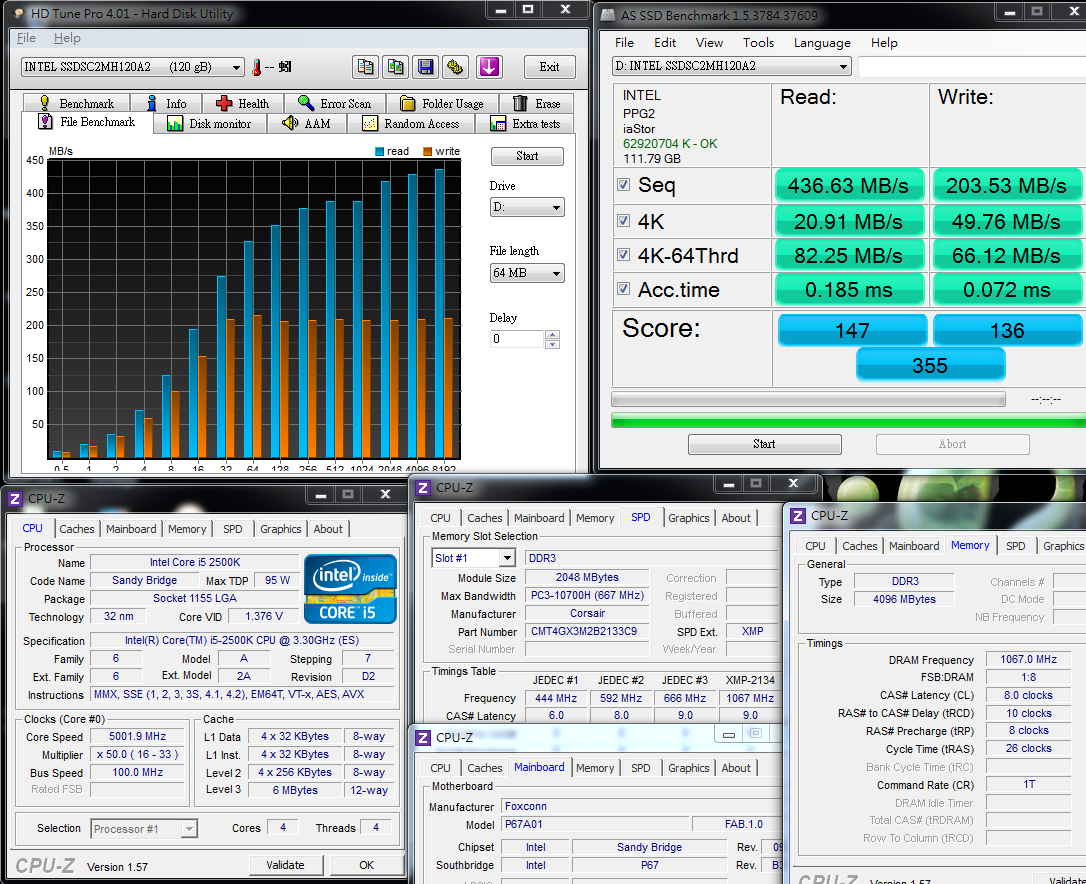
Intel 510 Series 120GB delivers read and write speed of up to 450/210 MB/s which is supposed to be the high-end product line in SSD market.
When it matches with P67 chipset, it has a good outperform in STAT3 transfer rate which can reach the spec or higher transfer performance..
Temperature test (Indoor temperature around 28?)
In idle condition, the temperature is around 39?~47?.

When CPU is operating in full speed, the temperature is around 87?~96?.
Intel Burn Test v2.4?Stress Level Maximum
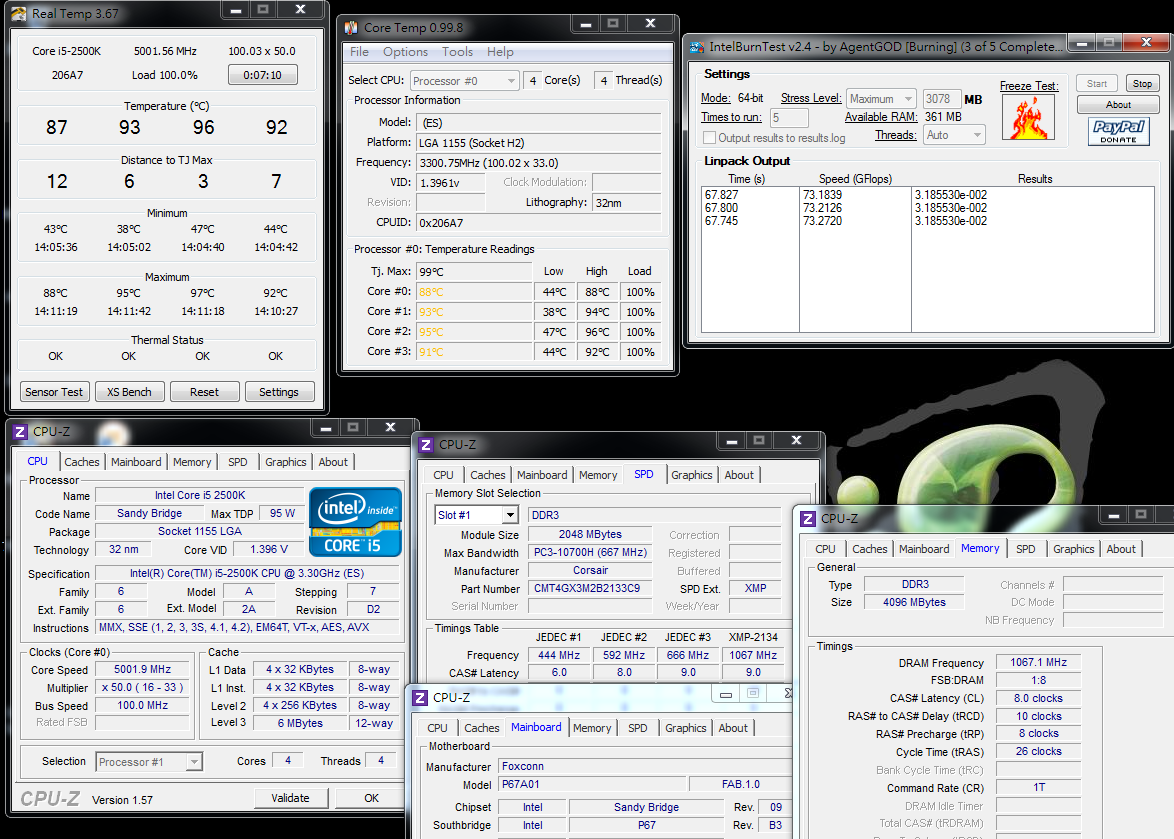
Summer is underway, so the indoor temperature also increase which leads to the temperature rise in overclocking platform.
When 2500K is overclocked to 5GHz, apart from the added voltage, the temperature also increases a lot.
You have to pay attention on this. If you want to get a lower temperature, it’s suggested to be overclocked to 4.8GHz and the voltage can be adjusted lower.
In this way, it will feature a better performance in temperature, voltage and power consumption for a long time user.
Surely it is difference for 2500K and it will depend on your own CPU to adjust.
Earlier some Ocers ask me about the performance difference between 2500K & 2600K.
Below is to use 2600K to overclock to 5GHz/DDR3 2134.2(CL=8)/VGA is changed to GTX 560Ti for CPU performance comparison.
CPUMARK 99 => 771
Fritz Chess Benchmark => 39.23/18830
CINEBENCH R11.5
CPU => 9.86 pts
CPU(Single Core) => 2.03 pts

Compared with 2500K, 2600K features more L3 cache by 2MB as well as the Hyper-Threading support.
From the above single-core test, the efficiency performance is close to 2500K.
However, due to the hyper-threading, 2600K features performance improvement by 25% than 2500K under same frequency.
Advantage:
1.The MB has a decent appearance and packing and the pricing is positioned at middle-end P67.
2.It features abundant BIOS option which has wide range of voltage as well as good overclocking performance.
3.Full Japanese solid-state capacitors, builds in POWER/RESET/CMOS Reset button and debugging LED.
4.It also employs OC Switch Button design and support IDE device which is hardly to find in P67 MB.
5.Dual-LAN, two eSATA connectors supporting SATA3,USB3,etc.
Disadvantage:
1.Without NVIDIA SLI support.
2.CPU voltage can be only displayed by means of self-brand software, some software can’t reveal the true CPU voltage.
3.The market visibility needs to be strengthened for FOXCONN MB.
Efficiency ??????????
Material ??????????
Specs ??????????
Appearance ??????????
Price/Performance cost ??????????
Currently many MB manufacturers have begun to launce the latest Z68 products.
The advantages of Z68 is that it features overclocking technology of P67 and display output specs of H67, but the price is more expensive than P67.
The feature of Z68 embedded display won’t be used if user plays game in PC.

The Rattler P67 unleashed by FOXCONN is priced at US$199(NT$5800), which will be set a little higher than entry-level P67 but cheaper that the middle-end one.
The cost performance is relatively good. Surely if it can be a little cheaper to close the price of entry level P67, the market competitive power will be stronger. .
FOXCONN used to target at High End market for Quantum Force series and the price is close to the other manufacturers.
This time we introduce P67 Rattler who’s pricing falls on the middle-end range. It’s really an encouraging thing.
We expect that FOXCONN will unveil X79 motherboard with more preferential price and offer the customers with more choices.
This article is also in my blog.
Welcome your visit.
-
Always Good Review and fantastic product reviewed

-
very interesting board
old bios is good
(i don't like UEFI bios) but there are few settings options for RAM a good point for it is a full voltage sensors
Foxconn hybrid phase are a very good solution for high end overclockers, anyway i think that this board is 12+2 when 12 phase is hybrid PWM and the other two phase is normal
like it

But i'm not sure
anyway great review

Ciao! Sembra che tu sia interessato a questa conversazione, ma non hai ancora un account.
Stanco di dover scorrere gli stessi post a ogni visita? Quando registri un account, tornerai sempre esattamente dove eri rimasto e potrai scegliere di essere avvisato delle nuove risposte (tramite email o notifica push). Potrai anche salvare segnalibri e votare i post per mostrare il tuo apprezzamento agli altri membri della comunità.
Con il tuo contributo, questo post potrebbe essere ancora migliore 💗
Registrati Accedi