
[ENG]New Gen Intel Entry Integrated Chipset - GIGABYTE H61M-D2P Parity Board Review
-

It’s been 5 months now since Intel launched latest Sandy Bridge structure.
The first launch is LGA 1155 socket P67/H67 chipset for different segments.
P67 is for K series CPU to have OC clock ratio features and without GPU output.
H67 is for Sandy Bridge CPU graphics output feature but no CPU OC function.
According to LGA 1156 H57 chipset, H67 is for higher price segment.
There should be some parity chipset like H55. This time the new chipset is H61.
H61 has 2 key differences with H67. One is RAID and the other one is SATA3.
However, H61 price is lower. For worksheet or not much expanding requirement users, it can be the better choice.
Many MB brands launch their H61 products since March.
H61 price segment is decided by graphics output ports and USB3 support.
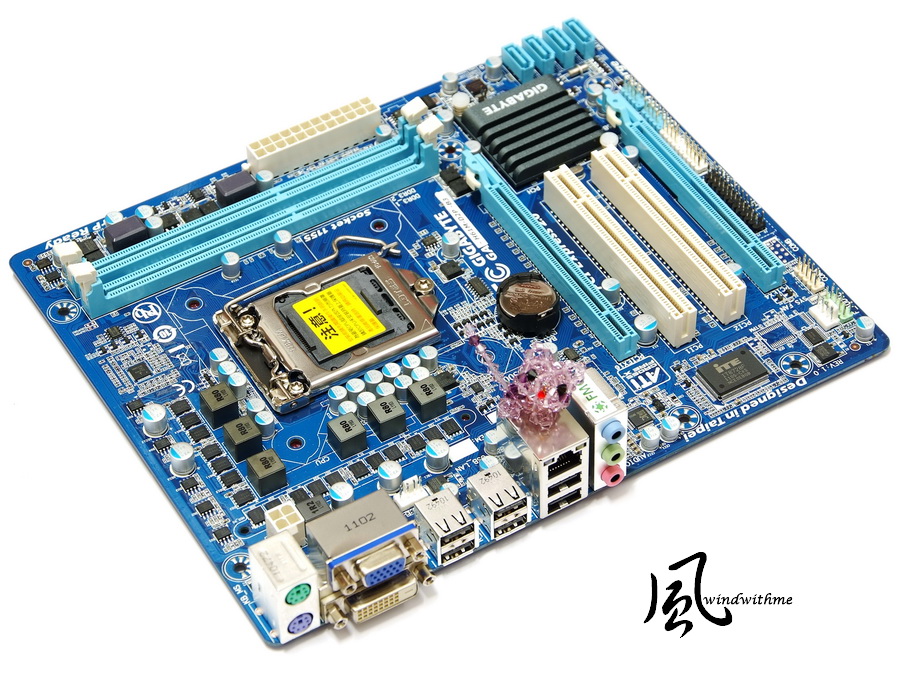
This review is entry H61 and model name is GIGABYTE H61M-D2P-B3.
The box design is simple and clean. White back and some wordings emphasize the spec.

GIGABYTE H61M-D2P-B3 Board
Due to Intel B2 issue, GIGABYTE in most Sandy Bridge chipset product adds B3.
B3 can avoid users to buy the old version. Actually, now you are hard to find B2 boards already.

100% Japanese Solid Caps and blue PCB as usual.
Micro ATX size is 24.4cm x 20.0cm which is suitable for All in one built-in GPU system.
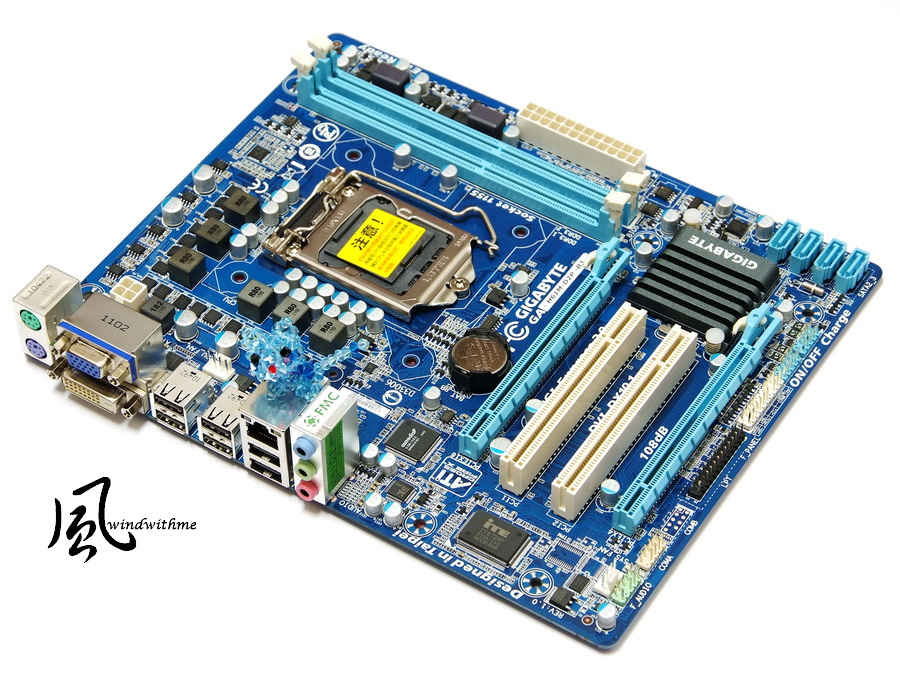
Accessories
Product manual, Quick installation guide, IO panel, SATA cables and utility CD

Lower-Left Corner
2 X PCI-E X16, first one is X16 and second one is X4.
2 X PCI
Realtek RTL8111E LAN Chip
Realtek ALC889 Audio Chip supports 7.1 channels and High Definition Audio technology.

Lower-Right Corner
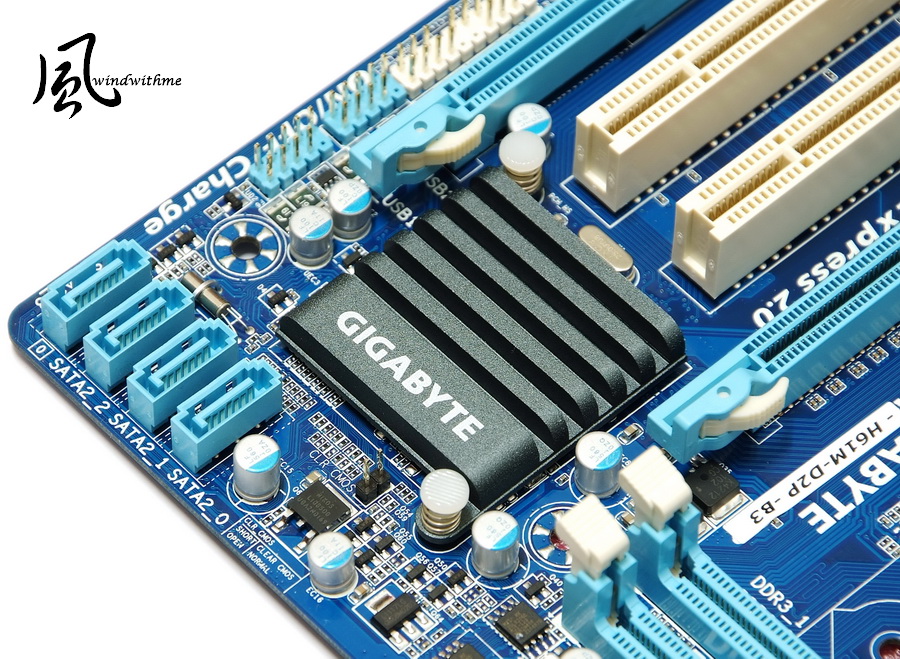
4 X blue SATA provided by H61 which are SATA2 and no RAID support.
There are 2 USB 2.0 front port connectors to support 4 USB 2.0 devices in front panel.
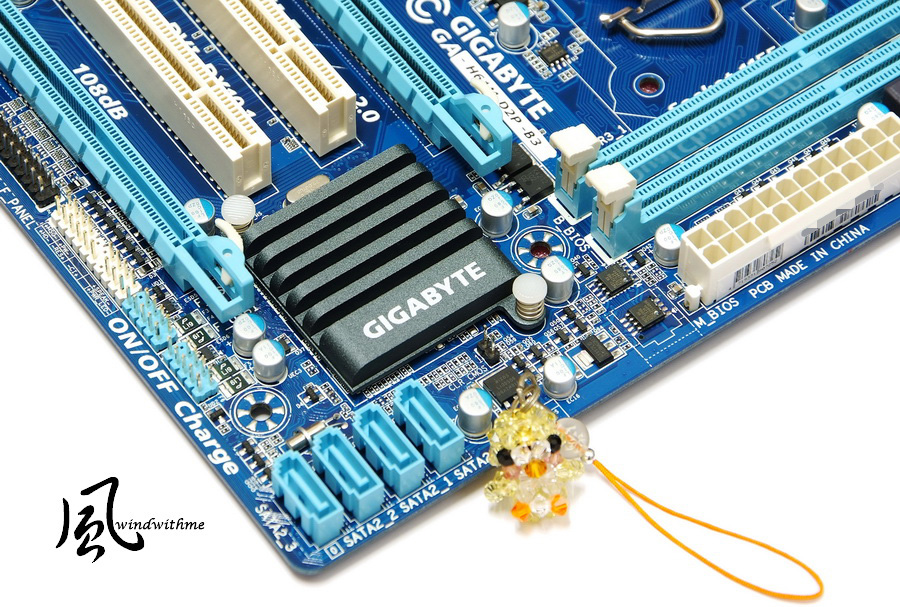
Upper-Right Corner
2 X DIMM DDR3 support 800/1066/1333. DDR3 max capacity is 16GB.
Next is 24-PIN power connector.
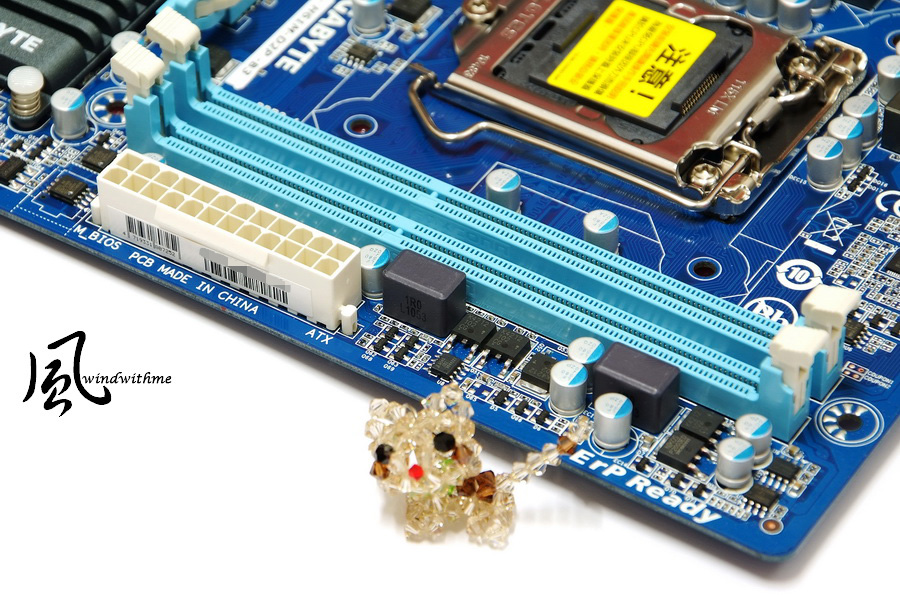
Upper-Left Corner
4+1+1 phases PWM which is enough for 32nm CPU.
Left is 4Pin power connector.

IO
1 X PS2 Keyboard
1 X PS2 Mouse
D-SUB/DVI output
6 X USB 2.0(Black)
1 X RJ-45 LAN

-
It’s been 5 months now since Intel launched latest Sandy Bridge structure.
The first launch is LGA 1155 socket P67/H67 chipset for different segments.
P67 is for K series CPU to have OC clock ratio features and without GPU output.
H67 is for Sandy Bridge CPU graphics output feature but no CPU OC function.
According to LGA 1156 H57 chipset, H67 is for higher price segment.
There should be some parity chipset like H55. This time the new chipset is H61.
H61 has 2 key differences with H67. One is RAID and the other one is SATA3.
However, H61 price is lower. For worksheet or not much expanding requirement users, it can be the better choice.
Many MB brands launch their H61 products since March.
H61 price segment is decided by graphics output ports and USB3 support.
This review is entry H61 and model name is GIGABYTE H61M-D2P-B3.
The box design is simple and clean. White back and some wordings emphasize the spec.
GIGABYTE H61M-D2P-B3 Board
Due to Intel B2 issue, GIGABYTE in most Sandy Bridge chipset product adds B3.
B3 can avoid users to buy the old version. Actually, now you are hard to find B2 boards already.
100% Japanese Solid Caps and blue PCB as usual.
Micro ATX size is 24.4cm x 20.0cm which is suitable for All in one built-in GPU system.
Accessories
Product manual, Quick installation guide, IO panel, SATA cables and utility CD
Lower-Left Corner
2 X PCI-E X16, first one is X16 and second one is X4.
2 X PCI
Realtek RTL8111E LAN Chip
Realtek ALC889 Audio Chip supports 7.1 channels and High Definition Audio technology.
Lower-Right Corner
4 X blue SATA provided by H61 which are SATA2 and no RAID support.
There are 2 USB 2.0 front port connectors to support 4 USB 2.0 devices in front panel.
Upper-Right Corner
2 X DIMM DDR3 support 800/1066/1333. DDR3 max capacity is 16GB.
Next is 24-PIN power connector.
Upper-Left Corner
4+1+1 phases PWM which is enough for 32nm CPU.
Left is 4Pin power connector.
IO
1 X PS2 Keyboard
1 X PS2 Mouse
D-SUB/DVI output
6 X USB 2.0(Black)
1 X RJ-45 LAN
-
PWM controller is following Intel latest VRD 12 design guide. The cost is higher than traditional design.
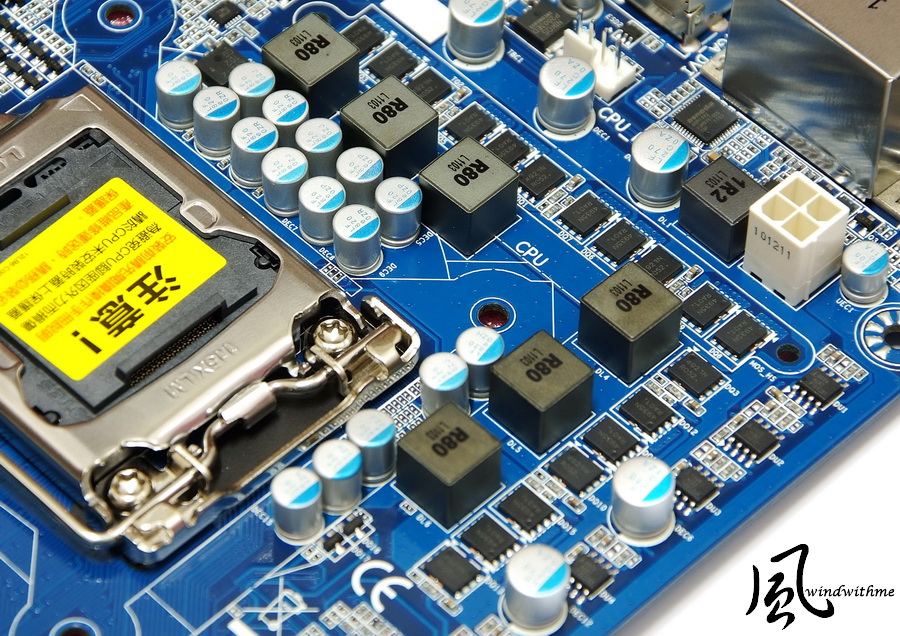
GIGABYTE heatsink use new design. Matt surface makes it look better.
Boot screen is similar to packing.
BIOS Main Page

MB Intelligent Tweaker, M.I.T.

Clock setup page
CPUfrequency/multiplier, DDR3 clock, Integrated Graphics clock, etc.

CPU Related Technology
C1E for power saving.

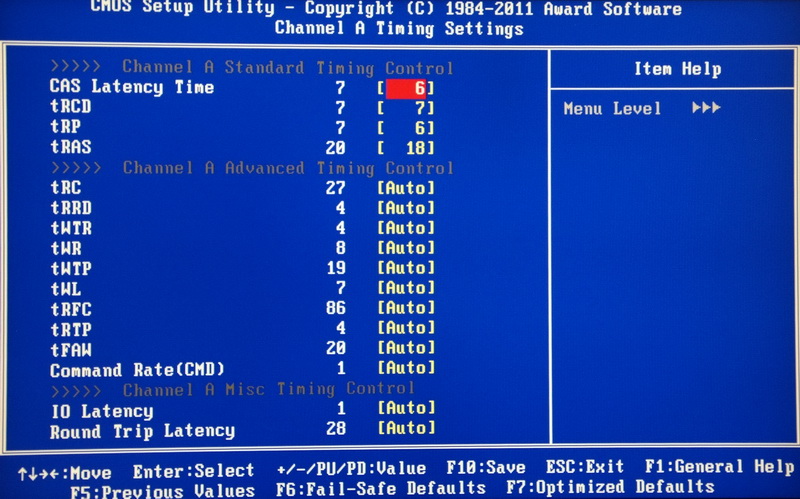
Advanced DDR3 parameters.
Voltage page
Dynamic Vcore(DVID) -0.320~+0.640V
QPI/Vtt Voltage 0.900~1.440V
Graphics DVID -0.320~+0.640
PCH Core 0.900~1.500V
DRAM 1.100~2.400V

PC Health Status

H61 is most entry chipset in Sandy Bridge. There are many limitations in BIOS tuning.
However, GIGABYE still provides rich BIOS items for user to adjust.
H61M-D2P BIOS is mainly for GPU OC, CPU/DDR3 voltage and DDR3 parameters tuning.
Fine tune the items can improve some system performance.
-
Test Configuration
CPU: Intel Core i3-2120
MB: GIGABYTE H61M-D2P-B3
DRAM: CORSAIR CMX8GX3M2A1600C9
VGA: Integrated Graphics
HDD: CORSAIR Force SSD 40GB
POWER: Antec HCG 400W
Cooler: Intel Original Cooler
OS: Windows7 Ultimate 64bit

Performance Test
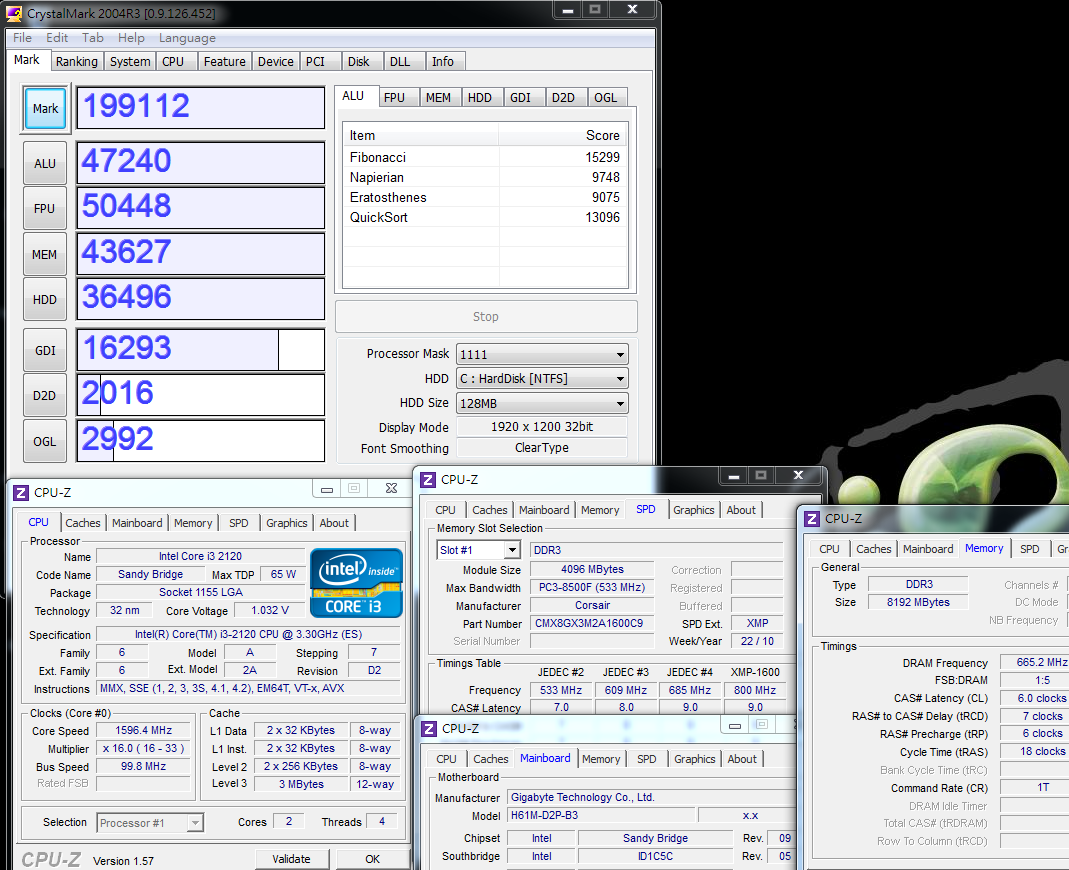
CPU 99.8 X 33 => 3293.4MHz
C1E Enable
DDR3 1330.4 CL6 7-6-18 1T
Hyper PI 32M X 4 => 16m 27.559s
CPUMARK 99 => 508

Nuclearus Multi Core => 12926
Fritz Chess Benchmark => 13.10/6288

CrystalMark 2004R3 => 199112
CINEBENCH R11.5
CPU => 3.16 pts
CPU(Single Core) => 1.32 pts

PCMark Vantage => 11831

Windows Experience Index - CPU 7.1

H61 chipset with Core i3-2120 have very good benchmark for most software.
Sandy Bridge structure CPU/DDR3 performance is much more improved than LGA 1155.
2nd Gen Core i3 is more expensive. If you are use Pentium G series, the C/P will be better.
Temperature( Room is around 25?)
Enter to OS desktop - 24~28
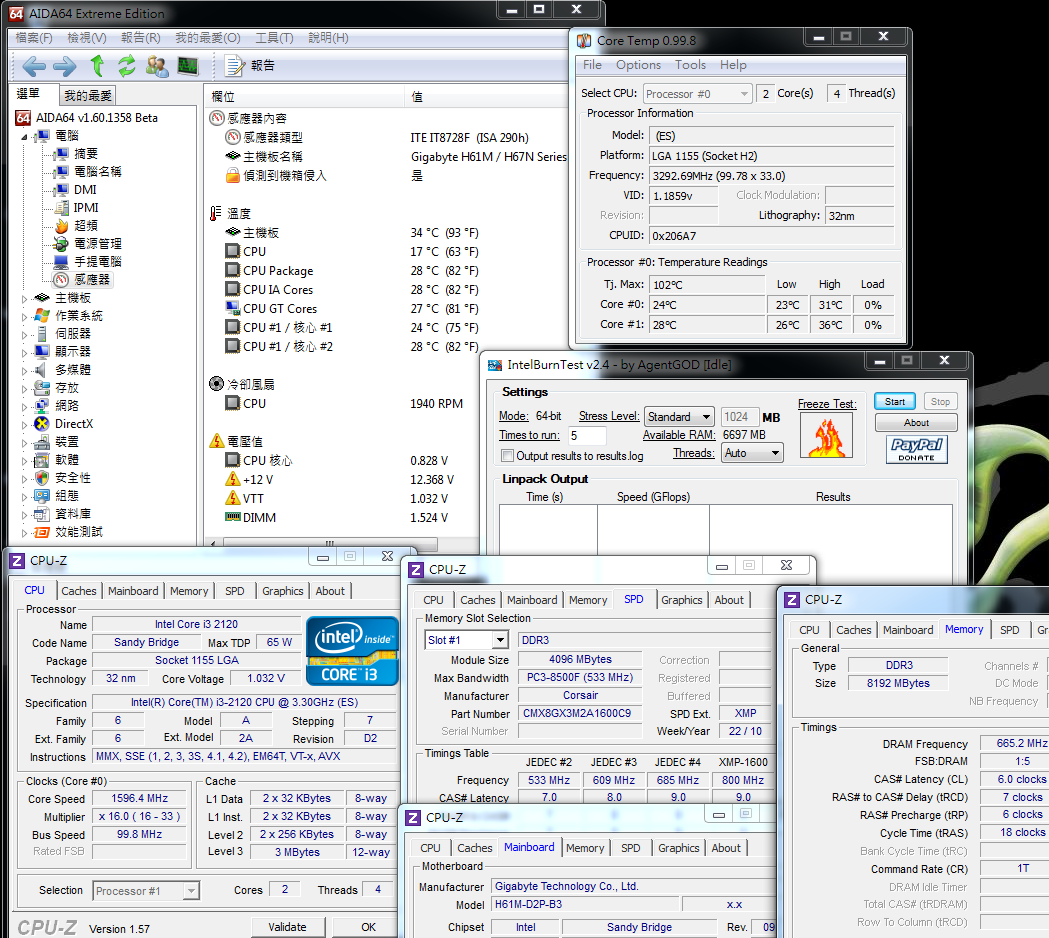
CPU Full Speed - 44~50
Intel Burn Test v2.4?Stress Level Maximum
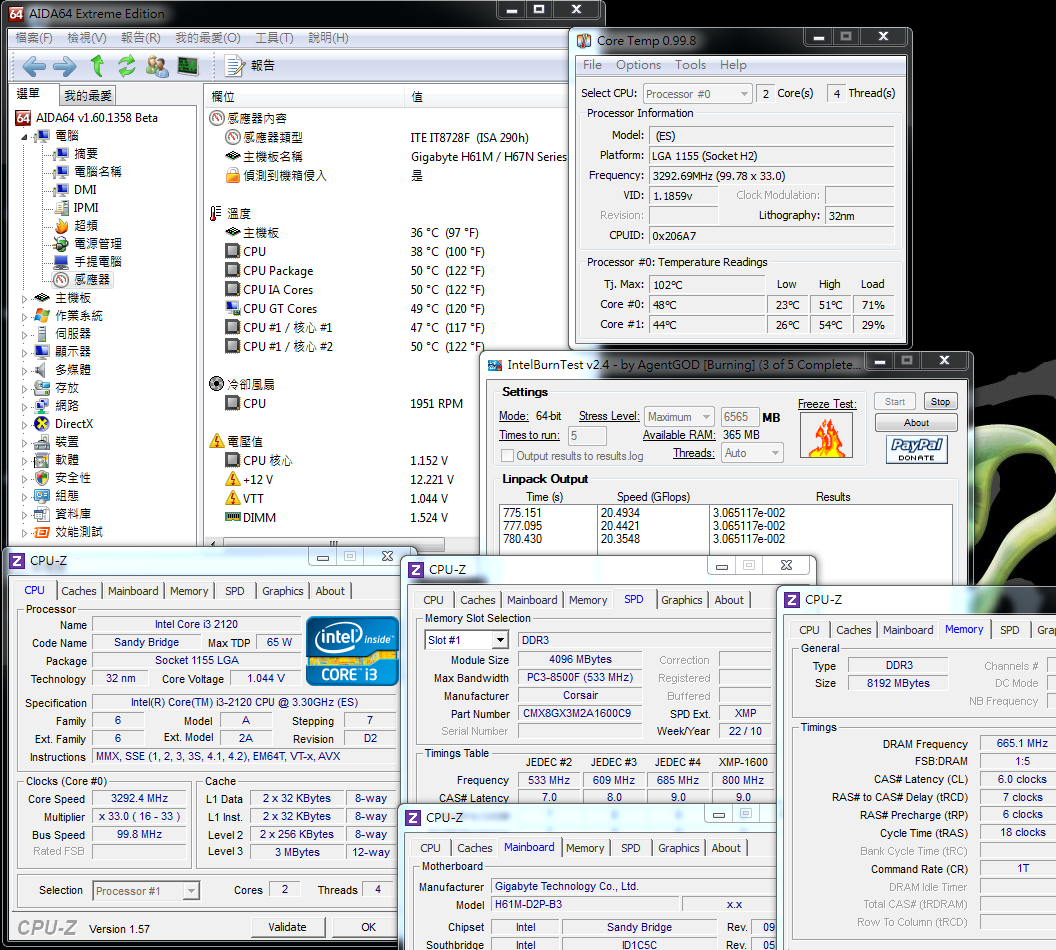
For 32nm i3 CPU, the temperature is always good. I use Intel original slim type cooler for this test.
The room temperature is higher than real environment. It caused the full speed is 54?.
Of course, if you are installing in chassis, it may increase 5~8 due to the air flow.
Power Consumption
Enter to OS desktop - 23W

-
CPU Full Speed - 47W

Compare to i3-540 with H55, the power consumption is 52W/83W.
You can see the 32nm 2nd Gen Core i3-2120 has much lower power consumption and higher performance.
If you are serious for power saving, Sandy Bridge structure really show you the strength.
DDR3 Bandwidth
DDR3 1330.4 CL6 7-6-18 1T
ADIA64 Memory Read - 16436 MB/s
Sandra Memory Bandwidth - 17690 MB/s
MaXXMEM Memory-Copy -18285 MB/s
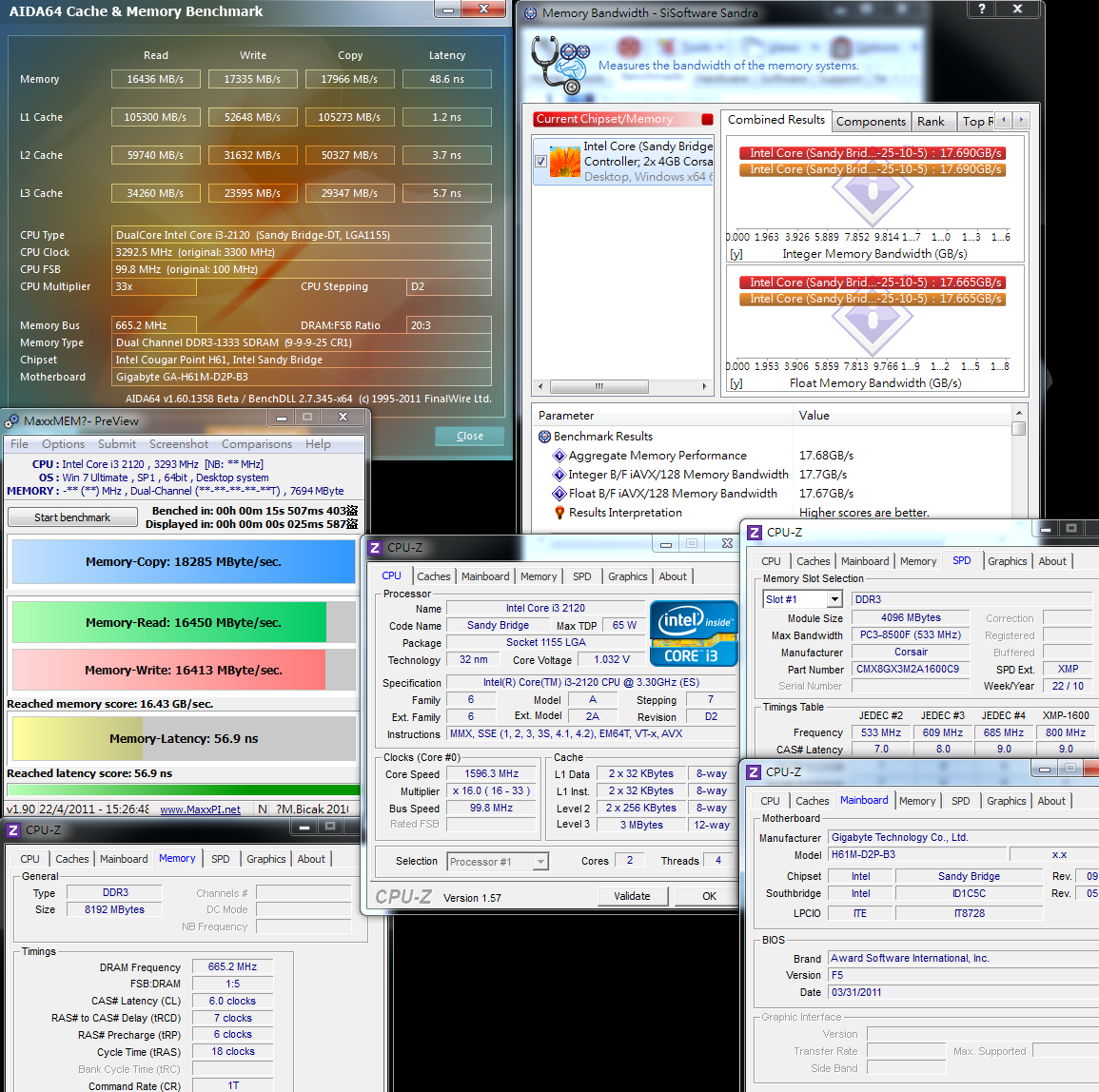
H61 chipset only can support DDR3 1333. The clock seems not high.
However the Memory Controller is new design, the performance is still much higher.
After fine tune to CL6 7-6-18 1T, you can see the DDR3 score is very high.
Intel HD Graphics HD2000 Performance test
Default clock is 1100MHz
3DMark Vantage => P1046

StreetFighter IV Benchmark
1024 X 768 => 30.79 FPS

FINAL FANTASY XIV
1280 X 720 => 374

Sandy Bridge built-in GPU in all SKUs. The models are HD2000/HD3000.
Core i3-2120 is using HD2000 and you can see the 3D performance is much better than previous platform.
You can treat it as the highest GPU 3D performance currently. You can use it to meet more 3D software requirement.
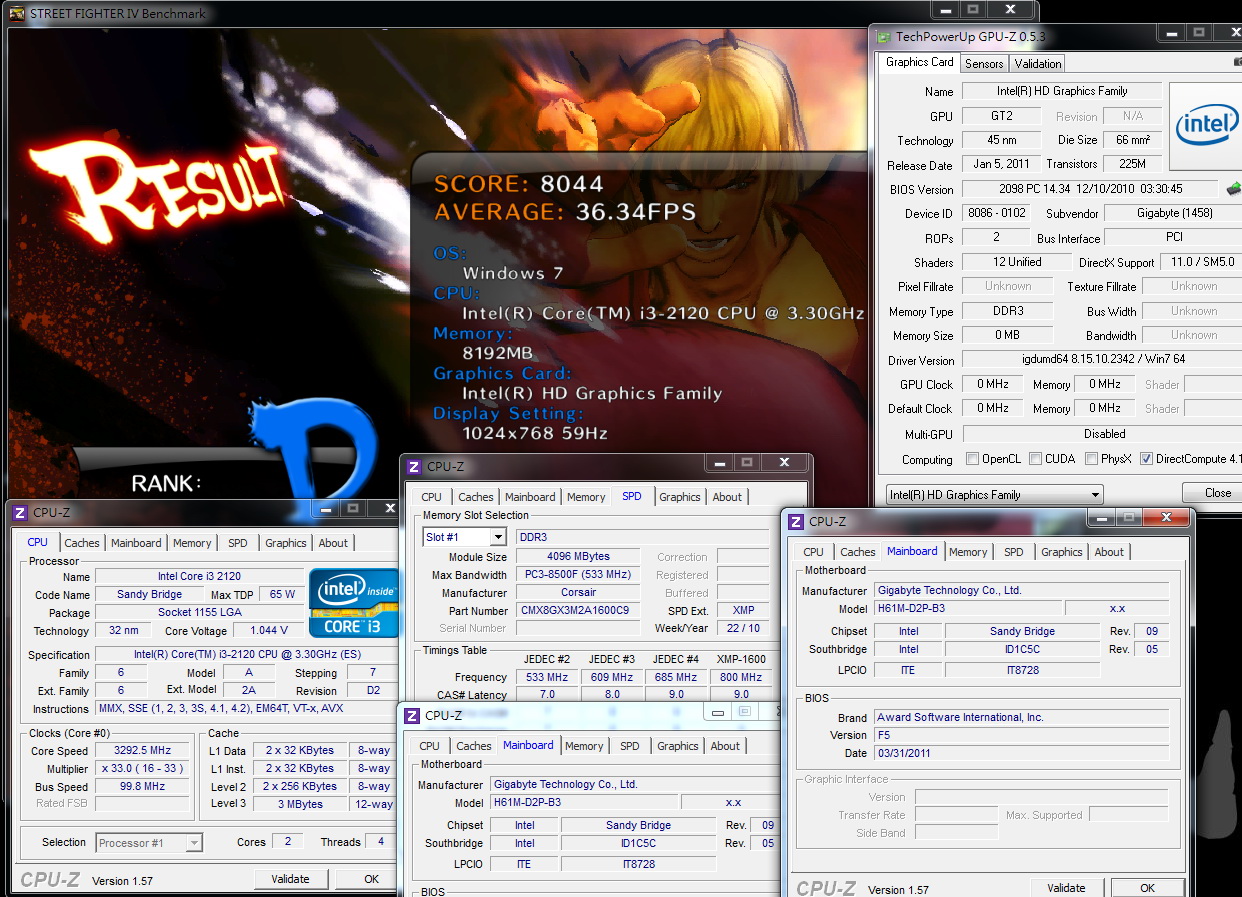
OC to 1333MHz
3DMark Vantage => P1357

StreetFighter IV Benchmark
1024 X 768 => 36.34 FPS
FINAL FANTASY XIV
1280 X 720 => 447

Using BIOS GPU clock to adjust it from 1100 to 1333MHz, the performance increases about 18~29%.
It’s almost same to i5-2300 which need to OC to 1700~1800MHz.
i3 HD2000 OC range is much smaller, but after OC GPU, the 3D performance is still some improvement.
Let’s compare the power consumption after OC GPU
Enter to OS desktop - 24W

CPU Full Speed - 57W

After OC Intel HD2000 to 1333, it just increase 1W and full speed increase to 10W.
You can see even GPU built-in design, the clock and performance also impact the power consumption.
-
SATA transfer test with CORSAIR FORCE SERIES F40
EVEREST Read Test Suite - Linear Read(Middle) 259.8 MB/s
CrystalDiskMark Read 149.4 Mb/s?Write 48.97 MB/s
Random Access Write 64KB 228.023 MB/s
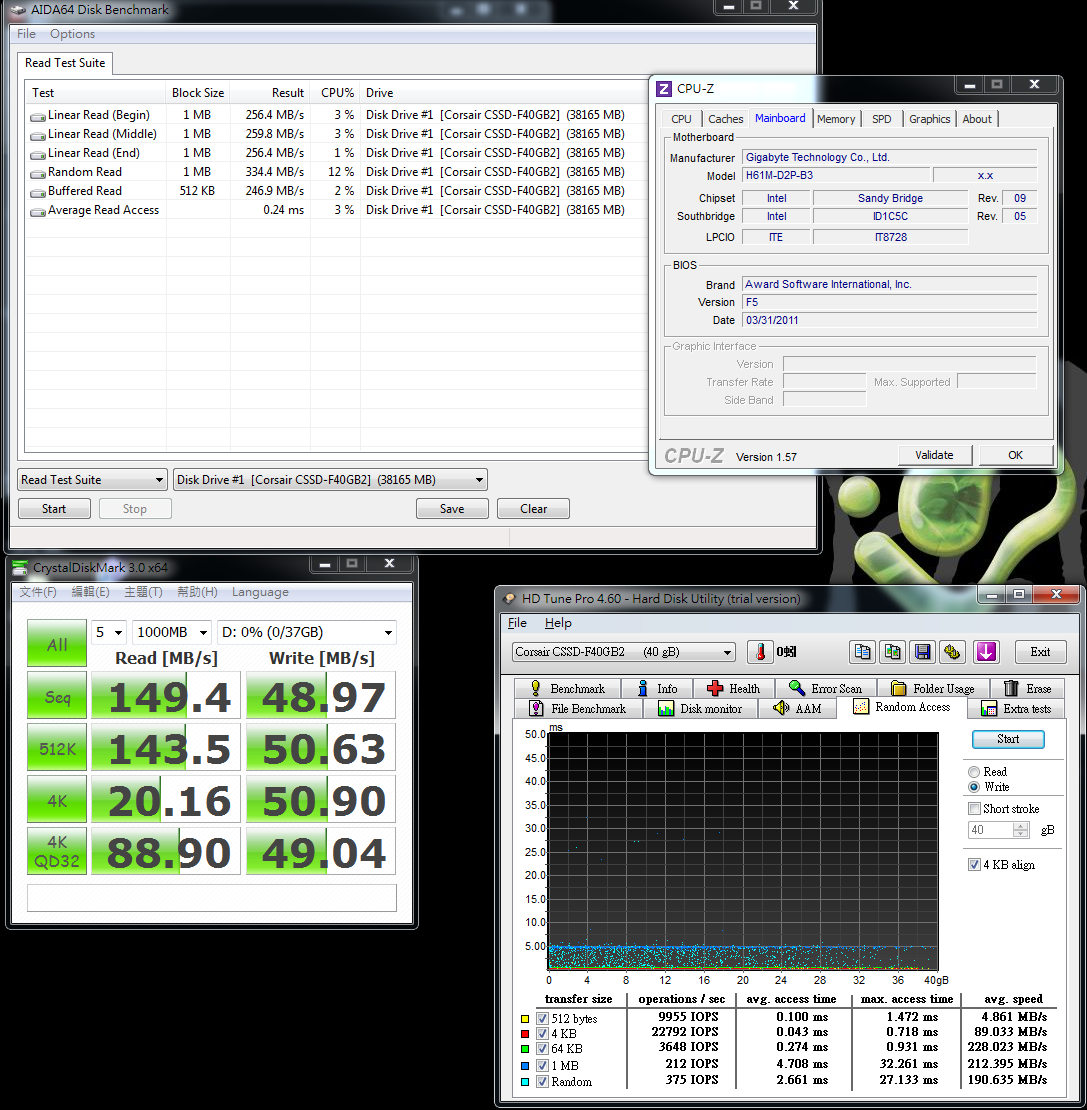
EVEREST Linear Read Average 259.9 MB/s
ATTO DISK Benchmark over 16k has great performance. The max read/write is 286.2 Mb/s and 263.6 MB/s
AS SSD Benchmark
Seq Read - 146.04 MB/s Write - 46.28 MB/s
4K-64Thrd Read - 96.83 MB/s Write - 43.55 MB/s

H61 is entry chipset so it doesn’t support RAID. You can enable AHCI for higher performance SSD.
CORSAIR FORCE F40 official spec is 280/270 MB/s. In some software, it almost can reach it.
4K performance is also good. If you are using small files more often, 4K reading speed is very important for SSD performance.
H61M-D2P-B3 has no CPU OC features, you still can adjust some other BIOS items.
BIOS shows CPU default voltage is 1.164V and adjusting to -0.210V. After reboot, the BIOS shows 0.984V
Temperature( Room is around 25?)
Enter to OS desktop - 26~27
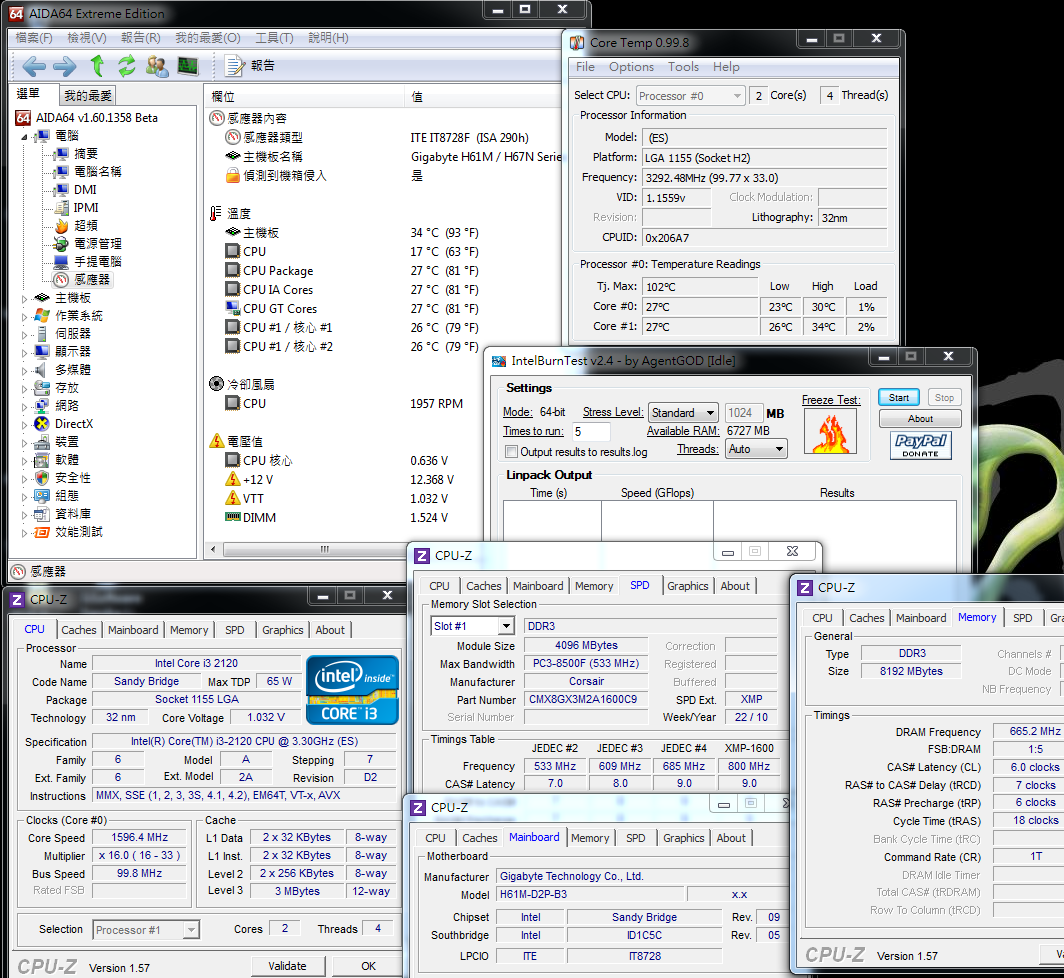
CPU Full Speed - 38~42
Intel Burn Test v2.4?Stress Level Maximum

Lower the CPU voltage, you can have better temperature and power consumption.
Of course, you have to do the reliability test after lowering the voltage to make sure you can use this setup for long time.
Comparing 2 settings, enter to OS desktop temperature is same.
For full speed test, there is 10 degrees difference. So lower the CPU voltage is also can lower the temperature.
This is another trick for non-OC H61 system.
GIGABYTE H61M-D2P-B3
Good
1. Simple and clean design packing. Also good spec and components
2. H61 make All in one system have lower power consumption and better performance.
3. 100% Japanese solid caps, PWM is 4+1+1. The components are better quality.
4. BIOS items are rich. Users can do OC GPU or voltage tuning.
5. Built-in 3D performance is big improvement than previous generation.
You can even watch Blue-Ray with i3.
Weak
1. H61 chipset temperature is a little bit too high.
2. DDR3 DIMM only supports 2 DIMMs.
Performance ??????????
Components ??????????
Specification ??????????
Outlook ??????????
C/P Value ??????????
GIGABYTE H61M-D2P-B3 market price is 2650 around 93USD.
It has DVI/D-SUB dual output and the price is similar to the others.
Some H61 also have 3 graphics output, USB3 and 4DIMM DDR3 design, but the price will be more expensive.
Users can get it by your own budget.
H61/H67 MB price is little bit lower than H55/H57.
Also, this time all MB brands provide more models to the market.
The key issue is the Core i3 2100 price is higher than Core i3-540 around 10USD.
So the LGA1155 and LGA1156MB+CPU price are similar.
Intel has launched Sandy Bridge Pentium G CPU on 22 May.
This combo will have better C/P for users to enjoy this latest platform performance.

This article is also in my bolg.
Welcome your visit.
-
very good wind
Ciao! Sembra che tu sia interessato a questa conversazione, ma non hai ancora un account.
Stanco di dover scorrere gli stessi post a ogni visita? Quando registri un account, tornerai sempre esattamente dove eri rimasto e potrai scegliere di essere avvisato delle nuove risposte (tramite email o notifica push). Potrai anche salvare segnalibri e votare i post per mostrare il tuo apprezzamento agli altri membri della comunità.
Con il tuo contributo, questo post potrebbe essere ancora migliore 💗
Registrati Accedi