
[ENG] - Intel Corei5-2300 with best buy BIOSTAR TH67XE
-
In the beginning of 2011, Intel released its latest platform with LGA 1155 version, also known as Sandy Bridge architecture.
The release modes of its processor and chipset products are much similar to the last generation of LGA 1156.
What’s more, Sandy Bridge’s process technology has been improved comprehensively up to 32nm, and its efficiencies have also been enhanced in many aspects.
Each CPU carries a built-in HD2000 or HD3000, which is another feature of the new platform.
It is the first wave to release several 4Cores 32nm versions for CPUs; the series name is Core i5/Core i7.
Chipsets with built-in display and output function include H67/H61 types, and the major difference lies in the specification and ability to support Riad.
H67 is an advanced chipset that was released in the beginning of January this year, but the H61 entry level positioning will be made available after March.
Currently, the leading CPU is 2300, a version with the lowest price of Core i5.
Product model: Intel Core i5-2300; Frequency: 2.8GHz
It supports the latest generation of Turbo Boost 2.0 technology and can reach a performance of up to 3.1GHz.
It has 4 Cores but does not adopt the Hyper-Threading technology.
It can reach a maximum of 4 threads, which is called 4C/4T.
It has a 32nm process and power consumption of 95W, as well as a L3 Cache of 6MB, and easy-to-use 4Cores CPU in LGA 1155 products.
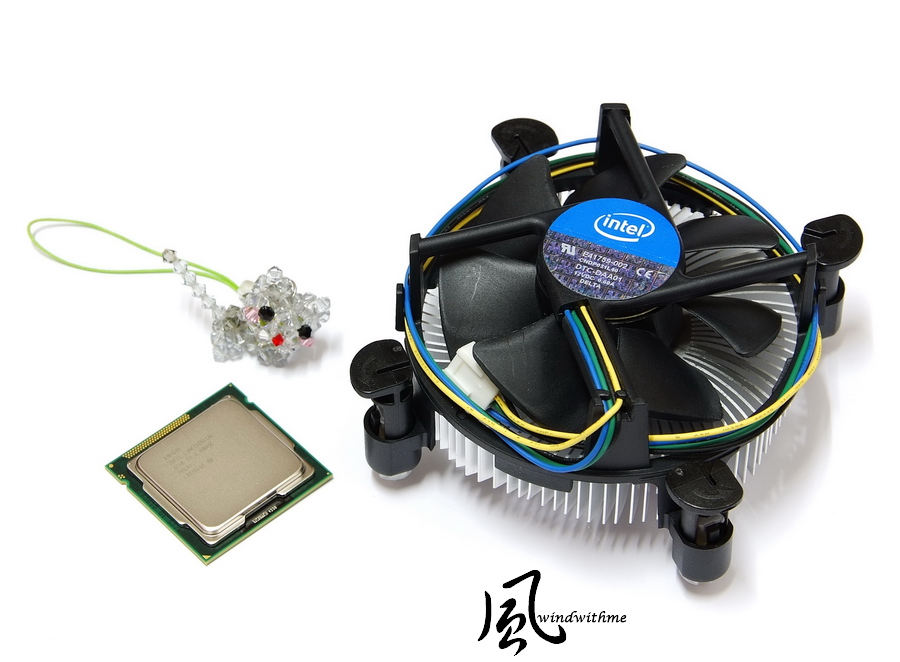
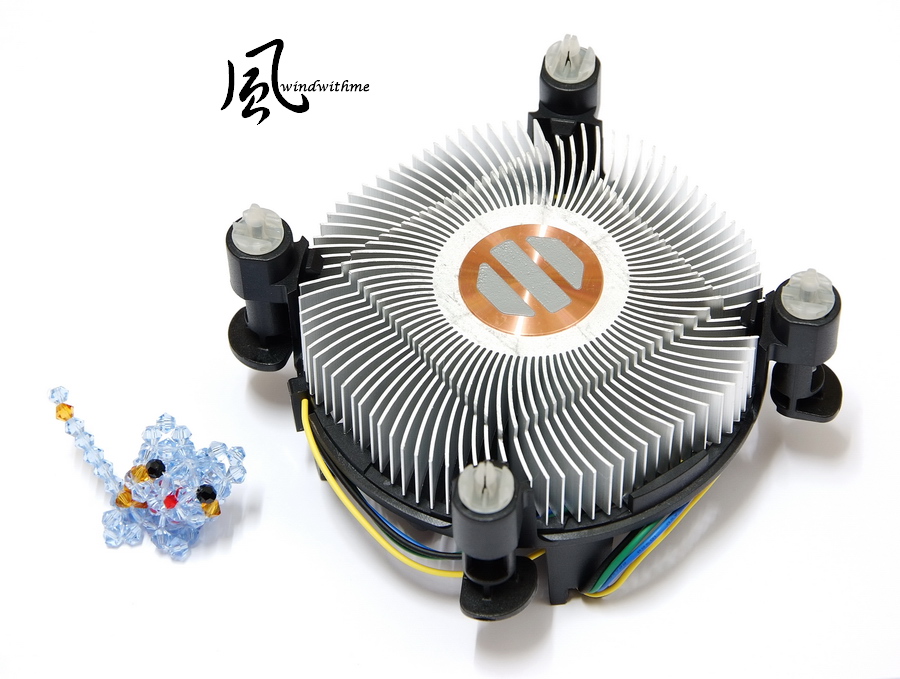
Intel 4Cores CPU integrates with the copper heat sink which has its bottom attached to some solid thermal conductive adhesive.
I personally suggest coating some thermal grease onto the CPU before installing it because this can reduce the temperature efficiently.
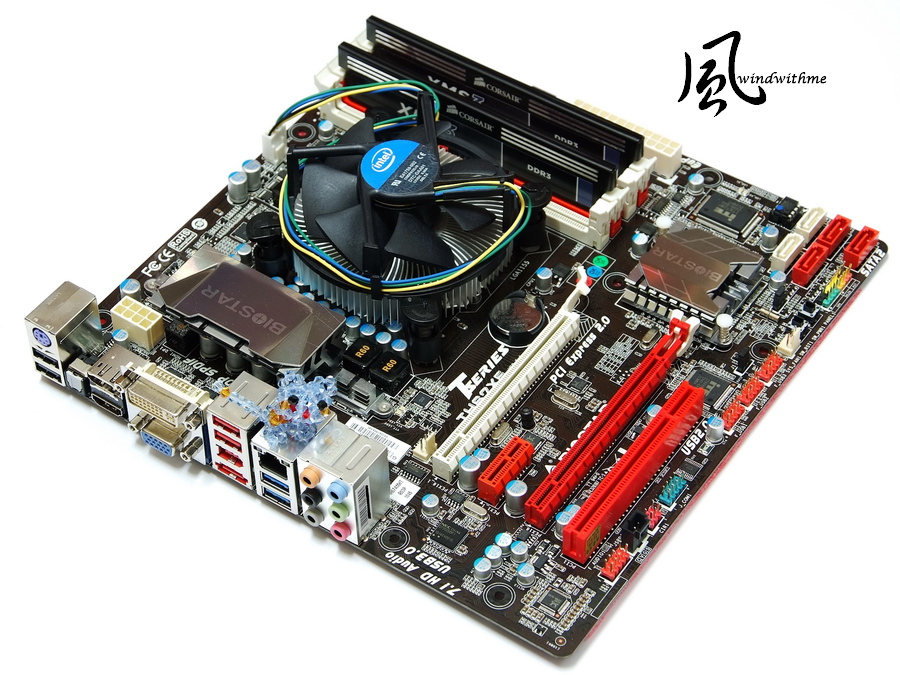
MB adopts BIOSTAR TH67XE, its XE series is a high-level product line and its price isn’t as high as that of other brands.
The price of this product in the U.S. is about US$105, which is equivalent to around NT$3,100.
Compared to other H67 products in Taiwan which cost NT$4,000~5,000 or higher, the price of BIOSTAR H67 is much reasonable.

In terms of color, the black PCB is common while other PCI-E or DIMMs have red and white colors.
These are much more conspicuous than the previous yellow or green colors.
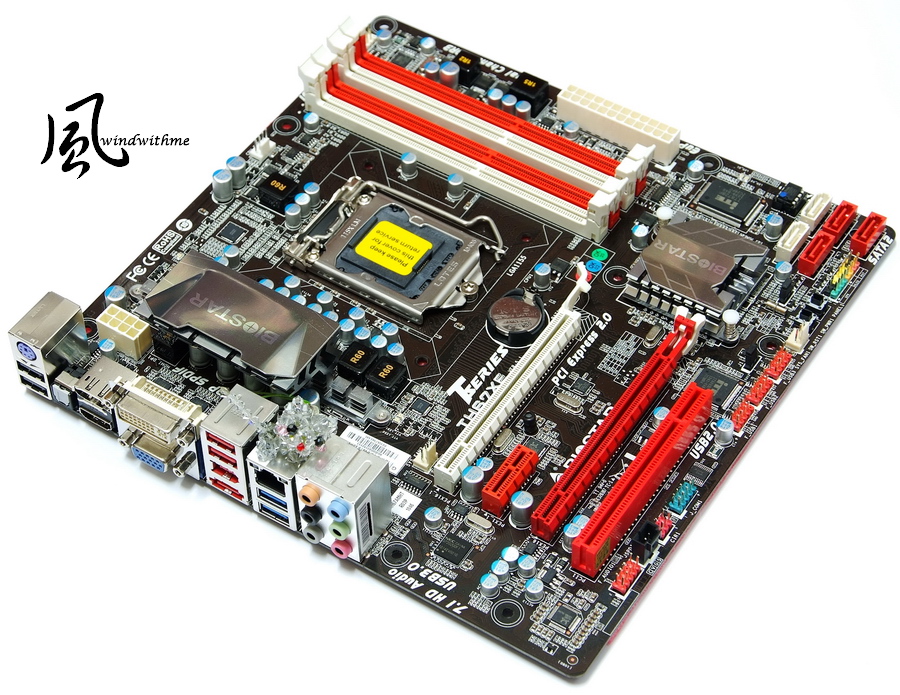
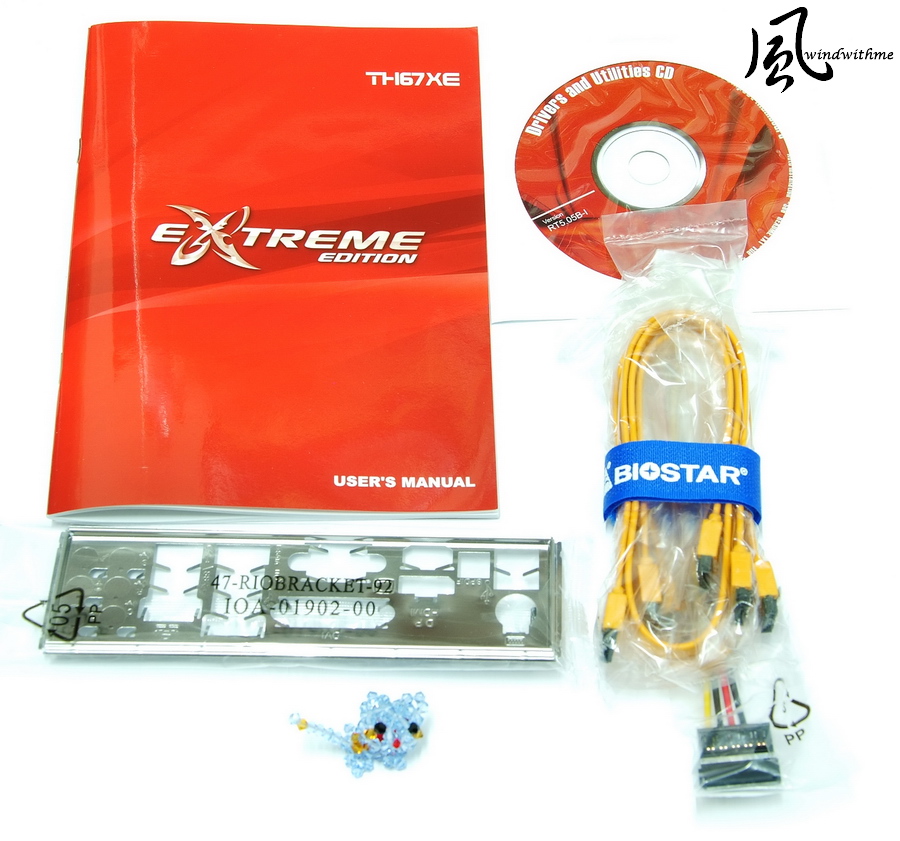
Attached accessories
Product manual, IO files, SATA wires, driver software and disc
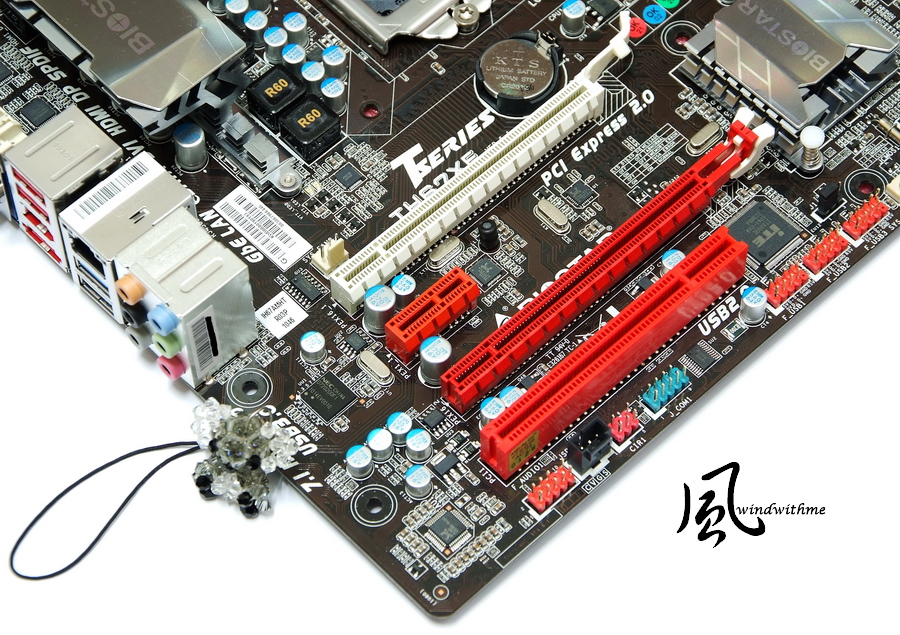
Lower left of mother board
2 X PCI-E 2.0 X16; Bandwidth: X16+X1
1 X PCI-E X1
1 X PCI
Realtek RTL8111E network chip
Realtek ALC892 audio chip supports 8+2 sound channels and Blu-Ray Codec technology.
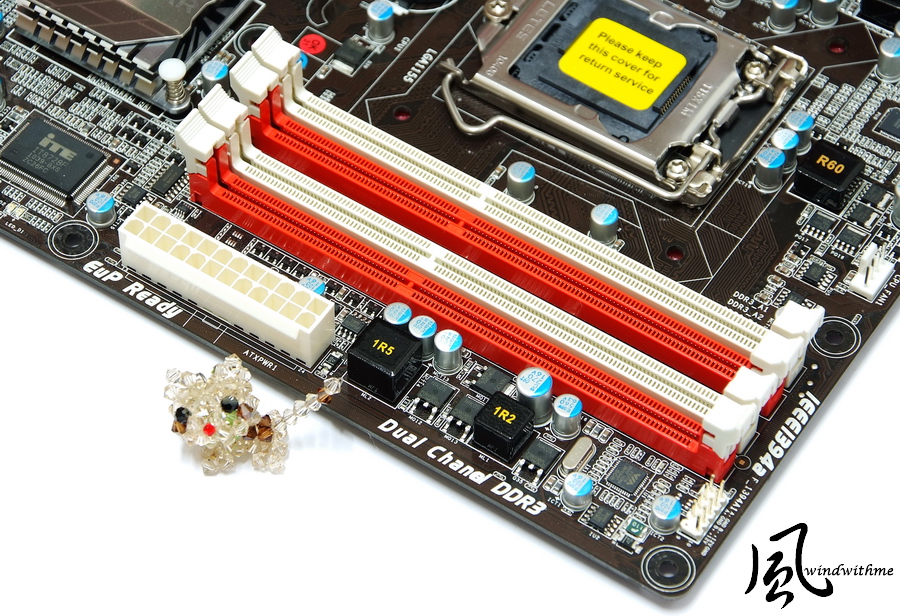
Lower right of mother board
3 X red SATAII, provision of H67 chip, SATA2 specification, supports RAID 0? RAID 1?RAID 5 and RAID 10
2 X white SATAIII?provision of H67chip?SATA3 specification?supports RAID 0? RAID 1?RAID 5 and RAID 10
Power and Reset buttons

Upper right of mother board
4 X DIMM DDR3?supports 1066/1333 and a maximum capacity of DDR3 of 16GB
There is a 24-PIN power input end at the side
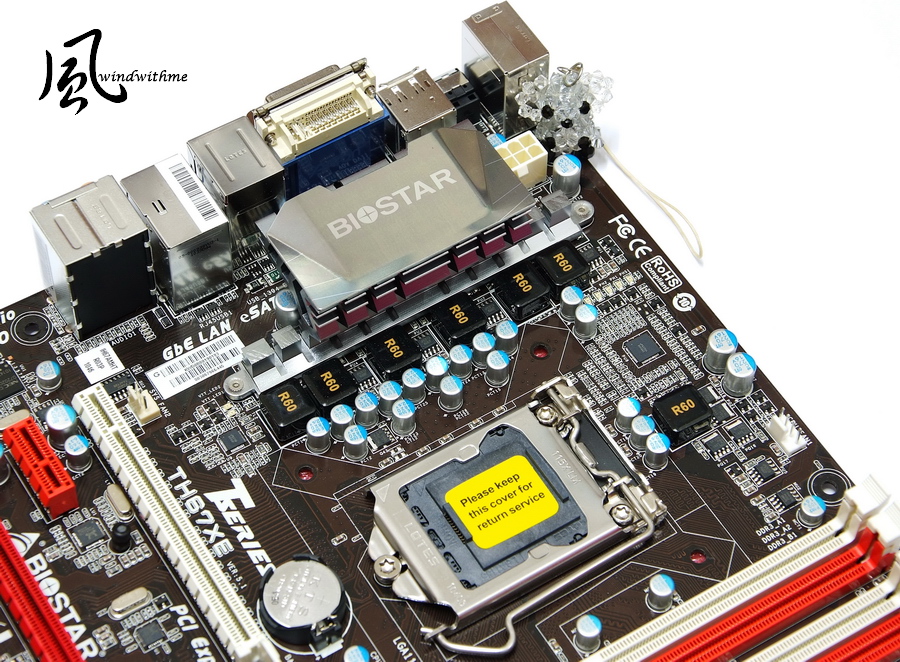
Upper left of mother board
TH67XE adopts a 7-phase power supply design and there is a 8Pin power input end at the upper side
-
In the beginning of 2011, Intel released its latest platform with LGA 1155 version, also known as Sandy Bridge architecture.
The release modes of its processor and chipset products are much similar to the last generation of LGA 1156.
What’s more, Sandy Bridge’s process technology has been improved comprehensively up to 32nm, and its efficiencies have also been enhanced in many aspects.
Each CPU carries a built-in HD2000 or HD3000, which is another feature of the new platform.
It is the first wave to release several 4Cores 32nm versions for CPUs; the series name is Core i5/Core i7.
Chipsets with built-in display and output function include H67/H61 types, and the major difference lies in the specification and ability to support Riad.
H67 is an advanced chipset that was released in the beginning of January this year, but the H61 entry level positioning will be made available after March.
Currently, the leading CPU is 2300, a version with the lowest price of Core i5.
Product model: Intel Core i5-2300; Frequency: 2.8GHz
It supports the latest generation of Turbo Boost 2.0 technology and can reach a performance of up to 3.1GHz.
It has 4 Cores but does not adopt the Hyper-Threading technology.
It can reach a maximum of 4 threads, which is called 4C/4T.
It has a 32nm process and power consumption of 95W, as well as a L3 Cache of 6MB, and easy-to-use 4Cores CPU in LGA 1155 products.
Intel 4Cores CPU integrates with the copper heat sink which has its bottom attached to some solid thermal conductive adhesive.
I personally suggest coating some thermal grease onto the CPU before installing it because this can reduce the temperature efficiently.
MB adopts BIOSTAR TH67XE, its XE series is a high-level product line and its price isn’t as high as that of other brands.
The price of this product in the U.S. is about US$105, which is equivalent to around NT$3,100.
Compared to other H67 products in Taiwan which cost NT$4,000~5,000 or higher, the price of BIOSTAR H67 is much reasonable.
In terms of color, the black PCB is common while other PCI-E or DIMMs have red and white colors.
These are much more conspicuous than the previous yellow or green colors.
Attached accessories
Product manual, IO files, SATA wires, driver software and disc
Lower left of mother board
2 X PCI-E 2.0 X16; Bandwidth: X16+X1
1 X PCI-E X1
1 X PCI
Realtek RTL8111E network chip
Realtek ALC892 audio chip supports 8+2 sound channels and Blu-Ray Codec technology.
Lower right of mother board
3 X red SATAII, provision of H67 chip, SATA2 specification, supports RAID 0? RAID 1?RAID 5 and RAID 10
2 X white SATAIII?provision of H67chip?SATA3 specification?supports RAID 0? RAID 1?RAID 5 and RAID 10
Power and Reset buttons
Upper right of mother board
4 X DIMM DDR3?supports 1066/1333 and a maximum capacity of DDR3 of 16GB
There is a 24-PIN power input end at the side
Upper left of mother board
TH67XE adopts a 7-phase power supply design and there is a 8Pin power input end at the upper side
-
IO
VGA/DVI/HDMI/Display Port
4 X USB 2.0(Red/Black)
2 X USB 3.0(Blue)
1 X eSATA/USB 2.0 (share the red)
1 X IEEE 1394a
1 X RJ-45 (network connector)
1 X S/PDIF Out Port

The power pack is covered with heat sinks.
Both the appearance and the texture are quite good; the design of the radiating area is also considered.

The heat sink of the H67 chipset also adopts the same material and design

BIOS Homepage
O.N.E Adjustment page
CPU Clock 100 is adjusted to 107MHz
Graphics Core Ratio Limit is the overclocking option of GPU
DDR3 DRAM Multiplier 10.66/13.33
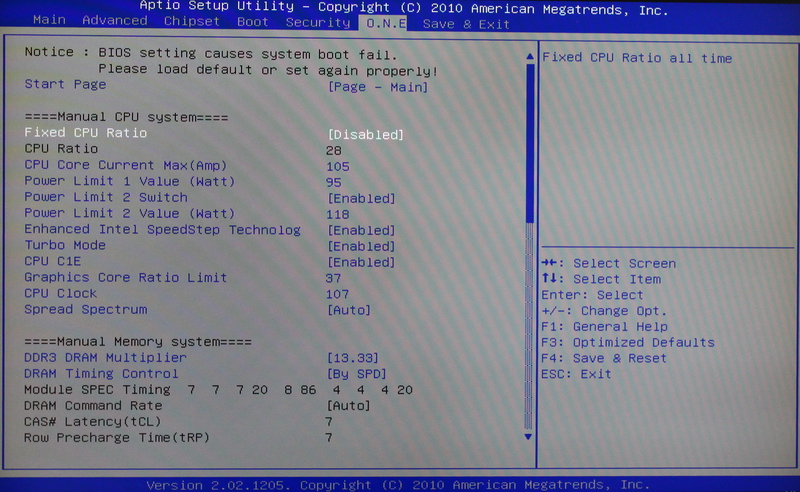
Voltage options
There are four CPU VCore Mode options, including SPEC Volgate/Auto/Offset Mode/Fixed Mode
CPU VCore Offset +0.010~+0.520V
CPU VCore Fixed 1.000~1.790V
There are four IGD VCore Mode options, including SPEC Volgate/Auto/Offset Mode/Fixed Mode
IGD VCore Offset +0.010~+0.520V
IGD VCore Fixed 1.000~1.520V
DRAM Voltage 1.300~2.200V
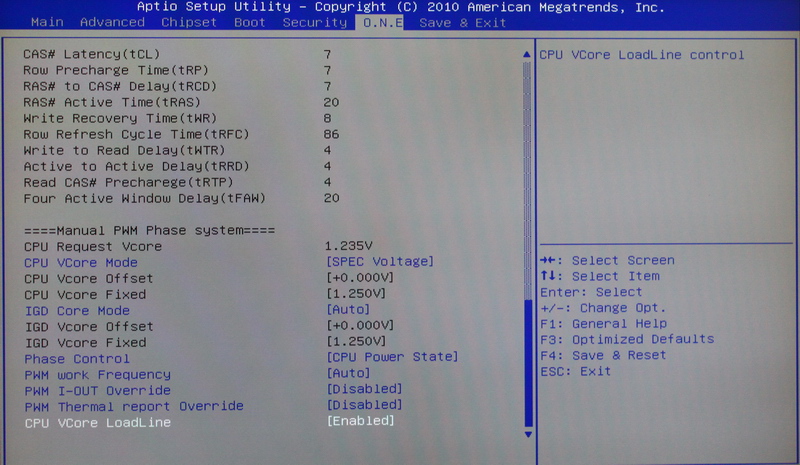
IGD Memory can select the capacity of the shared main storgae that is required by the built-in GPU.

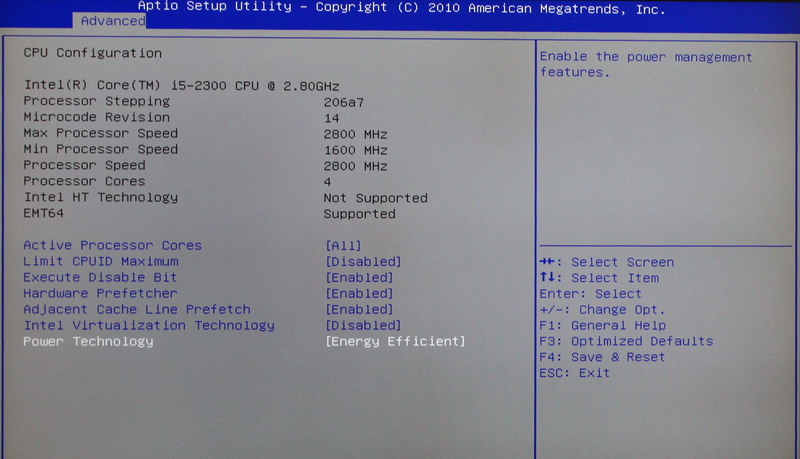
CPU Configuration
Enable and disable some relevant functions of the CPU
Common HT technology or the function of selecting the use of a few cores
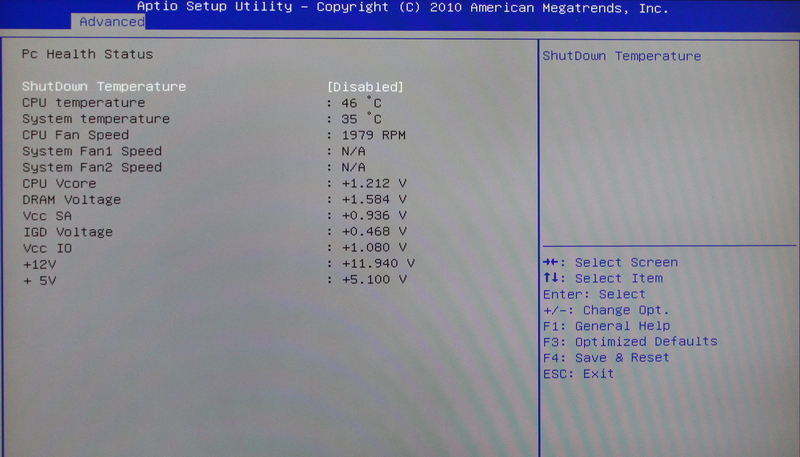
PC Health Status
The built-in monitoring chip of MB can be used to know the current status of various primary voltages or the temperature conditions inside the system
Above is the BIOS settings of windwithme in the BIOSTAR TH67XE overclocking.
H67 chipset is characterized by All In One positioning, thus overclocking only requires CPU external frequency/GPU frequency/DDR3 frequency.
Test platform
CPU: Intel Core i5-2300
MB: BIOSTAR TH67XE
DRAM: CORSAIR CMX8GX3M2A1600C9
VGA: Integrated Graphics
HDD: Intel X25-V 40GB RAID 0
POWER: CORSAIR CX430W
Cooler: Intel original radiator
OS: Windows7 Ultimate 64bit

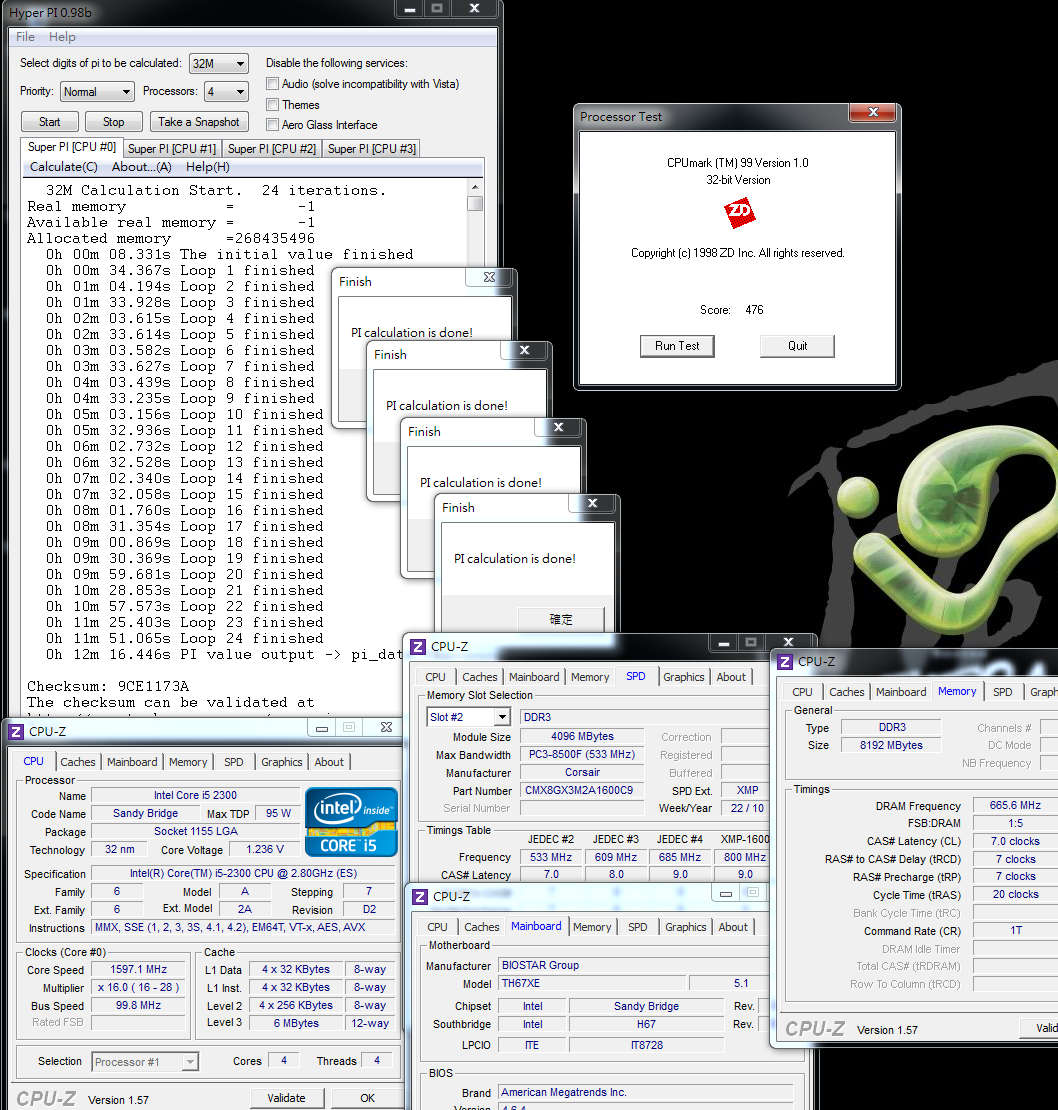
Preset performance
CPU 99.8 X 28 =>2794.4MHz
Start Turbo Boost and C1E
DDR3 1331.2 CL7 7-7-20 1T
Hyper PI 32M X4 => 12m 16.446s
CPUMARK 99 => 476
-
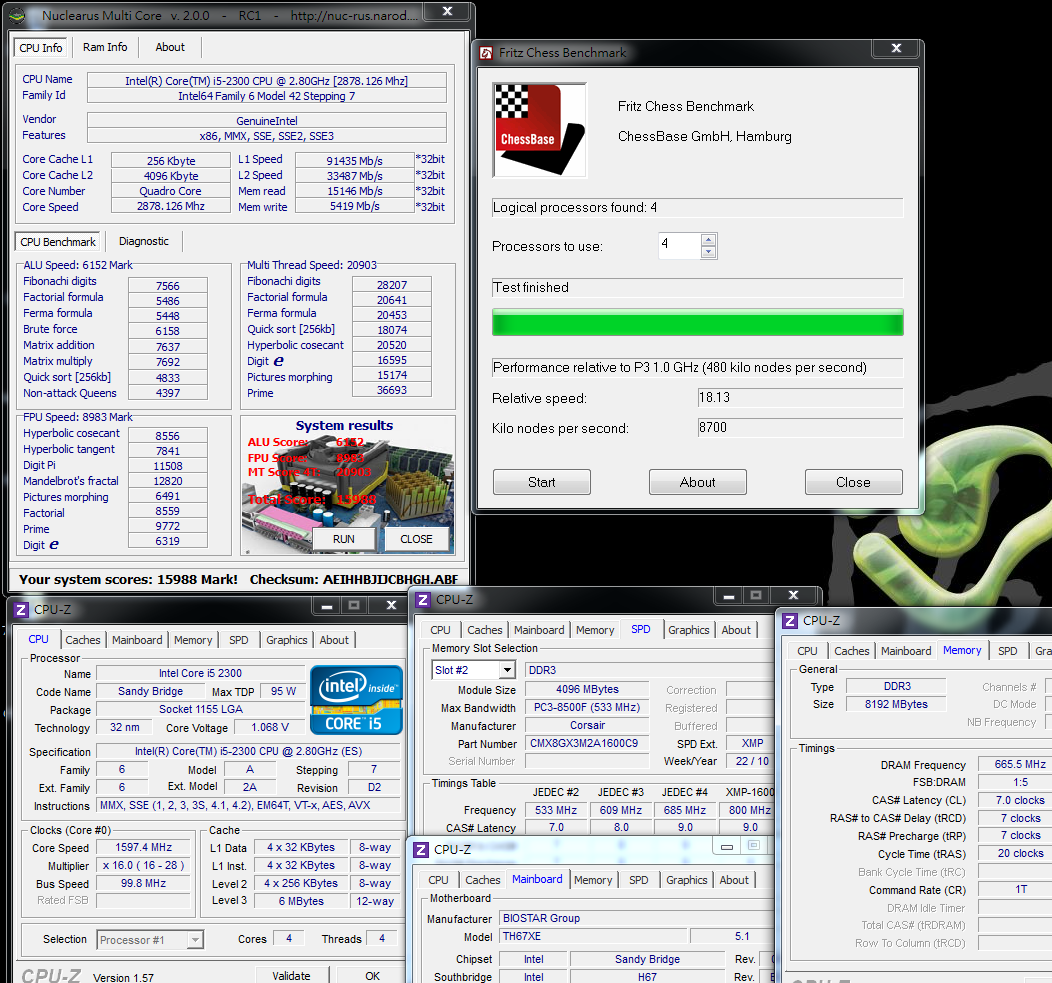
Nuclearus Multi Core => 15988
Fritz Chess Benchmark => 18.13/8700
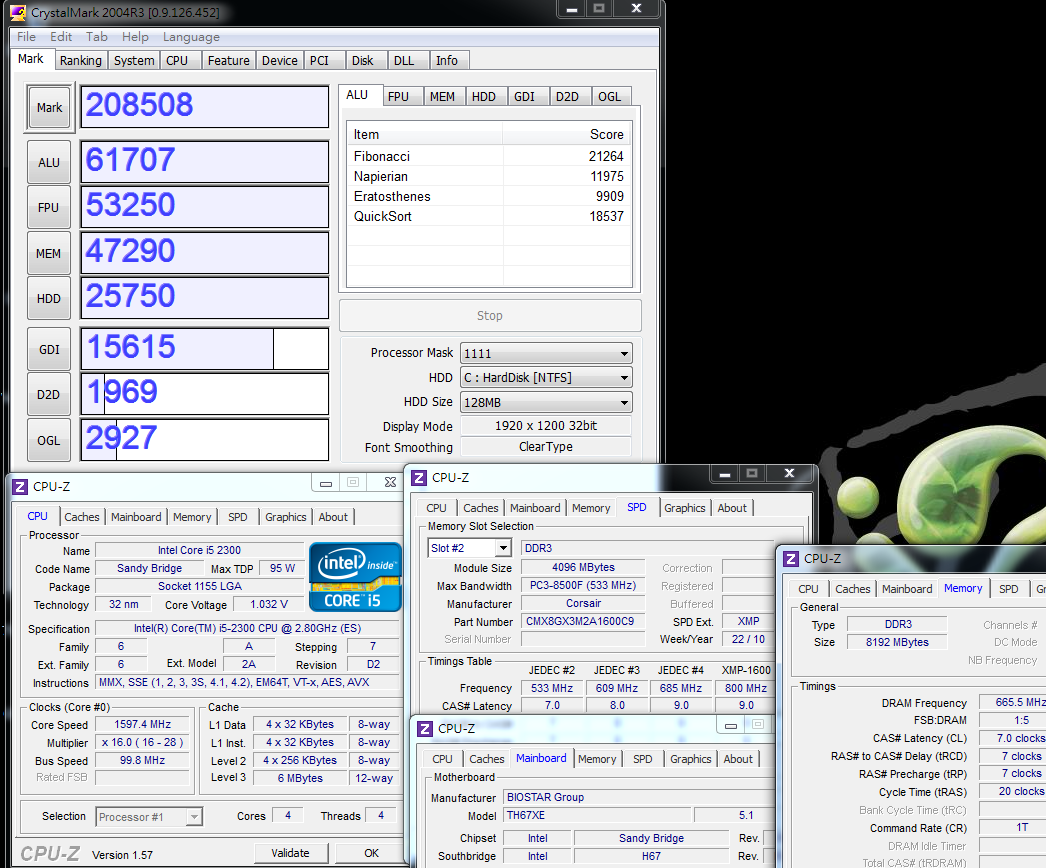
CrystalMark 2004R3 => 208508
CINEBENCH R11.5
CPU => 4.63 pts
CPU(Single Core) => 1.25 pts

PCMark Vantage => 14528

Windows Experience Index - CPU 7.4

Core i5-2300 is a version of Sandy Bridge 4Cores CPU with the lowest frequency and poorest specification.
However, because of the enhanced performance of the new architecture and the 4C4T core architecture,
it has earned a good performance score in the software testing.
With a default value of 2.8GHz, plus a Turbo Boost 2.0 frequency that can reach up to 3.1GHz, it has many applications.
Temperature performance(room temperature is about 18?)
During system standby: - 23~30

At full speed of CPU: - 58~60
Intel Burn Test v2.4?Stress Level Maximum

The performance of the original Intel radiator is relatively good
At full speed, the temperature is even a little lower than the previous temperature as the 2500K original radiator is tested.
The 5~10 ? difference might be caused by the high or low frequency.
For better temperature performance, there is a need to spend more money for a replacement with a higher level CPU radiator.
Power consumption test
During system standby: - 35W

At full speed of CPU: - 100W

The power consumption performance is also one of the characteristics of Sandy Bridge after it changes its 4Cores CPU process into 32nm.
With the integration of the C1E energy-conserving technology,
power consumption can be reduced more effectively and the CPU’s power consumption at standby and full speed modes is greatly reduced compared to the previous 45nm CPU.
Comparison of DDR3 bandwidths
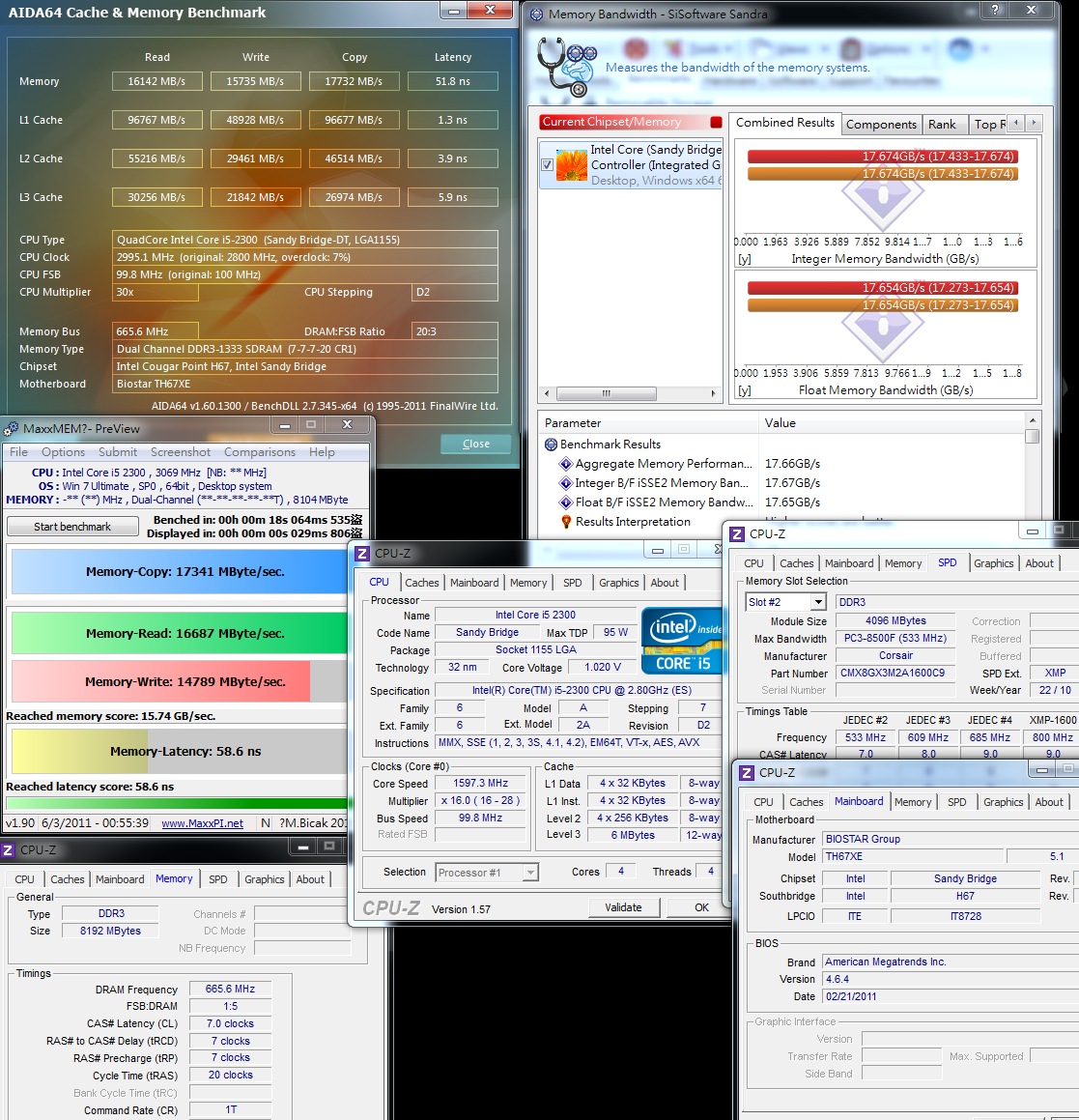
DDR3 1331.2 CL7 7-7-20 1T
ADIA64 Memory Read - 16142 MB/s
Sandra Memory Bandwidth - 17674 MB/s
MaXXMEM Memory-Copy -17341 MB/s
-
DDR3 1426.8 CL7 7-7-20 1T
ADIA64 Memory Read - 17417 MB/s
Sandra Memory Bandwidth - 18980 MB/s
MaXXMEM Memory-Copy -18573 MB/s
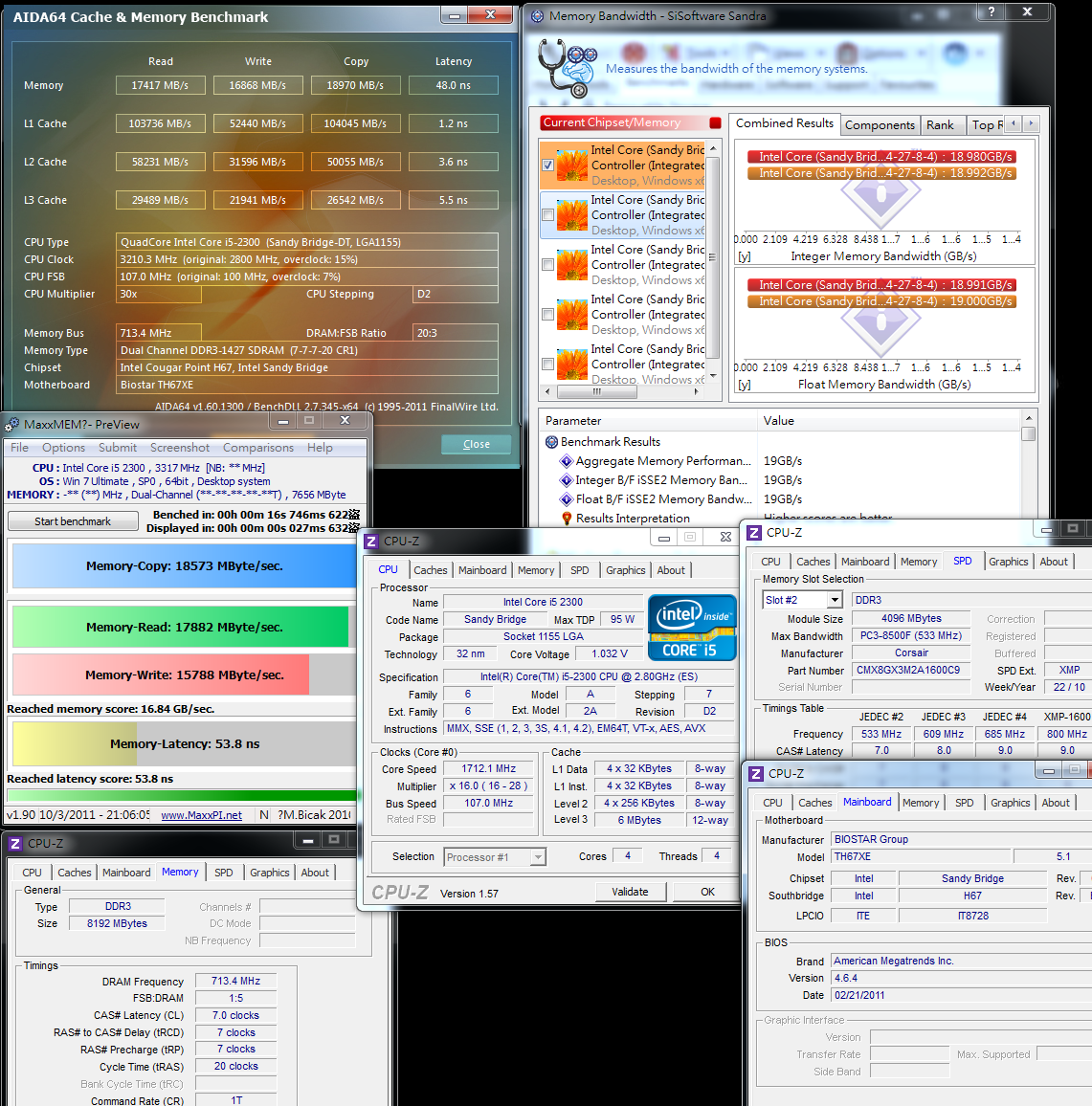
The built-in CPU of previous LGA 1156 Core i3/i5 integrated with H55, may not be able to run the DDR3 bandwidth.
However, the new generation LGA 1155 may have addressed this problem with its built-in CPU that begins to retain the architecture performance.
With regard to the Core i platform of Intel built-in GPU, its DRAM bandwidth performance is no longer as good as that of Core 2 Duo.
There is an improvement of over 50% in the bandwidth of DDR3 1333.
Overclocking performance
CPU 107 X 28 =>2996MHz
Start up Turbo Boost and C1E
DDR3 1426.8 CL7 7-7-20 1T
Hyper PI 32M X4 => 11m 25.356s
CPUMARK 99 => 509
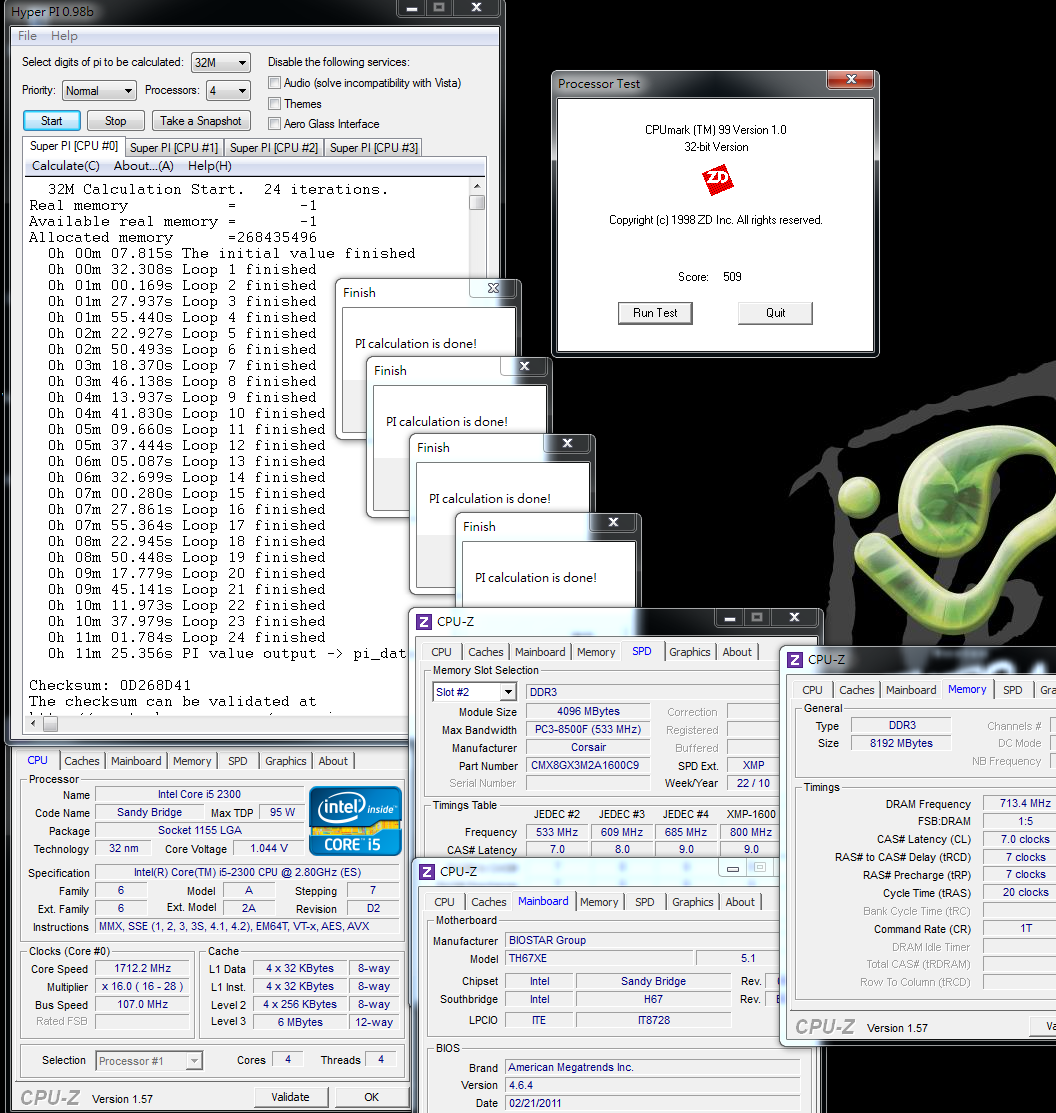
Nuclearus Multi Core => 17939
Fritz Chess Benchmark => 19.63/9424

CrystalMark 2004R3 => 221505
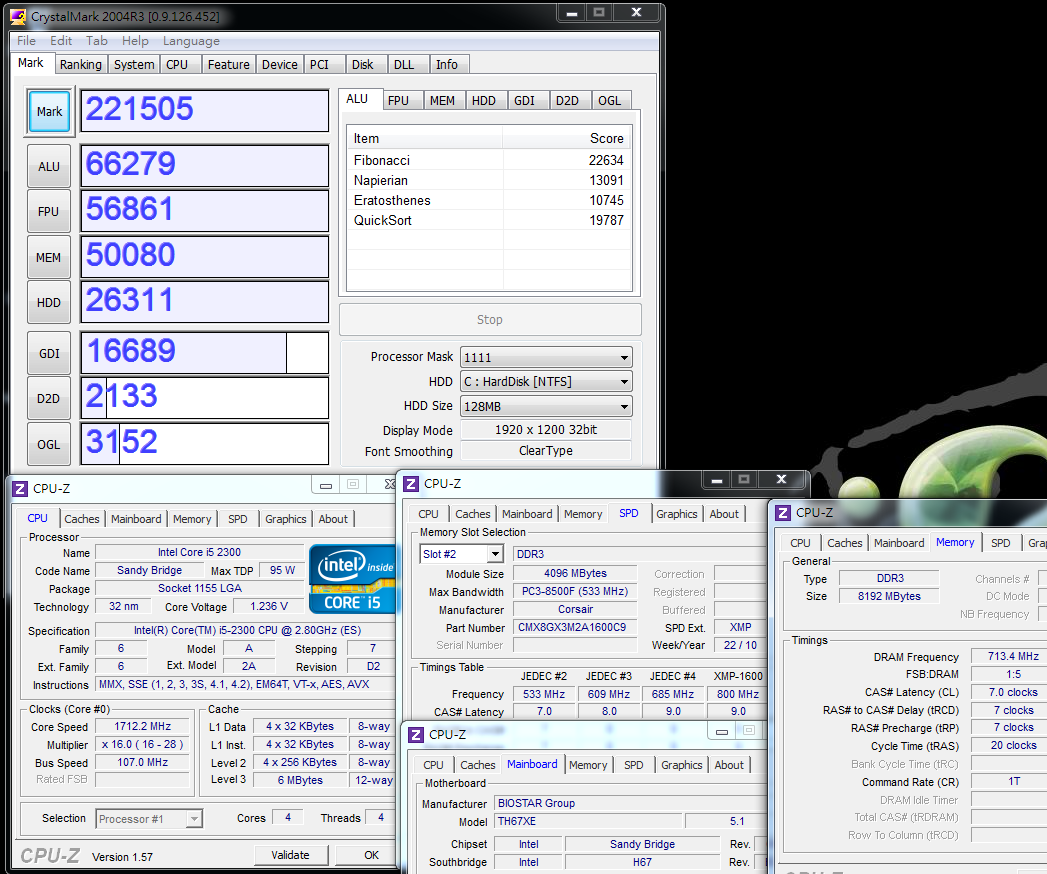
CINEBENCH R11.5
CPU => 4.92 pts
CPU(Single Core) => 1.33 pts

PCMark Vantage => 16264

Windows experience index - CPU 7.4
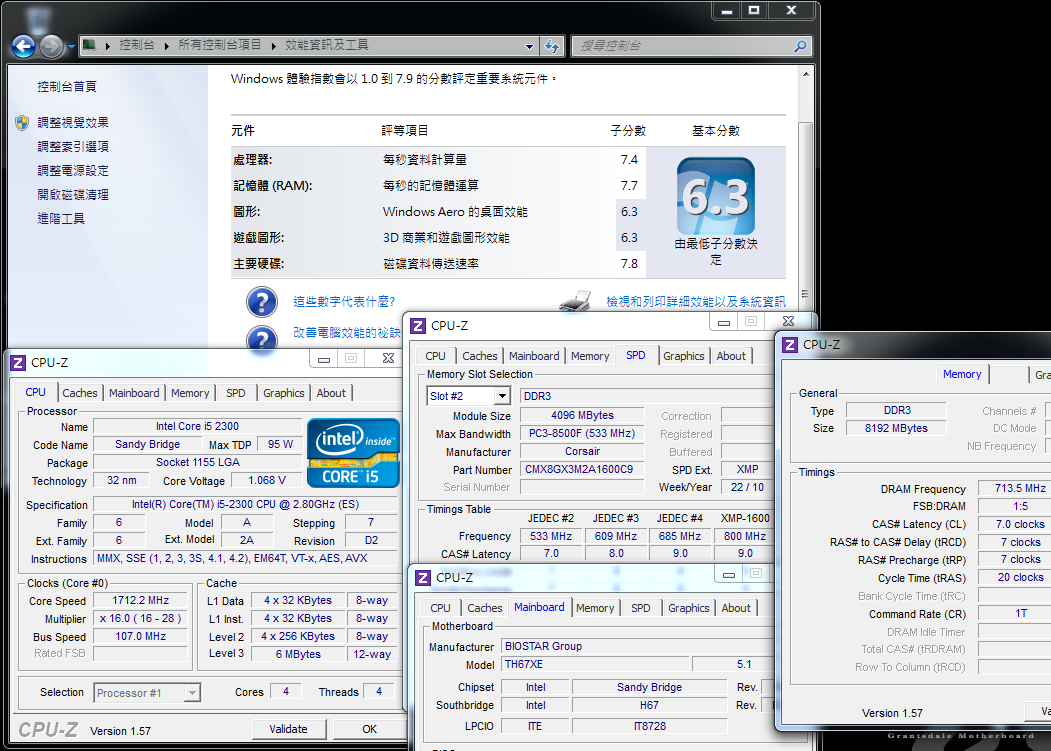
There are more limitations for Sandy Bridge in CPU overclocking than ever before.
If only the CPU external frequency is adjusted, then the CPU can operate stably within a range of 104~107MHz.
In terms of overclocking and multiplication, there are only 2500K/2600K integrated with P67 chipset that can realize a drastic overclocking.
As to H67, only a small overclocking of the external frequency can be adjusted,
and the whole frequency after the external frequency’s change to 107MHz, will increase from 2.8 to almost 3GHz.
Temperature performance (room temperature is about 18?)
During system standby: - 25~33

At full speed of CPU: - 61~64
Intel Burn Test v2.4?Stress Level Maximum
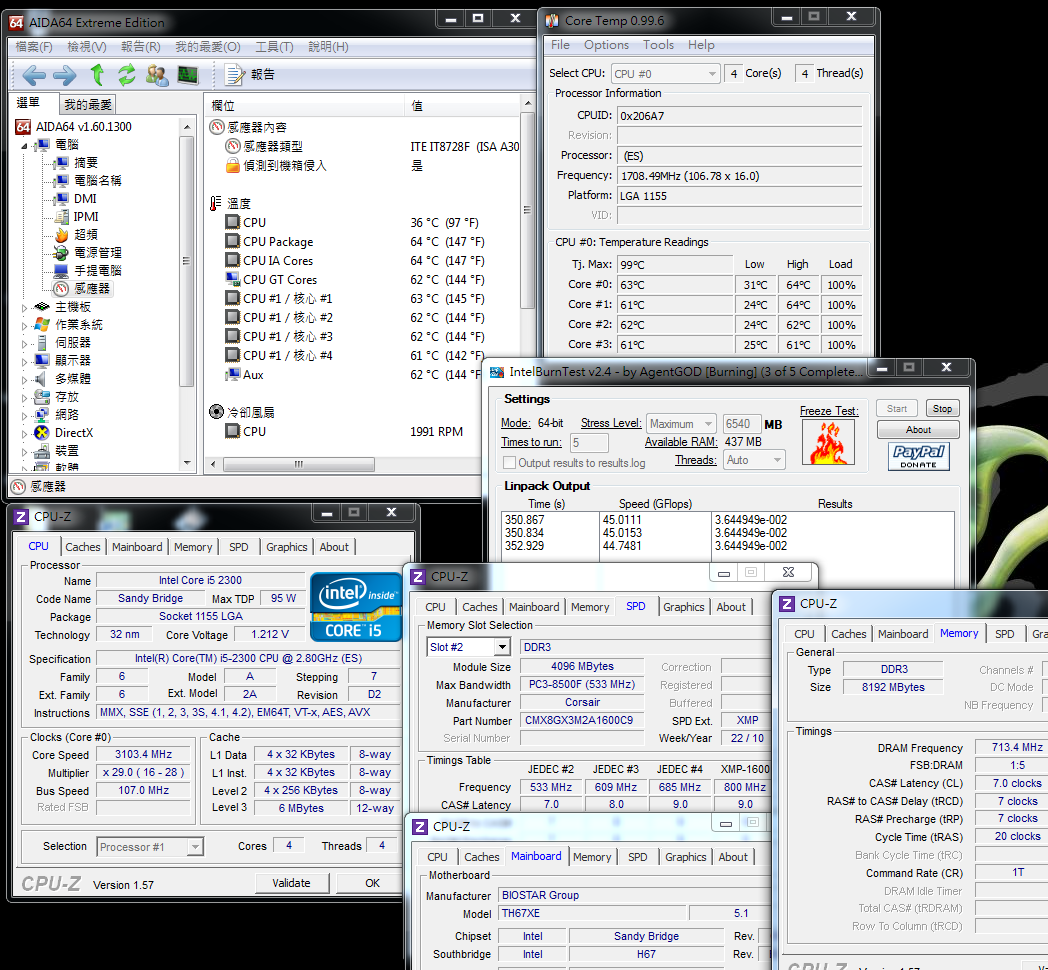
Since the overclocking is only about 7%, there is no big difference in the temperature.
By comparing the default values, the temperature difference during system standby is about 3? and this is just about 4? at full speed of the CPU.
Power consumption test
During system standby: - 37W

-
At full speed of CPU: - 105W

There is also a slight lag between the power consumption after overclocking and the default value.
It can be known that CPU overclocking has little effect on the temperature and power consumption.
Intel HD Graphics HD2000 performance test
Preset frequency
3DMark Vantage => P1251

StreetFighter IV Benchmark
1280 X 720 => 30.65 FPS

FINAL FANTASY XIV
1280 X 720 => 408
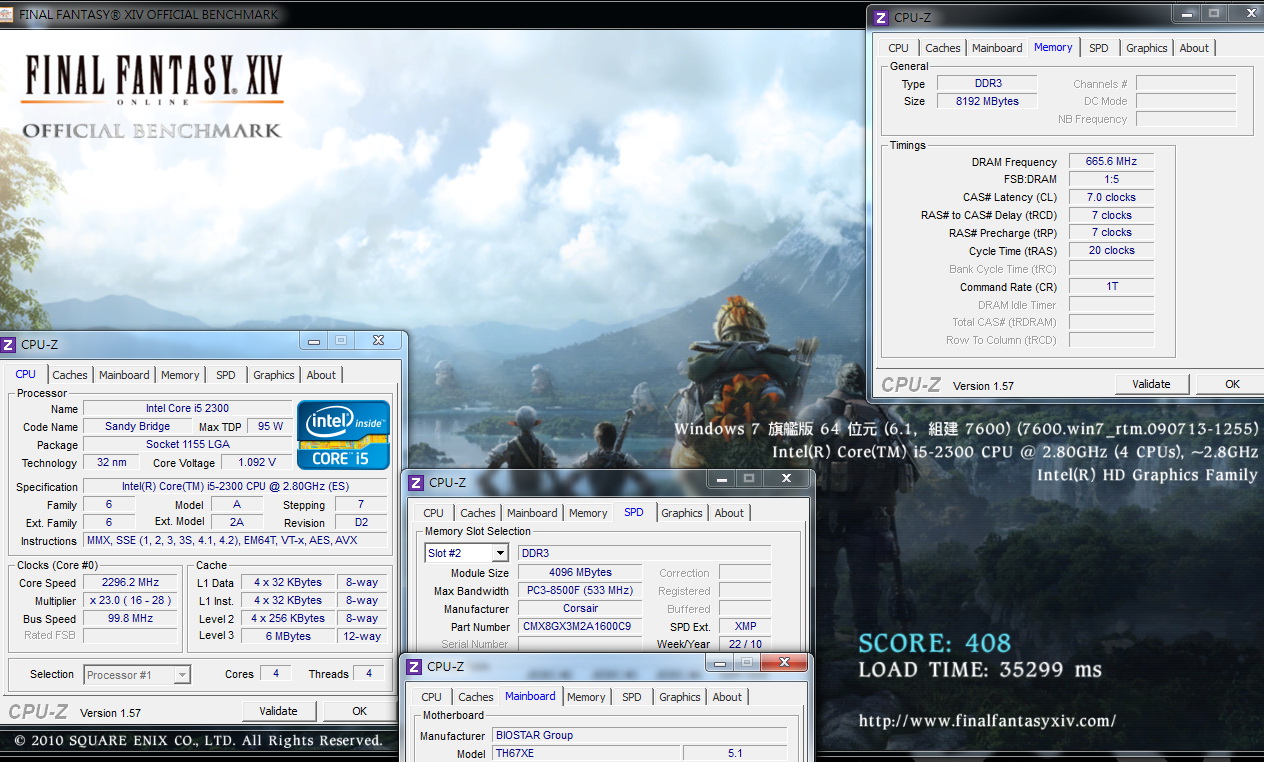
By comparing the built-in 2300K HD2000 GPU with the previously tested 2500K HD3000 GPU, there is a lag of about 30%~40% in its 3D performance.
There is no big difference between the two in this aspect when compared in the Game.
For example, the performances of 2300K HD2000 GPU and 2500K HD3000 GPU in StreetFighter IV are 30FPS and 40FPS, respectively.
HD2000 overclocking frequency
37 X 50 =>1850MHz
3DMark Vantage => P2078

StreetFighter IV Benchmark
1280 X 720 => 44.61 FPS

FINAL FANTASY XIV
1280 X 720 => 623

After the overclocking of HD2000, there is a performance increase of over 50% in the three kinds of Game Benchmark softwares mentioned above.
Sandy Bridge’s GPU overclocking scope is greatly increased. Similarly,
the preset performance is also 2~3 times higher than the last generation of i3-540 integrated with H55.
The great leap in 3D performance definitely creates an impact on the M-ATX/ITX market for built-in GPU,
but this also depends on how the competitor -- AMD respond with new chipsets in the future.
BIOSTAR TH67XE
Advantages
1. H67XE is much cheaper compared to the H67 products of other brands;
2. Built-in Power/Reset button, 7-phase PWM power supply design, USB 3.0/eSATA and other extended interfaces
3. BIOS provides CPU external frequency/GPU frequency/DDR3 frequency setting, as well as diverse voltage options.
4. The Sandy Bridge platform has low temperature and low power consumption. It also has more DDR3/GPU performance than the previous platform.
Disadvantages
1. BIOSTAR has no channels in Taiwan at present;
2. Segmental adjustment is required when adjusting the external frequency of the CPU from 100MHz to 107MHz.

Performance ratio: ?????????
Material ratio: ??????????
Specification ratio: ??????????
Appearance ratio: ??????????
C/P ratio: ??????????
Intel Core i5-2300 is sold at about NT$5,600 in Taiwan, which is equivalent to around US$ 190.
Core i5-2400 is about NT$5,750, which is equivalent to around US$195. There is a small price difference between these two CPUs.
Specifically, i5-2300 has 2.8GHz and i5-2400 has 3.1GHz; the C/P of 2400 seems to be much higher.
Unless there is a price reduction of 2300 in the future so as to create a price difference between the two, customers may opt for the 2400 CPU.
The tested TH67XE still has the advantages emphasized by BIOSTAR, which include effciency, overclocking and affordability.
Moreover, its material and specification are much better than the low level H67, but its price is lower than the middle and high level H67 of other brands.
The C/P ratio of BIOSTAR is indeed attractive to consumers given its price. It also provides an overvalued choice for consumers with limited budget.
This article mainly shares information on the performance of i5-2300 integrated with H67, and its affordability in many aspects.
It also provides the HD2000 3D performance test.
To those who still have some questions about the 3D performance of HD2000/HD3000,
I suggest you read the previous tests related to 2500K which I have uploaded. Thank you for reading this article:)
This review also post in my blog WIND3C
Welcome 3C lovers to visit and advise.
Thanks

-
good jobs
-
good work...
Ciao! Sembra che tu sia interessato a questa conversazione, ma non hai ancora un account.
Stanco di dover scorrere gli stessi post a ogni visita? Quando registri un account, tornerai sempre esattamente dove eri rimasto e potrai scegliere di essere avvisato delle nuove risposte (tramite email o notifica push). Potrai anche salvare segnalibri e votare i post per mostrare il tuo apprezzamento agli altri membri della comunità.
Con il tuo contributo, questo post potrebbe essere ancora migliore 💗
Registrati Accedi