
2010 Mainstream DIY PC Set Reference-AMD Platform OC Guide
-
These years, the DIY PC market seems to be smaller and smaller.
The main reasons are Notebook popularized and Netbook, Apple iPad launched.
Most users just use computer for internet surfing or email.
However, the internet topic of how to build a DIY PC is still very popular so far.
Many users will search info by budget or needs to build own DIY PC.

There are many friends ask me how to build the DIY PC.
I think there are 2 kinds of mainstream PC.
One is all in one MB, which built-in GPU. The price is lower and budget is around 11000~13000NTD, 365~431USD.
The other one is discrete with graphic card for 3D online game.
The price is still the key concern. We just pick the entry model. The budget is around 14000~16000NTD, 465~531USD.
However, in my personal idea, I still recommend to add more budgets.
Some hardware like VGA or HDD, you can enhance performance and spec for just pay more few hundred NTD.
Also, you can use this PC longer.
For this kind of article, I hope I can share every year.
Last share is early 2010, Intel annual best buy Micro ATX PC with Core i3-530 boxed cooler OC guide.
Recent 2 years, AMD more emphasize in fair price.
The low price multi-core CPU strategy is more and more acceptable for end users.
This time, I set the budget at 15500NTD, around 515USD, to build a high C/P value PC for your reference.
CPU Processor
I buy the most popular entry X4 CPU - AMD Athlon II X4 640.
3.0GHz, 45nm, 2MB L2 cache, Revision C3
Recently, AMD launched X4 645, 3.1GHz, and price is a little higher.
So after considering, I still pick higher C/P X4 640. The price is 2950NTD, around 98USD.

Inside the box
Manual, sticker, cooler, Athlon II X4 640

Upper Left is cooler bottom, 100% aluminum, and thermal paste.
Lower Right is AMD Athlon II X4 640, AM3 socket and compatible with AM2+. AMD platform has better extensibility.

DRAM
DDR3 price keeps dropping. There are more and more 4GB DDR3 kit in the market.
If you have more budgets and may need 64-bit OS in the future, 4GBX2 is the better choice currently.
I use CORSAIR DDR3 1600 4GBX2, dual channel. The price is a little higher.
CORSAIR is a well known international brand and passed the dual channel stability test. The price is still acceptable.
The price is around 125USD.
CORSAIR CMX8GX3M2A1600C9

As AMD in non-OC condition, the system can run at DDR3 1600, so I choose 1600 DDR3.
If your budget is limited, you can choose DDR3 1333 or 2GX2 kit.

Mainboard
For building AMD platform, there are 2 kinds of chipset.
880G and 890GX are built-in GPU. 880G price is lower and many brands can choose.
I use GIGABYTE 880GMA-UD2H. The SB is SB850, supporting SATA3 and NEC USB3.0 technology.
The price is 3500NTD, around 116USD.
GIGABYTE GA-880GMA-UD2H

CPU PWM is 4+1 phase.
2 X PCI-E X16, supports ATI Hybrid CrossFireX and bandwidth is X16+X4.

Audio is Realtek ALC892, supports 7.1 channel and Dolby Home Theater surrounding technology.
The same chipset series, there is also one more model, 880GM-UD2H. The SB is SB710 and no SATA3 and USB3.
This model price is around 600NTD, 20USD, lower than 880GMA. If you have limited budget for MB, you also can consider this.

Power Supply
I use Antec High Current Gamer 400W, HCG series is Antec latest product line.
The price is 2490NTD, around 83USD.

-
These years, the DIY PC market seems to be smaller and smaller.
The main reasons are Notebook popularized and Netbook, Apple iPad launched.
Most users just use computer for internet surfing or email.
However, the internet topic of how to build a DIY PC is still very popular so far.
Many users will search info by budget or needs to build own DIY PC.
There are many friends ask me how to build the DIY PC.
I think there are 2 kinds of mainstream PC.
One is all in one MB, which built-in GPU. The price is lower and budget is around 11000~13000NTD, 365~431USD.
The other one is discrete with graphic card for 3D online game.
The price is still the key concern. We just pick the entry model. The budget is around 14000~16000NTD, 465~531USD.
However, in my personal idea, I still recommend to add more budgets.
Some hardware like VGA or HDD, you can enhance performance and spec for just pay more few hundred NTD.
Also, you can use this PC longer.
For this kind of article, I hope I can share every year.
Last share is early 2010, Intel annual best buy Micro ATX PC with Core i3-530 boxed cooler OC guide.
Recent 2 years, AMD more emphasize in fair price.
The low price multi-core CPU strategy is more and more acceptable for end users.
This time, I set the budget at 15500NTD, around 515USD, to build a high C/P value PC for your reference.
CPU Processor
I buy the most popular entry X4 CPU - AMD Athlon II X4 640.
3.0GHz, 45nm, 2MB L2 cache, Revision C3
Recently, AMD launched X4 645, 3.1GHz, and price is a little higher.
So after considering, I still pick higher C/P X4 640. The price is 2950NTD, around 98USD.
Inside the box
Manual, sticker, cooler, Athlon II X4 640
Upper Left is cooler bottom, 100% aluminum, and thermal paste.
Lower Right is AMD Athlon II X4 640, AM3 socket and compatible with AM2+. AMD platform has better extensibility.
DRAM
DDR3 price keeps dropping. There are more and more 4GB DDR3 kit in the market.
If you have more budgets and may need 64-bit OS in the future, 4GBX2 is the better choice currently.
I use CORSAIR DDR3 1600 4GBX2, dual channel. The price is a little higher.
CORSAIR is a well known international brand and passed the dual channel stability test. The price is still acceptable.
The price is around 125USD.
CORSAIR CMX8GX3M2A1600C9
As AMD in non-OC condition, the system can run at DDR3 1600, so I choose 1600 DDR3.
If your budget is limited, you can choose DDR3 1333 or 2GX2 kit.
Mainboard
For building AMD platform, there are 2 kinds of chipset.
880G and 890GX are built-in GPU. 880G price is lower and many brands can choose.
I use GIGABYTE 880GMA-UD2H. The SB is SB850, supporting SATA3 and NEC USB3.0 technology.
The price is 3500NTD, around 116USD.
GIGABYTE GA-880GMA-UD2H
CPU PWM is 4+1 phase.
2 X PCI-E X16, supports ATI Hybrid CrossFireX and bandwidth is X16+X4.
Audio is Realtek ALC892, supports 7.1 channel and Dolby Home Theater surrounding technology.
The same chipset series, there is also one more model, 880GM-UD2H. The SB is SB710 and no SATA3 and USB3.
This model price is around 600NTD, 20USD, lower than 880GMA. If you have limited budget for MB, you also can consider this.
Power Supply
I use Antec High Current Gamer 400W, HCG series is Antec latest product line.
The price is 2490NTD, around 83USD.
-
80Plus Copper Certificate, Active PFC design, 12cm low acoustic fan, 3 years warranty.
If you just use for word processing and no need external graphic card, you also can consider blow 400W product.

HDD uses WD long life model, 640AAKS. The performance is not so outstanding, but the price is its main advantage.
I used to use WD 15EARS. The performance is only 75MB/s which is similar with 640AAKS.
If you have higher capacity need, currently 1T~1.5T HDD price is also only a little bit higher.
You just need to check the performance in advance.
The above components are not must.
If you don’t need such high performance, you can choose cheaper products. On the other hand, you can buy more high end one.
Base on your demand, budget and favorite brand, you can choose whatever you want. It’s the most fun for DIY PC.
Configuration
CPU: AMD Athlon II X4 640
MB: GIGABYTE GA-880GMA-UD2H
DRAM: CORSAIR CMX8GX3M2A1600C9
VGA: ATI Radeon HD 4250
HD: WD 640AAKS 640GB
POWER: Antec High Current Gamer 400W
Cooler: AMD original cooler

Default Performance
CPU 200.9MHz X 15 => 3013.7MHz
DDR3 1607.4 CL9 9-9-24 1T 1.400V
Hyper PI 32M X4 => 23m 50.367s
CPUMARK 99=> 393

Nuclearus Multi Core => 13227
Fritz Chess Benchmark => 14.94/7172

CrystalMark 2004R3 => 153603

CINEBENCH R11.5
CPU => 3.40 pts
CPU(Single Core) => 0.87 pts

Windows Experience Index - CPU 7.3

PCMark Vantage => 6222

X4 640 default frequency is 3.0GHz already, so it’s capable for most applications.
Even for the file converting performance is also good due to the quad core multi-tasking.
The original cooler is around 1670rmp under BIOS control. The acoustic is very low.
If it’s in full speed, it’s 3260rpm which is louder in bare system. The noise is acceptable inside the chassis.
Temperature
Standby - 28~31

CPU Full Speed - 62~65
Intel Burn Test v2.4?Stress Level Maximum

The standby temperature is very low. This number is satisfied.
The full speed is 62 degree C and it’s too high for bare system.
X4 640 original cooler is too slim. It may cause the temperature too high.
-
Power Consumption
Standby - 59W

CPU Full Speed - 150W

45nm X4 CPU power consumption is not so good, but it’s still better than the standard.
It’s still a power saving system. I hope AMD can implement 32nm to lower the power consumption.
3D Performance
Built-in GPU ATI Radeon HD 4250 560MHz
3DMARK 2006 => 1757

3DMARK VANTAGE => P302
CPU SCORE => 9919
GPU SCORE => 228

StreetFighter IV Benchmark
1024 X 768 => 20.87FPS

These years, AMD built-in GPU performance is better than the others.
Above 3D performance is still lower than entry graphic card, but compare to the other built-in GPU, the 3D performance is pretty good.
880G built-in ATI Radeon HD 4250, the 3D performance is around 20~25% lower than own 890GX HD 4290.
BIOS OC Setup
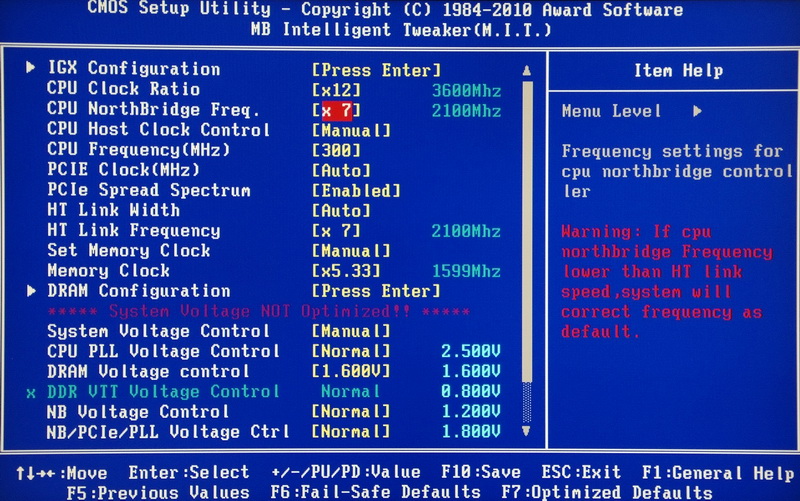
Main BIOS tuning page, called M.I.T.
CPU clock set to 300MHz, you need to adjust CPU NorthBridge Freq./HT Link Frequency.
I suggest you to set at X7, 2100MHz. It’s helpful for the stability after pulling CPU to 300MHz.
Voltage Page
DRAM Voltage control 1.300~2.500
CPU NB VID Control -0.600~+0.600V(0.025V)
CPU Voltage Control -0.600~+0.600V(0.025V)
Memory depends on DRAM quality. The range set at CPU/DDR3 as 300/1600.
CPU Voltage Control/DRAM Voltage Control bases on memory quality to adjust the voltage.
If 300MHz is not stable, you can adjust NB Voltage Control to 1.3000V.

DDR3 set up is CL7 8-7-24 1T

Built-in ATI Radeon HD 4250 Setup Page
It can share up to 512MB system memory and OC the clock from 560MHz to 830MHz.

CPU Unlock can enable X2/X3 CPU to X4 by chance.
CPU Core Control is more detail features. If X2 cannot enable to X4 stable, you have one more option to enable to X3.

-
PC Health Status

Previously, as my experience of using 785G, 790GX or 890GX, the AMD CPU can OC to 300MHz mostly.
For the BIOS setup and DRAM multiplier, you have to pay more attention for these setup, then you can join AMD 300MHz club.
DDR3 bandwidth comparison
DDR3 1607.2 CL9 9-9-24 1T 1.400V
ADIA64 Memory Read - 9205 MB/s
Sandra Memory Bandwidth - 12044 MB/s
MaXXMEM Memory-Copy - 10903 MB/s

DDR3 1600 CL7 8-7-24 1T 1.600V
ADIA64 Memory Read - 9557 MB/s
Sandra Memory Bandwidth - 12588 MB/s
MaXXMEM Memory-Copy - 11545 MB/s

AMD started to build in Memory Controller into CPU since K8.
During that time, it really created the better bandwidth and memory clock, However, years passed, the Core i series performance has over it.
The CORSAIR DDR3 quality is very good. The official spec is 1.400V for DDR3 1600 CL9.
I set as DDR3 1600 CL7 8-7-24 high performance parameter. It just needs 1.600V to pass all benchmark software.
OC Performance
CPU 300MHz X 12 => 3599.8MHz
DDR3 1607.4 CL9 9-9-24 1T 1.400V
Hyper PI 32M X4 => 20m 28.284s
CPUMARK 99=> 463

Nuclearus Multi Core => 15673
Fritz Chess Benchmark => 17.56/8428

CrystalMark 2004R3 => 185249

CINEBENCH R11.5
CPU => 3.86 pts
CPU(Single Core) => 1.01 pts

WindowsExperience Index - CPU 7.4

PCMark Vantage => 6314

X4 640 default clock is 3.0GHz. After OC to 3.6GHz, some benchmark improves 20%.
Windows Experience Index doesn’t improve much.
Or we can say, since the index over 7, the score cannot improve much dues to the highest score is 7.9.
PCMark Vantage is a multi-factors benchmark software, the performance improvement is not much.
For original cooler, long time run at 3.6~3.75GHz can be stable.
Temperature
Standby - 32~34

-
CPU Full Speed - 64~66
Intel Burn Test v2.4?Stress Level Maximum

As thermal meter, the standby and full speed temperature after OC is around 2~4 degree C comparing to default.
After OC, the temperature is a little higher than default. Maybe it’s AMD 45nm characteristic?!
Power Consumption
Standby - 68W

CPU Full Speed - 204W

3D Performance
Built-in GPU ATI Radeon HD 4250 830MHz
3DMARK 2006 => 2138

3DMARK VANTAGE => P417
CPU SCORE => 11567
GPU SCORE => 315

StreetFighter IV Benchmark
1024 X 768 => 25.88FPS

When OC the ATI Radeon HD 4250 clock from 560 to 830MHz, the 3D benchmark software improve around 30%.
880G is capable for general 3D application or games. If you need to run some professional 3D application, you better to add a grapgic card.
During the test, the pity is the revision C3 X4 CPU cannot enable L3 Cache.
Even though as my experience, the L3 Cache doesn’t improve performance much.
However, enableL3 Cache is for personal feeling. This is the main difference between C2 and C3.
Of course, C3 also has some strength. As per the internet, C3 has better memory compatibility. It’s helpful for DDR3 OC range.
As per my experience, the same voltage, C3 OC range is around 100~200MHz to C2.
AMD strategy is focus on mid-low market for years. You can see in this segment, CPU and chipset price are lower.
For the mid-end to hi-end market, the performance is lower than Core i and DDR3 performance is also lower.
I do hope AMD K10 structure ca improve this issue. However, so far AMD is still focus on multi-core and higher C/P value.

After buying Case and DVD writer, you can build your own PC. The budget is around 15500NTD.
If you have any preferences of price, performance or brand, you can adjust your budget.
If the 3D performance is not enough in the future, you just need to spend 2000~ 3000NTD for graphic card upgrade.
This DIY PC could be the mid-high performance and mid-low price choice.

After sharing AMD 2010 mainstream platform, I will share Intel platform asap.
Due to the year end, the Intel mainstream platform will be done near year end or early 2011.
Wish you keep supporting my original review article. Thanks

This article is also published in my personal blog. WIND'S 3C
You are welcome to check any time.
Ciao! Sembra che tu sia interessato a questa conversazione, ma non hai ancora un account.
Stanco di dover scorrere gli stessi post a ogni visita? Quando registri un account, tornerai sempre esattamente dove eri rimasto e potrai scegliere di essere avvisato delle nuove risposte (tramite email o notifica push). Potrai anche salvare segnalibri e votare i post per mostrare il tuo apprezzamento agli altri membri della comunità.
Con il tuo contributo, questo post potrebbe essere ancora migliore 💗
Registrati Accedi