
guida ai dissipatori
-
thermalright
thermalright IFX-14

caratteristiche tecniche:
dimensioni:
- Dimension : L146.2 x W124 x H161 mm (heatsink only)
- Weigh t: 790g (heatsink only)
- Recommended Fan : All 120mm & 140mm Fan
dimensioni dissipatore posteriore:
- Dimension : L134.5 x W163.5 x H112.6 mm (heatsink only)
- Weight : 130g (heatsink only)
- Recommended Fan : All 80mm & 70mm Fan
Compatibilità
- INTEL: All Intel Socket LGA775 processors
- AMD: Athlon64 / FX / X2 / Opteron Socket AM2 processors
thermalright ultra 120 extreme

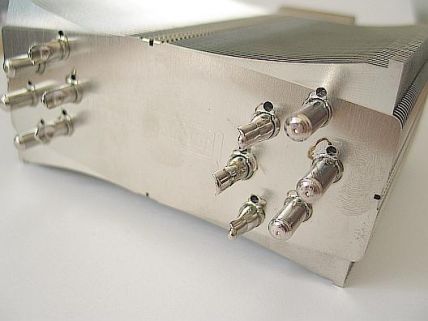
caratteristiche tecniche:
Technical Spec.:
Dimension:
L63.44 x W132 x H160.5 mm (heatsink only)
Weight:
790g (heatsink only)
Recommended Fan
All 120mm Fan
Compatibility:
INTEL: All Intel LGA775 processors
AMD: All AMD Socket AM2 Processors
alcune review:
Thermalright Ultra-120 Extreme: 6 Heatpipes - Review Hartware.net
AnandTech: Thermalright Ultra 120 Extreme: Is More Better?
come fissare le fan a cilindro unico:
Hardware Upgrade Forum - View Single Post - scythe infinity vs thermalright ultra 120 extreme
thermalright ultra 120/90

per far diventare compatibile l'ULTRA 120/90 anche con il socket AM2 vi occorre il AM2 Bolt-Thru Kit che trovate sul sito thermalright.com nella lista accessori
-specifiche tecniche ULTRA 120:
Dimension:
L63.5 x W132 x H160.5 mm (heatsink only)
Weight:
745g (heatsink only)
Recommended Fan
All 120mm Fan
-specifiche tecniche ULTRA 90:
Dimension:
L45 x W102 x H147 (heatsink only)
Weight:
435g (heatsink only)
Recommended Fan
Maker: Panaflo (Panasonic)
Model: FBL09A12M
Size: 92 x 92 x 25 (mm)
Bearing: Hydro Wave
Voltage: 12V
Speed: 2450 rpm
Air Flow: 48 CFM
Noise Level: 30.0 dBA
Weight: 110g (3.88 oz)
thermalright ultima 90I

specifiche tecniche:
* Six-heatpipe design for extra fast heat transfer
* Equipped with a 92mm fan (included), or as an alternative choice, a 120mm fan (not included) to help cool CPU surrounding
* Light and easy installation
* High performance, low noise level at competitive price
Dimension:L115 x W55 x H139 (heatsink only)
Weight:460g (heatsink only)
thermalright si-9xv for xeon processor

specifiche tecniche:
* Multiple heatpipes for well spread heat around aluminum fins
* Soldered fins to copper base (nickel plated) to make effective contact
* Light weight and easy installation
* Optional passive cooling depending on system fan placement
Dimension:
L89 x W85 x H148 (mm), without fan
Weight:
360g (heat sink only)
Recommended Fan
Maker: Panaflo (Panasonic)
Model: FBL09A12M
Size: 92 x 92 x 25 (mm)
Bearing: Hydro Wave
Voltage: 12V
Speed: 2450 rpm
Air Flow: 48 CFM
Noise Level: 30.0 dBA
Weight: 110g (3.88 oz)
Intel Xeon processor supported by SI-9XV includes:
Intel 800 MHz System Bus Xeon processors up to 3.60 GHz
Intel 533 MHz System Bus Xeon processors up to 3.20 GHz
Intel 64 Bit Xeon Processors with 2MB L2 cache up to 3.8 GHz

Intel Dual Core Xeon processor 5000 series supported by SI-9XV includes:
Intel Xeon processor 5063
Intel Xeon processor 5050
Intel Xeon processor 5030
Intel 64-bit Xeon MP not supported by SI-9XV includes:
Intel 64 bit Xeon processor with 4 MB L3 Cache at 3.33 Ghz
Intel 64 bit Xeon processor with 8 MB L3 Cache at 3 Ghz
Intel 64 bit Xeon processor with 8 MB L3 Cache at 2.83 Ghz
Intel Dual Core Xeon processor 5000 series not supported by SI-9XV includes:
Intel Xeon processor 5080
Intel Xeon processor 5060
thermalright SI-128

caratteristiche tecniche:
Dimension:
L125 x W145 x H91.5 mm (heatsink only)
Weight:
510g (heatsink only)
Recommended Fan
All 120mm Fan
Compatibility:
INTEL: All Intel P4 LGA775 processors
AMD: Athlon64 / FX / X2 / Opteron all models**
alcune reviews:
DragonSteelMods - Thermalright SI-128 CPU Cooler
Thermalright SI-128 mit 8mm Heatpipes - Review Hartware.net
thermalright xp 90c

specifiche tecniche:
Dimensioni:
L116 x W96 x H75 (mm) Fin only, without fan
L116 x W96 x H96 (mm) Fin only, with 25mm thick fan
peso:
690g (heat sink only)
alcune review:
Thermalright XP-90C Heatsink Review - ap0calypse - The Last Stop in Tech
XP 90
specifiche tecniche:
Dimensioni:
L116 x W96 x H75 (mm) Fin only, without fan
L116 x W96 x H96 (mm) Fin only, with 25mm thick fan
peso:
360g (heat sink only)
alcune review:
Thermalright XP-90 P4/K8 Heatpipe
Thermalright XP-90 CPU Heatsink | silentpcreview.com
thermalright SI-120

specifiche tecniche:
Dimensioni:
L135 x W125 x H90 (mm) Heat sink only, without fan
peso:
400g (heat sink only)
alcune review:
Thermalright SI-120 CPU Cooler -= www.bigbruin.com =-
http://www.pro-clockers.com/article.php?id=77&page=1
scythe
Scythe:
Ninja PLUS// Infinity

caratteristiche tecniche:
Ninja PLUS
dimensione Heatsink :
110 x 110 x 150mm
dimensione ventola:
120 x 120 x 25mm
rumorosità:
23.5dBA
portata:
46.5CFM
velocità ventola:
1200rpm
peso:
815g
alcune review:
!!! OVERCLOCKZONE !!! Scythe NINJA Plus
:: PC Ekspert - Hardware EZine - Èlanci ::
5 High End Kühler im Vergleich Scythe Ninja Überblick Seite 2 @ TecCentral.de
Scythe SCNJ-1000 Ninja heatsink | silentpcreview.com
test/pareri/opinioni/novità sullo scythe ninja plus:
TH Ufficiale NINJA e INFINITY - Hardware Upgrade Forum
Infinity
Combined Dimensions:
125 x 116 x 160mm
Fan Dimensions:
120 x 120 x 25mm
Fan Noise Level:
23.5dBA
Air Flow:
46.5CFM
Fan Speed:
1200rpm (±10%)
Weight:
960g
alcune review:
Technic3D Reviews: Kühlungen: Scythe Infinity - Seite 1: Einleitung
Scythe Infinity im Test Intro Seite 1 @ TecCentral.de
Hardwareoverclock.com | Scythe Infinity CPU Kühler Testbericht
Scythe Infinity Heatpipe-Kühler - Review Hartware.net
sistema di aggancio secondario per chi nn vuole affidarsi alle clip
Illustrative Guide: Modify your Scythe Infinity mounting system... - XtremeSystems Forums
scythe ANDY SAMURAI MASTER

specifiche tecniche:
Combined Dimensions: 124 x 135 x 125(H) mm
Weight: 685g
Fan Dimensions: 120 x 120 x 25 mm
Fan Speed: 1,200rpm (±10%)
Fan Noise Level: 20.94 dBA
Air Flow: 49.58CFM
Bearing Type: Sleeve Bearing

Compatibility:
Intel
 LGA775 (SocketT) Proessor
Quad-Core Intel
Xeon Processor 3200 SeriesDual-Core Intel
Xeon Processor 3000 SequenceIntel
Core 2 Extreme processor
Intel
Core2 Quad processorIntel
Core2 Duo processorIntel
Core Duo ProcessorIntel
Pentium Processor Extreme EditionIntel
Pentium D ProcessorIntel
Pentium 4 Processor Extreme Edition supporting Hyper-Threading TechnologyIntel
Pentium 4 Processor supporting Hyper-threading TechnologyIntel
Celeron D ProcessorIntel
Socket478 ProessorIntel
Pentium 4 Processor Extreme Edition supporting Hyper-Threading TechnologyIntel
Pentium 4 Processor supporting Hyper-threading TechnologyIntel
Pentium 4 ProcessorIntel
Celeron D ProcessorIntel
Celeron Processor AMD SocketAM2 Proessor
AMD Athlon
64 ProcessorAMD Athlon
64 FX ProcessorAMD Athlon
64 X2 Dual-Core ProcessorAMD Socket940 Proessor
Dual-Core AMD Opteron
ProcessorAMD Opteron
ProcessorAMD Socket939 Proessor
AMD Athlon
64 ProcessorAMD Athlon
64 FX ProcessorAMD Athlon
64 X2 Dual-Core ProcessorAMD Socket754 Proessor
AMD Athlon
64 ProessorAMD Sempron
Processorscythe KAMA CROS

specifiche tecniche:
Overall Dimensions:
140(W) x 120(D) x 132mm(H)
Weight:
Ninja 6heat pipes CPU cooler:530g
Fan
Model #: SY1025SL12M
Dimensions: 100 x 100 x 25mm
Noise Level: 22.00dBA
Air Flow: 42.69 CFM
Speed: 1,500rpm (±10%)
Bearing Type: Sleeve Bearing
Compatibility:
Intel
LGA775 (SocketT) ProessorQuad-Core Intel
Xeon Processor 3200 SeriesDual-Core Intel
Xeon Processor 3000 SequenceIntel
Core2 Extreme processorIntel
Core2 Quad processorIntel
Core2 Duo processorIntel
Core Duo ProcessorIntel
Pentium Processor Extreme EditionIntel
Pentium D ProcessorIntel
Pentium 4 Processor Extreme Edition supporting Hyper-Threading TechnologyIntel
Pentium 4 Processor supporting Hyper-threading TechnologyIntel
Celeron D ProcessorIntel
Socket478 ProessorIntel
Pentium 4 Processor Extreme Edition supporting Hyper-Threading TechnologyIntel
Pentium 4 Processor supporting Hyper-threading TechnologyIntel
Pentium 4 ProcessorIntel
Celeron D ProcessorIntel
Celeron Processor AMD SocketAM2 Proessor
AMD Athlon
64 ProcessorAMD Athlon
64 FX ProcessorAMD Athlon
64 X2 Dual-Core ProcessorAMD Socket940 Proessor
Dual-Core AMD Opteron
ProcessorAMD Opteron
ProcessorAMD Socket939 Proessor
AMD Athlon
64 ProcessorAMD Athlon
64 FX ProcessorAMD Athlon
64 X2 Dual-Core ProcessorAMD Socket754 Proessor
AMD Athlon
64 ProessorAMD Sempron
Processoralcune recensioni:
Scythe KAMA Cross Heatsink - FrostyTech.com
Scythe Kama Cross CPU Cooler | Hardware Secrets
VR-Zone : Technology Beats - Scythe Kama Cross Heatsink Review
zalman
zalman 9500/9700

zalman 9500 AM2

specifiche tecniche:
Dimensioni 85(L) X 112(W) X 125(H)mm
Peso 530g
Costruzione completamente in rame
Area Dissipante 3,698 cm2
Ventola
Costruzione a cuscinetti
Velocità Silent Mode 1,350RPM ± 10 %
Velocità Low-noise Mode 2,600RPM ± 10 %
Livello di rumore Silent Mode 18.0dB ± 10%
Livello di rumore Low-noise Mode 27.5dB ± 10%
official topic--------->[official topic] Zalman CNPS 9500 - Hardware Upgrade Forum
alcune review:
nel post ufficiale!!
zalman 9700


specifiche tecniche:
Dimensions 90(L) X 124(W) X 142(H) mm
Weight Heatsink: 690g, Total (including fan): 764g
Base Material Pure Copper and Aluminum
Dissipation Area 5,490 cm2
Fan
Bearing Type 2 Ball-Bearing
Speed Silent Mode 1,250RPM ± 30 % Normal Mode 2,800RPM ± 10 %
Noise Level Silent Mode 19.5dB ± 10% Normal Mode 35dB ± 10%
Control Method PWM Control
-
noctua
Noctua NH U-12/9

specifiche tecniche:
compatibilita: Intel Socket 478 & LGA 775, AMD K8
Height (without fan): 155 mm
Width (without fan) : 124 mm
Depth (without fan): 70 mm
Height (with fan): 155 mm
Width (with fan): 124 mm
Depth (with fan): 95 mm
Weight: 700 g
materiali: rame (base e heat-pipes) alluminio (alette dissipanti)
Application: P4 all frequencies, AMD all frequencies
Fan size: 120x120x25mm, 120x120x35mm (2 fans mountable)
alcune review:
A Byte Apart Review: Noctua NHU-12 And NHU-9 CPU Coolers (Page 1 of 4)
:: PC Ekspert - Hardware EZine - Èlanci ::
SocketZone.com-Tutorials in ita!!
segnalo che da pochi giorni è disponibile in italia presso alcuni shop il Noctua AM2 Upgrade Kit che permette appunto di fissare il suddetto dissipatore al socket AM2
link AM2 upgrade kit=====>Noctua.at - sound-optimised premium components "Designed in Austria"!
come ottenere l'AM2 upgrade kit dalla noctua in via totalmente gratuita!!
[Noctua NH-U12 / NH-U9] Kit x AM2 --- gratuito x tutti! --- - Hardware Upgrade Forum
coolermaster
Coolermaster gemini 2

caratteristiche tecniche:
CPU Socket
Socket AM2/754/939/940/LGA775
Dimensioni
175x124.6x81.5mm
Materiali
Copper Base/ 6 Heatpipes/ Aluminum Fin
fan
2x120mm opzionali
alcune review:
Cooler Master GeminII CPU Cooler Review - Testing & Our Recommendation
Cooler Master GeminII Universal CPU Heatsink Review
TweakUp - The need for tweak speed 2007!
coolermaster hyper tx

-caratteristiche tecniche
Socket Type
Intel LGA 775
velocità fan
650 ~ 1800 R.P.M.
Dimensione fan
92 x 92 x 25mm
rumore
22dBA
portata d'aria massima
41.76 CFM
vita della fan
40,000 hours
Dimensioni
90 x 44 x 136.5mm
materiali
Aluminum Fin
peso
484 g
Connettore
4 pin
velocità regolabile con
Intelligent Fan Speed controller
alcune review:
DragonSteelMods - Cooler Master Hyper TX CPU Cooler (Intel 775)
SysOpt.com - Bigger Cooling, Smaller Footprint: Cooler Master Hyper TX (Intel version) Review
3dGameMan.com - #733 - Cooler Master Hyper TX HSF
Futurelooks :: Digital Lifestyle and Technology for the Masses
Gamezoom - Coolermaster Hyper TX
coolermaster mars new version

caratteristiche tecniche:
Socket Type Intel LGA 775
AMD Socket (754/ 939/ 940 / AM2 / F)
Heat Sink Dimension 132 x 120 x 105mm
Heat Sink Material Aluminum Fin + Copper base + 3 Heat pipes
Fan Dimension 90 x 25.4 mm
Fan Speed 900~3000 R.P.M.
Fan Air Flow 55.3 CFM (Max).
Fan Life Expectancy 40,000 hours
Bearing Type Sleeve Bearing
Sound Pressure Level 17 dBA (Min), Average 25 dBA
Connector 4 pin
Weight 672 g
Voltage 12 V
Fan Speed Adjustment 1. Silent Mode:1800R.P.M.
2. Performance Mode: 3000R.P.M.
3. PWM Mode: 900~2500 R.P.M.
antazone
antazone AS-C1000

caratteristiche tecniche:
Technische Daten:
# dimensioni: 55 x 56.8 x 80.8 mm
# Materiale:rame
# peso: ca 105g
# full compatibile
zerotherm
bt80/90

caratteristiche tecniche:
Dimension 100(L) x 94(W) x 77(H) mm
?Heatsink Material
Fin : Copper/al
Base : Copper
Heatpipe : Copper
Heat Dissipation Area 4,400
Cooling Capacity Over 150W
Fan Dimension 92 x 25 mm
Fan Speed Automatic fan speed control by PWM
750~2,500 rpm (± 10%) normally under 1,500 rpm
Acoustical Noise Max. 27 dBA (± 10%), normally under 18 dBA
Air Flow Max. 42.8 CFM
Fan Connector 4-pin, 4-wire (PWM)
Rated Voltage DC 12V
Power Consumption Max. 1.56W
Weight 678g (w/o optional components)
asus
Asus Silent square/pro

-caratteristiche tecniche:
Supporto CPU
Intel
Core2 Extreme/ Core2 Duo/ Pentium D (Dual-Core)Intel
Pentium 4 HT/Celeron DAMD Athlon
64 X2/ FX (Dual-Core)AMD Athlon
64/Sempron CPUVelocità Ventola 1,800 rpm with PWM control
Materiali Base in Rame + Alette Alluminio Doppio Strato + 5 Cond. Calore
Quiet: 18dBA per il normale livello operativo
Reliable: protezione termica VRM
Easy assembly: innovativo design per il modulo di ritenzione
CPU Support
Intel
Pentium D dual-core CPUIntel
Pentium 4 LGA775 & Socket 478 CPUAMD Athlon
64 X2 dual-core CPUAMD Athlon
64(-FX)solo l'asus silent square pro è compatibile con il socket AMD M2

Connettore:
4 pin
peso senza la fan:
656g
dimensione dissipatore (mm):
140(L) x 115(W) x 140(H)
Materiali:
Dual-side aluminum fins + copper base with 5 cooper heat pipes
dimensione della ventola (mm):
92 x 92 x 25
Bearing Type:
Sleeve
Speed
1800 rpm ± 10% with PWM
masssima portata:
32.25 CFM
Max. pressione dell'aria:
0.052 inch-H2O
voltaggio di funzionamento:
12V
voltaggio di operazione:
7~13V
Life Expectation
40,000 Hr
Certificato:
CE, TUV
coolermaster hyper tx
-caratteristiche tecniche
Socket Type
Intel LGA 775
velocità fan
650 ~ 1800 R.P.M.
Dimensione fan
92 x 92 x 25mm
rumore
22dBA
portata d'aria massima
41.76 CFM
vita della fan
40,000 hours
Dimensioni
90 x 44 x 136.5mm
materiali
Aluminum Fin
peso
484 g
Connettore
4 pin
velocità regolabile con
Intelligent Fan Speed controller
alcune review:
DragonSteelMods - Cooler Master Hyper TX CPU Cooler (Intel 775)
SysOpt.com - Bigger Cooling, Smaller Footprint: Cooler Master Hyper TX (Intel version) Review
3dGameMan.com - #733 - Cooler Master Hyper TX HSF
Futurelooks :: Digital Lifestyle and Technology for the Masses
Gamezoom - Coolermaster Hyper TX
asus Silent Knight

specifiche tecniche:
CPU Support
Intel
Core2 Extreme/ Core2 Duo/ Pentium D (Dual-Core)Intel
Pentium 4 HT/ Celeron D CPUAMD Athlon
64 X2/ FX (Dual-Core)AMD Athlon
64/ SempronFan Speed 2,200 rpm ± 10%
Material Cu. Base + Cu. Punched Fins (128 fins) + 6 Heat Pipes
asus triton 70

specifiche tecniche:
- The second fan allowance design satisfies the gamers' requirements
- 20% space saving for installation
- Thoughtful push pin and clip for easy installation without removing the MB
silverstone
silverstone nt-06

specifiche tecniche:
Model NT06 heatsink
Enclosure material Copper base w/ bonded aluminum lower fins
Copper heat pipes w/ soldered copper upper fins
Color Black fan shroud, zinc coated cooler
Application P4 Socket 478, LGA775, AMD Socket 754, 939, 940, AM2
Heat Pipe Type 8mm thick powder heat pipe
Cooling System Advanced two way cooling design
Net Weight 570 g
Dimension 125.4mm (W) x 78mm (H) x 148mm (D)
Cooling fan FM122 cooling fan
Dimension w/fan 125.4mm (W) x 111mm (H) x 148mm (D)
Fan blade size 120 x 120 x 32mm
Fan speed 800 ~ 2400rpm
Max air pressure 5.89mm H2O
Max airflow 107.13CFM
Noise 21.0dBA ~ 42.2dBA
Bearing dual ball
Control System Rear I/O slot fan controller
silverstone nt-03

specifiche tecniche:
Model NT03 heatsink
Enclosure material Copper base, fins, heat pipes
Color Copper, black
Application Intel Socket 478, LGA775, AMD Socket 754, 939, 940
Heat Pipe Type Powder
Net Weight 608 g
Dimension 90 mm (W) x 72 mm (H) x 64 mm (D)
Cooling fan 60mm cooling fan x 2
Fan blade 11
Fan blade size 60 x 60 x 15mm
Fan speed 3600rpm
Max air pressure 2.31mmH2O
Max airflow 17.89CFM
Noise 26.9dBA
Bearing ball
thermaltake
thermaltake big typhoon vx

specifiche tecniche:
Compatibility
Intel Core 2 Exterme(Socket LGA775)
Intel Core 2 Duo (Socket LGA775)
Intel Pentium Extreme Edition (Socket LGA 775)
Intel Pentium D (Socket LGA 775)
Intel Pentium 4 (Socket LGA775)
Intel Celeron D (Socket LGA775)
AMD Athlon 64 X2 (Socket 939, AM2)
AMD Athlon 64 FX (Socket 939, AM2)
AMD Athlon 64 (Socket 754, 939, AM2)
AMD Sempron (Socket 754, AM2)
Heatsink Dimension
122(L) x 122(D) x 103(H) mm
Heatsink Material
Copper Base & Aluminum Fin (142Fin)
Heatpipe
Copper Tube 6mm x 6 pcs
Weight
822g
Fan Dimension
120x120x25 mm
Rated Voltage
12V
Started Voltage
7V
Power Input
3.00W
Fan Speed
1300 ~2000 RPM
Max. Air Flow
86.5CFM
Max. Air Pressure
2.22mmH2O
Noise
16dBA~24dBA
Life Expectation
30,000hrs
Connector
3 Pin
thermaltake max orb

specifiche tecniche:

thermaltake v1

caratteristiche tecniche:

-
-----------------------------------------------------------------------------
-----------------------------------------------------------------------------
interassi dei socket:
Intel:


Xeon

AMD:
Athlon
64
Socket A

-------------------------------------------------------------------------------
--------------------------------------------------------------------------------
staffa di fissaggio multisocket:
939,775,478, AM2

----------------------------------------------------------------------------------
---------------------------------------------------------------------------------
coretemp 0,94/0,95 e conroe/allendale
vediamo di chiarire anche questa sgradevole situazione che si è venuta a formare con i vari coretemp e i tjunction dei vari conroe/allendale.
allora:
tutti i core 2 duo dedicati all'ambito desktop hanno un tjunction di 85° compresi tutti i core 2 duo con revisione B2.
per monitorare questi processori si usa coretemp 0,95 o successivi.
le revisioni L2 dei core 2 duo hanno anche loro un tjunction di 85° ma per monitorare correttamente le temperature dei core bisogna usare coretemp 0,94.
tutti gli altri processori attualmente disponibili incluse le versioni per portatiti (laptop processor T1300, T1400, T2300 to T2700, T5500, T5600, T7200, T7400, T7600) inclusi i Core Solo,Core Duo,Core 2 Duo mobile hanno un tjunction di 100°.
i 4*00 hanno un tjunction di 100°
----------------------------------------------------------------------------
-----------------------------------------------------------------------------
socket 775 e affini
molti affermano erroneamente che il sistema di aggancio per il 775 risulta essere ''debole'' per dissy come l'infinity e similia.
tutto ciò non è vero;basta essere sicuri di averlo montato correttamente!
pressione di un infinity su un conroe:
Hardware Upgrade Forum - View Single Post - TH Ufficiale NINJA e INFINITY
-------------------------------------------------------------------------------
-------------------------------------------------------------------------------
peso e affini
girano voci infondate che tirano conclusioni insensate sul peso dei dissipatori ovvero molti utenti affermano che dissy da 1kg possono rompere le main o il socket.
nulla di più errato infatti in fase di produzione le main vengono sottoposte a stress anche di 10kg.
link esplicativo infinity su 7900:
Hardware Upgrade Forum - View Single Post - guida ufficiale ai dissipatori
x conroe:
[Thread Ufficiale] DATABASE TEMPERATURA INTEL CORE 2 DUO - Hardware Upgrade Forum
------------------------------------------------------------------------------
link utile sui dissipatori passivi
Thermalright HR-1: fanless solution!!! - Hardware Upgrade Forum
------------------------------------------------------------------------------
visto il proliferare di schede madri con i sensori di rilevamento delle temperature sballati anche di 10° in più o in meno rispetto a reali valori e visto che molti utenti sostengono di arrivare sotto la tamb (temperatura ambiente) con un disipatore ad aria;trascrivo qui una parte di guida presa dal sito megaoverclock.it riguardante la formazione di condensa su sistemi con celle di peltier:
IL PROBLEMA DELLA CONDENSA.
Nelle condizioni più comuni, l'aria secca è miscelata con vapore acqueo e per questo motivo è denominata aria umida. La massa unitaria d'aria può contenere una certa quantità di acqua sotto forma di vapore. Tale capacità è rappresentata dal titolo o umidità assoluta (Kg di vapore in un Kg di aria secca) ed ha un valore massimo (saturazione) che è funzione crescente della temperatura dell'aria. L'umidità assoluta x è indicata dal rapporto:
x= Mv / Ma
ove Mv = massa di vapore espressa in kg, e Ma = massa d'aria secca espressa in Kg.
La temperatura a cui vengono raggiunte le condizioni di saturazione ed ha inizio la condensazione prende il nome di TEMPERATURA DI RUGIADA.
Ciò significa che un abbassamento opportuno della temperatura porta l'aria umida in uno stato instabile, nel quale vi è eccesso di vapore. Il nuovo equilibrio si raggiunge tramite la condensazione, cioè il passaggio dalla fase gassosa alla fase liquida, della massa del vapore che eccede il limite che corrisponde alla nuova temperatura. Questo fenomeno si verifica a contatto con le superfici "fredde", cioè quelle che hanno una temperatura minore della temperatura di rugiada, valore che si ricava dal diagramma di Mollier (vedi grafico).
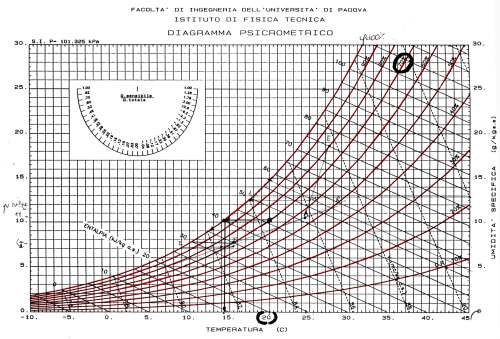
DIAGRAMMA DI MOLLIER.
Le superficie raffreddate dal lato freddo della cella di Peltier, non devono possedere una temperatura minore della temperatura di rugiada, altrimenti si ha la formazione del pericoloso fenomeno della condensa. Per comprendere al meglio questo concetto, facciamo un esempio: durante la stagione invernale, nella finestra di un locale adibito a cucina si osserva spesso che il vetro si appanna. Ciò indica la trasformazione del vapore in acqua ed avviene quando la temperatura superficiale del vetro diventa inferiore alla temperatura di rugiada. In poche parole, ogni qualvolta la superficie di un corpo ha una temperatura inferiore alla temperatura di rugiada dell'aria con cui è a contatto, sulla stessa superficie condensa la quantità di acqua che non può essere contenuta nell'aria sotto forma di vapore. Questo fenomeno provoca la formazione di acqua sui corpi che hanno una temperatura superficiale inferiore alla temperatura di rugiada.
Per evitare tale fenomeno occorre verificare che la temperatura di tutti i punti della superficie esposta sia maggiore della temperatura di rugiada. Cioè, imporre la condizione che:
ts > tr
ove ts rappresenta la temperatura della superficie del corpo e tr la temperatura di rugiada.
Come si ricava la temperatura di rugiada?
Come già detto, la temperatura di rugiada si ricava dal diagramma di Mollier, leggendo l'intersezione tra la curva di saturazione e la retta che rappresenta una trasformazione a titolo costante, a partire dalle condizioni di temperatura ed umidità dell'ambiente considerato (nel nostro caso l'interno del case). Per semplificare il procedimento abbiamo messo a disposizione i valori della tabella A, i quali vi aiuteranno a evitare il nemico numero uno.
TABELLA A

Come si legge la tabella A?
La colonna verde, corrisponde alla temperatura dell'aria esterna, mentre la colonna in rosso è la percentuale di umidità relativa. Conoscendo entrambi i valori, seguendo l'incrocio riga / colonna, potrete determinare il valore di formazione della condensa. Se la vostra temperatura della faccia fredda della Peltier e della cpu è superiore a tale valore, non sussiste alcun problema, mentre se accade il contrario la condensa è assicurata!.
Un esempio:
Se ho una temperatura dell'aria di 20°C (colonna verde) e un umidità relativa del 85% (colonna rossa), la temperatura del processore, e della superficie fredda della Peltier, dovrà essere superiore ai 17,4°C. Così, se decidete di installare una Peltier, fate attenzione alla formazione della condensa.
-
Spesso si sente parlare di lappatura ma pochi sanno realmente come effettuarla.
il processo in se non porta pericoli enormi ma comunque può comportare ad un malfunzionamento del dissipatore:
COME PROCEDERE:
Come prima cosa abbiamo bisogno del materiale che consiste in:
-pasta abrasiva (tipo quella che si usa x le carrozzerie delle auto)

-carta abrasiva o vetrata di 4 differenti grane:
400/600/800/1200

-Olio extravergine d’oliva
-nastro adesivo x il fissaggio della carta vetrata
(tutti i materiali li potete trovare in qualsiasi negozio di fai da te per una 10 di euro.)
bene; ora che abbiamo tutto l'occorrente possiamo passare alla pratica:
come prima cosa prendiamo un foglio di carta vetrata con grana da 400 e lo fissiamo su di un piano liscio e solido, va benissimo anche un tavolo di legno basta che sia stabile, quindi prendiamo il nostro dissipatore e incominciamo a sfregarlo contro la carta con una discreta pressione e con un movimento a forma di 8 il che permette di avere una migliore uniformità di attrito su tutta la base del dissipatore.
All'inizio vi sembrerà che le cose peggiorino invece che migliorare ma non preoccupatevi è tutto nella norma.
Una volta che avrete ottenuto il dissipatore con una base omogenea dovreste sentirlo molto ruvido e ''rigato'',non fatevi prendere dal panico ma passate alla fase successiva e prendete il foglio di carta vetrata da 600.
fissiamolo anche questo al tavolo e se avete riscontrato particolare fatica nella fase precedente mentre passavate il dissipatore sul foglio potete aggiungerci qualche goccia d'olio in modo da diminuirne leggermente l'attrito.
dopo circa 15 minuti che state effettuando questa operazione dovreste riscontrare una buona planarità su tutta la superficie.
Se siete sicuri della buona riuscita dell'operazione e non riscontrate miglioramenti ulteriori con il foglio da 600 passate a quelli da 800 e 1200 sempre effettuando una discreta pressione e con un movimento a 8.
finite anche quest'ultime operazioni il dissipatore si presenta completamente liscio al tatto e non provoca nessun attrito se non quello fisico che si va a formare tra due superfici a contatto.
Passiamo ora alla fase di estetica e di lappatura a specchio del dissipatore:
-Prendiamo un po’ di pasta abrasiva e mettiamola su di una spugna o batuffolo di cotone e sfreghiamo energicamente con movimenti circolari la base del dissipatore e dopo 5/10 minuti dovreste avere un risultato simile a questo:

ora che avete il vostro dissipatore potete andare a rimetterlo sul procio e meritarvi il vostro ben meritato calo di temperature

il procedimento si puo utilizzare per qualsiasi parte atta allo scambio di calore del nostro computer vedi:
his della cpu (segnatevi il serial prima,perchè poi a causa della lappatura viene via)/chipset/dissy vga/waterblock(qualsiasi) etc...........

lappatura piu lucidatura eseguite in modo ottimale:

------------------------------------------------------------------------------------------
una volta che abbiamo ottenuto il nostro dissipatore a specchio possiamo iniziare a montarlo ma anche qui incappiamo in alcune difficoltà tra cui la scelta della pasta termoconduttiva.
Essa serve per eliminare le possibili sacche d'aria che si vanno a formare tra il dissipatore e l'his del processore e che quindi andrebbero a compromettere il corretto scambio termico tra la cpu e il dissy andando inevitabilmente ad aumentare le temperature di lavoro.
eccone alcune elencate (in ordine di efficenza):
1-artic silver 5 & artic mx1 (fuori produzione)

2-Zalman ZM-STG1

metodo di applicazione consigliato da zalman:

official topic:
[Pasta Termica] Zalman ZM-STG1 - Hardware Upgrade Forum
i metodi di applicazione qui sono molteplici:
-chicco di riso al centro della cpu che poi viene spalmato dalla pressione dell dissipatore.
-pasta che viene spalmata con carte di credito o tessere telefoniche
-dito avvolto nel domopack
qualsiasi modo di applicazione userete il risultato dovrebbe venire simile a questo:

segnalo altre paste molto buone che si stendono nel medesimo modo:
3- OCZ Ultra 5 Plus

4-CoolerMaster Premium

5- GeIL High Performance

inoltre esiste il metallo liquido ma che sconsiglio alla maggior parte degli utenti per via delle sue proprietà corrosive contro l'alluminio:

foglio di alluminio corroso:

official topic:
[NOVITA'] Addio pasta siliconica , è l'ora del metallo liquido? - Hardware Upgrade Forum
per chi volesse approfondire l'argomento sulle paste e sul loro metodo di applicazione segnalo questo th by pitta:
[TH UFFICIALE] Come si applica la PASTA TERMICA - Hardware Upgrade Forum
-------------------------------------------------------------------------------
link utili:
OBENGWARE Zalman ZM-STG1 review
[Pasta Termica] Zalman ZM-STG1 - Hardware Upgrade Forum
--------------------------------------------------------------------------------
come spalmare la pasta su di un athlon xp

Montare CPU(Athlon XP): ACCORGIMENTI - Hardware Upgrade Forum
------------------------------------------------------------------------------------
------------------------------------------------------------------------------------
------------------------------------------------------------------------------------
------------------------------------------------------------------------------------
Passiamo ora ai dissipatori per il chipset della nostra scheda madre che spesso e volentieri sono rumorosi..
Anche qui ne esistono di svariati tipi e il modo di installazione è identico a quello dei dissipatori per la cpu per quanto riguarda la pasta termica.
Ma veniamo subito al sodo senza farfugliamenti vari ed eccoli elencati per potenza dissipante:
1-Noctua NC-U6
2-Thermalright HR-05 sli
3-Thermaltake CL-C0034 Extreme Spirit II
4-Coolermaster Blue Ice Pro
5-Zalman ZM-NBF47
6-Zalman ZM-NB47J
7-SilenX XIXN40C
8-Arctic Cooling Chipset Cooler
9-Revoltec Chipset Freezer
alcune info/caratteristche:
Thermaltake CL-C0034 Extreme Spirit II

caratteristiche tecniche:
Heatsink Dimension 48x40x70 mm
Fan Dimension : 40x40x10 mm
Rated Voltage : 12V
Started Voltage : 7V
Rated Current : 0.1A
Power Input : 1.20W
Fan Speed : 4500±10% RPM
Max. Air Flow : 3.47 CFM
Max. Air Pressure: 1.61mmH2O
Noise : 19dBA
Life Expectation : 30,000 Hours
Connector : 3 Pin
Weight: 169 g
thermalright HR-05/sli

caratteristiche tecniche:
Dimension:
L77.9 x W19(fin), W30(base)x H105 (mm), without fan
Weight:
145g (heat sink only)
Optional Fan:
Any 70x70x15mm fan
Zalman Z
M-NBF47

caratteristiche tecniche:
- Dimensions : 81(L) X 37(W) X 47(H)mm
- Heatsink Material : Pure Aluminum
- Weight : 57g
Coolermaster Blue Ice II
ImageShack - Hosting :: coolermastermw7km4.jpg
caratteristiche tecniche:
Heat Sink Dimension 60 x 47 x 69mm
Heat Sink Material Aluminum fins with copper base
Fan Dimension 40 x 40 x 10mm
Fan Speed 4,500 R.P.M.
Fan Air Flow 4.5 CFM
Fan Life Expectance 20,000 hrs
Bearing Type Sleeve
Noise Level 22 ~26 dBA
Weight 140 g
Application Universal application for all platforms
Zalman ZM-NB47 J

caratteristiche tecniche:
Dimensions 37 (L) X 37 (W) X 47 (H) mm
Weight 54g
Material Aluminum
Revoltec Chipset Freezer
http://img225.imageshack.us/img225/8590/rs006rlex4.jpg
caratteristiche tecniche:
Material:Aluminium
Scope of supply:1 Heat Sink, 2 Thermal adhesive pads, 2 mounting
brackets, 4 mounting pins, 1 protective frame, 1 tube
thermal conductive paste
official topic:
Zalman ZM-NBF47:[Dissi Chipset Passivo] Nuovo Zalman NBF47 - Hardware Upgrade Forum
link utili
comparazione in italiano fra:
- Noctua NH-U6
- Zalman ZM-NB47J
- Zalman ZM-NBF47
- Coolermaster Chipset Cooler PAC-P01
- SilenX iXtrema IXN-40C
- Thermalright HR-05
- Thermalright HR-05 SLI
- Microcool NorthPole XE whisper
link------->Review: 8 Dissipatori per Chipset Analizzati - pcsilenzioso.it forum
-
raffreddamento ram
in questo campo nel 90% dei casi applicare dei dissipatori aggiuntivi porta a pochi risultati o comunque porta a risultati ottenibili tranquillamente anche con una sola 120mm downvoltata a 5v.
comunque prendiamone in considerazione qualcuno ed elenchiamolo secondo la sua potenza dissipante:
ddr2/ddr3
1-Thermalright HR-07
2-OCZ XTC Memory Airflow Cooler
3-Thermaltake Cyclo Ram-Cooler
4-Zalman ZM-RHS1
ed ecco i prodotti:
thermalright
thermalright hr-07

specifiche tecniche:
Dimension:L150 x W27 x H86 mm (Heatsink Only)
Weight:150g (Heatsink Only)
Recommended Fan:70mm ,80mm ,92mm Fan
Compatibility
DDR1 DDR2 Single Sided Memory Module&Duble Sided Memory Module
(for Mother Board Memory Slot “Dimm Slot 1&3 ” “Dimm Slot 2&4” DualChannel)
Important Note: In order to install HR-07, you will have to remove the heat spreader on your memory module. However, Thermalright is not responsible for any problems or damages that may occur during the removal of memory heat spreader. Users will be at their own risk. If you are not sure or do not know how to remove/uninstall your heat spreader, please contact your memory manufacturer for instructions.
alcune recensioni:
Thermalright HR-07: heatpipes per le ram in italiano
TWEAK.DK /-/ Thermalrigth HR-07
ocz
ocx xtc

specifiche tecniche:
Cools DDR1 or DDR2 memory modules
Improves overclocking performance on all memory modules
Optimized for the OCZ XTC* heatspreader design
2 60mm ultra-low noise fans deliver superior cooling
Blue fan LEDs
Aluminum-based
Full Dimension with brackets: 23mm with brackets (H) 68mm (D) 153mm (W)
OCZ 1 Year Warranty
alcune recensioni:
techPowerUp! Review :: OCZ XTC Memory Cooler :: Page 1 / 4
3dGameMan.com - #803 - OCZ XTC Cooler
----------------------------------------------------------------------------------------
----------------------------------------------------------------------------------------
Per quanto concerne i mosfet per ora l'unico dissipatore degno di nota che mi sento di consigliarvi è questo:
thermalright hr-09s

specifiche tecniche:
HR-09U
- Dimension : L84 x W17 x H48
- Weigh t: 90g
HR-09S
- Dimension : L84 x W32.3 x H48
- Weight : 90g (heatsink only)
------------------------------------------------------------------------------------------
------------------------------------------------------------------------------------------
Rivolgiamo ora la nostra attenzione verso l'amata gpu che sempre più spesso viene overclockata ai suoi limiti ma senza un adeguato sistema di raffreddamento causando poi come ben sappiamo problemi di instabilità ed artefatti......
Tra le varie case che producono dissipatori per vga troviamo la zalman,thermalright,artic cooling,revoltec,thermaltake ed aerocool.
l’argomento verrà preso per i dissipatori dalla serie 78**/79** per le vga nvidia e dalla serie 18**/19** per le vga ati per ovvi motivi logistici e amministrativi della guida nonché per far si che la cosa non diventi dispersiva ma che rimanga aggiornata ed efficacie nel tempo.
andiamo ora al nocciolo della questione e incominciamo con la ‘’presentazione’’ dei dissipatori per vga della serie 7800/7900 di invidia.
come di consueto i dissipatori sono presentati in ordine performante sia in termini di potenza dissipante che di silenziosità cercando di fare una media tra i 2 fattori.
nvidia
serie 8800gt*

1-thermalright HR-03 PLUS
2-thermaltake TMG nd5
serie 78**/79**

1-thermalright hr-03 rev.A
2-thermalright hr-03 + fan 92x92mm >18/20cfm
3-Thermalright VGA-Cooler V-1 - Ultra
4-Zalman CNPS Fatal1ty FC-ZV9
5-Zalman CNPS VF900-CU
6-Revoltec VGA Graphic Freezer Pro
7-Zalman CNPS VF700-CU - LED
8-Arctic Cooling VGA Cooler Accelero X1
9-SilenX XIXG80CA - VGA (solo 7800gt/gtx series)
10-Sytrin KUFormula VF1
11-Be Quiet Polar Freezer VGA-Heatpipe + fan>25cfm
12-Thermaltake Schooner Extreme VGA
ati
serie x18**/x19**

1-thermalright hr-03 rev.A
2-thermalright hr-03 + fan 92x92mm >18/20cfm
3-Thermalright VGA-Cooler V-1 - Ultra
4-Zalman CNPS Fatal1ty FC-ZV9
5-Zalman CNPS VF900-CU
6-Revoltec VGA Graphic Freezer Pro
7-Arctic Cooling VGA Cooler Accelero X2
8-Zalman CNPS VF700-CU - LED (solo x1800 series)
9-Sytrin KUFormula VF1
10-Be Quiet Polar Freezer VGA-Heatpipe + fan>25cfm
11-Thermaltake Schooner Extreme VGA
12-Aerocool Heatpipe VGA Video Magic VM-102
prima di effettuare l'acquisto controllate sempre la compatibilità poichè un dissipatore può essere compatibile con la serie 7800 ma nn esserlo con la 7900
per chi ha un sonic tower e non sa cosa farsene..............

link al topic completo
x1900xt+thermaltake sonic tower
ora alcune recensioni:
thermalright
Thermalright VGA-Cooler V-1 - Ultra

specifiche tecniche:
dimensioni:
Heat sink (base,front): L30xW24xH2 (mm)
Heat sink (body,front): L80xW80xH20 (mm)
Heat sink (body, rear/with fan): L80xW80*H28.5
Rear heat sink to VGA card: 6 mm
peso:
310g (heat sink only)
ventola di base:
Maker: OEM
Size: 80x 80x 15 (mm)
Bearing: Two Balls
Voltage: 12V
Speed: 2500 rpm
Air Flow: 24.84CFM
Noise Level: 31.3 dBA
compatibilità:
ATI:
Radeon 9800, X700*, X800*, X850, X1800*, X1900*,X1950,X1900GT(*: Check for details)
NVIDIA:
GeForce 6600*, 6600 GT*, 6800, 6800GT, 6800 Ultra,7300GS, 7600G, 7800GT, 7800 GTX, 7900 GT, 7900 GTX* ,7950GT
* Specs subject to change without notice
thermalright hr-03/plus

plus:


specifiche tecniche hr-03:
Dimension:
L133 x W156 x H38 mm (heatsink only)
Weight:
350g (heatsink only)
feature:
* Designed to work fan-less or with a 92mm fan at low RPM for low-noise operation and higher performance
* Proprietary through holes on fins for efficient ventilation and proficient cooling
* 4 innovative designed heat pipes (2 U-shaped and 2 N-shaped heat pipes) for thorough heat distribution across multiple fins
* Two ways of mounting the cooler on video card for best space and configuration management
* Light weight and easy no-tool installation
* Vast compatibility with system cases (ATX & BTX)
* SLI/Crossfire friendly for those serious gaming enthusiasts
* Cosmetically contoured design for that vanity look
compatibilità:
nvidia:
7800 Series PCI-E OK
7900 Series PCI-E OK
7950GT PCI-E OK
ati:
X1300 Series PCI-E OK
X1600 Series PCI-E OK
X1650 Series PCI-E OK
X1800 Series PCI-E OK
X1900 Series PCI-E OK
specifiche tecniche hr-03 plus:
* A maximum of 6 heatpipes for maximum amount of heat transfer to work with any of 92mm or smaller fans for best configuration to suit your needs
* Proprietary two-heatsinks-soldered-to-form-as-one design to maximize cooling capacity
* 6 heatpipes soldered immensely close to heatsink fins to increase heat transfer efficiency
* Two ways of mounting the cooler on video card for best space and configuration management in ATX and BTX form factor cases
* Light weight and easy no-tool installation
* SLI compatible for serious gaming enthusiasts
* Cosmetically contoured design for that vanity look
Dimension:
L133 x W156 x H38 mm (heatsink only)
Weight:
410g (heatsink only)
VGA Card Compatibilities
Compatible with Nvidia GeForce 8800GTX& 8800GTS video cards.
NOTE: In order for HR-03 PLUS to run effectively, it is strongly recommended that a 92mm fan is installed.
X1950 Series PCI-E OK
thermalright hr-03 rev.A

specifiche tecniche:
Dimension:L133 x W156 x H 38 mm (heatsink only)
Weight:350g (heatsink only)
thermalright v2

caratteristiche tecniche:
Feature
* 4 heapipe design in all copper structure
* Works with any 80mm of 15mm or 25mm width fan (not included)
* No-tool easy installation without hassle
* Compact in size and light in weight
* Vast compatibility supporting multiple types of video cards
* SLI/Crossfire compatible for serious gaming enthusiasts
* Supports SLI/Cross Fire and perfect for HTPC form factor taking up only one slot
Dimension:
L116.2 x W95.6 x H27.6mm (heatsink only)
Weight:
290g (heatsink only)
compatibilità:


zalman
Zalman CNPS VF900-CU/fatal1ty


specifiche tecniche:
vf-900
- Dimensions : 96(L) X 96(W) X 30(H)mm
- Weight : 185g
- Base Material : Pure Copper
- Bearing Type : 2-Ball
- Speed : 1,350 ~ 2,400rpm ± 10%
- Noise Level : 18.5 ~ 25.0dB ± 10%
vf-900 fatal1ty
- Dimensions : 96(L) X 96(W) X 30(H)mm
- Weight : 185g
- Base Material : Pure Copper
- Bearing Type : 2-Ball
- Speed : 1,650 ~ 3,600rpm ± 10%
- Noise Level : 20 ~ 36.0dB ± 10%
compatibilità:
ATI X1600 Series
ATI X1300 Series
ATI Radeon 9*** Series (except 9550/9600)
ATI Radeon X*** Series
NVIDIA Geforce4 MX Series
NVIDIA Geforce FX 5200
NVIDIA Geforce FX 5500
NVIDIA Geforce FX 5600(FX 5700)
NVIDIA Geforce 6600 Series (except 6600 AGP Series)
NVIDIA Geforce4 Ti 4*** Series
NVIDIA Geforce FX 5700(Ultra) Series
NVIDIA Geforce FX 5800 Series
NVIDIA Geforce 6600 Series (except 6600 AGP Series)
ATI X1600 Series
NVIDIA Geforce 6600 Series (except 6600 AGP Series)
NVIDIA Geforce 7600 Series
NVIDIA Geforce FX 5900 Series
NVIDIA Geforce FX 5950 Series
ATI X1900 Series
ATI X1800 Series
NVIDIA Geforce 7900 Series
NVIDIA Geforce 7800 Series (except 7800GS)
NVIDIA Geforce 7600 Series
NVIDIA Geforce 6800 Series
vf 1000
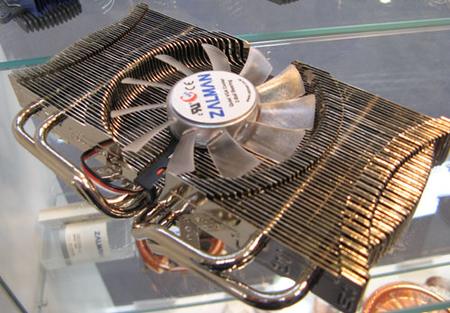
presumibilmente compatibile con 8800gt*
artic cooling
Arctic Cooling VGA Cooler Accelero X1 / X2

specifiche tecniche:
Heat Sink: 152(L) x 90(W) x 30(H) mm
Fan: 141(L) x 120(W) x 28(H) mm
Overall Dimensions: 152(L) x 120(W) x 30(H) mm
Rated Fan Speed: 500 - 2000 RPM
Power Consumption: 0.13 Amp.
Air Flow: 9.82 CFM / 16.7 m3/h
Weight: 262 g
Noise Level: 0.4 Sone
Thermal Resistance: 0.39°C/Watt
Thermal Interface Material: Pre-applied MX-1 Paste
Warranty: 6 Years
compatibilita X1:
NVIDIA 6800 series
NVIDIA 7800 series (just PCIe)
NVIDIA 7900 GTX, GTO
not compatible to most 7900 GT boards
compatibilità X2:
ATI X1800 series
ATI X1900 series
ATI X1950 series
-
raffreddamento hdd
anche se in questo campo i dissipatori a mio modesto parere servono a ben poco o meglio una fan posta sul frontale porterebbe a migliori benefici che ad un dissipatore passivo,passo comunque ad elencarne qualcuno tra i più performanti.
antazone
ANTAZONE AS-D1000 Anti-Shock Circular Heatpipe Cooler


Sharkoon
Sharkoon HDD Cooler

specifiche tecniche:
Overall dimensions 145 x 145 x 35 mm
Fan speed 900 rpm
Airflow 28,7 m³/h
Noise level 22 dB(A)
Rated voltage 12 V (DC)
Power consumption 0,84 W
Connector 5.25" connector
specifiche tecniche:
# dimensioni: 145,6 x 148 x 43,75 mm (LxBxH)
# Materiali: rame/Aluminium
# peso: ca. 631g
zalman
ZM-2HC2

specifiche tecniche:
Dimensions 143.5 (L) X 146.5 (W) X 36.5 (H) mm
Weight 270g
Material Aluminum, Copper, Rubber
Heat Dissipating Area 415 cm2
Compatible HDDs
3.5-inch Hard Disk Drive for PCs
Standard Size : 146 X 101.6 X 25.4 (20) mm
silentmaxx
silentmaxx
-HD-silencer rev. 2.0
specifiche tecniche:
Maße (mm) 170x145x40
Schacht 5,25" Schacht
max. Plattenbreite 3,5"
max. Plattenhöhe 1" (2,54cm)
max. HD Umdrehung 10.000 U/min
-
spero di non aver scritto strafalcioni grammaticali:D
-

-
Che dire ho dato un occhio qua e la, ma mi sembra tutto veramente ben fatto :clapclap: complimenti per il lavoro svolto :n2mu:
 :ave:
:ave:Valerio
-
grazie;
l'unica cosa che mi dispiace un po è che non riesco a farmi accettare i tag dal forum per le immagini dirette.
oltretutto le classifiche le ho tramite grafici e perderebbero un pelo di visibilità con i link.
-
Strano solitamente funzionano, magari prova a sentire principino, lui sicuramente ti sa dire di più di me
Valerio
-
valego ha scritto:
Strano solitamente funzionano, magari prova a sentire principino, lui sicuramente ti sa dire di più di me
Valerio
appena lo becco su msn chiedo....
anche perche come puoi vedere ha tutto un'altro effetto con le img:
-
questa invece è una parte delle classifiche.

-
microcip ha scritto:
appena lo becco su msn chiedo....anche perche come puoi vedere ha tutto un'altro effetto con le img:
:cheazz: ma cmq le immagini si vedono come su hwupgrade, uguale uguale
Valerio
-
ah si:cheazz:
figura da cioccolataio:fiufiu:
io ho solo i link...boh..va beh meglio cosi.
-
Prova ad andare nel tuo profilo, modifica le opzioni, nel pannello "Opzioni di visualizzazione discussioni" guarda se la voce "Visualizza le immagini (incluse le immagini allegate (e non) nel codice
 )" è spuntata, se non lo è spuntale e guarda se così vedi le immagini
 -
era un problema di cache...risolto tutto ora:)
-
Perfetto

-
ti giuro che come ho un po di tempo la divoro!!!!complimentoni!!!!!
-
mikisx ha scritto:
ti giuro che come ho un po di tempo la divoro!!!!complimentoni!!!!!hai tutto il tempo che vuoi...
io domani parto finalmente in vacanza e ritorno il 23:haveaniceday:.


 )" è spuntata, se non lo è spuntale e guarda se così vedi le immagini

Ciao! Sembra che tu sia interessato a questa conversazione, ma non hai ancora un account.
Stanco di dover scorrere gli stessi post a ogni visita? Quando registri un account, tornerai sempre esattamente dove eri rimasto e potrai scegliere di essere avvisato delle nuove risposte (tramite email o notifica push). Potrai anche salvare segnalibri e votare i post per mostrare il tuo apprezzamento agli altri membri della comunità.
Con il tuo contributo, questo post potrebbe essere ancora migliore 💗
Registrati Accedi