
Slot Ram della scheda madre sembrano funzionare male...
-
Hai provato a controllare le RAM che non abbiamo errori con Memtest?
-
tom1 ha scritto:
Hai provato a controllare le RAM che non abbiamo errori con Memtest?
No ancora no. Ma ho provato tutti e 4 i banchi e negli altri slots non danno problemi
-
Fai comunque questa prova come prova del 9 per escludere completamente la RAM
-
Ciao mi sono successe 2 cose stranissime: ho notato che uno dei 2 moduli vecchi che il programma HWiNFO64 rileva come Kingston in realtà smontandolo presenta un etichetta Samsung con tanto di numero di serie e modello. Posto i dati che HWiNFO64 mi da per ogni modulo e nella scheda del modulo che ti dicevo metto i dati che io leggo sull etichetta tra parentesi:
Primo modulo Ram, il piu vecchio Samsung
General Module Information
Module Number: 0
Module Size: 2 GBytes
Memory Type: DDR2-SDRAM
Module Type: Regular Unbuffered (UDIMM)
Error Check/Correction: None
Memory Speed: 400.0 MHz (PC2-6400)
Module Manufacturer: Samsung
Module Part Number: M3 78T5663EH3-CF7
Module Serial Number: 259999042
Module Manufacturing Date: Year: 2008, Week: 41
Module Characteristics
Module Width: 64-bits
Module Voltage: SSTL 1.8V
SPD Revision: 1.2
Number Of Ranks: 2
Row Address Bits: 14
Column Address Bits: 10
Number Of Banks: 8
Module timing
Supported Burst Lengths: 4, 8
Refresh Rate: Reduced 0.5x (7.8 us)
Supported CAS Latencies (tCAS): 6.0, 5.0, 4.0
Min. RAS-to-CAS Delay (tRCD): 15.00 ns
Min. Row Precharge Time (tRP): 15.00 ns
Min. RAS Pulse Width (tRAS): 45 ns
Supported Module Timing at 400.0 MHz: 6.0-6-6-18
Supported Module Timing at 333.3 MHz: 5.0-5-5-15
Supported Module Timing at 266.7 MHz: 4.0-4-4-12
Min. Row-Activate To Row-Activate Delay (tRRD): 7.50 ns
Write Recovery Time (tWR): 15.00 ns
Internal write to read command delay (tWTR): 7.50 ns
Internal read to precharge command delay (tRTP): 7.50 ns
Minimum Activate to Activate/Refresh Time (tRC): 60.00 ns
Minimum Refresh to Activate/Refresh Command Period (tRFC): 127.50 ns
Address and Command Setup Time Before Clock (tIS): 0.17 ns
Address and Command Setup Time After Clock (tIH): 0.25 ns
Data Input Setup Time Before Strobe (tDS): 0.05 ns
Data Input Setup Time After Strobe (tDH): 0.12 ns
Secondo modulo Ram, comprato 3 anni fa circa, Samsung ma HWiNFO64 lo rileva come Kingston
General Module Information
Module Number: 1
Module Size: 2 GBytes
Memory Type: DDR2-SDRAM
Module Type: Regular Unbuffered (UDIMM)
Error Check/Correction: None
Memory Speed: 400.0 MHz (PC2-6400)
Module Manufacturer: Kingston (samsung)
Module Part Number: 99U5429-006.A00LF (M378T2953EZ3-CE6)
Module Serial Number: 2888250983
Module Manufacturing Date: Year: 2009, Week: 19
Module Characteristics
Module Width: 64-bits
Module Voltage: SSTL 1.8V
SPD Revision: 1.2
Number Of Ranks: 1
Row Address Bits: 14
Column Address Bits: 11
Number Of Banks: 8
Module timing
Supported Burst Lengths: 4, 8
Refresh Rate: Reduced 0.5x (7.8 us)
Supported CAS Latencies (tCAS): 6.0, 5.0, 4.0
Min. RAS-to-CAS Delay (tRCD): 15.00 ns
Min. Row Precharge Time (tRP): 15.00 ns
Min. RAS Pulse Width (tRAS): 45 ns
Supported Module Timing at 400.0 MHz: 6.0-6-6-18
Supported Module Timing at 333.3 MHz: 5.0-5-5-15
Supported Module Timing at 266.7 MHz: 4.0-4-4-12
Min. Row-Activate To Row-Activate Delay (tRRD): 7.50 ns
Write Recovery Time (tWR): 15.00 ns
Internal write to read command delay (tWTR): 7.50 ns
Internal read to precharge command delay (tRTP): 7.50 ns
Minimum Activate to Activate/Refresh Time (tRC): 60.00 ns
Minimum Refresh to Activate/Refresh Command Period (tRFC): 195.00 ns
Address and Command Setup Time Before Clock (tIS): 0.17 ns
Address and Command Setup Time After Clock (tIH): 0.25 ns
Data Input Setup Time Before Strobe (tDS): 0.05 ns
Data Input Setup Time After Strobe (tDH): 0.12 ns
Terzo modulo Ram uno di una coppia di moduli Kingston appena comprati ed identici
General Module Information
Module Number: 0
Module Size: 2 GBytes
Memory Type: DDR2-SDRAM
Module Type: Regular Unbuffered (UDIMM)
Error Check/Correction: None
Memory Speed: 400.0 MHz (PC2-6400)
Module Manufacturer: Kingston
Module Part Number: KVR800D2N6/2G
Module Serial Number: 1761804802
Module Manufacturing Date: Year: 2012, Week: 1b
Module Characteristics
Module Width: 64-bits
Module Voltage: SSTL 1.8V
SPD Revision: 1.2
Number Of Ranks: 1
Row Address Bits: 14
Column Address Bits: 11
Number Of Banks: 8
Module timing
Supported Burst Lengths: 4, 8
Refresh Rate: Reduced 0.5x (7.8 us)
Supported CAS Latencies (tCAS): 6.0, 5.0, 4.0
Min. RAS-to-CAS Delay (tRCD): 15.00 ns
Min. Row Precharge Time (tRP): 15.00 ns
Min. RAS Pulse Width (tRAS): 45 ns
Supported Module Timing at 400.0 MHz: 6.0-6-6-18
Supported Module Timing at 266.7 MHz: 5.0-4-4-12
Supported Module Timing at 200.0 MHz: 4.0-3-3-9
Min. Row-Activate To Row-Activate Delay (tRRD): 7.50 ns
Write Recovery Time (tWR): 15.00 ns
Internal write to read command delay (tWTR): 7.50 ns
Internal read to precharge command delay (tRTP): 7.50 ns
Minimum Activate to Activate/Refresh Time (tRC): 60.00 ns
Minimum Refresh to Activate/Refresh Command Period (tRFC): 105.00 ns
Address and Command Setup Time Before Clock (tIS): 0.20 ns
Address and Command Setup Time After Clock (tIH): 0.27 ns
Data Input Setup Time Before Strobe (tDS): 0.10 ns
Data Input Setup Time After Strobe (tDH): 0.17 ns
Quarto modulo Ram della coppia di Kingston appena comprate
General Module Information
Module Number: 2
Module Size: 2 GBytes
Memory Type: DDR2-SDRAM
Module Type: Regular Unbuffered (UDIMM)
Error Check/Correction: None
Memory Speed: 400.0 MHz (PC2-6400)
Module Manufacturer: Kingston
Module Part Number: KVR800D2N6/2G
Module Serial Number: 1761804802
Module Manufacturing Date: Year: 2012, Week: 1b
Module Characteristics
Module Width: 64-bits
Module Voltage: SSTL 1.8V
SPD Revision: 1.2
Number Of Ranks: 1
Row Address Bits: 14
Column Address Bits: 11
Number Of Banks: 8
Module timing
Supported Burst Lengths: 4, 8
Refresh Rate: Reduced 0.5x (7.8 us)
Supported CAS Latencies (tCAS): 6.0, 5.0, 4.0
Min. RAS-to-CAS Delay (tRCD): 15.00 ns
Min. Row Precharge Time (tRP): 15.00 ns
Min. RAS Pulse Width (tRAS): 45 ns
Supported Module Timing at 400.0 MHz: 6.0-6-6-18
Supported Module Timing at 266.7 MHz: 5.0-4-4-12
Supported Module Timing at 200.0 MHz: 4.0-3-3-9
Min. Row-Activate To Row-Activate Delay (tRRD): 7.50 ns
Write Recovery Time (tWR): 15.00 ns
Internal write to read command delay (tWTR): 7.50 ns
Internal read to precharge command delay (tRTP): 7.50 ns
Minimum Activate to Activate/Refresh Time (tRC): 60.00 ns
Minimum Refresh to Activate/Refresh Command Period (tRFC): 105.00 ns
Address and Command Setup Time Before Clock (tIS): 0.20 ns
Address and Command Setup Time After Clock (tIH): 0.27 ns
Data Input Setup Time Before Strobe (tDS): 0.10 ns
Data Input Setup Time After Strobe (tDH): 0.17 ns
A questo punto mi chiedo se HWiNFO64 sia affidabile...
L'altra cosa bizzarra che è successa è questa: ho smontato i 2 vecchi moduli Ram è ho deciso di provare con montati solo i 2 nuovi. Ricordandoti che gli slots in cui avevo problemi erano il III ed il IV, adesso montando i due moduli sugli slots I e II il PC non parte proprio, cioé schermo nero. Se sposto il modulo 2 dal II (ripeto che sono assolutamente identici) al III slot (mettendoli in parallelo) il PC si avvia ma dopo qualche minuto di utilizzo si congela. Ho provato (per escludere il nuovo modulo montato sullo slot II possa essere difettoso) a smontare il modulo montato sullo slot I e montarci quello messo sullo slot II (che non faceva avviare il PC) e il PC funziona normalmente... quindi sembrerebbe che a prescindere dal modulo se ne monto uno nel II slot il PC non parte, se lo monto nel III diventa instabile e se ne monto uno qualsiasi nel I va tutto ok. Questo solo con i moduli nuovi perche i 2 vecchi erano montati sul I e II slots e non davano problemi... Ora proverò a montare i due moduli nuovi sugli slots III e IV singolarmente per vedere cosa succede. A questo punto non ci capisco piu niente e stanotte provero con MemTest86 -
Ok è successa un altra cosa assurda. Ora funziona tutto! In pratica ho fatto prima la prova con i 2 moduli Kingston nuovi montandoli singolarmente in tutti e 4 gli slots. Con il primo banco mi funzionava nel I e nel II slot, nel III era instabile e nel IV non partiva il PC. Con il secondo banco mi funzionava nel I slot, nel II si congelava nella schermata di caricamento windows 7, nel III era instabile e nel IV non si avviava il PC. Così ho provato a montare il secondo banco Kingston sul I slot che li non dava problemi, ed ho provato ad aggiungere il I banco sul II slot perche li funzionava bene; ed il computer reggeva con 4 giga totali. Poi ho provato ad aggiungere nel III slot il vecchio banco Samsung il primo che ho avuto, e funzionava ma era instabile. Ho provato a spostarlo nel IV slot e funzionava bene senza apparente instabilità. 6 giga totali. Per ultimo ho provato a montare il vecchio banco Samsung (quello comprato 3 anni fa e che HWINfo64 legge come Kingstone) sul III slot... e sembra tutto funzionare bene, con 8 giga complessivi di ram!!! Davvero non capisco con che criterio succeda tutto questo ma devo capire il perche , perche il pc non è stabile. Stanotte faro fare il memtest. Settare manualmente i settaggi nel bios è difficile? Come si resetta il bios?

-
Il BIOS si resetta togliendo la batteria tampone a PC Spento per qualche secondo.
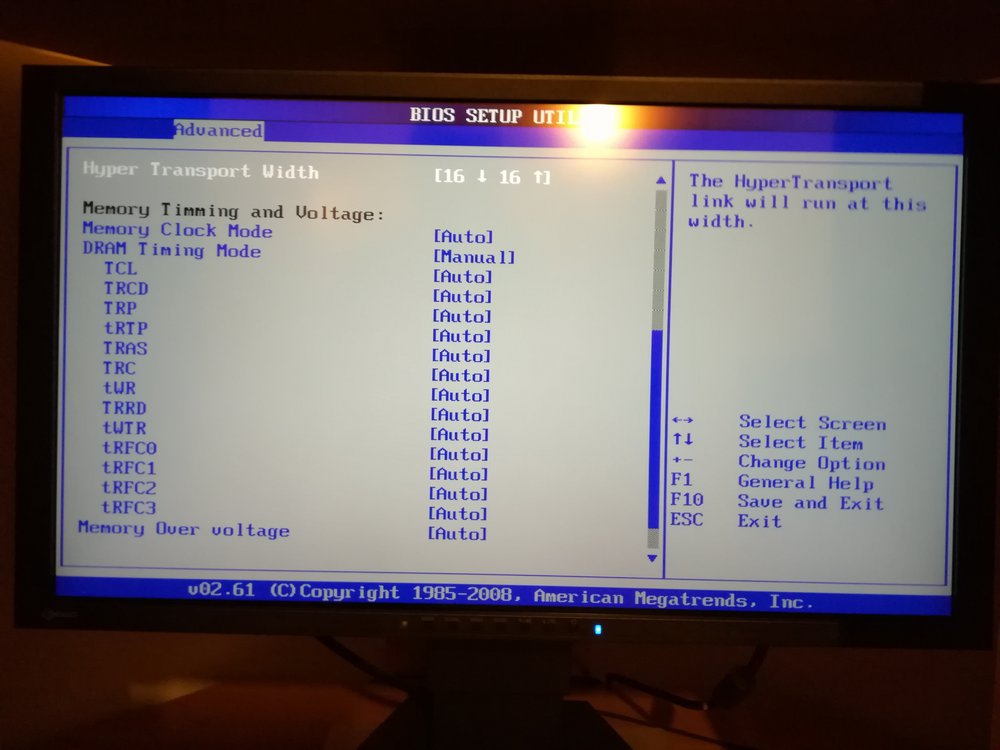
Impostare i Timings manualmente non è complicato. Posta eventualmente le schermate BIOS relative la gestione della RAM.
-
ok ma io i timings dei moduli ram dove li prendo?
-
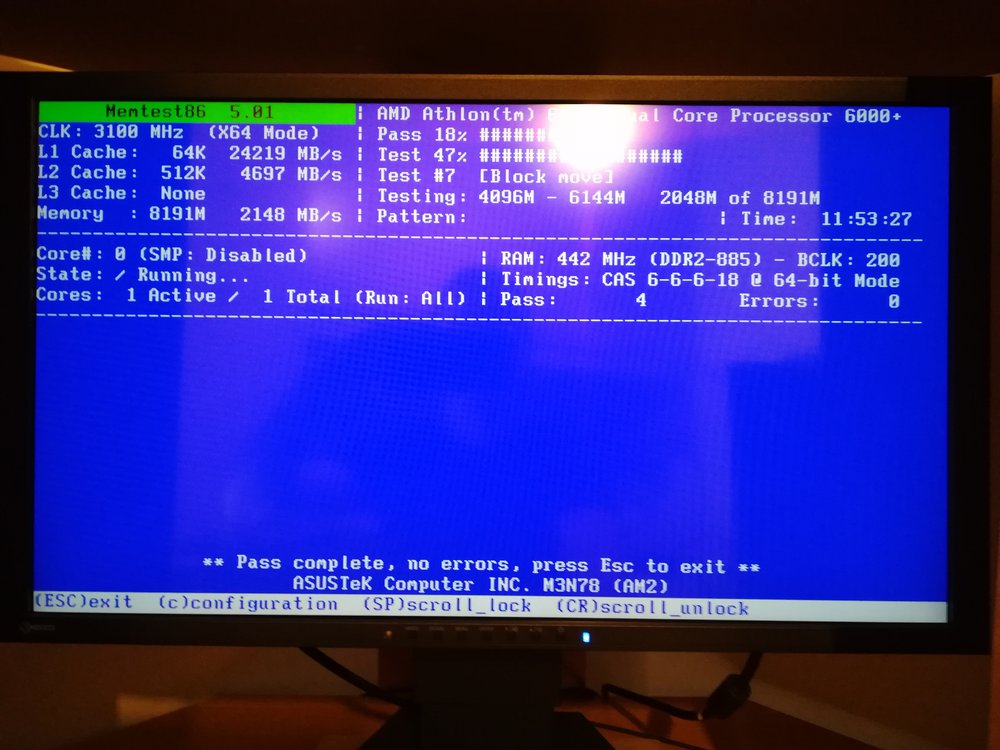
posto il risultato di memtest86 e la schermata del bios
-
Allora ho resettato il bios, non come dicevi tu ma spostando i jumper preposti aquesto scopo (nella mia scheda madre si fa così) ma non è cambiato niente, il pc dopo un po va in crash. Stanotte ho fatto il memtest86 che mi sembra non abbia rilevato alcun errore. Posto schermata del memtest e del bios. Qualcuno mi dovrebbe spiegare come si imposta manualmente la ram perche io non ne ho idea.
-
Ragazzi mi abbandonate sul piu bello?
-
E inutile che continuo a fare domande tanto non gliene frega niente a nessuno qui
Ciao! Sembra che tu sia interessato a questa conversazione, ma non hai ancora un account.
Stanco di dover scorrere gli stessi post a ogni visita? Quando registri un account, tornerai sempre esattamente dove eri rimasto e potrai scegliere di essere avvisato delle nuove risposte (tramite email o notifica push). Potrai anche salvare segnalibri e votare i post per mostrare il tuo apprezzamento agli altri membri della comunità.
Con il tuo contributo, questo post potrebbe essere ancora migliore 💗
Registrati Accedi