
[ENG] High C/P ratio Intel X79 motherboard - FOXCONN QUANTUMAN1 In-depth Review
-
Ever since Intel officially launch Sandy Bridge-E new platform in 2011 November,
several motherboard companies successively roll out new motherboard based on X79 chipset to support Intel next generation high-end platform.
Due to the continuous effort of self-own brand management made by FOXCONN, Quantum Force series still dominant high-end motherboard.
FOXCONN X79 QUANTUMIAN1 still provides various choices for the market though the quantities of Quantum Force series are not as various as they are in the past time.
Soon after the release of Intel X79 chipset, FOXCONN promptly roll out corresponding X79 motherboard.
Quantum Force was naming in a special way which the Intel code won’t be shown on the models.
This time, QUANTUMIAN1 which belongs to the series of Quantum Force still follows the high-end style both in material and design.
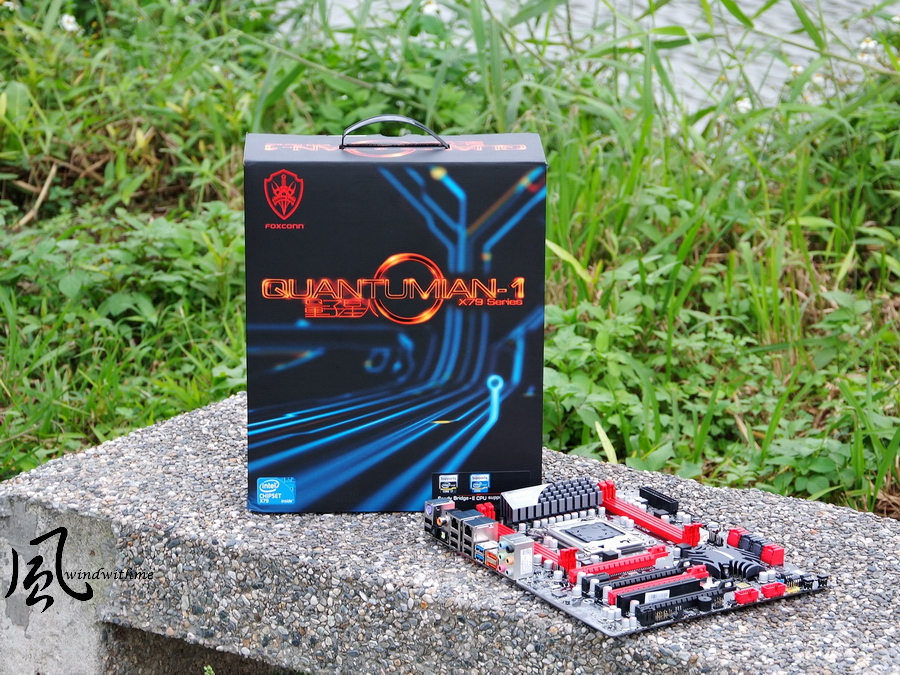
The patterns shown on exterior packing of high-end product are always different which exhibits the great efforts on art design.

The full picture of FOXCONN QUANTUMIAN1
Quantum Force is common to use black and red to create contrast visual sense.
Currently, there are more and more motherboard brands adopt these two colors to match.

It is known that the market segment of QUANTUMIAN1 X79 is positioned as high-end product line.
Besides, the corresponding specification, design and featured over clocking function have also been highly highlighted.

Accessories
Product manual, easy guide, nVIDIA SLI 3Way bridge, CD and IO shield

SATA connectors and cables both in red and yellow
DC power cable SATA

The lower left side of motherboard
4 X PCI-E 2.0 X16?supports 4Way CrossFireX / 3Way nVIDIA SLI
Bandwidth X16+X8+X16+X8?PCI-E slot is using X16
1 X PCI-E X1
1 X PCI
Dual Gigabyte Lan, Realtek 8111E and Intel 82975V
Audio, Realtek ALC892, supports up to 7.1 channel and High Definition Audio

The lower right side of motherboard
2 x red SATA3, provided by x79 chipset
4 x black SATA2, provided by x79 chipset
Above could mix to establish RAID0, RAID1, RAID5 and RAID 10.
The maximum performance could be determined by installed SATA
2 x red SATA3, provided by ASM1601 chipset
Dual BIOS?1 X front panel header and 1 X USB 2.0 device slot

The upper right side of motherboard
The color of DDR3 DIMM slot is also red in order to be consistent to the other parts,
from which we can see that FOXCONN pays a lot of attention on minor design as well. The upper black part is 24-PIN power input.
The right black parts are front USB3.0 expansion slots.

The upper side of motherboard
LGA 2011 CPU adopt 14 phase digital PWM, heat sink on upper side of motherboard could heat dissipation for MOSFET
Both left and right side, 4 X DIMM DDR3 which supports up to 32GB of system memory
Quad channel DDR3 2400(oc*)/2133 (oc*)/1866(oc*)/1600/1333/1066, supports Extreme Memory Profile

IO
1 X PS2 keyboard port
6 X USB 2.0(black)
1 X Clera CMOS button(black triangle)
1 X S/PDIF out port
2 X Gigabit LAN
2 X USB 3.0(blue)
2 X eSATA(orange)
6 ports audio jacks

OC Switch Button
In the OC mode, pressing the OC_SW2 button will increase the CPUclock by 1MHz per step, and the debug led code will increase 0.1 at the same time.
The debug led code “0.1” means the CPU clock is101MHz.
A row of sliver small round dot means PCB Voltage Sensor which users could directly measure voltage.

-
Ever since Intel officially launch Sandy Bridge-E new platform in 2011 November,
several motherboard companies successively roll out new motherboard based on X79 chipset to support Intel next generation high-end platform.
Due to the continuous effort of self-own brand management made by FOXCONN, Quantum Force series still dominant high-end motherboard.
FOXCONN X79 QUANTUMIAN1 still provides various choices for the market though the quantities of Quantum Force series are not as various as they are in the past time.
Soon after the release of Intel X79 chipset, FOXCONN promptly roll out corresponding X79 motherboard.
Quantum Force was naming in a special way which the Intel code won’t be shown on the models.
This time, QUANTUMIAN1 which belongs to the series of Quantum Force still follows the high-end style both in material and design.
The patterns shown on exterior packing of high-end product are always different which exhibits the great efforts on art design.
The full picture of FOXCONN QUANTUMIAN1
Quantum Force is common to use black and red to create contrast visual sense.
Currently, there are more and more motherboard brands adopt these two colors to match.
It is known that the market segment of QUANTUMIAN1 X79 is positioned as high-end product line.
Besides, the corresponding specification, design and featured over clocking function have also been highly highlighted.
Accessories
Product manual, easy guide, nVIDIA SLI 3Way bridge, CD and IO shield
SATA connectors and cables both in red and yellow
DC power cable SATA
The lower left side of motherboard
4 X PCI-E 2.0 X16?supports 4Way CrossFireX / 3Way nVIDIA SLI
Bandwidth X16+X8+X16+X8?PCI-E slot is using X16
1 X PCI-E X1
1 X PCI
Dual Gigabyte Lan, Realtek 8111E and Intel 82975V
Audio, Realtek ALC892, supports up to 7.1 channel and High Definition Audio
The lower right side of motherboard
2 x red SATA3, provided by x79 chipset
4 x black SATA2, provided by x79 chipset
Above could mix to establish RAID0, RAID1, RAID5 and RAID 10.
The maximum performance could be determined by installed SATA
2 x red SATA3, provided by ASM1601 chipset
Dual BIOS?1 X front panel header and 1 X USB 2.0 device slot
The upper right side of motherboard
The color of DDR3 DIMM slot is also red in order to be consistent to the other parts,
from which we can see that FOXCONN pays a lot of attention on minor design as well. The upper black part is 24-PIN power input.
The right black parts are front USB3.0 expansion slots.
The upper side of motherboard
LGA 2011 CPU adopt 14 phase digital PWM, heat sink on upper side of motherboard could heat dissipation for MOSFET
Both left and right side, 4 X DIMM DDR3 which supports up to 32GB of system memory
Quad channel DDR3 2400(oc*)/2133 (oc*)/1866(oc*)/1600/1333/1066, supports Extreme Memory Profile
IO
1 X PS2 keyboard port
6 X USB 2.0(black)
1 X Clera CMOS button(black triangle)
1 X S/PDIF out port
2 X Gigabit LAN
2 X USB 3.0(blue)
2 X eSATA(orange)
6 ports audio jacks
OC Switch Button
In the OC mode, pressing the OC_SW2 button will increase the CPUclock by 1MHz per step, and the debug led code will increase 0.1 at the same time.
The debug led code “0.1” means the CPU clock is101MHz.
A row of sliver small round dot means PCB Voltage Sensor which users could directly measure voltage.
-
BIOS Main
FOXCONN hasn’t imported UEFI interface which is much more artistic and controlled by mouse compared to traditional BIOS.
However, it takes time to power on and the frequency of crash shutdown is comparably high.

Quantum BIOS
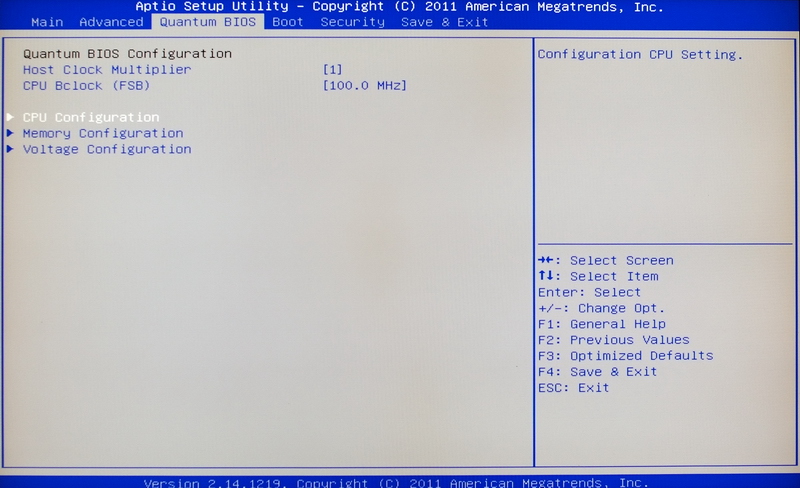
CPU selection menu
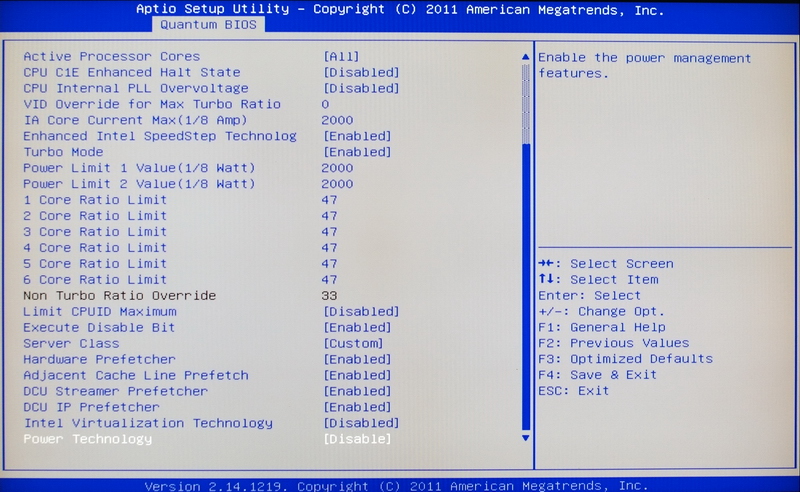
When over clocking, if you don’t CPU clock to be fluctuated downwards, you need to adjust the following selection.
CPU C1E Enhanced Halt State closing
To higher IA Core Current MAX and Power Limit 1/2 Value, the following example is to adjust to 2000

Power Technology is requested to be closed so that CPU clock won’t be fluctuated when over-clocking above 4.5GHz
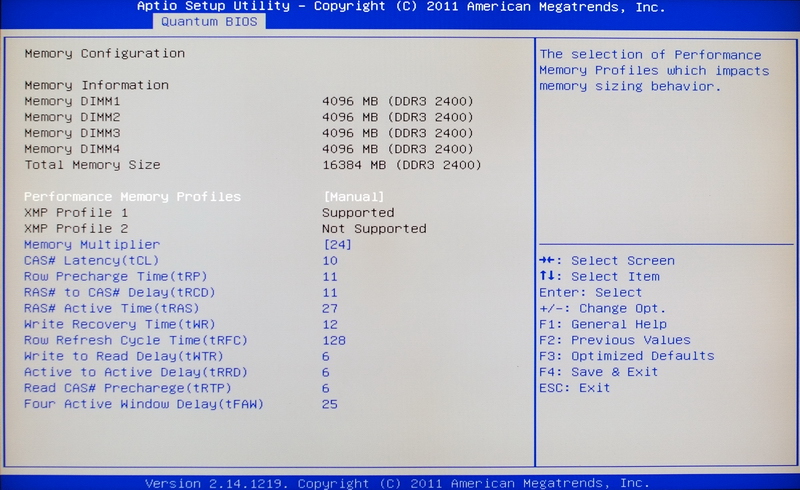
DDR3 parameter setting selection which provided various DRAM to slightly adjust parameter and steadily utilize it.
The following setting is DDR3 2400 CL10 11-11-27 2T
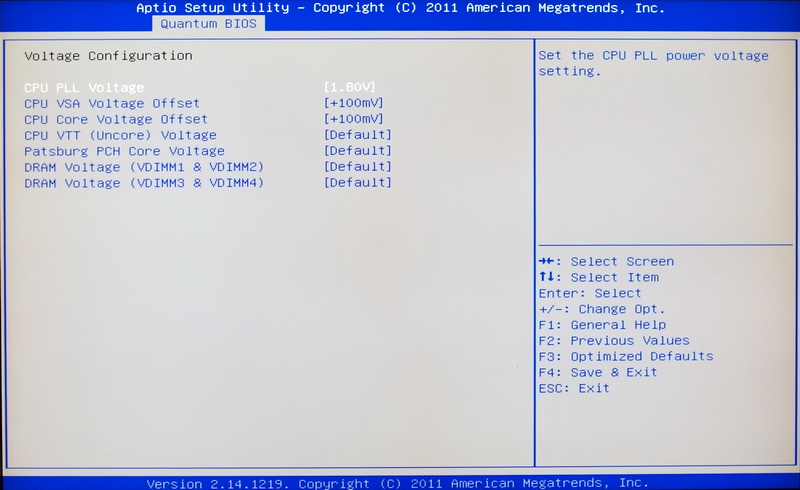
Voltage menu
CPU PLL Voltage 1.80~2.43V
CPU VAS Voltage Offset +10~+630mV
CPU Core Voltage Offset +10~+630mV
CPU VTT (Uncore) Voltage 1.005~2.011V
Patsburg PCH Core Voltage 1.005~2.011V
DRAM Voltage (VDIMM1 & VIDMM2) 1.005~2.307V
DRAM Voltage (VDIMM3 & VIDMM4) 1.005~2.307V
Hardware Monitor

Above is the over-clocking of both raising CPU multiplier and DDR3 clock.
The voltage of both CPU and DDR3 has to be paid attention and so as the optimal of DDR3 parameter.
If you want to over-clock to above DDR3 2133, except for DDR3, CPU VAS Voltage Offset plays another critical role.
Voltage+100mV has to be setup. Above is the over-clock setting by windwithme, which is the reference for x79 platform.
Testing platform
CPU: Intel Core i7-3960X
MB: FOXCONN Quantum Force QUANTUMIAN1
DRAM: CORSAIR DOMINATOR-GT CMT16GX3M4X2133C9
VGA: msi N560GTX-Ti Twin Frozr II
HD: CORSAIR Performance Pro Series 128GB
POWER: Thermaltake Toughpower Grand 1200W
Cooler: CORSAIR Hydro Series H80
OS: Windows7 Ultimate 64bit

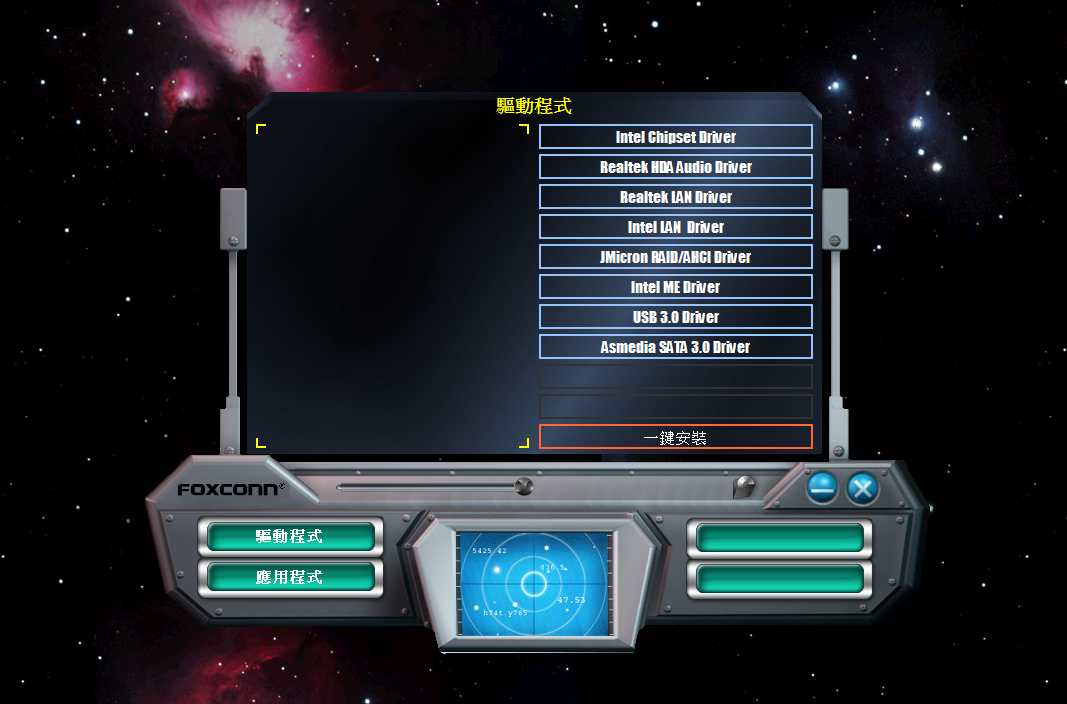
FOXCONN software setup menu
Full screen and outer space background are shown up after power on.
-
Installable application software
Too bad that there is no AEGIS PANEL software

Over-clocking testing
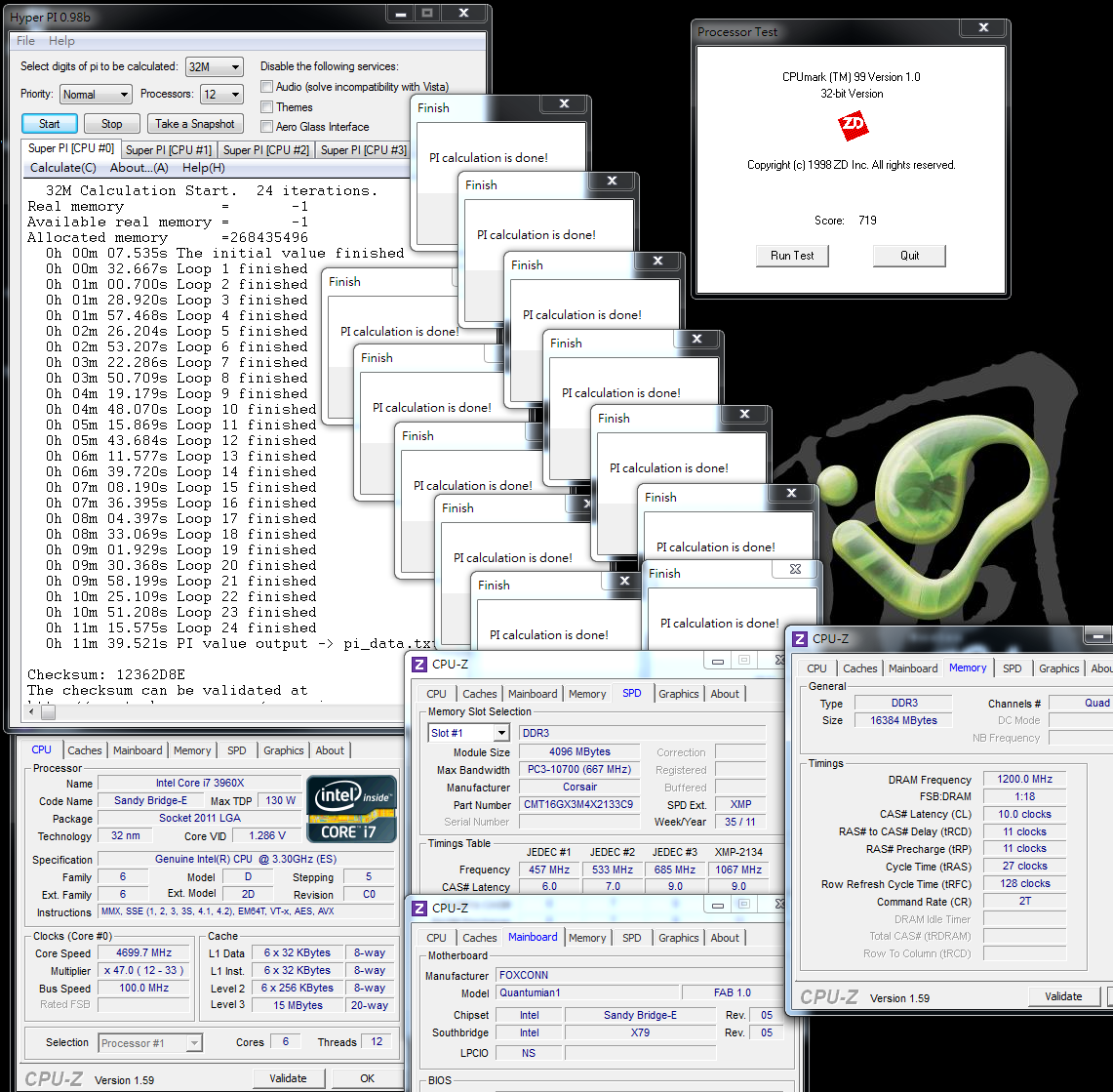
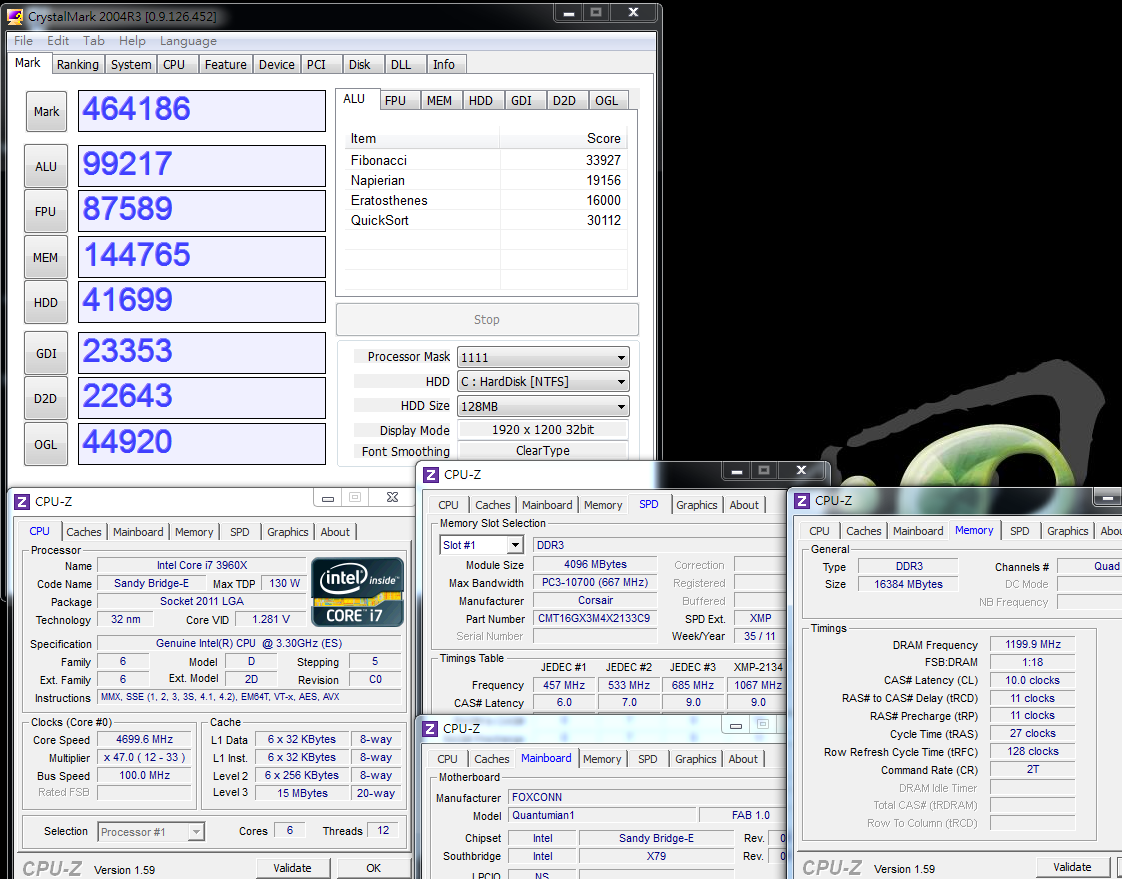
CPU 100 X 47 => 4700MHz 1.286V
DDR3 2400 CL10 11-11-27 2T 1.55V
Hyper PI 32M X 12 => 11m 39.521s
CPUMARK 99 => 719
x264 FHD Benchmark => 37.6
Fritz Chess Benchmark => 52.36/25134

CrystalMark 2004R3 => 464186
CINEBENCH R11.5
CPU => 13.74 pts
CPU(Single Core) => 1.90 pts

PCMark Vantage => 28771

It only requires about 1.28V of 3960X OC 4.7GHz to steadily operated above testing software.
Since the thread of Sandy Bridge-E3960X/3930K is up to 6C12T,
above testing performance is higher than 50% compared to 2600K /2700K 4C8T under the same clocking,
which is at the same time one of the featured highlight even though the price of CPU is higher than the market.
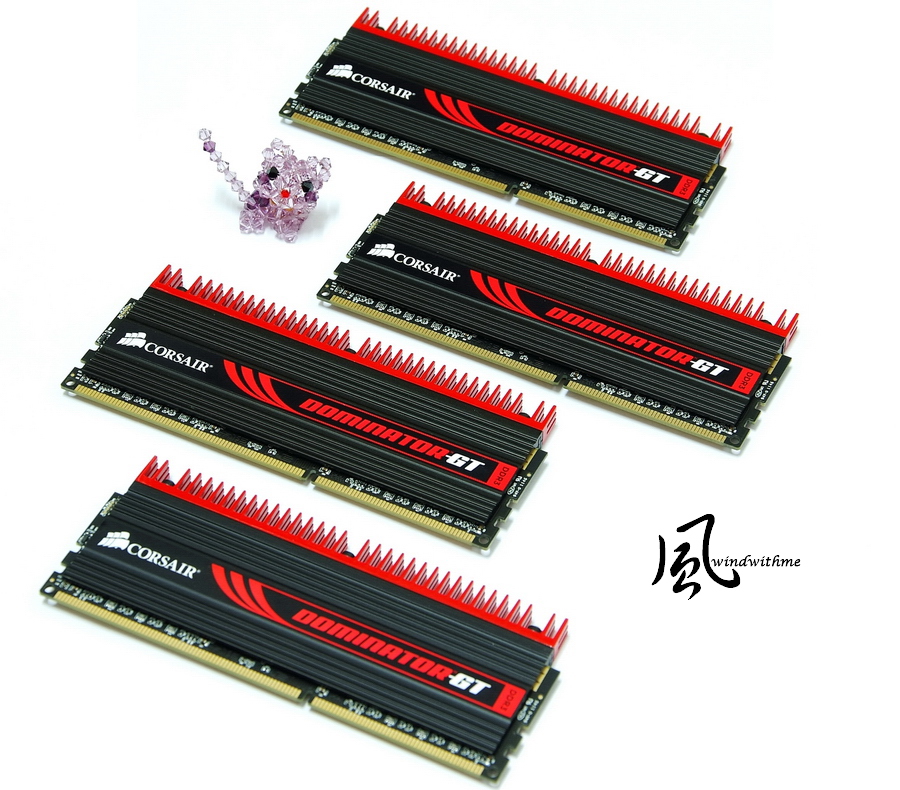
DDR3 is using the United States CORSAIR high-end DOMINATOR-GT series, which the style# is CMT16GX3M4X2133C9
Clock is 2133?parameter is CL9 11-10-27 1.50V?capacity is 4 X 4GB

Quad channel DDR3 chipset is another X79 primary featured new technology which first one ever supports DeskTop.
It supports the latest 1.3 version at Extreme Memory Profile(XMP) automatically over-clocking.
In other wards, you would not able to enable XMP if your DDR3 is not the latest XMP 1.3version.
To enable XMP DDR3 2134.4 CL9 11-10-26 2T test
ADIA64 Memory Read - 21702 MB/s
Sandra Memory Bandwidth - 50428 MB/s
MaXXMEM Memory-Copy - 17733 MB/s
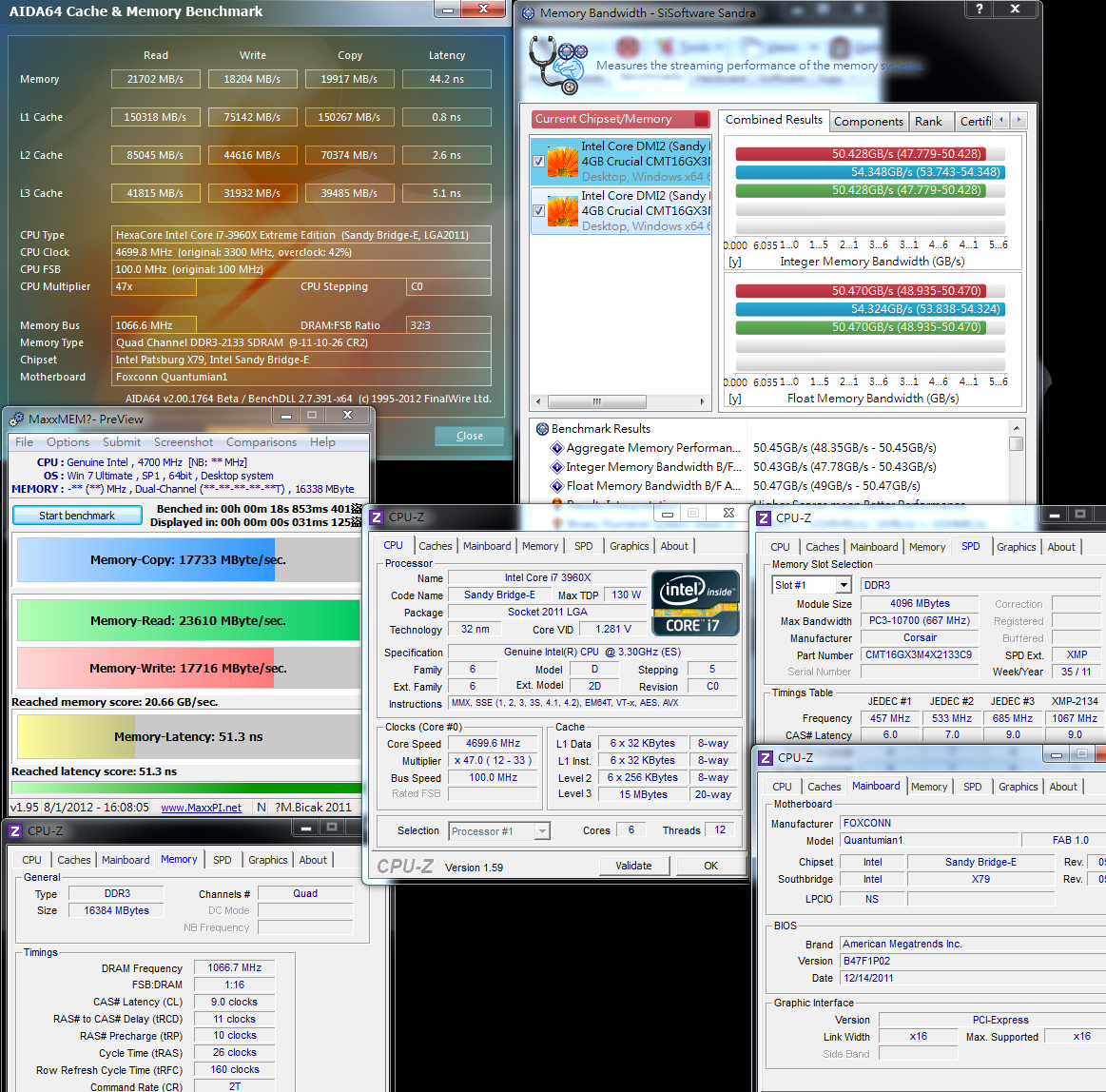
Over- clocking DDR3 2400 CL10 11-11-27 2T 1.55V
ADIA64 Memory Read - 22692 MB/s
Sandra Memory Bandwidth - 54348 MB/s
MaXXMEM Memory-Copy - 18144 MB/s

Both ADIA64 and MaXXMEM do not make any obvious effort under the structure of Duad channel;
however the memory bandwidth of Sandra and above test CrystalMark is higher than two times than LGA 1155 platform.
It seems the software technology of supporting quad channel will plays an critical role on performance gap of DDR3.
CORSAIR DOMINATOR-GT could steadily up to DD3 2400 under QUANTUMIAN1 default voltage.
The performance of over-clocking is pretty amazing, which is partly contributed to the scope of over-clocking of DDR3 in X79 chipset.
-
3D test
msi N560GTX-Ti Twin Frozr II
3DMark Vantage CPU SCORE => 91380

FINAL FANTASY XIV
1920 X 1080 => 4707

StreetFighter IV Benchmark
1920 X 1080 => 305.85 FPS

The scores of 3DMark Vantage on CPU SCORE is incredible high, it’s contributed by Intel 6C12T without question.
Other 3D Game test software do not take many advantages on multiple cores, they would get higher scores based on CPU.
Basically, it’s rarely for game to support up to CPU of 4 cores therefore the rendering ability of CPU structure is highly important.
Power Consumption test
There is no required software to open CIE power saving technology, 77W, under OS desktop.

There is no required software to open CIE power saving technology, 177W, under OS desktop.

To operate LinX to full speed CPU - 364W

The power consumption of 3960X 6C12T CPU over-clocking 4.7GHz
It is more to say that C1E is a outstanding power saving choice, which you can save around 100W when you open C1E technology under stand by mode.
The power consumption when the CPU full speed is 364W which is no difference compared to the previous combination of X58 and 980X OC 4GHz.
The above theory is as same as high-end VGA. The next high-end VGA generates much more performance but with no difference on power consumption compared to the previous same product level.
It is proved that Sandy Bridge-E possess higher clock and more progress on power saving.
Temperature (Room temperature is around 21?
When system standby- 33~37
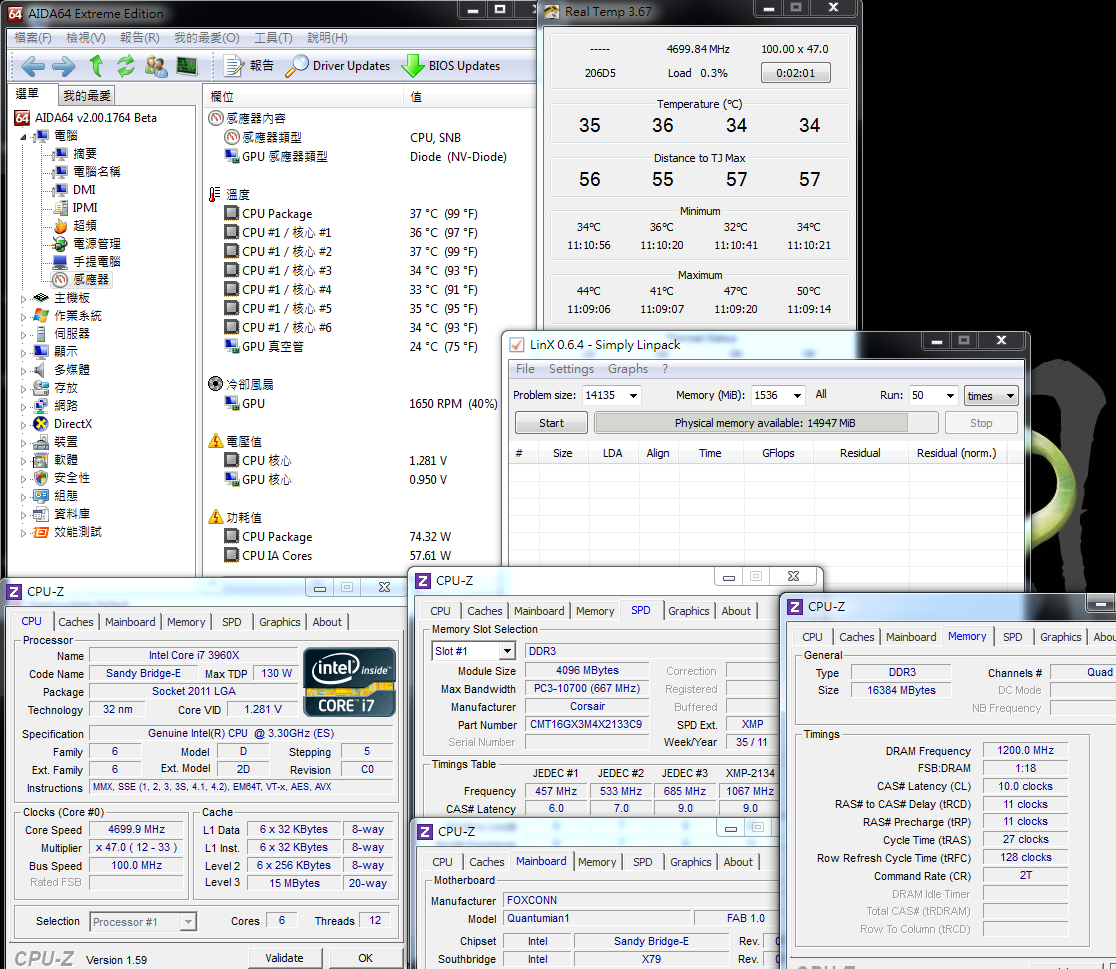
To operate LinX to full speed CPU - 61~66
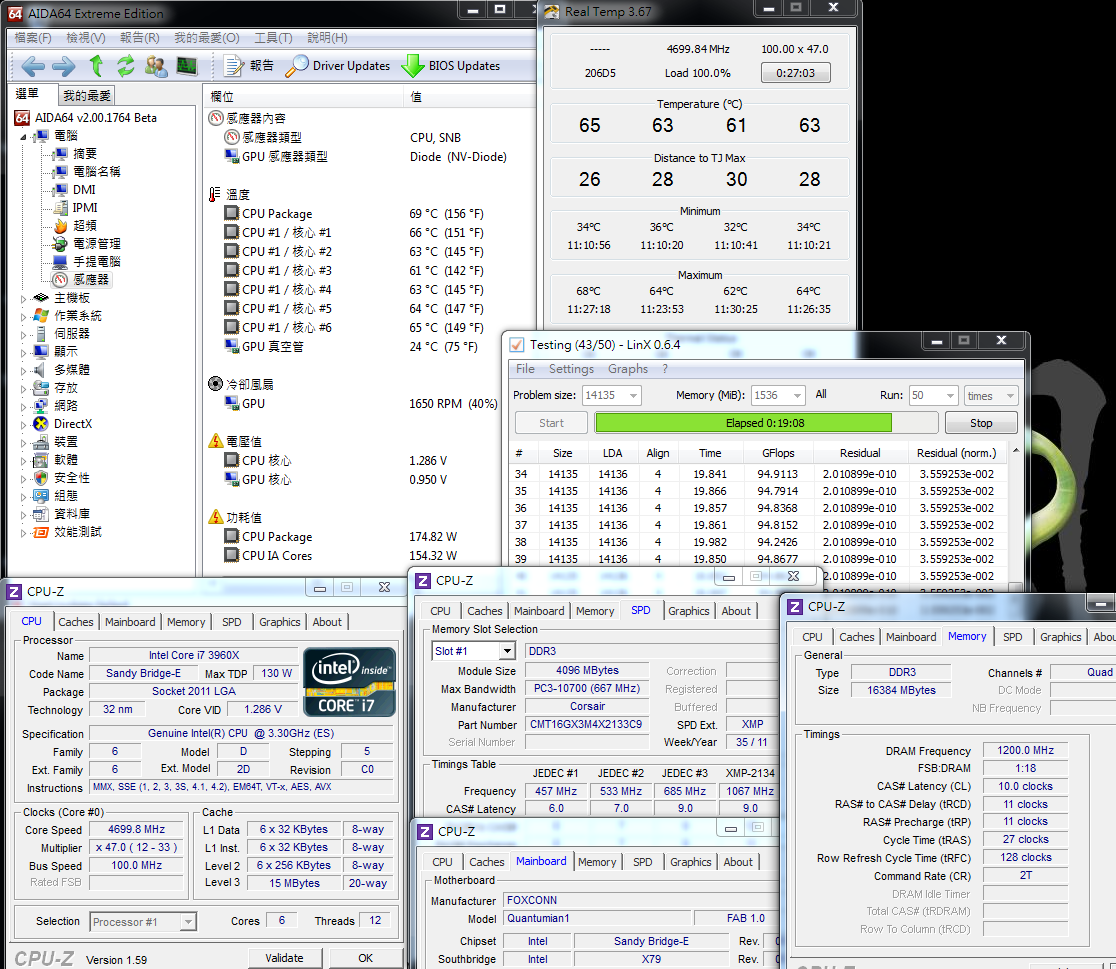
One minute afte the end of LinX operation - 36~38

Core i7-3960X is the highest Intel CPU specification. It’s suggested to use much higher-end cooler under over-clocking.
The temperature performance of both standby and full speed under OC4.7 GHz over-clocking is quiet excellent.
In order to avoid the gap between the temperature-measured software and actual temperature, the heat pipe of water cooling is just warm but hot.
Whether you are using CORSAIR Hydro Series H80 water cooling when test or CPU high-end cooler,
when CPU is extreme over-clocking, it is the one and only way to pay attention to thermal.
-
Last, under the same room temperature 21? and over-clocking of CPU OC 4.7GHz, the temperature of MOSFET is measured by temperature-measured software.
The performance is pretty good compare to others X79- standby 44.7? and burning 83.6?,
which is contributed to heat sink since most of X79 motherboards will over 80? while over-clocking.
I personally suggest emphasizing heat dissipation when over-clocking.
The following product review of X79 will also measure the temperature of the hardware as reference.
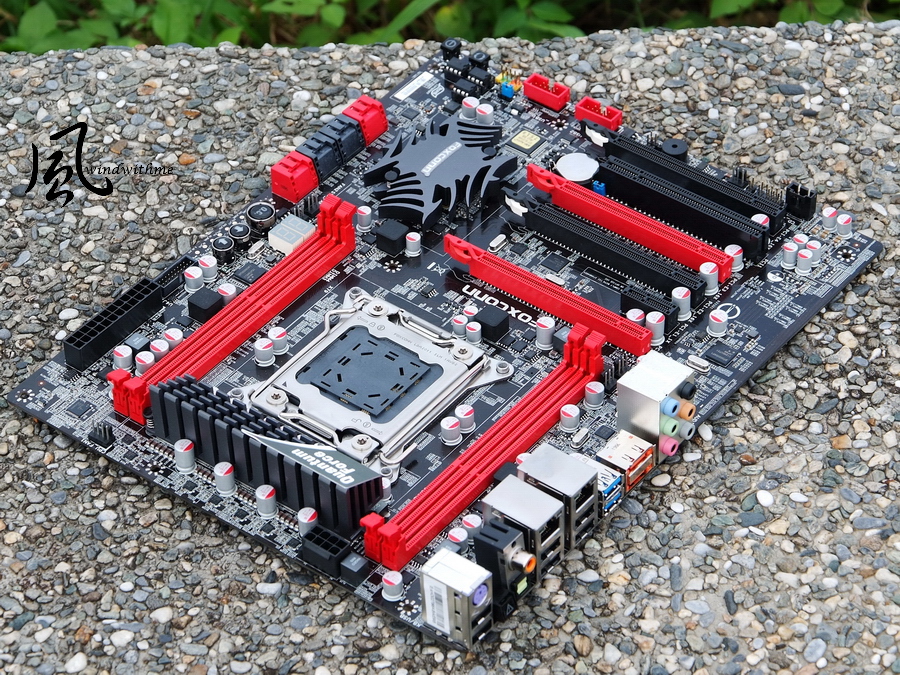
FOXCONN Quantum Force QUANTUMIAN1
Pros
1. Quantum Force possesses artistic exterior packing and high-end standard materials
2.Japanese 100% solid capacitor embedded POWER/RESET/CMOS Reset button and debug light.
3. Up to 4 X PCI-E X16 which effectively level up 3D performance.
4. Outstanding over-clocking performance which only requires 1.286V when 4.7GHzand DDR3 2400
5. Special OC Switch Button design to directly provide over-clocking request.
6. Dual gigabit LAN, 2xeSATA and PWM 14-phase
Cons
1. To suggest add the selection of DRAMIT in BIOS
2. To install the current trend of motherboard market-UEFI BIOS
3. To improve the FOXCONN MB brand visibility and channel
Performance ??????????
Material Usage ??????????
Specification ??????????
Appearance ??????????
Price/Quality ??????????
It has been 3 years for Intel to update the previous high-end product line X58 chipset of LGA 1366.
It is expected that the structure of LGA 2011 would be market for at least 2-3years which is longevity than Intel lower-end product line.
However, theoretically, high-end chipset performs much better than others.
Quad DDR3 and the bandwidth of Dual PCI-E X13 are the most featured strengths.
Besides, CPU supports 6C12T which is lack from middle-end LGA1155.
Though X79 belongs to high-end product line, it segmented by entry level, middle-end and high-end based on price.
The price of FOXCONN QUANTUMIAN1 is around USD$275 which possesses the entry price of X79 but performs as same as middle-end X79, USD$330.
It indirectly promotes the C/P of QUANTUMIAN1.
QUANTUMIAN1 performs quiet outstanding. CPU 4.7GHz / DDR3 2400 could be achieved by stable voltage.
Besides, it is a steal to have 4 X PCI-E X16 under this price. On top of that, the color and materials of motherboard meets the standard of high-end product line.
It would be better if BIOS update could add UEFI interface and 1T selection in the near future.
In recent years, the selectable motherboard brands become less and less.
It would be great if FOXCONN could continuously roll-out more Quantum Force product line and to have more products to support more models.
To populate more high-end and various FOXCONN product line would provide numerous benefits for hard-core users.
This article is also post in my blog WIND3C, Any comments are welcome.
-
a little note: motherboard's name seems to be Quantumian, not quantuman.

Anyway, i cannot understand how the chipset's heatsink can be efficient: it's a massive aluminium block!

-
not bad the mobo
-
Makkio ha scritto:
a little note: motherboard's name seems to be Quantumian, not quantuman.
Anyway, i cannot understand how the chipset's heatsink can be efficient: it's a massive aluminium block!
Yes, QUANTUMIAN1
Thank you:)
-
Thank you for the review!
It seems an interesting competitor among x79 motherboards.
Compared to ASRock motherboards that generally have the same C/P ratio... which is better in your opinion?
-
Good job....Fantastic review.....
Ciao! Sembra che tu sia interessato a questa conversazione, ma non hai ancora un account.
Stanco di dover scorrere gli stessi post a ogni visita? Quando registri un account, tornerai sempre esattamente dove eri rimasto e potrai scegliere di essere avvisato delle nuove risposte (tramite email o notifica push). Potrai anche salvare segnalibri e votare i post per mostrare il tuo apprezzamento agli altri membri della comunità.
Con il tuo contributo, questo post potrebbe essere ancora migliore 💗
Registrati Accedi