
[ENG] Pre-test of Latest Intel Top-Level 4-Cores CPU i7-2700K
-
Intel released the new generation framework of Sandy Bridge at early January, 2011; meanwhile, LGA 1155 is provided for support.
Compared with the specifications of several platforms in the past, the LGA 1155 is provided with a lot of modifications in CPU overclocking (OC) at this time.
Firstly, when a CPU with the external frequency of 100 MHz is overclocking, the other surrounding clock rates will be increased accordingly, thus the upper limit will fall around 110 MHz.
Although the new 32nm process is introduced into the new generation 4 cores CPUs, overclocking can be only achieved by using frequency multiplication.
The model names of i5-2500K and i7-2600K that are two kinds of CPUs without lock frequency multiplication have been released for a long time, which are considered as the representatives of the overclocking line.
However, the overclocking can be only done by working with the chipset of overclocking frequency multiplication, i.e., P67 or Z68.

The overclocking environment for LGA 1155 is simply declared above, hoping the users can aware of the hardware for the equipment clearly.
The middle-level CPU featured by overclocking is Core i5-2500K, while the advanced-level is Core i7-2600K.
The main difference between them is that the 2600K is provided with Hyper-Threading (HT) technology and an 8MB L3 cache, while the 2500K is only provided 6 MB L3 cache without HT.
This time I pursue Core i7-2700K which will appear on the market very soon and replace the advanced 2600 K.
The total clock rate of 2700K is 3.5 GHz, which supports the new generation Turbo Boost 2.0 and can reach the maximum performance of 3.9 GHz.
The real 4 Cores are incorporated into the Hyper-Threading technology, so that eight threading can be executed, 4C/8T for short.
With the 32 nm process, the power consumption of 95W and the 8-MB L3 Cache, the 2700K, surpassing the 2600K 100MHz, becomes the most advanced CPU of LGA 1155.
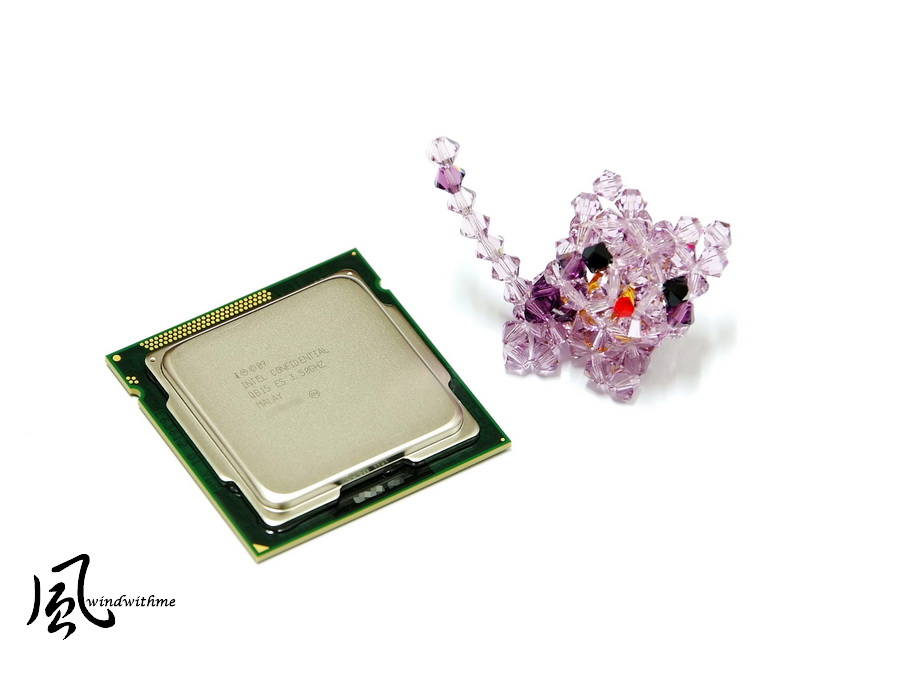
The rear side of the 2700K is still D2 Revision, so that there is little difference in appearance between the 2700K and the 2600K at this part.

The MB is the latest Z68 high-level chipset of LGA 1155, i.e., the latest version TZ68K+ released by BIOSTAR.
The appearance and the specification are the same as that of the TZ68A+ shared before and the primary difference is supply voltage of CPU.
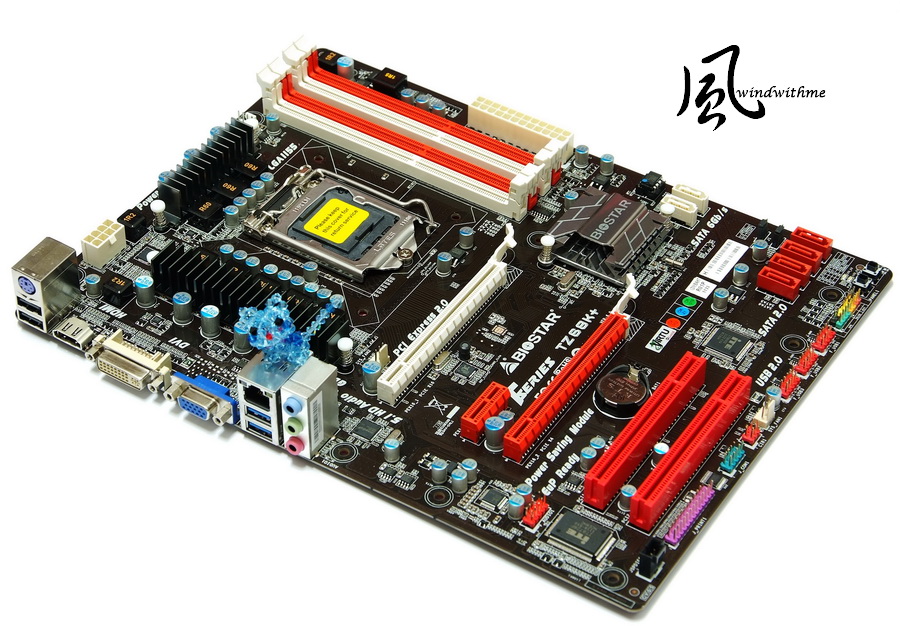
Although the TZ68K+ is the new edition of BIOSTAR Z68, the price is still about US$99, thus it can challenge the low-price market of ATX Z68.
By using the well-marked red-black matching, it has the most specifications as that of the Z68 series with the built-in Power/Reset button and a simple debugging LED.

With respect to IO, there are three types among which the two blue USBs 3.0 can provide high-speed transmission.
If provided two more USBs 2.0, it would be more perfect with respect to the scalability.

The previous TZ68A+ is designed with four-phase power supply only, while the new edition TZ68K+ is provided with eight-phase power supply, which is the primary difference.
However, as mentioned before, one-phase power supply can provide about 30-40 W, so , the four-phase power supply is already quite enough for overclocking of power consumption of Intel CPU.

The heat sinks above the Z68 chipset look good because of being cut by a special manner.
Two native SATA3 units of Z68 are positioned at the right side, which are used at a general environment or in a Raid0 state.

Test platform
CPU: Intel Core i7-2700K
MB: BIOSTAR TSERIES TZ68K+
DRAM: CORSAIR CMZ8GX3M2A1866C9R
VGA: Intel HD Graphics 3000
HD: Intel 510 Series 120GB
POWER: Thermaltake TR2 450W
Cooler: CORSAIR Hydro Series H80
OS: Windows7 Ultimate 64bit

Firstly, a performance test is performed by using the preset value of CPU.
Preset the performance
CPU 100 X 35 => 3500 MHz (booting Turbo Boost, and then C1E)
DDR3 1599.8 CL7 8-7-22 1T
Hyper PI 32M X8 => 15m 21.977s
CPUMARK 99 => 597

-
Intel released the new generation framework of Sandy Bridge at early January, 2011; meanwhile, LGA 1155 is provided for support.
Compared with the specifications of several platforms in the past, the LGA 1155 is provided with a lot of modifications in CPU overclocking (OC) at this time.
Firstly, when a CPU with the external frequency of 100 MHz is overclocking, the other surrounding clock rates will be increased accordingly, thus the upper limit will fall around 110 MHz.
Although the new 32nm process is introduced into the new generation 4 cores CPUs, overclocking can be only achieved by using frequency multiplication.
The model names of i5-2500K and i7-2600K that are two kinds of CPUs without lock frequency multiplication have been released for a long time, which are considered as the representatives of the overclocking line.
However, the overclocking can be only done by working with the chipset of overclocking frequency multiplication, i.e., P67 or Z68.
The overclocking environment for LGA 1155 is simply declared above, hoping the users can aware of the hardware for the equipment clearly.
The middle-level CPU featured by overclocking is Core i5-2500K, while the advanced-level is Core i7-2600K.
The main difference between them is that the 2600K is provided with Hyper-Threading (HT) technology and an 8MB L3 cache, while the 2500K is only provided 6 MB L3 cache without HT.
This time I pursue Core i7-2700K which will appear on the market very soon and replace the advanced 2600 K.
The total clock rate of 2700K is 3.5 GHz, which supports the new generation Turbo Boost 2.0 and can reach the maximum performance of 3.9 GHz.
The real 4 Cores are incorporated into the Hyper-Threading technology, so that eight threading can be executed, 4C/8T for short.
With the 32 nm process, the power consumption of 95W and the 8-MB L3 Cache, the 2700K, surpassing the 2600K 100MHz, becomes the most advanced CPU of LGA 1155.
The rear side of the 2700K is still D2 Revision, so that there is little difference in appearance between the 2700K and the 2600K at this part.
The MB is the latest Z68 high-level chipset of LGA 1155, i.e., the latest version TZ68K+ released by BIOSTAR.
The appearance and the specification are the same as that of the TZ68A+ shared before and the primary difference is supply voltage of CPU.
Although the TZ68K+ is the new edition of BIOSTAR Z68, the price is still about US$99, thus it can challenge the low-price market of ATX Z68.
By using the well-marked red-black matching, it has the most specifications as that of the Z68 series with the built-in Power/Reset button and a simple debugging LED.
With respect to IO, there are three types among which the two blue USBs 3.0 can provide high-speed transmission.
If provided two more USBs 2.0, it would be more perfect with respect to the scalability.
The previous TZ68A+ is designed with four-phase power supply only, while the new edition TZ68K+ is provided with eight-phase power supply, which is the primary difference.
However, as mentioned before, one-phase power supply can provide about 30-40 W, so , the four-phase power supply is already quite enough for overclocking of power consumption of Intel CPU.
The heat sinks above the Z68 chipset look good because of being cut by a special manner.
Two native SATA3 units of Z68 are positioned at the right side, which are used at a general environment or in a Raid0 state.
Test platform
CPU: Intel Core i7-2700K
MB: BIOSTAR TSERIES TZ68K+
DRAM: CORSAIR CMZ8GX3M2A1866C9R
VGA: Intel HD Graphics 3000
HD: Intel 510 Series 120GB
POWER: Thermaltake TR2 450W
Cooler: CORSAIR Hydro Series H80
OS: Windows7 Ultimate 64bit
Firstly, a performance test is performed by using the preset value of CPU.
Preset the performance
CPU 100 X 35 => 3500 MHz (booting Turbo Boost, and then C1E)
DDR3 1599.8 CL7 8-7-22 1T
Hyper PI 32M X8 => 15m 21.977s
CPUMARK 99 => 597
-
Nuclearus Multi Core => 23908
Fritz Chess Benchmark => 27.86/13374
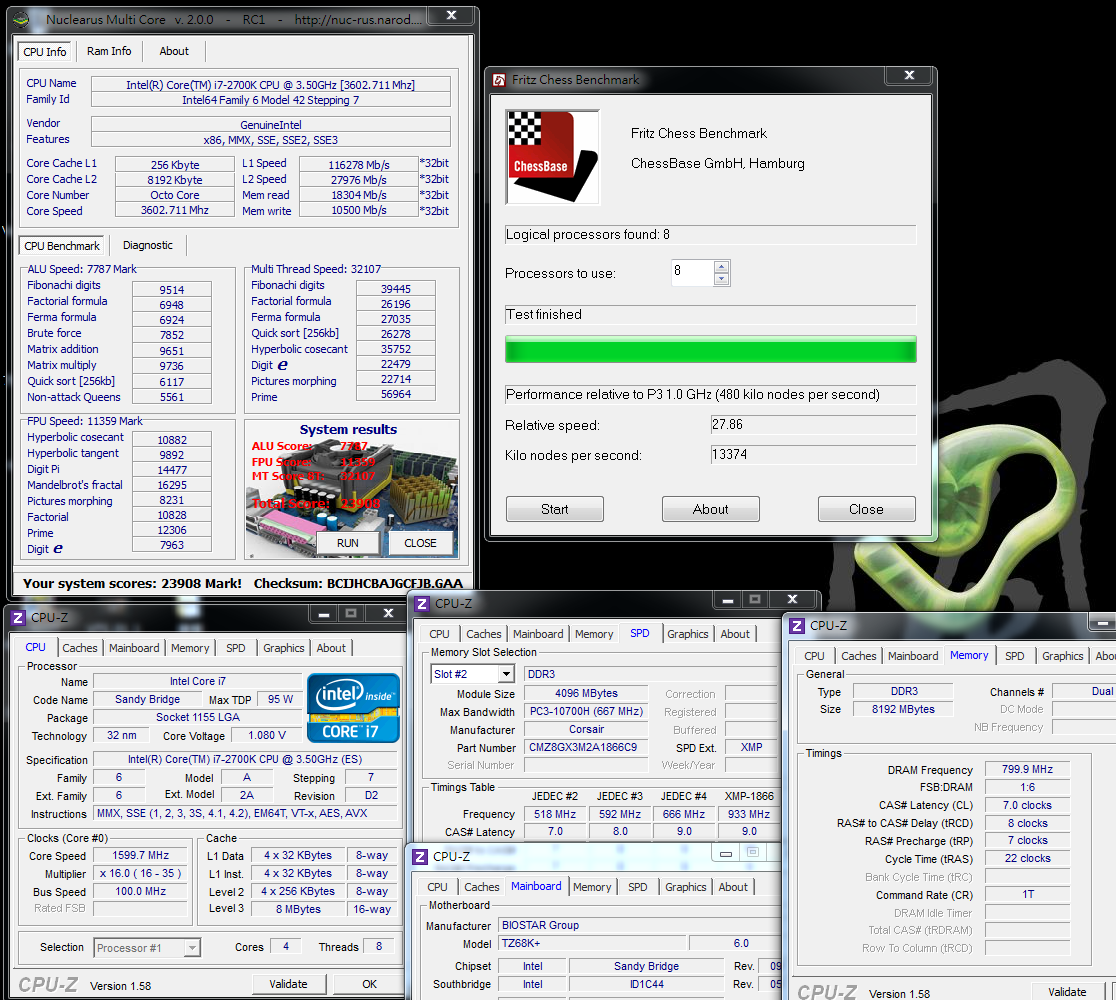
CrystalMark 2004R3 => 264699
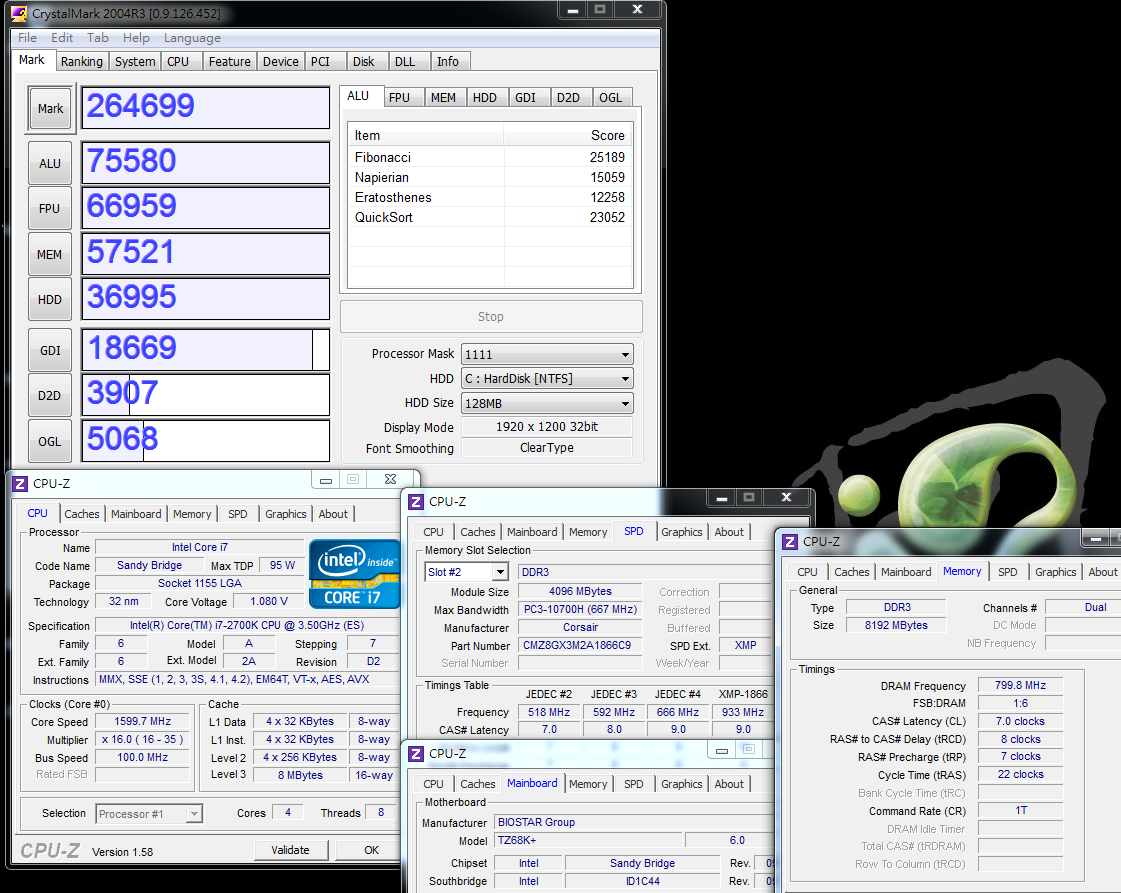
CINEBENCH R11.5
CPU => 6.93 pts
CPU(Single Core) => 1.57 pts
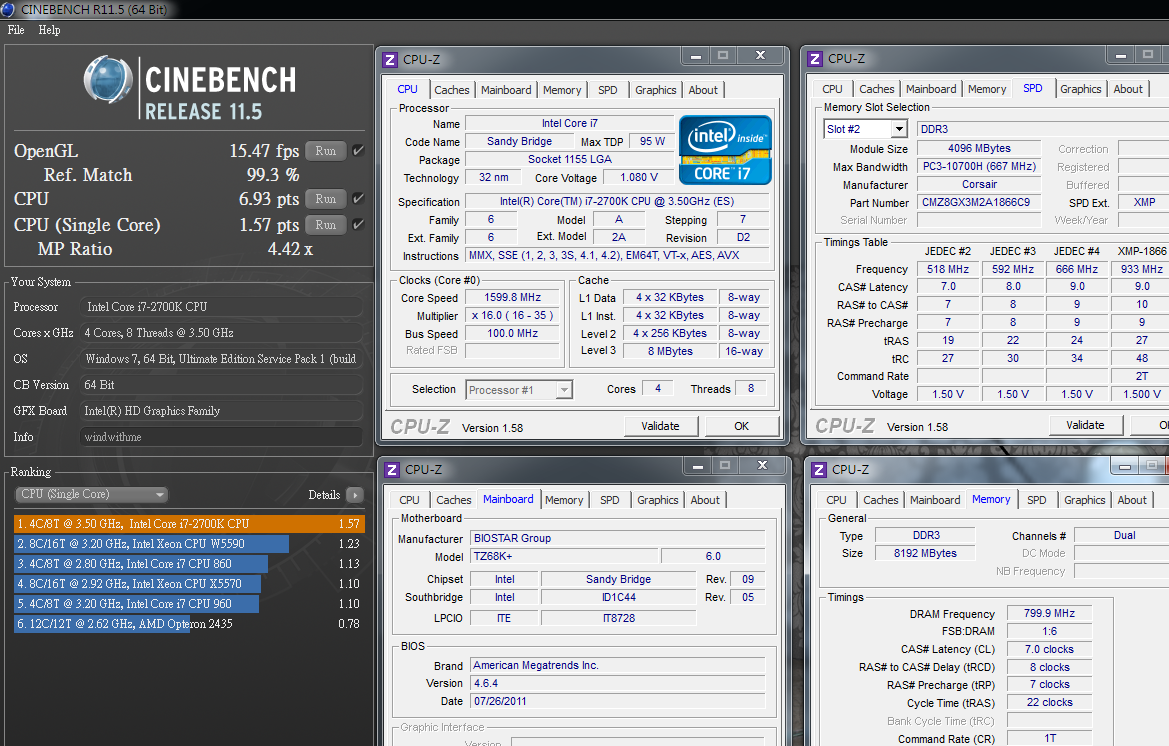
Experience index of Windows- CPU 7.6

PCMark Vantage => 19386

The frequency multiplication of the 2700K in the mode of Turbo Boost 2.0 is 39, 38, 37 and 36 respectively; and the basic clock rate is 3.5 GHz.
The above specification is 100 MHz higher than that of the 2600 K, the performance of this part is presented in the test, but the improvement is not much.
Practically, both the 2600K and the 2700K are the highest-level CPUs in the framework of the Sandy Bridge, and the data obtained without overclocking is fairly high already.
For a general use environment, most of the software requirements can be met by using the high performance preset in 2700K.
DRAM bandwidth test
DDR3 1599.8 CL7 8-7-22 1T
ADIA64 Memory Read - 19618 MB/s
Sandra Memory Bandwidth - 21335 MB/s
MaXXMEM Memory-Copy - 21168 MB/s

The DDR3bandwidth is much higher than that of our own platform or a competitor’s platform, which is the advantage of the improved LGA 1155.
The high transmission performance of nearly 20000 MB/s can be achieved only by using DDR3 1600, and the voltage is lower than that for the previous platforms.
Temperature performance (about 26 DEG C at room temperature)
System standby - 23~33
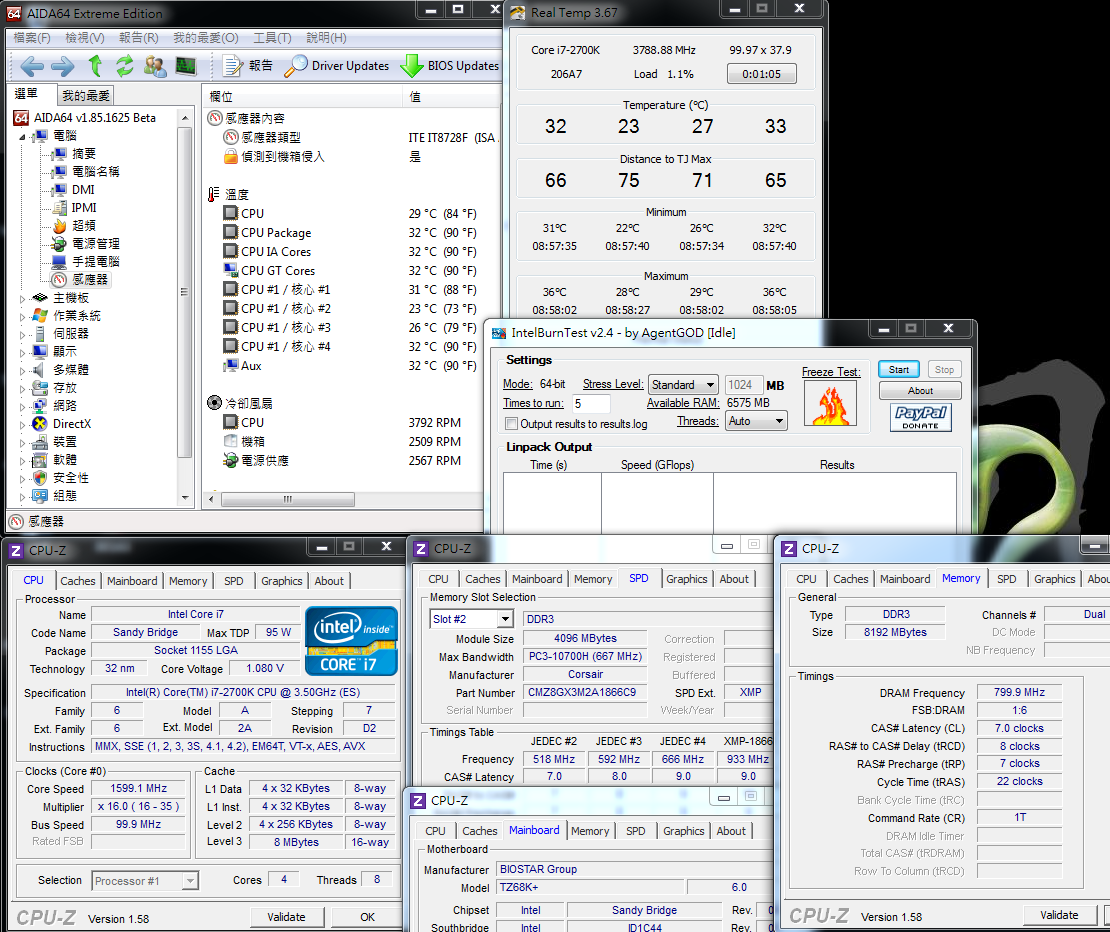
CPU full speed - 40~46
Intel Burn Test v2.4?Stress Level Maximum

The temperature performance when system standby is good by enabling the energy-saving function of C1E.
With the latest Hydro Series H80 of CORSAIR and the high thermal diffusivity of the hydro-cooling framework, the temperature is only 46 DEG C at full speed.
Only by working with excellent air-cooling or hydro-cooling equipment, the state of the preset value on 2700K can still be lowered to a low temperature.
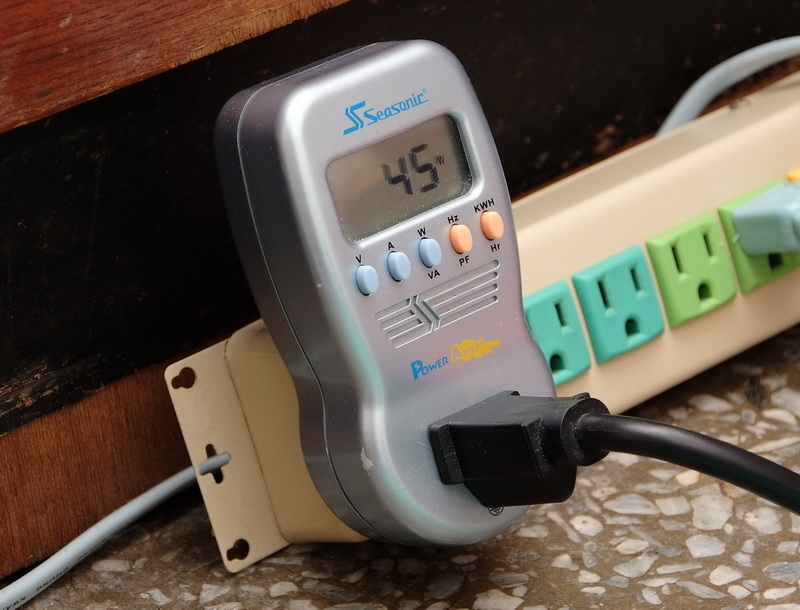
Power consumption test
No software running on the OS desktop - 45W
CPU full speed- 103W
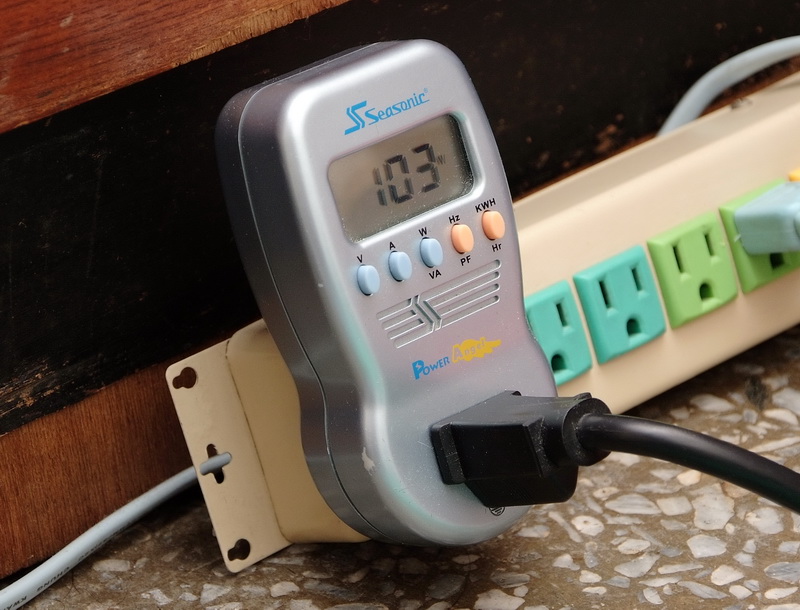
Due to introduction of 32nm, the power consumption is much lower than that of the previous generation Core i7-870 with the process of 45nm.
The power consumption of the clock rate at the environment of C1E is only 58W higher than that of the preset maximum clock rate.
Based on several articles about AMD APU shared by me recently, in a test with the same 32 nm and 4Cores, the power consumption of the APU platform is nearly twice that of AMD.
It is thus clear that the performance and the power consumption under the Intel’s framework have good advantages under the same process.
-
Performance test for Intel HD Graphics HD3000
The preset value of GPU at BIOS is 30 which is equal to 1500 MHz after conversion.
3DMark Vantage => P2500

StreetFighter IV Benchmark
1920 X 1080 => 30.58 FPS

In the Sandy Bridge, two GPUs, i.e., HD2000/HD3000 are built in by Intel, thus the performance is much advanced than the previous edition.
The detailed test data are shared in several related articles shared by me recently (windwithme).
The HD3000 has about 6-7 times 3D performance of the previous platform built-in GPU of Intel, thus it is believed that the applicable range is wider.
The following part is about sharing of the overclocking for 2700K.
New-style UEFI graphical interfaces are introduced into the BIOS items by BIOSTAR.

O.N.E debugging page
By changing 2700K at Turbo Mode to 50, the clock rate, i.e., 100 X 50 => 5GHz, will be executed.
The Internal PLL Voltage Override is a special Intel overclock option, which effectively strengthens the stability of the CPU after substantially overclocking.
It is suggested that the C1E should be powered off when overclocking, thereby facilitating control of clock rate and voltage of the CPU.

When setting clock rate and parameters for DRAM, the smaller the numerical values are, the higher the performance is.
The following example is DDR3 1866 CL8 10-9-27 1T, and the set values for the other detailed options are adjusted for optimization.
User can perform miniature adjustment on the clock rate or the parameters according to the condition of the DDR3 on hand, so as to increase the performance of the DRAM.

The CPU voltage adjustment is one of the key points for overclocking.
It can be adjusted according to the condition of CPU and the heat-dissipation system of the platform; and the CPU VCoce LoadLine is Enabled.
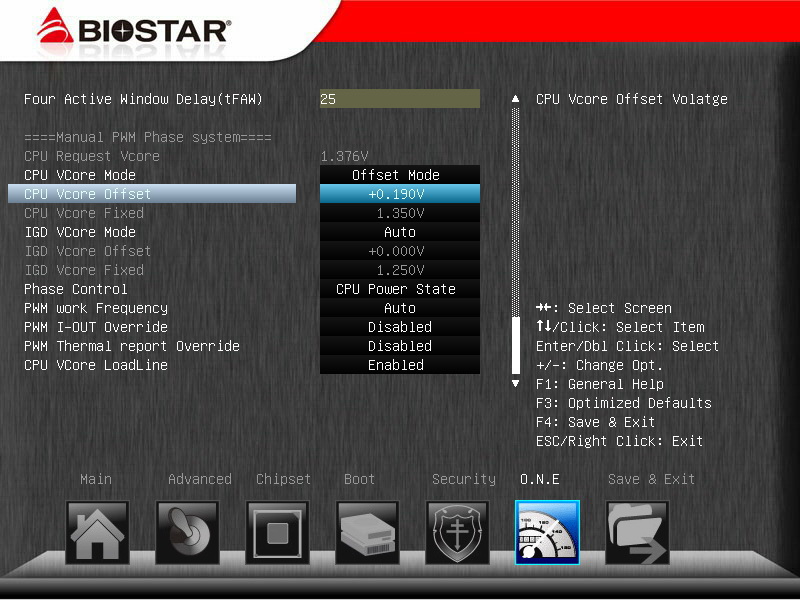
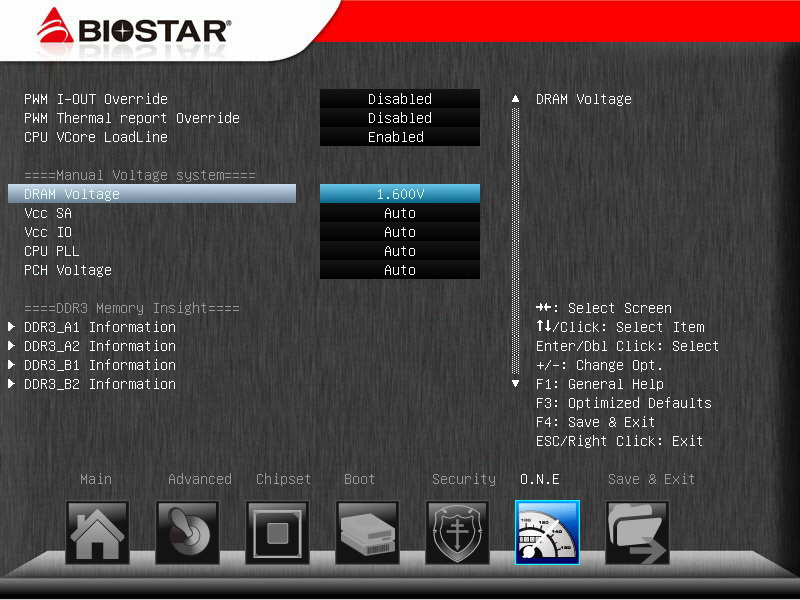
The DRAM voltage is another option to be adjusted for overclocking.
Substantially, the overclocking at the Sandy Bridge platform is much simpler than that of the previous platforms,
so the overclocking can be realized by grasping CPU frequency multiplication, DDR3 parameters, and voltage adjustment for both.
PC Health Status
It’s still felt that the temperature test result for CPU is on the much higher side;
actually, the wind temperature of the heat sinks or the temperature of the software for measuring temperature are much lower.

The above are personally stable set values for 2700K OC 5GHz, which may be readjusted for overclocking according to different hardware or difference between conditions individually.
However, the general direction is at least right, which can be considered as reference for setting BIOS for the overclocking users.
Overclocking performance
CPU 100 X 50 => 4998.9MHz, at full speed is 1.416V.
DDR3 1866.4 CL8 10-9-27 1T 1.600V
Hyper PI 32M X 4 => 11m 52.875s
CPUMARK 99 => 771
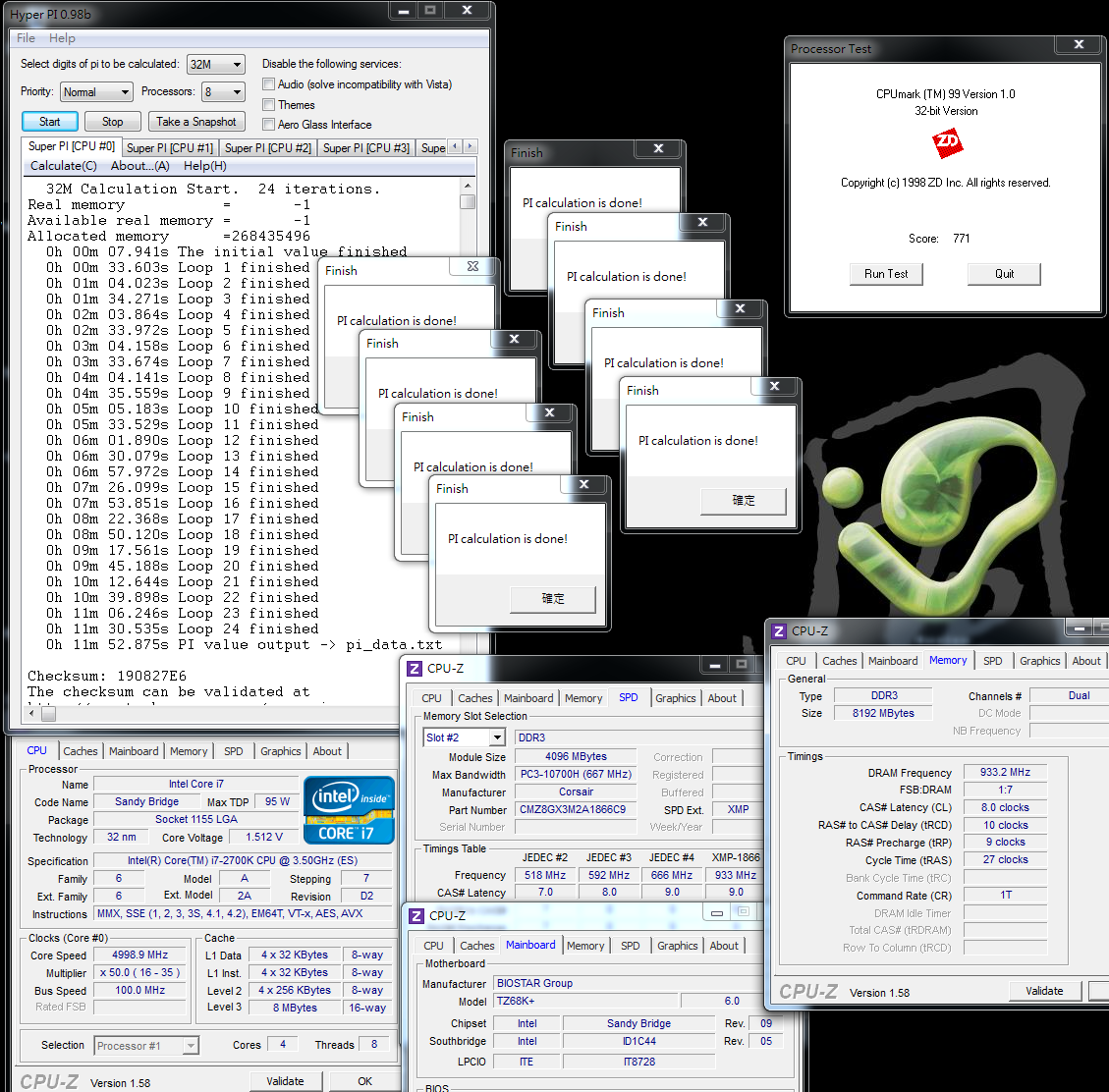
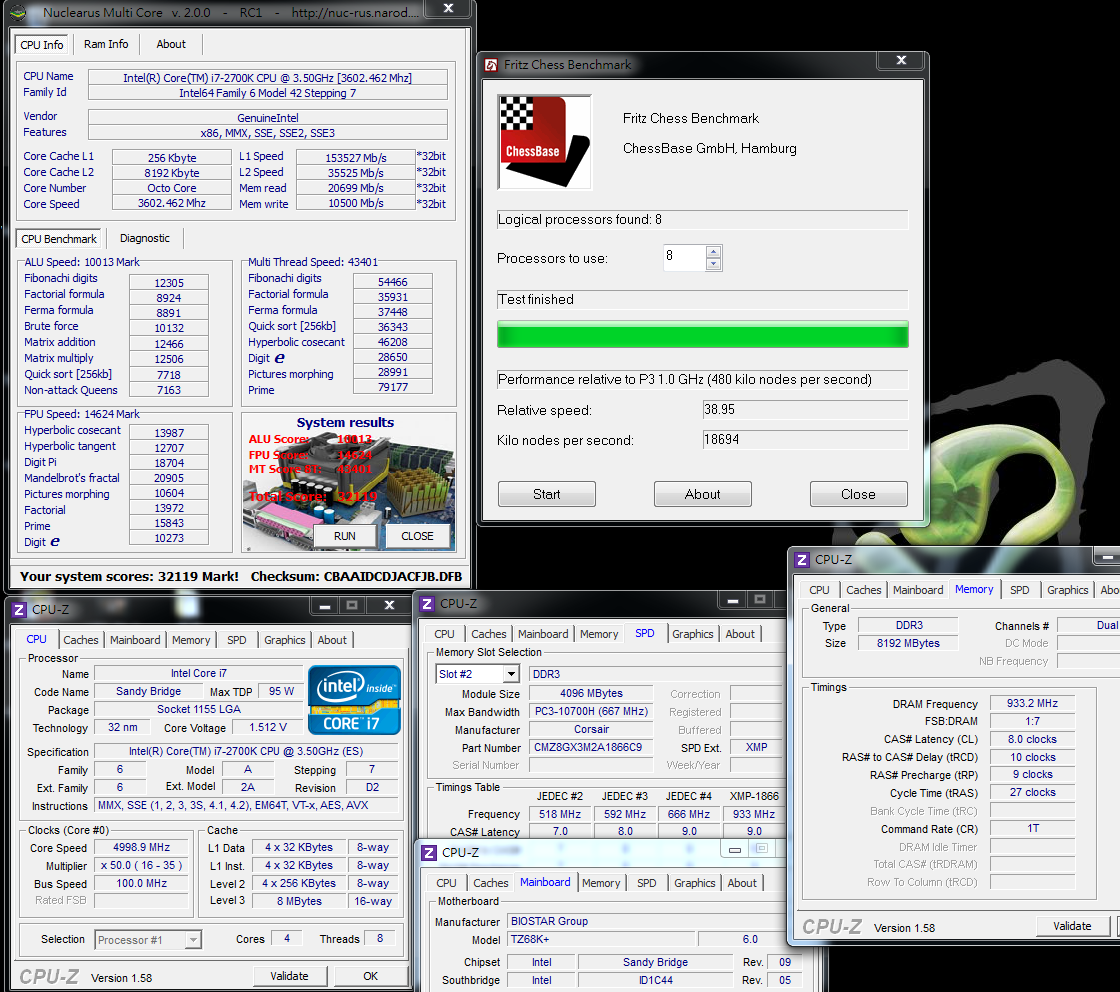
Nuclearus Multi Core => 32119
Fritz Chess Benchmark => 38.95/18694
-
CrystalMark 2004R3 => 341127

CINEBENCH R11.5
CPU => 9.74 pts
CPU(Single Core) => 2.03 pts

Windows experience index - CPU 7.8
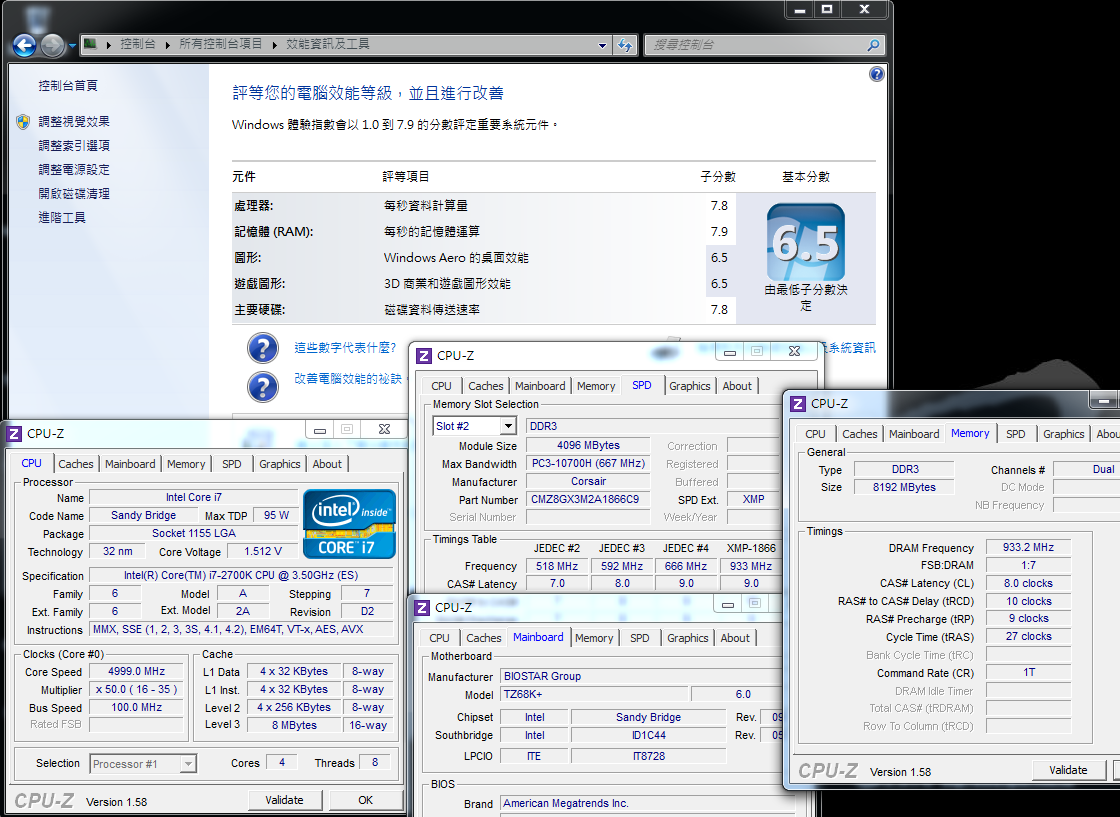
PCMark Vantage => 24126
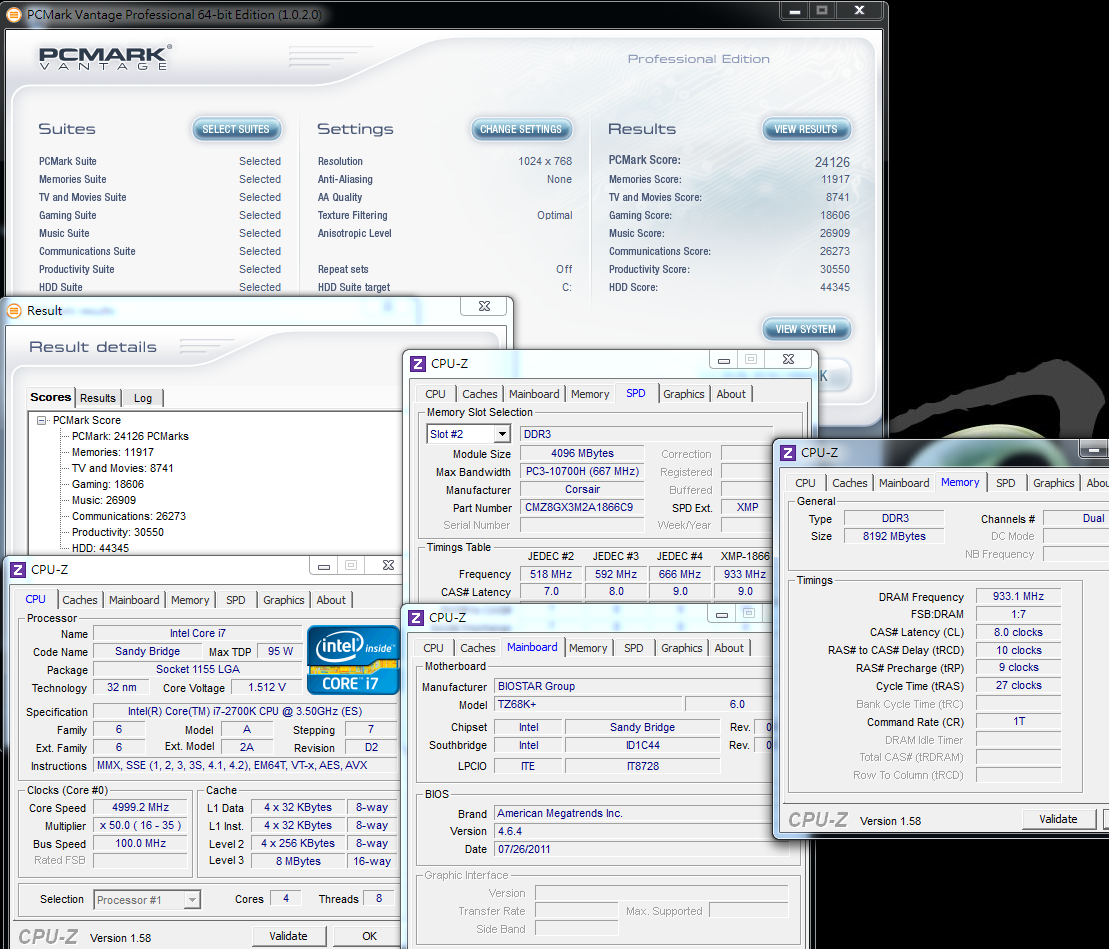
After overclocking, the performance is increased by about 30% at the single-core threading, and by over 40% at the multi-core threading, which is quite satisfactory.
The 5GHz which is the performance of 2700K should be the acme of the 4 Cores CPU on the market currently.
In the future, it may be surpassed by Sandy Bridge-E or Ivy Bridge to be released next year which uses its own LGA 2011 platform.
DRAM bandwidth test
DDR3 1866.4 CL8 10-9-27 1T
ADIA64 Memory Read - 22805 MB/s
Sandra Memory Bandwidth - 24680 MB/s
MaXXMEM Memory-Copy - 25963 MB/s
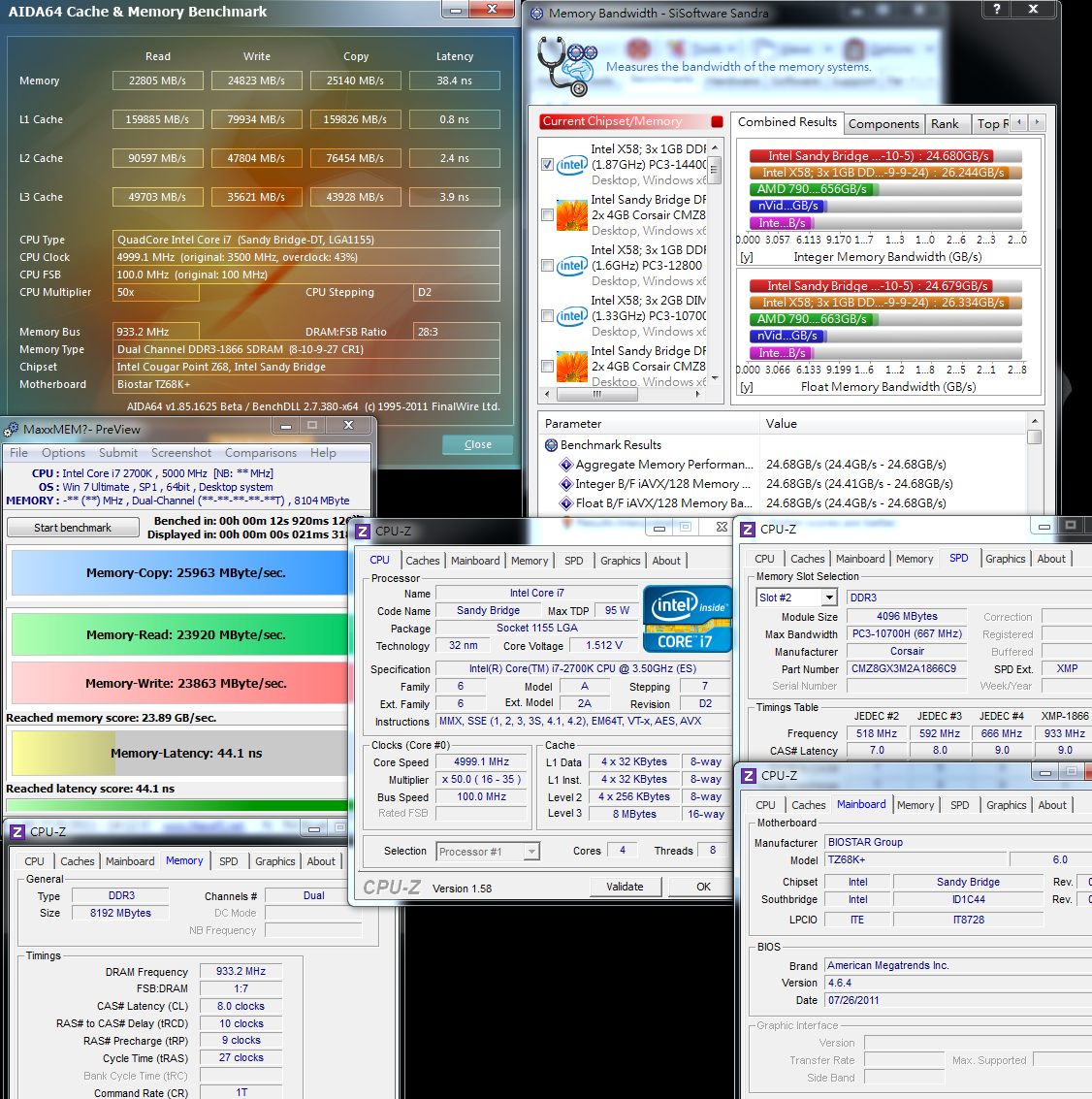
The Sandy Bridge framework improves the bandwidth of DRAM a lot, thus a dual-channel platform can already compete with the performance of a tri-channel platform of X58.
Furthermore, the bandwidth improvement for DDR3 is in clock rate, there is 10-20% bandwidth improvement after being increased from 1600 to 1866.
The high bandwidth performance for LGA 1155 is helpful to improvement for system performance to some extent.
Temperature performance (about 26 DEG C at room temperature)
System standby- 36~42

CPU full speed - 76~80
Intel Burn Test v2.4?Stress Level Maximum

The temperature increases a little when system standby because of overclocking, which is substantially within an acceptable range.
The temperature increases a lot at full speed, which will also happen to the Sandy Bridge framework at the high clock rate of 5 GHz.
Therefore, it is quite important to lower the temperature which is also a challenge for the capability of the heat sinks.
The temperature is about 90 DEG C when top-level air cooling is employed previously.
The hydro-cooling performance of CORSAIR H80 is excellent, in which the temperature is below 80.
It is an acceptable overclocking temperature for most users.
For BIOSTAR, the voltage control of CPU can be strengthened, 1.512V at standby and 1.416V at full speed are helpful to stability after overclocking, but it fluctuates strongly.
Power consumption test
No software running on OS desktop - 103W
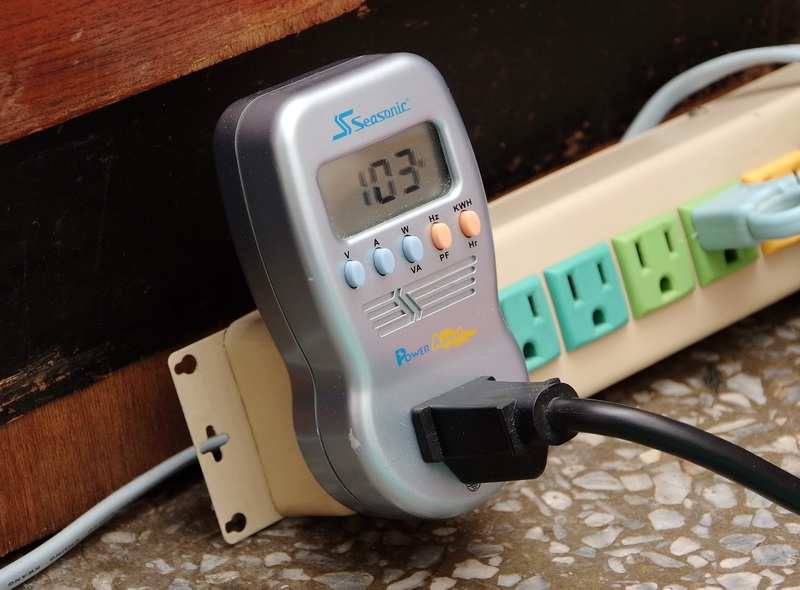
CPU full speed- 239W

After powering off the C1E, the power consumption after overclocking is increased a lot simultaneously, which it is over 100W at standby.
The power consumption will be increased by about 136 W at full speed.
From the clock rate and performance of 5 GHz, the power consumption is a little higher than 95 W which is the official preset data.
However, compared with the high power consumption of competitor’s 32 nm 4Cores/8Cores, the power consumption for 32nm process of Intel is excellent.
It is necessary to select two chipsets, i.e., P67/Z68 and the like to play the overclocking performance of the three frequency-unlocked CPU, i.e., 2500K?2600K and latest 2700K.
P67 has lowered to a reasonable price on the market, so that it is a MB choice with light economic burden for consumers with limited budgets.
But Z68 has the primary functions of two chipsets at the same time, i.e., overclocking frequency multiplication of CPU of P67 and display output of H67,
so that it is the chipset of LGA 1155 that has the most comprehensive functions currently.
Unlike LGA 1156 or LGA 775 at a quite high price when just released in one year, Z68 of the LGA 1155 platform soon after being put on the market has a reasonable price.
Additionally, Z68 has exclusive SSD acceleration, so that it is a good function for accelerating the performance of system for the users with small-capacity SSD on hands.
If selected by myself, I prefer to directly selecting Z68 MB optimally through adding some budgets.
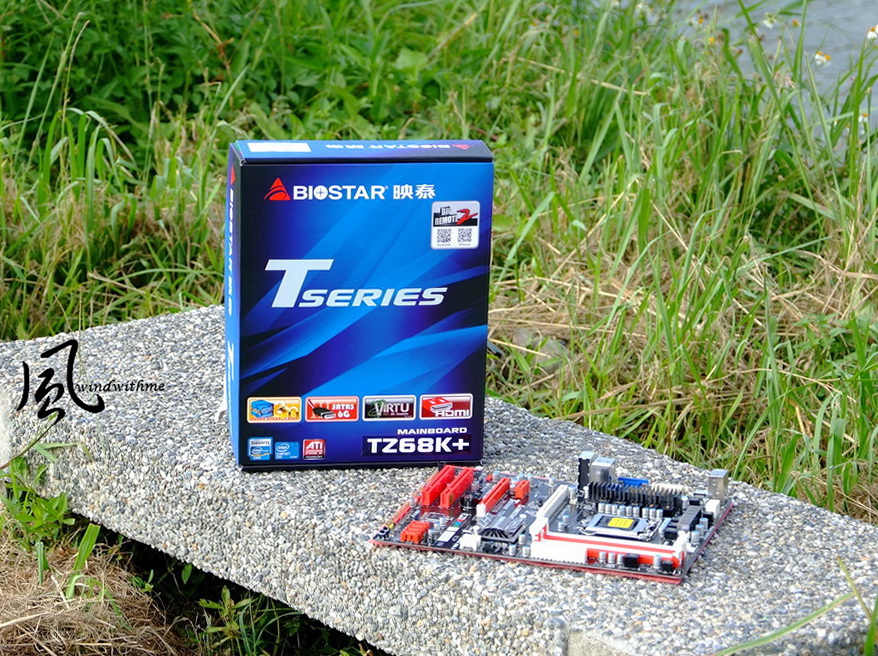
The price of TZ68K+ of BIOSTAR is about the same as that of P67 of the other brands; from this part, the value of C/P is obviously enhanced.
With the overclocking capability of a rather high level and the advantages of supporting UEFI user interface and eight-phase power supply, the Z68 should be taken into account.
If the number of USB 2.0 can be increased or the voltage of CPU can be suppressed, it will be a valuable high-performance Z68 MB.
Intel will release 2700K in Q4, which should be used to replace 2600K that is the highest-level CPU of LGA 1155 currently.
Although, 2700K is only increased by 100 MHz, the price is only tens of dollars higher according to information on Internet.
The voltage for overclocking at 5GHz is about the same as that for 2600K which is shared by windwithme, and is about 1.4V.
At Nov., Intel will release a higher level LGA 2011 platform, in which the configuration of X79 and CPU will be much more expensive than that of 2700K and Z68.
On the current market, the middle-high level platform with higher value of C/P consists of several combinations, i.e., Z68+2500K or 2600K/2700K.
Personally, I think it is unnecessary for the users who already have 2600K to upgrade, and it would be better for those who want to buy 2600K recently to wait the market information of 2700K.
The above is about sharing my experience for overclocking of i7-2700K, which is provided for users in need as references.
This article is also post in my own blog WIND3C Welcome your visit.
-
very goood wind
-
Fantastic job...!!!
Ciao! Sembra che tu sia interessato a questa conversazione, ma non hai ancora un account.
Stanco di dover scorrere gli stessi post a ogni visita? Quando registri un account, tornerai sempre esattamente dove eri rimasto e potrai scegliere di essere avvisato delle nuove risposte (tramite email o notifica push). Potrai anche salvare segnalibri e votare i post per mostrare il tuo apprezzamento agli altri membri della comunità.
Con il tuo contributo, questo post potrebbe essere ancora migliore 💗
Registrati Accedi