
[ENG]Intel Core i7-2600K with GIGABYTE Z68X-UD7,the latest High End Platform OC Guide
-
Intel launched 4th chipset for Sandy Bridge in May. It’s Z68 which is familiar to many users.
Z68 chipset is most high end one for Sandy Bridge. You can OC and have GPU output.
Z68 is integrated with P67 OC function and H67 multi graphic output features.
Even though Z68 doesn’t have great OC ability as Internet rumors, it actually adds 2 new technologies.
It really helps for data transfer and multimedia performance.
The First is Intel Smart Response Technology which using small capacity SSD to speed up HDD OS and software.
The other is Lucid Virtu GPU virtualization technology. Users can switch between built-in GPU and external graphics card.
For the market price, Z68 MB is the most expensive Sandy Bridge products.
However, the price gap between P67 is not big. Basically, the same level P67/Z68 products, the price gap is only 18USD.
For users who set budget for mid-high Sandy Bridge MB, Z68 MB C/P value should be higher.
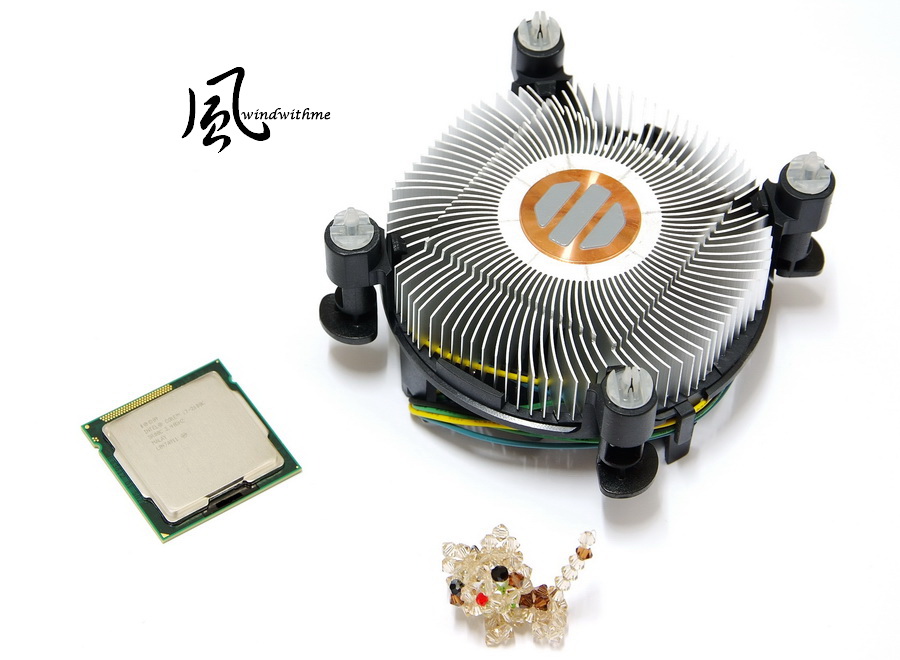
CPU uses LGA 1155 most high end Intel Core i7-2600K.
K series mean it unlock the frequency. In 1155 platform, there are only 2500K/2600K.
Intel new Logo packing. The box is smaller than last generation which is more green.

Inside box are CPU, original cooler, product manual and logo sticker.

Intel 4 Cores CPUs most use copper bottom coolers.
2600K clock is 3.4GHz which support latest Turbo Boost 2.0 technology to achieve 3.80GHz performance.
It’s physical 4 Cores with Hyper-Threading. There are total 8 threads which is known as 4C/8T.
32nm and 95W power consumption. L3 Cache is 8MB and it’s LGA 1155 most high-end CPU so far.
GIGABYTE Z68X-UD7-B3
Since LGA 1155, GIGABYTE makes color change in their mid-high products.
It’s all black design. The PCB, DRAM and PCI slots are all black. Especially, the PCB is matt for better looking.
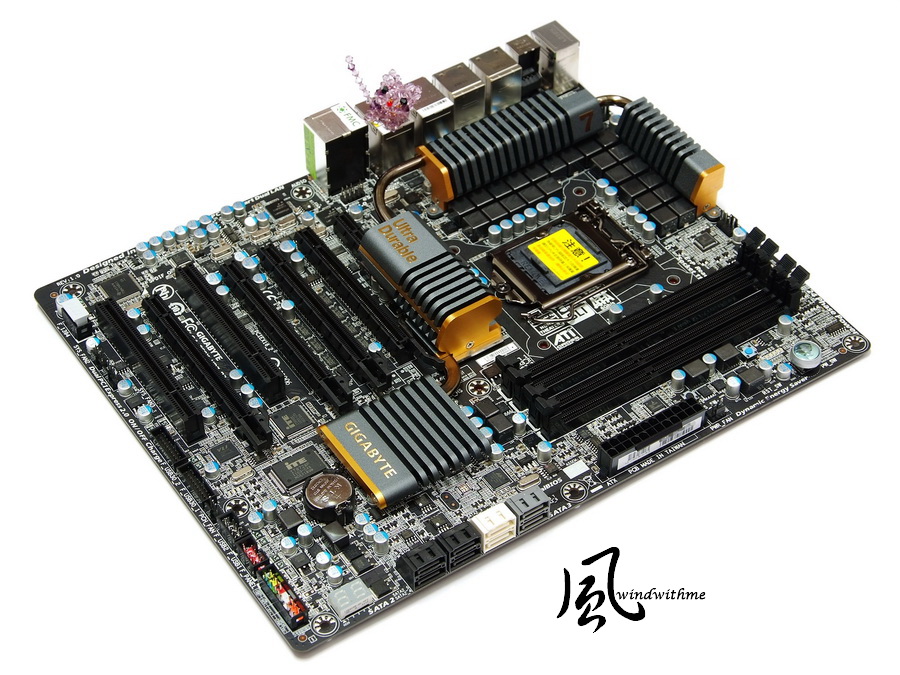
So far, GIGABYTE all black version is starting from UD3R and UD3P to UD4/UD5/UD7.
The others which are like D3, UD3, DS3 or even lower, they are still traditional blue PCB.
Of course, I think blue PCB is still ok. I am more caring about the components and design.
Some users feel high end MB must be black, because it looks with better texture. That’s why there are many black MBs in the market.
Accessories
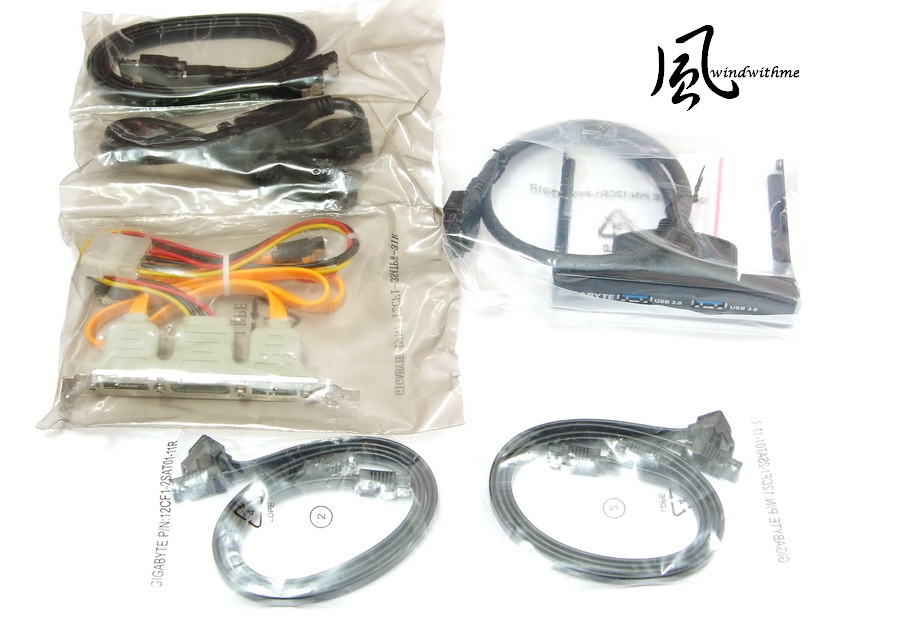
Product Manual, Software Guide, Driver CD, I/O panel, CrossFireX/SLI bridges.

SATA cables, front 3.5” USB 3.0 panel, external eSATA Port
Lower-Left Corner
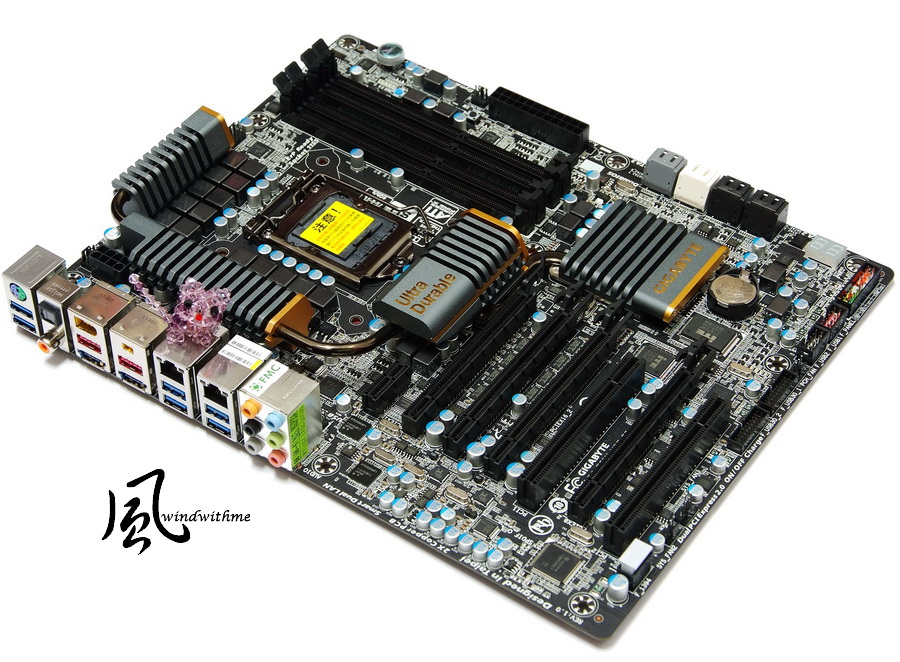
4 X PCI-E 2.0 X16 slots support 2Way/3Way ATI CrossFireX/NVIDIA SLI technology.
PCIEX16_1 and PCIEX16_2 bandwidth are X16. PCIEX8_1 and PCIEX8_2 bandwidth are X8.
1 X PCI-E 2.0 X1
2 X PCI
2 X Realtek RTL8111E LAN Chip supports Teaming and Smart Dual LAN.
Realtek ALC889 audio chip supports 7.1 channel and Dolby Home Theater technology.

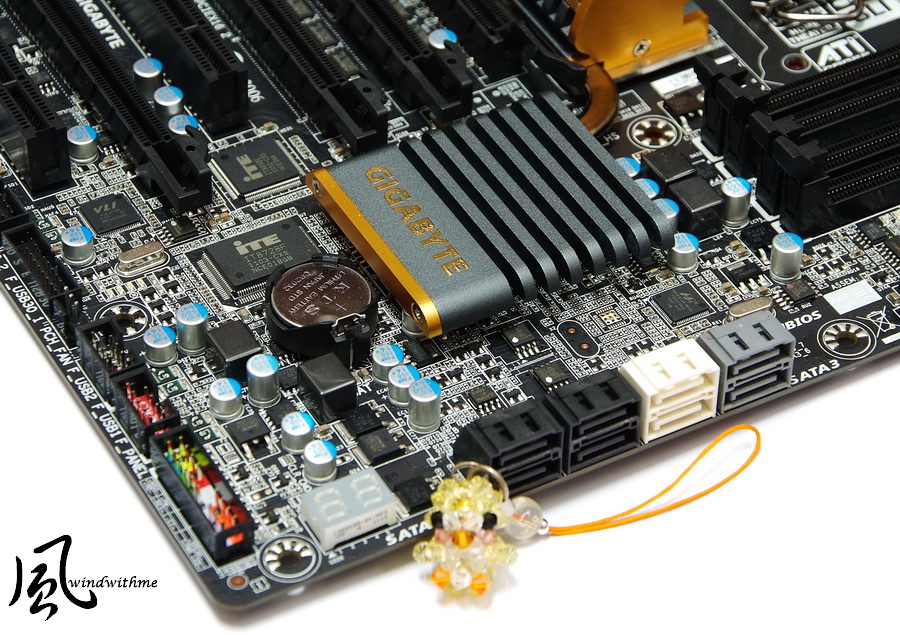
Lower-Right Corner
2 X White SATAIII provide by P67.
4 X Black SATAII provide P67.
You can hybrid use. It supports RAID 0, RAID 1, RAID 5 and RAID 10.
2 X Gray SATAIII provide by Marvell 88SE9128. It supports RAID 0, RAID 1.
Lower-Right corner is debug LED to let user understand the hardware status during boot.
-
Intel launched 4th chipset for Sandy Bridge in May. It’s Z68 which is familiar to many users.
Z68 chipset is most high end one for Sandy Bridge. You can OC and have GPU output.
Z68 is integrated with P67 OC function and H67 multi graphic output features.
Even though Z68 doesn’t have great OC ability as Internet rumors, it actually adds 2 new technologies.
It really helps for data transfer and multimedia performance.
The First is Intel Smart Response Technology which using small capacity SSD to speed up HDD OS and software.
The other is Lucid Virtu GPU virtualization technology. Users can switch between built-in GPU and external graphics card.
For the market price, Z68 MB is the most expensive Sandy Bridge products.
However, the price gap between P67 is not big. Basically, the same level P67/Z68 products, the price gap is only 18USD.
For users who set budget for mid-high Sandy Bridge MB, Z68 MB C/P value should be higher.
CPU uses LGA 1155 most high end Intel Core i7-2600K.
K series mean it unlock the frequency. In 1155 platform, there are only 2500K/2600K.
Intel new Logo packing. The box is smaller than last generation which is more green.
Inside box are CPU, original cooler, product manual and logo sticker.
Intel 4 Cores CPUs most use copper bottom coolers.
2600K clock is 3.4GHz which support latest Turbo Boost 2.0 technology to achieve 3.80GHz performance.
It’s physical 4 Cores with Hyper-Threading. There are total 8 threads which is known as 4C/8T.
32nm and 95W power consumption. L3 Cache is 8MB and it’s LGA 1155 most high-end CPU so far.
GIGABYTE Z68X-UD7-B3
Since LGA 1155, GIGABYTE makes color change in their mid-high products.
It’s all black design. The PCB, DRAM and PCI slots are all black. Especially, the PCB is matt for better looking.
So far, GIGABYTE all black version is starting from UD3R and UD3P to UD4/UD5/UD7.
The others which are like D3, UD3, DS3 or even lower, they are still traditional blue PCB.
Of course, I think blue PCB is still ok. I am more caring about the components and design.
Some users feel high end MB must be black, because it looks with better texture. That’s why there are many black MBs in the market.
Accessories
Product Manual, Software Guide, Driver CD, I/O panel, CrossFireX/SLI bridges.
SATA cables, front 3.5” USB 3.0 panel, external eSATA Port
Lower-Left Corner
4 X PCI-E 2.0 X16 slots support 2Way/3Way ATI CrossFireX/NVIDIA SLI technology.
PCIEX16_1 and PCIEX16_2 bandwidth are X16. PCIEX8_1 and PCIEX8_2 bandwidth are X8.
1 X PCI-E 2.0 X1
2 X PCI
2 X Realtek RTL8111E LAN Chip supports Teaming and Smart Dual LAN.
Realtek ALC889 audio chip supports 7.1 channel and Dolby Home Theater technology.
Lower-Right Corner
2 X White SATAIII provide by P67.
4 X Black SATAII provide P67.
You can hybrid use. It supports RAID 0, RAID 1, RAID 5 and RAID 10.
2 X Gray SATAIII provide by Marvell 88SE9128. It supports RAID 0, RAID 1.
Lower-Right corner is debug LED to let user understand the hardware status during boot.
-
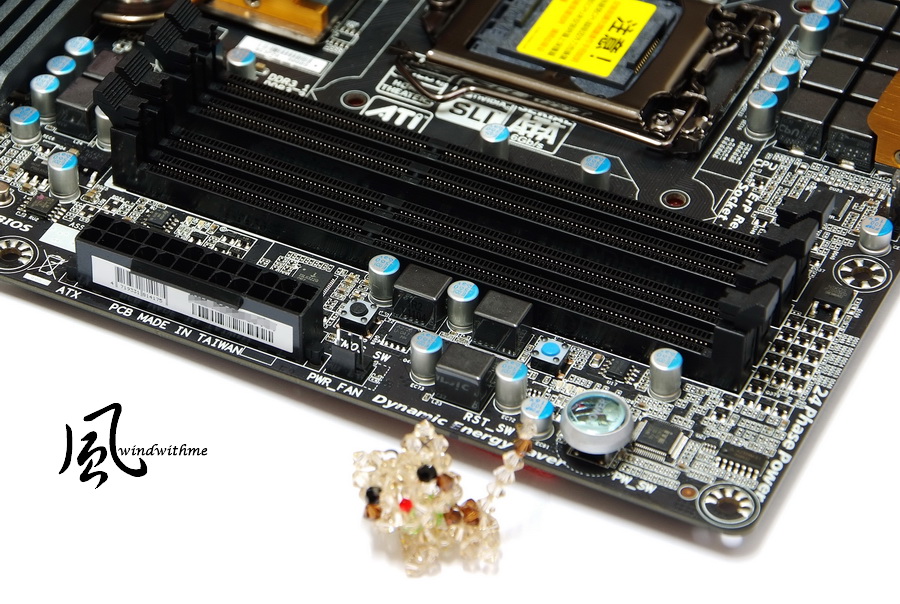
Upper-Right Corner
4 X DIMM DDR3 support 1066/1333/1600/1866/2133 and 32GB capacity.
It supports XMP (Extreme Memory Profile) memory and next is 24-PIN power in.
Sandy Bridge has improved the DDR3 insertion. Users don’t need to insert from DIMM1 as LGA 1366 or LGA 1156.
LGA 1155 can insert whatever DIMM1 or DIMM2 to boot the system.
Upper-Left Corner
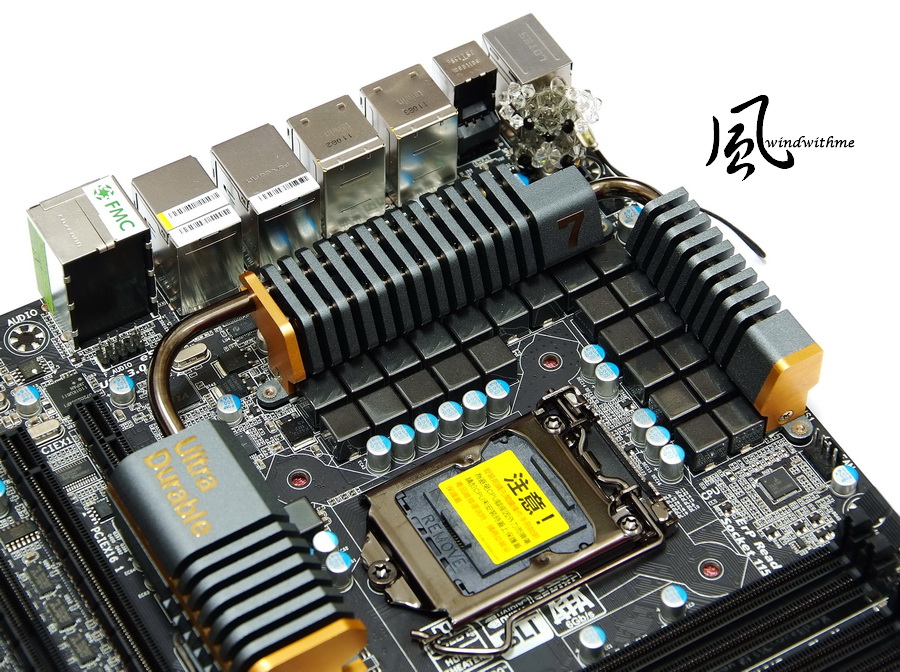
UD7 use top grade 24-phase PWM and dual power switch to achieve the maximum power supply and power efficiency to save power.
CPU metal cover with plating for better texture. The upper left is 8Pin power in.
IO
1 X PS/2 KB/Mouse
2 X USB 2.0(Black)
6 X USB 3.0(Blue)
2 X eSATA also support USB 3.0(Blue)
2 X IEEE 1394a
2 X RJ-45 LAN
1 X S/PDIF fiber/coaxial output

Z68X-UD7 has no GPU output interface as other Z68.
It just provides more expansion interfaces to replace to GPU output.
I guess this model is focusing on high end market, so users demand for built-in GPU is less.
Providing more USB3.0, eSATA or other ports are more useful than Intel built-in CPU.
This design can be good or bad. It depends on user needs. Other brands also has similar deign in high end Z68.
PWm is Intel latest VRD 12 (Voltage Regulator Down).
It also uses Driver MOSFETs to have better power efficiency.

2 USB 3.0 use NEC D720200AF1, Made in Japan.
It supports up to 10 USB 3.0 devices
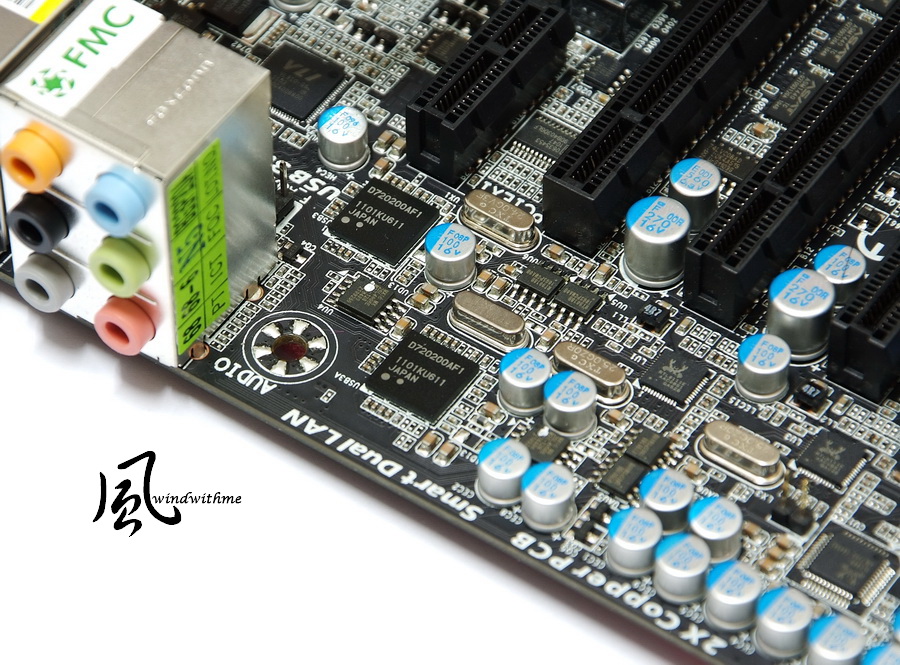
GIGABYTE heatsink is also new design. The matt process makes the texture better.
UD7 is GIGABYTE high end version, the heatsink is bigger to enhance cooling performance in PWM and chipset.

Boot Screen

Main BIOS Tuning Menu, called M.I.T.

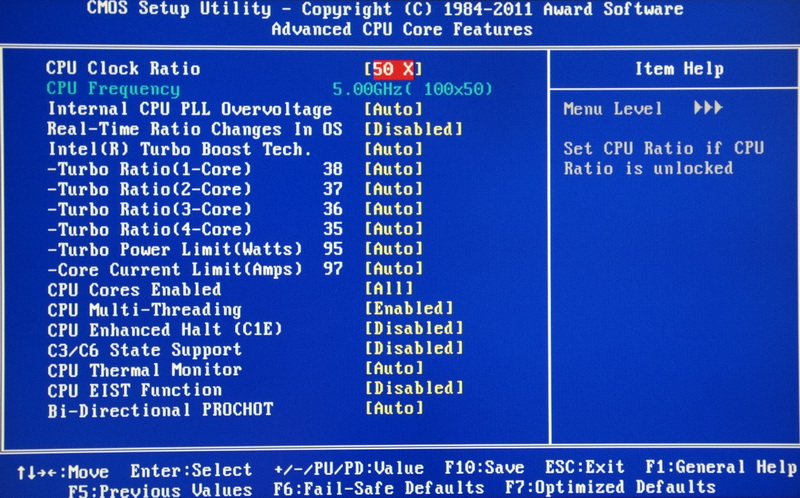
Clock set up page
It has CPU frequency/ratio, DDR3 frequency.

2600K default ratio are 38, 37, 36 and 35. Turbo Boost 2.0 has more detail CPU boost mode.
Internal PLL Voltage Override is special item for P67/Z68. You can use it to improve the stability when OC CPU over 5GHz.
P67 default is disable and Z68 is enable. Users have to beware of it.
-
Memory Setup Page
It has 800, 1066, 1333, 1600, 1866 and 2133.
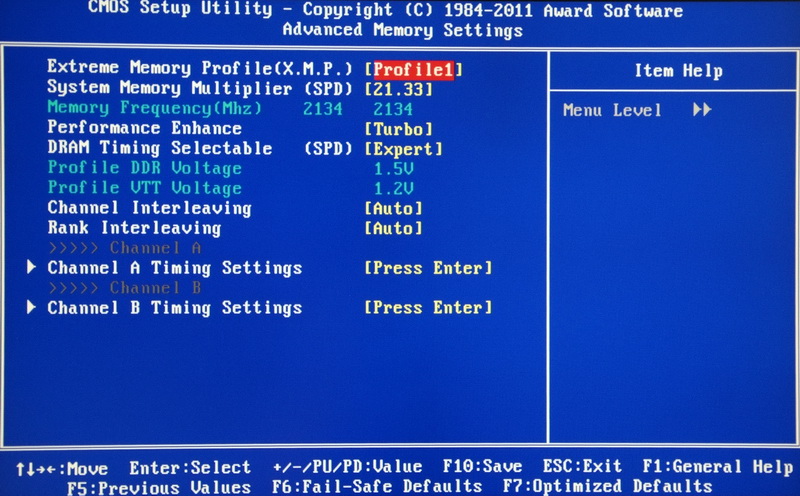
Advanced DDR3 Parameters Setup Page
The setting below is DDR3 2133 CL7 10-7-27 1T

Voltage Page
Milti-Steps Load-Line Disabled/Level 1~Level10
CPU Vcore 0.750~1.700V
QPI/Vtt Voltage 0.800~1.700V
PCH Core 0.840~1.940V
CPU PLL 1.520~2.520V
DRAM Voltage 0.900~2.600V

PC Health Status

Z68 BIOS OC tuning is same as P67.
CPU just needs to adjust the ratio and fine tune voltage by CPU quality.
For DDR3 OC setup, you just need to adjust the frequency, CL and voltage to fit your memory.
Sandy Bridge BIOS OC is much easier than the past. Of course you only can use 2500K/2600K two CPUs.
The setup above is windwithme using 2600K. CPU/DDR3 set as 5GHz/2133you’re your reference.
Test Configuration
CPU: Intel Core i7-2600K
MB: GIGABYTE Z68X-UD7-B3
DRAM: CORSAIR DOMINATOR-GT CMT4GX3M2B2133C9
VGA: msi N560GTX-Ti Twin Frozr II
HD: Seagate Momentus XT 500G/ CORSAIR CSSD-F40GB2
POWER: Thermaltake TR2 450W
Cooler: CORSAIR Hydro Series H70
OS: Windows7 Ultimate 64bit

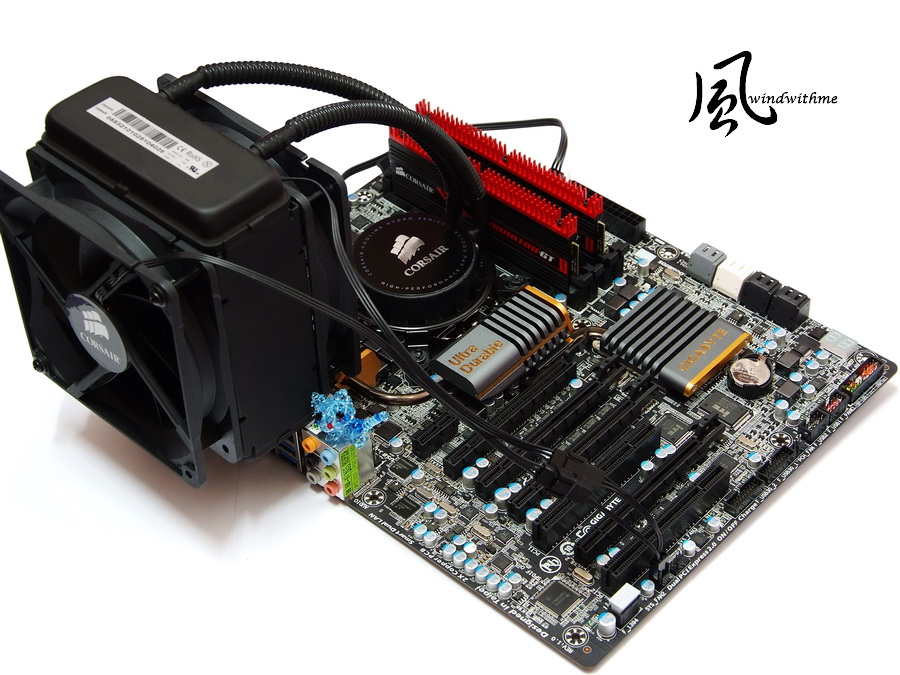
The cooler I use special CORSAIR Hydro Series H70 water cooler.
Hydro Series has 5 models and the latest models are H80 and top H100.

Most user image for water cooler is hard to install, but the cooling performance is better.
However, CORSAIR water cooling kit emphasizes easy to install and no extra space need.
During test, H70 can install in standard ATX Case which is very convenient.
All black design make cooling pipe be better texture. You can install 2 12cm fan in both sides. Rotation speed set at 1600/2000rpm.

The bottom is big dimension cooper sink which is good for heat conduction.
The original thermal paste quality is very good. I suggest you can use it directly.
Just like me install CPU very often, so I use Arctic Sliver or higher grade one instead.
The temperature is still 3~5 ? higher than H70 original one. You have to beware it.

GIGABYTE provides many tools in OS. Most is familiar with the users.
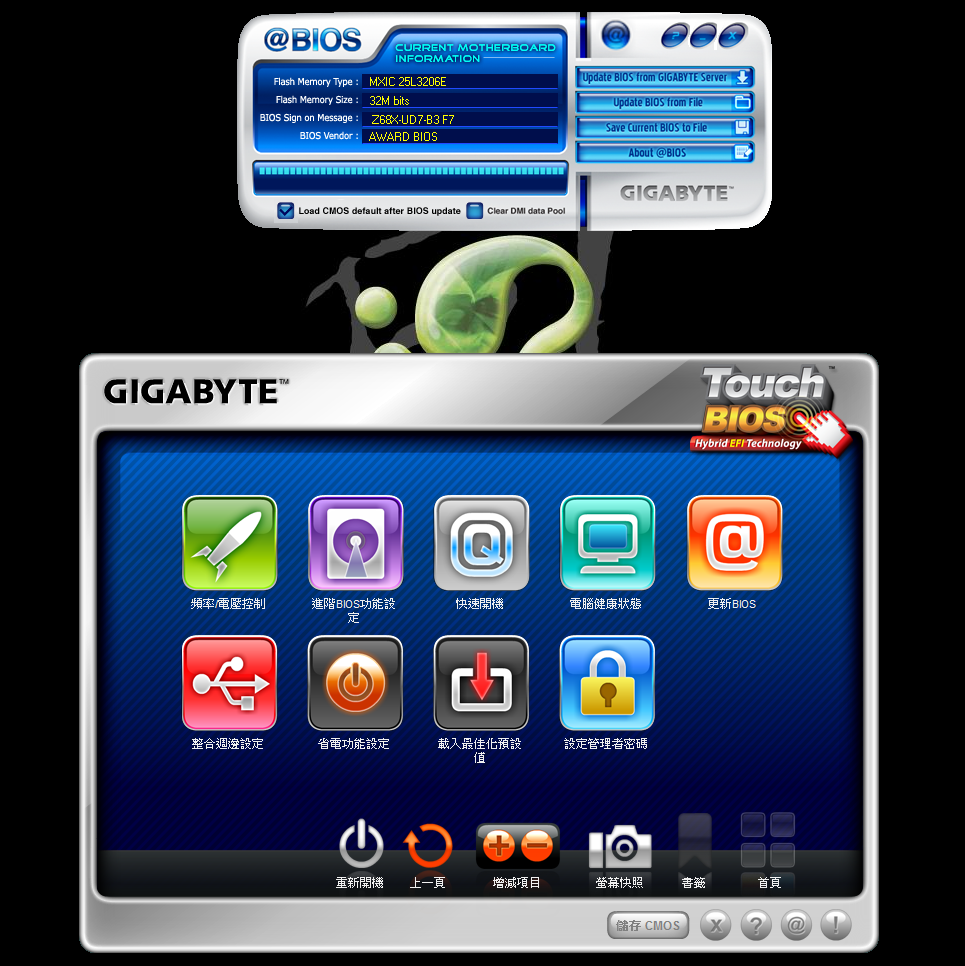
This time, I pick 2 new applications to test. The first is fresh new Touch BIOS.
It provides multi-language interface. The pic is Traditional Chinese version.

The key feature is you can adjust BIOS in OS.
Even though not all items can find, for the OC and standard setup are included which means you can find 80% BIOS items in Touch BIOS.
If you are using the hottest touch panel LCD, you can use Touch BIOS more easily.

Sandy Bridge DDR3 bandwidth is 20~30% higher than LGA 1156 in most software.
Advanced Memory Controller technology frees the DDR3 install limitation and the bandwidth is even same as LGA 1366 3-channel platform.
-
Touch BIOS also integrated several GIGABYTE tools.
For example, “Update BIOS” links to @BIOS. After installing Touch BIOS, you don’t have to install some tools.
Z68 exclusive Intel Smart Response technology is using HDD and SSD set to Raid0 mode to make SSD as the cache.
This new feature needs to set Raid0 in BIOS before installing OS and install Intel software after OS is done.
Most users set HHD as AHCI or IDE mode. If you would like to add SSD in the future, you have to reinstall OS.
GIGABYTE EZ Smart Response can simplify the steps. It let user can install SSD and enable SRT function under HDD IDE or AHCI mode.
In the pic, HDD uses AHCI mode to install the Windows7. Then I plug CORSAIR F40 SSD to SATA3 port.
Then enable EZ Smart Response, the system will reboot after dialog window jump out.
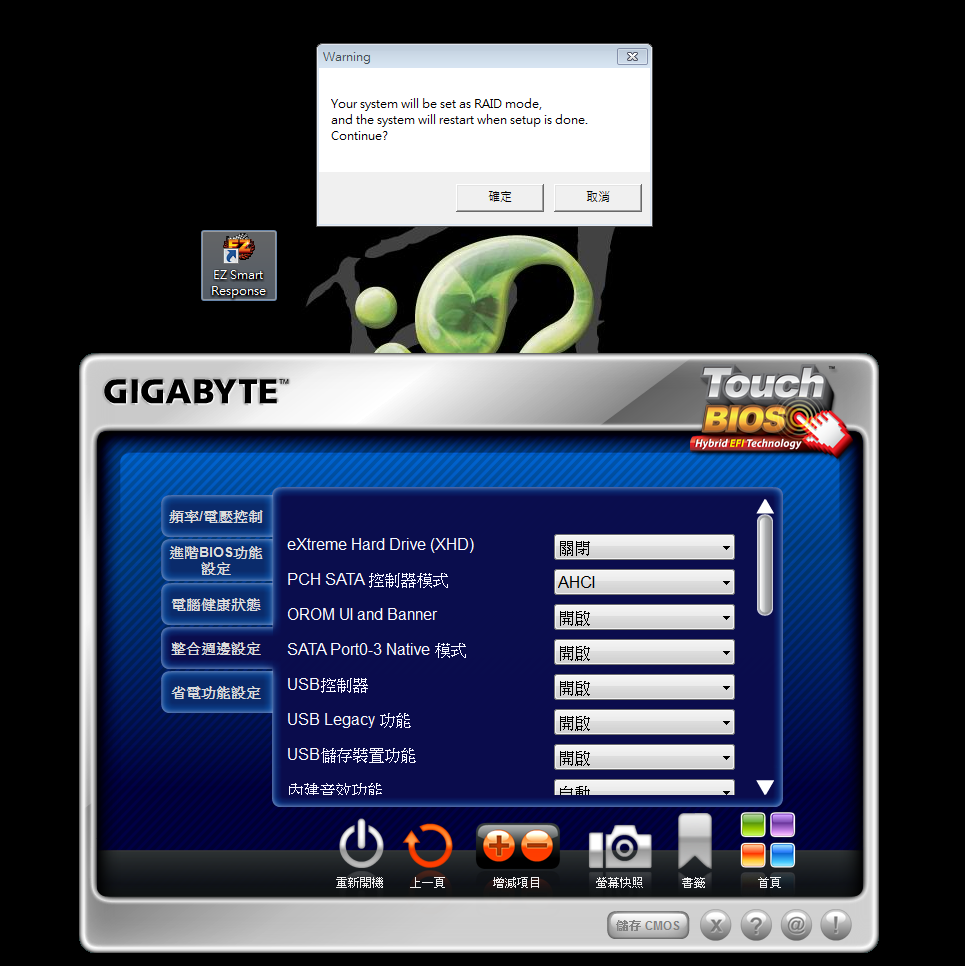
After enter OS again, it will jump out another dialog window and ask to reboot again.
You will need to reboot 2 times and the BIOS change to Raid0 mode and you can use Intel SRT software to choose the speed up mode.

First of all, I use default CPU voltage to test OC performance.
CPU OC 4.5GHz and DDR3 1600 CL6 setup to share the total performance.
OC performance without adding
CPU 100 X 45 => 4501.5MHz 1.240V
DDR3 1600.6 CL7 7-7-21 1T 1.460V
Hyper PI 32M X8 => 13m 31.029s
CPUMARK 99 => 693

Nuclearus Multi Core => 28266
Fritz Chess Benchmark => 35.00/16798
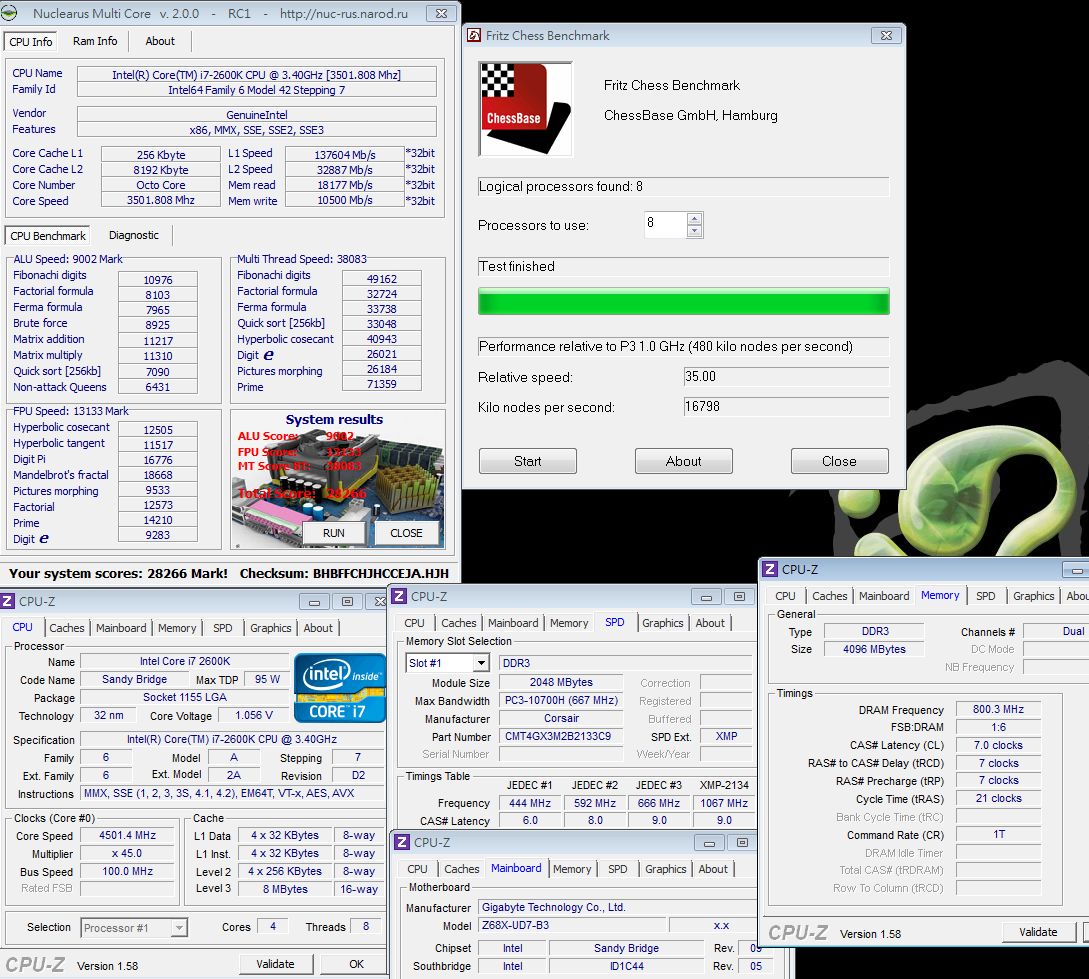
CrystalMark 2004R3 => 349880

CINEBENCH R11.5
CPU => 8.78 pts
CPU(Single Core) => 1.82 pts
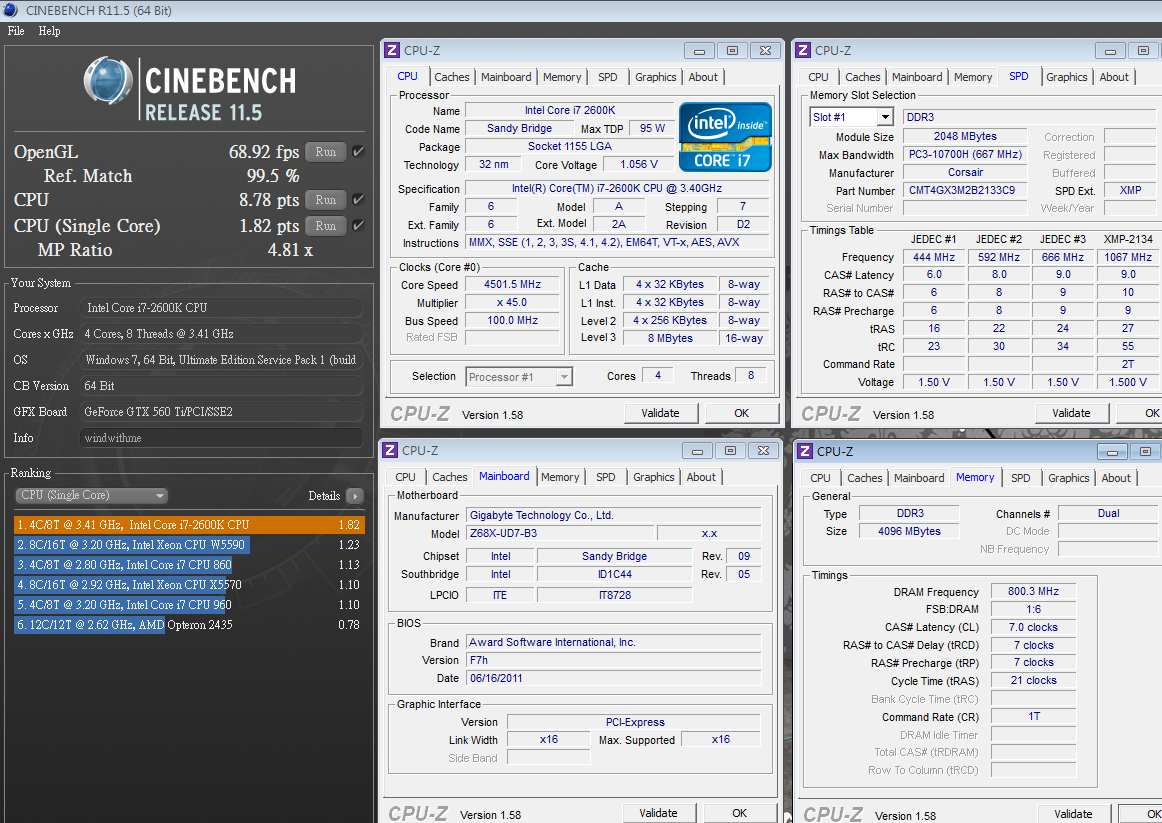
Windows Experience Index - CPU 7.8
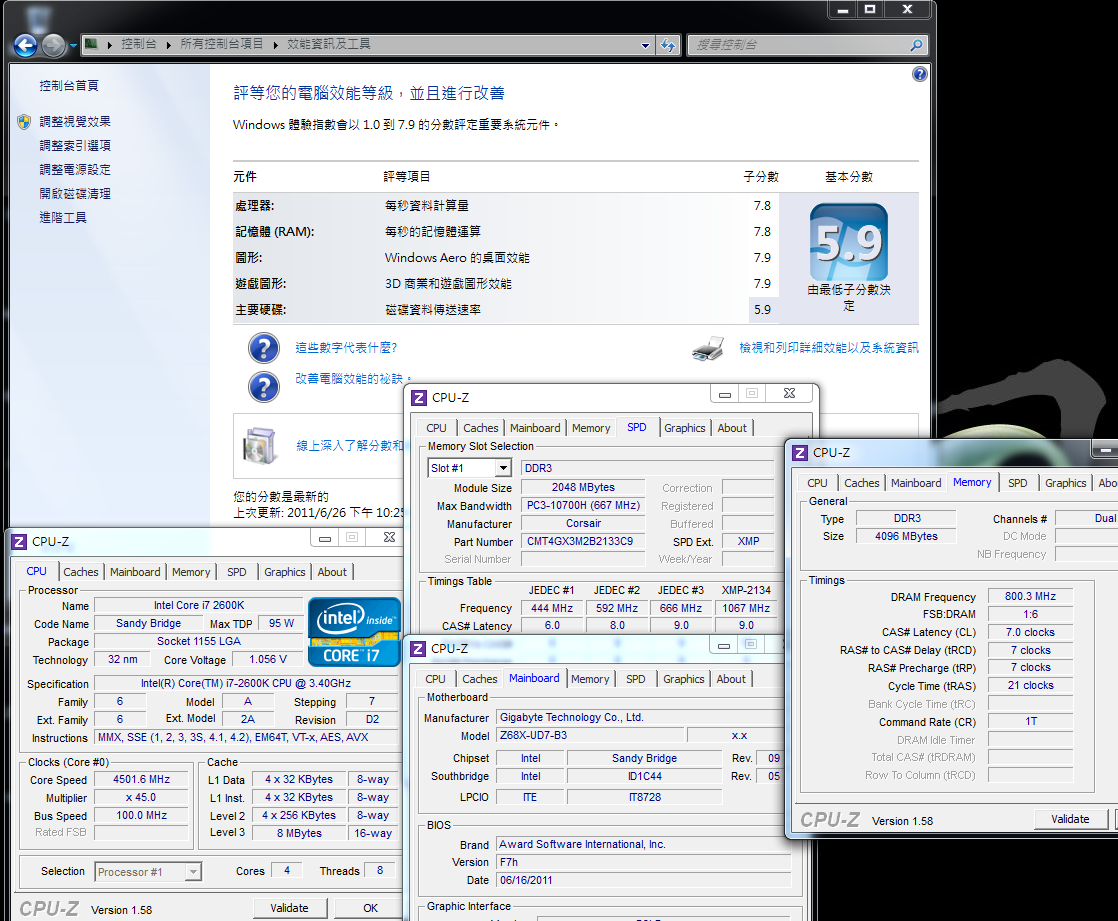
PCMark Vantage => 14594
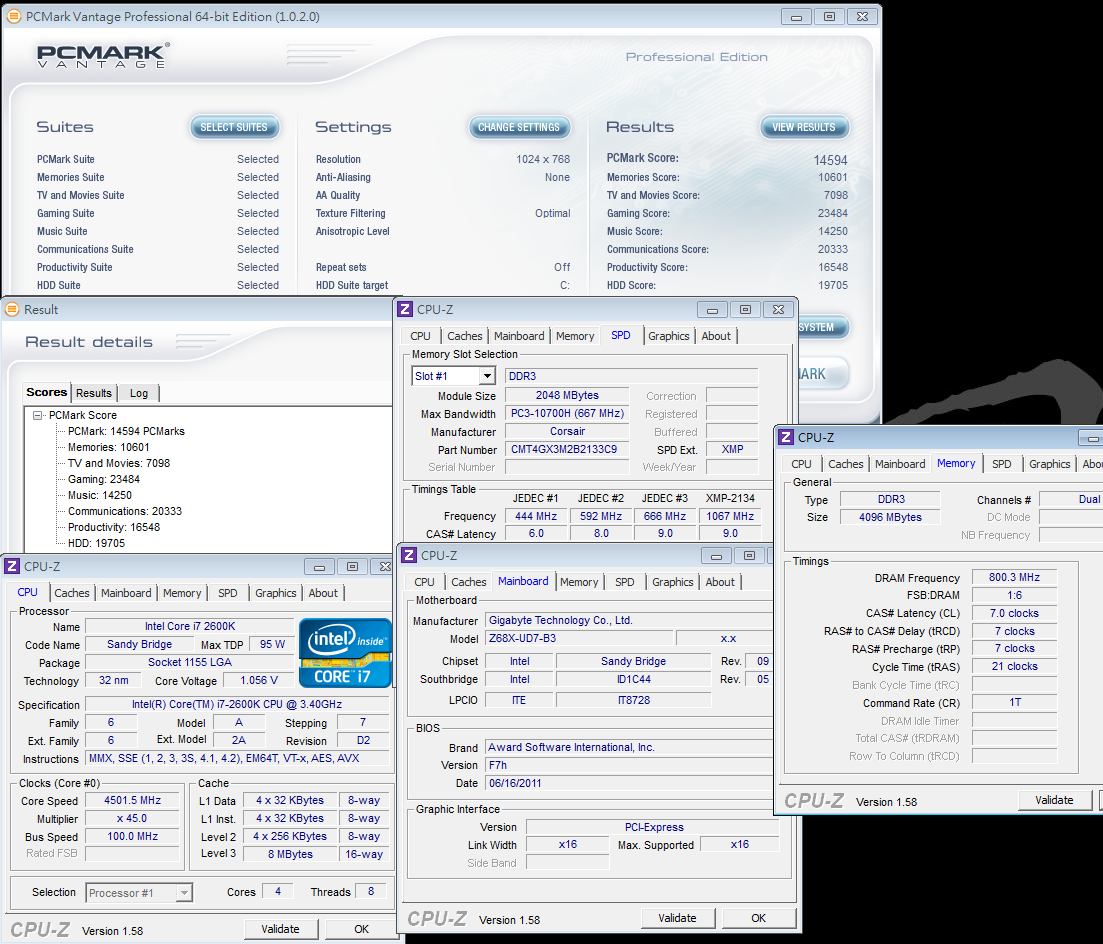
2600K default voltage at BIOS is 1.245V and OC to 4.5GHz. I can finish all test by using 1.240V.
Even though it’s not big OC gap, but it’s balance for performance, voltage, temperature and power consumption.
It’s practical and good performance.
Comparing to LGA1156 same clock CPU, Sandy Bridge is 10% faster.
4C8T CPU with 32nm improves the OC ability quite much.
DDR3 Test
ADIA64 Memory Read - 19727 MB/s
Sandra Memory Bandwidth - 21183 MB/s
MaXXMEM Memory-Copy - 22166 MB/s

Sandy Bridge DDR3 bandwidth is 20~30% higher than LGA 1156 in most software.
Advanced Memory Controller technology frees the DDR3 install limitation and the bandwidth is even same as LGA 1366 3-channel platform.
-
Temperature (Room Temp. is 28?)
Enter to OS Desktop - 37~44

CPU Full Speed - 55~70
Intel Burn Test v2.4?Stress Level Maximum

The temperature is acceptable which CPU OC to 4.5GHz.
It’s summer now, Taiwan weather is hot, the CPU Full Speed is only 70?
If you use for longtime under this setup, the stability is not a problem. H70 water cooling system really shows the benefit.
Power Consumption Test
Enter to OS Desktop - 114W
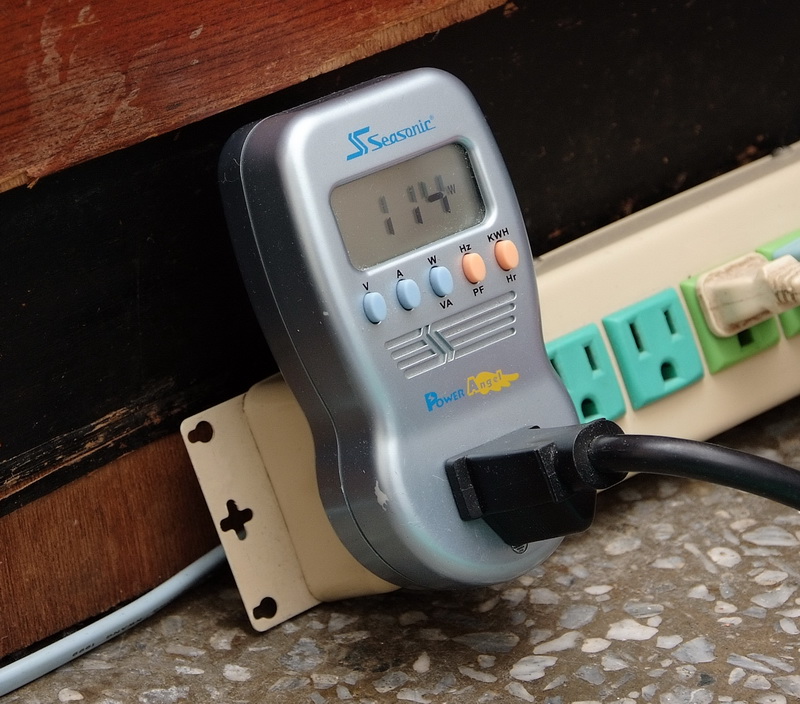
CPU Full Speed - 198W

Since this is high end platform, I use high end Z68 MB with top end 2600K CPU. Of course the VGA is mid-high end GTX 560 Ti.
Enter to OS, the Power Consumption is only 114W. CPU full speed, 4.5GHz, is only 198W.
Sandy Bridg CPU and chipset power consumption is much improved.
Z68 exclusive Intel Smart Response Technology Test, hereinafter called ISRT.
You need to install Smart Response Technology 10.5 to enable it.
I use HDD Seagate Momentus XT 500G, 2.5”, 7200rp, and built-in 4GB SLC SSD.
Performance test
ATTO DISK Benchmark over 32K test, reading is 101.6 Mb/s and writing is 103.6 MB/s.
CrystalDiskMark Seq Read - 99.97 MB/s and Write - 94.57 MB/s

HD Tune Pro 4.60 Benchmark
File Benchmark
Transfer size over 2048k, the read performance is over 90MB/s.
Read - Average 84.1 MB/s Access Time 0.661ms
ADIA64 DISK Benchmark
Buffered Read Average - 217.2 MB/s

Momentus XT is hybrid HDD, the read/write performance above is not big improvement.
Due to the built-in 4GB SSD, Access Time/ Buffered Read performance is SSD level.
Access time is very fast, so the booting or software performance is all rising.
Install CORSAIR F40 SSD to enable Intel ISRT for 2nd step.
F40 spec is 2.5” and the max performance is 280/270 MB/s, Random 4K writing performance is 50000 IOPS.
Enhanced Mode - (It’s write through mode, so will have no data loss)
ATTO DISK Benchmark over 32K test, reading is 242.9 Mb/s and writing 101.4 MB/s
CrystalDiskMark Seq Read - 149.0 MB/s, Write - 49.98 MB/s

HD Tune Pro 4.60 Benchmark
File Benchmark
Over 128K, the reading performance is over 230MB/s.
Read - Average 118.8 MB/s Access Time 0.076ms
ADIA64 DISK Benchmark
Buffered Read Average – 222.2 MB/s
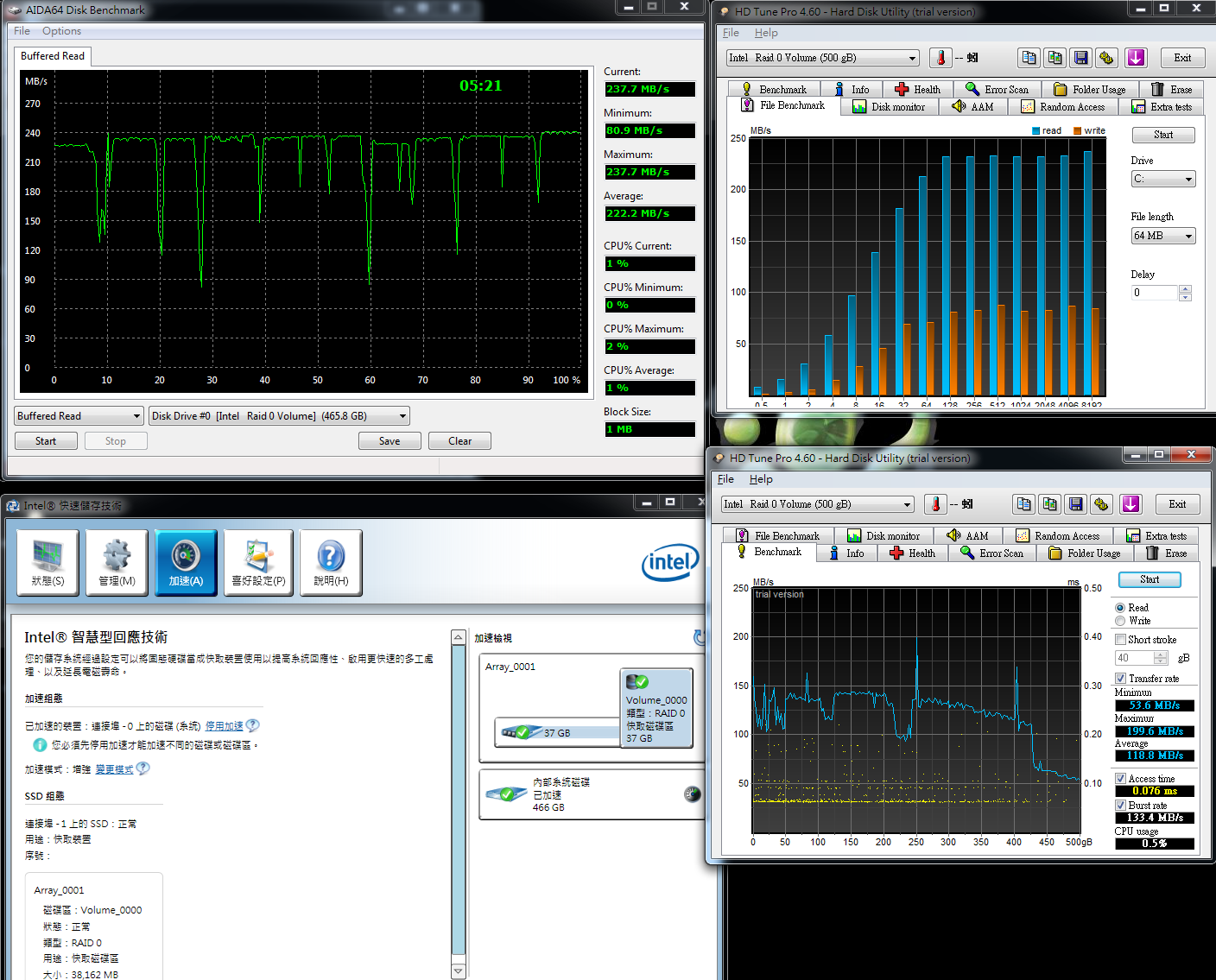
In Enhanced Mode, the reading performance is almost same as F40 SSD performance.
Writing and 4K performance is similar to HDD which is not big improvement.
ISRT technology is using SSD as buffer cache, some benchmark software need to run several times to achieve the best transfer rate.
Maximized Mode - (Caches writes as well as reads)
ATTO DISK Benchmark over 64k test, max reading is 275.6 Mb/s and writing is 262.9 MB/s.
CrystalDiskMark Seq Read – 148.8 MB/s Write - 49.55 MB/s
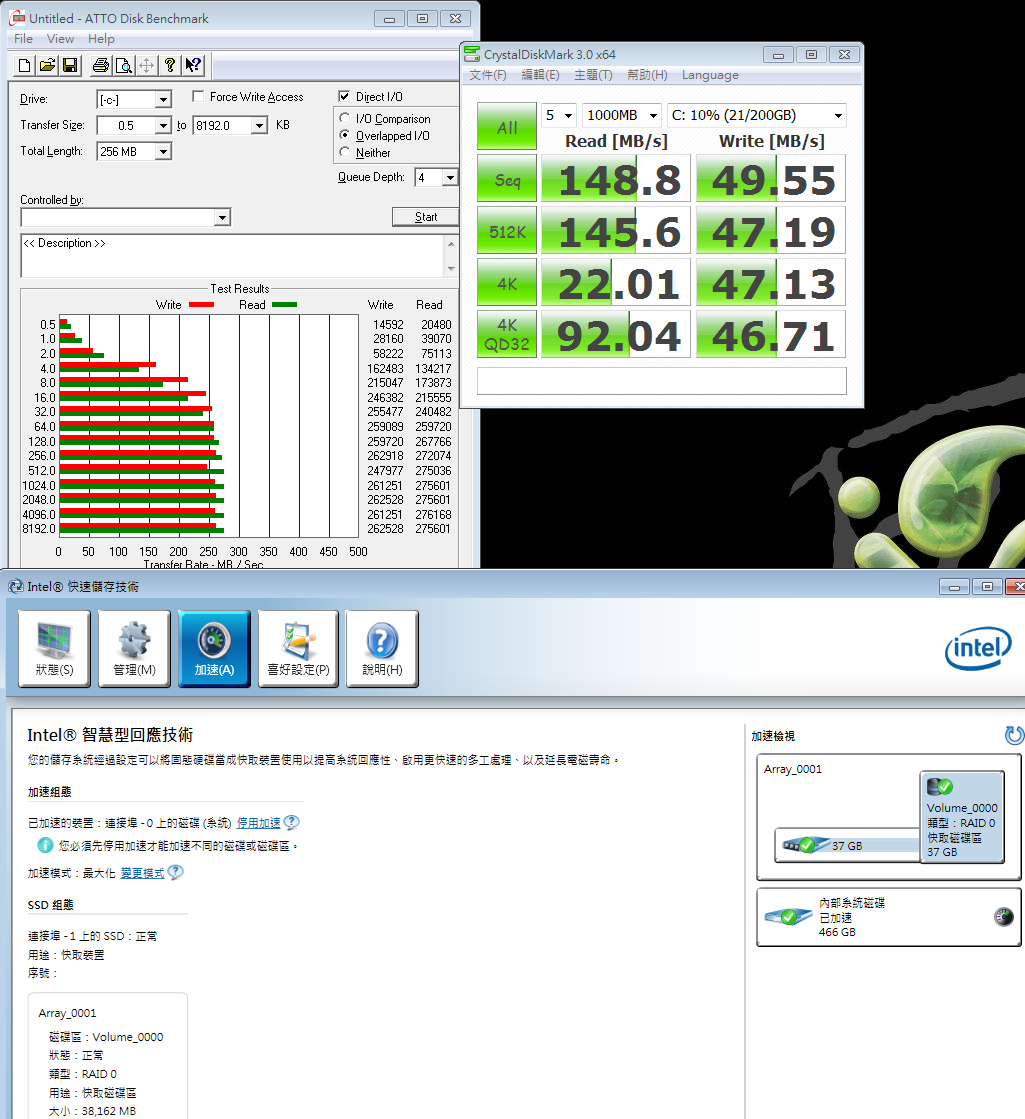
HD Tune Pro 4.60 Benchmark
File Benchmark
Over 256K, the reading is over 250MB/s.
Read - Average 133.0 MB/s Access Time 0.080ms
ADIA64 DISK Benchmark
Buffered Read Average - 240.2 MB/s

In maximized mode, writing and 4K performance is great improved and almost same performance as SSD F40.
Enhanced mode improvement is not as big as Maximized mode. However, it’s write-through cache without data loss risk.
Maximized mode is read/write cache. If you encounter access issue or drive failure, the data may lost or system crash.
Depending on your need, you can choose which SRT mode is more suitable for you.
-
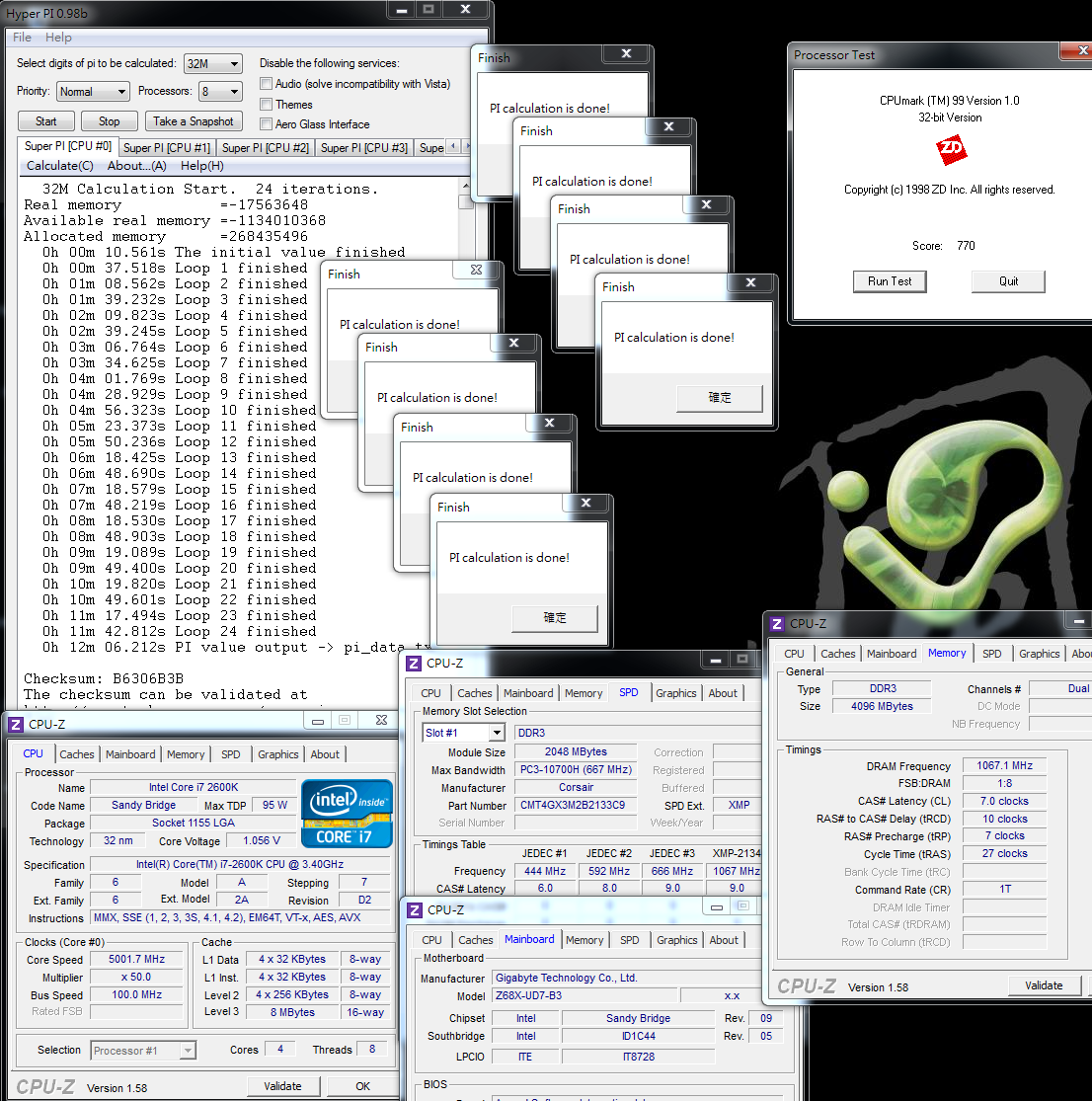
5G OC Performance
CPU 100 X 45 => 4501.5MHz 1.400V
DDR3 1600.6 CL7 7-7-21 1T 1.600V
Hyper PI 32M X8 => 12m 06.212s
CPUMARK 99 => 770
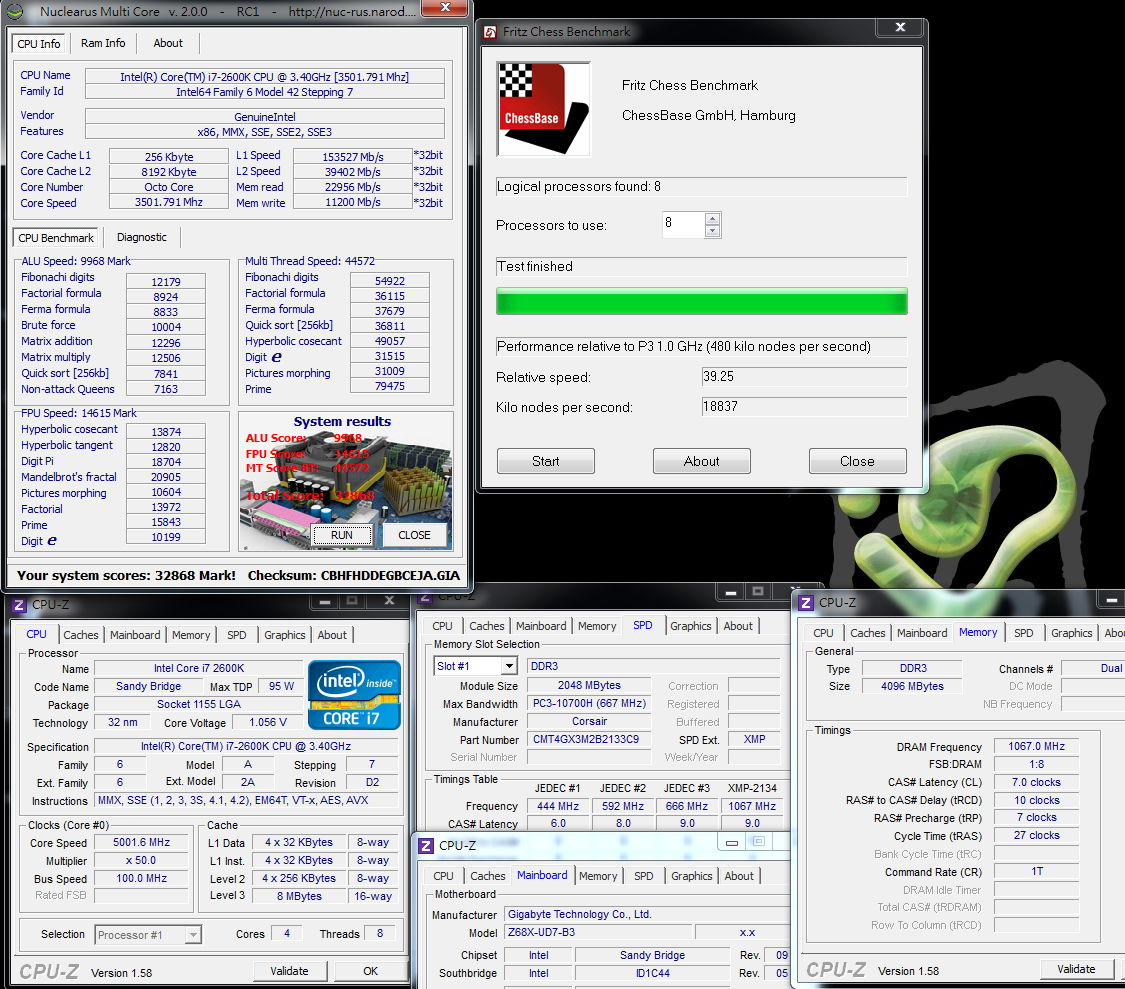
Nuclearus Multi Core => 32868
Fritz Chess Benchmark => 39.25/18837
CrystalMark 2004R3 => 404509

CINEBENCH R11.5
CPU => 9.73 pts
CPU(Single Core) => 2.04 pts
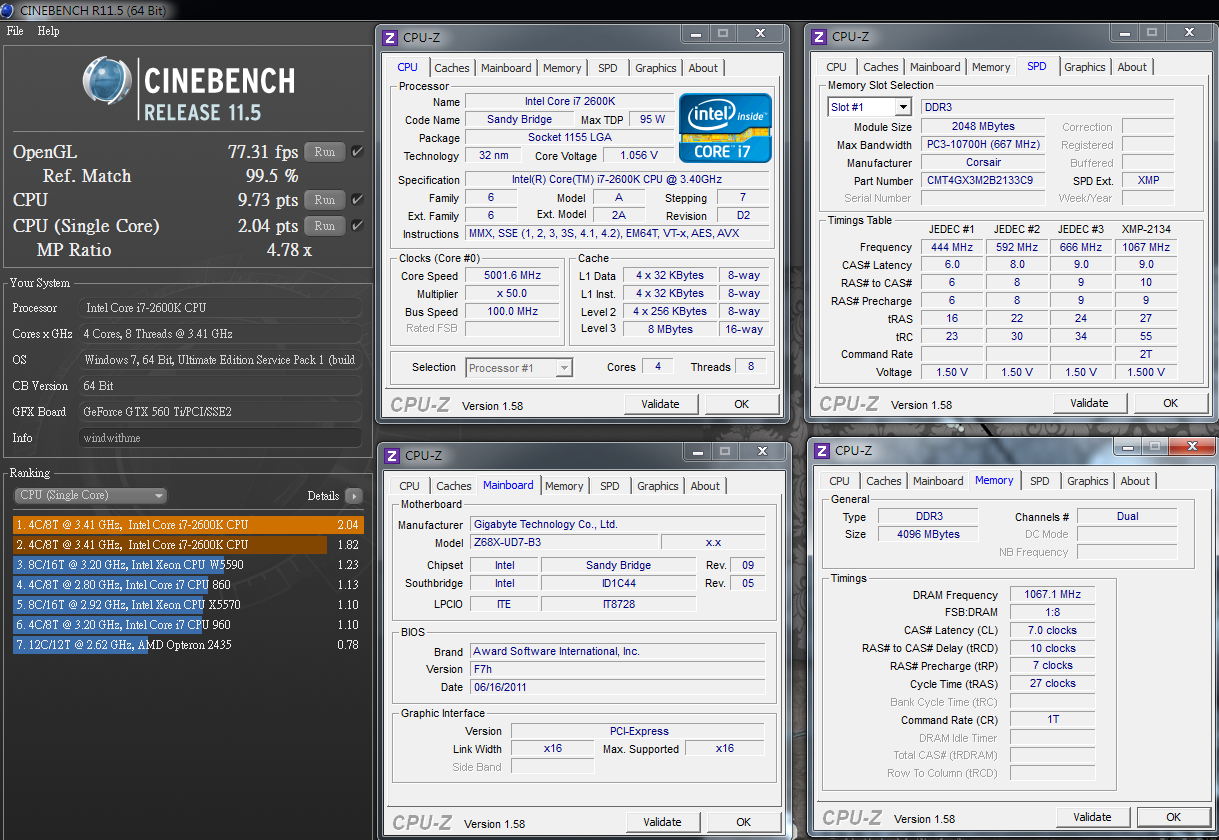
Windows Experience Index - CPU 7.8

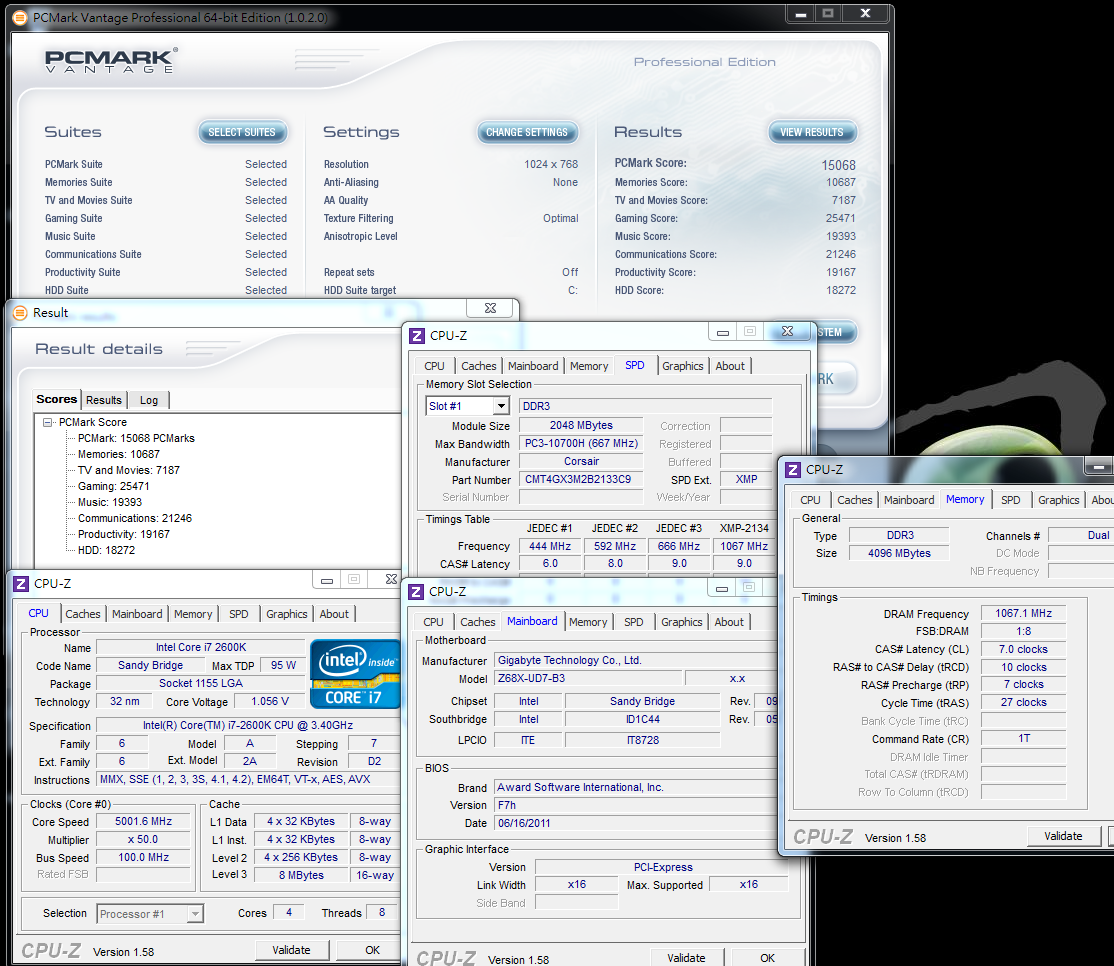
PCMark Vantage => 15068
After Sandy Bridge launched, New 5G Club start to appear in internet.
If you want to join it, besides good quality 2600K, cooler is another key factor.
Pulling 4.5GHz to 5GHz, CPU related benchmark increase 8~10%.
5GHz 2600K single core performance is hard to have competitor.
Muli-tasking competitor? is only Intel 990X OC 4.5GHz or possible AMD Llano.
DDR3 Test
ADIA64 Memory Read - 24955 MB/s
Sandra Memory Bandwidth - 27908 MB/s
MaXXMEM Memory-Copy - 27807 MB/s
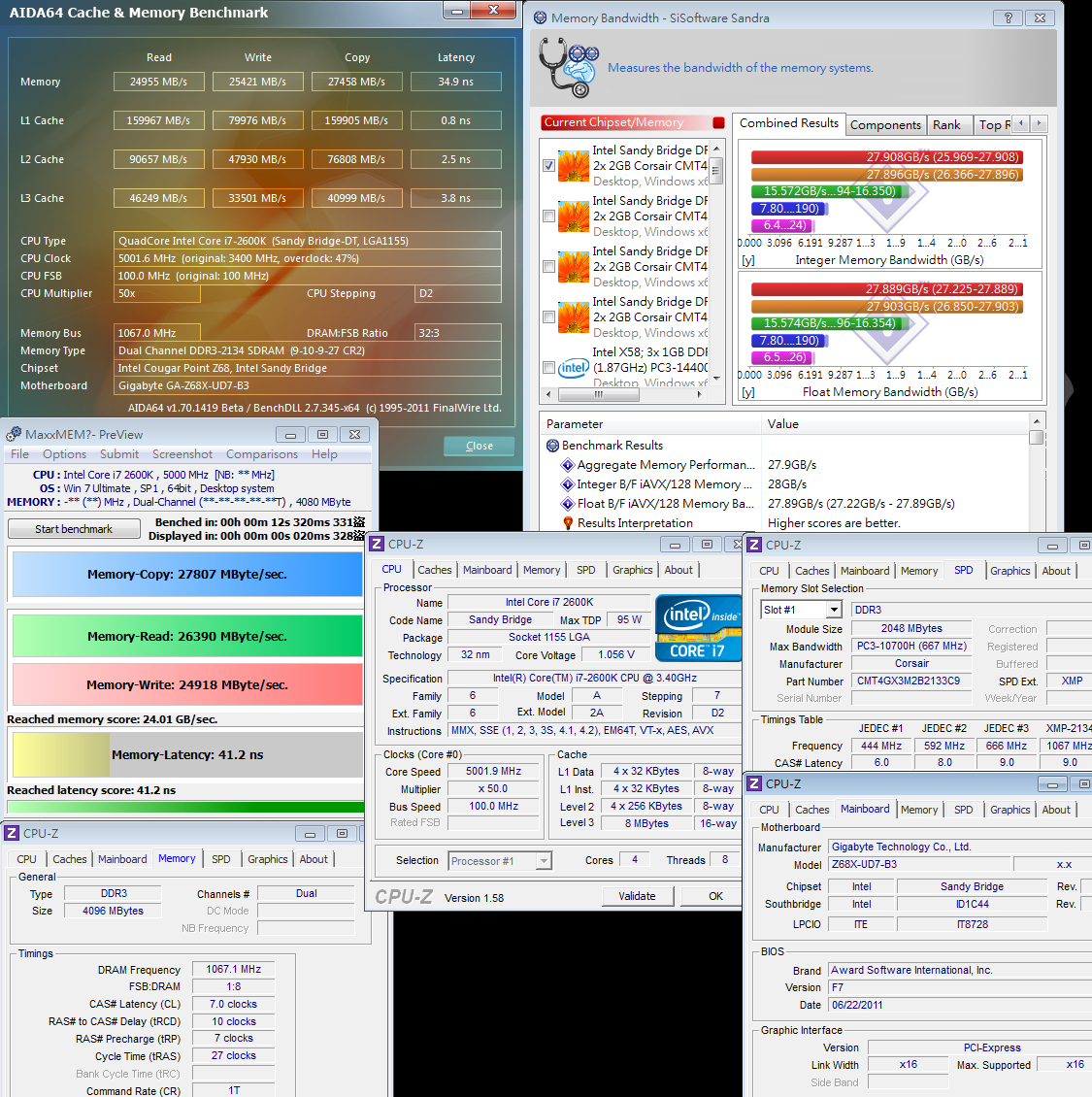
LGA 1155 platform DRAM bandwidth is decided by clock.
DDR3 2133 performance is much higher than DDR3 1600.
Of course, CL can rise some bandwidth, but the key factor is still frequency.
Temperature (Room Temp. is 28?)
Enter to OS Desktop - 37~43
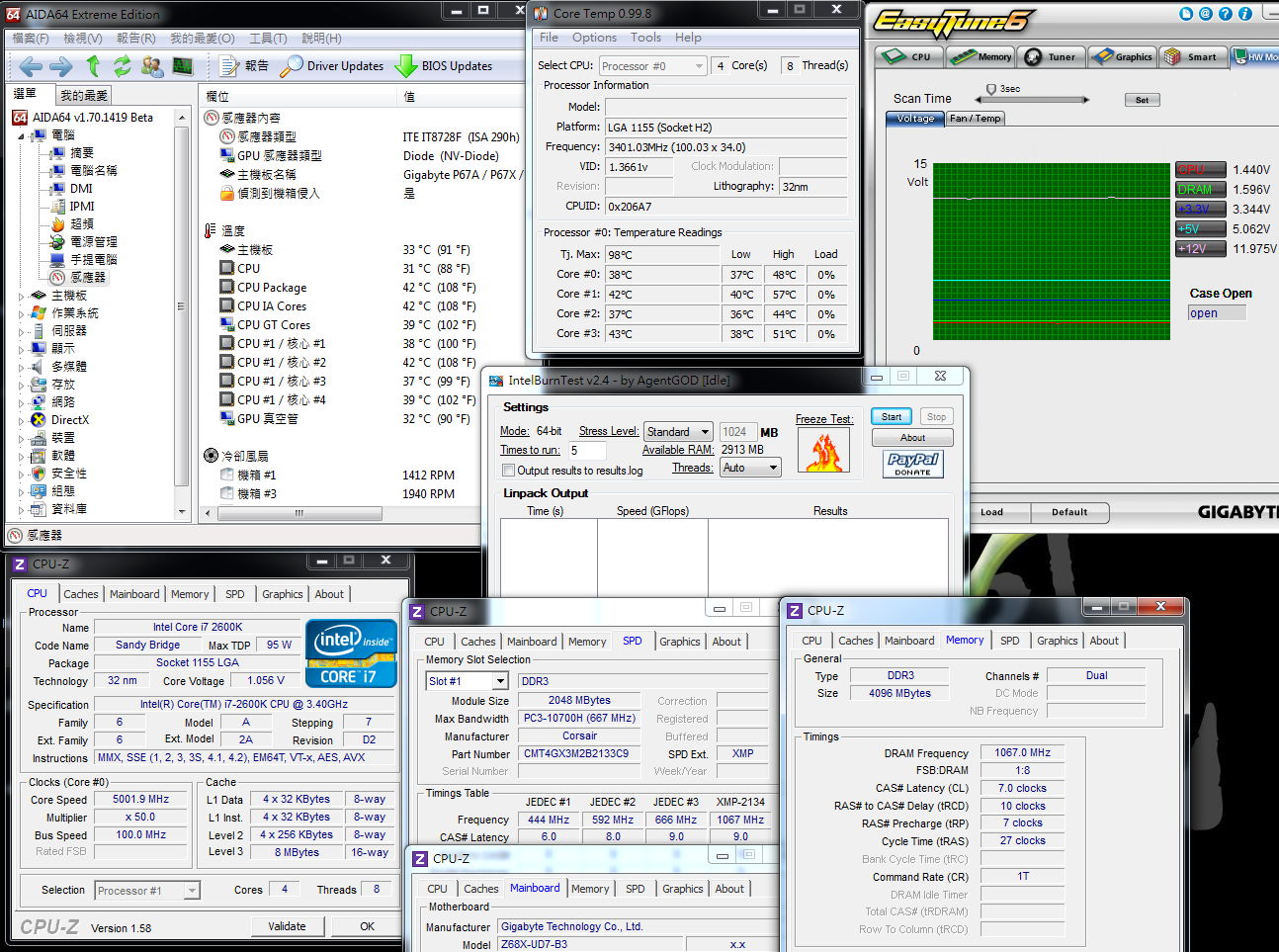
CPU Full Speed - 72~81
Intel Burn Test v2.4?Stress Level Maximum

When entering to OS desktop, the temperature is similar to 4.5GHz. Full Speed is 11~17? higher.
This is caused by higher voltage and frequency. It’s the extra cost for 5GHz.
If you are using Mega Shadow Deluxe Edition, in full speed, the temperature is 90?.
This review is using CORSAIR H70 water cooling system, so you can see the difference.
Last review, I used 2500K OC 5G/FOXCONN P67/nVIDIA GTX590 platform, Power Supply using 550W is enough.
This time, 2600K OC 5G/GIGABYTE Z68/ nVIDIA GTX560 Ti, I use 450W to see if it’s enough for this high end platform.
Thermaltake TR2 450W?Active PFC and 80PLUS Bronze.

-
Cooling fan size is 12cm and 2200rpm low acoustic.
It’s 5 years warranty and 1 year for swapping new.
450W spec with the price and service, it’s good C/P value.
If they can improve components more in the future, it’s very good value PSU.

Power Consumption Test
Enter to OS Desktop - 135W
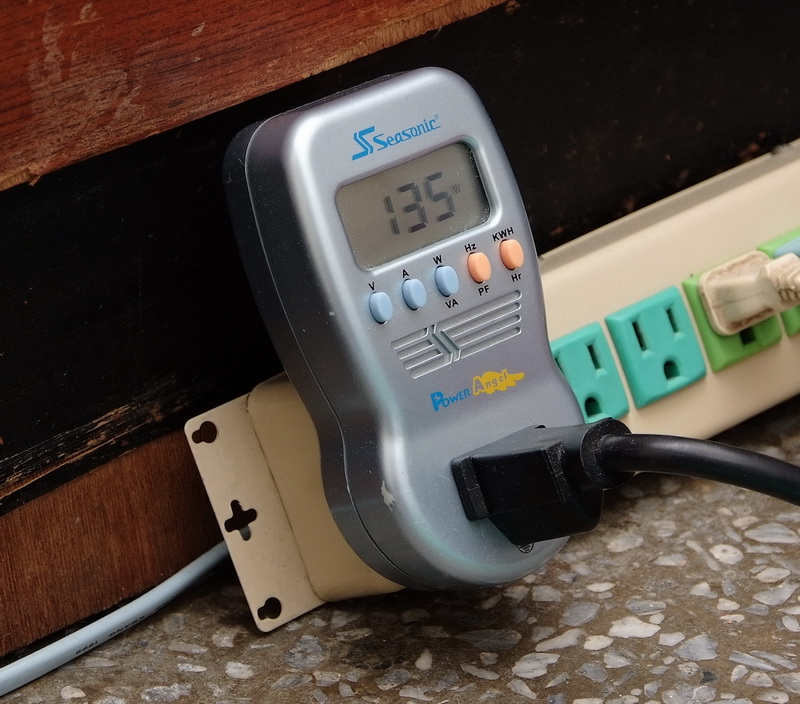
CPU Full Speed - 261W

Power Consumption status is similar to temperature. Entering to OS, Power Consumption is 21W higher than 4.5GHz which is not big gap.
5GHz full speed Power Consumption is 261W which is 63W higher than 4.5GHz.
This is another extra cost for 5GHz. For enthusiasts, the proud of 5GHz long term run is priceless.
TR2 450W can really deal with this high end platform. Even GTX560 Ti full speed run, it’s still hard to over 400W Power Consumption.
Sandy Bridge structure is really saving PC power.
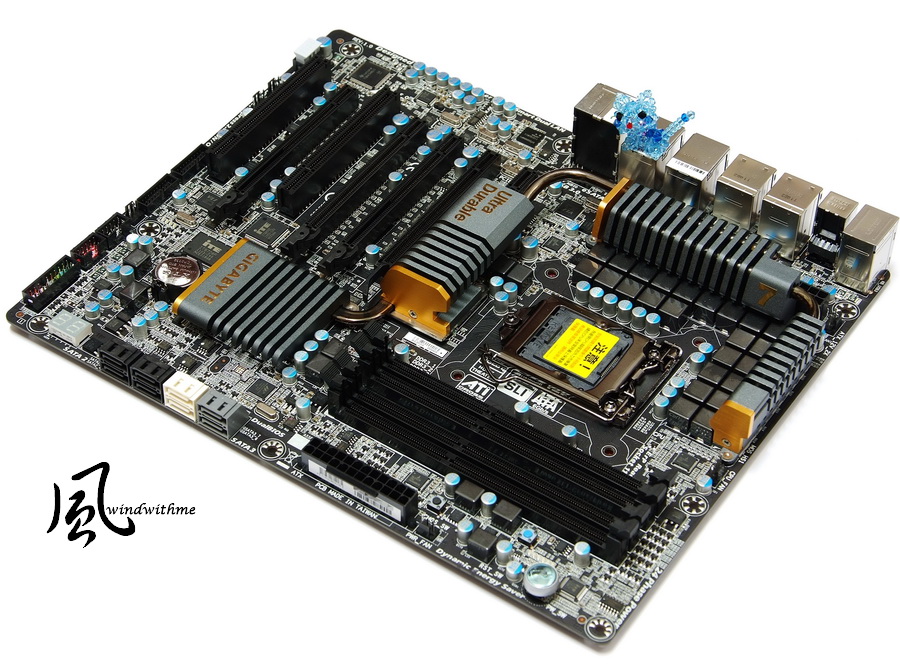
GIGABYTE Z68X-UD7-B3
Good
1.Z68X-UD7 is all black design and new heatsink design. The texture is better.
2.Rich BIOS items, more voltage range, OC ability is very good.
3.VGA can support up to 3Way ATI CrossFireX/NVIDIA SLI technology
4.Dual LAN, 2 eSATA, 4 SATA3 and 10 USB3.
5.100% Japanese Solid Capacitors, built-in POWER/RESET/CMOS Reset buttons and debug LED.
6.Z68 exclusive SRT is really helpful for system performance, and GIGABYTE own design, EZ Smart Response, can avoid re-installing OS.
Weak
1.Due to rich IO interfaces, it doesn’t have GPU output which cannot support Lucid Virtu.
2.CPU voltage only display correctly in BIOS and own software. Some software cannot display right.
Performance ??????????
Components ??????????
Specification ??????????
Outlook ??????????
C/P Value ??????????
UD7 is one of the most high end GIGABYTE model. The components and spec are the best in GIGABYTE brand.
As it’s top end product, the price is also high.
For pyramid top MB product, C/P value is always low. It’s only for high budget users.
If you need high performance CPU, I recommend 2500K/2600K.
After OC, the performance is improved clearly. Also new technologies of Sandy Bridge can improve platform efficiency.
Z68 is only one integrated P67 OC and H67 GPU output Sandy Bridge chipset.
Z68MB price is higher than P67 in same spec.
If your original budget is P67, you can consider Z68.
So far Z68 product line is not many in Taiwan. I believe all MB makers will launch more Z68 products for users.

This article is top Intel LGA1155 platform which includes performance and new technologies.
This is should be my longest review this year. It takes me 2 weeks for OC, tuning and all features test.
My next one will be entry Z68 or AMD FM1 platform. Please look forward it.
This article is also in my blog.
Welcome your visit.
-
Excellent review wind and good job
-
Good job

Ciao! Sembra che tu sia interessato a questa conversazione, ma non hai ancora un account.
Stanco di dover scorrere gli stessi post a ogni visita? Quando registri un account, tornerai sempre esattamente dove eri rimasto e potrai scegliere di essere avvisato delle nuove risposte (tramite email o notifica push). Potrai anche salvare segnalibri e votare i post per mostrare il tuo apprezzamento agli altri membri della comunità.
Con il tuo contributo, questo post potrebbe essere ancora migliore 💗
Registrati Accedi