
[Thread Ufficiale] NVIDIA GF104 - GeForce GTX 460
-
G80 ha scritto:
Morale se prendi una GLH che ha le frequenze degli shader a 1600 pareggi praticamente la potenza di calcolo teorica della 470,e sì,se non usi applicazioni che la sfruttano Physx non serve a una mazza.
Al massimo si potrebbe prendere una 460 GLH singola adesso e fra qualche mese, se ci saranno molti più titoli che implementano physix, prenderne un'altra e fare uno sli.
-
Poliphilo ha scritto:
Al massimo si potrebbe prendere una 460 GLH singola adesso e fra qualche mese, se ci saranno molti più titoli che implementano physix, prenderne un'altra e fare uno sli.Già

-
ciao a tutti, vorrei 1a vostra opinione riguardante la 460 della gigabyte. sarei intenzionato ad acquistarla, leggendo qua e là, ne parlano tutti bene! voi ke ne pensate? in overclocking (qst lo kiedo a delly) :-)?
-
V[Caronte;233069']ciao a tutti' date=' vorrei 1a vostra opinione riguardante la 460 della gigabyte. sarei intenzionato ad acquistarla, leggendo qua e là, ne parlano tutti bene! voi ke ne pensate? in overclocking (qst lo kiedo a delly) :-)?[/quote']
per come la vedo io non cambia nulla...son tutte pressapoco uguali, prendi quella che trovi a meno...che risparmi e ti diverti di più a overcloccarla...
-
delly ha scritto:
per come la vedo io non cambia nulla...son tutte pressapoco uguali, prendi quella che trovi a meno...che risparmi e ti diverti di più a overcloccarla...
grazie x avermi risp.... :n2mu: si intendo prendere qst, ha un buon sistema d dissipazione (se nn il migliore della serie), qnd nn ho problemi d alte temperature, poi ha un buon prezzo...
-
delly ha scritto:
per come la vedo io non cambia nulla...son tutte pressapoco uguali, prendi quella che trovi a meno...che risparmi e ti diverti di più a overcloccarla...
Anzi visto che c'è più margine di overclock dovrebbe costare di più... Il divertimento non ha prezzo!
-
Le085 ha scritto:
Anzi visto che c'è più margine di overclock dovrebbe costare di più... Il divertimento non ha prezzo!già...proprio vero...lol...:clapclap:

-
V[Caronte;233073']grazie x avermi risp.... :n2mu: si intendo prendere qst' date=' ha un buon sistema d dissipazione (se nn il migliore della serie), qnd nn ho problemi d alte temperature, poi ha un buon prezzo...[/quote']
Ciao
Si la Gigabyte dovrebbe esser una delle poche con i dissi sui VRM,controlla comunque che non sia mai...
-


Ecco la bimba Goes like Hell By Rhada

-
258.96 a 840 /1680/1025
Dx9-------------> Scores 1841, fps 71.3 , Min 13.6 , Max 136.2
Dx10------------> Scores 1698, fps 67,4 , Min 6,3 , Max 129,9
Dx11------------> Scores 1079, fps 42,8 , Min 4,1 , Max 82,9
259.32 a 840/1680/1025
Dx9-------------> Scores 1767, fps 70,1 , Min 28,9 , Max 130,9
Dx10------------> Scores 1709, fps 67,8 , Min 29,2 , Max 129,6
Dx11------------> Scores 1091, fps 43,3 , Min 18,9 , Max 82,8
259.47 a 840/1680/1025
Dx9-------------> Scores 1852, fps 73,5 , Min 29,4 , Max 136,6
Dx10------------> Scores 1716, fps 68,1 , Min 28,2 , Max 130,0
Dx11------------> Scores 1098, fps 43,6 , Min 19,1 , Max 83,2
-
Rhadamanthis ha scritto:
258.96 a 840 /1680/1025Dx9-------------> Scores 1841, fps 71.3 , Min 13.6 , Max 136.2
Dx10------------> Scores 1698, fps 67,4 , Min 6,3 , Max 129,9
Dx11------------> Scores 1079, fps 42,8 , Min 4,1 , Max 82,9
259.32 a 840/1680/1025
Dx9-------------> Scores 1767, fps 70,1 , Min 28,9 , Max 130,9
Dx10------------> Scores 1709, fps 67,8 , Min 29,2 , Max 129,6
Dx11------------> Scores 1091, fps 43,3 , Min 18,9 , Max 82,8
249.47 a 840/1680/1025
Dx9-------------> Scores 1852, fps 73,5 , Min 29,4 , Max 136,6
Dx10------------> Scores 1716, fps 68,1 , Min 28,2 , Max 130,0
Dx11------------> Scores 1098, fps 43,6 , Min 19,1 , Max 83,2
Più i driver sono vecchi meglio vanno i giochi dx9...

-
Rhadamanthis ha scritto:
258.96 a 840 /1680/1025Dx9-------------> Scores 1841, fps 71.3 , Min 13.6 , Max 136.2
Dx10------------> Scores 1698, fps 67,4 , Min 6,3 , Max 129,9
Dx11------------> Scores 1079, fps 42,8 , Min 4,1 , Max 82,9
259.32 a 840/1680/1025
Dx9-------------> Scores 1767, fps 70,1 , Min 28,9 , Max 130,9
Dx10------------> Scores 1709, fps 67,8 , Min 29,2 , Max 129,6
Dx11------------> Scores 1091, fps 43,3 , Min 18,9 , Max 82,8
249.47 a 840/1680/1025
Dx9-------------> Scores 1852, fps 73,5 , Min 29,4 , Max 136,6
Dx10------------> Scores 1716, fps 68,1 , Min 28,2 , Max 130,0
Dx11------------> Scores 1098, fps 43,6 , Min 19,1 , Max 83,2
molto bene...

sembra molto buoni questi driver allora...
-
uscita la versione 2.0.0 Finale di MSI AfterBurner...
Migliorie:
-
Voltage control layer has been seriously revamped to give additional freedom to extreme overclockers with new custom design MSI graphics cards. Now MSI Afterburner is able to control up to 3 voltages on custom design MSI Fermi and other future custom design MSI graphics cards. New adjustable voltages include memory voltage and special multi-purpose auxiliary voltage feeding either memory bus (also known as VDDCI on AMD graphics cards) or PCIE bus and crystal (PEXVDD on NVIDIA graphics cards)
-
Added core, memory and auxiliary PEXVDD voltage control for custom design MSI N480GTX Lighning series graphics cards with uP6225+uP6262 voltage regulators
-
Added core, memory and auxiliary PEXVDD voltage control for custom design MSI N470GTX Twin Frozr II OV3 series graphics cards with uP6218+uP6262 voltage regulators
-
Added core, memory and auxiliary PEXVDD voltage control for custom design MSI N460GTX Hawk series graphics cards with uP6262 voltage regulators
-
Added core voltage control for custom design MSI N460GTX Cyclone series graphics cards
-
Added auxiliary VDDCI voltage control for reference design AMD RADEON HD 5870 series graphics cards
-
Added fan tachometer monitoring for NVIDIA graphics cards. Please take a note that not all graphics cards are tachometer reading capable. So depending on graphics card and cooling system fan tachometer monitoring can be unavailable
-
Optimized NVIDIA driver-level clock frequency monitoring codepath
-
Minimum clock limits for all graphics cards have been reduced from 75% to 50%
-
Dynamic overclocking, voltage and fan speed limits. MSI Afterburner no longer uses static slider limits calibration and adjusts the limits dynamically when some external factors affect it (e.g. Overdrive clock limits on AMD cards or VGA BIOS fan speed and voltage limits on NVIDIA GeForce GTX 400 cards)
-
New temperature hysteresis settings for software automatic fan control mode gives you additional way to improve cooling system thermal and acoustic parameters
-
Now fan speed limits (i.e. minimum and maximum fan speeds accepted by VGA BIOS and display driver) are displayed in custom fan speed curve editor window
-
Built-in skin sizes have been reduced due to optimized internal skin panels representation and optimized compiled bitmap cache
-
Optional skin compression ability in the built-in skin compiler. Skin format reference documentation has been updated to document new compression options
-
Minor built-in skins appearance tweaks
-
Now MSI Afterburner uses previously undocumented power user oriented startup mode via the task scheduler under Windows Vista / Windows 7. MSI Afterburner launch no longer requires UAC confirmation at Windows startup. Please take a note that Microsoft Visual C++ 2008 runtime libraries must be installed to get new startup mode working
-
Now MSI Afterburner automatically fixes startup link if or is enabled but the registry or task scheduler startup entry is missing
-
Startup profile is now displayed in option floating tooltip instead of the main window
-
Now power users can enable optional DirectInput based hotkeys handler via the configuration file. DirectInput based hotkeys processing can seriously reduces hotkey response time in the applications heavily loading CPU (mostly 3D games) and leaving not enough time for processing standard keyboard input message queues. Please take a note that enabling such sophisticated hotkeys handling mode can cause some system security applications (e.g. pro-active application behavior analysis module of KIS) to warn you about possible keylogging threat
-
Improved skin engine, now skinned controls support horizontal and/or vertical centering. Skin format reference guide has been updated to document these new alignment modes
-
MSI On-Screen Display server has been upgraded to version 3.7.2. New version gives you the following improvements:
-
Now screen capture events are identified visually by text message flashing in On-Screen Display during 0.25s
-
Built-in skin sizes have been reduced due to optimized compiled bitmap cache
-
Added On-Screen Display profile for Startcraft II : Wings of Liberty
-
Added configuration file switch allowing sending MSI Afterburner to system tray instead of closing on button click
-
option is no longer set in the startup task settings to allow automatically starting application via the task scheduler on laptops or on some UPS models
-
Added optional data filtering mode for all hardware monitoring graphs. Now it is possible to enable special math data filtering algorithm independently for each hardware monitoring graph to reject misreading spikes caused by sensor access conflicts when running multiple hardware monitoring tools at the same time
-
Now it is posssible to use both core and shader clock as the primary clock when adjust the clocks in linked mode
-
Fixed videomemory usage monitoring for non-primary NVIDIA graphics cards
-
Application restart is no longer required to apply new user interface language
-
Updated localization engine. Now floating tooltips based context help system supports macro definitions
-
Localization reference guide documentation has been updated to v1.1
-
Various typo fixes in different language packs
-
Added Korean localization
-
Voltage control layer has been seriously revamped to give additional freedom to extreme overclockers with new custom design MSI graphics cards. Now MSI Afterburner is able to control up to 3 voltages on custom design MSI Fermi and other future custom design MSI graphics cards. New adjustable voltages include memory voltage and special multi-purpose auxiliary voltage feeding either memory bus (also known as VDDCI on AMD graphics cards) or PCIE bus and crystal (PEXVDD on NVIDIA graphics cards)
-
Fantastico MSI Afterburner

Vediamo come risponderà EVGA col Precision+sua versione tweakata di FurMark.
-
lowenz ha scritto:
Fantastico MSI AfterburnerVediamo come risponderà EVGA col Precision+sua versione tweakata di FurMark.
già...afterburner è veramente ottimo...
non sarebbe male se nelle prox versioni di precision aggiungessero la possibilità di overvolt...
-
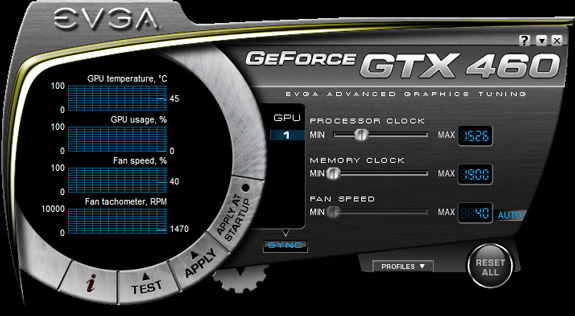
NUOVO EVGA PRECISION 2.0
Migliorie:
- Added software automatic fan control mode allowing end users to define custom temperature to fan speed mapping curve
- Added floating tooltips based help system for advanced EVGA Precision settings window
- Now it is possible to pause hardware monitoring module via "Pause" command in the context menu of hardware monitoring window
- Performance profiler status information is no longer power user oriented, now it is possible to toggle the performance profiler status visibility directly via "Show status" command in the context menu of hardware monitoring window
- Now it is possible to clear hardware monitoring history via "Clear history" command in the context menu of hardware monitoring window
- Now it is possible to get directly into hardware monitoring graph properties by clicking a tray icon associated with it or via "Properties" command in the context menu of hardware monitoring window
- Added multilanguage system and sample Russian localization pack
- Added SDK folder containing reference guide documentation for third party EVGA Precision skin and localization creators
- Now core clock controls are displayed on GeForce 400 series if built-in skins are in use. Please take a note that it is still impossible to adjust core and shader clocks independenty on these cards due to GPU architecture limitations
- Now it is posssible to use both core and shader clock as the primary clock when adjusting the clocks in linked mode
- Removed some outdated options from advanced EVGA Precision settings window
- Framerate monitoring graph limits have been changed to [0,100] FPS
- Fan tachometer monitoring graph limits have been changed to [0,5000] RPM
- Fixed videomemory usage monitoring for non-primary Nvidia graphics cards
- Added ability to assign a hotkey for toggling the On-Screen Display Server blocking. This hotkey is aimed to provide a simple way for diagnosing the server related compatibility issues
- Now EVGA Precision uses previously undocumented power user oriented DirectInput based hotkey handler. New hotkey handling mechanism drastically reduces hotkey response time in applications heavily loading CPU. Please take a note that new sophisticated hotkeys handling can cause some system security applications (e.g. KIS proactive defense module) to warn you about possible keylogging threat
- Now screen capture events are also indicated by notification messages in the hardware monitoring window
- Added software automatic fan control mode allowing end users to define custom temperature to fan speed mapping curve
-
-
Uh, ottimo!
-
-



Ciao! Sembra che tu sia interessato a questa conversazione, ma non hai ancora un account.
Stanco di dover scorrere gli stessi post a ogni visita? Quando registri un account, tornerai sempre esattamente dove eri rimasto e potrai scegliere di essere avvisato delle nuove risposte (tramite email o notifica push). Potrai anche salvare segnalibri e votare i post per mostrare il tuo apprezzamento agli altri membri della comunità.
Con il tuo contributo, questo post potrebbe essere ancora migliore 💗
Registrati Accedi