
[ENG]Intel Ivy Bridge Entry ITX Platform - GIGABYTE B75N Performance Guide
-

2012, almost all active MB brands launched ITX boards.
ITX advantage is smaller dimension. If using high performance CPU,
GPU or WiFi technology support, it may create more value to PC as competing with smart phones, tablets or laptops.
GIGABYTE former two generations Intel ITX MB specs were normal and late.
For Ivy Bridge structure, the specs are improved a lot. It?s capable to compete with the others.
Taiwan has two models, H77N WIFI and B75N. The PCB designs are almost the same.
The main difference is H77N WIFI built-in BT4.0 / WiFi card and antenna.
H77 chipsets supports two SATA3 devices, but B75 only supports one.
This article is testing GIGABYTE B75N. It uses better texture black PCB.
If you have WiFi demand, you can choose H77N WIFI.

CPU PWM is 4+1 phases. B75 cannot adjust CPU ratio, so it?s enough for Core i7.
B75N market price is higher than other B75 ITX MB. However, the specs and components are quite high level.

Lower Side
1 X PCI-E X16 3.0 supports X16 bandwidth.
Dual LAN chips are both Realtek RTL8111E.
Audi chip is Realtek ALC892, supporting 7.1 channels and High Definition Audio technology.

Right Side
2 X DIMM DDR3 support 1066/1333/1600(Must use Ivy Bridge CPU)
DDR3 max capacity is 16GB, supporting Extreme Memory Profile technology.

Upper Side
1 X White SATA, support SATA3 by B75
3 X Black SATA, support SATA2 by B75
Upper left corner is Mini PCI-E slot for installing WiFi/BT 4.0 card. Lower left corner is 24-PIN power connector.

IO
1 X PS/2 KB/Mouse
2 X USB 3.0(Blue)
2 X HDMI
1 X DVI-I
4 X USB 2.0(Black)
2 X RJ-45 LAN
1 X S/PDIF Optical output
5 X Audio jacks

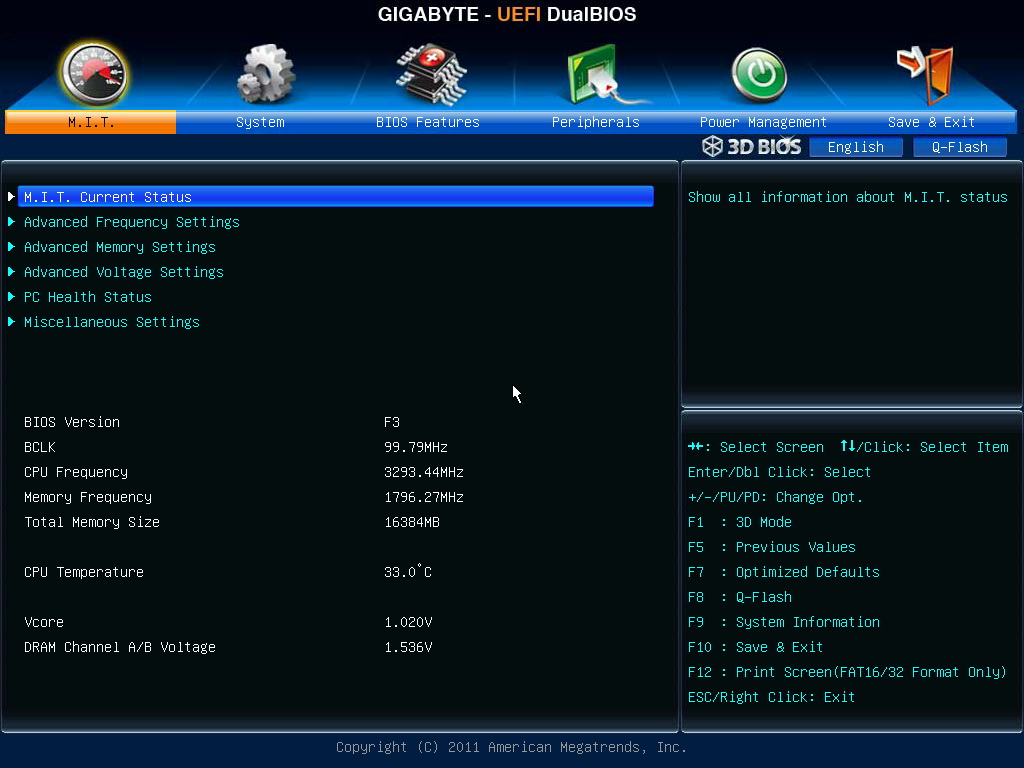
In 3D BIOS main screen, it shows major parts explanation as cursor over.

UEFI DaulBIOS the other interface is traditional screen. Most users are more familiar.
Test System Configuration
CPU: Intel Core i3-3220
MB: GIGABYTE B75N
DRAM: CORSAIR DOMINATOR-GT DDR3 1866 8GX2
VGA: Intel HD Graphics 2500 / AMD Radeon HD 7700
HDD: Seagate Momentus 500G
POWER: XIGMATEK Tauro 400W Bronze
Cooler: XIGMATEK HDT-S1283
OS: Windows8 64bit

-
2012, almost all active MB brands launched ITX boards.
ITX advantage is smaller dimension. If using high performance CPU,
GPU or WiFi technology support, it may create more value to PC as competing with smart phones, tablets or laptops.
GIGABYTE former two generations Intel ITX MB specs were normal and late.
For Ivy Bridge structure, the specs are improved a lot. It?s capable to compete with the others.
Taiwan has two models, H77N WIFI and B75N. The PCB designs are almost the same.
The main difference is H77N WIFI built-in BT4.0 / WiFi card and antenna.
H77 chipsets supports two SATA3 devices, but B75 only supports one.
This article is testing GIGABYTE B75N. It uses better texture black PCB.
If you have WiFi demand, you can choose H77N WIFI.
CPU PWM is 4+1 phases. B75 cannot adjust CPU ratio, so it?s enough for Core i7.
B75N market price is higher than other B75 ITX MB. However, the specs and components are quite high level.
Lower Side
1 X PCI-E X16 3.0 supports X16 bandwidth.
Dual LAN chips are both Realtek RTL8111E.
Audi chip is Realtek ALC892, supporting 7.1 channels and High Definition Audio technology.
Right Side
2 X DIMM DDR3 support 1066/1333/1600(Must use Ivy Bridge CPU)
DDR3 max capacity is 16GB, supporting Extreme Memory Profile technology.
Upper Side
1 X White SATA, support SATA3 by B75
3 X Black SATA, support SATA2 by B75
Upper left corner is Mini PCI-E slot for installing WiFi/BT 4.0 card. Lower left corner is 24-PIN power connector.
IO
1 X PS/2 KB/Mouse
2 X USB 3.0(Blue)
2 X HDMI
1 X DVI-I
4 X USB 2.0(Black)
2 X RJ-45 LAN
1 X S/PDIF Optical output
5 X Audio jacks
In 3D BIOS main screen, it shows major parts explanation as cursor over.
UEFI DaulBIOS the other interface is traditional screen. Most users are more familiar.
Test System Configuration
CPU: Intel Core i3-3220
MB: GIGABYTE B75N
DRAM: CORSAIR DOMINATOR-GT DDR3 1866 8GX2
VGA: Intel HD Graphics 2500 / AMD Radeon HD 7700
HDD: Seagate Momentus 500G
POWER: XIGMATEK Tauro 400W Bronze
Cooler: XIGMATEK HDT-S1283
OS: Windows8 64bit
-
CPU is Intel Core i3-3220, most entry Ivy Bridge so far.
The clock is 3.3GHz, physical 2 Cores with Hyper-Threading for 4 threads, called 2C4T.
It?s 22nm, TDP 55W and 3MB L3 Cache.
System Performance Test
CPU 99.8 X 32 => 3292.41MHz
DDR3 1796 CL9 10-9-27 2T
Hyper PI 32M X4 => 14m 14.585s
CPUMARK 99 => 514

Nuclearus Multi Core => 14268
Fritz Chess Benchmark => 13.29/6378

CrystalMark 2004R3 => 191818

CINEBENCH R11.5
CPU => 3.17 pts
CPU(Single Core) => 1.32 pts

PCMARK7 => 3099

Windows8 Experience Index - CPU 7.2

Core i3-3220 single thread performance is very high. 2C4T structure also works well for multi-tasking.
If you have higher performance demand for file converting or graphics related applications, you can consider Core i5 or i7 CPU. It will improve the performance.
DRAM Test
DDR3 1796 CL9 10-9-27 2T
ADIA64 Memory Read - 18452 MB/s
Sandra Memory Bandwidth - 22463 MB/s
MaXXMEM Memory-Copy - 19663 MB/s

DDR3 1995.4 CL9 11-10-27 1T
ADIA64 Memory Read - 19416 MB/s
Sandra Memory Bandwidth - 25345 MB/s
MaXXMEM Memory-Copy - 20886 MB/s

Ivr Bridge Momory Controller improves a lot. B75 chip can reach DDR3 2000.
Previous Sandy Bridge CPU with entry chipset only supported DDR3 1066~1333.
Comparing Intel two generations, DDR3 clock improves a lot. The bandwidth increases 25%.
Temperature (Room is 19)
Enter to OS Desktop - 26~28
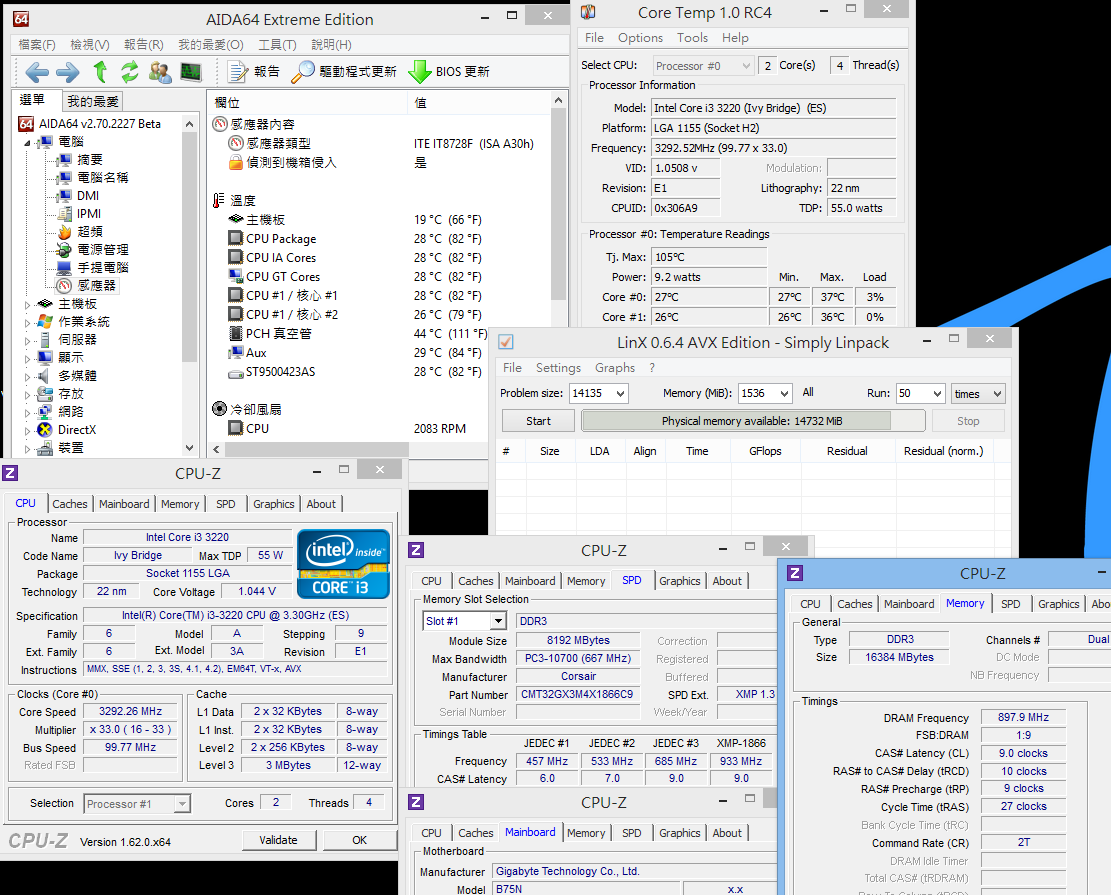
CPU Full Speed - 47~49
LinX 0.6.4

The test above is using Intel original cooler. The result is quite good already.
22nm is another Ivy Bridge advantage. Core i3-3220 temperature is quite low in default clock.
If installing in chassis, I estimate the temperature will rise 5~8 degree C more which is still acceptable.
-
For ITX platform users, most will use Intel original CPU Cooler.
Besides the convenience, it?s also hard to find ITX CPU Cooler.
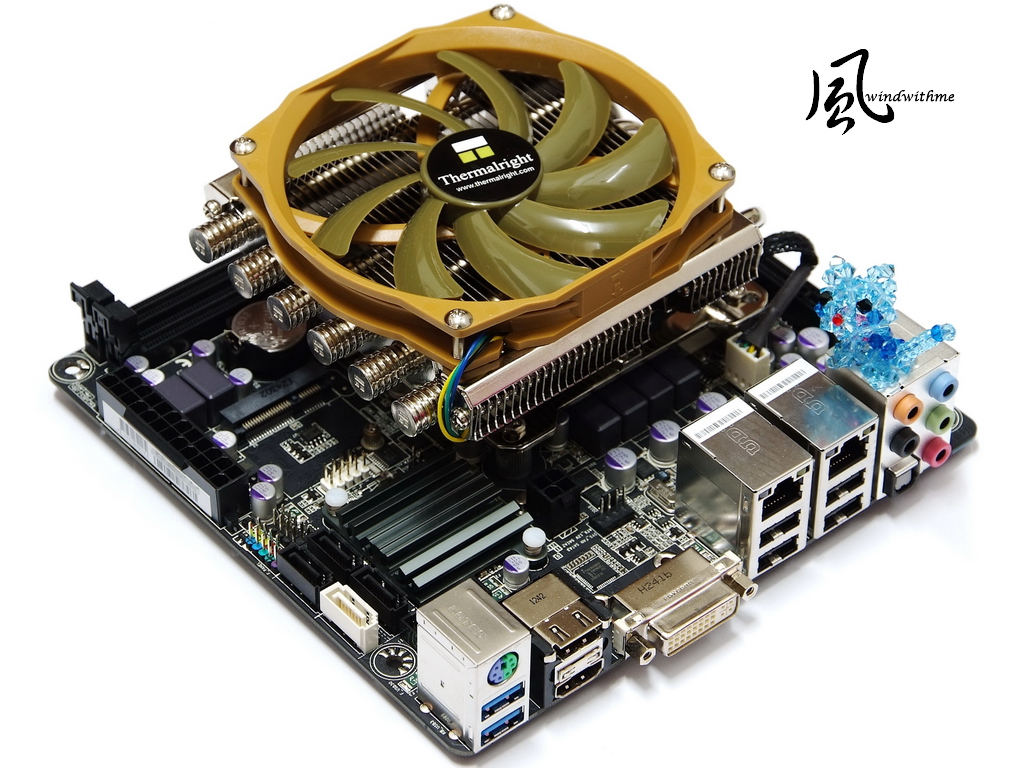
Thermalright, high end cooler maker, just launched a high end cooler for ITX platform.
The model is AXP-100. Packing is corrugated paper with black printing.

Contents
Left is manual, right is installation parts, and lower right is cooler.
The fan spec is L 108.25mm X H 101.5mm and Noise Level is 22~30 dBA.

AXP-100 body is nickel-plated. 6 heat-pipes improve thermal conduction.
L 121.1mm X W 105.47mm X H 44.15mm, the height with fan is 5.8cm.

CPU contact face is mirror polished. It looks like a boutique, and the price is also high.
If you would like to build a high end ITX PC or look for better heat dissipation, AXP-100 is one of the options.
However, big CPU cooler will interfere with DIMM1, you also can use standard height DDR3.

Temperature (Room is 19)
Enter to OS Desktop - 23~27

CPU Full Speed - 41~43
LinX 0.6.4

Comparing AXP-100 with Intel original cooler, when entering to OS desktop, it?s 1~3 lower and full speed is 5~6 lower.
The cooler performance is good at full speed condition, but the improvement is not huge. It dues to Core i3-3220 is low heat.
If I used Core i5 or i7 CPU, I believed AXP-100 would be much better.
3D Performance Test
Intel Core i3-3220 built-in HD Graphics 2500
3DMark Vantage => P1761

StreetFighter IV Benchmark
1280 X 720 => 45.00 FPS

FINAL FANTASY XIV
1280 X 720 => 726

HD Graphics 2500 is 30~50% faster than HD Graphics 2000.
However, the score is only entry level. If you use ITX PC as media player or limited 3D usage, it?s good enough.
If you would like to play 3D games, I do recommend you to install VGA.
Adding AMD Radeon HD 7700
3DMark Vantage => P7994

-
StreetFighter IV Benchmark
1280 X 720 => 143.98 FPS

FINAL FANTASY XIV
1280 X 720 => 2472

You can see the 3D performance increase 3-4 times more after using Radeon HD 7700.
General ITX Case is designed for saving space. You only can use short or Low Profile cards.
You have to put this into your consideration.
Power Consumption
Enable C1E, Enter to OS Desktop - 24W

Disable C1E, Enter to OS Desktop - 33W

Enabling and disabling CPU C1E power saving cause 9W difference.
It?s about 37.5% power saving.
Running LinX to make CPU full speed - 51W

Running OCCT Power Supply Test - 70W

CPU full speed and CPU+GPU full speed are 19W different.
It means HD Graphics 2500 full speed will consume 19W.
Adding AMD Radeon HD 7700 and running OCCT Power Supply test - 95W

After changing to AMD Radeon HD 7700, power consumption increases 41W.
AMD Radeon HD 7700 consumes less power in general usage. It?s quite power saving.
Intel latest ITX platform is saving power dues to 22nm manufacturing.
Many ITX Cases bundle with 150~200W Power Supply which are enough for general use.
GIGABYTE B75N
Pros
1.B75N uses black PCB for better texture
2.Dual LAN and dual HDMI for better video and network transmission.
3.Built-in Mini PCI-E slot to install WiFi card
4.Using 22nm entry dual core CPU, the temperature and power consumption performance is good.
5.DDR3 max clock and integrated GPU performance also improve by Ivy Bridge structure.
Cons
1.Price should be more competitive.
2.DDR3 1866, enable XMP, only shows DDR3 1796
Performance ?????????? 80/100
Components ?????????? 83/100
Specifications ?????????? 86/100
Appearance ?????????? 82/100
C/P Value ?????????? 84/100
GIGABYTE launched H77N WIFI and B75N LGA 1155 ITX both are competitive.
Comparing to the others, the specs are impressive and price is also acceptable.
Especially, H77N WIFI bundles BT4.0/WiFi card and antenna, the price is just a little bit higher than B75N.
For users has WiFi demand, it?s a good C/P value ITX MB.
All major MB brands have several ITX MBs in the market and price is very reasonable.
Just like B75N, it is little higher than other Micro ATX B75 MBs.
In the past, ITX MB price was 50~100% more than M-ATX.
Parity ITX platform is a trend, if you would like to build a small PC or HTPC.

Windwithme has 5-6 athletic shoes.
I just bought one basketball and one running shoes. I will make a review as I have free time.
ADIDAS CROSS 'EM basketball shoes. After trying on, the price and comfort are both good.

The other is ASICS GEL-KAYANO 18. I make quite much research and try on before buying.
The online reviews are very positive. I hope my first ASICS try can be a good experience.

This article also post in my blog - WIND3C, All comments are welcome.
-
I think that this mobo is very good for assembled a multimedia pc
-
quote
Ciao! Sembra che tu sia interessato a questa conversazione, ma non hai ancora un account.
Stanco di dover scorrere gli stessi post a ogni visita? Quando registri un account, tornerai sempre esattamente dove eri rimasto e potrai scegliere di essere avvisato delle nuove risposte (tramite email o notifica push). Potrai anche salvare segnalibri e votare i post per mostrare il tuo apprezzamento agli altri membri della comunità.
Con il tuo contributo, questo post potrebbe essere ancora migliore 💗
Registrati Accedi