
[ENG]Intel Ivy Bridge Structure with Core i5-3450 Performance and OC Share
-
Intel officially launched Ivy Bridge end of April. The market was full of mid-end and high-end products.
CPU still only had Core i5 and Core i7. Core i3 hasn’t updated to Ivy Bridge structure.
Currently Core i3, Pentium and Celeron CPUs are Sandy Bridge for better price.
I do hope Ivy Bridge structure Core i3 to launch earlier for better C/P value.
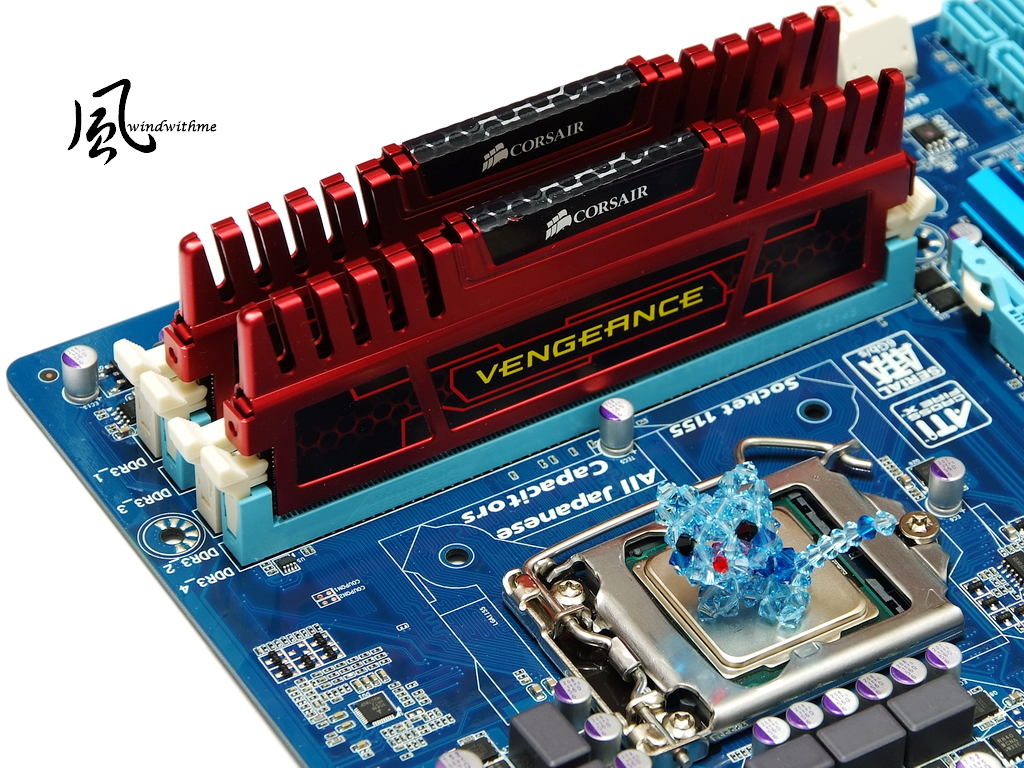
Currently, most entry Ivy Bridge is Core i5-3450. The price is for mid-end market.
Recently, Intel launched i5-3470 to replace it. The key difference is 100MHz clock.
These two models are replacing former Core i5-2400. I will share the performance difference below.
CPU is Intel Core i5-3450.
Clock is 3.1GHz and supports Turbo Boost 2.0 technology. The max clock is 3.5GHz.
It’s latest 22nm manufacturing, 3D transistor technology, physical 4 Cores and 4 threads, called 4C4T.
It’s 77W TDP and 6MB L3 Cache. You can see i5-3470 has appeared in the channel.
This article is for who has bought i5-3450 or looking forward i5-3470.

Intel 4 cores CPUs all use cooper bottom cooler. The bottom has solid-state thermal paste.
I recommend you to put more thermal paste personally to lower the temperature.

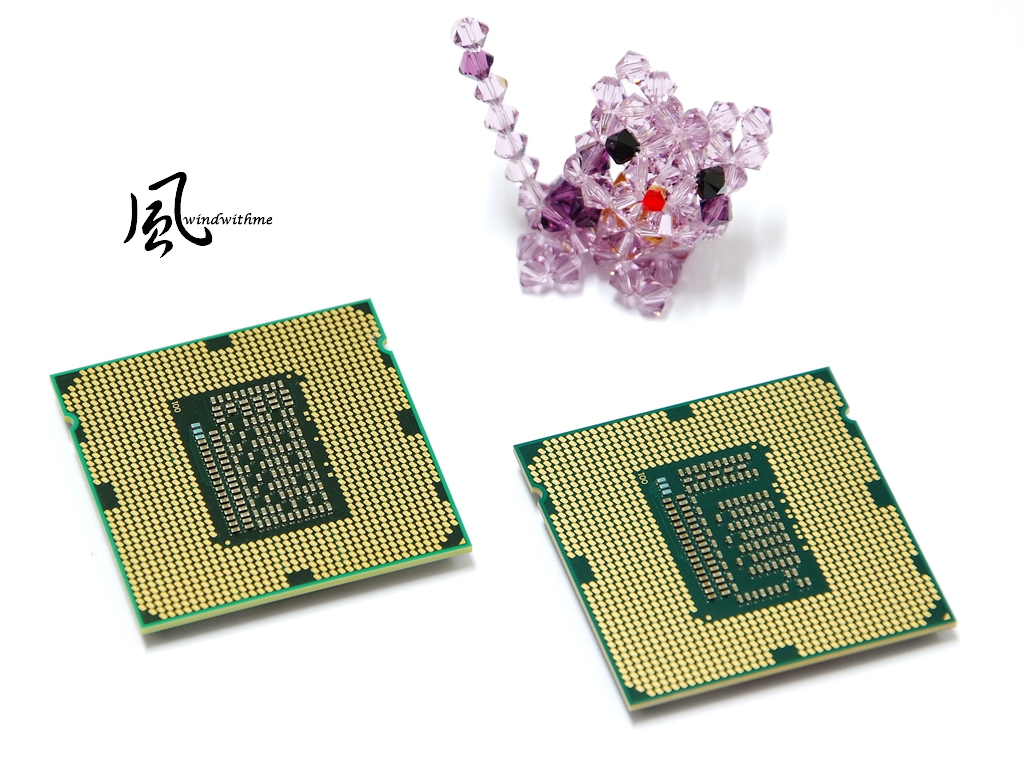
Lower-Right i5-3450 and Upper-Left i5-2400 Comparison.

Right is i5-3450 and left is i5-2400.
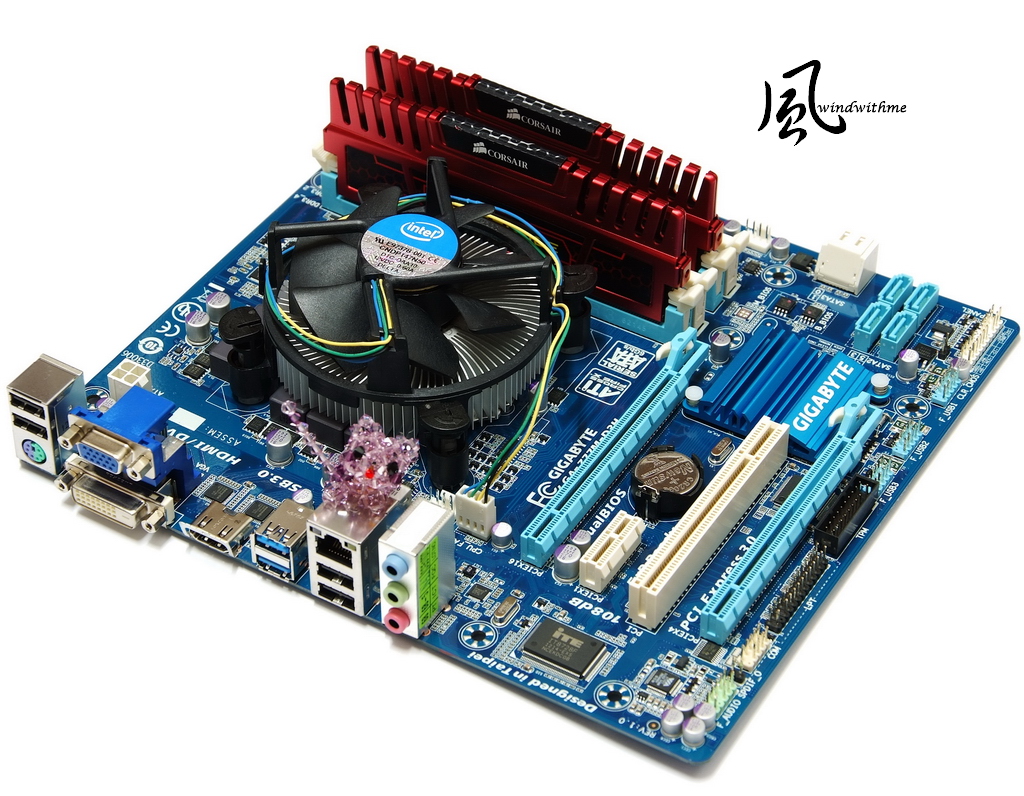
MB uses GIGABYTE Z77M-D3H, price is around 116USD.
PCB is Micro ATX and dimension is 24.4 X 22.0cm.
It’s blue PCB and white slots. I prefer blue color more.
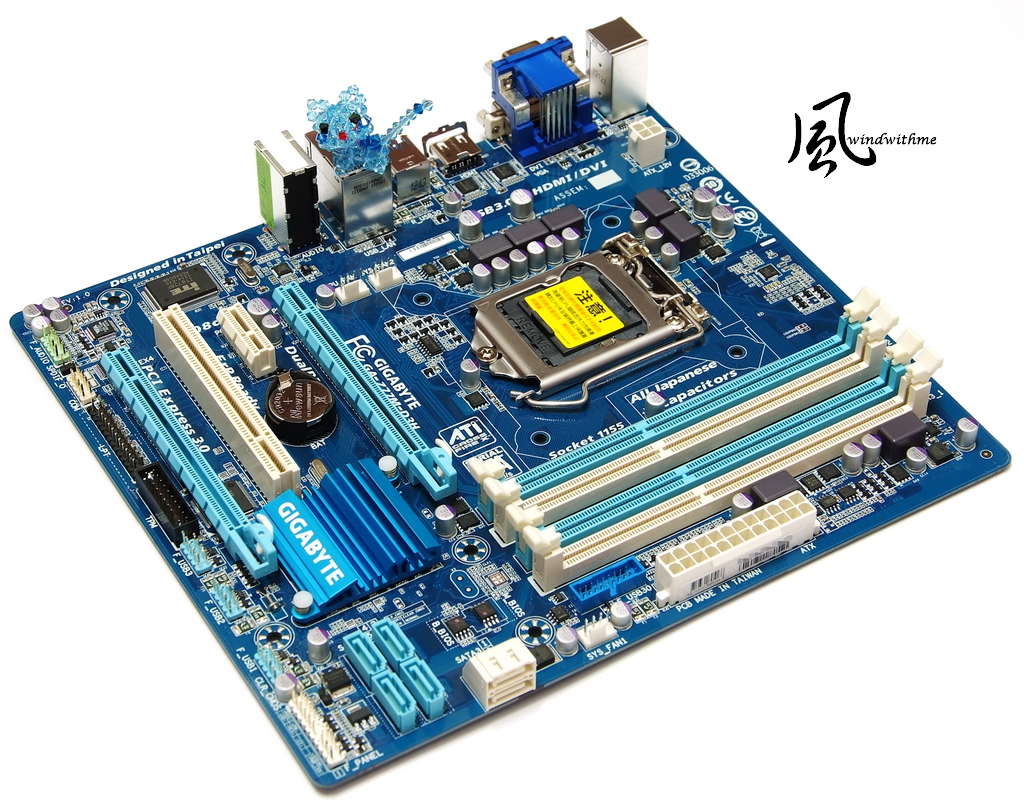
Windwithme used to share several ATX Z77 MBs. This time, I am using entry Micro ATX Z77.
Z77M-D3H is the cheapest version in 3 key brands.
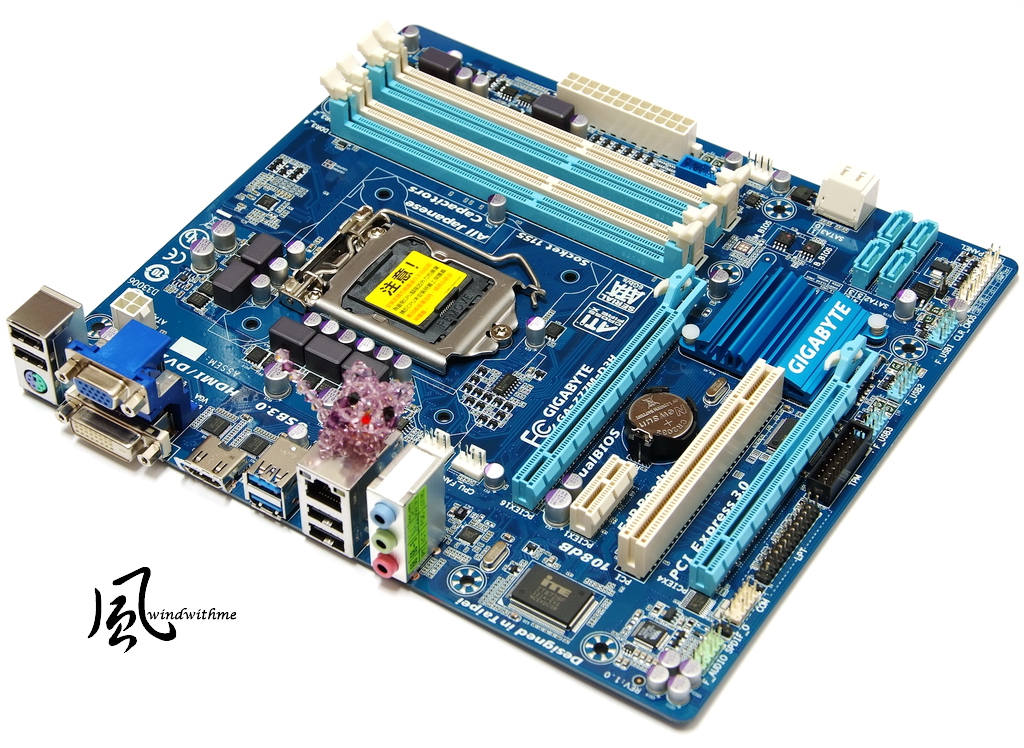
Lower-Left Corner
2 X PCI-E X16 supports 2-Way AMD CrossFireX
When using Ivy Bridge CPU, the bandwidth is Gen3, X16 + X4
1 X PCI-E X1
1 X PCI
LAN chip is Atheros GbE LAN
Audio chip is VIA VT2021 supporting 7.1 channel and High Definition Audio Technology
Design in Taipei

Lower-Right Corner
2 X White SATA, provided by Z77 and support SATA3.
4 X Black SATA, provided by Z77 and support SATA2.
It supports hybrid RAID 0, RAID 1, RAID 5 and RAID 10. The max performance is decided by installed SATA devices.
2 X 64 Mbit flash Dual BIOS and TPM(Trusted Platform Module) header.

Upper-Right Corner
4 X DIMM DDR3 support 1066/1333/1600/2400(OC). The max DDR3 capacity is 32GB.
It supports Extreme Memory Profile. Upper right is 24-PIN power connector and front USB 3.0.

-
Intel officially launched Ivy Bridge end of April. The market was full of mid-end and high-end products.
CPU still only had Core i5 and Core i7. Core i3 hasn’t updated to Ivy Bridge structure.
Currently Core i3, Pentium and Celeron CPUs are Sandy Bridge for better price.
I do hope Ivy Bridge structure Core i3 to launch earlier for better C/P value.
Currently, most entry Ivy Bridge is Core i5-3450. The price is for mid-end market.
Recently, Intel launched i5-3470 to replace it. The key difference is 100MHz clock.
These two models are replacing former Core i5-2400. I will share the performance difference below.
CPU is Intel Core i5-3450.
Clock is 3.1GHz and supports Turbo Boost 2.0 technology. The max clock is 3.5GHz.
It’s latest 22nm manufacturing, 3D transistor technology, physical 4 Cores and 4 threads, called 4C4T.
It’s 77W TDP and 6MB L3 Cache. You can see i5-3470 has appeared in the channel.
This article is for who has bought i5-3450 or looking forward i5-3470.
Intel 4 cores CPUs all use cooper bottom cooler. The bottom has solid-state thermal paste.
I recommend you to put more thermal paste personally to lower the temperature.
Lower-Right i5-3450 and Upper-Left i5-2400 Comparison.
Right is i5-3450 and left is i5-2400.
MB uses GIGABYTE Z77M-D3H, price is around 116USD.
PCB is Micro ATX and dimension is 24.4 X 22.0cm.
It’s blue PCB and white slots. I prefer blue color more.
Windwithme used to share several ATX Z77 MBs. This time, I am using entry Micro ATX Z77.
Z77M-D3H is the cheapest version in 3 key brands.
Lower-Left Corner
2 X PCI-E X16 supports 2-Way AMD CrossFireX
When using Ivy Bridge CPU, the bandwidth is Gen3, X16 + X4
1 X PCI-E X1
1 X PCI
LAN chip is Atheros GbE LAN
Audio chip is VIA VT2021 supporting 7.1 channel and High Definition Audio Technology
Design in Taipei
Lower-Right Corner
2 X White SATA, provided by Z77 and support SATA3.
4 X Black SATA, provided by Z77 and support SATA2.
It supports hybrid RAID 0, RAID 1, RAID 5 and RAID 10. The max performance is decided by installed SATA devices.
2 X 64 Mbit flash Dual BIOS and TPM(Trusted Platform Module) header.
Upper-Right Corner
4 X DIMM DDR3 support 1066/1333/1600/2400(OC). The max DDR3 capacity is 32GB.
It supports Extreme Memory Profile. Upper right is 24-PIN power connector and front USB 3.0.
-
Upper-Left Corner
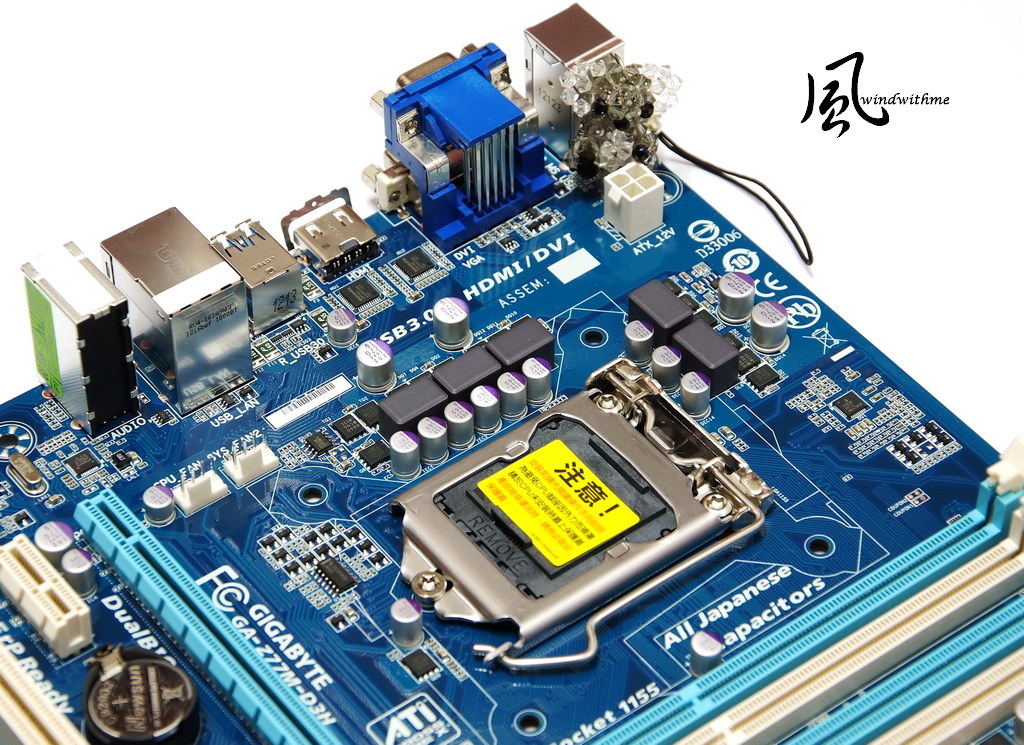
It’s 5 phases PWM design, 3 for CPU, 1 for GPU and 1 for MCH. Upper left is 4Pin power in connector.
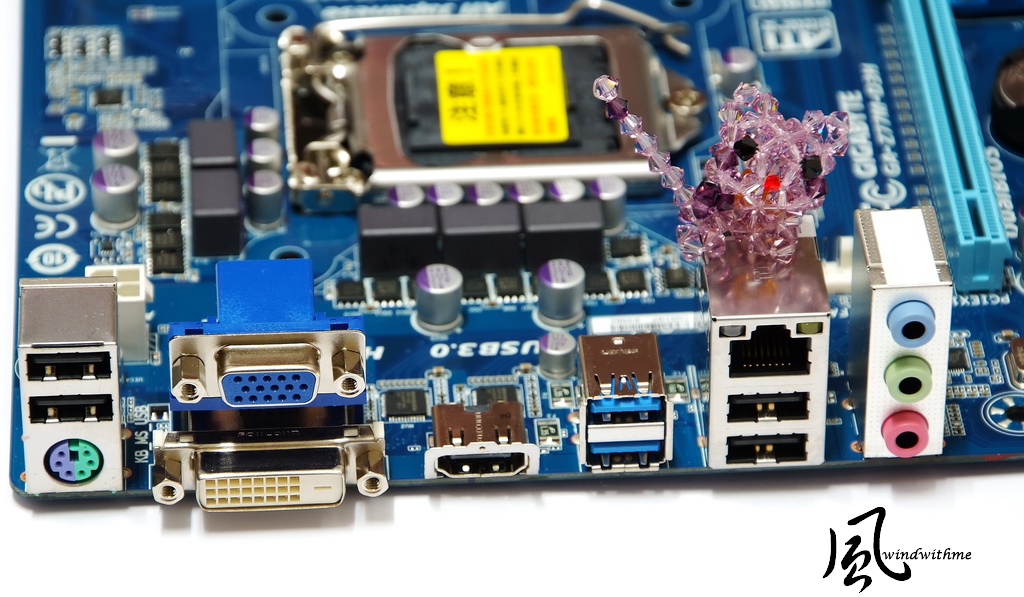
IO
1 X PS2 KB/Mouse
1 X D-Sub / DVI-D / HDMI
4 X USB 2.0(Black)
2 X USB 3.0/2.0(Blue)
1 X RJ-45 LAN
3 X Audio jacks
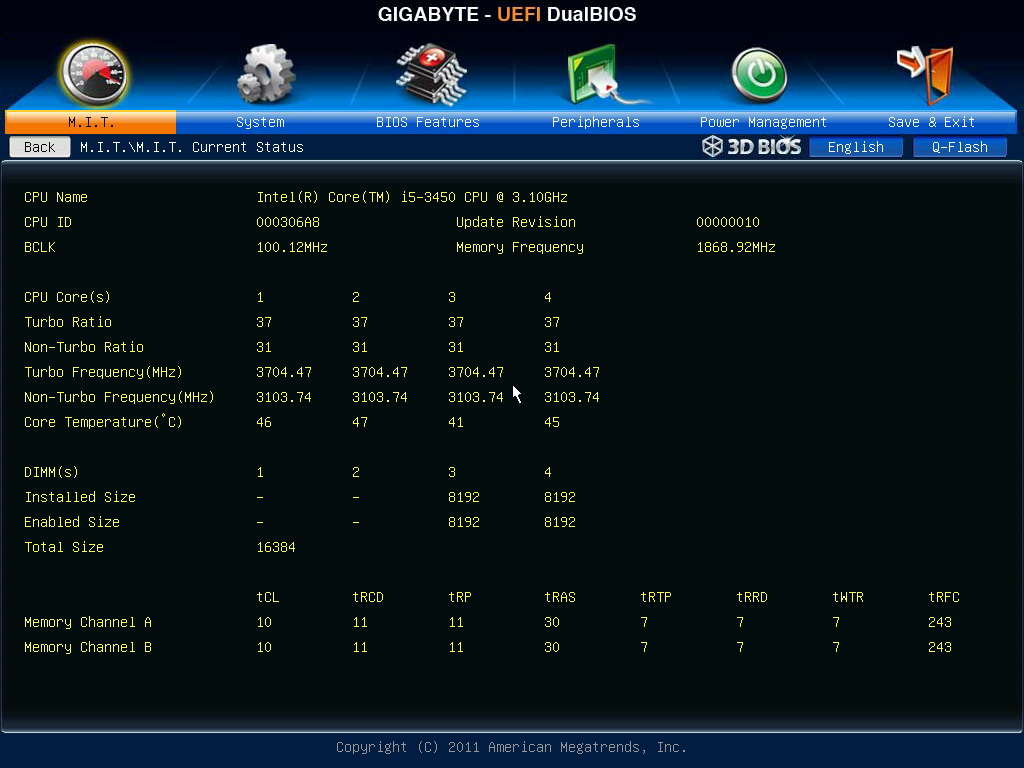
UEFI Screen
Intel Core i5-3450 default clock is 3.1GHz. I enable Turbo Boost 2.0 to boost the single core to work at 3.5GHz. 4C4T full speed can reach 3.3GHz.
If using same brand H77, the max CPU Clock Ratio is 35.
When using Z77, the max CPU Clock Ratio up to 37. That’s why I am using Z77 here.

CPU ratio adjusts to 37, disable C1E and EIST, power saving features. You can set CPU clock at 3.7GHz.
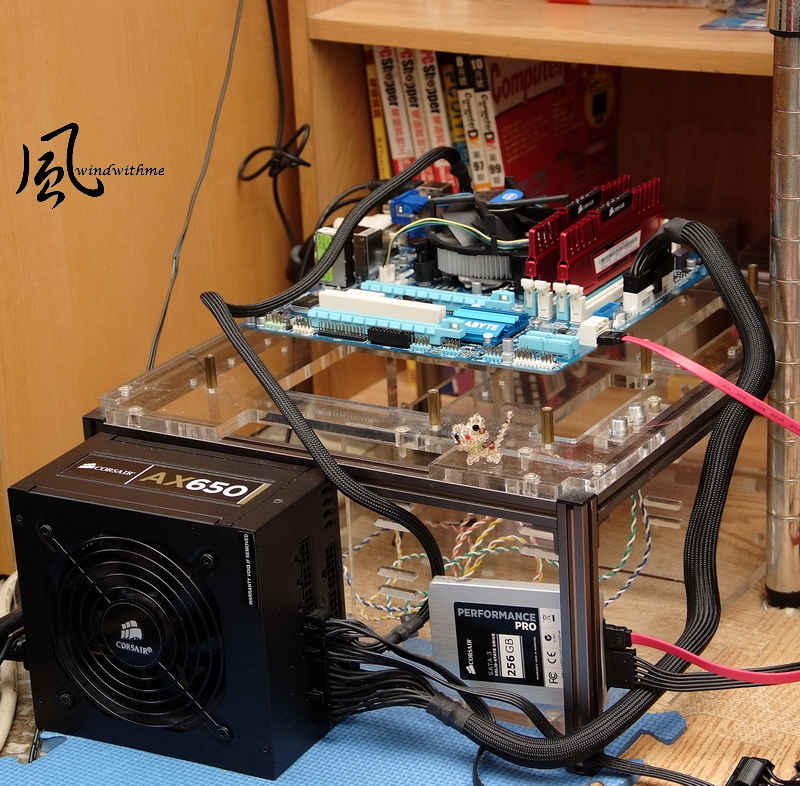
Testing Configuration
CPU: Intel Core i5-3450
MB: GIGABYTE Z77M-D3H
DRAM: CORSAIR CMZ16GX3M2A1866C10R
VGA: Intel HD Graphics 4000
HD: CORSAIR Performance Pro 256GB SSD
POWER: CORSAIR AX650W
Cooler: Intel Original Cooler
OS: Windows7 Ultimate 64bit
The comparison is between default and OC mode.
The 1st picture is default.
CPU 100.1 X 31 => 3100MHz
Enable C1E and Turbo Boost, the clock will floating between 1600 to 3500MHz by CPU utilization rate.
DDR3 1334.8 CL7 8-7-21 1T
The 2nd picture is after OC.
CPU 100.1 X 37 => 3703.79MHz
DDR3 1868.6 CL10 11-11-30 2T, enable XMP mode.
Hyper PI 32M X4 => 10m 59.772s
CPUMARK 99 => 550

Hyper PI 32M X4 => 9m 39.354s
CPUMARK 99 => 585

CPUMARK 99 only test single core, so the performance of 3.5GHz and 3.7GHz are similar.
Nuclearus Multi Core => 19550
Fritz Chess Benchmark => 20.39/9787

Nuclearus Multi Core => 22682
Fritz Chess Benchmark => 22.93/11005
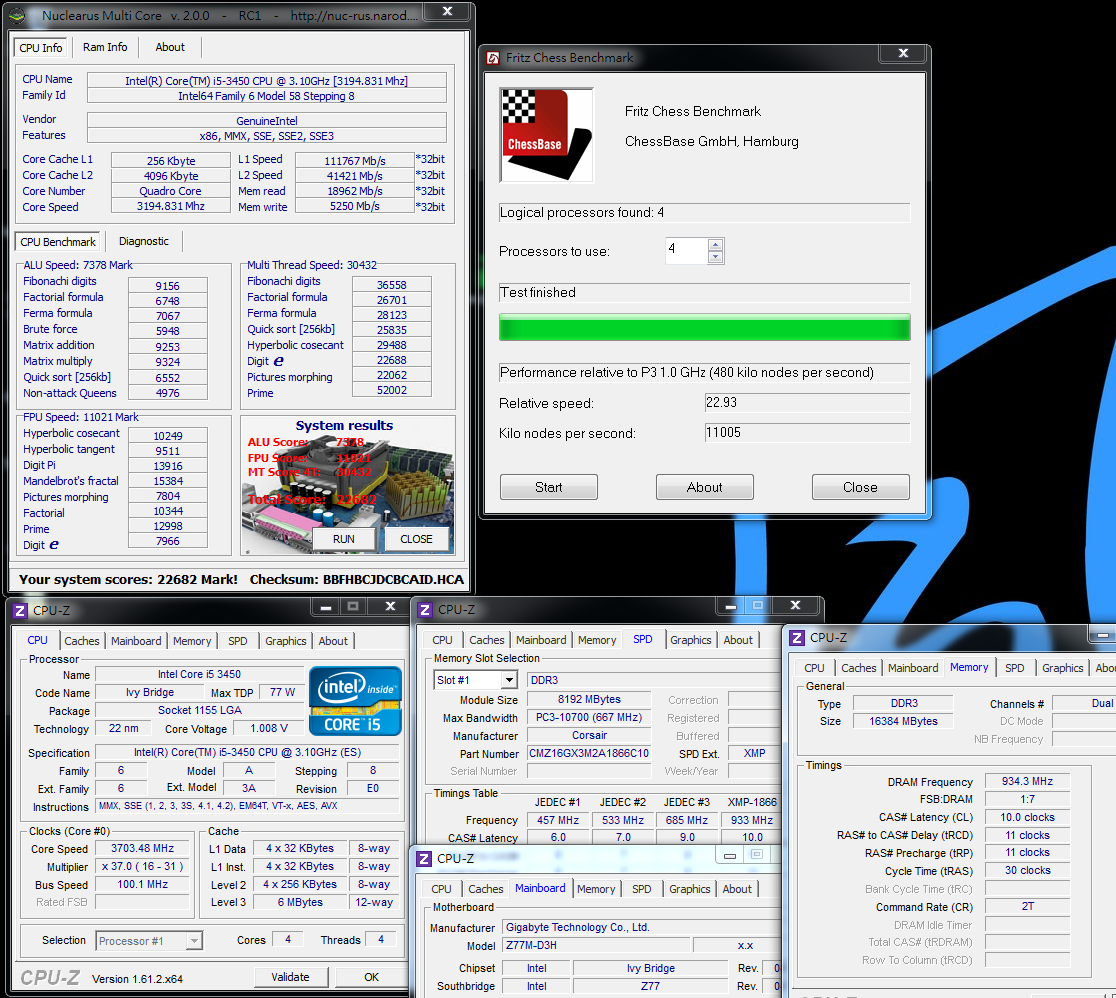
Fritz Chess Benchmark only test CPU multi-tasking 4C4T computing capability. The performance increase around 12.5%.
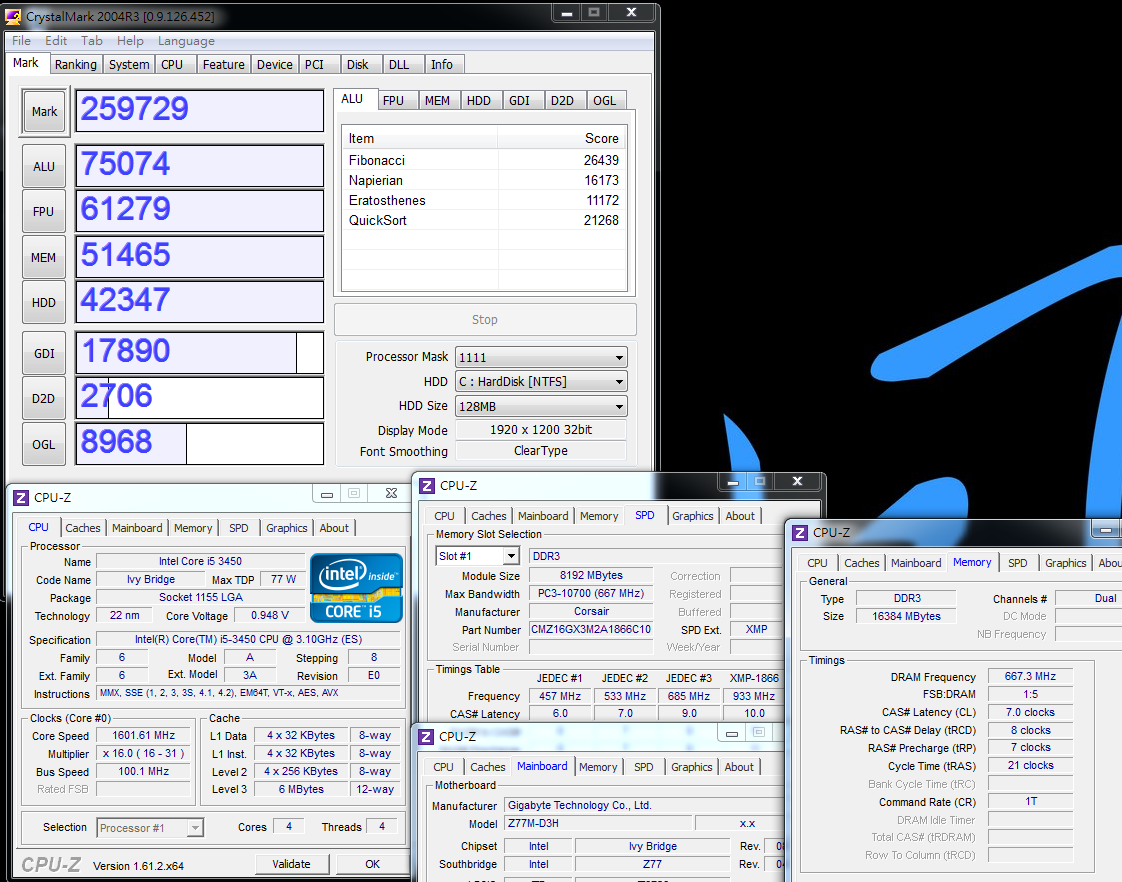
CrystalMark 2004R3 => 259729
-
CrystalMark 2004R3 => 295310

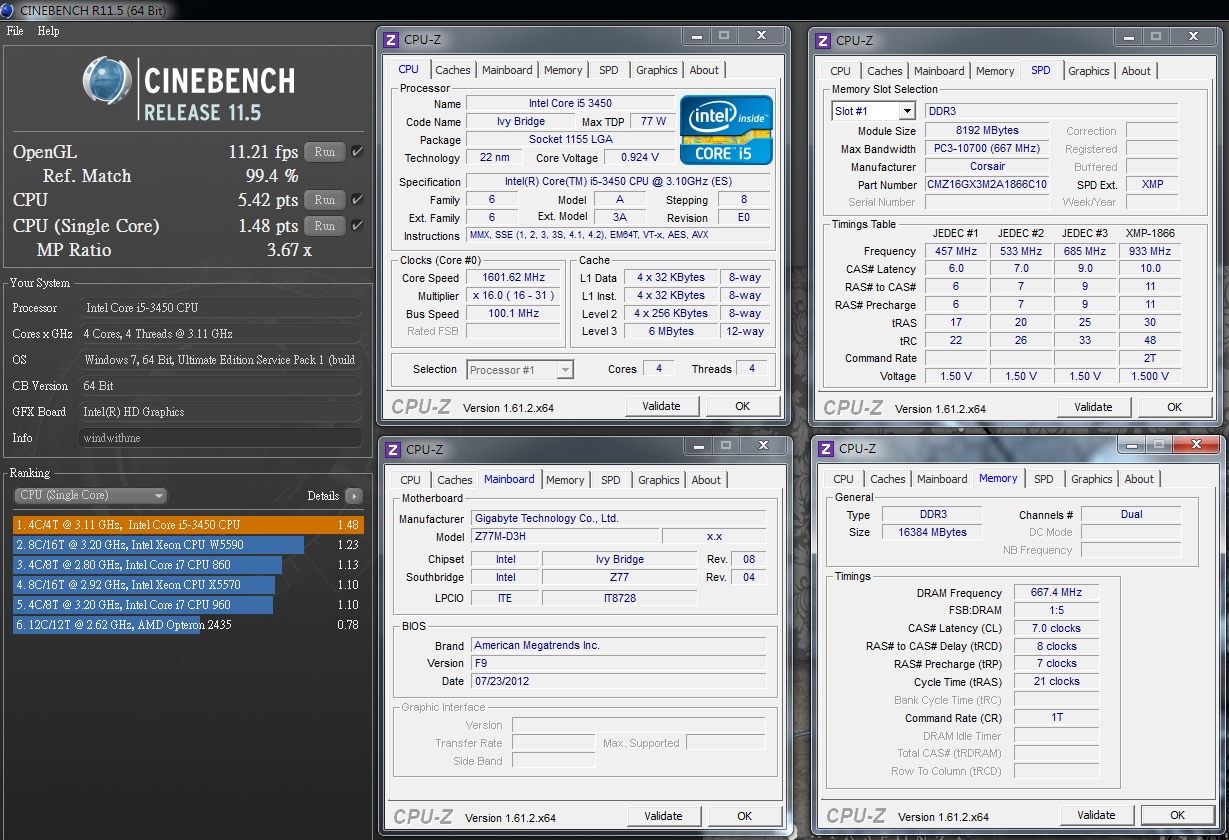
CINEBENCH R11.5
CPU => 5.42 pts
CPU(Single Core) => 1.48 pts
CINEBENCH R11.5
CPU => 6.06 pts
CPU(Single Core) => 1.57 pts
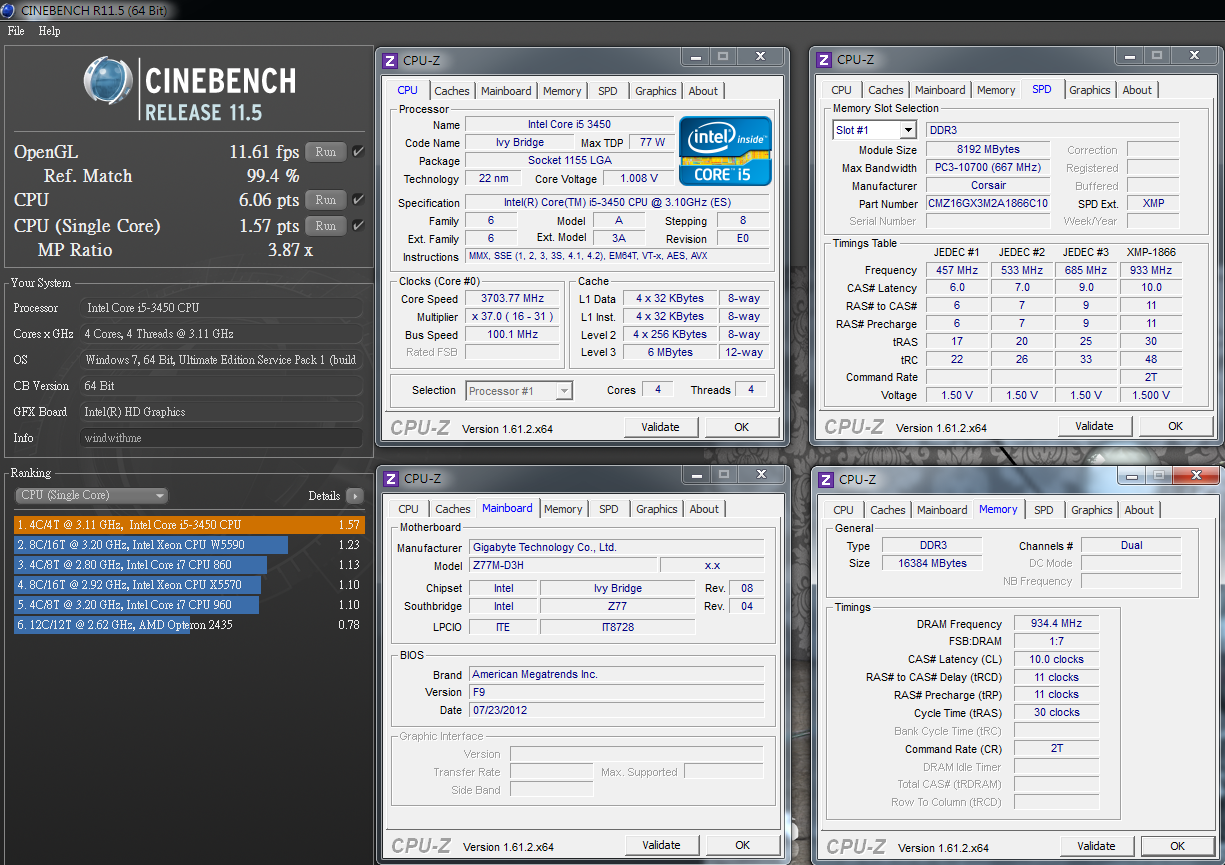
CINEBENCH R11.5 can see single core performance increases 6% and quad cores performance increases 11.8%.
FRYRENDER
Running Time => 8m 12s
x264 FHD Benchmark => 16.2
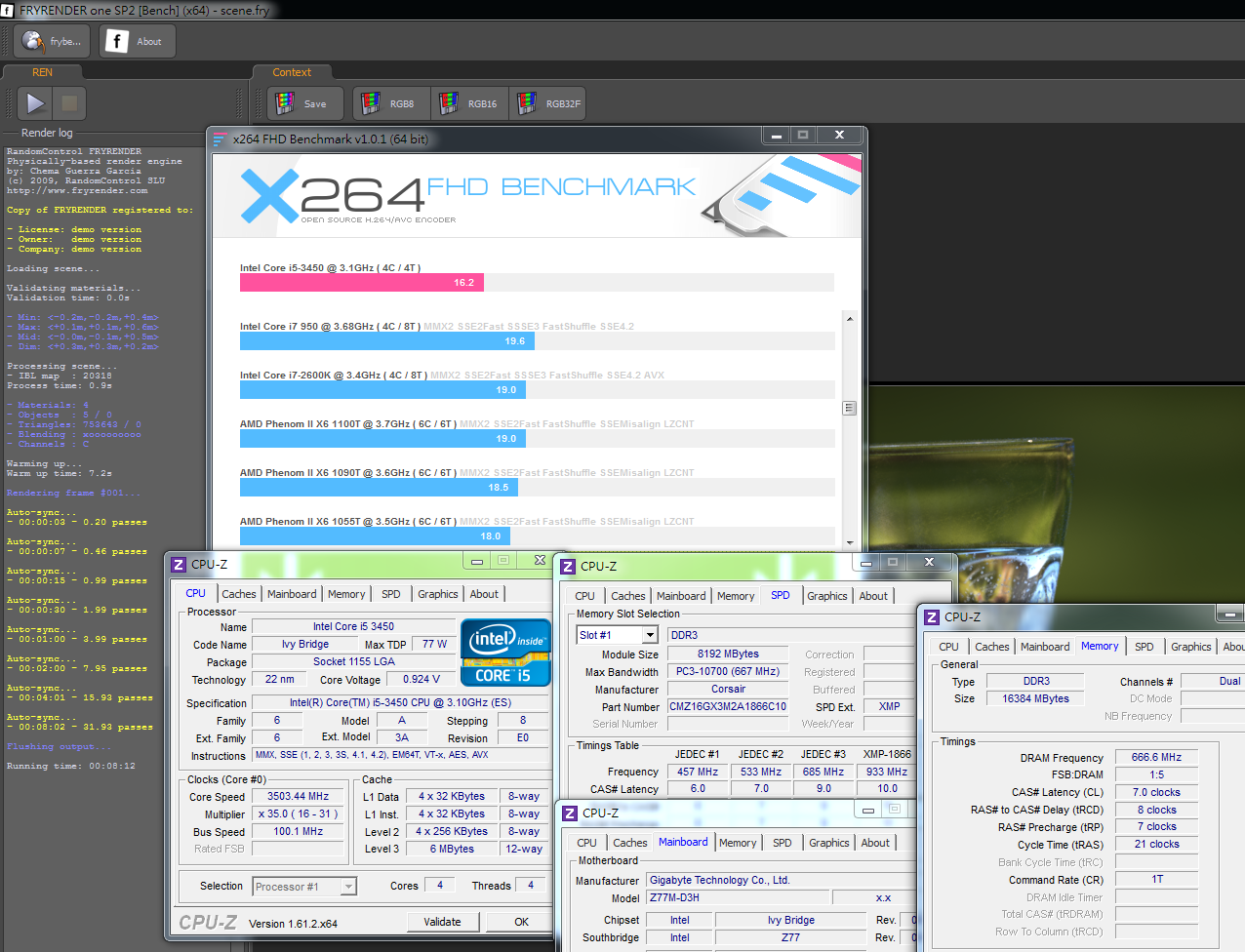
FRYRENDER
Running Time => 7m 18s
x264 FHD Benchmark => 18.2
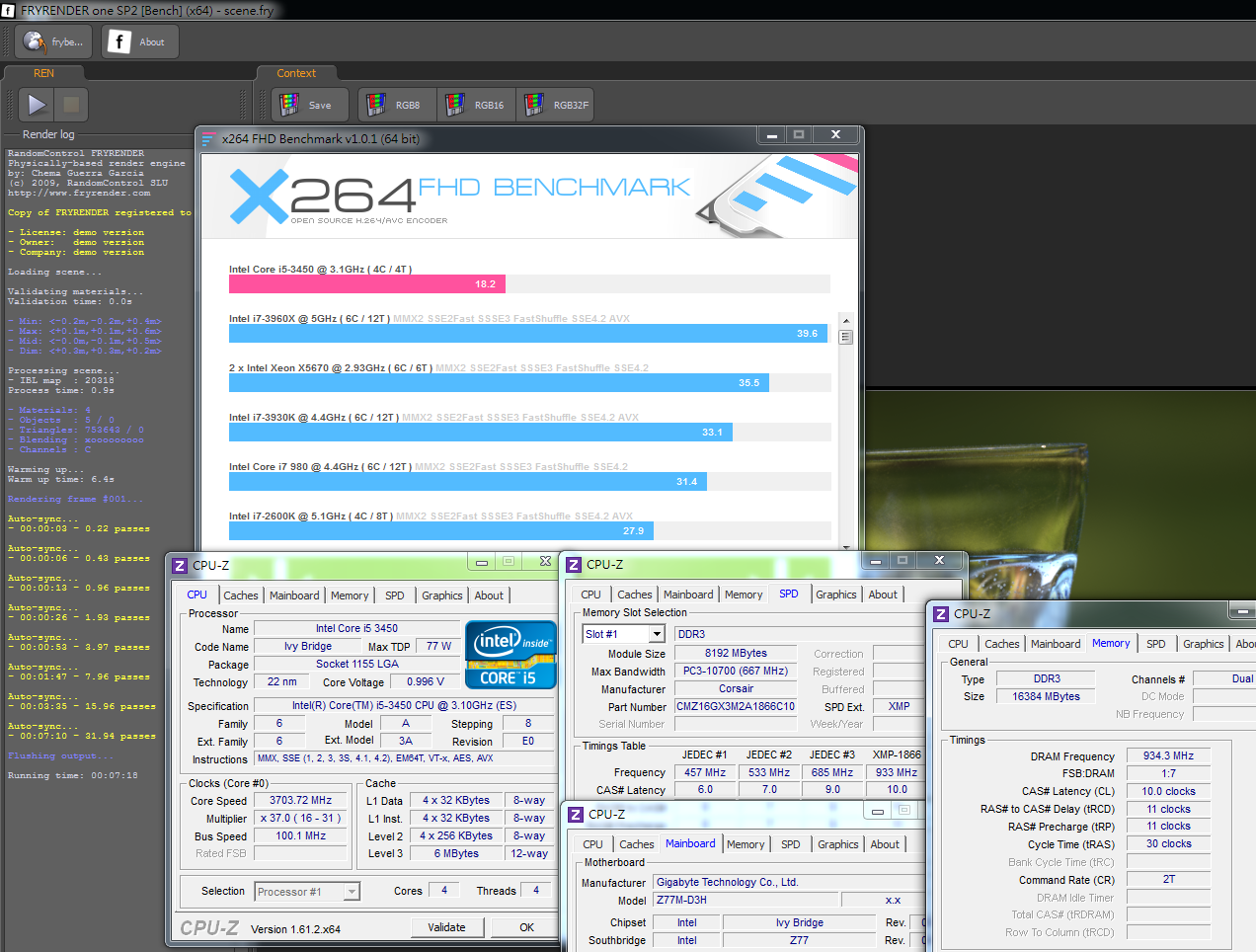
Both above software performance increase about 12%.
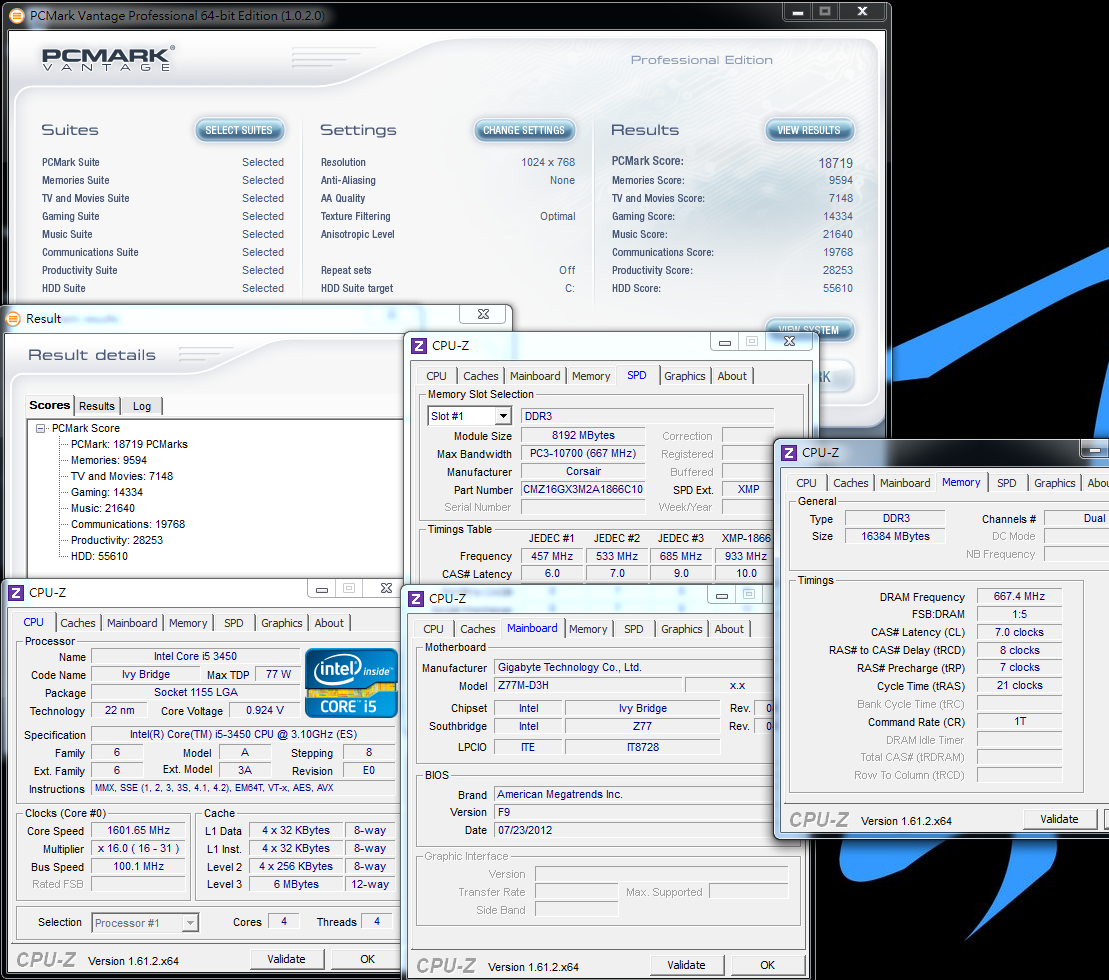
PCMark Vantage => 18719
PCMark Vantage => 20435
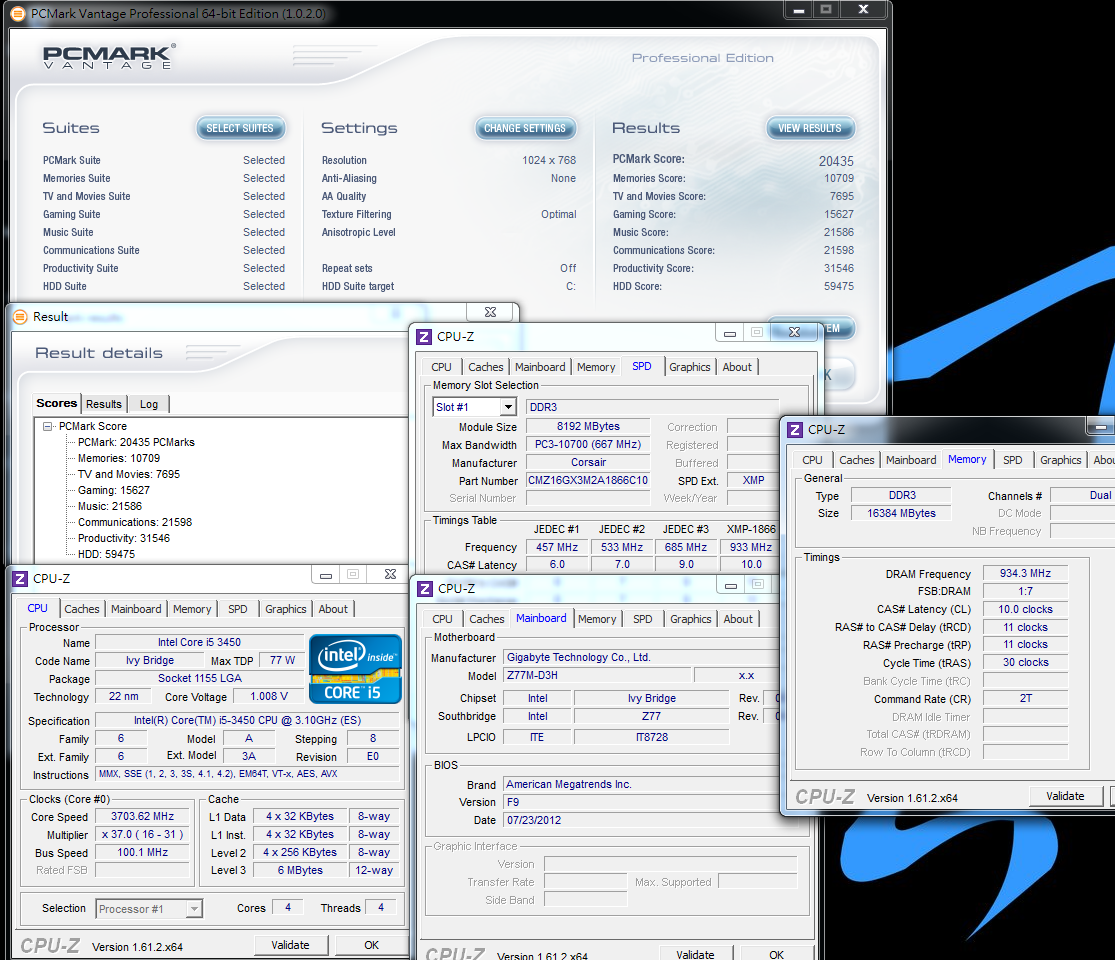
You can see i5-3450 can do some OC by Z77 chipset.
The single core performance is up 6% and quad cores are up to 12~13%. It does improve the overall performance.
DDR3 Test
Default is DDR3 1334.8 CL7 8-7-21 1T
ADIA64 Memory Read - 16082 MB/s
Sandra Memory Bandwidth - 17526 MB/s
MaXXMEM Memory-Copy - 18004 MB/s

DDR3 Test
XMP mode is DDR3 1868.6 CL10 11-11-30 2T
ADIA64 Memory Read - 19208 MB/s
Sandra Memory Bandwidth - 23583 MB/s
MaXXMEM Memory-Copy - 21263 MB/s

DDR3 clock pull from 1333 to 1866, the performance increases 18.1~34.6% upon different software.
Even though Ivy Bridge and Sandy Bridge DDR3 bandwidth in same clock are similar,
Ivy Bridge can pull DDR3 clock higher than Sandy Bridge if memory quality is good enough.
SSD is another key tool to enhance system performance. In the past two months, it’s annual price dropping time for SSD.
128 or 256GB SSD price drops around 30~50%. It’s good news for all users.
I am using CORSAIR Performance Pro 256GB which is higher capacity for easily arrangement.
Let’s look at packing first. This series is official 3 years warranty by CORSAIR.

-
nice mobo.
-
Contents
Left side is Performance Pro 256GB. Right side is 2.5” to 3.5” adaptor and screws.
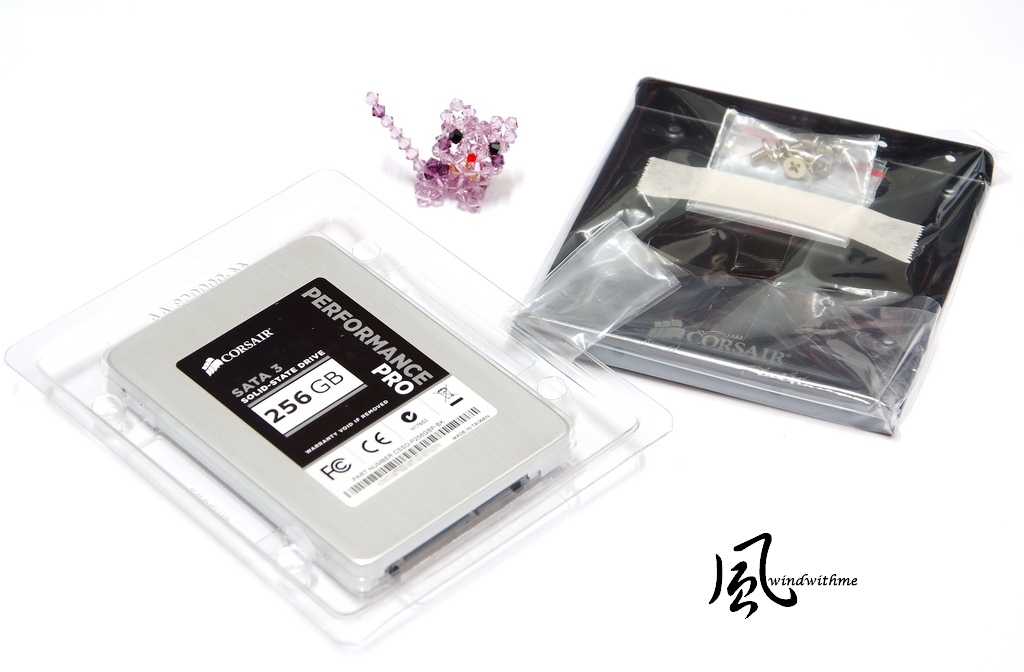
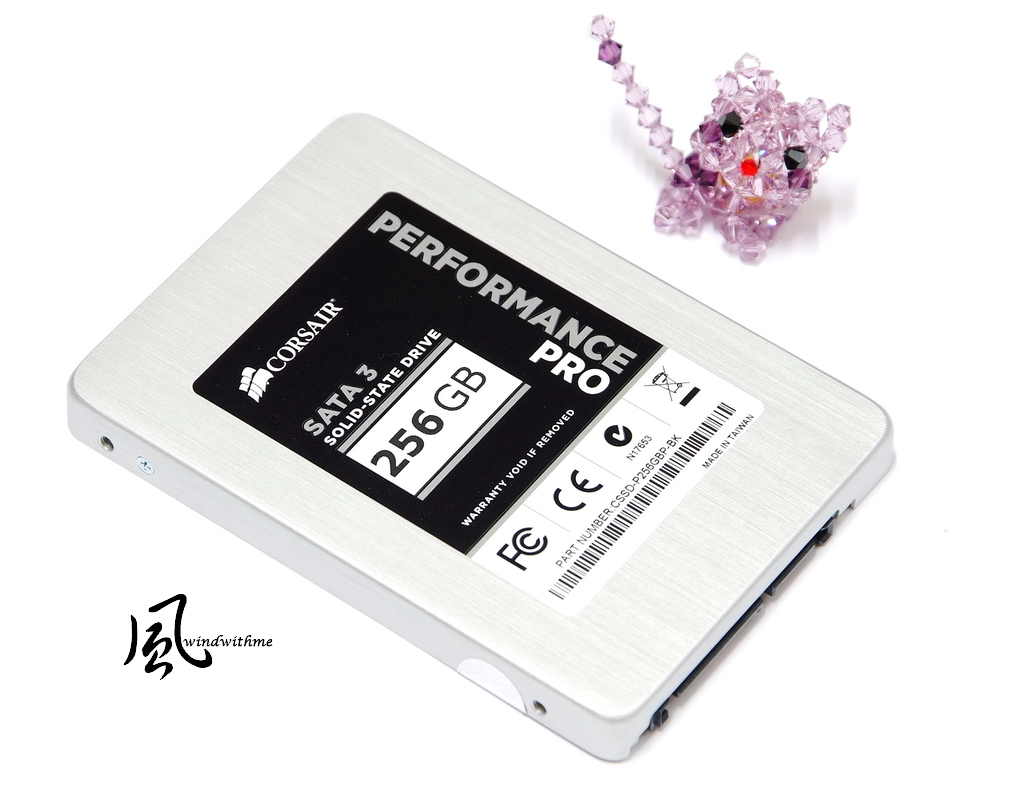
The size is 2.5”. Official spec, max ATTO Disk Benchmark is 515/440 MB/s.
Random 4K max writing performance is 65000 IOPS. It’s high performance spec in SSD market.
ATTO DISK Benchmark over 512k test can reach max read 538 Mb/s and max write 443.1 MB/s.
CrystalDiskMark Seq Read - 523.2 MB/s Write - 435.6 MB/s

AS SSD Benchmark - 940
Seq Read - 500.97 MB/s Write - 422.08 MB/s
4K - 64Thrd Read - 278.91 MB/s Write - 251.25 MB/s

BootRacer
Time to Logon 3 seconds
Time to Desktop 12~13 seconds

CORSAIR Performance Pro sues Marvell 88SS9174-BKK2 controller which is very stable in writing performance.
The random and sequential write are both over 400 MB/s. AS SSD also has very high score.
That’s why users more prefer Marvell than SanForce.
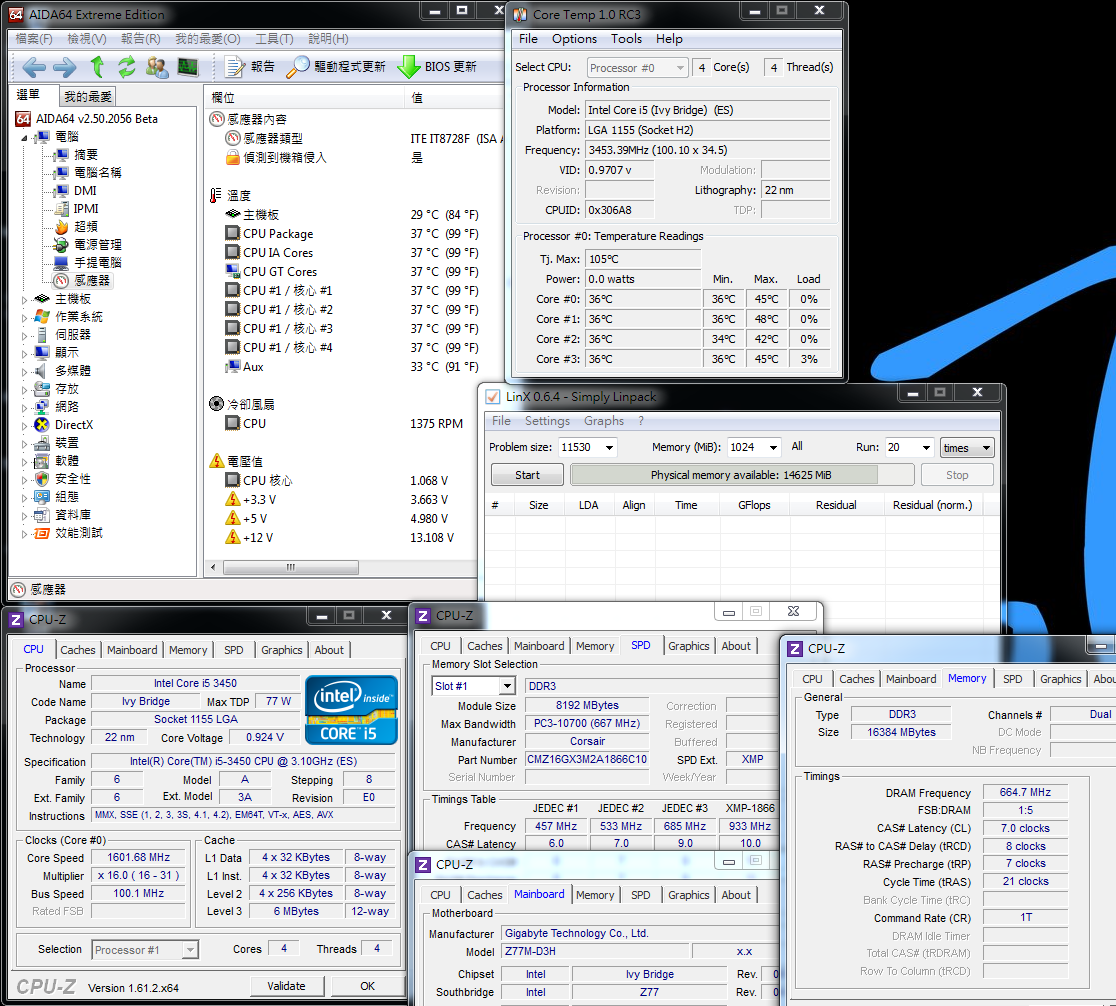
Temperature(Room is 30 degrees C)
Default, OS Desktop - 36~37
OC, OS Desktop - 45~50
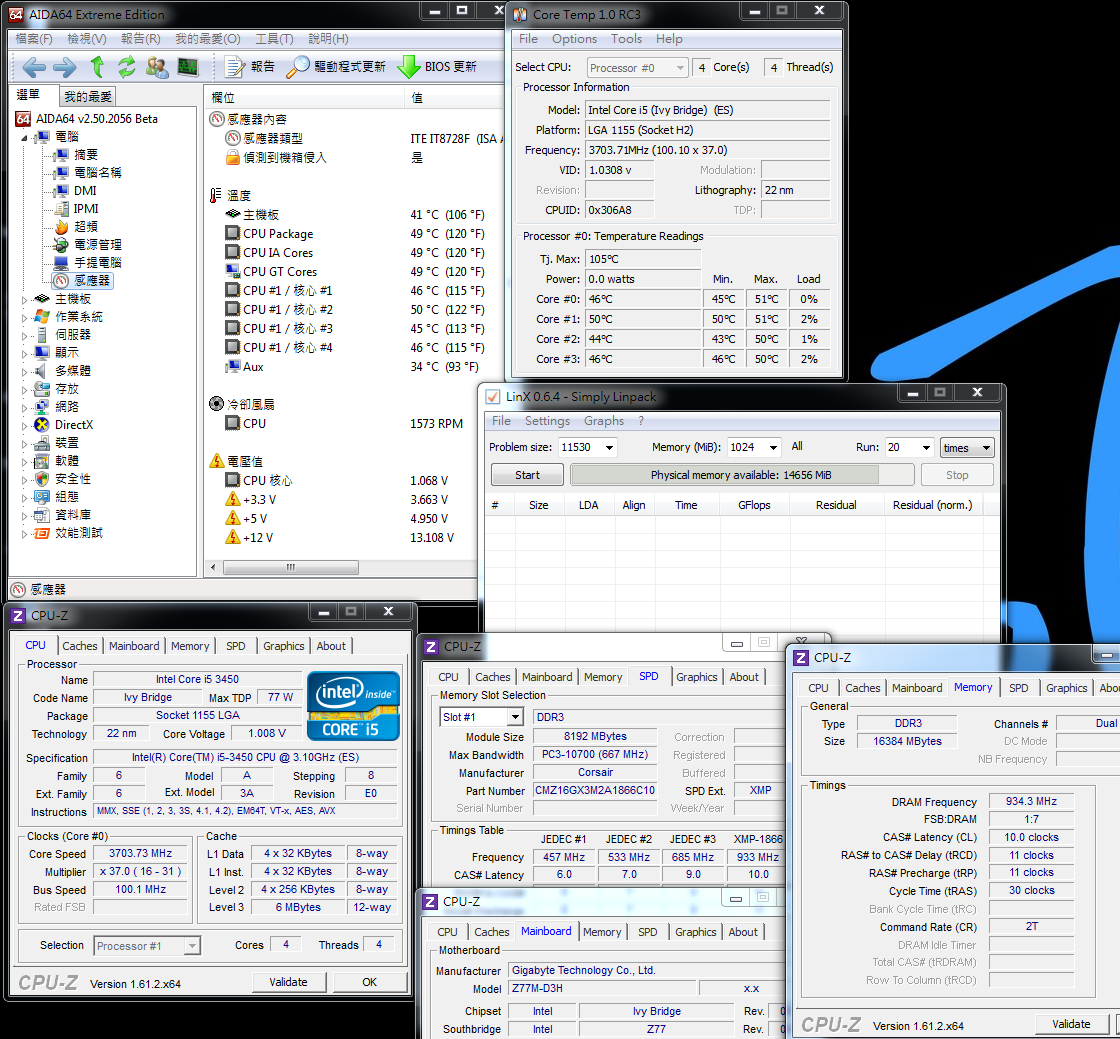
Default mode, as enabling C1E power saving feature, the CPU clock is only 1600MHz.
OC mode, as disabling C1E, the CPU is always running at 3700MHz.
Due to CPU power saving feature, CPU clock will affect temperature.
Default, Full Speed - 61~67
Intel Burn Test v2.4?Stress Level Maximum
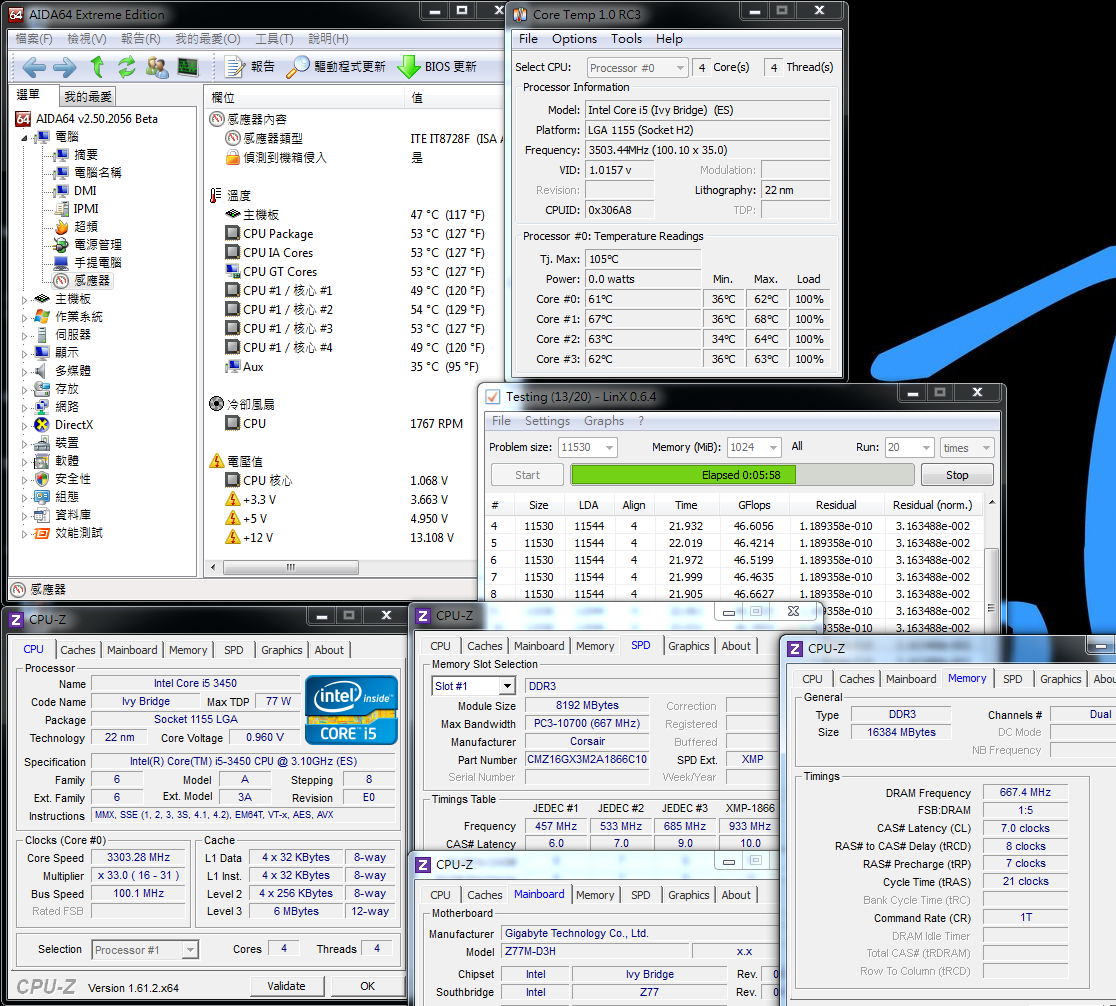
OC, Full Speed - 62~70
Intel Burn Test v2.4?Stress Level Maximum

i5-3450 is running in 3.3GHz in default mode and 3.7GHz in OC mode.
It’s only 400MHz gap and temperature is only 1~3 degrees different.
The cooler is Intel original one, so the temperature after OC is very impressive.
Power Consumption Test
Default, OS Desktop - 26W

-
Nice review, very detailed! Thanks for sharing!
-
Power Consumption Test
OC, OS Desktop - 46W
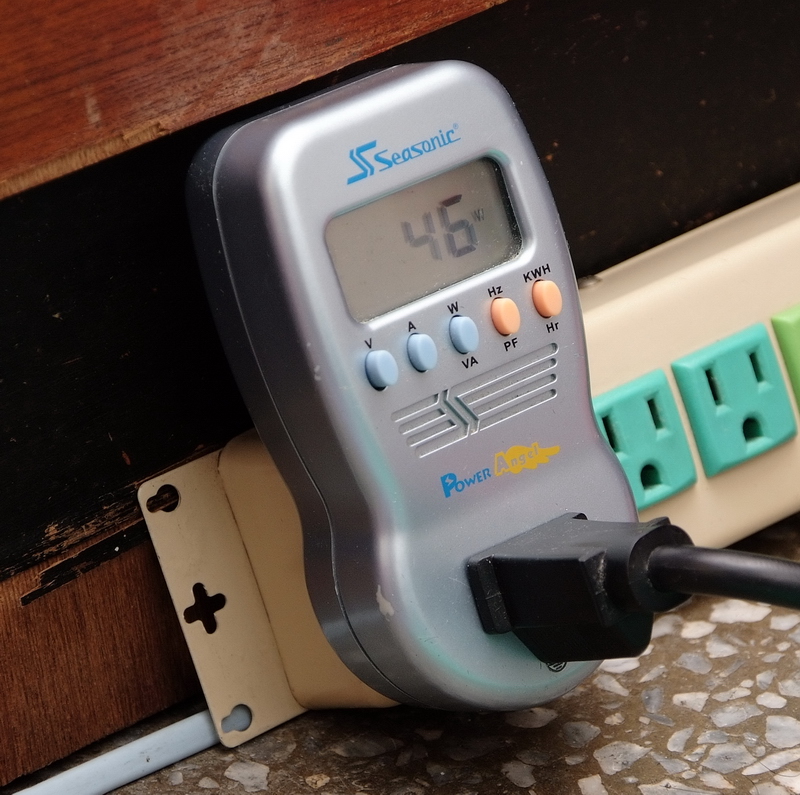
Comparing to temperature, the power consumption is affecting by C1E in default mode.
If you enable C1E in OC mode, the power consumption will drop a lot.
Default, running LinX to fully speed CPU - 75W
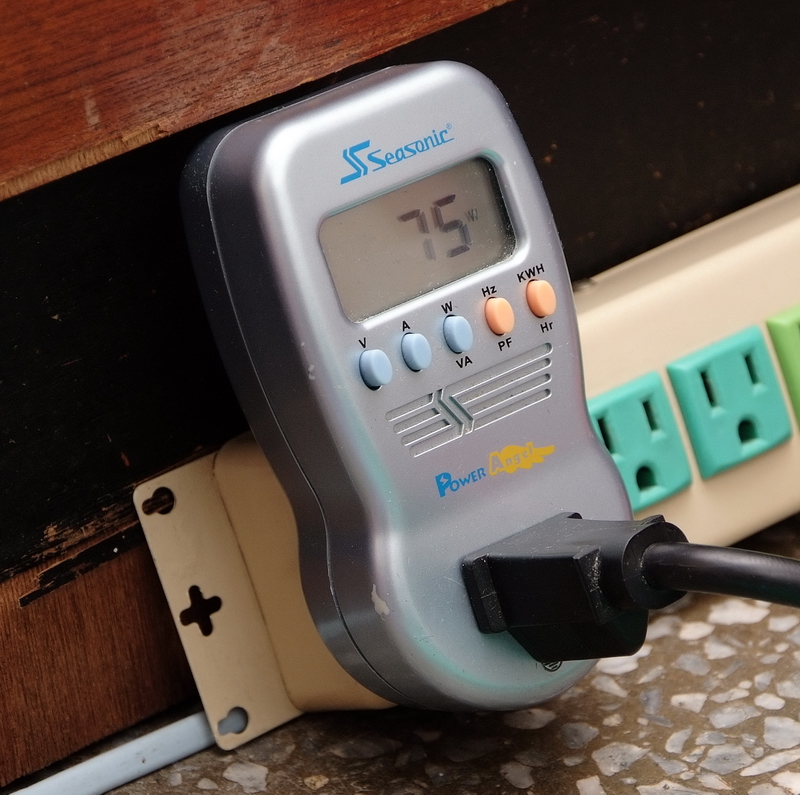
OC, running LinX to fully speed CPU - 80W

When i5-3450 full speed more, the power consumption is only 5W as 400MHz clock difference.
Ivy Bridge 22nm manufacturing save power more than 25~35% comparing to Sandy Bridge.
Finally, I also test latest HD2500 IGP 3D performance.
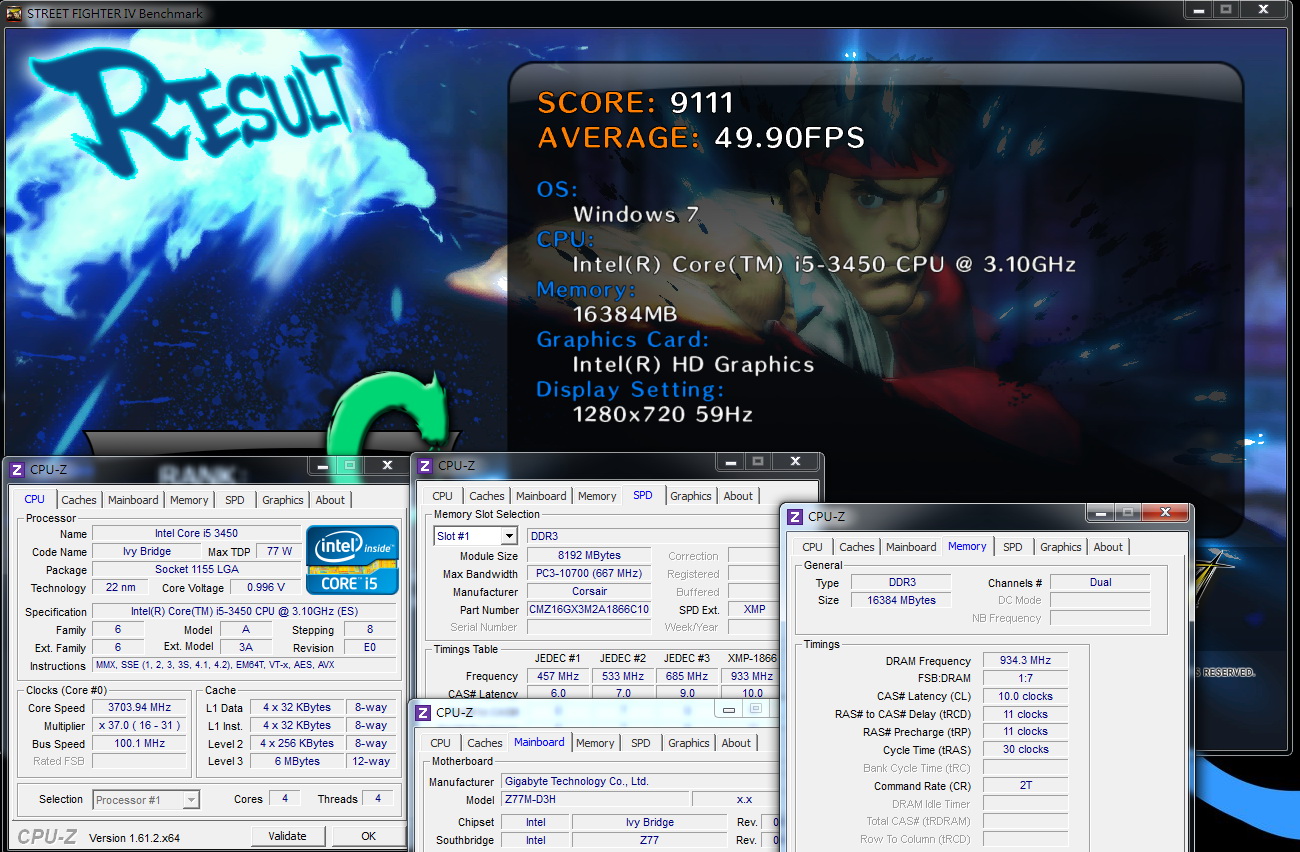
i5-3450 OC to 3.7GHz and HD2500 default clock is 1.1GHz.
3DMark Vantage => P1988

StreetFighter IV Benchmark
1280 X 720 => 49.90 FPS
FINAL FANTASY XIV
1280 X 720 => 765

In 3DMark Vantage, HD2500 is similar to HD2000.
StreetFighter IV Benchmark improves 12% and FINAL FANTASY XIV improves 23%.
The 3D performance increasing range is not big but still helpful.
More accurate, HD2500 performance is still lower than former HD3000. User can notice by model name.
For Ivy Bridge structure, if you want to have better integrated 3D performance, you can choose HD4000 IGP.
GIGABYTE Z77M-D3H
Pros
1.Z77 series use white color packing and booting screen. It’s minimalist style.
2.Phasing in UEFI BIOS and providing two BIOS interfaces.
3.Built-in personal preferred Atheros LAN and VIA audio.
4.Micro ATX Z77 is lower price, but features and performance are standard level above.
Cons
1.CPU PWM better to have heatsink
2.Rare IO audio jacks better to have 6 for better function.

Performance ?????????? 83/100
Components ?????????? 82/100
Specification ?????????? 79/100
Appearance ?????????? 77/100
C/P Value ?????????? 86/100
As Intel launched latest Ivy Bridge structure this year, it includes CPU and chipset.
Entry IGP HD2500 is improved a little and high end IGP HD4000 improves a lot from HD3000.
CPU performance is 10~14% enhance from Sandy Bridge in same spec and clock.
Power consumption is much lower by 22nm implement.
CPU temperature is a little higher than Sandy Bridge, but it’s still affordable for efficient OC.
Ivy Bridge has Z77, H77 and B75 chipsets to complete the market segment.
The price is lower than 6 series within few months after launching due to tough competition in MB market this year.
Z77M-D3H price is only 17USD higher than H77M-D3H.
If your budget is higher, Z77 provides you better C/P certainly.
If you don’t OC, H77 is also alternative solution for you.
This article mainly focus on Intel Core i5-3450 and Micro ATX Z77 Ivy Bridge entry combo.
You can refer it if you have got i5-3450 or plan to buy i5-3470.

This article is also post in my blog - WIND3C, All comments are welcome.
Ciao! Sembra che tu sia interessato a questa conversazione, ma non hai ancora un account.
Stanco di dover scorrere gli stessi post a ogni visita? Quando registri un account, tornerai sempre esattamente dove eri rimasto e potrai scegliere di essere avvisato delle nuove risposte (tramite email o notifica push). Potrai anche salvare segnalibri e votare i post per mostrare il tuo apprezzamento agli altri membri della comunità.
Con il tuo contributo, questo post potrebbe essere ancora migliore 💗
Registrati Accedi