
[ENG] - In-depth Performance Analysis of Intel 6-series with ECS H67H2-M
-

The latest generation in the Intel architecture is the LGA 1155, officially released in early January of this year.
In the first wave of the 6 series chipsets were two chipsets, the P67 and the H67.
The two have different market positions and based on the previous LGA 1156 nomenclature rules, the P stands for high-performance without VGA output.
As is common with the ATX design of the H67,
it is clear that it has a VGA output but no CPU overclocking capabilities and is therefore suitable for combination with the Micro ATX specification.
From January to now -- the end of February -- windwithme has shared reviews of two types of P67 overclocking test-use CPUs,
the more popular i7-2600K and the i5-2500K, as next-generation PC platforms for performance and overclocking.
However, on January 31,
Intel announced that there were bug issues in SATA2 devices under which prolonged use might result in degradation of HDD performance.
At the same time, Intel announced the recall of the B2 chipset and as quickly as possible provided the new B3 version chipset in March to resolve this problem.
This forced all MB/NB manufacturers to respond as quickly as possible,
and nearly all the MB makers had to recall products or offer replacements to those who had already purchased the motherboards.
In response to this news, I hope all consumers can understand more about the current status of the 6 series chipset
Back on the main topic, at this time, I am sharing the first article on tests of the Intel H67 chipset with an Elitegroup-brand motherboard,
the model H67H2-M. This is part of the Black Series, a high-end product line started more than a year ago.
Elitegroup has been selling it on the web, in shopping malls and even on the OC market, hoping to gradually enter the consumer market and build their brand image.
The H67H2-M packaging has bright reflective material, making this product eye-catching

Accessories Included
English user manual, a quick guide, IO panel, driver software on a CD and plastic protective covers for the IO interface

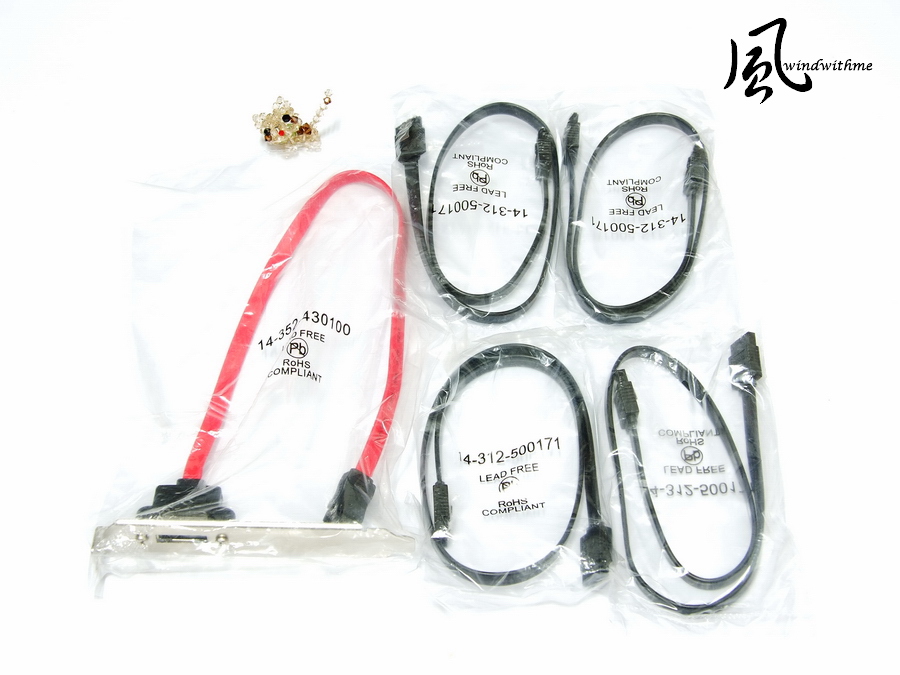
SATA cables and eSATA connectors
H67H2-M enclosure
The mainly black PCB has a sticker listing the main features of the product
the CPU and the DDR3 slots with 15? gold contact that triple the antioxidant, heat resistant and scratch resistant properties of ordinary products.
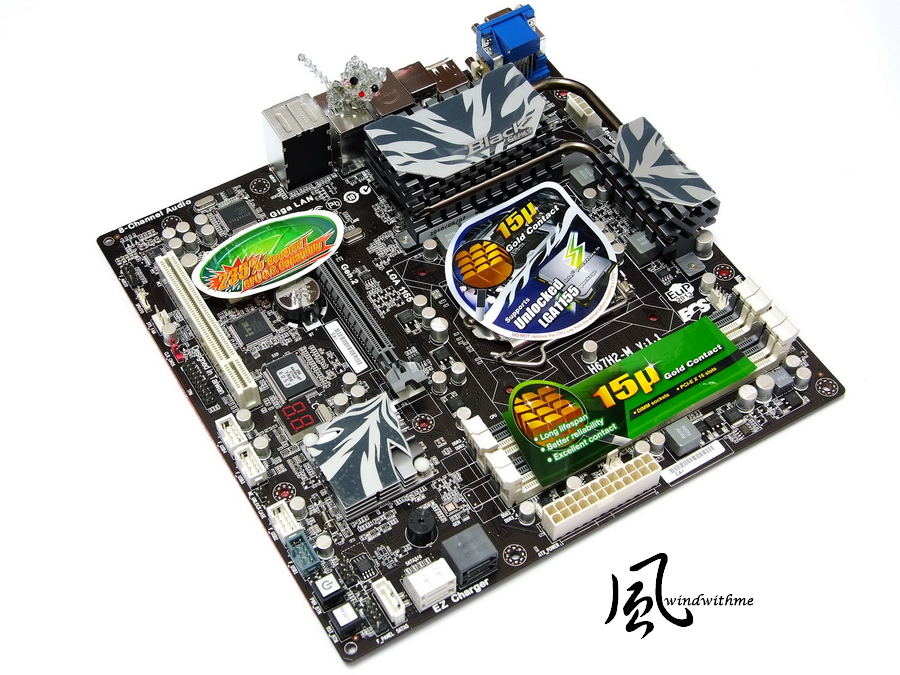
Micro ATX specifications, dimensions 244mm x 244mm
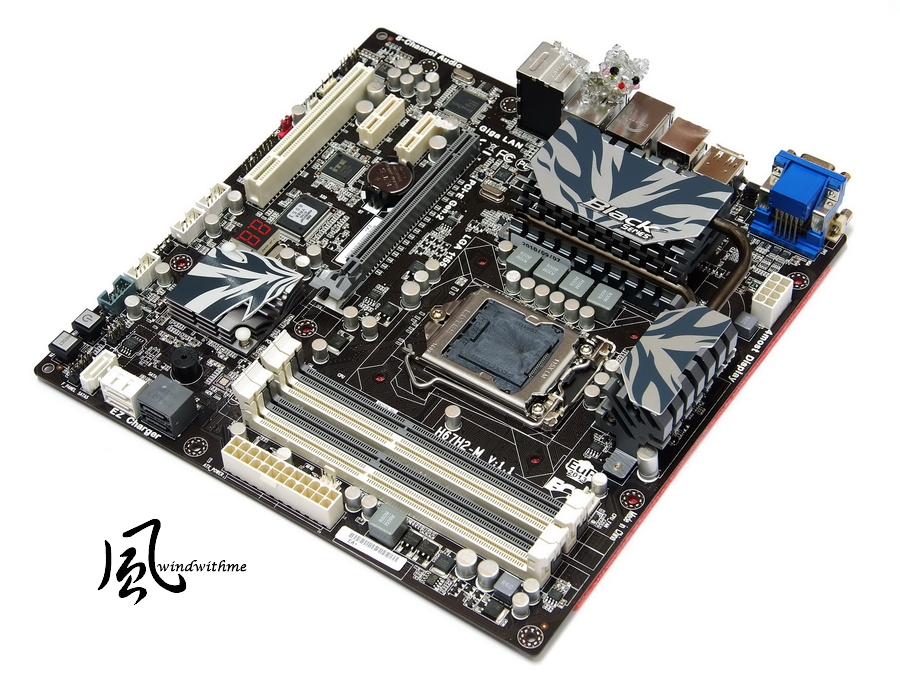
H67H2-M products are the top of the H67 line in terms of materials, and in design are different from other entry-level H67 products
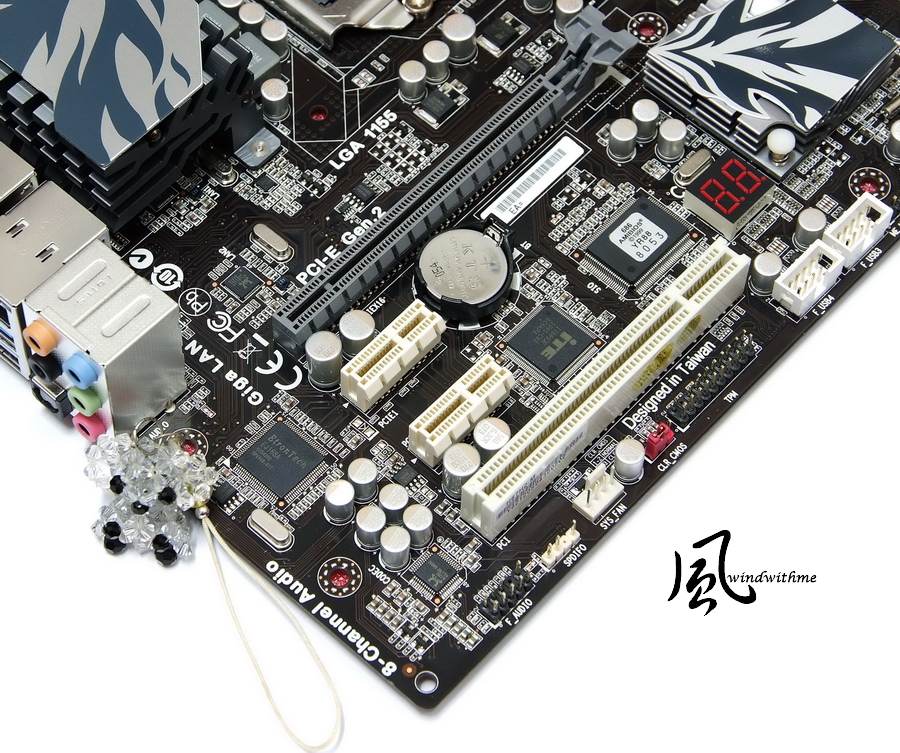
Motherboard lower left
1 X PCI-E Gen 2.0 X16
2 X PCI-E X1
1 X PCI
Realtek RTL8111E dual network chip with support for teaming
Realtek ALC892 audio chip supporting 8-channel High Definition audio
Etron USB 3.0 controller chip, at back two USB 3.0 IO expansion units
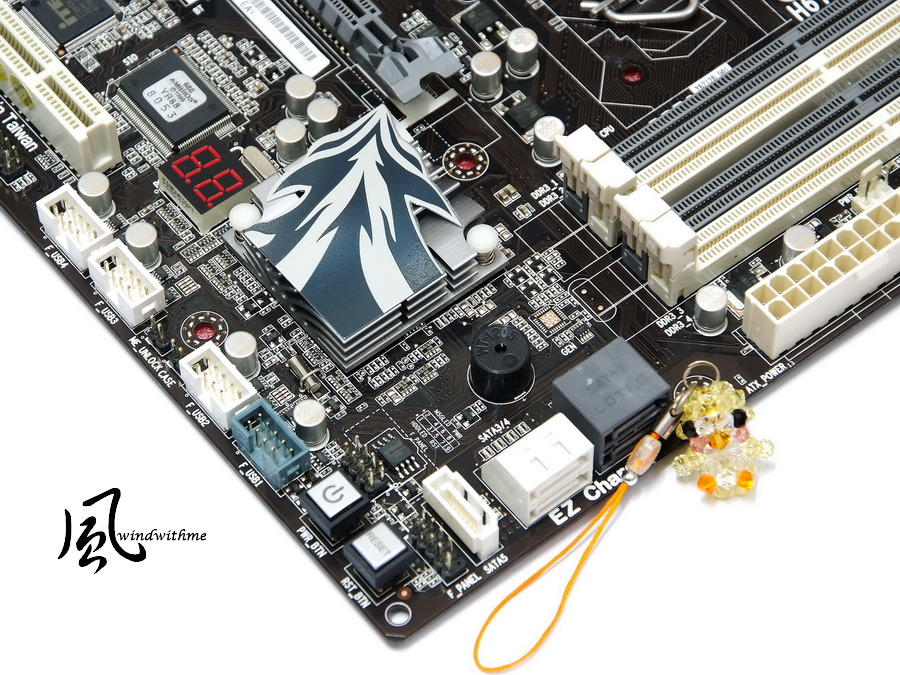
Lower right of motherboard
3 X white SATA, H67 installed, SATA2 specifications
2 X grey SATA, H67 installed, SATA3 specifications
can be used interchangeably and can support RAID 0, RAID 1, RAID 5, RAID 10 and other specifications
Power, Reset button, built-in Debug LED
The heat sink designed in a flame shape. Below is the Intel H67 chipset single-chip design
Top right of motherboard
4 X DIMM DDR3, supports 1066/1333, maximum DDR3 capacity of 32GB.
Adjacent to the 24-PIN power input

Motherboard upper left
Place for installation of LGA 1155 CPU
The H67H2-M uses 4 +1 +1 power input. Intel limits the H67 CPU to operate without overclocking as the 32nm process technology is up to the task.

-
The latest generation in the Intel architecture is the LGA 1155, officially released in early January of this year.
In the first wave of the 6 series chipsets were two chipsets, the P67 and the H67.
The two have different market positions and based on the previous LGA 1156 nomenclature rules, the P stands for high-performance without VGA output.
As is common with the ATX design of the H67,
it is clear that it has a VGA output but no CPU overclocking capabilities and is therefore suitable for combination with the Micro ATX specification.
From January to now -- the end of February -- windwithme has shared reviews of two types of P67 overclocking test-use CPUs,
the more popular i7-2600K and the i5-2500K, as next-generation PC platforms for performance and overclocking.
However, on January 31,
Intel announced that there were bug issues in SATA2 devices under which prolonged use might result in degradation of HDD performance.
At the same time, Intel announced the recall of the B2 chipset and as quickly as possible provided the new B3 version chipset in March to resolve this problem.
This forced all MB/NB manufacturers to respond as quickly as possible,
and nearly all the MB makers had to recall products or offer replacements to those who had already purchased the motherboards.
In response to this news, I hope all consumers can understand more about the current status of the 6 series chipset
Back on the main topic, at this time, I am sharing the first article on tests of the Intel H67 chipset with an Elitegroup-brand motherboard,
the model H67H2-M. This is part of the Black Series, a high-end product line started more than a year ago.
Elitegroup has been selling it on the web, in shopping malls and even on the OC market, hoping to gradually enter the consumer market and build their brand image.
The H67H2-M packaging has bright reflective material, making this product eye-catching
Accessories Included
English user manual, a quick guide, IO panel, driver software on a CD and plastic protective covers for the IO interface
SATA cables and eSATA connectors
H67H2-M enclosure
The mainly black PCB has a sticker listing the main features of the product
the CPU and the DDR3 slots with 15? gold contact that triple the antioxidant, heat resistant and scratch resistant properties of ordinary products.
Micro ATX specifications, dimensions 244mm x 244mm
H67H2-M products are the top of the H67 line in terms of materials, and in design are different from other entry-level H67 products
Motherboard lower left
1 X PCI-E Gen 2.0 X16
2 X PCI-E X1
1 X PCI
Realtek RTL8111E dual network chip with support for teaming
Realtek ALC892 audio chip supporting 8-channel High Definition audio
Etron USB 3.0 controller chip, at back two USB 3.0 IO expansion units
Lower right of motherboard
3 X white SATA, H67 installed, SATA2 specifications
2 X grey SATA, H67 installed, SATA3 specifications
can be used interchangeably and can support RAID 0, RAID 1, RAID 5, RAID 10 and other specifications
Power, Reset button, built-in Debug LED
The heat sink designed in a flame shape. Below is the Intel H67 chipset single-chip design
Top right of motherboard
4 X DIMM DDR3, supports 1066/1333, maximum DDR3 capacity of 32GB.
Adjacent to the 24-PIN power input
Motherboard upper left
Place for installation of LGA 1155 CPU
The H67H2-M uses 4 +1 +1 power input. Intel limits the H67 CPU to operate without overclocking as the 32nm process technology is up to the task.
-
IO
D-SUB/DVI/HDMI / Display Port
clr CMOS button
4 X USB 2.0 (Red / Black)
2 X USB 3.0 (Blue)
1 X eSATA / USB 2.0 Sharing (red)
2 X RJ-45 Internet port
1 X S / PDIF
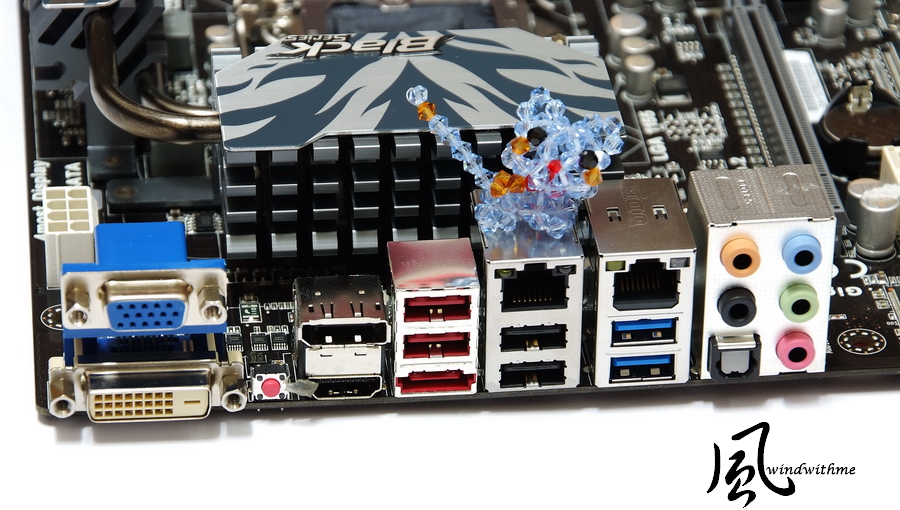
Equipped with ECS Black Series typical Qooltech III dual heat-pipe thermal module design

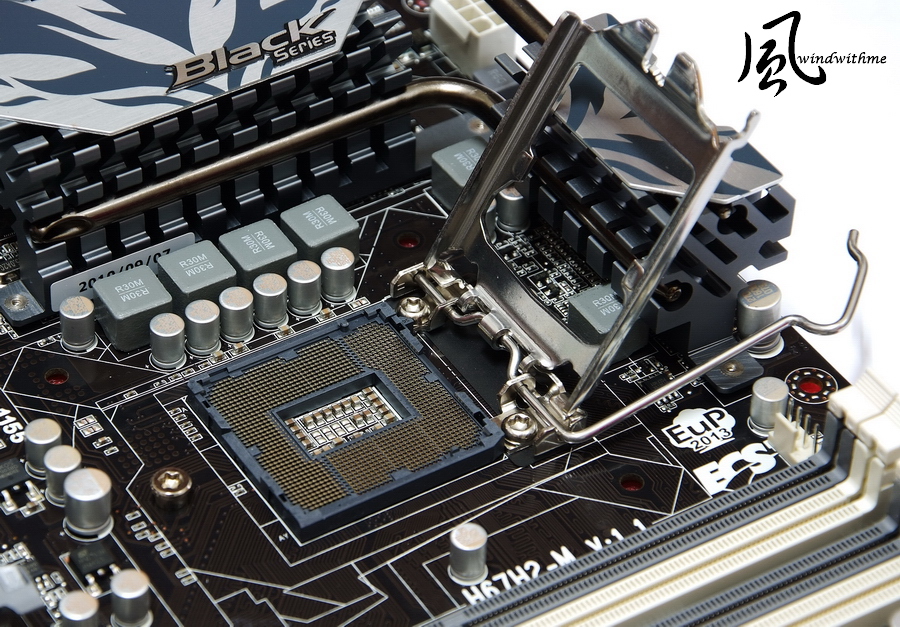
LGA 1155-pin layout
With 15? gold contact, commonly known as triple gold material
BIOS screen
M.I.B X, ECS overclocking technology
This page has to adjust the voltage options. DDR3 1T/2T with the current CPU clock / DDR3 capacity / voltage status
CPU Voltage +20 ~ 320mV
DIMM -800 ~ +630 mV
IMC Voltage +15 ~ +675 mV

ICC overclocking options page

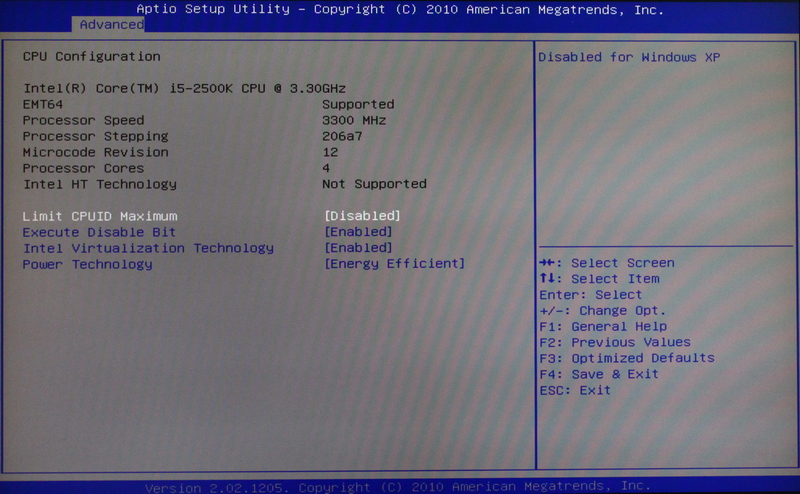
CPU technology configuration page
TurboBoost, C1E option can be selected for reduced power consumption

DRAM timing information
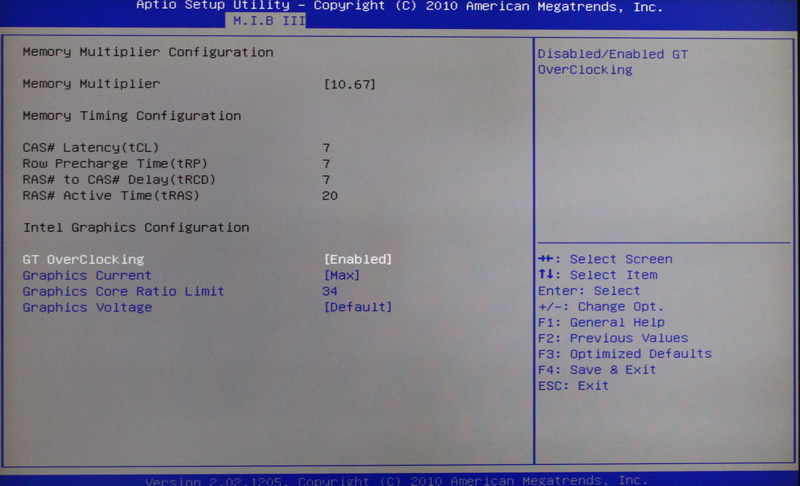
Intel integrated GPU overclocking options
When overclocking, it is recommended to first set Graphics Current to Max
When the clock is set to the Graphics Core Ratio Limit, default is 22
Each level of the clock is 50MHz, and in the figure 34 means 34 X 50 => 1700MHz
IGD Memory has three options, namely 32/64/128MB
For DVMT / FIXED Memory, there are three options, 128/256MB/Maximum

Other CPU related technology options
In addition to turning off C1E, Power Technology should also be shut down so that the CPU can be maintained at the default 3.3GHz operation.
PC Health Status

The H67 chipset does not provide a CPU multiplier or FSB overclocking options.
Essentially for All In One PC use, so in this regard Intel has created more restrictions compared with the previous LGA 1156 generation.
But the built-in GPU overclocking option is the special characteristic of the H67. The BIOS design of the ECS H67H2-M takes this into full account.
-
Test platform
CPU: Intel Core i5-2500K
MB: ECS H67H2-M
DRAM: CORSAIR CMX8GX3M2A1600C9
VGA: Integrated Graphics
HD: Intel X25-V 40GB RAID 0
POWER: CORSAIR CX430W
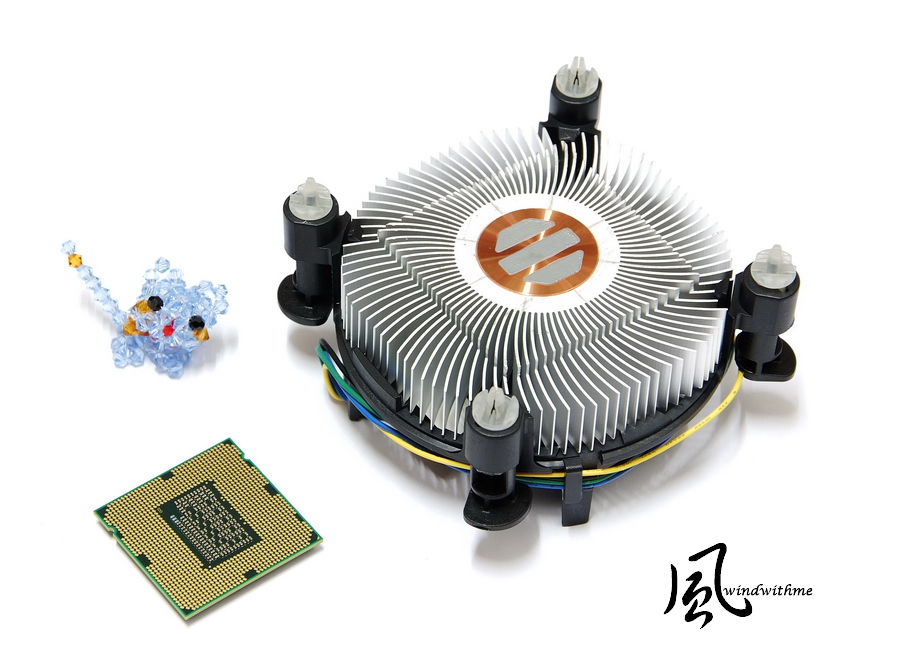
Cooler: Intel original manufacturer cooler
OS: Windows7 Ultimate 64bit

CPU use of Core i5-2500K
The product name is the Intel Core i5-2500K.
The K series appeared in 2010, signifying that the clock function is unlocked at 3.3GHz,
enabling a new generation of Turbo Boost 2.0 technology, with performance up to 3.70GHz.
Entity 4 Cores but without Hyper-Threading technology and a total of up to 4 threads, referred to as 4C/4T
32nm process technology, power 95W, total of 6MB L3 Cache. The LGA 1155 is currently in the second rank of the high-end CPUs.
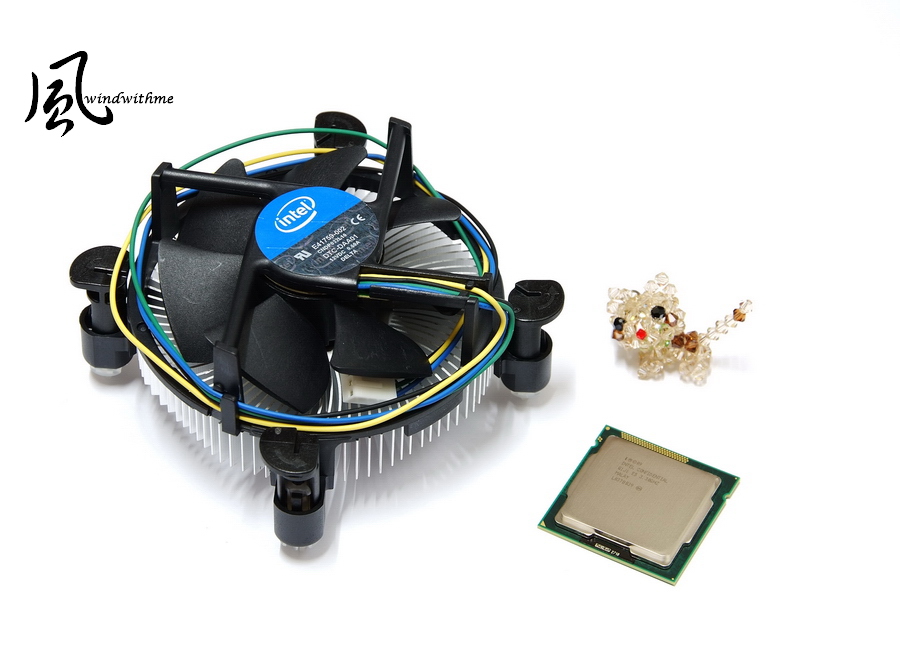
Because the Sandy Bridge i3 series will be on the market after the end of February, at this point for testing we'll use the high-end 4Cores i5.
Later, if I get my hands on an i3-2100, I will do detailed performance tests to understand the actual performance of the built-in GPU on the i5-2500K.
Performance
CPU 99.8 X 35 => 3293.4MHz
Power on Turbo Boost, power on C1E
DDR3 1064.4 CL7 7-7-20 1T
Hyper PI 32M X4 => 11m 54.091s
CPUMARK 99 => 568

Nuclearus Multi Core => 19330
Fritz Chess Benchmark => 20.81/9986
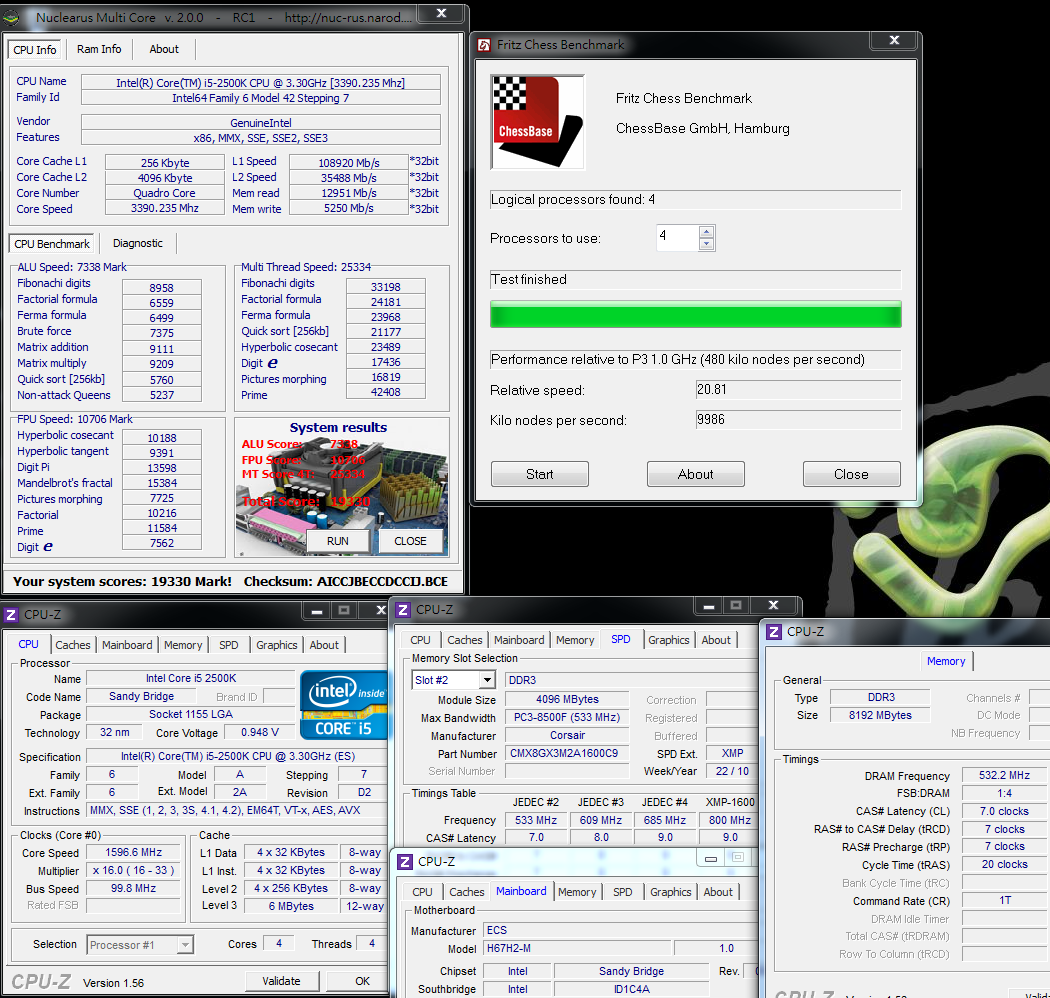
CrystalMark 2004R3 => 223913
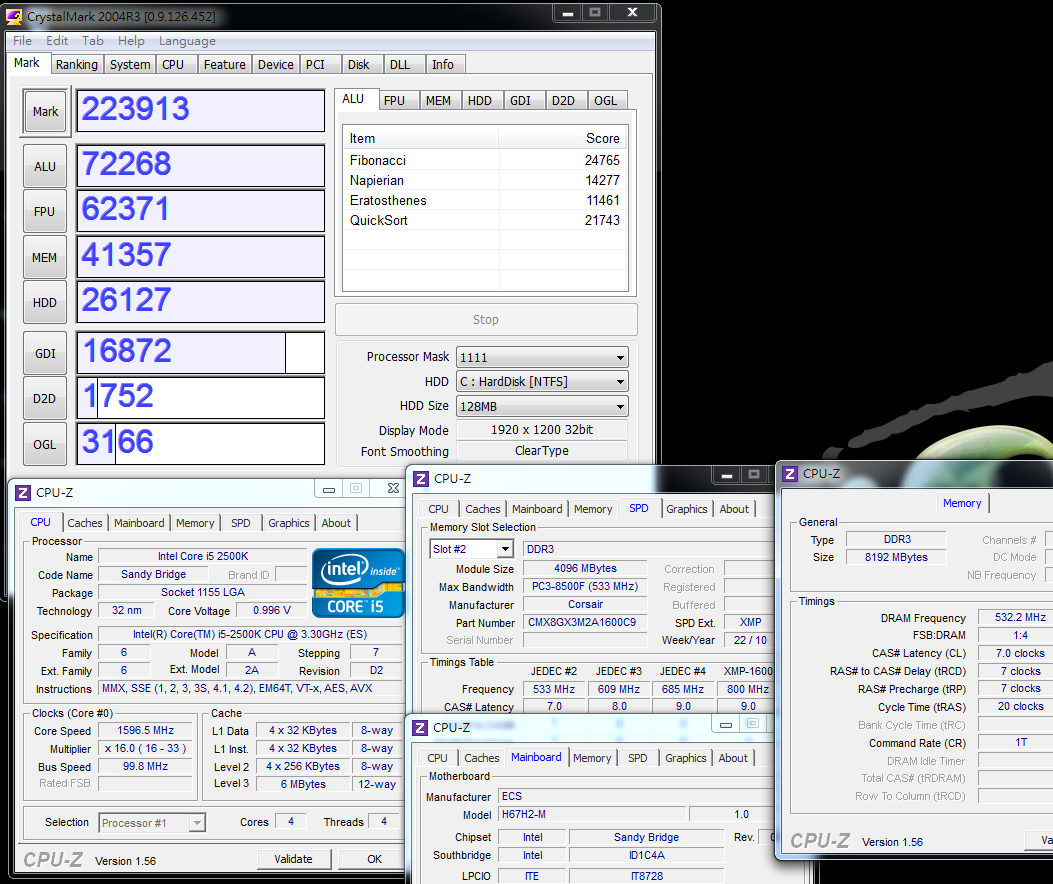
CINEBENCH R11.5
CPU => 5.41 pts
CPU(Single Core) => 1.47 pts

PCMark Vantage => 15688

Windows experience index - CPU 7.5
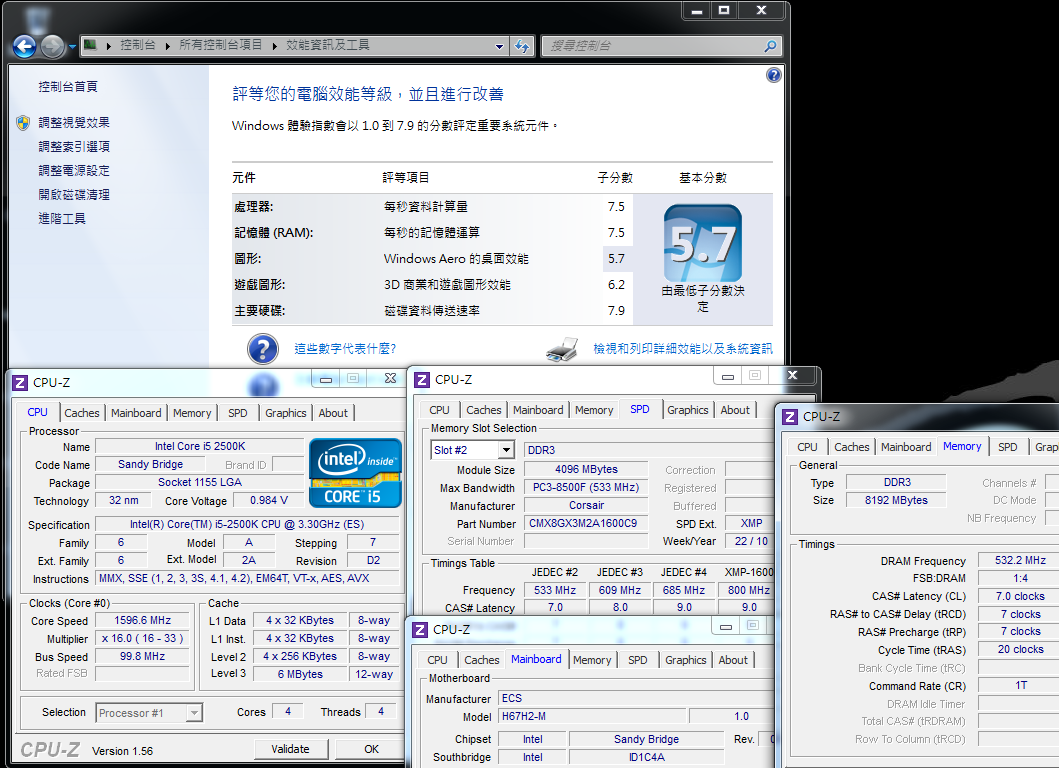
The i5-2500K CPU together with the H67 had advantages and disadvantages compared with the P67 that was previously tested, but the differences were not many.
The H67 and P67 chipsets were very similar in performance under default settings, and the performance was not bad.
Compared with the previously reviewed i5-760, the new 2500K CPU had performance improvements of about 2 to 3 percent
On one hand,
with the same clock speed, the LGA 1155 had about 10% higher performance than the LGA 1156
With the i5-2500K at 3.3GHz added to the mix, the i5-760 running at 2.8GHz was the only factor behind differences in performance.
This is provided to all netizens as a reference.
DDR3 bandwidth comparison
DDR3 1064.4 CL7 7-7-20 1T
ADIA64 Memory Read - 14091 MB/s
Sandra Memory Bandwidth - 14133 MB/s
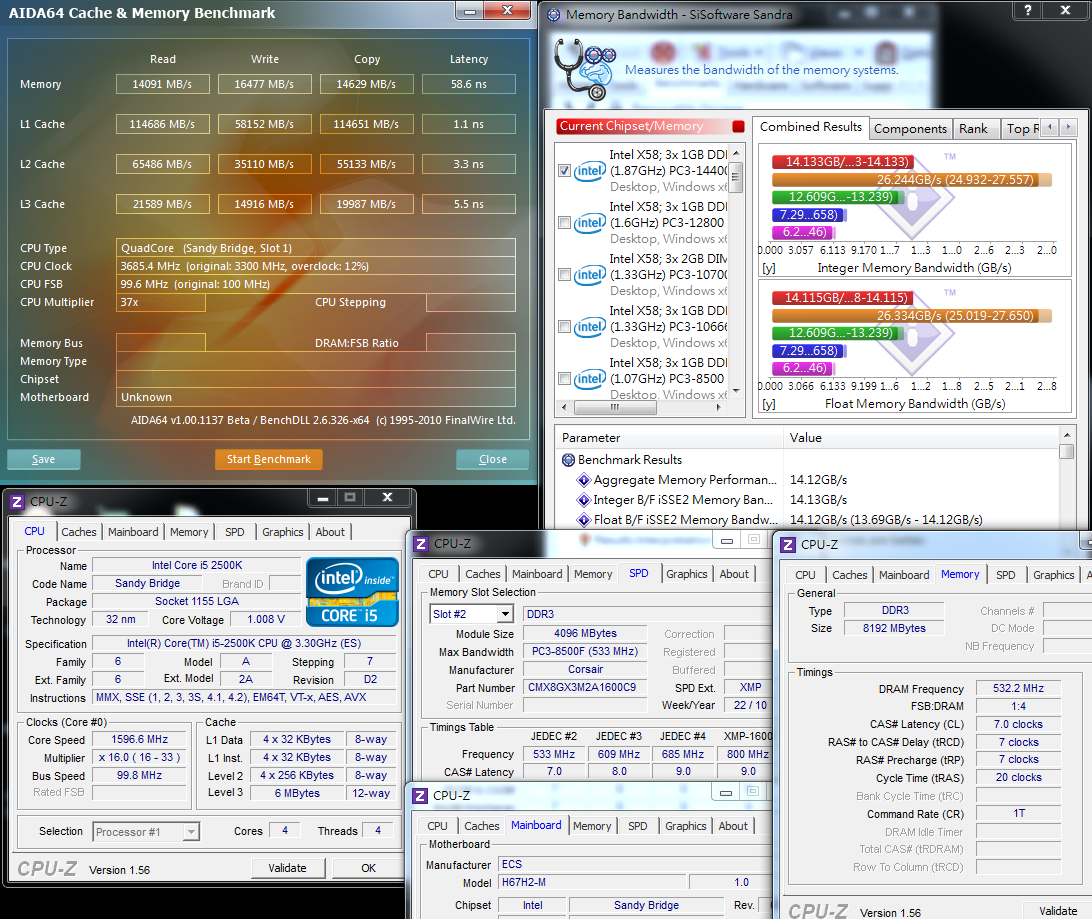
From the above bandwidth performance test of DDR3, we can see improvements on the problems of the older generation
It is simply the built-in GPU of the CPU that lowers the bandwidth of the DDR3. This is a special characteristic of the LGA 1156 i3/i5 32nm CPU.
The Sandy Bridge i5-2500K has the same built-in GPU but the DDR3 bandwidth allows excellent performance.
Only working with DDR3 1064, it already operates at a bandwidth about 36 to 59% higher than the previous generation i3-540 DDR3 1333.
We hope that in the future we will have the opportunity to share our experience with the i3-2100 operating with such a high bandwidth.
The lack of BIOS options for DDR3 1333 is something of a drawback.
-
Temperature performance (room temperature about 20 degrees)
System Standby - 20 ~ 29

CPU full speed - 66~71
Intel Burn Test v2.4?Stress Level Maximum
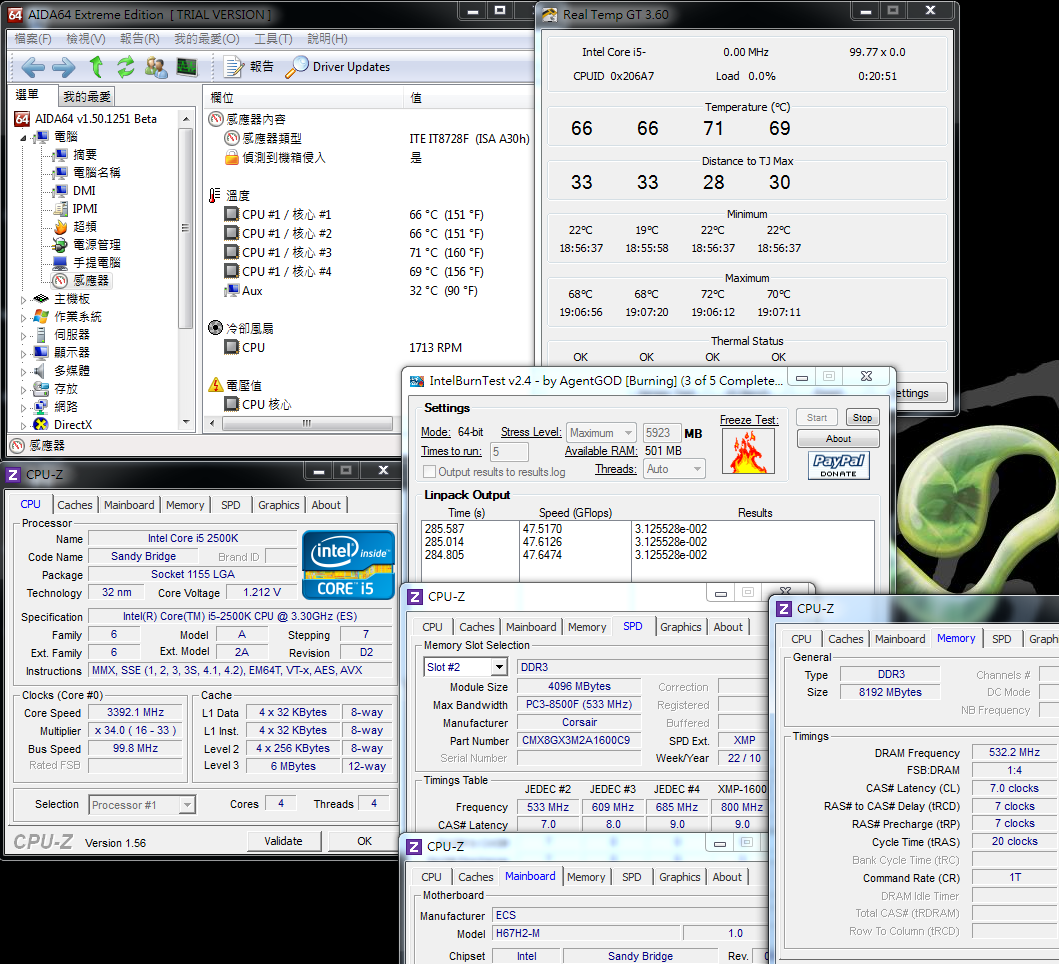
For use of Intel's original copper base heat sink,
I personally recommend that prior to installation users should add a coat of thermal grease to improve heat dissipation.
The 2500K temperature shown by the motherboard's hardware monitoring by means of software
as demonstrated by the data above was slightly in error and was not the actual temperature.
It seems the temperature data is a bit high, and the actual air temperature near the heat dissipator didn't feel so hot.
Perhaps the high temperature measurement was the result of the measurement software.
Power Consumption Test
System Standby - 29W

CPU full speed - 111W
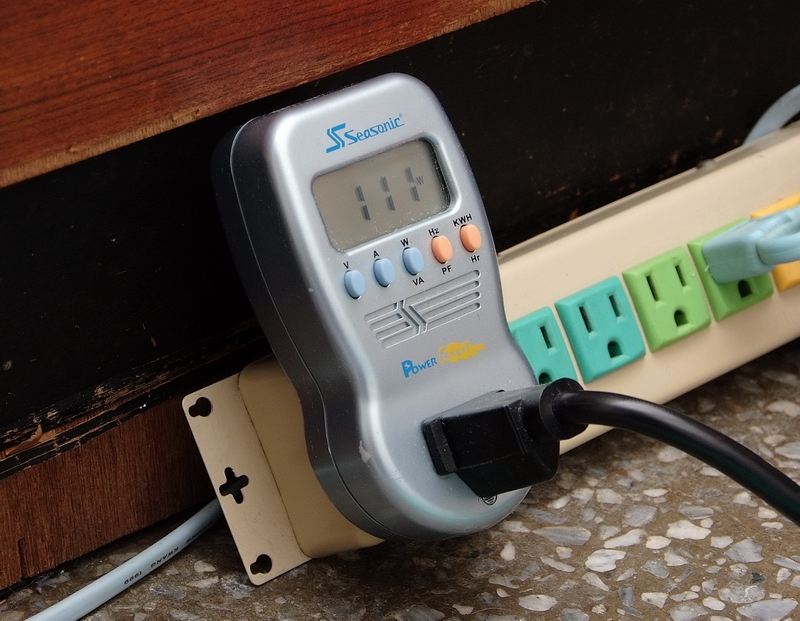
With the C1E 32nm process, the energy-saving technology of the 4Cores 2500K takes power consumption to a staggeringly low level.
At full speed, power consumption is also acceptable, and even if in the future VGA is used in the mid-range product line, the PSU may need 400 ~ 450W only.
The H67H2-M platform with the H67 chipset lets consumers have a higher performance host PC or HTPC.
The Sandy Bridge architecture is different from the previous generation LGA 1156 platform derived from the Core i3 ~ i7 CPUs with a full range of internal GPUs.
Under the Intel HD Graphics line, there are the HD2000 and HD3000 series.
For the high-end HD3000, currently only the 2405S/2500K/2600K of the HD3000 series are equipped with GPUs.
The following test is for the i5-2500K together with the HD3000, ordinarily operating at 850MHz with the highest default clock of 1100MHz.
In the first half of the BIOS portion, the 22-fold frequency is mentioned.
Intel HD Graphics HD3000 Benchmark
Default clock 1100MHz
3DMark Vantage => P1677

StreetFighter IV Benchmark
1280 X 720 => 40.42 FPS
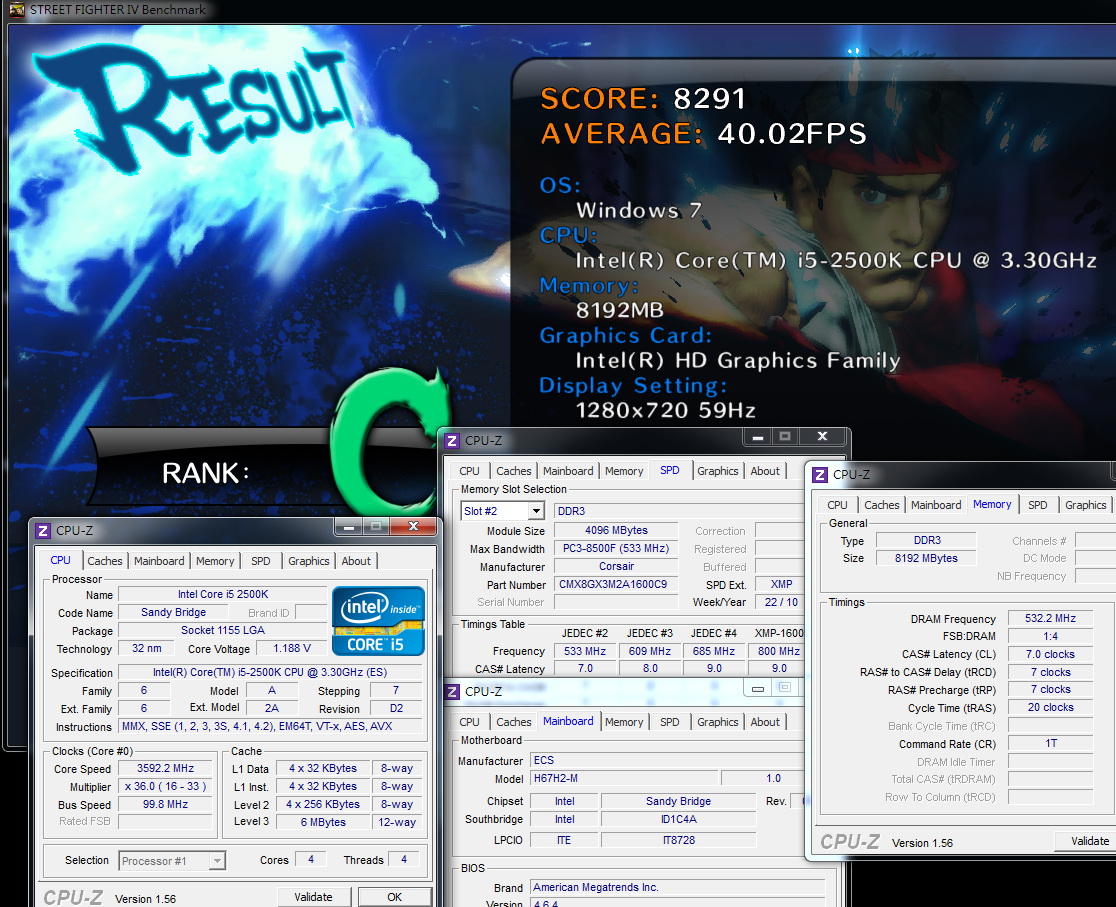
DEVIL MAY CRY4
1280 X 720 => 37.14/32.26/41.35/24.38 fps

FINAL FANTASY XIV
1280 X 720 => 669
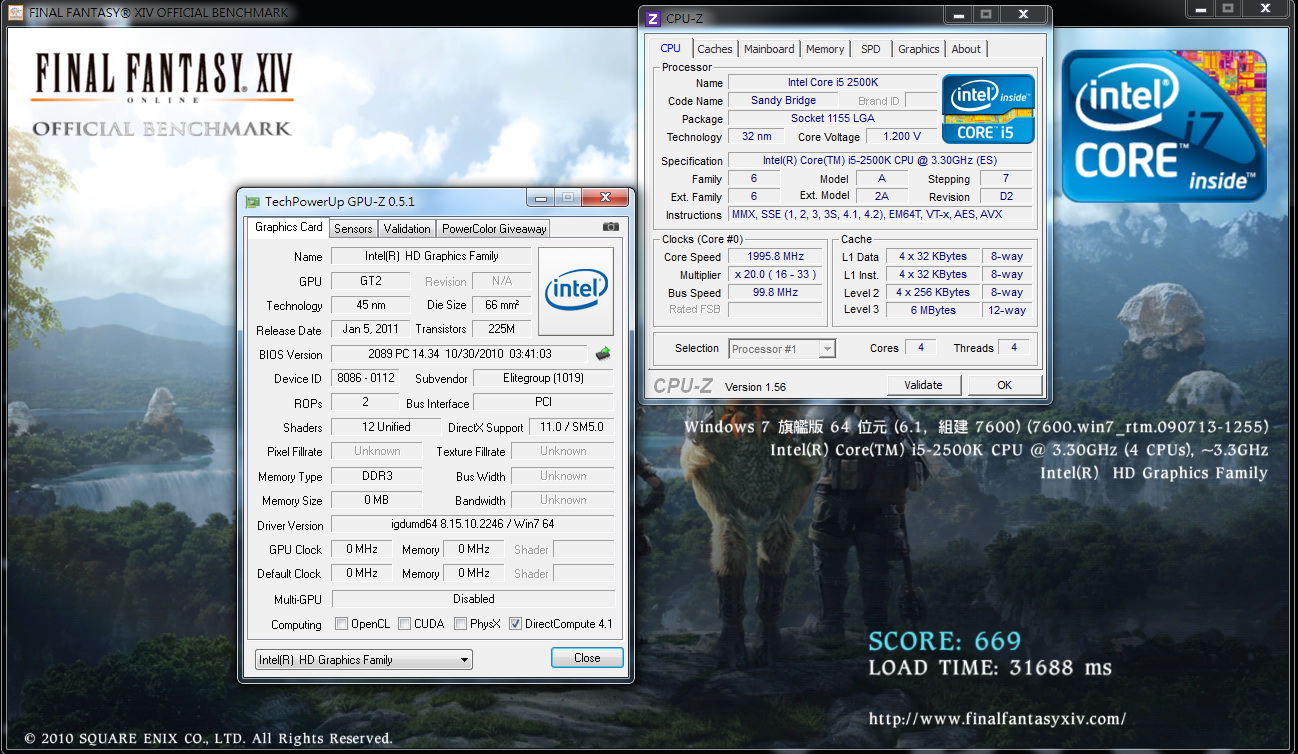
3D performance of the H67 platform is a huge improvement. Compared with the previous generation i3-540 H55, the 3D performance of 3DMark Vantage is four times better.
With StreetFighter IV Benchmark, it's about twice as good.
This built-in GPU is a great leap forward after the previous LGA 1156's built-in 3D performance caught up with rival AMD.
This time, the multiple gains in the 3D performance of Intel's LGA 1155 Sandy Bridge platform times provide Intel a clear advantage to aggressively expand its share in the HTPC market.
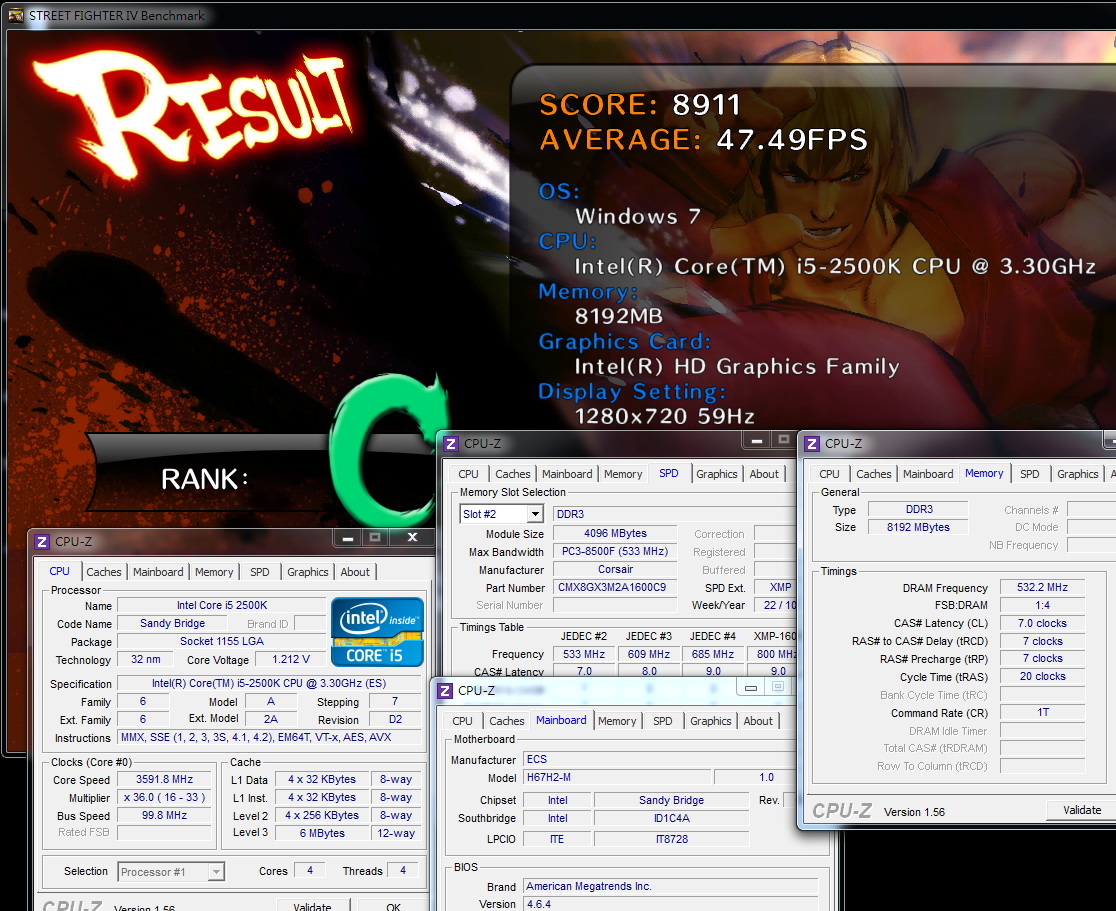
1700MHz overclocking
3DMark Vantage => P2536
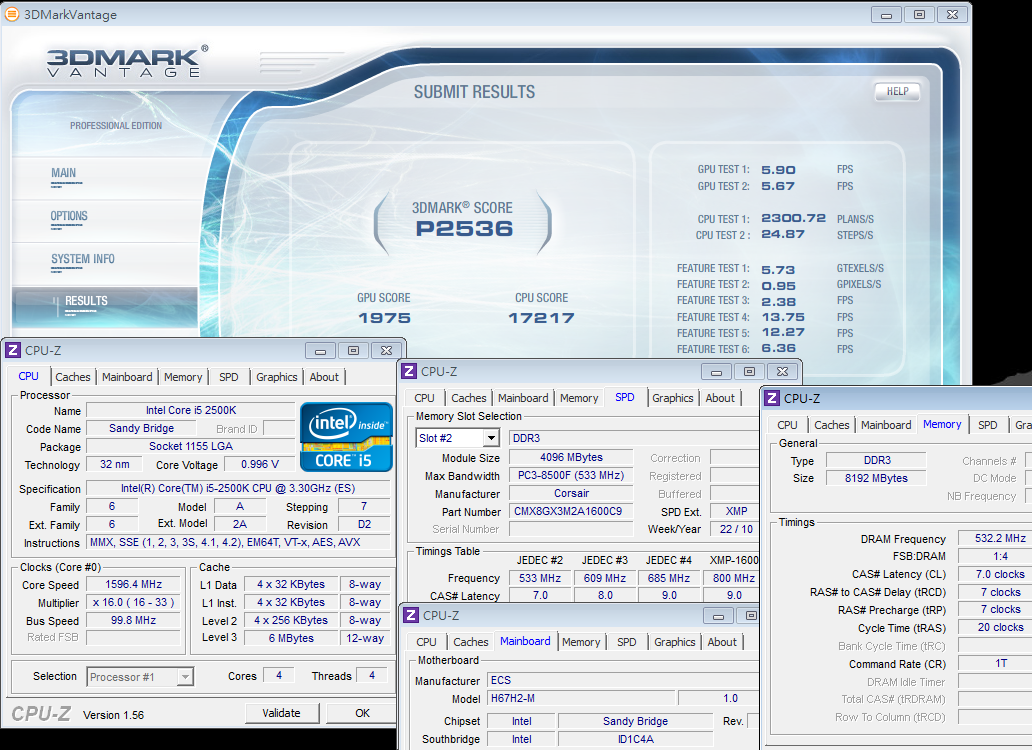
-
StreetFighter IV Benchmark
1280 X 720 => 47.49 FPS
DEVIL MAY CRY4
1280 X 720 => 48.49/43.25/57.83/33.63 fps

FINAL FANTASY XIV
1280 X 720 => 881

Using the H67H2-M BIOS overclocking GPU functions to achieve more than 34 times overclocking speed shows that the HD3000's overclocking capabilities are not to be underestimated.
Generally speaking, overclocking to 1700 ~ 1800MHz is not too difficult.
After overclocking, 3DMark Vantage has a nearly 50% performance improvement.
In other areas, StreetFighter IV has gains of about 20%, and DEVIL MAY CRY4/FINAL FANTASY XIV, about 30%.
For benchmark games such as 3DMark Vantage to have such great 3D performance, consumers should be more satisfied.
The improvement in audio and video performance is a major feature of Sandy Bridge.
Next, we tested Intel's new Quick Sync Video Technology,
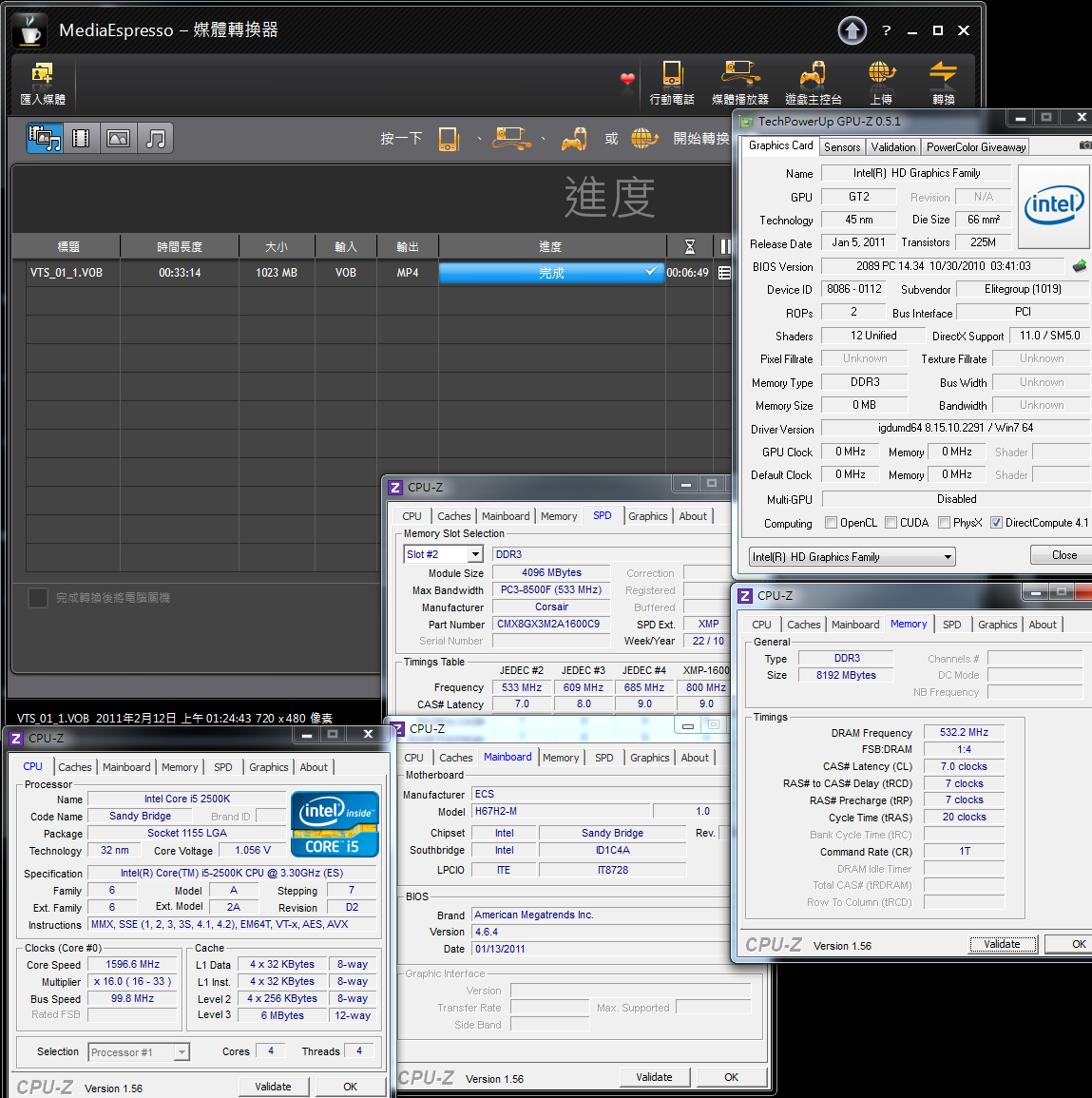
MediaEspresso to compare the built-in GPU and external VGA and the time required for video conversion of a DVD file called VTS_01_1.VOB with a size of 1023MB, 2500K into an MP4 file.
Intel HD Graphics HD3000
Turn on Intel Quick Sync Video (better quality)

6 minutes 49 seconds
msi N560GTX-Ti Twin Frozr II
Using nVIDIA CUDA technology

8 minutes 09 seconds

For this file, Intel's Quick Sync Video was 1 minute 20 seconds faster than the nVIDIA CUDA.
If you use an external VGA with CUDA and switch to Intel's built-in HD3000 H67, you get a time improvement of about 37% or more.
If you are using external VGA, you cannot take advantage of the Intel Quick Sync Video technology. This is something you need to be aware of.
In addition, with the two file conversion technologies, video performance is also something we care about.
In the future, I will carefully note the differences.
Video playback test
With movies on hand that I've bought, I used Blu-ray versions of “Inception”. The copyright for the above video belongs entirely to the owner.

With a Blu-ray movie, you have to use PowerDVD mode, and on a Windows desktop, it's not easy to do a video capture, so a direct capture screen is used as a reference here.
The CPU utilization rate is approximately 13 ~ 20%, and with the HD resolution of 1920 X 1080, video playback is smooth.
ECS H67H2-M
Advantages
1. H67 is a more high-end product with attractive packaging materials and good accessories
2.15? gold contacts, Realtek RTL8111E chip, USB 3.0/eSATA and other materials
3. BIOS overclocking with the GPU provides features that set Sandy Bridge's 3D performance at a higher standard
4. 2500K with satisfactory power consumption performance and overall performance also at a high level
5. Qooltech III for dual heat-pipe thermal module, built-in debug LED and POWER / Reset button
Disadvantages
1. The recommended BIOS option is to turn on the DDR3 clock, allowing the user the freedom to choose 1066/1333
2. The surface area of the heat sink near the CPU is too large, and if you want to install a better cooling device, there may not be enough room.
3. Compared with other first-rate MB factories, in the future, expansion of retail channels and repair services by ECS will provide greater convenience to consumers, both areas they care about.

Performance comparison ? ? ? ? ? ? ? ? ? ?
Materials comparison ? ? ? ? ? ? ? ? ? ?
Specifications comparison ? ? ? ? ? ? ? ? ? ?
Appearance comparison ? ? ? ? ? ? ? ? ? ?
Price to performance comparison ? ? ? ? ? ? ? ? ? ?
The performance of the H67H2-M launched by ECS is very good in all respects.
With the BIOS, if more DDR3 options can be added, that will be an improvement.
Specifications and materials of the H67 compared with those of other MB manufacturers are fairly standard.
The scalability enabled by the dual network features of Micro ATX, USB 3.0 and eSATA creates a high-end PC host.
The price of US$149 is equivalent to NT$4,372.
For these material standards, the high-end H67 is a bit pricey.
Compared with other MB brands, the H67 is a bit expensive, yet the price to performance of the ECS H67H2-M is fairly good.
The integrated Sandy Bridge chipset's great value in the future should be targeted at the H61, allowing more room for pricing.
Regarding the Intel 6 series chipset bug incident, ECS on February 7 issued a statement on its website.
The company halted shipments of the Sandy Bridge B2 version, and the company will unconditionally replace all sold goods with the B3.
This policy and those of other top-line MB manufacturers is very sincere in the hope of keeping the design flaws of the P67/H67 to a minimum.
The entrance of the Sandy Bridge architecture to the market has enabled the performance of Micro ATX MBs and multimedia to make very clear steps forward.
The conversion efficiency of Intel's Quick Sync Video is especially impressive.
For those consumers who prefer a small PC host this is a great benefit, but prior to the H61's market debut, the H67 is a higher priced option.
This report shares specifications and descriptions of all aspects of the ECS H67H2-M's performance as reference for consumers.

This review also post in my blog WIND3C
Welcome 3C lovers to visit and advise.
Thanks
-
nice review wind and good performance
Ciao! Sembra che tu sia interessato a questa conversazione, ma non hai ancora un account.
Stanco di dover scorrere gli stessi post a ogni visita? Quando registri un account, tornerai sempre esattamente dove eri rimasto e potrai scegliere di essere avvisato delle nuove risposte (tramite email o notifica push). Potrai anche salvare segnalibri e votare i post per mostrare il tuo apprezzamento agli altri membri della comunità.
Con il tuo contributo, questo post potrebbe essere ancora migliore 💗
Registrati Accedi